Disclosure: As an Amazon Associate, ilcastellomenu.com earns from qualifying purchases. Links on this page are affiliate links; they cost you nothing extra. Prices and availability change often, so check the current Amazon listing before you buy.
This controller charging dock review starts with the honest version of the product: a charging dock does not make your controller better, faster, or more responsive, and it does not charge its battery by magic. What it does is give the controller a home. Instead of a cable snaking across the desk, a controller left wherever you dropped it, and a battery that is flat at the exact moment friends arrive, you get a small stand that keeps one or two controllers upright, visible, and topped up, ready to lift and play. That is a convenience product, and this review judges it as one — on fit, on daily ease, on how reliably it connects and charges, on how it treats your batteries over months of use, and on whether the tidiness it promises survives contact with a real household. If you have ever lost the start of a game night to a dead controller and a hunt for a cable, you already understand the problem this category exists to solve.
Controller Charging Dock Review: Key Takeaways and Short Verdict
Key Takeaways
- A dock is convenience and tidiness, bought with money instead of cable clutter. It charges the same rechargeable batteries a cable charges, at a broadly comparable speed in everyday use — the win is habit, not physics.
- Compatibility is model-specific. Docks are shaped for particular controllers and, where the controller uses a removable pack, for particular battery packs and covers. Check fit for your exact controller before anything else.
- The best dock is the one that makes docking effortless: a controller that drops in without fiddling, a clear charging indicator, and a base that stays put on the desk.
- A dock suits players who finish a session by putting the controller down in the same place every time. Players who charge from the couch with a long cable while still playing will get less from it.
- Buy for the platform you actually play. A dock that fits a controller you rarely use is furniture, not a solution.
- Verdict in one line: worth it for tidy desks and shared gaming spaces, unnecessary for single players happy with a cable — and this review explains exactly where that line falls.
Who it suits: the player with a dedicated gaming desk or TV setup, the household with two controllers in rotation, and anyone whose charging cable currently lives in a tangle behind the console. Who should skip it: the player who mostly plays wired or within reach of a long cable, the player between platforms whose next controller is undecided, and anyone whose controller model is unusual enough that dock fit is uncertain — for them, a good cable and a spare battery routine remain the sensible answer.
In this guide
What a Controller Charging Dock Is and Where It Fits
A controller charging dock is a small powered stand shaped to receive one or two game controllers. Depending on the design, the controller connects through contacts on the dock that meet contacts on a battery pack or on the controller itself, or the dock simply holds the controller while a short connector engages its charging port. While docked, the controller’s rechargeable battery charges; when you lift the controller, it is ready. Most docks add a small indicator light that shows charging versus charged at a glance, and most draw power from the console, a USB source, or a small mains adapter, depending on the model. That is the whole mechanism. There is no performance component, no input-lag story, no competitive edge — and any review that invents one is selling you something.
Where it fits in a setup is equally plain. The dock lives where the controllers live: beside the console under the television, or at the edge of the gaming desk. Its job in that spot is partly electrical and partly behavioural. Electrically, it keeps batteries topped up between sessions, which matters because modern controllers are hungry devices — vibration, wireless radios, lights, and audio features all draw from the same pack — and a controller used most evenings will not stay ready on occasional charging. Behaviourally, it creates a single obvious resting place, and that turns out to be the larger benefit in most homes. Controllers that have a home stop migrating to sofa cushions, shelves, and the tops of bookcases. They stop being stepped on. They stop disappearing entirely on the one evening guests come round. Players underestimate how much of the dock’s value is simply this: a place, always the same place, where the controller is, charged.
The category splits into a few recognisable shapes. Single docks serve one controller and suit solo players with tidy desks. Dual docks charge two at once and are the natural choice for households, couples, and anyone who rotates a spare. Some designs are platform-official or platform-licensed in style, shaped precisely for one controller family; others are third-party designs covering a popular controller from several makers at once. There are also charging stations that add storage for games or headsets, which can suit a TV corner but add bulk a desk may not want. Throughout this review, the focus stays on the mainstream dock: one or two controllers, a clear indicator, and a footprint a desk can spare.
Design, Build and Setup
Good dock design is mostly about the moment of docking. You come back from a session, your attention already elsewhere, and you set the controller down one-handed, possibly in dim light, possibly while talking to someone. A well-shaped dock guides the controller home: the cradle matches the controller’s curves, the contacts meet without a wiggle-and-press ritual, and the indicator confirms the connection so you are not guessing. A poorly shaped dock demands aim, force, or a second hand, and a dock that demands attention will eventually be ignored — the controller gets left on the desk beside it, uncharged, and the whole purchase quietly fails. When you read listings or handle a dock in a shop, judge that one-handed, eyes-half-elsewhere moment above every other feature, because you will repeat it thousands of times.
Build quality shows in the base. A dock should stay planted when a controller is lifted out at an angle, which means a little honest weight or a grippy underside, and it should not rock on its own cable. The cradle plastics should feel like they will survive years of small knocks, because controllers do not always land gently. Cable routing matters more than it sounds: a dock whose power cable exits sensibly toward the back of the desk keeps the tidy promise, while one whose cable drapes across the front recreates the clutter you bought the dock to remove. Indicators deserve a mention of their own — a clear, dim-enough light that distinguishes charging from charged without lighting up a bedroom at night is a small kindness you will appreciate daily, and an overly bright or ambiguous light is the kind of flaw that only reveals itself after a week of living with the thing.
Setup is genuinely simple, and any dock that makes it complicated has failed at its one job. In outline: place the dock where the controllers live, connect its power source, fit any battery pack or cover the design requires to the controller, and set the controller in the cradle to confirm the indicator responds. Where a dock uses its own rechargeable packs in place of the controller’s standard arrangement, that swap is the only real step, and it is also the moment to check fit carefully — the pack should sit as the maker intends, the cover should close properly, and the controller should still feel right in the hand, because a pack that changes the controller’s balance or makes the back cover bulge is a compromise you will feel in every session. Keep the packaging and any standard covers somewhere sensible, so returning the controller to its original arrangement later stays easy.
Performance in Real Use
Day-to-day charging
In daily use, the dock’s performance story is refreshingly boring, which is the point. You finish playing, you dock the controller, the indicator shows it charging, and by the next session it is full. The honest comparison with a cable is this: a dock charges the same batteries at a broadly comparable speed to plugging in directly, because the battery and its charging circuitry set the pace in both cases. Anyone promising that a dock will dramatically out-charge a cable — or warning that it will be dramatically slower — is usually overstating what differs. What differs is not speed but certainty. A cable charges a controller only on the days you remember to plug it in. A dock charges on every day you put the controller down, which, once the habit forms, is every day. Over a month of real life, the docked controller is simply full more often, not because the dock is quicker, but because the human is more consistent.
Two controllers, one household
The dual-dock household is where the category earns its keep most visibly. Two controllers rotate: one in play, one resting and charging, or both docked overnight after a shared session. Nobody opens a drawer looking for a cable. Nobody starts a film night or a match with a warning light blinking. For families, the dock also ends a small recurring negotiation about whose turn it is to use the charged controller. In testing terms there is little more to measure here than reliability — both slots connecting cleanly, both indicators telling the truth, neither controller slowly sliding out of alignment as the evening’s knocks accumulate — and that reliability, repeated nightly without a single thought, is exactly the performance a buyer is paying for. If your household regularly uses two controllers, weight this section heavily and consider the single-controller dock a false economy.
Battery care over months
A fair question is whether living on a dock harms a controller’s battery over time. The sensible, qualitative answer is that modern rechargeable packs and their charging circuits are designed to stop charging when full and to sip only as needed, so a controller resting on its dock is not being force-fed power around the clock. The bigger influences on battery life are heat, deep discharges, and simple age. On those measures, dock life is comparatively kind: the controller sits in open air rather than under a cushion, and it rarely runs flat, because it is topped up after every session instead of being drained to empty and rescued in a panic. The habits that do help any rechargeable controller apply here too — keep the dock out of direct sun and away from radiators, and if a controller will be unused for a long stretch, it does not need to live on the dock the whole time. Treat the dock as a home base, not a life-support machine, and your packs will age as gracefully as rechargeable packs can.
At the desk versus at the television
Where the dock lives changes what good looks like. At a gaming desk, within arm’s reach of a PC setup like those in gaming desks for a complete setup, a compact single or dual dock suits best: small footprint, short cable run to a USB source, and an indicator you can glance at without leaning. On a desk the dock competes for space with keyboard, mouse, and monitor stands, so slim designs win. At a television, the dock usually sits on a media unit with more room and a longer distance to the couch, so a slightly larger dual dock with storage can make sense, and its indicators are read from across the room — another reason clear, calm lighting matters. In both places the same test applies: can everyone in the household dock the controller correctly, first try, in the dark, without thinking? If yes, the dock will be used. If not, it will be bypassed, and a bypassed dock is just an ornament with a power cable.
Strengths and Trade-Offs
Strengths
- Controllers gain a permanent home, which ends the lost-controller hunt and keeps them off floors, sofas, and stacks of paper.
- Batteries are topped up as a side effect of putting the controller down, so a full controller becomes the default rather than the exception.
- The desk or TV corner looks tidier: one short dock cable replaces the roaming charge cable and its tangle.
- Indicators give an at-a-glance answer to the oldest question in gaming households — is it charged? — without picking anything up.
Trade-offs
- It is a convenience purchase: it does not improve the controller, the battery, or your game, and its value is entirely in habit and tidiness.
- Fit is specific. The wrong dock for your controller model is useless, and platform changes can retire a dock overnight.
- It occupies a fixed spot and a power source, and a controller that lives on it cannot be used while charging unless you also keep a cable handy for play-and-charge moments.
How It Compares
Against the humble cable, the dock wins on consistency and tidiness and loses on flexibility and price tier. A cable lets you play while charging, reaches the couch, and costs very little; it also gets lost, frayed, borrowed for a phone, and forgotten on exactly the days it mattered. Against a spare-battery routine — swapping a fresh pack in when one runs flat — the dock wins on simplicity, because there is nothing to swap and no charged-versus-flat pack confusion in a drawer, while the swap routine wins for marathon sessions where a controller must be revived instantly mid-game. Against the larger charging station with game and headset storage, the plain dock wins on footprint and focus, and loses if your TV corner genuinely needs one object to organise everything. None of these rivals is wrong. They are answers to different habits, and the comparison that matters is with your own: if your cable routine already never fails you, a dock adds tidiness only; if it fails you monthly, a dock changes the routine itself. The representative models below show how the mainstream makers approach the same job.
PowerA charging dock — the licensed, straightforward option
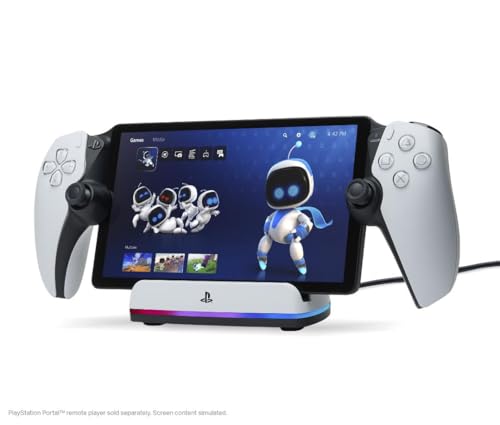
PowerA’s charging docks are the names many console owners meet first, because the brand works closely within the console ecosystems and sells docks shaped for specific controller families, typically in the entry-to-mid tier. The appeal is straightforwardness: a dock made for your controller, an indicator that tells the truth, and in relevant designs the battery arrangement included and matched to the cradle. For a buyer who wants the decision to be simple — this dock, for this controller, from a brand the platform itself is comfortable standing near — this is the reference option. Best for: console players who want a matched, no-research purchase for a specific controller. Not suited for: mixed-platform households hoping one dock will serve very different controllers, because the fit here is deliberately specific.

Razer controller charging dock — the desk-styled option
Razer’s approach to the controller charging dock brings the brand’s desk-first styling to the category: a dock designed to look at home beside gaming keyboards and mice, generally in the mid-to-premium tier, with the fit again made for particular controller families. For PC-and-console players whose dock will live visibly on a battlestation rather than under a television, that design attention is a legitimate reason to choose it — an object you see all day should be one you like seeing, a principle that also guides setups like keyboards for gaming and work. Best for: desk-based players who care how the setup looks and want the dock to match the rest of the gear. Not suited for: buyers shopping purely on the lowest tier, or anyone whose controller is outside the families the dock is shaped for.

PDP charging station — the household workhorse option
PDP’s charging stations round out the mainstream picture, typically aimed at the practical household end of the market in the entry-to-mid tier, often handling two controllers and emphasising clear indicators and a compact footprint for media units. This is the option that tends to suit the shared TV corner: two slots, no fuss, and a design that disappears into the entertainment setup rather than performing on a desk. Best for: families and shared living rooms running two controllers on one console. Not suited for: players who want a dock as a styled desk object, or single-controller players who would be paying for a second slot they never use. Whichever direction you lean, the companion piece controller charging dock reviews looks at the same category from the multi-controller, whole-household angle, and the power context behind the desk is covered in ups battery backup vs surge protector.
Who Should Buy It, Who Should Skip It, and a Pre-Buy Checklist
Buy a controller charging dock if your controllers have no fixed home, if flat batteries have interrupted even a handful of sessions, if two or more controllers rotate through your household, or if you are finishing a desk or TV setup and want the last visible cable tangle gone. Buy one, specifically, at the moment you buy a second controller: that is when the charging question doubles and when the dock habit is easiest to start. Skip it if you play mostly at a desk with a cable already permanently plugged in and a routine that works, if you are about to change platforms, or if your controller is an unusual model whose dock fit you cannot confirm with confidence — an uncertain fit is the one purchase error this category punishes completely, because a dock that almost fits is a dock that does not charge.
Before you buy, run this checklist. First, name your exact controller model and generation, and confirm the dock is made for it — not merely for the same console family in general terms. Second, check what the dock expects the controller to contain: some designs charge the controller’s own arrangement through contacts, others supply their own packs and covers, and the listing should make that plain. Third, decide single or dual honestly, based on how many controllers your household actually uses weekly. Fourth, confirm the power source suits your spot — console USB, a spare port, or a mains adapter — and that the cable run reaches without stretching. Fifth, look at the indicator and the footprint in photographs with real objects for scale, and picture the dock in your room at night and at arm’s reach. A dock that passes those five checks is very likely to be a dock you will still be happily using years from now.
Setup, Care and Maintenance Essentials
Setup takes minutes: choose the spot, connect power, fit any supplied pack or cover exactly as the maker directs, dock the controller, and confirm the indicator shows charging. Then do the small things that make the habit stick. Put the dock where the controller naturally lands at the end of a session, not where it looks best in a photograph; a dock two steps out of the natural path will be used for a week and then bypassed. Tell the household the one rule — controller sleeps on the dock — because a dock used by one person and bypassed by everyone else solves half the problem. Keep a plain cable in a drawer as the understudy, for play-while-charging moments and for guests with different controllers.
Care is light but real. Contacts are the dock’s working surface: keep them free of dust and crumbs, and give the cradle an occasional wipe with a dry or barely damp cloth, with power disconnected, so the connection stays clean and the indicator stays truthful. If a controller ever sits on the dock without the indicator responding, lift it, check for anything caught in the cradle, reseat it deliberately, and check the fit of its pack or cover before assuming anything has failed — most dock problems are alignment or debris, not electronics. Keep the dock’s cable unpinched and its vents, if any, unobstructed, and keep the whole arrangement away from the drinks that inevitably patrol gaming desks. Batteries themselves need no special ritual beyond the ordinary: avoid baking the setup in direct sun, and if a pack’s stamina fades after long service, replace the pack rather than the whole arrangement where the design allows it. Looked after this way, a dock is one of the longest-lived, least-demanding objects in a gaming setup.
Final Verdict
The controller charging dock is a small, honest product that does one small, honest job: it makes a charged controller the default state of your setup, and it makes your desk or TV corner tidier while doing it. It will not charge meaningfully faster than the cable it replaces, it will not suit a controller it was not shaped for, and it will not help a player whose cable routine already never fails. Judged on what it actually promises, though, the mainstream docks from makers like PowerA, Razer, and PDP deliver: drop the controller in, see the light, walk away, play tomorrow. For solo players with a working cable habit, it is a pleasant luxury in the entry-to-mid tier. For two-controller households and finished battlestations, it is close to essential — the rare accessory whose absence you feel within a week of removing it. Buy the fit for your exact controller, buy the slot count for your real household, and let the habit do the rest.
Living With a Dock: The First Month, Honestly
The first week with a dock is about habit formation, and it is worth being deliberate. Put the dock in the controller’s natural landing spot, use it every single session without exception, and resist the temptation to leave the controller on the arm of the sofa just this once. Habits in a household are contagious in both directions: one person docking reliably makes the dock feel like the obvious place, while one controller abandoned on a coffee table quietly licenses everyone else to abandon theirs. By the second week, most players report the small, telling change that defines success in this category — they stop thinking about charging at all. The controller is simply ready, the way the television is simply ready, and the low-battery warning becomes a rarity associated with unusually long sessions rather than a routine feature of game night.
By the end of the first month, two judgements have usually formed. The first is about fit and connection: either docking has become a one-handed, unthinking motion — the standard a good dock meets — or there is a small daily friction, a wiggle or a reseat, that has begun to grate. That friction matters more than it sounds, because it compounds; a dock that irritates you slightly every day for years is worse than a cable, which at least irritates you honestly and cheaply. The second judgement is about the room. The corner where controllers used to sprawl now has a small, orderly object doing visible work, and guests stop asking where the controllers are because the answer is in plain sight. If both judgements are positive at a month, the dock has earned its place permanently. If the first is negative, return or exchange it while you still can, because fit problems do not improve with age — they are the one flaw in this category that time makes worse, not better.
Reading a Dock Listing Like a Reviewer
Listings for charging docks are short, cheerful, and occasionally slippery, so it pays to read them with a reviewer’s checklist. The first thing to pin down is the exact controller compatibility, stated in models and generations, not in console marketing names. The second is what is in the box: some docks include the battery packs and covers their design requires, others assume them, and discovering the difference after delivery is the category’s most common disappointment. The third is the power source — whether the dock runs from a console’s USB port, needs a mains adapter, or includes one — because that decides where the dock can live. The fourth is the indicator: photographs showing the dock in a real room tell you more than feature lists, including whether the light looks calm or garish, and whether the cradle’s shape genuinely matches your controller’s silhouette.
Treat speed claims with the calm scepticism this review has used throughout. Charging pace is governed by the battery and its circuitry, so dramatic promises deserve dramatic doubt; what you are buying is connection reliability and habit, and neither appears in a specification table. Look instead for the unglamorous details: a base described as weighted or non-slip, a cable of sensible length, a cradle shaped for one-handed docking, and a maker with a real support presence if a pack or cover ever needs replacing. Reviews from owners of your exact controller are worth more than a higher average from owners of a different one, because fit — the thing that decides everything — is controller-specific. Read the unhappy reviews first and sort them by cause: if the complaints are about fit for a controller you do not own, they may not apply to you; if they are about connection dropouts on your exact model, walk away.
Troubleshooting the Small Problems
Most dock problems are small, physical, and fixable in a minute, and it helps to know the short list before frustration sets in. If the indicator does not respond, work through power, seating, and cleanliness in that order: confirm the dock’s cable is firmly connected at both ends, lift and reseat the controller deliberately, and clear any dust or debris from the cradle and contacts. If one slot of a dual dock misbehaves while the other works, swap the controllers between slots — the result tells you whether the issue follows the controller, which points at its pack or cover fit, or stays with the slot, which points at the dock itself. If a controller charges but seems to lose its charge unusually fast in play, suspect the ageing battery before the dock, especially if the controller is years old; docks deliver power, but they cannot restore capacity a pack has lost to time.
A controller that rocks in its cradle or needs pressure to connect is telling you something about fit, and the answer is rarely to press harder. Check that any supplied cover is the correct one and fully closed, that nothing from a skin, shell, or accessory is changing the controller’s outline — decorative shells and grips are a genuinely common cause of dock failure, because a cradle shaped for a bare controller cannot be expected to swallow a dressed one — and that the controller is the generation the dock expects. If accessories are the conflict, decide which you value more: many players keep the primary controller bare and docked, and dress the secondary one however they like. That small household treaty has saved more dock purchases than any technical fix.
The Dock in a Wider Setup
A charging dock rarely arrives alone; it usually joins a setup that is gradually becoming deliberate — a desk arranged rather than accumulated, a TV corner with the cables finally managed. In that context the dock plays well with the other quiet infrastructure of a gaming space. Power is the obvious partner: a dock plugged into a sensible, protected outlet arrangement benefits from the same thinking covered in the ups battery backup vs surge protector comparison elsewhere on this site, not because a dock needs battery backup — it plainly does not, since a dock in an outage simply pauses — but because a tidy, protected power corner serves every device on the desk at once. Seating, screens, and surfaces complete the picture in the site’s gaming desk and peripheral guides, and the dock’s contribution to that whole is disproportionate to its size: it is the piece that makes the controllers, the objects handled most, look intentionally placed rather than temporarily dropped.
It is also worth saying what a dock does not organise. It will not manage headset cables, charge a handheld console, or discipline the drawer of legacy controllers from previous platforms, and buying a sprawling station in the hope that it will govern the whole room usually ends with a large object governing a small part of it. The tidy setups that actually stay tidy share a pattern: each object has one job and one place, and the dock is the controllers’ place. Keep that discipline — dock for controllers, drawer for cables, shelf for the rest — and the small daily satisfaction that made you buy the dock in the first week is still there in the fiftieth.
The Real Costs Beyond the Price Tier
Every accessory costs more than its tier, and a dock’s extra costs are worth naming so they can be weighed honestly. The first is space: a dual dock claims a patch of desk or media unit roughly the size of a paperback book, forever, and on a crowded desk that patch has rivals. The second is a power source: a port or a socket is committed, and on setups where both are scarce, that commitment should be planned rather than discovered. The third is the platform commitment itself. A dock is married to one controller family, so its useful life is bounded by how long that family stays your family’s controller; a household that changes platforms every couple of years will cycle docks faster than a household that settles on one ecosystem for a generation of consoles. None of these costs is large, but together they explain why the right buyer is a settled one — settled platform, settled room, settled routine — and why the wrong buyer is someone mid-transition, for whom a cable’s platform-blind flexibility is worth more than a dock’s polish.
Set against those costs, the savings are real but soft, and honesty requires describing them as soft. A dock saves the minutes spent hunting cables and controllers, which are small minutes that arrive at the worst possible times — guests waiting, a match forming, a child losing patience. It saves the low-level disorder of a charging cable that migrates around a room, plugs into the wrong adapter, and frays at the connector from being bent at the same angle every night. It may save a battery from the deep-flat cycles that come from being forgotten, though that benefit is a tendency, not a promise. What it cannot do is save money in any direct sense: cables are cheaper, and a dock is bought with the understanding that convenience and calm are worth a modest tier of spending. Players who accept that framing are almost always satisfied. Players who expected a performance upgrade are the ones writing disappointed reviews, and the fault lies in the expectation, not the dock.
A Short Word on Households, Guests and Spares
The social life of a dock deserves a section of its own, because controllers are social objects. In a household with children, the dock quietly teaches and enforces the one rule that keeps gaming gear alive: it has a home, and it goes home at the end of play. In a household with guests, the dock performs a small act of hospitality — controllers visible, charged, and obviously ready signal that joining in is easy, and nobody has to watch a host perform the cable-and-drawer ritual before a game can start. For the player who hosts regularly, keeping the second slot permanently occupied by a charged spare is the whole system in miniature: one controller in hands, one on the dock, rotation without thought. It is a modest vision of domestic order, but it is a real one, and it is the reason this unglamorous category keeps selling year after year while flashier accessories fade.
One Controller, Two Controllers, or a Whole Drawer?
It is worth pausing on the household that owns more controllers than any dock can hold — the drawer of current, previous, and novelty controllers that many gaming homes accumulate. A dock is not the answer to that drawer, and pretending otherwise leads to the sprawling multi-bay station that organises nothing. The better system is triage. The two controllers in genuine weekly rotation earn the dock, because they are the ones whose readiness matters. The occasional third controller — the fighting-game pad, the retro-styled spare, the one a particular guest prefers — can live happily on a cable routine, charged before the occasions that need it. Legacy controllers from retired platforms should be stored with their batteries tended occasionally and their cables coiled, not given permanent powered places in a room they no longer serve. This triage is the difference between a setup that looks curated and one that looks like a shop shelf, and it keeps the dock’s promise — the controllers you reach for are ready — actually true, rather than diluted across hardware you barely touch.
Finally, a note on timing. The best moment to buy a dock is alongside a controller, a console, or a room rearrangement, when routines are being formed anyway and the dock can be part of the new normal from the first evening. The worst moment is in frustration, mid-crisis, with a flat controller in hand and a game night starting — that purchase is rushed, fit checks get skipped, and this category punishes skipped fit checks completely. Buy it calmly, check it carefully, and let it disappear into the background of a setup that simply works.
Beyond the First Impression: Checks That Separate the Picks
Verify the listing, not just the product
A review can only judge the controller charging dock in front of it, but what arrives at your door depends on the listing you order from. Before choosing, confirm that the listing names the exact model, generation and bundle contents you think you are buying, because Gaming pc listings often group variants under one page. When picks such as PDP Charging Station, PowerA Charging Dock and Razer Controller Charging Dock are on your shortlist, run this check against each listing in turn. Check which accessories are in the box and which are sold separately, and note the seller’s returns terms while you are there. Ten minutes of listing hygiene prevents the most common review-versus-reality mismatch: a good product judged by the wrong variant.
Consistency is the quiet test
Single impressive results are easy; a good controller charging dock repeats them on an ordinary day, with ordinary materials, when you are in a hurry. Across the picks in this review, the models that earned their place did so by being predictable: the same setup producing the same outcome, with controls that behave identically every time. In a compact home office where every item has to earn the space it occupies, predictability is worth more than a peak performance figure you will rarely reach. When you read the individual assessments above, treat consistency comments as the highest-value signal in each one.
Fit and feel, judged honestly
Specifications can tell you a controller charging dock will fit; only handling tells you whether it feels right doing it. Weight distribution, control placement, surface finish and the force needed for routine adjustments all shape whether you reach for the product gladly or work around it. When picks such as PDP Charging Station, PowerA Charging Dock and Razer Controller Charging Dock are on your shortlist, run this check against each listing in turn. If your shortlist comes down to two similar models, this tactile layer is usually the honest tie-breaker, and it is personal: a control layout one reviewer calls cramped, a smaller-handed owner may call perfect. Where possible, judge fit against your own hands, desk and habits, not the reviewer’s.
The detail that dates a design
Every Gaming pc generation has a detail that quietly dates it: a port standard on its way out, a control app that has stopped receiving updates, a consumable format being phased away. When reviewing a controller charging dock, that detail matters because it decides how gracefully the product ages. A model built on current standards and widely stocked consumables will still be serviceable when a flashier rival is orphaned by its own ecosystem. Check the age of the design, not just its feature list, and favour the product whose supporting ecosystem is still actively maintained.
What the box should contain — and what it should not need
Unboxing is a small but telling review checkpoint for a controller charging dock: the essentials for the first session should be in the box, the instructions should match the actual unit, and nothing vital should depend on an immediate second purchase. If a pick requires an accessory to perform its core job, that dependency is flagged in its assessment above, because it changes both the real cost and the first-day experience. Equally, beware bundles padded with extras you will never use; in a compact home office where every item has to earn the space it occupies, unused bundle clutter is a cost paid in storage, not a bonus.
Reading the assessments against your own routine
These reviews were written against a general routine, and your routine is the final filter. Map each pick’s stated strengths onto your busiest realistic day with a controller charging dock: if a pick’s best quality serves a task you do rarely, it is not the pick for you, however strong the assessment. If a pick’s noted limitation sits in a corner of the workflow you never visit, discount it. This translation step — from review conditions to your conditions in a compact home office where every item has to earn the space it occupies — is where a good review becomes a good decision rather than a borrowed opinion.
Treat it as part of the purchase itself, not as homework to do after the box arrives.
None of this requires expertise — only the willingness to check your own routine before trusting a generic recommendation.
Five honest minutes at this stage is worth more than five hours of comparison browsing.
Frequently Asked Questions
Does a charging dock charge faster than a cable?
Not in any way that matters day to day. The controller’s battery and charging circuitry set the pace whether power arrives through a dock’s contacts or a cable’s connector, so treat the two as broadly comparable. The dock’s real advantage is consistency: it charges every time you put the controller down, while a cable only charges on the days you remember it. Over a month, the docked controller is full more often because the habit is better, not because the electricity is quicker.
Will a dock fit my controller?
Only if it was made for it. Docks are shaped for specific controller models and generations, and where a design uses its own battery pack and cover, those are specific too. Check the listing against your exact controller before buying, and be wary of vague claims about fitting a whole console family. A dock that almost fits will not connect reliably, and unreliable connection is the one flaw that makes a dock useless, so this check deserves more care than any other part of the purchase.
Is it bad to leave a controller on the dock all the time?
In ordinary use, no. Modern rechargeable packs and their charging circuits are designed to stop when full and to maintain rather than force-feed, and a docked controller sits in open air and rarely runs completely flat, both of which are kind to a battery. Keep the setup out of strong heat and direct sun, and if a controller will be unused for a very long stretch, there is no need for it to live on the dock throughout. Normal nightly docking is exactly the life these products are designed for.
Single or dual dock — which should I choose?
Count the controllers your household actually uses in a week. If two rotate regularly — a spare, a partner’s controller, a child’s — choose dual, because the second slot is what turns the dock from a personal tidy-up into the household’s charging system. If you genuinely play alone with one controller, a single dock saves space and money. The common mistake is buying single to save a little and then watching the second controller, bought a month later, go back to living on a cable.
Can I still play while the controller charges?
Not while it sits on the dock — docking and playing are mutually exclusive, because the controller is resting in a cradle. The practical answer is to keep a plain charging cable in a drawer for the rare session where a controller runs low mid-game: plug in, keep playing, and return the controller to the dock afterwards. Households that rotate two controllers on a dual dock rarely face the problem at all, since a charged spare is usually waiting.
What if the indicator does not light when I dock the controller?
Start with the physical checks, because they solve most cases. Lift the controller out, look for dust or anything caught in the cradle or around the contacts, reseat the controller deliberately until it sits as the maker intends, and confirm any fitted battery pack or cover is properly closed. Check the dock’s own power connection as well. If a clean, correctly seated controller still gets no response, consult the maker’s support — but in everyday life, alignment and debris are far more common culprits than failure.
Related Reading
controller charging dock reviews ups battery backup vs surge protector gaming mice for esports play gaming chairs that finish a setup