Disclosure: As an Amazon Associate, ilcastellomenu.com earns from qualifying purchases. Links on this page are affiliate links; they cost you nothing extra. Prices and availability change often, so check the current Amazon listing before you buy.
If you are weighing up ups battery backup vs surge protector protection for a gaming PC, a console setup, or a small home office, the most important thing to understand before anything else is that these two devices do different jobs. They are often sold side by side, they are often shaped a little alike, and their names are often used as if they were interchangeable, but they are not substitutes for each other. One guards against sudden spikes in voltage. The other keeps power flowing, briefly, when the wall supply disappears altogether. Confusing the two is not a harmless mistake: it can leave you believing you have time to save your work during a blackout when you have none at all, or believing a battery unit will absorb every kind of electrical abuse when its surge side is only one part of what it does. This guide works through the comparison honestly, criterion by criterion, so you can decide which job you actually need done, and whether you need both jobs done at once.
Ups Battery Backup Vs Surge Protector: The Quick Verdict
Choose a surge protector if your only concern is a sudden spike travelling in from the mains — the kind of brief, sharp rise in voltage that can stress or damage electronics — and if a complete loss of power would merely be an inconvenience rather than a risk to unsaved work, an in-progress download, or a delicate shutdown process. Choose a UPS battery backup if losing power without warning would cost you something real: an unsaved document, a corrupted save file, a recording that cannot be repeated, or a PC that should be shut down in an orderly way rather than cut dead mid-write. Many desk setups honestly need both kinds of thinking at once, because a good UPS also includes surge protection on at least some of its outlets, while a standalone surge protector never includes a battery. The short version is simple: a surge protector clamps spikes and keeps nothing running; a UPS keeps things running for a short window and usually clamps spikes as well. Everything else in this article is detail that helps you apply that sentence to your own desk, your own gear, and your own tolerance for risk.
In this guide
Key Takeaways
- A surge protector ONLY clamps voltage spikes. It keeps nothing running in an outage — not for a minute, not for a few seconds of useful work. When the power goes, everything plugged into it goes dark at the same moment.
- A UPS battery backup gives you a short window to save your work and shut down safely. It is a bridge to a tidy shutdown, not a way to keep gaming through a blackout, and treating it as one will disappoint you and drain the battery fast.
- Surge protection wears out over time. The components that absorb spikes sacrifice a little of themselves with each event, so an old protector that has taken many hits may look fine while offering far less protection than it once did.
- Never plug a UPS into a surge strip, and never plug a surge strip into a UPS, as a way of gaining extra outlets. Maker guidance is consistent on this point: daisy-chaining these devices can cause problems and can void the protection you were counting on.
- Battery care matters. A UPS battery ages whether you use it or not, it will eventually need replacing, and the old battery should be recycled through a proper collection route rather than thrown in household waste.
- If your gear is valuable and your work is unsaved, the UPS is the safer default for the computer itself, with simpler surge protection reserved for peripherals that can lose power without harm.
What Each Device Actually Does
The surge protector, in plain terms
A surge protector sits between the wall and your equipment and watches the incoming voltage. Most of the time it does nothing at all, because the supply is behaving normally and there is nothing to act on. When a spike arrives — a brief surge well above the normal level, perhaps from a lightning strike somewhere on the network, from the grid switching, or from a large appliance cycling — the protector diverts or absorbs that excess energy before it can reach your devices. Think of it as a pressure relief valve: silent and irrelevant on a calm day, and the only thing standing between a sudden pressure wave and the equipment behind it on a bad one. What it does not contain is any meaningful store of energy of its own. There is no battery inside a plain surge protector, no reserve to draw on, and therefore no ability whatsoever to keep a screen lit, a drive spinning, or a console running once the supply itself fails.
It is also worth separating a true surge protector from a plain power strip, because the two are sold in similar packaging and look almost identical on a shelf. A basic strip is really just an extension lead with extra sockets: convenient, but offering no clamping at all. A surge protector adds the protective components and usually an indicator light to show that protection is still active. If the device on your floor has no protection indicator and no mention of surge suppression in its documentation, assume it is a strip, not a protector, no matter how sturdy it feels. That distinction matters enormously when you are deciding what stands between a storm and an expensive monitor.
The UPS battery backup, in plain terms
A UPS — an uninterruptible power supply — contains a rechargeable battery, charging circuitry, and outlets, some of which are backed by that battery and some of which may be surge-protected only. While the wall supply is healthy, the unit passes power through and keeps its battery topped up. The instant the supply drops out or falls outside a safe range, the UPS switches the battery-backed outlets over to its own stored energy, quickly enough that a desktop PC normally rides through the changeover without rebooting. That is the entire magic trick, and it is a genuinely useful one: a momentary dip that would have crashed your machine becomes a non-event, and a full outage becomes a calm few minutes in which you can save, close, and shut down properly instead of losing everything mid-sentence.
The limits are just as important as the trick. The battery in a typical desk-sized UPS is modest, because the unit is designed to be affordable, compact, and safe sitting under a desk. It is sized for a graceful exit, not for continued work. Running a gaming PC, a bright monitor, and a set of powered speakers from it during an outage will drain it far faster than running just the computer and one screen, and trying to finish a match, a render, or a long download on battery power is a reliable way to run out of stored energy before you run out of task — at which point the shutdown you get is exactly the abrupt one you bought the UPS to avoid. Treat the battery as a lifeboat, not a second mains supply, and it will serve you well.
Criterion One: Protection Against Spikes
On pure spike protection, a good standalone surge protector is a focused tool doing one job, and a UPS is a broader tool doing that job among others. Both can clamp surges on their protected outlets. The practical differences are about attention and upkeep rather than a dramatic gap in principle. A dedicated protector is cheap enough to replace on a sensible cycle, easy to move between rooms, and simple to check: look for the protection indicator, and replace the unit if that indicator says protection has gone, or after a major electrical event that you know hit your home. A UPS spreads its cost and its bulk across battery, inverter, and protection together, so owners tend to keep it for many years — which is fine for the battery side if the battery is replaced when needed, but it means the surge side can quietly age in the background while the owner is thinking only about battery health.
Whichever device you choose, remember that surge protection is sacrificial. Each spike absorbed consumes a little of the protective capacity, and a large event can consume a great deal at once. A protector that survived a dramatic storm with everything still working may have spent most of its protective life doing so. That is not a failure; that is the device doing its job exactly as designed. The failure is assuming it can do the same job forever afterwards without being checked or replaced. Build a simple habit: after any outage accompanied by flickering, bangs, or visible lightning nearby, glance at the indicators on your protection gear, and be willing to retire a unit that has clearly taken a hit.
Verdict on spikes: effectively a draw in principle, with a practical edge to the standalone protector for cheap, easy replacement, and an edge to the UPS for combining protection with battery backup in one box on the outlets that matter most.
Criterion Two: What Happens in a Blackout
This is the criterion where the comparison stops being close. In a blackout, a surge protector does nothing to keep you running, because it has no stored energy. Your PC, console, monitor, and router lose power at the same instant the rest of the house does. If you were mid-game, you are back at the last save. If you were mid-document, you are relying on whatever autosave happened to capture. If your machine was writing to a drive at that moment, you are hoping the file system coped. None of that is the protector’s fault — it never promised otherwise — but it is the single most common misunderstanding in this whole category, and it is why the wording on the box deserves a careful read rather than a hopeful skim.
The UPS, by contrast, turns a blackout into a managed event. Your screen stays on. Your machine keeps running. You get a short, calm window — and short is the honest word — to save your work, close your applications, and shut the system down in the orderly way its designers intended. For a network storage box or a home server, that orderly shutdown can be the difference between a clean restart later and a long, anxious rebuild. For a gamer, it is the difference between saving at a sensible point and losing progress. What it is not, to say it plainly once more, is a licence to keep playing until the power returns. Outages do not announce their length, and a battery drained to empty in the first minutes of a long outage leaves you exactly as exposed as having no UPS at all, plus a battery that has been worked hard for nothing.
Verdict on blackouts: the UPS wins outright, because it is the only one of the two that does anything at all. If blackout behaviour matters to you in any way, this criterion alone settles the question.
Criterion Three: Brownouts, Dips and Messy Power
Not every power problem is a dramatic spike or a total outage. Supplies also sag: the voltage dips for a moment when a heavy load kicks in somewhere, lights flicker, and sensitive electronics feel a brief moment of undernourishment. A plain surge protector does not help here at all, because its job begins only when voltage goes too high, not when it falls too low. A dip passes straight through it, and if the dip is deep enough, your PC reboots just as surely as if the power had been cut. Homes with older wiring, outbuildings on long cable runs, or heavy appliances sharing a circuit are exactly the places where these small, frequent dips can be a recurring annoyance rather than a rare event.
Many UPS units handle this middle ground better, because the battery is already there to fill a gap: when input falls outside the range the unit is happy with, the battery-backed outlets can be supported until the supply recovers. Some designs also condition the output in other ways, but you do not need to chase sophisticated terminology to get the practical benefit. The point for a buyer is simpler: if your problem is flicker and momentary dips rather than rare dramatic spikes, the battery-backed device addresses the problem you actually have, while the surge-only device addresses a problem you may rarely meet. Diagnose your own power first. Keep a rough note of what actually happens in your home over a few months — full cuts, brief flickers, or nothing at all — and let that diary, not a salesperson, steer the purchase.
Verdict on messy power: the UPS again, because a surge protector has no answer to voltage that falls instead of rising. If your lights flicker regularly, that is a UPS-shaped problem.
Criterion Four: Cost, Bulk and Everyday Living With It
A surge protector is small, light, inexpensive in tier terms, and asks almost nothing of you. It fits behind a TV stand, travels easily, and can be replaced without a second thought when its protection indicator gives up. It is the entry tier of power protection in every sense: modest commitment, modest capability, honest value for equipment that would merely be inconvenient to lose mid-use but expensive to damage with a spike. For a television, a game console used casually, a set of speakers, or a charging corner for phones and handhelds, that level of protection is often entirely proportionate. Not every outlet in the house needs a battery behind it, and pretending otherwise wastes money and space.
A UPS is a different kind of household object. It is heavier, bulkier, and sits in the mid-to-premium tier of desk accessories rather than the entry tier. It needs ventilation space, it should not be buried under papers or pushed against a wall, and its battery is a consumable that will need attention in time. It also rewards you with behaviour no strip can offer. The sensible way to think about the cost difference is not as paying more for the same thing, but as paying for a second, distinct capability — time. You are buying minutes of calm during an outage and immunity from momentary dips, and for the machine that holds your work, that time is usually worth far more than the price gap. For a lamp or a console you only play for fun, it usually is not. Match the spending to the consequence of a sudden shutdown, device by device, rather than buying one solution for the whole room.
Verdict on cost and bulk: the surge protector wins on simplicity and tier; the UPS wins on capability per desk that matters. Most homes end up sensibly owning both, each where it belongs.
Criterion Five: Safety Habits and What Not to Do
Some rules in this category are absolute, and the most important is the daisy-chain rule: never plug a UPS into a surge strip to reach a distant socket, and never plug a surge strip into a UPS to gain extra battery-backed outlets. Maker guidance is consistent on this, and the reasoning is practical. A UPS expects to be connected directly to the wall so it can draw and manage power as designed; interposing another device can interfere with that, can overload the battery-backed outlets when a strip multiplies what is plugged into them, and can undermine the protection and any connected-equipment assurances that came with the unit. If you need more battery-backed sockets, the correct answer is a UPS with more of them, or a clearer decision about which few devices genuinely deserve battery support. Everything else can live on ordinary or surge-protected outlets that are not battery-backed.
Other habits are quieter but just as worthwhile. Keep the UPS where air can move around it, because batteries and electronics both dislike heat. Do not stack heavy objects on it. Test it occasionally in the calm way the maker suggests — many owners simply note how it behaves during real short outages — rather than discovering a tired battery during the one outage that matters. When the battery eventually weakens, replace it with the correct type if the unit is designed for user replacement, following the maker’s instructions, or retire the unit responsibly if it is not. Old batteries, and old UPS units themselves, should go to proper recycling or collection points: they contain materials that do not belong in household waste, and most regions have schemes for exactly this. A surge protector at end of life is simpler, but the same principle applies — electrical waste routes exist for a reason, so use them.
Verdict on safety: neither device is difficult, but the UPS demands a little more respect and routine care. Follow the no-daisy-chain rule with both, and either choice stays a safe one.
Strengths and Trade-Offs of Each Side
Surge protector: strengths
- Focused, affordable protection against voltage spikes for any device, in any room, with almost no setup.
- Small and light enough to live behind furniture or travel with a console setup.
- Cheap in tier terms to replace on a sensible cycle, which suits a component that is sacrificial by design.
Surge protector: trade-offs
- Keeps nothing running in an outage or a dip — the lights go out and so does everything plugged into it.
- Protection wears out invisibly over time unless you check the indicator and replace the unit.
- Easy to confuse with a plain power strip that offers no protection at all, so labels must be read carefully.
UPS battery backup: strengths
- Keeps the computer and screen alive through dips and brief outages, turning a crash into a non-event.
- Gives you a short window to save work and shut down safely when a full blackout arrives.
- Usually combines battery backup on some outlets with surge protection, covering two risks in one unit.
UPS battery backup: trade-offs
- Costs more, weighs more, and takes more desk or floor space than any strip or protector.
- The battery is a consumable: it ages, needs eventual replacement, and must be recycled responsibly.
- The runtime is a bridge to shutdown, not a way to keep working or gaming through a long outage.
Who Each Option Suits, and Who Should Skip Each
The surge protector suits the entertainment corner: the television, the soundbar, the console you play for fun, and the streaming box. It suits the charging shelf where phones, tablets, and handhelds gather. It suits any device whose sudden loss of power is an annoyance rather than a loss, but whose electronics are valuable enough that a spike would be an expensive day. It also suits renters and students who move often, because it is light, cheap to replace, and asks nothing of the building. Skip the surge-only route for your main computer if you do any work on it that you would mind losing, if your storage is not fully backed up elsewhere, or if your local power dips often enough to reboot the machine — in all of those cases you are asking the device to solve a problem it was never built to solve.
The UPS suits the desk where work lives: the gaming PC that is also a work machine, the creator workstation mid-render, the home office computer, the network storage box that should never be cut dead, and the router you would like to keep alive briefly so a laptop on its own battery can stay online while you finish and save. It suits anyone whose power flickers. It suits anyone who has already lost work once and does not intend to lose it twice. Skip the UPS, or at least do not overspend on one, for devices that shrug off a power cut: lamps, chargers, most entertainment gear, and anything with its own internal battery that simply keeps going anyway, like a laptop — although even there, a small UPS for the router and external drive can be a thoughtful, proportionate purchase. If you are setting up a broader desk, the thinking in gaming desk setups that put power within reach and monitors for gaming and streaming pairs well with the power decisions in this guide, because cable and outlet planning is easiest before the furniture is full.
How to Decide: A Branching Checklist
Start with one question: if the power vanished this second, what would you actually lose? If the honest answer is nothing beyond the last few minutes of a game you can replay, a good surge protector is a proportionate answer for that gear, and you can stop there for those outlets. If the answer involves a document, a project file, a recording, a download you cannot resume, or a storage device that dislikes sudden stops, you need a battery in the chain for that machine, which means a UPS. Next question: does your power flicker or dip, even occasionally? If yes, that strengthens the UPS case further, because surge-only protection does nothing for dips. Next: which devices truly need the battery? Be strict. The computer and one monitor are the usual answer; the router is a common and sensible third. Speakers, lamps, chargers, and the second and third screens almost never make the cut, and excluding them keeps the battery’s short window reserved for the shutdown that matters.
Then think about upkeep honestly. If you know you will never check an indicator light or replace a battery, a simpler setup maintained well beats a sophisticated one neglected: put the protector where you can see it, and set a personal reminder to glance at it after storms. If you are comfortable with a little routine care, the UPS will repay it. Finally, plan the physical layout before you buy: the UPS must plug directly into the wall, sit somewhere ventilated, and reach the computer without a chain of extensions. Measure with your eyes, rearrange the desk corner if needed, and remember that a tidy power corner is also a safer one. Readers planning the whole battlestation at once may also find gaming chairs that finish a desk setup and keyboards for gaming and work useful companions to this decision.
Where to Buy: Representative Models for Each Side
The models below are representative, well-known examples of each side, described in prose only while verification is pending. Treat the tiers in words — entry, mid, premium — as your guide, check the current listing carefully before you buy, and confirm outlet layout and battery-backup versus surge-only sockets from the maker’s own documentation, because those details decide whether a unit fits your desk.

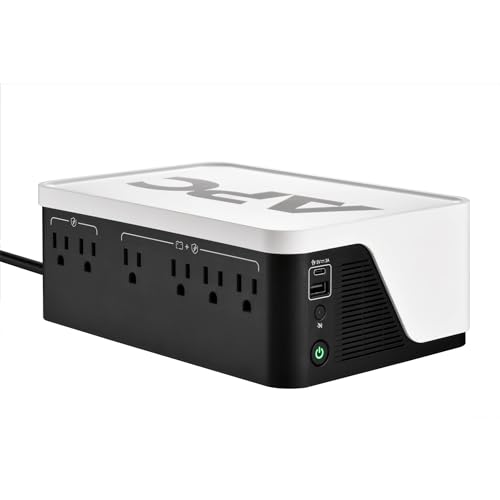
APC Back-UPS — the familiar name on the battery side
APC’s Back-UPS family is the range many people picture when they first imagine a desk UPS: a compact tower or strip-style unit from a maker that has specialised in power protection for decades. In prose terms it sits in the mid tier for home and small-office use, with a mix of battery-backed and surge-only outlets, a replaceable battery on many models in the family, and a reputation built on doing the basic job — ride through a dip, bridge an outage, shut down safely — without drama. For a first UPS under a gaming or work desk, it is a sensible reference point against which to compare everything else: if another unit offers a layout you prefer, you will know exactly what you are trading. Best for: a first-time UPS buyer protecting one PC and one monitor. Not suited for: anyone expecting to keep a full gaming rig playing through a long blackout — no desk UPS is.

CyberPower UPS — the value-minded battery alternative
CyberPower’s UPS range is the other name that comes up in almost every desk-power conversation, typically positioned as a keenly competitive alternative in the same mid tier, with similarly mixed outlet layouts and a strong following among home-office and gaming users. Owners often choose between this family and the one above on layout, footprint, and which unit fits the physical corner they have available, rather than on any dramatic difference in the core promise. That is a healthy way to shop this category: the core promise — a short, calm bridge to a safe shutdown, plus surge protection — is the same, so buy the shape and outlet arrangement that suits your desk, from a maker with a real support network behind it. Best for: buyers comparing two reputable mid-tier families on layout and fit. Not suited for: powering heaters, laser printers, or other heavy or spiky loads, which do not belong on a small desk UPS.

Tripp Lite surge protector — the focused spike specialist
Tripp Lite’s surge protectors represent the dedicated end of this comparison: no battery, no pretence of keeping anything running, just clamping and careful outlet design from a maker long associated with power infrastructure. In tier terms these sit from entry to mid depending on the model, and the family’s appeal is exactly its focus — this is the device for the TV wall, the console shelf, and the charging corner, where a spike is the risk and an outage is merely an interruption. Look for a clear protection indicator, a layout that fits your plugs without crowding, and a form factor that suits the furniture it will live behind. Best for: entertainment and charging areas where spike protection is the whole job. Not suited for: any computer whose sudden shutdown would lose work — that job belongs to a UPS.

Belkin surge protector — the household name for everyday setups
Belkin’s surge protectors are the other household-name option in this half of the comparison, widely sold in strip and compact forms for home and office use, generally in the entry-to-mid tier. For many households the decision between this family and the one above comes down to outlet spacing for bulky adapters, cord length to reach an awkward socket, and whether the unit will sit on a desk or hide behind a cabinet. Those mundane details are genuinely the right criteria for a surge-only device, because its protective job is standardised while its physical fit in your room is not. Best for: everyday rooms where plugs, spacing, and cord reach decide the purchase. Not suited for: being mistaken for a battery backup — like every surge protector, it keeps nothing running when the power fails. For keeping the data side of a setup safe in other ways, see also external drives for long-term storage.
Final Recommendation by Use Case
For a work or gaming PC that holds anything you would mind losing, buy the UPS, plug the computer and one monitor into its battery-backed outlets, put the rest of the desk on its surge-only outlets or a separate protector, and adopt the habit of saving early when the lights flicker. For a television, console, and sound setup used purely for entertainment, a good surge protector is the proportionate, tidy answer, replaced on a sensible cycle and after any major electrical event. For a home with genuinely messy power — flickers, dips, frequent brief cuts — weight everything toward the UPS for the computer and the router, because your problem is continuity, not just spikes. For a household on a tight budget, protect in order of consequence: the computer first, the storage second, the entertainment gear third, and never let the perfect become the enemy of a protector that is actually plugged in. Whichever side you land on, you will be better protected than the majority of desks, which run everything from a plain strip and hope. Hope is not a power strategy; now you have one. If your next step is the controllers on that desk staying ready, continue to controller charging dock review and its companion controller charging dock reviews.
Know Your Own Power: A Short Home Audit
Before you finalise any purchase in this category, spend a week noticing your own electricity. Most people shop for power protection from a single memorable event — one dramatic storm, one outage that cost them a file — and then protect against that event alone, whether or not it is the event their home actually produces. A short, honest audit corrects that. Note every flicker of the lights, every momentary dip that makes a fan stutter, and every full cut, along with what you were doing at the time. Note also which appliances were running: a kettle, a washing machine, and a heater starting together can dip a tired circuit in ways that have nothing to do with the weather outside. After a week or two you will have a picture, and the picture usually points clearly. Frequent small dips point to the battery side of this comparison. Rare, storm-linked drama points to surge protection done properly and replaced on schedule. A clean record points to proportionate, entry-level protection and money saved for other parts of the setup.
While you audit, audit the sockets too. Count what is actually plugged in at the desk, and be honest about how many of those things matter. The typical gaming desk hides a small crowd: the PC, one or two monitors, speakers, a router, an external drive, a lamp, two chargers, and a console that migrated there months ago. Of that crowd, only a few items earn battery support, but almost all of them earn basic surge protection, and laying that out on paper before you shop prevents the classic mistake of buying a unit whose outlet arrangement does not match the crowd it must serve. Note which plugs are bulky adapters that block neighbouring sockets, because outlet spacing, mundane as it sounds, is one of the most common reasons a well-chosen protector ends up half-used in practice.
Setting Up Whichever You Choose
Setup for a surge protector is mostly about placement and honesty. Plug it directly into the wall where possible, route its cord so it is not pinched by furniture or stretched across a walkway, and leave its indicator light somewhere you can actually see it during your occasional checks — a protector hidden so completely that its warning light is invisible is a protector whose warnings you will miss. Connect the entertainment or charging gear, keep heavy heat-producing appliances off it, and write the month and year of installation on a small label on the unit itself. That label turns a vague intention to replace it someday into a decision you can make at a glance after a storm or a few years of service.
Setup for a UPS deserves ten unhurried minutes. Charge it as the maker directs before trusting it, plug it directly into the wall, and connect only your chosen few devices to the battery-backed outlets, using the surge-only outlets for the rest of the desk if the layout suits. Position it where air moves and where its alarms and indicators can be noticed, not sealed inside a closed cabinet. If the unit offers a data connection so the computer can be told to shut itself down automatically during an outage, that feature is worth configuring on a work machine or a storage box that may be unattended when power fails; an automatic, orderly shutdown is the whole point of the device, and it should not depend on you being in the room. Finally, do one calm rehearsal: with your work saved, notice how the unit behaves when the supply is interrupted, so the real event holds no surprises. A rehearsed shutdown is a boring shutdown, and boring is exactly what you are buying.
Common Mistakes in This Category
The first mistake is the one this article opened with: buying a surge protector and believing it will keep a computer running in an outage. The second is the mirror image: buying a UPS and believing its battery makes surge thinking unnecessary, when in fact its protective components age like any others and its surge-only outlets deserve the same respect as a standalone protector. The third is overloading the battery side — hanging speakers, lamps, printers, and extra screens off the backed outlets until the short shutdown window becomes a very short one. The fourth is daisy-chaining, already covered, which persists because it is physically easy and looks harmless; resist it. The fifth is buying on the biggest number on the box without checking outlet layout, battery replaceability, and whether the unit’s alarms can be muted for a bedroom desk — small livability details that decide whether a good device stays plugged in or gets quietly unplugged after a week of beeping at night.
The sixth mistake is forgetting the rest of the path. Power protection guards the mains path, but a serious nearby strike can also travel along other cables connected to your gear. You do not need to become an electrician to respect that fact: keep protection thinking whole-room rather than single-device where you reasonably can, unplug prized gear during the worst storms if you are home and it is safe to do so, and keep proper backups of anything irreplaceable, because no protector or battery is a substitute for a copy of your data stored somewhere else. Protection buys you safety and time; backups buy you certainty. The two together are what a resilient desk actually looks like.
One last perspective is worth keeping as you decide. Power protection is unglamorous, and that is precisely why it is under-bought: it produces no visible improvement on a normal day, no brighter screen and no faster frame rate, only the absence of a disaster that then never happens and can never be photographed. Judge it the way you judge a backup or a lock — not by what it adds to a good day, but by what it quietly prevents on the worst one. Bought in that spirit, sized to the gear that genuinely matters, and maintained with the small habits described above, either side of this comparison earns its place. Bought as an afterthought and forgotten in a tangle of cables, even the better device is only half a solution.
Choosing Between the Alternatives: A Practical Ups Battery Backup Tie-Break
Look at what each choice makes easier next month, not just today, because the better option is usually the one that leaves fewer awkward compromises behind it. Think about the longest session you realistically run, not the average one, since heat, noise, clutter and small annoyances all grow more noticeable over time. Ask whether the benefit you want survives your least favourite conditions, such as low light, a crowded desk, a warm room or a rushed start to the day. Check that nothing you place on, under or beside the ups battery backup blocks airflow, movement, visibility or access that the design quietly depends on.
As a concrete listing check, take the APC Back-UPS and the CyberPower UPS named earlier in this article and confirm, line by line, that each variant offered matches the size, connection and contents described for it here. If you work in more than one place, decide whether this ups battery backup stays fixed in one spot or travels, and judge its size, weight and setup time accordingly. Think about storage for the accessories this ups battery backup brings with it, so spare parts and tools end up in one known place instead of scattered across drawers. Start this final check away from the listings, with the space, the equipment and the routine you already have written down in plain terms. If you keep switching your preference, the deciding factor is probably a practical detail such as size, connection or handling rather than headline performance, so go and settle that detail directly.
Keep a short note of what worked, what annoyed you and what you adjusted, because that note is more useful than memory when you later replace or add another ups battery backup. Separate the features you will use in the first month from the ones that only sound reassuring, and let the first group carry far more weight in the decision. If the ups battery backup will be shared, agree on one home position and one simple reset routine, so each person does not undo the previous person’s adjustments. Keep the packaging and any small adapters, feet, brackets or fasteners together until the ups battery backup has survived a full week of ordinary use in its final position.
Run one deliberately awkward task early on, the kind you usually avoid, and see whether this ups battery backup handles your edge cases or only your easiest work. A calm final test is to walk away mid-task, come back later, and see whether the setup still makes sense at a glance without reconstructing what you were doing. To choose between the two sides of this comparison, name the task where they genuinely differ and ignore the many jobs where either would perform perfectly well. When you compare notes with other owners, match their comments to setups like yours, because advice from a very different room, workload or routine can mislead. Notice the small sounds, lights and movements during normal use, because those everyday details decide whether a ups battery backup feels settled or constantly demands attention.
Plan where the cables or materials connected to this ups battery backup will run when the room is tidy, not just while you are testing on an empty surface. When a specification is stated in unfamiliar terms, translate it into your own routine: how long, how often, how far, how loud in practice, before letting it sway you. Leave a little headroom in every direction that matters, whether that means physical space, connection capacity, adjustment range or simply time to do a task properly.
Frequently Asked Questions
Will a surge protector keep my PC on during a blackout?
No. A surge protector has no battery and no stored energy, so when the supply fails, everything plugged into it loses power at the same instant. Its only job is clamping voltage spikes while power is present. If you need even a short window to save and shut down, you need a UPS battery backup for that machine. This is the most common misunderstanding in the category, so it is worth being completely blunt about it before you spend anything.
Can I game through a blackout on a UPS?
Not realistically, and you should not plan to. A desk UPS is designed to give you a short window to save your progress and shut down safely, not to power a gaming session until the supply returns. A gaming PC and monitor draw heavily, the battery drains quickly under that load, and when it empties the shutdown is the abrupt kind you bought the unit to avoid. Save, shut down, and let the battery stay ready for the next event.
Can I plug a UPS into a surge protector, or the other way round?
No. Maker guidance is consistent: do not daisy-chain them in either direction. A UPS should plug directly into the wall socket, and you should not hang a surge strip off its battery-backed outlets to multiply them. Doing so can interfere with how the UPS manages power, can overload the backed outlets, and can undermine the protection you were relying on. If you need more battery-backed sockets, choose a UPS that has them.
Does surge protection wear out?
Yes. The components that absorb spikes are sacrificial: every event they handle consumes some of their capacity, and a single large event can consume a great deal. A protector can keep passing power perfectly while offering much less protection than when it was new. Check the protection indicator regularly, replace the unit if the indicator says protection has gone, and be ready to retire a protector after a major storm or electrical incident in your home.
What should I plug into the battery-backed outlets?
Be strict: the computer itself and one monitor are the core answer, because those are what you need to save work and shut down safely. A router is a sensible addition if you want a laptop to stay connected briefly during an outage. Leave speakers, lamps, chargers, extra screens, printers, and heaters off the battery side. The fewer the loads, the longer and calmer your shutdown window will be when it matters.
What do I do with an old UPS battery?
Treat it as electrical waste, not household rubbish. If your UPS has a user-replaceable battery, follow the maker’s instructions for swapping it and take the old battery to a battery recycling or household hazardous-waste collection point. If the unit is sealed or at end of life, take the whole unit to an electrical-waste scheme. Batteries contain materials that should be recovered properly, and collection routes for them are widely available.
Related Reading
controller charging dock review controller charging dock reviews gaming desks that suit a full setup gaming mice for esports play