Disclosure: As an Amazon Associate, ilcastellomenu.com earns from qualifying purchases. Links on this page are affiliate links; they cost you nothing extra. Prices and availability change often, so check the current Amazon listing before you buy.
This guide is built around one search: graphics card support bracket review. This is a deep review of the product class itself: what a graphics card support bracket is, how the main designs differ in real builds, and which of them earns a place under a heavy modern card. Real designs are used as reference points throughout, discussed in prose and positioned by tier in words, because fit — not a feature list — is what decides satisfaction here. Everything that follows works from the same honest core. A support bracket prevents and corrects sag; it does not repair an already-damaged PCIe slot or a cracked PCB. Fitting is always done with the PC off and unplugged. The support point belongs under the far corner of the card, on something solid, never pressing on fans or shroud vents, and the setting is level — never cranked upward against the board. Keep those four facts in view and every style, tier and brand name in this article falls into its proper place.
Key Takeaways
- A bracket prevents sag; it does not repair a damaged slot or a cracked board.
- The support point matters more than the brand: far corner, solid surface, never a fan or vent.
- Level is the goal — a card jacked above its line is stressed in the opposite direction.
- Pillars suit most towers; fixed brackets suit travellers and multi-GPU builds.
- Measure the gap and the footing before shortlisting any design.
In this guide
What a Graphics Card Support Bracket Is and Where It Fits
A graphics card support bracket is the simplest part in a modern PC: a prop, post or arm that carries some of the weight of a long graphics card at the end furthest from its slot. It exists because coolers outgrew boards. As cards became longer, thicker and heavier to stay cool and quiet, the fixing at the back of the case and the connector in the slot were left holding a lever they were never really sized for. The bracket’s whole job is to shorten that lever. In this graphics card support bracket review, the class is judged the way owners actually experience it: whether the card sits level a month after fitting, whether the part stays where it was put, whether it survives cleaning and card swaps gracefully, and whether it asks anything unreasonable of the build around it. Judged on those terms, the good designs are very good value in the entry and mid tiers, and the premium tier is bought for looks and integration rather than for stronger support.
Why Graphics Cards Sag in the First Place
Sag is simple leverage, and understanding it makes every later decision easier. A modern graphics card is a long, heavy board held firmly at only one end: the bracket screwed to the back of the case and the connector seated in the PCIe slot. Everything beyond that fixing point — the cooler, the fans, the shroud and the backplate — hangs in the air. Coolers have grown much larger than the boards they cool, because quieter, cooler operation demands more metal and more fan area, so the far end of a flagship card can carry real weight at the end of a long lever. Gravity pulls that corner down a little, the board flexes a little, and over months the droop becomes visible even to someone who never opens the case. A support bracket does not change the card or the slot; it simply adds a second, gentle point of support under that far corner so the lever is no longer working alone.
What Sag Can and Cannot Do to Your Hardware
Honesty matters here, because support brackets are sometimes sold with fear. Visible sag is mostly a cosmetic problem, and plenty of cards have run drooped for years without failing. The real concerns are slower and quieter: constant flex puts steady stress on the PCIe slot and on the solder joints and traces near it, and a card that moves when the case is bumped or carried is a card whose connector is being worked back and forth. What a bracket cannot do is just as important. It cannot repair a PCIe slot that is already damaged, it cannot mend a cracked PCB, and it cannot fix a card that was bent by being dropped or forced. If your slot is already loose, your system crashes when the card is touched, or you can see damage to the board, the answer is repair or replacement, not a prop. A bracket is prevention and tidiness, bought early and cheaply — not a cure.
The Support Point: Where a Bracket Should Actually Touch
Almost everything about using one of these products well comes down to a single detail: the support point. The padded top of the support should sit under the far corner of the card, as close to the unsupported end as your case layout allows, because that is where the leverage is greatest and where a small lift does the most good. It should press against a solid part of the card — the edge of the shroud, the frame or the backplate structure — and it should never press on a fan blade, a fan hub, an exposed fan opening or a vent in the shroud. Pushing up into a spinning fan is the one genuinely harmful mistake in this whole category. The contact should also be gentle: you are taking the droop out and holding the card level, not jacking it upward past level. A card pushed above its natural line is under stress in the opposite direction, which defeats the entire purpose.
Upright Pillar Supports Explained
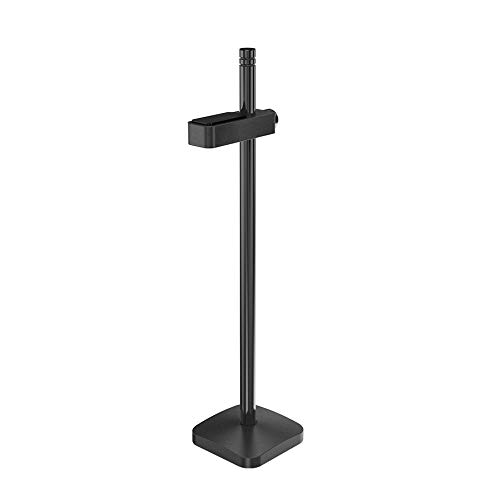
The most common design is the upright pillar: a vertical post that stands on the power supply shroud or the floor of the case, with an adjustable arm or a sliding, padded rest that rises to meet the underside of the card. Pillars are popular because they fit the widest range of cases and cards, need no permanent modification, and can be removed in seconds when you swap hardware. Their weakness is the surface they stand on. A pillar needs a flat, solid place to stand, and in cases with a perforated shroud, a fan mounted below the card, or a very short gap between card and shroud, finding that footing can be awkward. Pillars also become part of the view through a glass side panel, so their finish and proportions matter more than their simple job suggests. For most single-card builds in a conventional tower, though, this is the default answer.
Design, Build and Setup
Across the class, build quality shows in the same places: the stiffness of the post or arm, the grip of the foot or the solidity of the fixing, the padding on the rest, and the smoothness of the adjustment. Setup follows one pattern for every design in this review. With the PC off, unplugged and on its side if that helps, seat the card fully, screw its bracket down, route its power cables so they are not pulling the card down, then position the support, raise it in small steps, and sight along the card until its line matches the slot. Close the case only when everything is secure and nothing can wander. That unhurried ten minutes is the entire skill of this category, and every design below is judged partly on how easy it makes those ten minutes feel.
Graphics Card Support Bracket Review: the Reference Designs
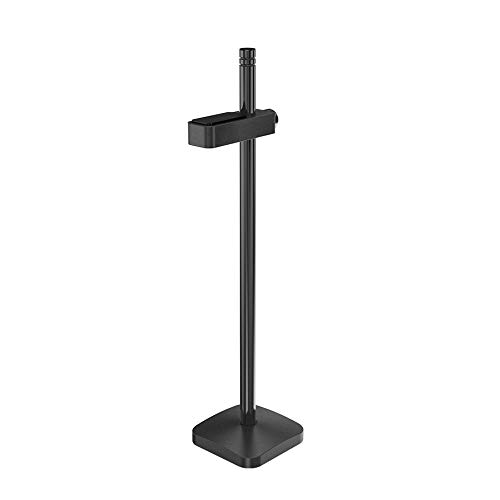
MHQJRH Graphics Card GPU Brace Support
The MHQJRH Graphics Card GPU Brace Support represents the upright pillar style in its most familiar form. In prose terms it sits in the entry tier of this category: judge it by the tests this article keeps returning to — a secure footing or fixing, a padded rest, adjustment that locks once set, and a support point that can land on a solid part of your card, well away from any fan or vent. Fitted that way, with the PC off and unplugged and the height set until the card sits level rather than lifted, it does the one job this category exists for: it holds the far corner of a heavy card so the slot and the board no longer carry the whole lever alone. It will not repair a slot or a board that is already damaged, and no honest support should claim otherwise. Check the current listing for exactly what is included before you buy, and measure your own build first, because fit in this category is decided by your case and your card, not by any listing photograph.
In a review context, what stands out is how little drama a good example creates: once set, it disappears into the routine of the build, noticed only when the card is swapped or the case is cleaned.
Best for: builders whose measured clearances suit this style of support and who want the card held level with a padded, locked rest. Not suited for: builds where its footing or fixing has nowhere sound to go, or where its rest would land on a fan, a vent or a fragile part of the shroud.
Cooler Master ELV8 GPU Bracket
The Cooler Master ELV8 GPU Bracket represents an addressable-lit pillar design from an established case and cooling brand. In prose terms it sits in the premium tier of this category: judge it by the tests this article keeps returning to — a secure footing or fixing, a padded rest, adjustment that locks once set, and a support point that can land on a solid part of your card, well away from any fan or vent. Fitted that way, with the PC off and unplugged and the height set until the card sits level rather than lifted, it does the one job this category exists for: it holds the far corner of a heavy card so the slot and the board no longer carry the whole lever alone. It will not repair a slot or a board that is already damaged, and no honest support should claim otherwise. Check the current listing for exactly what is included before you buy, and measure your own build first, because fit in this category is decided by your case and your card, not by any listing photograph.
For review purposes, the telling test is the month-later check — whether the setting has held, the pad is still seated and the card is still level without anyone having touched it.
Best for: builders whose measured clearances suit this style of support and who want the card held level with a padded, locked rest. Not suited for: builds where its footing or fixing has nowhere sound to go, or where its rest would land on a fan, a vent or a fragile part of the shroud.
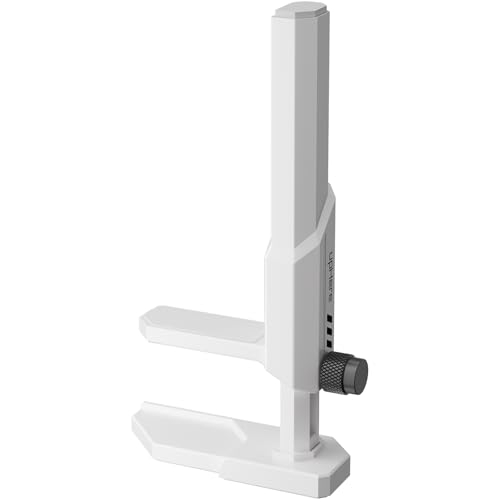
upHere Graphics Card Support
The upHere Graphics Card Support represents a simple, widely chosen upright support with a clean, understated look. In prose terms it sits in the entry tier of this category: judge it by the tests this article keeps returning to — a secure footing or fixing, a padded rest, adjustment that locks once set, and a support point that can land on a solid part of your card, well away from any fan or vent. Fitted that way, with the PC off and unplugged and the height set until the card sits level rather than lifted, it does the one job this category exists for: it holds the far corner of a heavy card so the slot and the board no longer carry the whole lever alone. It will not repair a slot or a board that is already damaged, and no honest support should claim otherwise. Check the current listing for exactly what is included before you buy, and measure your own build first, because fit in this category is decided by your case and your card, not by any listing photograph.
In a review context, what stands out is how little drama a good example creates: once set, it disappears into the routine of the build, noticed only when the card is swapped or the case is cleaned.
Best for: builders whose measured clearances suit this style of support and who want the card held level with a padded, locked rest. Not suited for: builds where its footing or fixing has nowhere sound to go, or where its rest would land on a fan, a vent or a fragile part of the shroud.
Lian Li GB-001 Anti-Sag Bracket
The Lian Li GB-001 Anti-Sag Bracket represents a case and motherboard-mounted approach rather than a free-standing pillar. In prose terms it sits in the mid tier of this category: judge it by the tests this article keeps returning to — a secure footing or fixing, a padded rest, adjustment that locks once set, and a support point that can land on a solid part of your card, well away from any fan or vent. Fitted that way, with the PC off and unplugged and the height set until the card sits level rather than lifted, it does the one job this category exists for: it holds the far corner of a heavy card so the slot and the board no longer carry the whole lever alone. It will not repair a slot or a board that is already damaged, and no honest support should claim otherwise. Check the current listing for exactly what is included before you buy, and measure your own build first, because fit in this category is decided by your case and your card, not by any listing photograph.
For review purposes, the telling test is the month-later check — whether the setting has held, the pad is still seated and the card is still level without anyone having touched it.
Best for: builders whose measured clearances suit this style of support and who want the card held level with a padded, locked rest. Not suited for: builds where its footing or fixing has nowhere sound to go, or where its rest would land on a fan, a vent or a fragile part of the shroud.

nkomax GPU Support Bracket
The nkomax GPU Support Bracket represents an upright support sold on straightforward adjustment and a tidy footprint. In prose terms it sits in the mid tier of this category: judge it by the tests this article keeps returning to — a secure footing or fixing, a padded rest, adjustment that locks once set, and a support point that can land on a solid part of your card, well away from any fan or vent. Fitted that way, with the PC off and unplugged and the height set until the card sits level rather than lifted, it does the one job this category exists for: it holds the far corner of a heavy card so the slot and the board no longer carry the whole lever alone. It will not repair a slot or a board that is already damaged, and no honest support should claim otherwise. Check the current listing for exactly what is included before you buy, and measure your own build first, because fit in this category is decided by your case and your card, not by any listing photograph.
In a review context, what stands out is how little drama a good example creates: once set, it disappears into the routine of the build, noticed only when the card is swapped or the case is cleaned.
Best for: builders whose measured clearances suit this style of support and who want the card held level with a padded, locked rest. Not suited for: builds where its footing or fixing has nowhere sound to go, or where its rest would land on a fan, a vent or a fragile part of the shroud.

EZDIY-FAB GPU Holder
The EZDIY-FAB GPU Holder represents a holder aimed at builders who want the support to match a styled, lit interior. In prose terms it sits in the mid tier of this category: judge it by the tests this article keeps returning to — a secure footing or fixing, a padded rest, adjustment that locks once set, and a support point that can land on a solid part of your card, well away from any fan or vent. Fitted that way, with the PC off and unplugged and the height set until the card sits level rather than lifted, it does the one job this category exists for: it holds the far corner of a heavy card so the slot and the board no longer carry the whole lever alone. It will not repair a slot or a board that is already damaged, and no honest support should claim otherwise. Check the current listing for exactly what is included before you buy, and measure your own build first, because fit in this category is decided by your case and your card, not by any listing photograph.
For review purposes, the telling test is the month-later check — whether the setting has held, the pad is still seated and the card is still level without anyone having touched it.
Best for: builders whose measured clearances suit this style of support and who want the card held level with a padded, locked rest. Not suited for: builds where its footing or fixing has nowhere sound to go, or where its rest would land on a fan, a vent or a fragile part of the shroud.
Performance in Real Use
Holding a Heavy Flagship Card
Under a large, heavy card, the differences between designs stop being theoretical. A stiff pillar with a wide, grippy foot holds its setting indefinitely; a flexing post or a foot that skates on a smooth shroud slowly gives the droop back. Fixed brackets, anchored to the case or board, are the most set-and-forget of all, because nothing about them can be knocked loose. In every case the visible result, properly fitted, is the same satisfying one: a card that sits level with its slot and stays that way.
Living With the Support Day to Day
Day to day, a good support is invisible, and that is the highest praise available in this category. It does not rattle, does not drift, does not foul the side panel, and does not turn a routine clean into a rebuild. The designs that annoy owners are the ones that demand recurring attention: friction adjustments that creep, pads that fall off, feet that slide when the case is nudged. When you read owner feedback on any model, weight those boring complaints heavily — they predict your experience far better than first-day enthusiasm does.
Card Swaps and Upgrades
A support earns extra credit at upgrade time. Pillars lift out in seconds and usually adapt to the next card with a fresh height setting. Fixed brackets may need their mounting revisited if the new card’s support point sits somewhere different, and a bracket sized for one case may not transfer to the next at all. None of this is a reason to avoid fixed designs; it is a reason to keep their fittings and spare pads, and to treat every new card as a fresh fitting rather than an assumption.
Showcase Builds and Glass Panels
In a glass-sided build the support is on stage, and here the lit and machined designs justify themselves honestly: they turn a necessary prop into a deliberate part of the composition. The discipline does not change — solid point, gentle pressure, nothing near a fan — but the shortlist order flips, with finish considered earlier. Even in a showcase, though, a discreet pillar in shadow beats a drooping card, every time.
Horizontal Brace Arms and What They Do Differently
A third approach runs a brace along the length of the card rather than propping it from below at one point. Horizontal braces and support arms attach near the rear of the case and extend forward, holding the card along its edge or at its far end from a structure that is itself screwed down. Done well, this spreads the support and can look very deliberate, especially in a showcase build. Done badly, it can foul cables, clash with tall memory or a large air cooler, or press along a part of the shroud that was never meant to take load. The lesson is the same as with every type: support belongs under a solid structural point near the far corner, applied gently. Whichever family you choose, judge it by where it touches the card and how securely its other end is anchored, not by how elaborate it looks in a listing photograph.
Materials, Feet and Pads: the Small Parts That Decide Quality
Two brackets that look alike in photographs can feel completely different in the hand, and the difference is in the small parts. A metal post or arm flexes far less than a thin plastic one, and flex in the support simply hands the sag back to the card. The foot matters too: a wide foot with a grippy, non-slip pad stands calmly on a smooth shroud, while a narrow or hard foot can skate when the case is moved. At the top, the rest that touches your card should be padded — rubber or a similar forgiving material — so the contact is firm without marking the shroud or transmitting vibration. Threads and locking rings should turn smoothly and hold their setting; a support that slowly winds itself down over a month is decoration, not support. None of this requires exotic engineering. It requires ordinary parts made properly, which is exactly what separates the good examples in this category from the forgettable ones.
Adjustment: Height, Reach and Locking
Every build puts the underside of the card at a different height, so adjustment is not a luxury feature — it is the product. Good supports adjust in two directions: the height of the post, so it can meet cards in cases with tall or short shrouds, and the position of the rest along the card, so the support point can land on something solid. Fine adjustment matters because the correct setting is a narrow band: too low and the bracket does nothing at all, too high and it is bending the card upward. Look for adjustment that locks — a ring, a screw or a positive detent — rather than friction alone, and set the final height by eye with the card’s own line as your reference. The card should sit level, parallel with the slot it plugs into. When in doubt, stop a fraction early: supporting most of the weight without forcing the last visible fraction of droop out is the safer, kinder setting.
Strengths and Trade-Offs
Strengths
- Prevents the slow flex that stresses a slot and board over years of use
- Costs little, in the entry and mid tiers, for a part that can serve several cards
- Removes cleanly at upgrade time, with no modification to card or case
Trade-Offs
- Does nothing at all for a slot or board that is already damaged
- Fit is build-specific: the wrong style has nowhere sound to stand or attach
- A careless fitting — on a fan, or cranked upward — is worse than no bracket
How It Compares
Against doing nothing, a bracket wins wherever real droop exists and loses nothing where it does not — you simply do not buy one. Against the improvised props builders sometimes use, a proper bracket wins on padding, stability and the certainty that nothing loose is wandering inside a powered case. Against a new case with a built-in support, the standalone bracket wins on choice: you keep the case you like. Within the class, pillars win on universality, fixed brackets win on security, and lit designs win on looks. There is no overall champion, and any review that crowns one without asking about your case and card is selling, not reviewing.
Who Should Buy It and Who Should Skip It
Buy a support bracket if your card visibly droops, if it is a long and heavy design, if your PC travels, or if you are building new with a flagship card and want the slot protected from day one. Use the checklist before you order: card seated and screwed down, power cables not pulling the card down, gap below the card measured, footing or mounting point identified, and a solid support point located clear of fans and vents. Skip it if your card is short and light and sits level, if your card is vertically mounted and its kit provides support, or if your compact case honestly has no room — and seek repair instead if the slot or board is already damaged.
Setup, Care and Maintenance Essentials
Fit with the PC off and unplugged, set the height by eye against the line of the slot, and recheck the setting after the first week, when pads have settled. After that, the bracket joins your normal cleaning routine: brush the dust from around its foot, confirm the pad is in place and the card still level, and refit it fresh whenever the card comes out. Keep any spare pads and fittings with your motherboard box. That is the whole maintenance burden of the category, and it is measured in seconds per year.
Reading the Listings Closely: What to Verify Model by Model
Fit and feel, judged honestly
Specifications can tell you a graphics card support bracket will fit; only handling tells you whether it feels right doing it. Weight distribution, control placement, surface finish and the force needed for routine adjustments all shape whether you reach for the product gladly or work around it. When picks such as nkomax GPU Support Bracket, EZDIY-FAB GPU Holder and MHQJRH Graphics Card GPU Brace Support are on your shortlist, run this check against each listing in turn. If your shortlist comes down to two similar models, this tactile layer is usually the honest tie-breaker, and it is personal: a control layout one reviewer calls cramped, a smaller-handed owner may call perfect. Where possible, judge fit against your own hands, desk and habits, not the reviewer’s.
The detail that dates a design
Every Graphics Cards generation has a detail that quietly dates it: a port standard on its way out, a control app that has stopped receiving updates, a consumable format being phased away. When reviewing a graphics card support bracket, that detail matters because it decides how gracefully the product ages. A model built on current standards and widely stocked consumables will still be serviceable when a flashier rival is orphaned by its own ecosystem. Check the age of the design, not just its feature list, and favour the product whose supporting ecosystem is still actively maintained.
What the box should contain — and what it should not need
Unboxing is a small but telling review checkpoint for a graphics card support bracket: the essentials for the first session should be in the box, the instructions should match the actual unit, and nothing vital should depend on an immediate second purchase. If a pick requires an accessory to perform its core job, that dependency is flagged in its assessment above, because it changes both the real cost and the first-day experience. Equally, beware bundles padded with extras you will never use; in a household where the gear gets used hard on weekends and barely touched midweek, unused bundle clutter is a cost paid in storage, not a bonus.
Reading the assessments against your own routine
These reviews were written against a general routine, and your routine is the final filter. Map each pick’s stated strengths onto your busiest realistic day with a graphics card support bracket: if a pick’s best quality serves a task you do rarely, it is not the pick for you, however strong the assessment. If a pick’s noted limitation sits in a corner of the workflow you never visit, discount it. This translation step — from review conditions to your conditions in a household where the gear gets used hard on weekends and barely touched midweek — is where a good review becomes a good decision rather than a borrowed opinion.
Write the conclusion of that check down before you order, so the decision survives contact with a tempting listing.
That single habit separates owners who stay pleased with their choice from owners who quietly start shopping again within a season.
Frequently Asked Questions
Do all graphics cards need a support bracket?
No. Short, light cards with modest coolers sit happily in their slot for years with no visible droop and no help. The case for a bracket grows with the card: the longer and heavier the cooler, the longer the lever working on the slot, and the more a gentle second support point makes sense. Look at your own card first. If the far corner visibly droops, or the card is among the large, heavy designs of recent generations, a bracket is a proportionate answer. If the card sits level on its own, a bracket is jewellery, and you should buy it only if you want the look.
Can a support bracket fix a card that already sags badly?
It can hold a sagging card level again, which is usually what owners actually want, but it cannot undo damage that sag may already have done. If the slot has loosened, the board has cracked, or the system has become unstable when the card moves, a bracket is not a repair and should not be trusted as one. Straighten the card gently with support, by all means — but if there are symptoms beyond droop, have the hardware assessed. Prevention bought early is the honest promise of this category; resurrection is not on the menu.
Where exactly should the support touch the card?
Under the far corner, on a solid, structural part of the card — the edge of the shroud, its frame or a reinforced corner — as far from the slot as your layout allows. Never on a fan blade, fan hub, fan opening or shroud vent, and never against bare board components. The contact should be padded and gentle: enough to take the droop out and hold the card level with its slot, never enough to push the corner above that line. If the only available contact point is a fan or a vent, that bracket style does not fit your build.
Is it safe to install a bracket with the PC switched on?
No. Always shut the PC down, switch the power supply off and unplug it before opening the case and fitting anything that will sit inside it, close to a powered board. Installation is a two-handed, close-quarters job around connectors and fans, and it should be done on a still, unpowered machine, taking your time. The same rule applies every time you adjust, clean around or remove the bracket later. It costs a minute and removes the only real risk in an otherwise gentle job.
What about vertical GPU mounts and multi-GPU builds?
Treat both as separate questions. A vertically mounted card hangs from its mount on a riser rather than cantilevering from the slot, so classic sag largely disappears and a normal pillar usually has no job to do; use any support the mount kit itself provides. In a multi-GPU build, support each card at its own far corner if you support it at all, expect floor space for a pillar to be scarce, and look to case-mounted or motherboard-mounted designs — taking great care that one card’s support never presses on the fans of the card beneath it.
How do I know if a bracket will fit my case?
Measure, in this order: the gap between the underside of your installed card and the surface below it; the flat, clear area where a foot could stand or the mounting points a fixed bracket could use; and the position of a solid support point on the card, clear of fans and vents. Compare those three facts with the style you are considering — pillar, case-mounted or motherboard-mounted — before comparing brands or finishes. Fit in this category is physical and specific to your build, and no listing can settle it for you.
Related Guides
Keep reading within this cluster and the wider build guides on this site. See also the graphics card support bracket reviews guide. See also the graphics card support bracket buying guide guide. See also the graphics card support bracket pros and cons guide. See also the is a graphics card support bracket worth it guide. See also graphics cards for desktop builds. See also graphics cards for AMD-based systems. See also cases suited to custom cooling loops. See also graphics cards for multiple monitors. Each of those guides follows the same rule as this one: measure your own build first, and let fit — not marketing — make the final decision.
Clearance: Fans, Shrouds and the Space Below the Card
Before any bracket goes on a shortlist, look at the space it has to live in. Many cases mount fans on the power supply shroud or directly below the graphics card, and a pillar standing in that airflow — or worse, standing on a fan frame — helps nothing. Bottom intake fans, radiators and their tubing, front-panel cables and the thick bundle of power cables heading for the card all compete for the same few centimetres. Measure the gap between the underside of your installed card and the surface below it, and note what else occupies that gap. If the honest answer is that the space is already full, a case-mounted bracket that anchors elsewhere may be the only workable style, and in a very compact build the correct answer may be no bracket at all. Clearance is a fact about your specific build, not a detail a listing can settle for you.
Power Cables and the Hidden Clash Nobody Mentions
The most common fitting surprise has nothing to do with the bracket itself. Modern graphics cards draw their power through connectors on the top or the end of the card, and the cables leaving those connectors need room to bend without strain. A support arm positioned carelessly can end up exactly where a power cable wants to route, pushing the cable into a tighter bend or resting against its connector. When you plan the support point, trace the whole neighbourhood: where the power cables run, where the front-panel audio and USB leads pass, and whether a side panel bulge or cable channel will press on anything once the case is closed. Rerouting a cable to make room is normal and harmless; forcing one is not. A few minutes spent looking before you buy saves the particular frustration of a bracket that fits the card perfectly and the build not at all.
Vertical GPU Mounts Change the Question Entirely
If your card is mounted vertically — facing the side panel on a riser cable, as many showcase cases allow — the sag question changes shape. A vertical card hangs from its mount rather than cantilevering out of the slot, so the classic droop is largely gone, and a conventional pillar support usually has nothing useful to do. What vertical mounting introduces instead is its own set of concerns: the riser cable and its connectors carry the card, the bracket of the mount itself must be secure, and the card sits close to the glass, which affects its breathing room. Some vertical kits and cases include their own small supports or rests, and those matched parts are the right answer where they exist. Do not buy a horizontal-build support bracket for a vertical build out of habit. Check what your mount already provides, and only add support that the layout actually calls for.
Multi-GPU Builds: Twice the Weight, Half the Space
Two graphics cards double everything awkward about support. The lower card hangs over the bottom of the case with very little room beneath it, the upper card sits close above it, and the space a pillar would stand in is often occupied by the second card itself, by cables or by intake fans. In these builds, case-mounted or motherboard-mounted brackets earn their keep, because they take their anchor from the structure of the build instead of needing floor space that does not exist. Support each card independently, at its own far corner, and be especially careful that a support meant for one card never presses on the fans of the card below it — the clearances are tight enough that this mistake is easy to make and hard to see once the side panel is on. Builders running two cards for compute or rendering work, rather than gaming, should treat support as part of the build plan from the start, not an afterthought.
Small Cases and Compact Builds
In a small form factor case, honesty is the whole game. Many compact enclosures hold the graphics card in a sandwich layout, on a riser, or in a compartment so tight that there is simply no vertical gap for a pillar and no spare mounting point for a brace. Some compact cards are also short and light enough that sag was never going to be their problem. Measure before you shop, and accept the answer the tape measure gives you. Where a compact build does have a conventional layout and a long card, the slimmaker, simpler supports are the ones that fit, and case-mounted designs sized for smaller chassis exist for exactly this niche. What you should never do is force a full-size bracket into a compact case by bending, trimming or wedging it — a support under tension in the wrong place is worse than no support at all.
Looks, Lighting and the Glass Panel Effect
A support bracket is one of the few PC parts bought partly to be looked at. Through a tempered glass panel, a drooping card reads as untidy no matter how fast it is, and a level card with a discreet support reads as finished. That is why the category spans plain black pillars that try to disappear, machined designs that present themselves as jewellery for the build, and lit models whose addressable lighting syncs with the rest of the system. None of these is the wrong answer; they serve different builders. The caution is ordering. Lighting and finish should be the last filter you apply, after type, fit and support point are settled, because a beautiful bracket standing in the wrong place is still standing in the wrong place. Buy the support first and the ornament second, even when both come in the same box.
Transport, LAN Trips and Moving House
A PC that never moves asks little of its support bracket. A PC that travels — to a friend’s house, to a LAN event, or simply in the back of a car on moving day — asks much more. Every bump on the road works the graphics card in its slot, and a heavy card with no support is at its most vulnerable exactly then. A bracket earns its keep on the journey even if you barely notice sag at your desk. For regular travellers, fixed case-mounted or motherboard-mounted brackets have a real advantage: they cannot fall over in transit and end up rattling around against the card they were meant to protect, which a loose pillar genuinely can if it is knocked off its foot. The simplest travel routine is to lay the case on its side, motherboard down, so the card rests rather than hangs — and to check the support is still seated correctly when the machine is set up again.
Dust, Cleaning and Living With a Bracket Long Term
A bracket is not fit-and-forget forever; it becomes part of the machine you maintain. Dust settles on its top surfaces and around its foot just as it settles everywhere else in the case, and the support point itself deserves a look whenever you clean the build: check that the pad is still in place, that the post has not slowly settled, and that the card still sits level. Cleaning around an installed bracket is easy — a soft brush and short bursts of air, with the PC off and unplugged, and a hand keeping any nearby fan from spinning freely while you work near it. If you remove the card for a deep clean or an upgrade, remove the bracket first and refit it last, setting the height fresh rather than assuming the old setting suits a different card. Thirty seconds of attention twice a year is the entire maintenance burden of this product category.
Temperature and Airflow: What a Bracket Does Not Change
A support bracket is a mechanical part, and it is worth saying plainly what it does not do: it does not cool your card, quieten its fans or improve its performance in any measurable way. A slim pillar in open space has a negligible effect on airflow, and claims beyond that belong to marketing, not engineering. There is one airflow-adjacent caution, and it runs the other way. A badly placed support — or the cable rerouting done to accommodate one — can obstruct an intake fan below the card or press cables into the card’s own intake path. Keep the space under the card as clear as you found it, keep the support out of fan blades and fan openings, and your temperatures will be exactly what they were before, which is the correct outcome. Buy this product for level cards and peace of mind, and judge cooling products separately, on their own merits.