Disclosure: As an Amazon Associate, ilcastellomenu.com earns from qualifying purchases. Links on this page are affiliate links; they cost you nothing extra. Prices and availability change often, so check the current Amazon listing before you buy.
So, is a computer tower stand worth it? The short answer: worth it if your tower sits on carpet, if its filters go uncleaned because reaching them is a chore, or if you service the machine often enough that dragging it out has become a dread. Not worth it if your tower already sits accessibly on a hard floor with clean filters and clear intakes, because then a stand sells you benefits you already own. Everything below exists to help you decide which of those households is yours, honestly, before any money moves.
Key Takeaways
- Worth it most clearly for carpeted rooms with bottom-intake power supplies.
- The value is maintenance actually done: clean filters, easy access, protected floors.
- The costs are mostly behavioural: fit, locks, and cable slack demand one careful hour.
- If your current setup already breathes and cleans easily, the honest answer may be no.
In this guide
Is a Computer Tower Stand Worth It? What You Actually Get
The carpet problem is physics, not fussiness
Most modern towers draw their power supply air from underneath. The PSU sits at the bottom of the case, its fan facing down, pulling cool air through a filtered intake on the case floor. Set that case directly on carpet and the pile rises into the intake, the filter mats with fibres, and the fan works against a half-closed door every hour the machine runs. The result is not instant failure; it is a slow tax of higher temperatures, louder fans, and dust paste baked onto a filter you cannot reach without tipping the machine. A stand breaks that cycle with the simplest possible intervention: distance. Even a modest lift restores a clear air gap under the case, lets the intake breathe room air instead of carpet fibres, and turns filter cleaning into a slide-out job instead of a furniture-moving event.
Dust lives at floor level
The dirtiest air in any room is the air nearest the floor. Foot traffic kicks up fibres, pet hair drifts and settles there, and every door swing pushes a slow current of grit along the skirting board exactly where a floor-standing tower breathes. Raising the case even a short distance moves its intakes out of that sediment layer, and the difference shows up months later when you open the side panel and find grey felt on the fans of a floor machine but only a light film on a raised one. A stand will not make a dusty room clean, and it does not replace filter maintenance, but it changes the rate at which the machine eats the room. For allergy-sensitive households and homes with shedding pets, that slower rate is often the single most practical reason to buy one.
Cleaning access is the quiet headline benefit
Ask long-term stand owners what changed and most will not mention temperatures first; they mention cleaning. A tower on casters or a raised platform can be rolled or slid out in seconds, the floor beneath it vacuumed, the filters pulled, the rear cables inspected, and the whole machine returned before the kettle boils. Compare that with a floor tower in a tight corner, which effectively gets cleaned when something goes wrong. Regular, easy cleaning compounds: filters stay effective, fans stay quieter, and small problems like a fraying cable or a dusty GPU intake get spotted during routine passes instead of during a failure. A stand converts maintenance from a project into a habit, and habits are what actually keep machines healthy over years.
The Real Costs Beyond Money
Cable slack is part of the product
The moment a tower can roll, its cables become a system you have to design. Power, display, network, and USB leads all need enough slack to let the tower travel from its parked spot to a fully accessible position, turned so the rear panel faces you, without any connector taking the strain. Too little slack and the first cleaning session yanks a display cable at an angle its port will not forgive. Too much and the excess pools behind the desk collecting dust. The sweet spot is a gentle service loop: enough spare cable, loosely bundled, to roll the tower out, work on it, and roll it back. When you read any computer tower stand review, weigh this honestly, because the stand is only half the purchase; the cable plan is the other half.
Lock the casters before you lean on the cables
A rolling stand introduces a failure mode that a static tower never has: the machine can move when you do not want it to. The classic accident is leaning across the desk, bumping the tower with a knee, and watching it roll just far enough to tension every cable at the back. Locking casters exist precisely for this. Once the tower is parked in its working position, lock every lockable wheel, and treat unlocking as part of a deliberate move, like unplugging a cable. If a stand offers only two locking wheels, park those at the front where your knee arrives first. A stand that cannot be locked at all belongs in a calm corner, not beside a chair that spins, a standing desk that travels, or a toddler with ambitions.
Stability is a system, not a spec
A tower is tall, heavy, and top-biased once drives, coolers, and a large graphics card are aboard. On a stand, stability comes from the whole system: a footprint at least as wide as the case base, casters that do not wobble in their sockets, rails that contact the case evenly, and a floor that is level enough not to invite rolling. Test any new setup with intent. Park the tower, lock the wheels, then push the case gently at shoulder height from the side, the way a chair arm or a hip would. It should flex as one unit and settle, not rock, skate, or twist. If it does any of those, the fix is fit, not hope: re-seat the case, widen or narrow the rails, move the stand to level ground, and test again before cables go on.
There is also a learning cost, small but real. A rolling tower changes how the machine behaves in the room, and everyone who uses the room has to learn the new rules: unlock before moving, lock after parking, never drag by the cables, roll along the clear path rather than across the chair mat’s edge. Households absorb this in a week. The cost only bites when nobody teaches it, and the tower’s mobility gets discovered by accident, usually by a knee. Count one honest conversation and a demonstration as part of the purchase price, and the behavioural costs of ownership stay near zero.
Who It Pays Off For
The carpeted gaming room is the clearest winner. The tower’s power supply stops eating carpet, filters get cleaned because cleaning is now easy, and the machine rolls out for the graphics card upgrade instead of being dragged. The pet-owning household wins almost as clearly, because lifting intakes out of the hair layer at floor level slows the felt build-up that strangles fans between cleans. The frequent tinkerer wins on access alone: when the rear panel is thirty seconds away instead of a wrestling match, small jobs stop being postponed, and postponed jobs are how small problems become expensive ones.
Small rooms and shared spaces
In a bedroom-office, a dorm, or a shared flat, a tower on the floor is furniture everyone trips over and nobody owns. A stand tidies that social contract. The machine gains a defined parking spot, rolls aside for vacuuming the room properly, and stops migrating slowly across the floor on cable tension, as floor towers mysteriously do. For shared machines, the ability to roll the tower to whoever is upgrading or troubleshooting it is worth more than any thermal argument. Just agree the parking spot and the lock habit with everyone who uses the room, because a rolling tower in a shared space will be rolled, and the person who finds out the casters were unlocked will find out with their knee.
Who Should Skip It
Skip it if your tower sits on a hard floor in an open bay, filters visibly clean, rear panel reachable, because your setup already delivers everything a stand sells. Skip it if the real problem is placement, a tower baking beside a radiator or sealed in a cabinet, because no stand fixes a bad neighbourhood and the money belongs to the move. And skip the rolling versions if the room cannot support the discipline, a chaotic shared space where locks will not be used, in favour of a fixed platform that offers lift without mobility, or no stand at all.
Strengths and Trade-Offs of Owning One
Strengths
- Cleaner intake air and slower dust accumulation, compounding month after month.
- Maintenance that actually happens, because access stops being a barrier.
- Floors, carpets, and the tower’s own feet protected from grinding and moisture.
Trade-offs
- One careful fitting hour, plus lock and cable habits that must hold for everyone in the room.
- A little extra footprint and one more object with wheels or feet to keep honest.
- No help at all for heat problems caused by placement, fans, or case design.
What a stand cannot do for cooling
Honesty matters here: a computer tower stand is not a cooling upgrade in the way a bigger CPU cooler or an extra case fan is. It does not add airflow, it does not lower the temperature of the air your components breathe by more than the small difference between floor air and slightly higher air, and it will not rescue a case with blocked front intakes or a failing fan. What it does is remove an obstruction. If your tower currently sits on carpet with a suffocated bottom intake, a stand restores the airflow the case was designed to have, and temperatures return to the maker’s assumptions. If your tower already sits on a hard floor with clear intakes, expect cleanliness and convenience gains, not a thermal transformation. Judge any stand by that standard and you will not be disappointed.
Never let rails block an intake
Side and front intakes are easy to overlook when a stand’s rails or lips wrap the bottom edges of a case. Some towers breathe through low front vents, perforated side panels near the base, or a bottom-front intake that a tall stand lip can quietly cover. Before committing, crouch down and map where your case actually inhales. Then picture the stand around it. Rails should contact the case at structural points, below or beside vents, never across them. This is the one fitting mistake that can make a stand worse than the floor it replaced, because a blocked side intake starves components that the floor never threatened. Five minutes with a torch and a tape measure prevents the only genuinely harmful outcome in this whole category.
Alternatives to Consider
The honest alternatives are doing nothing, which is correct for a healthy hard-floor setup; moving the tower onto a sturdy desk or shelf, which trades workspace for dust-free access; and an under-desk holder, which is the maximal version of the stand idea for a permanent workstation. The shortlist below shows the stand shapes most buyers weigh against those alternatives, as prose-only recommendations while verification is pending.

VIVO CPU Stand
Best for: the low-risk first stand. This is a prose-only recommendation while verification is pending, so treat it as a shortlist entry to check against the current listing before you buy.
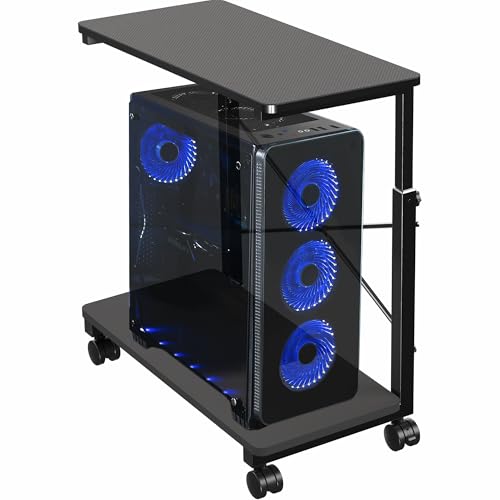
a straightforward adjustable floor stand from a brand better known for monitor arms, built with the same plain, functional approach. The width adjusts to grip the case, the casters roll without drama, and the frame keeps a low profile that disappears under a desk. It does nothing exotic, and that is the point: it is the sensible default for someone who wants the tower off carpet, wants to roll it out for cleaning, and does not want a piece of furniture doing it. Check the rail position against your case feet before ordering, and plan on locking the wheels once the tower is parked, because an unlocked stand turns every cable tug into slow drift.
Whichever stand you choose from this shortlist, run the same three checks before the return window closes: settle the case and shake-test it at shoulder height, confirm no rail or lip covers an intake on your specific case, and roll the tower to its fully serviced position to prove every cable has slack to spare. A stand that passes those three tests in your room is the right stand, whatever any review says.
BESIGN Computer Tower Stand
Best for: the carpet-focused platform. This is a prose-only recommendation while verification is pending, so treat it as a shortlist entry to check against the current listing before you buy.
a ventilated platform style stand that leans into airflow, with an open or mesh surface intended to let a bottom-mounted power supply breathe. That focus makes it a natural recommendation for towers that live on carpet, where the PSU intake faces down into pile that chokes it. The platform approach also spreads the load, which helps stability, and the modest lift still makes a real difference to dust and to mopping around the machine. What it gives up is drama in mobility: platform stands roll or slide less eagerly than tall caster carts, so if you pull your tower out every week to swap cables, a wheeled frame may serve you better.
Whichever stand you choose from this shortlist, run the same three checks before the return window closes: settle the case and shake-test it at shoulder height, confirm no rail or lip covers an intake on your specific case, and roll the tower to its fully serviced position to prove every cable has slack to spare. A stand that passes those three tests in your room is the right stand, whatever any review says.
Eureka Ergonomic CPU Stand
Best for: the adjustable frame for changing setups. This is a prose-only recommendation while verification is pending, so treat it as a shortlist entry to check against the current listing before you buy.
an adjustable-width rolling stand built around a steel frame and four caster wheels, two of which lock. The width adjusts by sliding the side rails, so one stand can follow you from a slim office case to a wider gaming tower, and the open frame leaves the sides of the case largely exposed to room air. In daily use its personality is practical rather than pretty: it rolls smoothly on hard floors, shrugs off the bumps of weekly cleaning, and keeps the bottom of the case far enough off the ground that a vacuum nozzle passes underneath without moving the machine. The trade-off is that the open rails demand an honest width check, because a case whose feet sit wider than the rail span will perch instead of settle.
Whichever stand you choose from this shortlist, run the same three checks before the return window closes: settle the case and shake-test it at shoulder height, confirm no rail or lip covers an intake on your specific case, and roll the tower to its fully serviced position to prove every cable has slack to spare. A stand that passes those three tests in your room is the right stand, whatever any review says.
How to Get the Most Value If You Buy
Value in this category is collected through habits, so install them with the stand. Fit it carefully on day one. Put the filter check on the calendar the same day, monthly for carpet and pets, and do the first clean immediately so the routine exists. Teach everyone in the room the lock rule. Route the cables once, properly, with a service loop you can see. Then forget the stand exists, which is the surest sign it is working: the machine breathes, the floor stays clean, and service days feel suspiciously easy compared with how they used to feel.
Hard floors change the calculation, not the verdict
On hardwood, tile, or laminate, the airflow emergency disappears, because a hard surface does not rise into a bottom intake. The case for a stand becomes about protection and access instead. Stands keep case feet off surfaces that mop water can reach, stop the slow grinding of grit trapped under a heavy tower every time it is nudged, and prevent the ring of compacted dust that forms around a static machine. Rolling access still matters in a tight desk bay. What changes is urgency and style: a low platform or a simple riser may serve a hard-floor setup perfectly, while the full locking-caster cart earns its keep where the tower must move often. Match the stand to the floor and the habit, not to the most dramatic sales pitch.
Heat sources and sunlight still matter
A stand lifts a tower; it does not choose where the tower lives. Keep the raised machine out of the same bad neighbourhoods as any tower: hard against a radiator, in a sunbeam through south-facing glass, inside a closed cabinet with the door shut, or with its exhaust blowing straight into a wall two inches away. Exhaust air needs somewhere to go and intake air needs to arrive at room temperature, not pre-heated by a heater. The stand’s contribution is that it makes repositioning easy, so when you notice the tower baking beside a heat source in winter, moving it to a sane spot is a two-minute job instead of an afternoon of cable archaeology.
The Decision Checklist
Answer yes or no, honestly. Is the tower on carpet or a dusty floor? Are its filters overdue right now? Is the rear panel hard to reach? Do you open or service the machine at least twice a year? Would rolling access make you clean more often? Is the floor beneath it shared with feet, pets, or mops? Three or more yes answers: a stand is worth it, and the only remaining question is style. One or two: a simple platform covers you. Zero: keep your money; your setup is already doing the stand’s job, and this guide’s honest verdict for your house is no.
Going Deeper: Living With a Raised Tower
Noise is an underrated part of this decision. A tower sitting directly on a hard floor couples its vibration into that floor, and a resonant floorboard or desk leg can turn a mild hum into a room-filling drone. A stand with sound feet or casters breaks some of that coupling, and lifting the machine off carpet stops the muffled, strained fan note of a suffocated intake. None of this replaces quiet components, but many owners are surprised how much of their machine’s voice was the floor’s, and how much calmer the room feels once the tower rides on a proper base.
If you rent, a stand quietly protects your deposit. Towers on carpet crush pile into a permanent-looking rectangle, trap grit that grinds finishes on hard floors, and can rust-stain or scuff when a heavy case is dragged rather than lifted. A stand keeps the machine’s whole footprint on its own wheels or feet, concentrates contact into small replaceable points, and makes the difference between a room that shows a computer lived there and one that does not. It is the least exciting reason on this page and, for some households, the one that pays back most concretely.
Children and pets rewrite the risk table. A floor tower is at exactly the height for a toddler’s exploratory fingers near intake fans and a cat’s preferred warm sleeping spot on top, shedding hair directly into every vent. Raising and defining the machine’s place does not make it childproof, and cables still need respect, but a locked stand removes the slow creep of a tower being nudged, climbed, and used as a step. In homes where the floor is a thoroughfare for small feet and paws, stability and locks stop being features and become the whole decision.
Finally, buy the stand for the room you have. Measure the desk bay, the gap beside the desk, the route the tower will roll when it comes out, and the door swing or chair path that crosses that route. A stand that fits the case but not the room will spend its life half-parked at an angle, casters unlocked because locking them is awkward, cables taut because the parking spot is a compromise. The right stand disappears into the room’s routines: parked square, locked without thought, rolled out along a clear path, and back again in under a minute.
Think of the stand as part of the case’s environment rather than an accessory bolted onto it. Cases are designed assuming they sit on a flat, hard, clear surface with room to breathe on every side the designer vented. Floors in real homes offer carpet pile, dust, mop water, kicked grit, and the occasional spilled drink. The stand is the adapter between the designer’s assumption and your actual room, and like any adapter it should be invisible when it works: the machine sits level, breathes freely, and moves only when you decide it moves.
There is a simple test for whether your current setup needs help. Run the machine under a normal load for twenty minutes, then slide a hand under the case and feel the intake area and the floor beneath. Warm, still, dusty air and a matted filter tell you the bottom of the case is living in a microclimate of its own making. A stand changes that microclimate more than any other single change at this scale, because it attacks the cause, restricted and dirty air at the intake, rather than the symptoms inside the case.
Weight deserves a calm word. A loaded gaming tower is heavier than it looks, and it will be lifted rarely but moved often once it can roll. Spread that weight across four sound casters or a full platform, never across a frame that flexes visibly when the case settles. Flex is information: it tells you the stand is working at the edge of its comfort, and edges are where slow failures live. A frame that sits flat, silent, and unmoved under the machine is the entire goal, and it is achievable at every tier of this market when the fit is right.
Consider the life of the machine, not just its first month. Towers get opened for storage upgrades, graphics card swaps, deep cleans, and the occasional mystery rattle. Every one of those jobs starts with moving the machine to where you can work. A stand turns that start from a deadlift into a roll, which matters more with each passing year and each heavier component. People keep stands through two or three successive computers, adjusting the width for each new case, which is why buying for adjustability and build honesty beats buying for a single case’s exact silhouette.
Noise is an underrated part of this decision. A tower sitting directly on a hard floor couples its vibration into that floor, and a resonant floorboard or desk leg can turn a mild hum into a room-filling drone. A stand with sound feet or casters breaks some of that coupling, and lifting the machine off carpet stops the muffled, strained fan note of a suffocated intake. None of this replaces quiet components, but many owners are surprised how much of their machine’s voice was the floor’s, and how much calmer the room feels once the tower rides on a proper base.
If you rent, a stand quietly protects your deposit. Towers on carpet crush pile into a permanent-looking rectangle, trap grit that grinds finishes on hard floors, and can rust-stain or scuff when a heavy case is dragged rather than lifted. A stand keeps the machine’s whole footprint on its own wheels or feet, concentrates contact into small replaceable points, and makes the difference between a room that shows a computer lived there and one that does not. It is the least exciting reason on this page and, for some households, the one that pays back most concretely.
The Value Test: How Often You Use It Decides Everything
Lifespan changes the whole calculation
A computer tower stand that serves for many years spreads its cost across thousands of uses; one that wears out, dates quickly or loses its supporting ecosystem does not. Judge lifespan by construction, consumable availability and how actively the maker still supports the line, rather than by optimism. This is where the picks discussed earlier differ most meaningfully for value: the model with the longer realistic service life can be the better value even when it is not the cheapest route in, because the cost per year of service is what your household actually pays.
The resale and hand-me-down exit
Value calculations usually assume you keep a computer tower stand forever, but a healthy second-hand market changes the risk. Products in the Desks category that hold their appeal tend to resell or hand down easily, which means a wrong decision is recoverable rather than total. That exit value argues for buying the respected model over the obscure bargain: if your circumstances change, the known computer tower stand finds a new home quickly. An ultra-cheap alternative with no following is the one that becomes pure sunk cost in a cupboard.
When waiting is the right answer
Sometimes the correct verdict is not no, but not yet. If your space, routine or budget is about to change — a move, a new job pattern, a renovation — the computer tower stand that suits today’s setup may be wrong for next season’s. Waiting costs nothing and buys information: you learn whether the need survives the change. The exception is when the need is already costing you weekly in time or frustration; then waiting is itself the expensive option, and the analysis earlier in this piece applies with full force. Distinguish a stable recurring need from a temporary itch before deciding.
The one-question shortcut
If the full analysis still leaves you undecided, ask the question that cuts through it: if this computer tower stand disappeared from your home after a month of use, would you replace it immediately, eventually, or not at all? People answer honestly when the purchase is framed as a loss. Immediate replacers should buy with confidence and choose the better model; eventual replacers should buy modestly; the not-at-all group has its answer too. In a busy shared workspace where several people use the same setup across the day, that instinct, checked against the use-frequency count, settles the worth-it question more reliably than any feature comparison.
Count the uses, honestly
The worth-it question for a computer tower stand is mostly a frequency question. Estimate how many times a month the product would genuinely be used in your routine — not the enthusiastic first fortnight, but month four, when the novelty has worn off. In a busy shared workspace where several people use the same setup across the day, a computer tower stand used weekly almost always justifies itself through saved time, avoided workarounds or better results, while the same product used twice a year is usually an expensive storage obligation. If your honest count is low, borrowing, hiring or using a service is the mathematically sound answer, and there is no shame in it.
The workaround you are already paying for
Most people considering a computer tower stand are already solving the problem somehow — with a slower method, a borrowed tool, a workaround that costs time or produces worse results. Price that workaround in attention and frustration, not just money: how often does it interrupt you, and what does the interruption cost the rest of your day? A purchase is worth it when it retires a recurring annoyance, not when it merely upgrades a process that was already painless. If your current workaround barely bothers you, the honest verdict for you is probably to skip the purchase.
Frequently Asked Questions
Does a computer tower stand actually help cooling?
It helps only by removing an obstruction. If your tower sits on carpet with a bottom-mounted power supply intake pressed into the pile, lifting it restores the airflow the case was designed for, and temperatures and fan noise usually settle back to normal. If the tower already sits on a hard floor with clear intakes, a stand will not meaningfully change component temperatures. Its reliable benefits in that case are cleaner filters, easier cleaning access, and protection from mop water and grit. Think of it as restoring design conditions, not as an active cooling upgrade.
Will any stand fit my case?
No, and fit is the one thing to verify before ordering. Measure your case at its feet, including rubber pads or outrigger feet, because that footprint is what the stand actually holds. Compare it with the stand’s adjustment range and picture where the rails will touch the case. The rails must contact structure, not vents, and the case should settle without rocking. Very wide gaming cases, cases with decorative side bulges, and small-form-factor machines are the usual exceptions that need a specific style, such as a platform or an under-desk holder, rather than a generic adjustable frame.
Are caster stands safe for an expensive gaming PC?
They are, provided three habits hold. First, the fit must be honest, with the case settled on its feet inside the rails. Second, the locking wheels must actually be locked whenever the tower is parked, so a knee bump cannot start it rolling. Third, the cables need a service loop with enough slack for the tower to roll out fully without tension on any connector. Break any one of those and a caster stand becomes a risk; honour all three and it is one of the most practical upgrades a desk setup can get, because service and cleaning become effortless.
Is an under-desk holder better than a floor stand?
It depends on how settled your setup is. A holder frees the entire floor, lifts the tower completely out of the dust layer, and looks exceptionally tidy, which makes it ideal for a permanent workstation on a solid desk. A floor stand wins on flexibility: it moves between desks and rooms, needs no installation into furniture, and lets the tower roll out for quick cable work. Renters, frequent upgraders, and anyone whose desk is thin or hollow should lean toward the floor stand. Settled owners with a sturdy desk can enjoy the holder’s clean result.
How often should I clean a tower that sits on a stand?
The stand makes cleaning easy enough that a light routine sticks. A sensible rhythm is a quick filter check every month or two, pulling the tower out, sliding the bottom filter free, and tapping or rinsing it as the maker allows, plus a deeper interior dust pass a couple of times a year. Homes with shedding pets or carpeted rooms should lean toward the shorter interval. The real change a stand brings is that each session takes minutes, so the schedule survives contact with real life instead of slipping until the fans announce the problem.
Can a stand damage my floor or carpet?
A good stand is kinder to floors than the tower itself. It concentrates contact into small caster or foot points that can be fitted with pads, stops the grit-grinding that happens when a heavy case is dragged, and prevents the crushed rectangle a static tower presses into carpet pile. Casters should be chosen for the surface: softer wheels for hard floors, and a check that locked wheels do not creep. The one caution is point load on very soft flooring, where a platform style that spreads weight over a wider area is the safer choice.
Related Guides
Keep exploring this cluster and the surrounding setup topics: computer tower stand review; computer tower stand reviews; computer tower stand buying guide; computer tower stand pros and cons; how to choose a computer tower stand; desks built for a desktop and tower; cable management options for desks; PC cases suited to liquid cooling; CPU coolers for desktops; desks for PC setups.