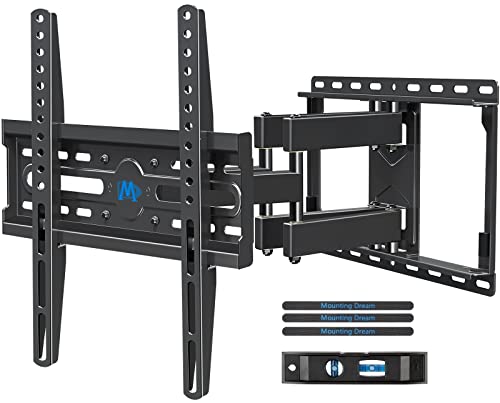
Disclosure: As an Amazon Associate, ilcastellomenu.com earns from qualifying purchases. Links on this page are affiliate links; they cost you nothing extra. Prices and availability change often, so check the current Amazon listing before you buy.
Any honest account of tv wall mount pros and cons has to begin by admitting that the product is two purchases in one: a piece of hardware, and a small act of construction. The pros mostly belong to the years after installation day; the cons mostly gather on installation day itself and in the commitments it locks in. That asymmetry explains the strange pattern in owner opinion — people rarely regret a mount that is up, level and correctly fixed, and rarely forgive one that was rushed, mismatched or hung in the wrong place. This article argues both sides at full strength: five to seven genuine advantages, five to seven genuine disadvantages, each explained rather than listed, and then the harder question — what those trade-offs mean for your specific room, your wall and your household’s habits.
Quick Verdict: Who the Pros Outweigh the Cons For
The pros win for households with a settled room layout, a wall whose construction they know, children or pets in the tip-over years, seats that would benefit from a screen at exact eye level or on a swivel, and anyone whose floor space is genuinely scarce. The cons win for renters under a no-drilling lease, serial room-rearrangers, households about to renovate, and anyone whose wall refuses to identify itself. If you are undecided after both lists, the tie-breakers later in this article — and our companion pieces, whether a TV wall mount is worth it and TV wall mount vs TV stand — will finish the argument.
In this guide
Key Takeaways: TV Wall Mount Pros and Cons at a Glance
- The biggest pro is spatial: mounting returns the television’s whole footprint to the room and centres the screen on your seats instead of on furniture
- The biggest con is commitment: holes, a fixed position and a rearrangement penalty are the price of that space, paid up front
- Safety cuts both ways: a structurally fixed screen cannot tip over — but a badly fixed one concentrates all its risk in four bolts
- Cost is mostly not the mount: the bracket is the small line; installation time, cable solutions and possible professional help are the real budget
- The wall decides: every pro on this list assumes fixings into structure; on a wall that cannot offer that, the cons take the argument by default
The Pros
Pro: The Floor Space Comes Back
Small rooms are where mounting earns its reputation. A television on a stand claims a cabinet, the cabinet claims floor area, and in a compact living room or a bedroom that floor area is the difference between a room that breathes and one that feels like storage. Lifting the screen onto the wall returns the whole footprint: a slimmer console, a chair where the cabinet stood, or simply visible floor, which changes how large a room feels more than any paint colour. Corner mounting with a full-motion arm is the small-room specialist move — the screen tucks into dead space most furniture cannot use and angles out toward the seating when needed. The cautions scale down with the room, though: viewing distances are short, so height and angle errors are felt more, and a large screen on a short wall can dominate in a way the template rehearsal will reveal honestly. Measure the room’s real life — doors opening, walkways, the vacuum’s route — and let the mount solve the space problem without creating a head-height obstacle on a path people walk in the dark.
Pro: The Screen Sits Exactly Where Eyes Want It
Viewing height is the decision people most often get wrong, usually by hanging the television where a picture would go instead of where eyes actually rest. The comfortable reference is simple: when you are seated, the centre of the screen should sit roughly at your eye level, so your neck stays neutral through a long film or match. Mounting higher is sometimes unavoidable — a fireplace, a tall sideboard, a bedroom where you watch propped on pillows — and in those rooms a tilting mount earns its keep by angling the screen down toward you. Before drilling anything, rehearse the height with a paper or cardboard template taped to the wall at the proposed position, then sit in every real seat in the room and live with it for an evening. Check the view from the seat nobody wants as well as from the best chair; a screen that works only from one cushion is a compromise the whole household will feel. The template costs nothing and an evening, and it has saved more living rooms than any tool in the box.
Pro: A Fixed Screen Cannot Tip, Rock or Be Pulled Down
In homes with small children, mounting stops being purely an aesthetic choice and becomes part of the safety furniture conversation. A television on a low stand is a climbable, pullable object at exactly toddler height, and tip-over accidents with furniture and screens are a recognised household hazard. A properly installed wall mount removes that particular risk entirely — the screen is out of reach, fixed to structure, and cannot be rocked or pulled down by a determined small person. The emphasis belongs on properly installed: a mount fixed only into plasterboard is not a safety device, it is the hazard relocated. Mounting also tidies the trailing cables that attract small hands, especially when they are routed through a raceway or an in-wall kit rather than dangling. None of this makes a room child-proof on its own — the cabinet below still needs its own thinking — but for many parents the safety argument, honestly weighed, is the deciding vote for the wall over the stand, ahead of looks, ahead of floor space, ahead of everything else on the list.
Pro: The Room Looks Intentional
There is a reason every styled interior photograph mounts the television: a screen on the wall reads as architecture, while a screen on a stand reads as an appliance that landed there. Mounting removes the visual negotiation between the set’s wide feet and the cabinet’s edges, lets the wall’s proportions govern, and gives cables a planned route instead of a visible shrug behind the furniture. This pro is easy to dismiss as superficial until you live in the room — the calm of a wall that looks designed, with the technology present but not cluttering, is a daily dividend that owners consistently rank higher after installation than they expected to beforehand.
Pro: Seating Flexibility With a Moving Mount
A full-motion mount converts one screen into several rooms’ worth of viewing: flat to the wall for films, angled to the kitchen for the news, swung toward the dining table for a final, pulled out and turned for a gaming session. No stand can do any of that. For open-plan homes this flexibility is not a luxury feature but the difference between the television serving the household’s actual geography and serving only the sofa’s. Even tilting mounts contribute a smaller version of the same pro, correcting height and glare that a stand’s fixed geometry must simply endure.
Pro: Cleaning and Living Around the Screen Get Easier
A mounted screen lifts the dusting nightmare of a stand’s crowded surface — consoles, bars, remotes, chargers — into a simpler arrangement with air around it. Floors vacuum without a furniture shuffle, robot vacuums stop treating the cabinet as a nemesis, and the wall behind can be painted without moving day. Small, unglamorous, and felt every single week: owners mention this pro with the enthusiasm usually reserved for much larger things, because domestic friction, removed, is a genuine quality-of-life gain.
The Cons
Con: Installation Is Real Work With Real Stakes
The classic mounting mistakes share a theme: each one skips a verification that would have taken minutes. Drilling on the first stud-finder beep without confirming the stud’s edges. Trusting the screen-size range on the box instead of measuring the actual hole pattern and weight of the actual television. Hanging the screen at picture height and discovering the neck ache a week later. Tightening bolts by feel — under-tightened fixings that creep, or over-tightened ones that crush plasterboard and strip timber. Running an ordinary power cord inside the wall because it was there and it fit. Lifting alone because help was an hour away. Every one of these is understandable, and every one is avoidable with the same remedy: slow the project down at the checking stages and speed it up nowhere. Mounting rewards the methodical and punishes the hurried with remarkable consistency, and the difference between the two approaches is rarely more than half an hour — spent before the first hole, when changes are still free, instead of after it, when they are not.
Con: The Wall Must Cooperate — and Sometimes It Will Not
Before any bracket goes on a wall, the wall itself has to pass an honest inspection. Knock along the surface and listen for the difference between hollow plasterboard, the duller note over a stud, and the dead solidity of masonry. Look for clues about what the wall is: its thickness at door openings, the material around existing fixings, the age and construction of the building. Check for what runs inside it, too — electrical cables tend to run vertically and horizontally from outlets and switches, and pipes gather near radiators, kitchens and bathrooms; a detector that senses both studs and services earns its place in the toolkit. Existing cracks, crumbly plaster, damp patches or a wall that flexes under hand pressure are all reasons to pause and reassess rather than proceed hopefully. A television mount concentrates a serious load onto a small area, and it applies that load every hour of every day, not just on installation day. The ten minutes spent interrogating the wall before drilling is the cheapest insurance in the whole project, and skipping it is the root cause behind almost every mounting failure story.
Metal stud walls, common in newer apartments and offices, change the fixing conversation completely. The studs are thin folded steel rather than solid timber, so the lag bolts designed for wood have nothing meaningful to bite into. The correct approaches are fixings made for the material — toggle-style anchors that spread load behind the plasterboard, or screws driven into the metal stud itself where the mount’s maker explicitly approves that method — and a more conservative view of load, especially with full-motion arms whose leverage multiplies at full extension. Many professionals respond to a metal-stud wall and a large screen by adding a plywood backing panel that spreads the load across several studs, and that belt-and-braces instinct is worth copying. If your building is new enough that you do not know the wall construction, find out before ordering anything: the mount that suits a timber wall may be the wrong purchase entirely for a steel-framed one. This is also the scenario where an installer’s experience is worth the most, because they have usually seen your exact wall before and already know which fixing survives in it.
Con: Position Becomes a Commitment
Furniture forgives; holes do not. A stand lets you rotate the room on a whim, swing the screen for a party, or move the whole arrangement to another wall in an afternoon. A mount fixes the television’s address, and every future rearrangement must either respect that address or pay in filler, paint and possibly new fixings. Households whose rooms evolve — growing children, changing work patterns, a sofa upgrade already planned — should weigh this con heavily, because the mount’s permanence is precisely the quality that makes it feel solid, and precisely the quality that will fight their next idea.
Con: Cable Problems Do Not Solve Themselves
Cable management deserves a plan before the drill comes out, because the neatest mount in the world looks unfinished with a bundle of leads dangling beneath it. Start with the rule that is not negotiable: an ordinary power cord must never be run inside a wall cavity. It is not rated for that job, it breaches electrical codes in most places, and it creates a hidden hazard. The legitimate ways to hide power are an in-wall cable kit specifically rated and listed for the purpose — the kind that uses proper in-wall cable between two fitted outlets — or having an electrician add an outlet directly behind the television. Signal cables are a separate question: HDMI and similar leads should be in-wall rated versions if they pass through the cavity, and they deserve gentle bends and a little slack rather than being pulled tight. If your walls or your lease rule out in-wall work entirely, a surface raceway painted to match the wall hides everything honestly and can look surprisingly tidy. Whatever route you choose, leave enough slack to pull a full-motion mount out and to reach the ports without a fight.
Con: Access Behind the Screen Can Be Awkward
Ports are the unglamorous detail that decides how a mounted television feels to live with. Screens differ in where their HDMI sockets, aerial connection and power inlet sit — some at the back facing the wall, some on a side edge, some on a separate connection box joined by a single cable. A slim fixed mount behind a television whose ports all face backwards can make every cable change a knuckle-scraping excavation, while the same mount behind a side-port screen is painless. Before choosing a mount family, inventory your connections honestly: the sources you plug in permanently, the ones that come and go, the console a child will want to connect on a rainy Saturday. If the list of occasional connections is long, a tilting or full-motion mount that lets you reach behind the screen earns its extra depth every single time. Right-angle adapters and short extension leads can rescue awkward ports, but they are rescues — the better outcome is a mount chosen with the port map in mind from the start, and a cable plan that leaves each lead reachable without removing the screen.
Con: The True Cost Includes More Than the Bracket
The mount itself is usually the smallest line in the true budget. Add the stud finder, the possible in-wall cable kit or electrician’s visit for an outlet, the soundbar bracket, the filler and paint for the inevitable exploratory hole, and — for masonry quirks, metal studs or very large screens — possibly an installer’s fee. None of this makes mounting poor value; over a decade the cost per evening is trivial. But a household comparing a mount’s shelf price against a stand it already owns is comparing the wrong numbers, and honest pros-and-cons accounting should say so plainly.
Con: Renters May Not Be Allowed the Pros
Renters face the mount question with an extra clause in the contract: every hole must eventually be answered for. That does not automatically rule mounting out — many landlords accept small, well-filled holes, and a conversation before drilling is always cheaper than a deduction afterwards — but it changes the ranking of options. A tilting or fixed mount that fixes into studs with a handful of bolts leaves a modest, fillable footprint; a large full-motion installation is a bigger commitment to reverse. The alternative, a good stand, asks nothing of the wall at all, and modern stand designs with wide, stable feet suit most rented rooms perfectly well. If you do mount in a rental, photograph the wall first, keep the removed screws and the filler matched to the paint, and keep the original stand and its screws in a labelled bag — future you, handing the keys back, will be grateful. And read the lease before the drill comes out: where the contract forbids drilling outright, the decision has already been made, and the stand comparison later in this cluster becomes the article that matters.
What the Trade-Offs Mean for You
For the settled family home, the ledger is not close: safety, space and position outweigh a half-day of installation many times over, and the cons mostly expire once the tools are put away. For the open-plan household, add the flexibility pro at full weight — it is the rare feature that gets used more over time, not less. For the gamer, weigh access and angle: the pros of a moving mount are session-shaped, and the cons of trapped ports will be felt weekly, so the family choice matters more than the brand. For the renter and the rearranger, the cons are structural rather than incidental — they do not fade after installation, they compound — and the stand’s case, argued fully in our TV wall mount vs TV stand comparison, deserves the win. For the fireplace room, the heat and height discussion is its own chapter:
Mounting above a fireplace is the most requested and most argued-about position in the category. It looks natural — the fireplace is already the room’s focal point — but it puts the screen well above seated eye level, which is why necks ache through long films, and it exposes the television to heat it was never designed to breathe. If the fireplace is decorative or rarely lit, a tilting mount angled firmly downward makes the position workable, and the paper-template test, watched from the real sofa for a full evening, will tell you honestly whether your household tolerates it. If the fire is used regularly, measure the temperature at the proposed screen position while it burns before committing; sustained heat and electronics are enemies, and no bracket fixes physics. Pull-down mounts that lower the screen over the mantel for viewing exist for exactly this dilemma and are worth considering where the fireplace position is non-negotiable. Whatever you choose, route cables away from the flue, never drill into a chimney breast without understanding its construction, and treat any doubt about heat as a veto, not a challenge.
Light is the invisible specification nobody lists on the box. A screen hung opposite a bright window can be technically perfect — level, secure, at the right height — and still be miserable to watch every sunny afternoon. Before fixing a position, sit in the room at the times you actually watch and study where reflections fall on the wall; a glossy screen will mirror whatever bright surface faces it. Tilting mounts help a little by angling reflections downward, and full-motion mounts help more by letting you swing the screen a few degrees away from a window, but the real fixes are positional: a different wall, a screen angled toward the seating rather than square to the room, or curtains and blinds doing honest work. Matte screens forgive more than glossy ones, and bias lighting behind the set can ease the contrast between a bright picture and a dark room. None of this appears in a product listing, which is why the paper-template rehearsal matters so much: tape the outline up, sit down at viewing time, and let the room itself tell you whether the plan works.
Context: Mount vs the Alternatives
Set against its rivals, the mount’s profile sharpens. Against a basic stand, it wins space, safety and position, and loses flexibility and zero-effort setup. Against a media cabinet with the screen standing on it, it wins the room’s proportions and loses storage — the cabinet held things the wall cannot. Against a projector, it wins brightness, simplicity and daytime viewing, and loses the cinema scale that vanishes when not in use. None of these rivals is foolish; each is the right answer to a different room. The mount’s claim is simply that for the most common modern room — one main seating group, a large thin screen, floor space at a premium — its pros align with the room’s needs and its cons align with a single afternoon.
How to Buy Smart If the Pros Win
If the ledger favours mounting, buy with the cons in mind and most of them shrink. Choose the simplest family that solves your geometry — every unused joint is a con you purchased. Verify pattern and weight from your television’s manual, never from the box’s size range. Read the mount’s own manual before ordering and check its plate against your stud spacing. Plan the cable route, including the power rule, before the drill. Shortlist from our TV wall mount buying guide, compare designs in the TV wall mount reviews roundup, and treat the pick slots there as starting points for verified listings. Smaller screens follow the same ledger at desk scale in the monitor wall mount review.
Setup and Care That Reduce the Cons
Lifting the television is a two-person job, full stop. Modern screens are light for their size but awkward in every other way: wide, smooth, fragile at the edges, and impossible to grip securely alone while you also try to locate a bracket you cannot see. Two people lifting together, each with a clear handhold and a rehearsed plan, turns the scariest thirty seconds of the project into a non-event. Agree the route from the table to the wall, agree who calls the movements, and agree where the screen goes if anything feels wrong — back down onto the padded table, never propped against a wall or a sofa arm. Keep children and pets out of the room for those minutes, keep the floor clear, and never hold the screen by its edges alone or let fingers press into the panel. If the television is large, if the mount sits high, or if either lifter has any doubt about their grip or their back, that is the moment to add a third person or to hand the job to an installer. Pride is not a structural material.
Whenever a mount sits above comfortable standing reach, a ladder enters the project, and ladder discipline deserves the same respect as the drilling itself. Use a sound step ladder tall enough that you work from a step well below the top, with both feet planted and your belt buckle staying between the rails; overreaching sideways from a ladder is how simple jobs become hospital stories. Never drill while balanced awkwardly, never hold the television while standing on a ladder — the hang itself should be planned so the lifters’ feet are on the floor wherever the wall allows — and never work from chairs, tables or other improvised platforms. Keep the ladder’s feet on a flat, clear surface, move it rather than stretching, and take the extra trips up and down as the price of doing the job once and safely. If the only way to reach the position is to work at a height that makes you uneasy, treat that unease as information: high mounts over fireplaces and on double-height walls are exactly the jobs professional installers exist for, and their fee is small next to a fallen screen or a fallen person.
A mounted television is not quite a fit-and-forget appliance. In the first weeks, glance at the installation with fresh eyes: is the screen still level, does a full-motion arm still hold the position you set, do the cables still have their slack at full extension? Fixings settle, arms drift if their joints need a touch more tension, and a five-minute check with a level and a gentle hand catches all of it early. After that, a seasonal once-over suffices — dust the vents the screen can finally reach, confirm the bracket feels rigid when you press a corner of the bezel gently, and re-check any cable that gets moved by cleaning or by children. Keep the mount’s instructions and the spare fixings in a labelled bag; if you ever move house or change televisions, that bag is gold. And keep the original stand. Televisions outlive their wall positions, rooms get rearranged, and the household that stored the stand can adapt in an afternoon, while the household that threw it away starts a very annoying shopping trip.
The full procedure, with every safety check in its place, is our how to install a TV wall mount guide. Households mounting on brick should also absorb the masonry notes before choosing fixings:
Masonry walls reward confidence and punish guessing. Brick and concrete will carry a television mount superbly — arguably better than any framed wall — provided the fixings match the material: proper masonry plugs or sleeve anchors, holes drilled to the depth and diameter the fixing specifies, and dust cleared from the hole so the plug seats fully. The traps are mortar joints, which are weaker than the brick they separate, and hollow blocks, which need fixings designed to spread load inside the cavity. Aim for the body of the brick or the solid part of the block, use a hammer drill with a masonry bit, and let the tool do the work rather than forcing it. Chimney breasts deserve extra caution: their construction varies, their flues carry heat, and services sometimes run in unexpected places within them. Old plaster over masonry can crumble around a fixing even when the wall behind is sound, so test-drill an inconspicuous spot if the surface feels doubtful. Done properly, a masonry installation is the one you will never think about again; done casually, it fails the same day.
Bottom Line
The pros of a TV wall mount are lived daily and compound quietly: space, safety, position, calm. The cons are concentrated, honest and mostly front-loaded: work, commitment and a wall that must be understood. That shape — pain once, benefit for a decade — is why most households that mount carefully never go back, and why the minority who regret it almost always regret the matching, not the mount. Read your room, read your wall, and the lists above will tell you which household you are.
The Pro and Con Nobody Lists: Attention
There is a subtler entry for each column that product pages never mention. On the pro side: a mounted screen changes what a room pays attention to. Freed from its cabinet, the television stops being the furniture’s reason to exist, and the room’s other elements — the window, the shelves, the people — reclaim visual rank. Hosts notice guests stop orienting to the set during conversation; the screen becomes a window that opens for a film and closes into the architecture afterwards. On the con side: a mounted screen is a permanent claim on the room’s best wall, and it outranks pictures, shelves and sometimes windows in every future decorating conversation. Households that love art on that wall, or that rotate décor seasonally, feel this con as a genuine loss rather than a footnote. Neither entry is decisive alone, but both are real, and both belong in an honest ledger — the mount rearranges not just furniture but attention, in both directions.
How the Ledger Changes With Screen Size
Size tilts the argument in ways worth tracing. Small screens — bedroom and kitchen sets — carry light versions of every con: smaller holes, an easy one-person-adjacent lift (still use two people), minimal leverage, and a stand that was never very stable or useful to begin with; their pros, especially safety and the reclaiming of a counter or dresser top, arrive nearly free. Mid-size living-room screens are the balanced case this article’s main ledger describes. Very large screens amplify both columns at once: the space and cinema-position pros become dramatic, the safety pro becomes serious, and the cons — lifting logistics, fixing loads, the cost of an error — grow teeth. At the largest sizes the ledger stops being a preference and becomes a planning exercise, and professional installation moves from the con column’s expense line to the pro column’s peace of mind. Judge your screen’s size honestly and the balance of this whole article shifts with it.
The Ledger for the Second Television
One more entry belongs in this accounting, visible only to households replacing a screen: the mount’s pros and cons repeat differently the second time. The cons mostly vanish — the holes exist, the wall is known, the position is proven — while the pros arrive undiminished, collected again by the new set from its first evening. A stand, by contrast, restarts its own ledger neutrally: same footprint, same geometry compromises, same tip-over footnote. This asymmetry matters for the worth of the original decision. A mount bought for one television is a close-run argument in many rooms; a mount that serves two or three televisions across a decade is one of the best-value objects in the house, its installation cost amortised into pennies per evening. Households confident they will stay, and keep watching screens in this room, should therefore read the main ledger with a thumb on the pro side of the scale — time is the mount’s ally in a way it never is for furniture.
Emotional Pros and Cons: The Ones Felt, Not Measured
Finally, the entries that never appear in specifications but decide real households. Pro: the small ceremony of a room that feels finished — the screen integrated, the surfaces clear, the technology in its place. Owners describe it with words like calm and sorted, and they describe it unprompted, which suggests it is the benefit they actually bought. Con: the low background awareness, in the first weeks, of a valuable object hanging on four bolts — a worry that fades entirely for correctly installed mounts and lingers, instructively, for any installation whose fixings were a guess. That lingering worry is information, and households that feel it should act on it: have the installation checked rather than learning to ignore the feeling. Emotional entries cut both ways, and an honest pros-and-cons article should end by honouring them, because the ledger that decides is always the one the household feels at midnight, not the one it calculates at noon.
The Ledger in One Room, Worked in Full
Abstract ledgers persuade nobody, so here is the argument run once, completely, in a specific room: a compact living room in a family house, one sofa, two armchairs at angles, a toddler, a stud wall of known construction, and a cabinet that exists only to hold the television. The pros arrive at full strength — the cabinet’s footprint returns enough floor for the toddler’s play mat and a real coffee table; the screen centres on the sofa and tilts a touch toward the armchairs’ side; the tip-over worry leaves the house; the wall, once bare, looks designed. The cons arrive honestly too — a Saturday of careful work, a soundbar to re-home on a bracket, holes that commit the room’s layout, and a console that must live on a smaller shelf. Weighed in that room, the decision is not close, and it is not close precisely because every fact the ledger needs was knowable in advance. Change three facts — make it a rental, a mystery wall and a household that rearranges each spring — and the same ledger convicts the mount just as thoroughly. The article’s lists are the general case; this room is the method. Run yours.
Pros and Cons for the Household That Hosts
One profile deserves its own short ledger because its priorities reorder both columns: the household that hosts. For hosts, the mount’s flexibility pro appreciates — a screen that turns toward the dining table or the overflow chairs is hospitality in hardware form — and its tidiness pro appreciates with it, because a room that reads calm photographs the evening better in memory. The cons shift too: commitment matters less to hosts, whose rooms are already arranged around gathering, while access matters more, because visiting consoles, karaoke boxes and borrowed devices arrive with guests and expect ports. A hosting household should therefore read the general ledger with access promoted into the top three cons and flexibility into the top two pros — which usually resolves, in practice, to a full-motion mount on verified structure, installed once and worked weekly. The ledger is the same; the weights are the household’s.
Scoring Your Own Ledger
To close the argument practically: take the two lists in this article and score each entry for your household, from zero if it does not apply to three if it dominates your daily life. Add each column. The exercise takes five minutes and converts a swirling debate into two numbers that, in the desk’s experience, almost always separate clearly — because households are rarely as balanced as their indecision feels. Where the totals tie, let safety and the lease vote as tie-breakers, in that order, and the ledger will have done its work.
Where the Strengths Stop Helping: Honest Edge Cases
How the balance shifts over a year of ownership
The pros-and-cons ledger of a tv wall mount is not static. In the first month, novelty inflates the pros; by the sixth month, the honest picture is about reliability, running costs and whether the product has earned a permanent place in your routine. Wear parts, consumable availability and the maker’s support responsiveness all matter more at month ten than at day ten. When you read owner feedback, weight the long-term reports accordingly: a complaint about a part that failed after a year tells you more than a first-week rave about unboxing.
The compromise candidate
Many buyers end up choosing neither the strongest nor the cheapest tv wall mount but the one whose weaknesses fall where they personally care least. That is a rational strategy, not a failure of research. List the cons of your final two candidates side by side and ask which set you would rather live with daily in a desk or bench that doubles as a workspace for two completely different hobbies. The product whose drawbacks sit in your blind spots will feel like the better product for years, even if a comparison table scores the other one higher on paper.
The advantage that depends on your habits
The headline advantage of a tv wall mount is real, but it is not automatic: it only pays out if your habits match it. Used the way it was designed, in a desk or bench that doubles as a workspace for two completely different hobbies, the strengths described earlier compound quietly — less friction, fewer workarounds, a smoother routine. Used against its grain, the same design choices become the source of the complaints in the cons column. Before deciding, be honest about which user you are on an ordinary tired weekday, not the organised version of yourself you plan to become next month.
Where the drawbacks bite hardest
The disadvantages of a tv wall mount are not evenly distributed across owners. They concentrate in specific situations: tight spaces, shared rooms, heavy daily loads, or workflows that change direction mid-task. If your routine involves any of those, the cons deserve double weight in your decision, because you will meet them weekly rather than rarely. Conversely, an owner whose setup avoids those situations entirely may never encounter the most-criticised weakness at all, which is why verdicts on the same tv wall mount can sound like descriptions of two different products.
The maintenance trade-off nobody advertises
Almost every tv wall mount trades purchase-day simplicity for a small ongoing maintenance obligation: cleaning, recalibrating, replacing a wear part, updating firmware or simply keeping accessories together. The trade is usually worth it, but it is not free, and it scales with how hard you use the product. In a desk or bench that doubles as a workspace for two completely different hobbies, skipped maintenance shows up first as small annoyances — a control that feels off, a result that drifts, a noise that was not there before — long before it causes a real failure. Budget the minutes, not just the money.
When the alternative is genuinely better
There are owners for whom skipping the tv wall mount altogether is the right call, and naming them is part of an honest pros-and-cons account. If your need is occasional, borrowed or built into something you already own, or if your space cannot give the product the conditions it needs, the alternative route avoids both the cost and the clutter. The pros only outweigh the cons when the problem the tv wall mount solves is a recurring one in your week. A problem you meet twice a year rarely justifies a permanent new resident in the Monitors category.
If a candidate fails this check, strike it from the list without regret and let the remaining options compete on merit.
Your future self, mid-task on a busy day, is the person this check is really for.
Keep the notes with the product’s paperwork; they become the baseline every later adjustment is judged against.
Write the conclusion of that check down before you order, so the decision survives contact with a tempting listing.
That single habit separates owners who stay pleased with their choice from owners who quietly start shopping again within a season.
Treat it as part of the purchase itself, not as homework to do after the box arrives.
None of this requires expertise — only the willingness to check your own routine before trusting a generic recommendation.
Five honest minutes at this stage is worth more than five hours of comparison browsing.
If a candidate fails this check, strike it from the list without regret and let the remaining options compete on merit.
Frequently Asked Questions
What is the biggest disadvantage of a TV wall mount?
Commitment. Installation fixes the screen’s position with holes in your wall, and every future rearrangement must work around that decision or pay to reverse it. The work itself is a close second: finding structure, drilling accurately and lifting a large fragile screen with a partner is a genuine project, not an unboxing. Both cons are front-loaded — they are paid once, on installation day and in future flexibility — which is why they loom large in the decision and small in long-term owner complaints. If your room layout changes often, this con alone can settle the question.
What is the biggest advantage of mounting a TV?
Owners consistently name the space and the position together: the television’s footprint leaves the floor, and the screen centres on the seats at true eye level instead of sitting wherever a cabinet happened to fit. In small rooms the reclaimed area changes how the space feels; in family rooms the safety dividend — a screen that cannot be rocked or pulled down — matters just as much. Unlike the cons, these advantages are collected every day, which is why the pros usually win the long argument even when installation day was hard work.
Is a TV wall mount safe, or is it a risk?
It is both, depending entirely on the fixing. A mount bolted into timber studs or solid masonry, rated comfortably above the television’s weight, is one of the safest ways to keep a screen in a home — immovable by children, pets or accidents. The same mount fixed only into plasterboard, or with substitute hardware, concentrates the entire risk into a few weak points and is genuinely dangerous. Safety in this category is not a product feature you buy; it is an installation standard you meet. The checks are simple, and this article’s cons section lists them without softening.
Do TV wall mounts damage walls?
They make a small number of deliberate holes — typically a handful of bolt holes into studs or masonry — and those holes are fillable in minutes when the mount comes down, leaving a wall that paints back to invisible. That is the honest scale of the damage for a correct installation. Incorrect installations damage more: exploratory holes from unmeasured drilling, crumbled plaster from wrong fixings, torn paper from anchors that pulled out. Renters should treat even the correct version as a landlord conversation first. Owners should treat it as the cheapest room renovation they will ever reverse.
Can a TV wall mount fall off the wall?
A correctly installed one, effectively no — structural fixings into studs or masonry, with a load rating above the screen’s weight, hold for decades, and the design margins are generous. Falls in the real world trace back to a short list of causes: fixings into plasterboard alone, bolts that missed the stud, anchors mismatched to masonry, or arms extended far beyond what a marginal wall could hold. Every cause on that list is a skipped check rather than a product failure, which is why this article keeps returning to the same liturgy: know your wall, fix into structure, respect the rating, and re-check the installation in its first weeks.
Are the pros worth it for a small TV?
Often, yes, and sometimes the case is stronger than for a large screen. A small television in a bedroom, kitchen or child’s room gains the same safety and space benefits, the installation is lighter work, and the screen can sit at the exact angle a bed or a counter demands — positions a stand serves badly. The cons shrink with size too: smaller holes, easier lifting, less leverage on fixings. The exception is the small screen that moves between rooms or serves as a sometimes-television; portability is a stand’s home turf, and a mount’s permanence argues against itself there.
Related Guides
Keep reading with these guides from the same cluster and the wider site: