Disclosure: As an Amazon Associate, ilcastellomenu.com earns from qualifying purchases. Links on this page are affiliate links; they cost you nothing extra. Prices and availability change often, so check the current Amazon listing before you buy.
A monitor wall mount review has to start with an honest admission: this is the most permanent way to hold a screen, and permanence is exactly why people hesitate. A desk arm clamps on and comes off in minutes. A riser just sits there. A wall mount asks you to find a stud, drill into a wall, and commit to a spot — and in exchange it gives you something neither alternative can match: a screen that floats completely clear of the desk, on a wall that was doing nothing, at a height you chose rather than a height a stand designer chose for you. This review works through the monitor wall mount as a product class in depth: the main designs, how they behave in daily use, where the cheap ones cut corners, and which buyers each design genuinely suits.
The short version is that a wall mount earns its keep in rooms where desk space is the scarcest resource. Small desks, standing desks that travel up and down against a wall, kitchen and workshop screens, bedroom televisions that double as monitors, trading and monitoring stations that never move — in all of these, taking the screen off the desk entirely is worth more than any amount of clever desk hardware. The price of that freedom is installation effort and a fixed location, and this review will not pretend otherwise. By the end you should know whether that trade fits your room, your wall, and your habits.
Key Takeaways From This Monitor Wall Mount Review
- Best for: small desks, fixed workstations, wall-facing setups and anyone whose screen never needs to move between rooms.
- Not suited for: renters who cannot drill, anyone who rearranges furniture often, or users who constantly pull the screen close and push it away.
- The wall and the fixing matter more than the bracket. A modest mount anchored into a stud will outlast a premium mount screwed into plasterboard alone.
- Fixed, tilting and full-motion designs solve different problems. Paying for articulation you never use buys you wobble, not value.
- Measure your VESA pattern and screen weight against the mount’s stated guidance before anything else; follow the manufacturer’s own instructions for your wall type.
- Plan cable routing before you drill. A floating screen with cables dangling down the wall loses half the visual benefit on day one.
Our verdict up front: for a settled, single-screen workstation against a suitable wall, a well-chosen wall mount is the cleanest, most space-efficient way to hold a monitor, and once installed it disappears from your attention entirely — which is the highest praise mounting hardware can earn. The sections below explain how we reached that, section by section, starting with what these products actually are.
In this guide
What a Monitor Wall Mount Is and Where It Fits
A monitor wall mount is a two-part system. One part is a wall plate that fixes to the wall with screws or bolts chosen for the wall material. The other part is a VESA plate that screws to the back of your monitor, using the square pattern of threaded holes that almost every modern display carries behind its stand mount. The two parts connect — directly, through a tilting knuckle, or through one or two articulated arms — and the screen ends up held by the building instead of by furniture. That single sentence explains both the appeal and the commitment: buildings do not wobble when you type, but they also do not move when you redecorate.
The market divides into three families. Fixed mounts hold the screen flat and close to the wall, like a picture frame. They are the simplest, stiffest and usually the slimmest option, and they suit screens that are viewed from one settled position — a monitoring display, a kitchen screen, a bedroom setup watched from a bed or a chair that never moves. Tilting mounts add a hinge at the top of the range of movement: the screen can angle down toward a lower seat or up toward a standing viewer, which matters when the mount sits higher than the viewer’s eyes. Full-motion mounts add arms and swivel joints, letting the screen pull away from the wall, swing sideways and rotate, at the cost of more joints, more flex and a more demanding installation.
Where does a wall mount fit in the wider world of screen support? Below it sits the stock stand that came in the box: free, adequate, and a permanent consumer of desk depth. Beside it sits the monitor arm, which offers the most day-to-day adjustability from a desk clamp or grommet — we compare the two directly in our monitor wall mount vs monitor arm comparison. Above it, in permanence, sits nothing: a wall mount is the end of the line. And underneath the whole question sits the humble riser, which lifts a screen a little and stores things beneath it; if your problem is height alone rather than space, the monitor riser review covers that simpler answer in depth.
One more framing point matters before we talk hardware. A wall mount moves the screen’s support from a horizontal surface to a vertical one, which changes the ergonomics conversation. On a desk, screen height is limited by stand design and desk height. On a wall, height is whatever you drill for, within the reach of your cables and your chair. That freedom is the product. Everything else — tilt ranges, arm lengths, cable channels — is refinement.
Design, Build and Setup
Build quality in this category announces itself in the hand. The wall plate should feel like a structural component, not a stamping: thick steel, clean welds, and a hole pattern generous enough to give you fixing options along a stud or across two. The VESA plate should match your monitor’s pattern exactly — manufacturers describe compatibility in qualitative terms in their own guides, and the honest rule is to follow the maker’s stated pattern and weight guidance for the specific model rather than any general rule of thumb, including ours. Detachable VESA plates, where the plate screws to the monitor first and then slides or hooks onto the wall assembly, transform installation from a two-person wrestling match into a manageable job, and we weight them heavily in this review.
The Three Designs, Up Close
Fixed mounts are a wall plate, a VESA plate, and as little else as possible. Their virtue is stiffness: with no joints, there is nothing to sag, drift or creak, and the screen sits closest to the wall. Their vice is total inflexibility — the viewing angle is set by where you drill, forever, so the measuring stage carries all the pressure. Tilting mounts add a controlled hinge, usually adjusted with a knob or a tool, and then locked. That one hinge solves the most common wall-mount regret, a screen mounted slightly high and glaring down at nobody. Full-motion mounts add one or two arm segments with elbow and wrist joints; the best use gas springs or well-made friction joints to hold position, while the worst slowly droop or swing when the desk is bumped.
Setup: What Installation Really Involves
Setup deserves plain language. You will locate a stud with a stud finder — or, on masonry, identify sound material for the correct anchors — and you will choose fixings matched to your wall type and to the combined load of mount and screen, following the mount maker’s instructions for that wall. You will check the drill path for electrical cables and water pipes before any hole is made; stud finders with detection features, knowledge of where services usually run, and simple caution all play a part, and if you are unsure, that uncertainty is a reason to hire a professional rather than to guess. You will level the wall plate, because a plate that is a degree out puts the screen a degree out forever. And for larger screens you will work with a second person: one pair of hands holds the display while the other engages the plate and the safety screws. None of this is advanced DIY, but all of it rewards patience over speed.
Cable planning belongs in setup, not after it. Decide before drilling whether cables will drop inside a surface raceway, run to a nearby socket along the skirting, or pass through the wall where local rules and the wall’s construction allow. Leave a service loop — a gentle surplus of cable — so the screen can come down for maintenance without unplugging everything blind. Power and signal cables should be long enough before you start; discovering a short cable with the screen already hung is the classic wall-mount rite of passage, and it is avoidable with ten minutes of measuring.
The Picks: Monitor Wall Mounts Worth Shortlisting
Because installation is the real cost of this category, the shortlist below favours designs with detachable plates, sensible cable provisions and instructions written for real walls. Treat each entry as a design archetype as much as a product: if a model is unavailable, its closest equivalent in the same family will serve you the same way. Match the family’s character to your room first, and the specific badge second.
VIVO Single Monitor Wall Mount — The Straightforward Fixed-and-Tilt Archetype
VIVO’s single-monitor wall mount represents the sensible centre of this market: a steel wall plate, a detachable VESA plate, and a tilt mechanism that covers the adjustment most fixed workstations actually need. In daily use its virtue is invisibility. The screen sits close to the wall, the tilt stays where you set it, and the whole assembly asks for nothing after installation day. It suits a home-office screen that faces one chair, a workshop display, or a kitchen monitor angled slightly down from a high mount. It is not the choice for a screen that must swing between two seating positions — no fixed-family mount is — and its cable provisions are basic, so budget a separate raceway if a clean wall matters to you.
Best for: settled single-screen desks that need tilt and nothing more. Not suited for: corner desks or shared viewing positions. Strengths: detachable plate makes the hang manageable; stiff, rattle-free hold; simple hardware with few failure points. Trade-offs: limited motion by design; basic cable management; the fixed position punishes careless measuring.

Mount-It! Full Motion Monitor Wall Mount — The Flexible Archetype
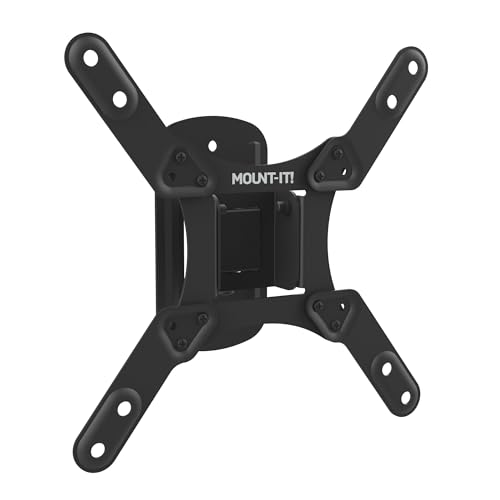
Mount-It! built its name on mounts that move, and its full-motion monitor wall mount is the archetype for buyers whose screen genuinely changes position: pulled in for focused work, pushed back and angled for a video call, swung aside so the wall can serve another purpose. The articulated arm gives that freedom, and the joints on the better examples hold position without daily re-tightening. The honest cautions are structural. Every joint is a potential flex point, the extended arm multiplies the load’s leverage on the wall fixing, and installation discipline matters even more than with a fixed mount — this is a mount that must go into a stud or properly anchored masonry, installed exactly as its maker directs. Choose it for flexibility you will use weekly, not for flexibility that merely sounds nice.
Best for: multi-position rooms, shared screens, bed-and-desk bedrooms. Not suited for: plasterboard-only walls or set-and-forget workstations. Strengths: genuine pull-out and swivel range; one mount serves several seating positions; good for screens that double as small televisions. Trade-offs: most demanding install of the three families; some flex at full extension; costs more in money and in measuring time.

WALI Monitor Wall Mount Bracket — The Entry-Tier Archetype
WALI’s wall mount bracket occupies the entry tier, and its lesson is that simple can be entirely sufficient. For a smaller, lighter screen in a fixed position — a secondary display, a monitoring screen, a child’s homework station — a basic bracket that matches the screen’s VESA pattern and weight guidance, fixed properly into solid material, does the whole job. Where entry-tier mounts ask for care is in the details: check the plate fit, use the fixings appropriate to your wall rather than assuming what is in the box suits every wall, and take the levelling step seriously, because budget mounts offer less slot adjustment to rescue a crooked plate. As a first wall mount, it teaches the category cheaply and honestly.
Best for: lighter secondary screens and first-time installers on a budget tier. Not suited for: large heavy displays or full-motion ambitions. Strengths: simple, inexpensive tier; quick install; perfectly stiff once fixed. Trade-offs: minimal adjustment; hardware in the box may not suit your wall type; less forgiving of measurement errors.
Ergotron LX Wall Monitor Arm — The Premium Archetype
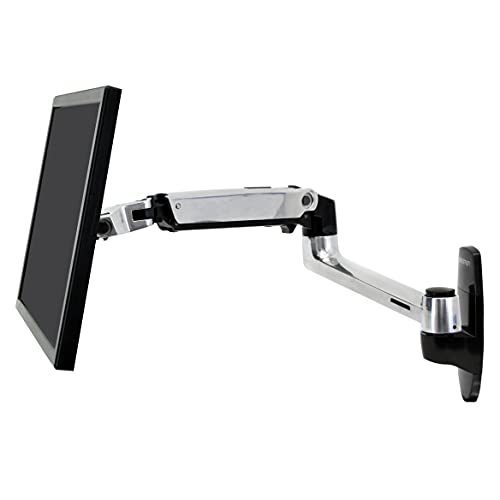
The Ergotron LX wall arm is what the premium tier buys: a polished, counterbalanced arm whose movement feels engineered rather than assembled, holding its position through years of daily repositioning. It belongs in professional settings — clinical workstations, design studios, control desks — where the screen moves many times a day and cheap joints would become a daily irritation. For a home user it is a considered indulgence: lovely to use, hard to justify unless the screen truly travels. Its wall requirements are the strictest of the four picks, because a long, loaded, moving arm is the most demanding thing you can attach to a wall; professional installation is a reasonable line item, not an extravagance.
Best for: professionals who reposition constantly and keep hardware for years. Not suited for: tight budgets or doubtful walls. Strengths: superb motion quality; long service life; refined cable routing. Trade-offs: premium tier pricing position; demanding installation; overkill for a screen that never moves.

VideoSecu Monitor Wall Mount Bracket — The Utility Archetype
VideoSecu’s brackets are the utility players of this category: widely sold, broadly compatible, unglamorous, and entirely adequate for the long tail of real-world screens — the spare monitor in the garage, the display in the rental property you do own and may drill, the point-of-information screen in a small business. The brand’s breadth is its strength; there is usually a VideoSecu bracket shaped like your problem. The corresponding duty is diligence: with utility hardware, read the specific model’s own guidance on pattern, weight and wall fixings rather than assuming, and inspect the hardware on arrival. Matched correctly and fixed properly, it simply works.
Best for: utility installs, secondary spaces, small-business displays. Not suited for: buyers who want premium motion or finish. Strengths: wide range; honest pricing tier; proven designs. Trade-offs: plain finish; instructions reward careful reading; motion models are basic.
Performance in Real Use
The Fixed Workstation
Day after day at one desk is the wall mount’s home fixture, and its performance there is defined by absence: no stand foot under your keyboard tray, no screen creep toward you as the desk gets bumped, no gap between what the desk holds and what the wall holds. The full depth of the desk becomes working surface. Writers and spreadsheet users feel it first — papers, notebooks and a keyboard can occupy the space where a stand used to live — and people with shallow desks feel it most, because a wall mount effectively deepens a shallow desk by the footprint of the stand it removes. If your desk is shallow, pair this thinking with monitor picks for dual setups and you will see how much layout freedom a wall gives back.
Standing, Sitting and Shared Heights
A wall mount fixes the screen to the room, not to the desk, which cuts both ways with height-adjustable desks. If your standing desk stands against the wall and travels through a modest range, a tilting wall mount set for your seated position may serve standing imperfectly, and vice versa. Honest guidance: wall mounts pair best with a fixed-height desk, or with a sit-stand desk whose owner mostly works at one height. If you alternate all day, every day, a desk arm that travels with the desktop is the more coherent tool — a point we develop in the monitor wall mount buying guide. For shared workstations — a family desk, a hot-desk corner — a full-motion wall mount earns its complexity, because each user can pull the screen to their own position in seconds.
Multi-Screen and Monitoring Setups
Walls scale. Two or three screens on individual wall mounts can be aligned with a precision that desk stands rarely achieve, and monitoring stations — security feeds, server dashboards, studio meters — benefit from screens that sit high, angled down, consuming no counter at all. The discipline is in the planning: heights, gaps and cable runs for a wall of screens should be drawn on paper, taped on the wall, and lived with for a day before a single hole is drilled. Painter’s tape outlines are the cheapest design tool in this entire category, and the installers who skip them are the ones filling holes later. For the ergonomic side of multi-screen layouts, ergonomic setups for two monitors is a useful companion read.
Cables, Cleaning and Daily Life
Real use includes dusting, plugging in a laptop, and a cat. A wall-mounted screen is easier to clean around than any desk setup — the desk wipes clear in one pass — but the cables become architecture: visible unless you plan them. A surface raceway painted to match the wall is the pragmatic answer in most homes, and it has the virtue of reversibility. Leave slack for the screen to tilt or swing through its full range without tugging connectors, and route power and signal together so the wall shows one managed line rather than a waterfall. Finally, a practical note: wall mounts and curious toddlers or climbing cats both argue for the safety screws and locking features to be engaged, every time, not just on installation day.
Strengths and Trade-Offs
Strengths
- Complete desk clearance: the entire footprint of the stand is returned to you, permanently.
- Height freedom: the screen sits at the height your posture needs, not the height a stand allows.
- Rock-solid hold: a properly fixed mount on a sound wall has no desk-bump wobble at all.
Trade-offs
- Permanence: holes in the wall and a location decision you live with until you re-drill.
- Installation effort: measuring, stud-finding, drilling and a second pair of hands for larger screens.
- Fixed geometry for fixed mounts: the viewing position is chosen once, so mistakes are durable.
How It Compares
Against a desk monitor arm, the wall mount wins on desk clearance and ultimate stability, and loses on day-to-day adjustability and reversibility; the full head-to-head is in monitor wall mount vs monitor arm. Against a riser, the wall mount wins on height range and space, and loses on simplicity, cost of effort, and the storage shelf a riser gives you — the riser’s case is made in the monitor riser buying guide. Against the stock stand, the wall mount wins on almost everything except the two things the stand is unbeatable at: it is already paid for, and it asks nothing of your walls. For screens in rented rooms, that pair of virtues often decides the matter before any comparison table is drawn, and there is no shame in it: the best mount is the one your situation allows you to install properly.
Who Should Buy It and Who Should Skip It
Buy a wall mount if your workstation has a settled home against a wall you may drill, if your desk is small or shallow, if your screen’s stand forces a height your neck dislikes, or if the display serves a fixed purpose — monitoring, kitchen reference, workshop manuals, a bedroom screen. Buy the tilting family if the screen must sit above eye level; buy full-motion only if the screen truly changes position weekly or serves more than one seat.
Skip it if you rent without permission to drill, if you rearrange rooms seasonally, if your desk floats in the middle of the room away from any wall, or if your screen travels between desks. Skip it, too, if the wall behind your desk is a partition you cannot verify — a mount is only ever as good as what it is fixed into, and an unknown wall is a reason to choose a desk arm instead. And if your only complaint is that the screen sits a little low, read monitor riser pros and cons before you reach for a drill; the simple fix may be the right one.
Setup, Care and Maintenance Essentials
Care for a wall mount is light but not zero. Every few months, check that tilt knobs and arm joints still hold position, and re-snug them as the maker directs. Dust the top edge of the screen and the wall plate, where dust gathers undisturbed for years. When the screen comes down — for a replacement, a move, a redecorate — support its full weight with a second person, disengage safety screws deliberately, and never let the display hang from its cables for even a moment. Keep the removed stand and its screws in a labelled bag; future you, selling the monitor or moving house, will be grateful. Finally, if a mount ever shows cracked paint around a fixing, a plate pulling away from the wall, or new movement that was not there before, take the screen down and investigate rather than monitoring the problem: wall fixings that are changing are telling you something.
A Month With a Wall-Mounted Screen: What Actually Changes
Reviews of mounting hardware tend to stop at installation day, which is a shame, because the lived experience of a wall-mounted screen diverges from a desk-mounted one in ways that only appear over weeks. The first change is spatial honesty. A desk stand lets clutter accumulate in the dead zone behind and beneath the screen, because that space is awkward: reachable, but shadowed. A wall mount deletes the dead zone. The desk surface becomes one continuous, visible plane, and the effect on tidiness is disproportionate to the effort — there is simply nowhere for the pile of cables, sticky notes and forgotten USB drives to hide. People who photograph their desks notice it immediately; people who clean their desks notice it weekly.
The second change is postural, and it arrives quietly. Because the screen height was chosen deliberately — measured against your chair and your eyes, rather than inherited from a stand — the small daily negotiations disappear: no stacking books under the stand, no hunching by afternoon, no tilting the screen up with one hand while squinting. If you share the desk with a taller or shorter partner, a tilting or full-motion mount turns a two-second adjustment into the whole solution, whereas a fixed mount will favour whoever the height was chosen for. Choose with the household in mind, not just the installer.
The third change is what happens when something goes wrong with the computer rather than the screen. Swapping a cable, adding a second display, plugging in a work laptop — all of these involve the back of the monitor, and a wall-mounted screen offers less casual access to its ports than a desk screen you can simply swivel around. This is a genuine, recurring friction, and the mitigations are worth adopting on day one: route a spare signal cable and leave it coiled in the raceway, use a small hub or dock on the desk so daily connections happen at desk level, and leave enough service loop that the screen can tilt or lift slightly for access. Owners who plan for ports stay happy; owners who do not, curse politely every time they change a cable.
Room by Room: Where Wall Mounts Shine and Struggle
The Home Office
The home office is the strongest case. The desk is permanent, the wall is yours, the screen’s job is fixed, and the reclaimed surface is used every hour. A fixed or tilting mount is usually the whole answer, and the room gains the calm, intentional look that makes people want to work in it. If the office doubles as a guest room, a full-motion mount lets the screen swing toward the bed or fold flatter to the wall, which is the one home-office scenario where articulation pays rent.
The Bedroom and Living Room
Bedroom screens are watched from a bed, which means from lower and further away than any desk chair. Height and tilt matter more than reach here: mount for the pillow’s eye line, not the standing eye line, and favour tilt. In living rooms, a monitor doing television duty benefits from a full-motion mount that pulls out and angles toward seating, then returns flat when the room is a room again. In both spaces, cable concealment carries unusual weight, because these are rooms where you look at the wall for pleasure.
The Kitchen, Workshop and Garage
Utility spaces are where wall mounts quietly dominate. A recipe screen above a kitchen counter, a manual or parts diagram over a workbench, a dashboard on a garage wall — all of them need to be visible, off the work surface, and safe from spills, flour and swinging timber. Fixed mounts rule here, mounted high with a downward tilt, and the buying questions shrink to two: is the wall sound, and can the cables reach. These are also the installs where a utility bracket like the VideoSecu archetype above is entirely in its element.
The Rental and the Dorm Room
And then the honest counterpoint: rooms you do not own, or will leave within the year, are where wall mounts struggle. Landlords vary, deposits are real, and a screen’s working life in a dorm room rarely justifies holes. In these rooms the desk arm and the riser are not compromises but correct answers, and the wall mount should wait for a wall that is yours. We say this in a review that recommends wall mounts because credibility is worth more than a sale: permanence is the product, and permanence needs the right home.
What We Look For When Judging a Wall Mount
The Wall Plate and Fixing Pattern
Everything begins at the wall plate, because everything ends there too — every gram of screen and every nudge of adjustment travels through it. We look for a plate wide enough to offer fixing choices, with slots that forgive small measuring errors and holes positioned to land on a stud without forcing the screen off-centre. The plate’s own stiffness matters: a plate that flexes when you lever it by hand will flex, slowly and silently, under a screen. Paint and finish are not vanity here; a plate that resists corrosion is a plate that will come off the wall willingly in five years, rather than leaving its screws behind.
The VESA Interface and the Hang
The joint between mount and monitor decides how installation day feels. Detachable plates that fix to the screen on a table, then hook or slide onto the wall assembly, are the single biggest usability feature in this category, especially for larger displays where one person supports real weight at arm’s length. We check how the safety mechanism engages — a positive click, a visible screw, a locking tab you can confirm by feel — because the moment of letting go of a hung screen should be a moment of certainty. We also value plates that sit flush, so the screen’s back clears the wall without the connectors being crushed against it; cable bend space is a real specification even when brochures ignore it.
Movement Quality, Where Movement Exists
For tilting and full-motion designs, the test is behaviour over time. A tilt hinge should move when you push it and stay when you stop, with adjustment that does not require tools you will lose. An arm should hold its position at full extension without a slow afternoon droop, and its joints should tighten with the hardware provided rather than improvisation. We are suspicious of motion that feels impressive in a showroom — loose, free, dramatic — because gravity grades every joint eventually. Slightly stiff, easily adjusted, and boring is the correct personality for a moving mount.
Instructions and Hardware Honesty
Finally, we judge the paperwork. Good instructions name wall types, match fixings to each, state the model’s pattern and weight guidance in qualitative, unambiguous terms, and warn about the things that matter: studs, services behind the wall, two-person lifts for large screens. Bad instructions are generic across a whole catalogue and silent on walls. The difference is not pedantry — in a category where the user’s wall is half the product, the instructions are where a manufacturer proves it understands its own hardware. When a maker’s guidance and general advice conflict, follow the maker, every time; they know their steel.
Choosing the Right Tier Without Overspending
Wall mounts tempt two opposite mistakes. The first is buying the cheapest bracket for the most expensive screen you own, saving a small sum against a large risk. The second is buying a premium articulated arm for a screen that will be positioned once and never moved again, paying for engineering that will spend its life as sculpture. The tier logic that avoids both mistakes is simple: spend on the joint you will use daily, economise on the joint you will use once. A fixed workstation uses its wall plate daily and its tilt hinge once — so the money belongs in plate quality and fixings, not in motion. A shared family screen uses its arm daily — so the money belongs in joint quality, and the entry tier is a false economy there.
It also helps to price the whole installation rather than the bracket alone. The true bill includes the mount, any anchors your wall requires beyond the box contents, a stud finder if you do not own one, a cable raceway if the wall will be seen, and — for large screens or uncertain walls — a professional installer’s visit, which many owners describe afterwards as the best money in the project. None of these extras is large, but together they explain why the sensible comparison is never bracket against bracket: it is finished, level, safely hung screen against finished, level, safely hung screen. Judge the picks in this review on that basis and the tiers sort themselves.
One last tier consideration is time. A mount is one of the few tech purchases that routinely outlives the device it holds: screens are replaced on a cycle of years, while a well-fixed wall plate can serve two or three successive displays, provided the VESA pattern and weight guidance of each new screen still match the mount — something to verify at every upgrade, following the new screen’s and the mount’s documentation. Buying a slightly better mount than today’s screen strictly needs is therefore not waste; it is the rare case where future-proofing is real, because the wall side of the equation does not go obsolete.
Final Verdict
A monitor wall mount is the most decisive upgrade in the screen-support category: the most space returned, the most height freedom, the most stability — and the most commitment demanded in return. Chosen to match a settled workstation and a sound wall, installed into a stud or properly anchored masonry with fixings suited to the wall, levelled carefully and cabled thoughtfully, it disappears into daily life and simply serves. That is exactly what the picks above are for. Choose the family first — fixed for permanence, tilting for high placements, full-motion for genuine multi-position use — and let how to choose a monitor wall mount walk you through the measurements if you want company for the decision.
A closing word on expectations. A wall mount will not fix a bad desk, a bad chair or a badly placed room; what it does is remove the screen from the list of things competing for your desk and your posture’s attention, and it does that one job completely. Owners consistently report the same surprise: the upgrade they notice is not the floating screen in photographs, but the ordinary Tuesday afternoon when the desk is clear, the screen is exactly where their eyes want it, and none of it required a thought. Hardware that disappears is hardware that worked. If that is the outcome you are buying, you are buying the right category — and the measurements in our linked guides will get you there without a single unnecessary hole.
And if you are still torn between mounting and not mounting, run the paper test this weekend: cut or tape a rectangle the size of your screen on the wall at your candidate height, clear the desk area the stand currently occupies, and work a full day in front of the outline. By evening you will know — in your shoulders, in your desk habits, in how often you glanced at the tape expecting a screen — whether the wall is where your display wants to live. Decisions about holes in walls deserve that kind of evidence, and it costs nothing but an afternoon.
That paper test has one more virtue: it reveals the cable question honestly. Standing where your chair will be, look at where the power socket and your computer actually are, and trace the path the cables would travel from the taped outline to those points. If the path is short and simple, installation will be too. If it crosses the wall like a river delta, you have learned — before drilling anything — that a raceway, a longer cable or a slightly different screen position belongs in your plan.
A Closer Hands-On Check: Putting a Monitor Wall Mount Through Real Tasks
Note the moment you first had to think about the monitor wall mount instead of your work, since that moment usually reveals more than any summary of features can. When you compare notes with other owners, match their comments to setups like yours, because advice from a very different room, workload or routine can mislead. When something behaves oddly, return to the basics first: power, connection, position, cleanliness and the last setting you changed, in that order, before assuming a fault. Start this final check away from the listings, with the space, the equipment and the routine you already have written down in plain terms.
As a concrete listing check, take the VIVO Single Monitor Wall Mount and the Mount-It! Full Motion Monitor Wall Mount named earlier in this article and confirm, line by line, that each variant offered matches the size, connection and contents described for it here. Revisit the decision after the novelty fades: the right monitor wall mount should feel almost boring in use, doing its job without negotiation every single time. Take a quick photo of the working setup before you change anything, so cable routes, positions and settings can be restored exactly if the new arrangement disappoints. Separate the features you will use in the first month from the ones that only sound reassuring, and let the first group carry far more weight in the decision. A fair test repeats the same task at least twice, once while you are paying attention and once while you work normally, because concentration can hide clumsy design.
Test in the order you actually work: power on, connect, adjust, run a real task, then tidy up, rather than judging the monitor wall mount on a single impressive first impression. If two options look identical on paper, choose the one whose controls, layout or handling you understood fastest, since clarity in daily use beats a longer feature list you never touch. Consider who else will use, move or clean around this monitor wall mount, because a choice that only works for one careful owner often frustrates everyone else in the household or team. Keep liquids, loose papers and anything that sheds dust or fibres at a sensible distance, unless the monitor wall mount was clearly designed to work right beside them.
When a specification is stated in unfamiliar terms, translate it into your own routine: how long, how often, how far, how loud in practice, before letting it sway you. If the monitor wall mount will be shared, agree on one home position and one simple reset routine, so each person does not undo the previous person’s adjustments. Compare what the listing promised with what the box actually contained, item by item, and treat any mismatch as a reason to pause before the return window closes. Keep a short note of what worked, what annoyed you and what you adjusted, because that note is more useful than memory when you later replace or add another monitor wall mount. Give a new monitor wall mount a fair trial in the position it was bought for before improvising workarounds, since many early complaints disappear once placement is corrected.
Recheck the return window and the condition requirements before you discard any packaging, especially for a monitor wall mount whose fit only becomes clear after several real sessions. Check the connection points you rely on every day, and note which ones are already occupied, shared or awkward to reach once furniture is back in place. Measure the place where a monitor wall mount will actually live, including the clearance you need to reach cables, doors, trays, vents or controls without moving everything else first.
Think about storage for the accessories this monitor wall mount brings with it, so spare parts and tools end up in one known place instead of scattered across drawers. When you check a single monitor wall mount closely, work from the outside in: condition and finish first, then controls and connections, then behaviour during a real task from start to finish. Avoid forcing a connector, bracket or moving part that resists you, because resistance is usually information about alignment or fit rather than an invitation to push harder. Think about the longest session you realistically run, not the average one, since heat, noise, clutter and small annoyances all grow more noticeable over time. Ask what you would do on the day this monitor wall mount stops working as expected, and whether you could swap, reset, clean or return it without dismantling half your setup.
Keep the area underneath and behind the monitor wall mount reachable for cleaning, since the spots you cannot reach become the spots where dust and lost small parts collect.
Frequently Asked Questions
Will a wall mount damage my wall?
It will make holes, which is not the same as damage if you own the wall and fill them when you eventually remove the mount. Expect screw or bolt holes at the plate positions, easily filled and painted over later. The real risk is not cosmetic: it is fixing into unsuitable material. Anchor into a stud or use anchors correct for your wall type and load, exactly as the mount maker directs, and the wall will hold the mount rather than the mount troubling the wall.
Can I wall mount a monitor that has no visible mounting holes?
Most modern monitors carry a VESA pattern under a cover or behind the stand attachment, and the manual states it plainly. A minority of slim designs genuinely lack one; adapter brackets exist for some of them, but they add flex and complexity. Check your exact model’s documentation before buying any mount, and treat the manufacturer’s stated pattern and weight guidance as the authority for your screen.
Is a wall mount safe in a house with children?
A correctly installed wall mount is generally safer than a freestanding screen, because the display cannot be pulled off a desk. The conditions are proper fixing into solid material, safety screws engaged, and cables routed so they cannot be grabbed and used as a pull cord. Two adults should handle larger screens during installation, and the finished install should not move when you press it firmly — if it does, take it down and fix the cause.
What wall types can take a monitor wall mount?
Timber or metal stud walls, brick, block and concrete all hold mounts well when the fixings match the material and the maker’s instructions are followed. Plasterboard or drywall alone, without a stud or specialist anchors rated for the job, is the weak case — and even with specialist anchors, heavy or full-motion mounts belong on studs or masonry. If you cannot identify your wall’s construction, that is a job for a professional installer, not for optimism.
How high should I mount my monitor?
As a starting point, the top of the screen near or slightly below seated eye level, with the centre of the screen a little below your natural line of sight, is the position most people settle into happily. The honest method is empirical: sit in your chair, have a helper hold or tape a paper outline at the candidate height, work for a while, and adjust the outline before you drill. Your chair, desk and eyes are the specification; generic numbers are only a place to begin.
Can I take the mount with me when I move?
Yes — mounts unbolt, and the wall plate holes fill in minutes. Keep the stand that came with your monitor so the screen can freestand in its next home while you decide on a new position, and keep all the small hardware together. Movers should transport the screen itself in its original box if you kept it, or wrapped and upright if you did not.
Related Reading
monitor wall mount reviews compared · the monitor wall mount buying guide · how to install a monitor wall mount · is a monitor wall mount worth it · dual monitor wall mount picks · desk cable management ideas