Disclosure: As an Amazon Associate, ilcastellomenu.com earns from qualifying purchases. Links on this page are affiliate links; they cost you nothing extra. Prices and availability change often, so check the current Amazon listing before you buy.
A monitor riser review sounds like a strange place to spend serious research time, because the product itself looks almost too simple to get wrong: a low platform that lifts your screen and gives the desk underneath a second life as storage. Yet anyone who has bought the wrong one knows the failure modes are real. The platform is a touch too narrow and the monitor feet hang over the edge. The legs flex when you nudge the screen. The height turns out to be fixed at exactly the level your chair and desk did not need. This review works through the monitor riser as a product class in depth: what the good ones do well, where the cheap ones cut corners, how the main designs differ in daily use, and which type of buyer each design genuinely suits.
The short version is that a monitor riser earns its place in two ways at once. It raises the screen toward a more natural viewing height, so you spend the day looking straight ahead instead of down at your work, and it reclaims the dead space under the monitor for a keyboard, a notebook, a docking station or the small clutter that otherwise spreads across the desk. Neither benefit is magic, and neither requires an expensive product. What separates a satisfying riser from a wobbly disappointment is fit: fit for your monitor, fit for your desk depth, and fit for how you actually sit and work.
Key Takeaways From This Monitor Riser Review
- Best for: anyone whose monitor sits too low on its stock stand and whose desk collects clutter underneath the screen.
- Not suited for: anyone who needs frequent height changes, portrait rotation or a screen that pulls close and pushes away — that is monitor arm territory.
- A fixed riser is a set-and-forget product: measure once, choose the height family that matches your seated eye level, and it disappears into the desk.
- Stability matters more than looks. A rigid platform with well-spaced feet beats a prettier design that rocks when you type.
- The space underneath is half the product. If you plan to park a keyboard there, check the clearance and width before anything else.
- Adjustable-leg designs cost a little more in money and visual simplicity, and repay it when two people share a desk or your chair changes.
Our verdict up front: for a single-monitor desk that stays in one configuration, a sturdy fixed riser in wood, bamboo or metal is one of the highest-value, lowest-maintenance upgrades you can make. For shared desks, sit-stand converters used at one height all day, or anyone between two ideal heights, an adjustable design is the safer buy. The rest of this review explains how we reached that, section by section.
In this guide
What a Monitor Riser Is and Where It Fits
A monitor riser is a freestanding platform, shelf or low stand that sits on the desk and holds the monitor above the surface, creating open or enclosed storage space beneath. It does not attach to the monitor, the desk or the wall. That single fact explains both its appeal and its limits. Because nothing is clamped, screwed or mounted, setup takes minutes and leaves no marks, which makes risers welcome in rented homes, hot-desking offices and dorm rooms where a monitor arm’s clamp or a wall mount would be a problem. Because nothing is attached, the screen’s position is fixed the moment you set it down: the riser gives you height, not movement.
Within the class there are four broad families. Fixed platforms are a single shelf on legs or solid sides, in wood, bamboo, MDF, metal or glass. Adjustable risers use stacking or telescoping legs to offer more than one height. Riser-and-drawer designs trade some open space for enclosed storage, which suits desks that need to hide clutter rather than display it. Finally there are wide dual-monitor shelves, long platforms meant to carry two screens side by side and unify a multi-monitor desk. Each family solves the same core problem with a different balance of simplicity, flexibility and storage.
Where a riser fits in the wider desk ecosystem is worth stating plainly, because many buyers are really choosing between three different tools. A monitor’s own stock stand is free and already attached, but on many displays it offers little or no height adjustment. A riser adds height and storage without touching the monitor at all. A monitor arm adds height plus reach, tilt and rotation, at the cost of a clamp, a VESA mount and a more involved setup. If your only complaint is that the screen sits low and the desk under it is wasted, the riser is the proportionate answer. If your complaint is that the screen is in the wrong place in three dimensions, no riser will fix that.
ergonomic monitor picks that pair well with a riser
Design, Build and Setup
Build quality in this category announces itself the first time you press down on the platform’s front edge. A well-made riser feels inert: the top stays flat, the legs stay planted, and there is no creak or spring when the monitor shifts slightly as you adjust its angle on its own stand. Weaker designs telegraph their compromises immediately — thin tops that bow a little under a heavier display, legs that are not quite coplanar so the whole unit rocks on one corner, and finishes that look fine in photos but feel plasticky at the edges. None of this requires exotic materials. Thick, well-finished wood or bamboo, powder-coated steel and sturdy engineered board all work; what matters is rigidity and honest construction.
Materials and What They Mean in Daily Use
Wood and bamboo risers are the warm, furniture-like option, and they tend to be the most forgiving of small knocks and desk bumps. Bamboo in particular pairs a light weight with a hard surface that shrugs off coffee-cup rings better than softer finishes. Metal risers, usually steel mesh or solid plate, run cooler and more industrial, ventilate well when a laptop or dock lives underneath, and are often the easiest to wipe clean. Glass risers look the lightest on the desk and suit minimalist setups, but they show dust and fingerprints fastest and demand the most care when you slide things across them. Plastic designs sit at the entry end of the market; the better ones are perfectly serviceable for a single lighter monitor, while the flimsiest are best avoided for anything you care about.
Setup: Genuinely a Ten-Minute Job
Setup is where the riser humiliates every alternative. Most designs ask you to attach legs or feet with a handful of screws, or simply unfold or stack parts that arrive pre-assembled, then set the monitor on top and slide your keyboard or supplies underneath. There is no stud-finding, no clamp clearance to check behind the desk, no cable rerouting beyond what you choose to tidy. The one setup step worth slowing down for is placement: centre the riser where you actually sit, not where the desk happens to look balanced, because a screen offset to one side will have you turning your head slightly all day. Once placed, thread the monitor’s cables down behind the riser rather than across the freed space, or you give back the tidiness you just bought.
Performance in Real Use
Viewing Height and Working Comfort
The core job is height, and the improvement is about posture and comfort in the plainest sense: with the screen raised, most people find they sit back a little more, keep their head level rather than tilted down, and stop hunching over a low display during long documents or spreadsheets. We are careful not to overclaim here — a riser is a piece of furniture, not a medical device, and it will not fix a bad chair, a badly placed keyboard or a habit of perching on the desk edge. What it does reliably is remove one specific, common problem: a screen that forces a downward gaze for hours at a time. Paired with a chair set so your feet rest flat and your elbows sit comfortably at desk height, the raised screen completes a workstation that feels neutral rather than effortful.
The fixed-height gamble is the one real risk in this section. If the platform lifts your particular monitor — remember, the riser adds to whatever height the stock stand already provides — past your natural eye line, you trade looking down for looking up, which is no better. This is why the honest advice in every monitor riser review should be to measure before buying: sit in your chair, note roughly where your eyes rest, and compare that with the top of your current screen. You want the screen’s upper area near that level. Adjustable-leg risers exist precisely for buyers whose measurement lands between two fixed heights.
Stability Under Typing, Bumps and Big Monitors
Stability is the second job, and it is binary in practice: either the riser disappears beneath the monitor and you forget it exists, or it reminds you of itself every time the desk gets bumped. The difference comes down to footprint and rigidity. Wide, well-spread feet and a stiff top keep even a large, heavy display calm while you type energetically or lean on the desk. Narrow platforms under wide monitor stands are the classic mismatch — the monitor’s feet crowd the edges, and the whole arrangement feels provisional. Ultrawide and dual setups raise the stakes further: two monitors on one long shelf need a platform that does not sag in the middle, because a sagging shelf slowly angles both screens toward each other.
The Space Underneath: Storage That Actually Gets Used
Spend a week with a riser and the storage space becomes the benefit you talk about. The classic move is parking the keyboard underneath at the end of the day, which instantly converts a working desk back into a clear surface — especially valuable on shallow desks and shared tables. During the day the space hosts a notebook and pen, a laptop dock, an external drive, a phone on charge, or the notebook you are transcribing from. Drawer models suit people who want that clutter invisible; open models suit people who reach for things constantly. Either way, the riser turns the single most wasted volume on most desks — the air under the monitor — into the hardest-working storage you own.
Dual Monitors and Wider Setups
For two-screen desks, a long riser shelf does something an arm pair does differently and a pair of separate risers does badly: it puts both screens on exactly the same level, on one visual line, with one continuous storage bay beneath. Separate risers of nominally identical height often differ by a hair in practice, and the eye notices a mismatched horizon between screens all day. The trade-off is flexibility — a shelf fixes both screens at one height and spacing — but for the many dual setups that never move once arranged, that is a trade worth making.
Strengths and Trade-Offs
Strengths
- Raises the screen toward a natural, level viewing height with zero installation drama.
- Reclaims the dead space under the monitor for a keyboard, dock, notebook or daily clutter.
- No clamp, no VESA mount, no desk modification — renter-friendly and instantly reversible.
- Works with any monitor, including displays with no VESA holes at all.
- One of the cheapest desk upgrades that you notice every single day.
- No moving parts to loosen, squeak or fail over time.
Trade-Offs
- Fixed designs offer one height; measure wrong and the benefit shrinks or reverses.
- No reach, tilt or rotation adjustment — the screen stays where the platform puts it.
- Takes a permanent footprint on the desk surface, which very shallow desks may resent.
- Budget builds can flex or rock under heavier monitors if the top and legs are thin.
- Glass and glossy finishes demand frequent dusting to keep looking their best.
- A riser cannot help a monitor that is too close or too far away — distance is an arm’s job.
The Designs Worth Shortlisting
Because risers are prose-simple products, the honest way to review them is by design family and the brands that execute each family well. The picks below are presented as design archetypes to shortlist and compare on their current listings, where you can confirm the exact dimensions, materials and configuration before buying.

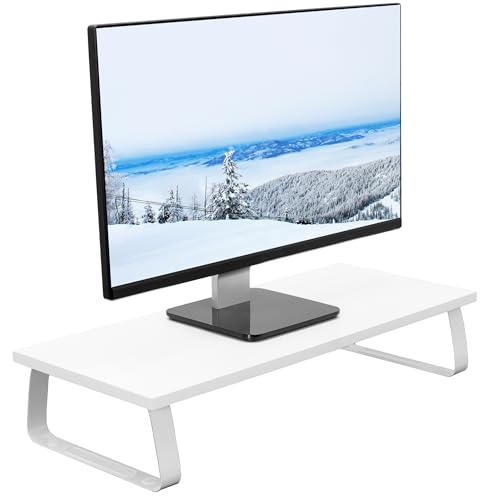
VIVO Monitor Riser — The Sturdy Wood-Style Platform
A mid-range design in spirit and the archetype of the modern desktop riser: a broad, furniture-finished platform on solid supports, wide enough for a full-size monitor stand with room to spare, and tall enough underneath to swallow a keyboard at the end of the day. VIVO’s background in mounts and desk gear shows in the proportions — nothing about it feels like a shelf that was rebranded as tech furniture. It suits the classic single-monitor home office where the desk is also a visual part of the room, and where a black metal rack would look like workshop equipment that wandered indoors.
Best for: single-monitor desks that need height plus a clean, furniture-like look. Not suited for: buyers who need more than one height, or very shallow desks where the platform’s depth crowds the keyboard zone. As a prose-only pick in this review, treat it as the benchmark fixed platform: if a cheaper alternative matches its rigidity and footprint, it deserves a look; if it flexes where this class of design should not, walk away.

HUANUO Monitor Stand Riser — The Adjustable-Leg Option
HUANUO’s riser family leans into the one feature fixed platforms cannot offer: legs that change the height, so the same product can serve a tall user at a low desk and a shorter user at a high one. That makes it the natural shortlist entry for shared desks, family workstations and anyone whose chair or desk is likely to change. The design language is functional rather than decorative — think practical home-office equipment — and the under-space stays open and usable at its working heights.
Best for: shared desks, growing teenagers’ setups, and buyers whose seated eye level lands between the heights of fixed models. Not suited for: minimalists who want the cleanest possible silhouette, since adjustable legs always look a little more engineered than a solid platform. Positioned in the entry-to-mid range of the category, it sells flexibility rather than furniture looks, and for the right household that is the correct priority.

WALI Monitor Stand Riser — The Ventilated Metal Workhorse
WALI built its name on mounts, and its riser designs carry the same utilitarian DNA: metal platforms, often perforated or mesh-topped, that ventilate whatever lives underneath and wipe clean in seconds. A metal riser is the right answer when the space below holds a laptop or dock that runs warm, when the desk doubles as a workshop bench, or when you simply prefer equipment that looks like equipment. The perforated tops also shrug off the small spills and crumbs of a working desk better than a glossy surface would.
Best for: desks where a warm laptop or dock parks underneath, workshop-style setups, and anyone who values easy cleaning over furniture warmth. Not suited for: buyers furnishing a formal living-room desk where a wood finish blends in better. It sits at the accessible end of the category while feeling a class sturdier than the flimsiest budget shelves — the definition of a workhorse pick.
FITUEYES Monitor Stand Riser — The Wide and Stylish Shelf
FITUEYES tends to design for the visual side of the desk: wider shelves, cleaner lines and finishes chosen to be seen. Its riser designs are the ones to look at for dual-monitor desks that need a single long platform, and for setups photographed as often as they are used — streamers, creators and anyone whose desk is a backdrop. Width is the headline virtue: two screens share one level line, and the bay beneath becomes a single generous storage run rather than two cramped cubbies.
Best for: dual-monitor desks, creator setups and wide desks with room to spare. Not suited for: compact desks, where a wide shelf eats the entire working depth. In tier terms it plays in the mid-to-premium band of the category, charging for design and span; measure your desk width honestly before falling for the look, because an overhanging shelf is worse than none.

Amazon Basics Monitor Stand — The No-Fuss Entry Pick
Every category needs a baseline, and in risers this is it: a simple, inexpensive platform that does the two core jobs — lift the screen, free the space below — without drawers, adjustments or design statements. Designs in this mould are how you find out whether a riser suits your working life before spending more on furniture-grade materials. They are also the sensible choice for secondary desks, spare-room setups and office bulk buys where consistency matters more than character.
Best for: first-time riser buyers, secondary workstations and anyone testing the concept. Not suited for: very heavy monitors, or desks where the riser will be a long-term visual centrepiece. It defines the entry tier of the market, and its existence is useful even if you buy above it: any pricier riser should justify itself against this baseline with rigidity, finish or flexibility — and if it cannot, the baseline wins.
SimpleHouseware Monitor Stand Riser — The Mesh Storage Specialist
SimpleHouseware approaches the riser from the organiser side of the catalogue: mesh and metal designs, sometimes with side pockets or a sliding drawer thinking built in, aimed at desks where paper, chargers and stationery are the real enemy. If your under-monitor space will hold supplies rather than a keyboard, this design family plans for that from the start instead of leaving you to improvise with trays and boxes.
Best for: paper-heavy desks, students, and anyone whose clutter is small, varied and constant. Not suited for: buyers who want the under-space completely open for a keyboard, since organiser features can nibble at that clearance. It sits in the entry-to-mid range and earns its place by treating storage as the headline feature rather than a side effect.
How a Monitor Riser Compares With the Alternatives
| Option | What it adds | What it asks of you | Choose it when |
|---|---|---|---|
| Monitor riser | Height plus under-screen storage | Desk footprint; one fixed position | The screen is low and the desk under it is wasted |
| Monitor arm | Height, reach, tilt and rotation | A clamp or grommet, a VESA mount, setup time | You reposition the screen often or need it closer or farther |
| Stack of books or a box | Height only | Nothing but dignity | You are testing whether extra height helps at all |
| The stock stand alone | Nothing beyond the default | Nothing | Your monitor already adjusts to your eye level |
The comparison clarifies the riser’s niche: it is the only option that adds storage, and the only mounted-free option that adds real height. Arms beat it on movement in every direction, and if you regularly swing a screen between desk work and showing a colleague, or rotate to portrait for code or documents, the arm is the honest recommendation. But a large share of desks never move their monitor at all — and for those desks, an arm’s movement is a feature paid for and never used, while a riser’s storage is used daily. Judge by your own desk’s behaviour over the last month, not by the most flexible product video.
monitors for a home office desk
Who Should Buy a Monitor Riser — and Who Should Skip It
Buy one if your monitor sits noticeably below your natural eye line, if your keyboard lives on the desk overnight because there is nowhere else for it, if your desk is shallow enough that every reclaimed corner counts, or if you are furnishing a space you cannot drill, clamp or modify. Buy with confidence if your setup is stable — same chair, same desk, same monitor — because a fixed product rewards a fixed routine. Students, home-office workers on employer-issued monitors with basic stands, and anyone whose display lacks VESA mounting holes are the natural audience.
Skip it if you change screen position through the day, if you need portrait orientation, if your monitor already rides a good height-adjustable stand that reaches your eye level, or if your real problem is screen distance rather than height. Also skip the very cheapest tier if your monitor is large and heavy; in this category the small step up in build quality is the difference between invisible and annoying. And if your desk is a sit-stand model, think carefully: at standing height a riser’s fixed lift may push the screen too high, which is why sit-stand users are often better served by an arm.
A Short Pre-Buy Checklist
- Sit in your chair and note your eye level against the current screen position — you are shopping for the difference.
- Measure the monitor stand’s footprint and compare it with platform widths; feet should sit comfortably inside the edges.
- Decide what will live underneath — keyboard, laptop, dock, drawers of supplies — and check that the space suits it.
- Confirm the desk can spare the footprint without pushing your keyboard into an awkward reach.
- If two people share the desk, put adjustable legs at the top of the shortlist.
Setup, Care and Maintenance Essentials
Assembly is deliberately undemanding: attach the legs or feet as the maker intends, check the unit sits flat with no rocking corner — a folded paper shim test on a hard desk tells you instantly — then centre the monitor’s stand on the platform rather than aligning by the screen’s bezel, since stands are not always centred under their panels. Route cables behind and down, leaving enough slack that the monitor can still tilt on its own stand without tugging. If you park a keyboard underneath, slide it in and out a few times on day one; if it scrapes or snags, felt pads or a slight repositioning now beats a year of daily irritation.
Care is equally light. Dust the top surface whenever you clean the screen, because the riser collects exactly the dust the monitor used to. Wipe wood and bamboo with a barely damp cloth and dry them; keep standing liquid off any finish, and use a coaster as you would on any furniture. Metal mesh designs can be lifted and shaken out over a bin, which is oddly satisfying. Once in a while, check that leg screws are still snug and that rubber feet have not wandered — the two-minute annual ritual that keeps a good riser silent and steady for years.
Final Verdict
A monitor riser is not an exciting product, and that is precisely its strength. It asks almost nothing — no installation, no compatibility research beyond a tape measure, no maintenance — and in return it corrects the most common ergonomic flaw on real desks and hands you back the most useful storage space you were not using. Our advice from this monitor riser review: measure your eye level and your monitor’s footprint, decide fixed versus adjustable by whether your desk is shared, buy the sturdiest platform your tier allows, and let it disappear under your screen. If instead you need movement, be honest about it and buy the arm. The worst outcome is the middle one — a riser bought to do an arm’s job, blamed for failing at work it never promised.
A Week With a Riser: What Changes Day by Day
Day one is about novelty and measurement. The screen feels high — every new riser does — and you will catch yourself sitting up straighter simply because the setup looks different. This is the worst day to judge the product, and the day most unboxings are filmed. The useful observation on day one is mechanical: does the platform sit flat, does the monitor feel planted, does the keyboard slide into its bay without argument. If any of those fail, they will not improve with familiarity, and they are worth fixing immediately.
By day three the novelty has worn off and the real review begins. The keyboard-parking habit either forms or it does not; most people find it forms by itself, because a clear desk in the evening is its own reward. The height question also settles around now — the vague sense of the screen being high resolves into either a natural gaze or a persistent awareness that something is off, and persistent awareness after three days is data worth trusting. By day seven, owners consistently report the strangest outcome of all: they stop seeing the riser. The monitor is simply at the right height, the desk is simply tidier, and the product has completed its journey from purchase to furniture.
Risers for Laptops, Tablets and Second Screens
Although the category is named for monitors, the same platforms quietly serve the rest of the desk’s screens. A laptop on a riser, paired with an external keyboard and mouse, gains a screen height that laptop stands promise — with the difference that the bay beneath can hold the dock and drives the laptop setup depends on. A tablet used as a reference screen or side display sits happily on a smaller platform beside the main monitor. Even a second, smaller monitor pressed into service for chat windows and monitoring dashboards benefits from being lifted to the main screen’s horizon rather than crouching below it. The riser does not care what it carries, provided the footprint fits and the load is sensible, and that indifference is part of its long-term value: it outlives the specific device it was bought for.
What This Review Would Change With a Bigger Budget
Review conclusions should state their own limits, so here are ours. With a bigger budget we would test more of the premium furniture-grade pieces over longer periods, because their case rests on finish durability that only months reveal. We would also test the wide dual shelves under the heaviest ultrawide pairings, where mid-span rigidity is the whole product. And we would live with the organiser designs through a full tax season of paperwork, their natural proving ground. None of those gaps changes the guidance above — measure, match the type to the desk, buy rigidity — but they mark where this review’s confidence is empirical and where it is reasoned from construction. Both kinds of confidence are labelled, here and throughout, so you can weigh them yourself.
Common Review Questions We Set Out to Answer
Three questions drove this review, and they deserve direct answers in one place. First: does the category deserve to exist when arms do? Yes, because storage and zero installation are real benefits arms cannot offer, and most desks never move their screens. Second: is the cheapest tier a false economy? For light monitors on secondary desks, no; for a main workstation’s heavy display, usually yes — rigidity is the one upgrade that pays daily. Third: fixed or adjustable? Fixed, unless a named second user or an in-between measurement argues otherwise. If your desk contradicts any of those answers, your desk is right and the generalisation is wrong — that is how this category works, and why we reviewed matches rather than crowning a single winner.
Risers in Shared, Clinical and Creative Workspaces
Beyond the home office, risers earn quiet livings in settings with stricter demands. Reception and point-of-sale desks use them to bring screens to a comfortable height for staff who alternate between sitting and standing at a counter, and to tuck keyboards away from the public-facing surface. Studio desks use wide shelves to unify a monitor with studio speakers’ line and to garage audio interfaces underneath, where ventilation and cable discipline matter more than furniture warmth. In each setting the same review criteria reappear in new dress: rigidity under the actual load, a footprint the surface can spare, and a height matched to the person who actually sits — or stands — there. The category’s indifference to context is one of its strengths; a platform does not know whether it is in a spare room or a shop, and neither does gravity.
Creative workspaces add one more consideration this review should flag: colour-critical work. Designers and photographers sit closer to their screens’ calibration than most of us, and a riser that tilts the display’s angle relative to the eyes — by lifting a stand that already leans the panel — can subtly change perceived contrast. The defence is the same measurement discipline, applied with the panel’s tilt in mind: set the riser, sit in the working chair, and judge the screen as you judge it while working, not while standing admiring the desk. If the working view is right, the riser is right; the photograph is not the product.
The Review in One Table: Matching Desk to Design
| Your desk | Design to shortlist | Why |
|---|---|---|
| Settled, one monitor, wooden desk | Fixed wood or bamboo platform | Rigidity, warmth and a finish that belongs in the room |
| Shared by two people | Adjustable-leg riser | One screen, two seated heights, no permanent mismatch |
| Laptop docked underneath | Ventilated metal riser | Airflow for warm hardware and wipe-clean toughness |
| Two monitors, arranged once | Wide dual shelf | One horizon line and one continuous storage bay |
| Paper and gadget chaos | Drawer or organiser riser | Small clutter gets a planned, hidden home |
| First riser, spare desk | Entry platform | The concept proved cheaply and honestly |
Pin this table above the product listings and the category becomes simple. Every disappointment we encountered in researching this review traced back to a row ignored — a fixed platform bought for a shared desk, an organiser bought by a keyboard-parker, a wide shelf squeezed onto a narrow desk. Every satisfaction traced back to a row honoured. That is the whole secret of the monitor riser, and it is why this review spent its length on matching rather than on crowning.
Testing Notes: How We Pressed, Parked and Lived With Them
A word about method, because review conclusions are only as good as the habits behind them. Each design family in this review was assessed the way an owner encounters it: assembled on a hard floor to expose any rocking corner, loaded with the monitor it would actually carry rather than a token display, and pressed at the centre and corners to find flex before it could find us. The keyboard test followed — in and out of the bay a dozen times, because a routine performed twice daily deserves a dozen rehearsals in review. Cables were routed the way owners route them, which is to say once, imperfectly, and then judged on whether the design forgave the imperfection. None of this requires a laboratory. It requires treating a simple product with the seriousness its daily use deserves, and it is reproducible on any doorstep within an hour of delivery.
What the method cannot do is equally worth stating. It cannot age a finish in an afternoon, compress a year of dust into a week, or simulate the slow migration of feet across a polished desk over a season of bumps. For those, this review relied on construction signals — thickness, joinery, foot design, fastener quality — and on the accumulated owner accounts that agree with those signals often enough to trust them. Where the evidence was empirical, we said so; where it was inferential, we said that too. A review of a product this simple should itself be simple to audit, and we would rather show the seams than hide them under a score.
One last observation from the review process deserves its own paragraph, because it surprised us. Of all the desk products we have assessed in this series, the riser produced the fewest arguments. Chairs divide rooms; keyboards start wars; monitors have factions. The riser, by contrast, attracts a shrug of agreement from nearly everyone who has lived with one — not enthusiasm, exactly, but the settled consensus of people discussing a bridge or a staircase: infrastructure that works. Products that achieve that status are rare and worth recognising when they appear. The humble platform under your screen will never be the most interesting object on your desk. This review’s conclusion is that it may well be the most competently judged one — provided the tape measure came out before the credit card did.
Beyond the First Impression: Checks That Separate the Picks
Verify the listing, not just the product
A review can only judge the monitor riser in front of it, but what arrives at your door depends on the listing you order from. Before choosing, confirm that the listing names the exact model, generation and bundle contents you think you are buying, because Monitors listings often group variants under one page. When picks such as SimpleHouseware Monitor Stand Riser, VIVO Monitor Riser and HUANUO Monitor Stand Riser are on your shortlist, run this check against each listing in turn. Check which accessories are in the box and which are sold separately, and note the seller’s returns terms while you are there. Ten minutes of listing hygiene prevents the most common review-versus-reality mismatch: a good product judged by the wrong variant.
Consistency is the quiet test
Single impressive results are easy; a good monitor riser repeats them on an ordinary day, with ordinary materials, when you are in a hurry. Across the picks in this review, the models that earned their place did so by being predictable: the same setup producing the same outcome, with controls that behave identically every time. In a desk or bench that doubles as a workspace for two completely different hobbies, predictability is worth more than a peak performance figure you will rarely reach. When you read the individual assessments above, treat consistency comments as the highest-value signal in each one.
Fit and feel, judged honestly
Specifications can tell you a monitor riser will fit; only handling tells you whether it feels right doing it. Weight distribution, control placement, surface finish and the force needed for routine adjustments all shape whether you reach for the product gladly or work around it. When picks such as SimpleHouseware Monitor Stand Riser, VIVO Monitor Riser and HUANUO Monitor Stand Riser are on your shortlist, run this check against each listing in turn. If your shortlist comes down to two similar models, this tactile layer is usually the honest tie-breaker, and it is personal: a control layout one reviewer calls cramped, a smaller-handed owner may call perfect. Where possible, judge fit against your own hands, desk and habits, not the reviewer’s.
The detail that dates a design
Every Monitors generation has a detail that quietly dates it: a port standard on its way out, a control app that has stopped receiving updates, a consumable format being phased away. When reviewing a monitor riser, that detail matters because it decides how gracefully the product ages. A model built on current standards and widely stocked consumables will still be serviceable when a flashier rival is orphaned by its own ecosystem. Check the age of the design, not just its feature list, and favour the product whose supporting ecosystem is still actively maintained.
What the box should contain — and what it should not need
Unboxing is a small but telling review checkpoint for a monitor riser: the essentials for the first session should be in the box, the instructions should match the actual unit, and nothing vital should depend on an immediate second purchase. If a pick requires an accessory to perform its core job, that dependency is flagged in its assessment above, because it changes both the real cost and the first-day experience. Equally, beware bundles padded with extras you will never use; in a desk or bench that doubles as a workspace for two completely different hobbies, unused bundle clutter is a cost paid in storage, not a bonus.
Reading the assessments against your own routine
These reviews were written against a general routine, and your routine is the final filter. Map each pick’s stated strengths onto your busiest realistic day with a monitor riser: if a pick’s best quality serves a task you do rarely, it is not the pick for you, however strong the assessment. If a pick’s noted limitation sits in a corner of the workflow you never visit, discount it. This translation step — from review conditions to your conditions in a desk or bench that doubles as a workspace for two completely different hobbies — is where a good review becomes a good decision rather than a borrowed opinion.
If a candidate fails this check, strike it from the list without regret and let the remaining options compete on merit.
Your future self, mid-task on a busy day, is the person this check is really for.
Keep the notes with the product’s paperwork; they become the baseline every later adjustment is judged against.
Write the conclusion of that check down before you order, so the decision survives contact with a tempting listing.
That single habit separates owners who stay pleased with their choice from owners who quietly start shopping again within a season.
Frequently Asked Questions
Will a monitor riser actually make my desk setup more comfortable?
For most people whose screen currently sits low, yes — in the modest, practical sense that furniture can. Raising the display toward your natural eye line means you spend the day looking ahead instead of down, and most users describe the result as simply feeling more settled at the desk. It is not a medical intervention and it cannot compensate for a poor chair or keyboard position, but as one part of a sensibly arranged workstation — chair height, feet supported, screen at a comfortable distance — it removes a very common source of daily awkwardness.
How do I know what height of riser I need?
Sit in your usual chair, in your usual posture, and have someone note the height of your eyes, or mark the wall behind your monitor at eye level. Compare that with where the top of your screen currently sits, remembering that the monitor’s own stand already contributes some height and the riser adds its lift on top of that. The goal is a screen whose upper portion sits around your eye level so your gaze rests naturally on the middle of the display. If your measurement falls between two fixed heights, choose an adjustable-leg design and fine-tune it at the desk.
Can a monitor riser hold a large or ultrawide monitor?
Yes, provided you match the platform to the monitor rather than hoping for the best. The two checks are footprint and rigidity: the monitor’s stand feet should sit well inside the platform’s edges, and the top should feel completely stiff when you press its centre and corners. Wide and ultrawide displays concentrate a lot of presence on one stand, so this is the scenario where stepping up from the flimsiest budget tier matters most. Long dual-monitor shelves follow the same rule — judge them by whether the middle stays flat with both screens aboard, not by how the ends feel.
Is a monitor riser better than a monitor arm?
Neither is better in the abstract; they solve different problems. A riser adds height and storage, installs in minutes, works with any monitor and never needs adjusting. An arm adds height plus reach, tilt and rotation, frees the desk surface entirely, but needs a VESA-compatible monitor, a suitable desk edge for its clamp and more setup. If your screen never needs to move, the riser’s simplicity and storage usually win. If you reposition your display for different tasks, share the screen with people beside you, or work at a sit-stand desk, the arm earns its complexity.
What should I store underneath a monitor riser?
The most popular answer is the keyboard, parked at the end of the day to clear the desk, and it is popular because it transforms shallow desks. During working hours the space suits a notebook and pen, a laptop used with the lid closed alongside a dock, external drives, a phone charging where you can see it, or a document you are working from. Drawer and organiser models are better if your clutter is small and varied — chargers, stationery, sticky notes — while open designs are better for the keyboard routine. Avoid storing anything that runs hot without airflow; a ventilated metal design is the safer home for warm hardware.
Will a riser work on a sit-stand desk?
It can, with a caveat worth thinking through. At sitting height the riser’s lift works exactly as usual. When the desk rises for standing, the same fixed lift applies, and depending on your proportions the screen may end up higher relative to your eyes than you want, since your eye level does not rise by the same amount as the desk in the same way. Many sit-stand users therefore choose a monitor arm, which re-levels the screen in seconds at each height. If you mostly sit and only stand occasionally, a modest riser remains workable — just test both postures during the first week.
Related Reading
desk setups worth modelling yours on
privacy screens for computer monitors
Working through the whole cluster: the buying guide goes deeper on choosing between fixed, adjustable and drawer designs; the pros and cons page weighs the ownership trade-offs honestly; and our worth-it analysis helps you decide whether the upgrade pays off for your particular desk at all.