Disclosure: As an Amazon Associate, ilcastellomenu.com earns from qualifying purchases. Links on this page are affiliate links; they cost you nothing extra. Prices and availability change often, so check the current Amazon listing before you buy.
Weighing up monitor riser pros and cons is a refreshingly honest exercise, because this is a product with nowhere to hide. A monitor riser does two things — it lifts your screen and it stores things underneath — and every advantage and disadvantage it owns flows from those two acts and from its defining trait: it does not move. This page lists the pros and cons the way owners actually experience them over months, not the way a product box lists them on day one. No inflated promises, no buried limitations: the genuine case for the riser, the genuine case against it, and then the part most pages skip — what the trade-offs mean for your specific desk.
The quick verdict: for a settled desk with a low screen and wasted space underneath, the pros dominate and it is not close. For a desk that needs movement, changing heights or screen repositioning, the cons are structural and no model in the category escapes them. Everything below exists to help you work out which desk you have.
Key Takeaways: Monitor Riser Pros and Cons at a Glance
- The headline pro: two daily benefits — a level, comfortable gaze and reclaimed storage — from a product with no installation and no moving parts.
- The headline con: the position is fixed. A riser gives height once; it cannot follow you, tilt for you or pull the screen closer.
- Best for: settled single-user desks, renters, small desks, and monitors without VESA mounting holes.
- Not suited for: sit-stand desks used at both heights, portrait-orientation work, and anyone who shares their screen by swinging it around.
- The pros compound quietly over time; the cons are all knowable before you buy, which makes this an unusually safe category to judge on paper.
In this guide
The Pros
Pro: It Raises the Screen to a Natural Viewing Height
The founding benefit, and still the main one. Most stock monitor stands leave the screen sitting low, so the working day is spent gazing downward. A riser lifts the display toward your natural eye level, and the working posture that follows — head level, shoulders settled, gaze resting on the middle of the screen — simply feels more sustainable across long documents, spreadsheets and calls. We state this as a comfort benefit, not a medical one: a riser is furniture, and it makes no promises about anyone’s neck or back. What owners consistently report is simpler and believable — the desk feels right in a way it did not before, and the low-screen awkwardness they had stopped noticing turns out to have been there all along.
Pro: It Reclaims the Dead Space Under the Monitor
Before the riser, the volume under your screen is the most wasted space on the desk: too low to use, too central to ignore. After it, that volume is a keyboard garage at night, a home for the dock and drives, a parking bay for the notebook you are working from. The transformation is disproportionate to the product’s size, especially on shallow desks, where parking the keyboard returns the entire work surface at the end of the day. No other desk accessory converts pure air into daily utility this directly, and for many owners this pro quietly overtakes the height benefit as the reason they would buy again.
Pro: There Is Nothing to Install
Set the legs, set the platform, set the monitor on top: the entire installation. There is no clamp to fit, no desk edge to qualify, no VESA pattern to check, no wall to drill and no landlord to consult. The riser works in rented rooms, dorms, hot-desking offices and listed buildings with equal indifference. It is equally easy to un-install — lift it away and the desk is exactly as it was — which makes it one of the few desk upgrades you can trial in your real life without commitment anxiety. In a category of accessories that increasingly demand compatibility research, the riser’s indifference to your setup is a genuine, underrated virtue.
Pro: It Works With Every Monitor
Because the monitor simply stands on the platform in the ordinary way, a riser has no compatibility list. Old displays, new displays, televisions pressed into service as monitors, screens with no mounting holes at all — if it has a stand, it can be risered. This universality matters more than it first appears. Monitor arms exclude a real population of displays that lack VESA mounts, and exclude more through weight limits at the extremes. The riser’s only compatibility questions are a tape measure’s: does the stand fit the platform, and can the platform carry the load without flexing. Answer those two and you are done.
Pro: Nothing Moves, So Nothing Wears Out
A riser has no joints to loosen, no springs to tire, no tension to drift out of adjustment over the years. The product you set up is the product you will have in five years, performing identically, in silence. Owners of articulated arms know the slow sag and the periodic re-tightening; riser owners know nothing of it. This also makes the riser the calmest possible support for the monitor itself — there is no mechanism between your display and the desk that can fail creatively. Boring, in load-bearing furniture, is the highest compliment available.
Pro: It Is One of the Cheapest Daily-Use Upgrades
Desk improvements usually charge heavily for benefits you notice weekly. The riser inverts that: it sits at the gentle end of desk spending, in every tier from entry platforms to furniture-grade pieces, and its benefits are noticed every hour you sit down. Cost-per-use arithmetic is rarely kind to accessories; here it is flattering to the point of suspicion. Even the premium end of the category — wide dual shelves, fine materials — remains a modest purchase next to the monitor it carries. Few products at any price are used this often for this long, and that ratio is the core of the value case.
Pro: It Makes the Whole Desk Look Intentional
An underrated pro, visible in every before-and-after photograph owners take: a screen floating at the right height, on a platform that echoes the desk, with the clutter given a bay to live in, reads as a designed workstation rather than equipment that accumulated. The riser gives the monitor a plinth, and plinths flatter everything placed on them. For desks that live in shared rooms — living rooms, studio flats, family kitchens — that visual order is not vanity; it is the difference between a workspace that intrudes and one that belongs.
The Cons
Con: The Height Is Fixed — Measure Wrong and It Stays Wrong
The mirror image of the riser’s simplicity. A fixed platform offers one lift, chosen at purchase, and if your seated eye level needed a different one, the riser will deliver the wrong height with complete reliability for years. Too low and nothing has changed; too high and you have traded a downward gaze for an upward one. Adjustable-leg designs soften this con without abolishing it — their range is a few set positions, not a continuum. The mitigation is entirely in your hands and takes two minutes: measure your seated eye level against your screen before ordering. But the con is real, and it is the category’s most common source of returns.
Con: No Movement — No Reach, Tilt or Rotation
A riser cannot bring the screen closer when you lean in to read fine detail, push it back when you spread out documents, tilt it for a standing colleague, or rotate it to portrait for code and long pages. The screen’s position is the platform’s position, permanently. For desks where the display never moves, this con is theoretical. For desks where it does — collaborative work, mixed tasks, sit-stand routines — it is decisive, and no riser at any tier answers it. This is the honest boundary of the category, and the point at which the monitor arm stops being an upgrade and becomes the correct tool.
Con: It Occupies Desk Surface Permanently
The platform’s footprint is desk you no longer have, in the exact zone where desks are most contested. On a generous desk this is nothing. On a shallow desk it can push the keyboard toward an awkward reach, squeeze the mouse’s territory, or crowd the notebook space to one side. The under-space repays much of the footprint — often more than all of it, once the keyboard parks below — but the repayment is in volume, while the cost is in surface, and some desks are poorer in surface than in volume. Measure the depth honestly; the con belongs to desks that cannot spare it.
Con: Cheap Builds Flex, Rock and Creak
The category’s budget floor contains some genuinely flimsy products: thin tops that bow under a substantial monitor, legs that are not quite level so the unit rocks on one corner, finishes that mark if you look at them firmly. A flexing riser is worse than its specs suggest, because the failure is continuous — a faint spring under the screen while you type, a creak when the desk is bumped, a monitor that never quite feels planted. The defence is cheap and reliable: press the centre and corners of any candidate, favour thickness and corner-spread feet, and treat the very cheapest tier as a light-monitor product. But the con must be listed, because in this category thrift is the one place buyers reliably get punished.
Con: Storage Underneath Is Fixed Storage
The bay under a riser has the dimensions it has. A keyboard that is slightly too wide, a laptop slightly too tall when docked, a drawer slightly too shallow for the charger you most wanted to hide — the space does not negotiate. Organiser models add their own version of the con: their pockets and dividers fit the designer’s imagined clutter, which may not be yours. None of this is a defect; it is the nature of furniture. But it means the storage pro only fully lands when you measure your intended tenant before choosing the design, and buyers who assume rather than measure are the ones writing the disappointed reviews.
Con: It Does Nothing for Screen Distance or a Bad Chair
A riser fixes height and storage. It does not fix a screen that is too close or too far, a chair at the wrong height, a keyboard in the wrong place, or a desk that is simply too small for the work. Buyers occasionally load it with the hopes of a whole ergonomic overhaul and then mark it down for delivering only its own job. Set expectations at the level of the product: one specific, common flaw corrected well. If your discomfort at the desk has several sources, the riser is a chapter of the fix, not the book — and it should be bought, and judged, as such.
Con: Some Finishes Are Maintenance Magnets
Glass tops show every fingerprint and dust mote in raking light. Glossy finishes announce every ring and crumb. Even matte wood collects the same dust the monitor used to, now displayed on a horizontal surface at eye level. None of this is structural, and a weekly wipe settles it, but buyers who chose a finish for the photograph sometimes resent keeping it photographable. The practical reading: busy desks should choose forgiving finishes — matte wood, bamboo, textured metal — and save the glass for desks that are tidied as a hobby rather than a chore.
What the Trade-Offs Mean for You
For the Settled Single-User Desk
The pros land at full strength and the cons mostly evaporate. Your height can be measured once and matched exactly, the screen never needs to move, and the storage bay gets a permanent tenant. If this is your desk, the analysis is short: choose the most rigid platform in your tier and stop deliberating.
For the Shared or Changing Desk
The fixed-height con becomes the live issue, and adjustable legs move from optional to essential. Accept the slightly engineered look as the price of a desk that fits two people. The rest of the pros — storage, simplicity, universality — apply unchanged, which is why shared desks are still riser desks, just adjustable ones.
For the Sit-Stand Desk
Be honest about your ratio. If you sit for the overwhelming majority of the day and stand occasionally, a modest riser remains workable, with the standing posture slightly compromised. If you alternate seriously, the no-movement con and the fixed-height con compound at standing height, and an arm is the truthful recommendation. The riser’s pros do not disappear — they are simply outvoted by your routine.
For the Small Desk
The footprint con and the storage pro fight directly, and storage usually wins: parking the keyboard underneath returns more usable surface than the platform consumes. The condition is depth discipline — choose compact designs, measure twice, and let the evening clear-down become the ritual that justifies the footprint every single day.
Context: Risers Against the Alternatives
| Option | Pros against a riser | Cons against a riser |
|---|---|---|
| Monitor arm | Full movement: reach, tilt, rotation, per-posture height | Needs VESA and a clamp; costs more; desk surface freed but no storage added |
| Height-adjustable monitor stand | Height built in, no extra footprint | Only helps if you replace the monitor; no storage; limited range on many models |
| Books or a crate | Free, immediate, honest | Unstable, unlovely, no considered storage, sizes are luck |
| Doing nothing | Costs nothing, changes nothing | The low screen and the wasted space remain, daily |
Read the table from your desk’s perspective. The arm’s pros are movement pros; if movement is not your problem, they are features without a user. The riser’s pros are stillness pros — height, storage, permanence — and they compound quietly. Neither column shames the other; they describe different desks.
How to Buy Smart, Given the Cons
- Measure your seated eye level against the screen, and your monitor stand’s footprint, before looking at a single product photo.
- Press-test rigidity in person where possible; in listings, favour thick tops, corner-spread feet and honest materials.
- Name the under-space tenant — keyboard, hardware or clutter — and choose the design family that serves it.
- If two people share the desk, buy adjustable legs and consider the fixed-height con closed.
- If your screen needs to move, believe the cons section and buy an arm instead — the smartest riser purchase is sometimes none.
- Choose forgiving finishes for busy desks: matte wood, bamboo or textured metal over glass and gloss.
the full monitor riser buying guide
Setup and Care That Reduce the Cons
Several cons shrink with ten careful minutes at setup. Rocking and creaking usually trace to a leg not fully seated or a foot slightly off the surface — assemble on a hard floor, check all four corners, and only then place the monitor. Height regret shrinks if you test the working posture for a full hour before deciding the riser is wrong; first impressions of a new screen height are notoriously unreliable, and most settle within a day. Cable discipline protects the storage pro: route leads down behind the unit on day one, because cables allowed to colonise the bay will never leave it.
Care defends the finish con. A coaster habit, a weekly dust, a barely damp cloth for wood and bamboo, and an occasional shake-out for mesh designs keep every material in its good phase. Check fasteners and feet a couple of times a year. That is the whole programme — the riser asks less maintenance than the monitor it carries, which is exactly how support furniture should behave.
Bottom Line
The monitor riser pros and cons resolve into a single sentence: it is a superb answer to a specific pair of problems — a low screen and wasted space beneath it — and no answer at all to problems of movement, distance or changing posture. If your desk has the first pair, the pros will pay you back daily for years, for modest money and zero installation. If your desk has the second set, the cons are structural and the arm is your product. Most desks, honestly assessed, have the first pair. Measure yours, and you will know which side of the line you are on before you spend anything.
our in-depth monitor riser review
The Picks Behind This Analysis
Pros and cons only become useful when they are attached to real designs, so here are the category’s reference points — the models our trade-off analysis keeps returning to. Each is a prose-only pick: compare current listings for exact dimensions and configurations, and judge them by the checks in the buying-smart section above.

VIVO Monitor Riser — Where the Pros Peak
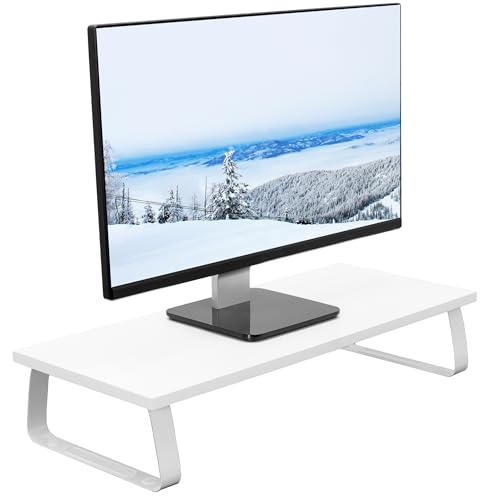
The furniture-grade fixed platform is the design where the category’s pros shine brightest: inert under the monitor, generous underneath, and styled to belong in a room. Its cons are the fixed platform’s cons in their purest form — one height, a real footprint — with none of the cheap-build asterisks. Best for: settled single-monitor desks. Not suited for: shared heights or shallow desks. Tier: mid-range.

HUANUO Monitor Stand Riser — The Con-Softener
Adjustable legs exist to soften this page’s headline con, and on shared desks they do. The trade is a slightly more engineered look and a mechanism where a statue would do. Best for: two users, one screen; growing teenagers; in-between measurements. Not suited for: design-led solo desks. Tier: entry-to-mid.

WALI Monitor Stand Riser — The Practical Middle
Ventilated metal trades furniture warmth for airflow, toughness and easy cleaning — a pros-and-cons exchange that hard-used desks win. Best for: warm hardware underneath, busy family or workshop desks. Not suited for: formal rooms. Tier: accessible, with build above its bracket.
FITUEYES Monitor Stand Riser — The Wide Commitment
The dual-monitor shelf maximises the storage and composure pros while maximising the footprint con in equal measure. It is the right trade exactly when the desk is wide and the setup settled. Best for: dual screens, creator desks. Not suited for: compact or evolving setups. Tier: mid-to-premium.

Amazon Basics Monitor Stand — The Honest Minimum
The baseline proves how much of the pro column survives at the entry tier: the lift, the storage, the zero installation. What thins out is rigidity headroom and finish. Best for: first risers, light monitors, spare desks. Not suited for: heavy displays. Tier: entry.
SimpleHouseware Monitor Stand Riser — Storage, Prioritised
Organiser-led design pushes the storage pro furthest and accepts the fixed-storage con most fully: the bays fit the clutter they were drawn for. Best for: small-item chaos, students, administrators. Not suited for: keyboard parking. Tier: entry-to-mid.
Pros and Cons Nobody Puts on the Box
The Social Pro: A Desk That Invites Work
Owners mention a benefit that never appears in specifications: a finished desk lowers the friction of starting. The screen is at height, the surface clears in the evening, the morning begins at a workstation that looks ready rather than recovered. It sounds soft, and it is, but behaviour follows environment in small daily ways, and a desk that reads as intentional gets sat at more willingly than one that reads as a pile. Count it as a minor pro — but notice that minor pros, paid daily, are this category’s entire business model.
The Hidden Con: It Can Anchor a Bad Layout
The mirror-image risk deserves equal honesty. A riser completes a setup, and completion can freeze a layout that deserved more thought — the monitor centred on the desk rather than on the chair, the desk itself in the wrong corner, the keyboard zone compromised by where the platform landed. Because the riser makes things feel finished, it can quietly end an optimisation process that was not done. The defence is sequence: arrange the chair, the desk position and your sitting place first, and let the riser be the last piece placed, centred on you. Bought in that order, it anchors a good layout instead of embalming a mediocre one.
The Environmental Angle, Briefly
On the credit side: a riser is a long-lived, repairable, material-simple object, often in wood, bamboo or metal, with no electronics and no planned obsolescence — the kind of product that gets handed down rather than landfilled. On the debit side: it is still a manufactured object bought to solve a problem that a better monitor stand would have prevented, and the greenest riser is the one a well-designed display made unnecessary. Both things are true. If you buy one, buy it once, in a material that ages gracefully, and the balance lands firmly in credit.
The Trade-Offs, Desk by Desk: Three More Profiles
The Hot-Desking Office
In offices where desks are booked rather than owned, the riser’s pros and cons rearrange themselves interestingly. The zero-installation pro becomes decisive — nothing is clamped, personal or permanent — and the storage pro survives as a per-desk tidy that the next occupant inherits gratefully. The fixed-height con, however, sharpens: a platform levelled for yesterday’s occupant is a stranger’s compromise today. Facilities teams solve this the way households do, with adjustable designs, or accept the riser as a storage-and-lift improvement averaged across many users rather than fitted to one. Either way, the analysis framework holds: name the user, and the trade-offs price themselves.
The Gaming and Streaming Desk
For gaming desks the pros gain a visual dimension — a wide shelf composes a multi-screen backdrop like nothing else at the tier — while the cons gain a behavioural one: players who reposition screens per game will feel the stillness as a restriction rather than a calm. The storage pro also shifts tenant, from keyboards to controllers, headsets and capture hardware, which organiser and wide designs serve well. The verdict follows the familiar rule: a settled gaming layout is a riser layout, and a restless one is an arm layout, and the player’s own last month of habits knows which.
The Home’s Second Desk
Spare-room, kitchen-table and landing desks share a profile: part-time use, borrowed furniture, low tolerance for fuss. Here the entry tier’s version of the trade-offs deserves respect — the pros arrive nearly intact, because lift and storage do not care about finish, while the cons shrink with hours used. A flex that would torment a full-time worker is invisible at a desk used three evenings a week. This is the profile where the baseline pick is not a compromise but the correct engineering decision, and where the pros-and-cons page happily contradicts any instinct to over-buy.
A Balanced Scorecard You Can Argue With
Pages like this one owe readers a summary they can disagree with precisely, so here is ours. On height correction, the riser scores as strongly as anything that is not an arm. On storage, it scores alone — no rival adds any. On simplicity and longevity, it scores at the top of desk accessories generally. On movement, it scores zero, by design, and we decline to soften that. On value, it scores in proportion to how settled the desk is: completely for the settled, partially for the changing, negatively for the restless, who will replace it with an arm and count the riser as tuition. Disagree with any line by pointing at your own desk’s habits — that is the argument this page has been making from its first paragraph.
And a final balance-sheet entry that belongs to neither column cleanly: the riser is honest. It promises two things, delivers exactly those two things, and its failures are all visible in advance to anyone who measures. In a market of accessories that over-promise by profession, a product whose pros and cons can be fully known before purchase is a small marvel. Weigh it with the tape measure it deserves, and whichever way your verdict falls, it will be the right one — because it will be yours, about your desk, with your eyes open.
Weighing the Intangibles
Confidence and the Finished-Desk Effect
There is a pro that owners describe awkwardly because it sounds like vanity, and it deserves a fair hearing on this page: a completed desk changes how its owner feels about the work done at it. Video calls frame a composed background. Clients and colleagues see order. The worker themselves sits down to a station that looks like it was decided rather than accumulated, and that small dignity is not nothing across a working year. We list it as a genuine but minor pro — minor, because it should never outvote a measurement, and genuine, because dismissing every intangible would make this page more rigorous and less true.
Decision Fatigue as a Hidden Pro
The riser’s stillness, listed among its cons, has a second face that belongs in the pro column for many temperaments. An arm invites adjustment, and adjustment invites the low-grade, endless question of whether the screen is quite right today. A riser forecloses the question entirely. The screen is where it is; attention goes to the work. Owners who describe their riser as calming are usually describing this foreclosure. Whether it reads as peace or as imprisonment depends on the owner’s relationship with their own tinkering — which is why this page keeps returning to the same instruction: know your desk, and know yourself at it, before the product has to mediate between the two.
The Con of Looking Ordinary
Balance requires the aesthetic con stated plainly: a riser is not an exciting object, and on a desk curated for drama it can read as the mundane note — a small shelf among sculptures. Streaming and creator desks sometimes reject risers for exactly this, preferring the technical theatre of arms and mounts. That is a legitimate preference and an illegitimate product judgement: the riser was never competing on theatre. But a pros-and-cons page that only lists functional cons would be hiding one of the real reasons real buyers choose otherwise, so here it stands, honestly weighed: if your desk is a stage, the riser’s quietness is a con. If your desk is a workplace, it is the entire point.
How the Balance Shifts Over Time
Most pros-and-cons lists are snapshots, but ownership is a film, and this category’s balance genuinely moves as it plays. In week one the height pro dominates and the storage pro is a novelty. By month three the novelty has inverted: the height is simply normal, invisible, while the storage routines — the parked keyboard, the housed dock, the vanished clutter — have become the benefits owners would refuse to surrender. The cons decay at different rates too. The footprint con fades as the desk reorganises around it; the finish-maintenance con persists at a low simmer forever; the fixed-height con either vanishes, if the measurement was right, or appreciates in irritation if it was wrong. Time, in other words, is kind to every aspect of a well-matched riser and merciless to a badly matched one — one more reason the measuring tape, not the price tag, is where this purchase is decided.
The Pros and Cons of Waiting
One trade-off this page has not yet weighed is temporal: the pros and cons of buying now versus later. Waiting has a genuine pro — an unsettled setup may settle, revealing whether the screen truly never moves and which height the household actually needs — and the book-stack experiment converts waiting from procrastination into research. But waiting has a con that compounds silently: every month at a low screen over a wasted bay is a month of the exact daily friction the riser exists to remove, and friction already being paid is a strange thing to keep paying out of caution. The balance, as usual on this page, is personal. If your setup is mid-change, wait with the books under the monitor and call it a trial. If your setup has been stable for a season, the trial has already run — you have simply been living in the control group.
What Would Change Our Balance
An honest pros-and-cons page should name its own expiry conditions. Ours would shift if monitors broadly shipped with genuinely capable height-adjustable stands, because the riser’s founding pro would shrink to its storage pro alone — still real, but a smaller case. It would shift if desks broadly became sit-stand by default, because the fixed-height con would move from a profile’s concern to the population’s. And it would shift if adjustable mechanisms became as rigid and invisible as fixed platforms, dissolving the category’s central trade rather than merely softening it. None of those shifts has happened yet, and the page you are reading describes the market that exists. But a balance that knows what would change it is worth more than one that pretends to be timeless — rather like the product it describes, which asks to be judged against the desk of today, not the desk of someday.
Until those shifts arrive, the ledger stands as this page has drawn it. The pros are daily, compounding and almost free of upkeep; the cons are structural, knowable in advance and fatal only to desks that needed a different product all along. There are worse bargains in the home office — most of them, frankly — and there are few products whose entire case, for and against, can be held in two hands and weighed before lunch. That weighability is the riser’s final, quiet virtue, and this page’s final entry in the pro column.
Frequently the Real Question: Riser Now, Arm Later?
A pattern this page sees constantly deserves a direct weighing: the buyer who suspects an arm is in their future but not their present, and wonders whether a riser now is money wasted then. The pros of the sequence are stronger than they look. The riser is inexpensive, serves fully from day one, and — this is the part buyers miss — rarely becomes redundant when the arm arrives, because a household of screens always has a second stand to lift, a laptop to perch or a shelf-shaped gap somewhere. The cons are equally concrete: if the arm is a definite, dated purchase, the riser’s service window may be weeks, and even a modest sum spent for weeks is poor value. The weighing therefore turns on the honesty of the word later. Later meaning someday: buy the riser, and let someday look after itself. Later meaning this quarter: skip it, and let the arm arrive to a desk that waited. Both answers honour the same principle that has governed this whole page — the product is fixed, so the variable must be your truth about your own plans.
There is a broader comfort in that principle, and it is a fitting place for the weighing to end. Most product categories punish honesty about your habits and reward aspiration; this one does the reverse. The riser’s pros are all payable to the desk you actually have, and its cons all fall on the desk you merely intend to have. Buy for the actual desk and the ledger balances in your favour almost every time. That is the whole argument, for and against, in its final form — and it fits, appropriately, on a shelf.
If this page has a bias, let it declare itself in closing: we believe the settled desk is more common than the restless one, and that most readers weighing these pros and cons are, whether they know it or not, describing a workstation that changes less than its owner imagines. That belief tilts our balance toward the pro column for the general reader — while every profile section above exists to tilt it back, precisely, for the reader it does not fit. A balance that cannot be tilted by the facts of your own desk would not be a balance at all. Bring the facts; the scales are honest; and may your screen, whatever you decide, end up exactly where your eyes wanted it all along.
Readers who want the entire page in their pocket can have it in four lines. It lifts the screen and frees the space beneath it — those are the pros that matter, and they pay out daily. It never moves and it takes up room — those are the cons that matter, and they are knowable before you spend anything. If your desk wants the first pair and can forgive the second, buy it and measure first. If your desk needs movement more than stillness, forgive this page its length and buy the arm. Everything else written here is commentary on those four lines — honest commentary, we hope, but commentary all the same.
The Trade-Offs That Only Show Up After the First Month
When the alternative is genuinely better
There are owners for whom skipping the monitor riser altogether is the right call, and naming them is part of an honest pros-and-cons account. If your need is occasional, borrowed or built into something you already own, or if your space cannot give the product the conditions it needs, the alternative route avoids both the cost and the clutter. The pros only outweigh the cons when the problem the monitor riser solves is a recurring one in your week. A problem you meet twice a year rarely justifies a permanent new resident in the Monitors category.
How the balance shifts over a year of ownership
The pros-and-cons ledger of a monitor riser is not static. In the first month, novelty inflates the pros; by the sixth month, the honest picture is about reliability, running costs and whether the product has earned a permanent place in your routine. Wear parts, consumable availability and the maker’s support responsiveness all matter more at month ten than at day ten. When you read owner feedback, weight the long-term reports accordingly: a complaint about a part that failed after a year tells you more than a first-week rave about unboxing.
The compromise candidate
Many buyers end up choosing neither the strongest nor the cheapest monitor riser but the one whose weaknesses fall where they personally care least. That is a rational strategy, not a failure of research. List the cons of your final two candidates side by side and ask which set you would rather live with daily in a busy shared workspace where several people use the same setup across the day. The product whose drawbacks sit in your blind spots will feel like the better product for years, even if a comparison table scores the other one higher on paper.
The advantage that depends on your habits
The headline advantage of a monitor riser is real, but it is not automatic: it only pays out if your habits match it. Used the way it was designed, in a busy shared workspace where several people use the same setup across the day, the strengths described earlier compound quietly — less friction, fewer workarounds, a smoother routine. Used against its grain, the same design choices become the source of the complaints in the cons column. Before deciding, be honest about which user you are on an ordinary tired weekday, not the organised version of yourself you plan to become next month.
Where the drawbacks bite hardest
The disadvantages of a monitor riser are not evenly distributed across owners. They concentrate in specific situations: tight spaces, shared rooms, heavy daily loads, or workflows that change direction mid-task. If your routine involves any of those, the cons deserve double weight in your decision, because you will meet them weekly rather than rarely. Conversely, an owner whose setup avoids those situations entirely may never encounter the most-criticised weakness at all, which is why verdicts on the same monitor riser can sound like descriptions of two different products.
The maintenance trade-off nobody advertises
Almost every monitor riser trades purchase-day simplicity for a small ongoing maintenance obligation: cleaning, recalibrating, replacing a wear part, updating firmware or simply keeping accessories together. The trade is usually worth it, but it is not free, and it scales with how hard you use the product. In a busy shared workspace where several people use the same setup across the day, skipped maintenance shows up first as small annoyances — a control that feels off, a result that drifts, a noise that was not there before — long before it causes a real failure. Budget the minutes, not just the money.
Treat it as part of the purchase itself, not as homework to do after the box arrives.
None of this requires expertise — only the willingness to check your own routine before trusting a generic recommendation.
Five honest minutes at this stage is worth more than five hours of comparison browsing.
If a candidate fails this check, strike it from the list without regret and let the remaining options compete on merit.
Your future self, mid-task on a busy day, is the person this check is really for.
Keep the notes with the product’s paperwork; they become the baseline every later adjustment is judged against.
Write the conclusion of that check down before you order, so the decision survives contact with a tempting listing.
That single habit separates owners who stay pleased with their choice from owners who quietly start shopping again within a season.
Treat it as part of the purchase itself, not as homework to do after the box arrives.
Frequently Asked Questions
What is the biggest disadvantage of a monitor riser?
The fixed position. A riser delivers one height and one place, forever: it cannot pull the screen closer, tilt it for a colleague, rotate it to portrait or re-level it when you switch between sitting and standing. For desks whose screens never move, the disadvantage never materialises. For desks whose screens move weekly, it is disqualifying, and no premium model escapes it because it is a property of the category, not of any design. The adjustable-leg models soften the height half of the problem for occasional changes, but the movement half stands. Know your screen’s habits before you buy.
Do monitor risers wobble?
Good ones do not; flimsy ones do, and the difference is construction rather than luck. A rigid top with real thickness, legs or sides that meet it squarely, and feet spread toward the corners will sit as inertly as the desk itself, even under a large monitor. Wobble enters with thin tops that bow, legs gathered toward the middle, and feet that are not perfectly coplanar. You can test all of it in seconds: press the platform’s centre, then a corner. If either produces movement or noise, that unit will announce itself every day you own it. Step one tier up and the problem disappears from the category.
Is a monitor riser better than stacking books under the monitor?
Books are the right experiment and the wrong destination. As an experiment they are perfect: free, immediate, and they tell you within a day whether extra screen height suits your posture. As a destination they fail on stability — a stack is a pile, not a structure — on storage, since the books occupy the very space a riser frees, and on looks, which matter more over months than we admit. The sensible path many owners take is books for a week, then a riser sized by what the books taught them. That sequence turns the category’s biggest con, fixed height, into a measured decision instead of a guess.
Can a monitor riser damage my desk or monitor?
It is among the least risky accessories you can add. The monitor sits on the platform exactly as it sits on the desk, on its own stand, with no clamps, adhesives or mounts involved. The desk bears a distributed load through the riser’s feet, comparable to the monitor’s own footprint, and felt or rubber feet protect finishes. The realistic cautions are ordinary ones: do not exceed a platform’s sensible load with an oversized display on a flimsy build, keep drinks off fine finishes as you would anywhere, and make sure the monitor’s stand sits fully on the platform rather than overhanging an edge. Observed, those make the riser a thoroughly benign housemate.
Are adjustable monitor risers worth it over fixed ones?
For the desks they are designed for, yes; for all others, the fixed design is the better buy. Adjustable legs earn their keep when a second person shares the screen, when a young user is still growing, when your measured ideal height falls between two fixed options, or when a chair or desk change is coming. In those cases the occasional adjustment prevents a permanent mismatch, which is the category’s main failure mode. On a settled single-user desk, the same mechanism is complexity without a customer — the fixed platform is more rigid, usually better looking, and one less thing to think about forever.
Will a monitor riser help if my desk is very small?
Usually yes, and small desks are where the storage pro does its most dramatic work. The platform consumes surface, but the bay beneath returns it with interest the first time you park the keyboard and reclaim the whole worktop. The conditions are proportion and depth: choose a compact design, confirm the desk’s depth still lets your keyboard and wrists sit comfortably in front of the riser, and avoid wide dual shelves and deep drawer units that were drawn for larger furniture. Measured that way, a small desk does not merely tolerate a riser — it is the desk that gains the most from one.