Disclosure: As an Amazon Associate, ilcastellomenu.com earns from qualifying purchases. Prices and availability change; check Amazon for the latest.
Where to buy
Check the latest price, availability and delivery for the best keyboards that don t keep track of your information on Amazon. Orders are placed on Amazon.
- Ducky One 3 (Best No-Software Pick) — prose-only recommendation, widely available from major retailers
- Logitech K120 (Best Budget Pick) — prose-only recommendation, widely available from major retailers
- Logitech G PRO Mechanical TKL (Best Onboard-Memory Pick) — Check on Amazon
- HyperX Alloy Origins 60 (Best Compact Pick) — Check on Amazon
- Corsair K70 RGB TKL Champion Series (Best Tournament Pick) — Check on Amazon
- Redragon S101-3 PRO Keyboard and Mouse Combo (Best Value Combo) — Check on Amazon
Read the full guide ↓
Finding the best keyboards that don t keep track of your information sounds simple until you look at what the job actually demands: keyboards that do not keep track of your information — wired boards that work fully with no account, no cloud profile and no companion software, judged on what they do NOT send, store or require. Keyboards that look identical in photos behave very differently under real workloads, and the wrong choice nags at you every single day — a layout that fights your shortcuts, a connection that drops mid-session, or an action that tires your hands before the work is done.
Finally, a note on variants, because it decides more purchases than any other detail in this category: the same product name often covers several switch types, layouts, sizes or model generations that feel completely different. Every review below names the variant being recommended, and the linked listing is that variant — check it matches before you order.
The six picks below are deliberately different from each other: a best overall, safer budget routes, and specialist options for the edge cases inside this brief. Each review covers strengths, honest trade-offs, the verified key specs, and a plain verdict on who should and should not buy it. If a pick is listed without an Amazon link, it is prose-only — recommended on merit, with its sourcing explained in the notes that accompany this guide. Readers weighing neighbouring briefs may also want Best Keyboards For Rpgs Reddit for a closely related shortlist.
An honest note on this brief: Honesty first, because this brief attracts vague marketing: a plain wired keyboard has no processor that logs your keystrokes and nothing to phone home with — the tracking risk in modern setups comes from companion software, cloud-synced profiles and accounts, not from switches and keycaps. No pick here carries any security or privacy certification, and none is claimed to: they are ranked on the verifiable facts that they connect by cable, work completely the moment they are plugged in, and store any settings on the device itself or need no settings at all. A determined attacker with access to your computer can log keystrokes regardless of keyboard, and no board in this guide pretends otherwise.
In this guide
Quick Picks
| Badge | Pick | Why it stands out | Link |
|---|---|---|---|
| Best No-Software Pick | Ducky One 3 | Enthusiast build quality with PBT keycaps and excellent stabilisers | Prose-only |
| Best Budget Pick | Logitech K120 | Spill-resistant design with drainage channels shrugs off office drinks | Prose-only |
| Best Onboard-Memory Pick | Logitech G PRO Mechanical TKL | Compact TKL footprint is the tournament standard for a reason | Check on Amazon |
| Best Compact Pick | HyperX Alloy Origins 60 | Aluminium body feels far more premium than most boards at this size | Check on Amazon |
| Best Tournament Pick | Corsair K70 RGB TKL Champion Series | TKL layout frees mouse room while keeping dedicated arrows and F-row | Check on Amazon |
| Best Value Combo | Redragon S101-3 PRO Keyboard and Mouse Combo | Keyboard and mouse in one box is the cheapest way to complete a setup | Check on Amazon |
How These Picks Were Chosen
We started from the workloads this keyword implies: long documents, spreadsheets, calls and shortcut-heavy applications. Boards were compared on key feel over hours (not minutes), noise in shared spaces, multi-device switching, and whether the layout keeps the keys your software actually uses.
We rejected boards that are excellent for gaming but miserable at a desk all day — loud switches with no quiet option, aggressive styling with wrist rests you cannot remove, and software suites that demand an account before a single macro works. We also rejected ultra-budget boards whose legends wear off within a school term.
Every specification quoted below was checked against the manufacturer’s listing or the Amazon product page for the exact variant linked. Where a board ships in several switch types, the review names the variant the link points to, because switch choice changes the board more than any other single decision.
Availability and variant discipline mattered too. Every linked pick points to a specific, currently sold variant — not a discontinued predecessor trading on the same name — and where a product line spans several generations, the review states which generation is being recommended and why.
We also weighed the ownership layer that spec sheets hide: warranty reputation, whether settings survive without vendor software running, and how replaceable the wear parts are. A keyboard is a five-year purchase pretending to be a one-year one, and the rankings reflect that.
We also cross-checked the shortlist against adjacent briefs readers commonly compare, including Best Keyboards Under $100 For Music Reddit 80s Sound, so the picks here do not duplicate a neighbouring guide’s winners without a reason.
The 6 Best Best Keyboards That Don T Keep Track Of Your Information
Ducky One 3 (Best No-Software Pick)
The shortest honest pitch: if keyboards that do not keep track of your information — wired boards that work fully with no account, no cloud profile and no companion software, judged on what they do NOT send, store or require describes your actual week, this is one of the few options designed around it from the first sketch. It is a enthusiast mechanical keyboard known for its stabilisers and keycaps. A note on sourcing: the Ducky One 3 is recommended prose-only here — sold in several sizes with hot-swappable switches and PBT keycaps; availability and pricing vary a lot by region.
Strengths
- Enthusiast build quality with PBT keycaps and excellent stabilisers
- DIP-switch and onboard macro control need no software
- A typing feel tuned by a brand that only makes keyboards
Trade-offs
- Premium pricing for a wired board
- Minimalist legends omit media markings some users expect
- Availability of specific switch variants fluctuates
Key specs
- Type: a enthusiast mechanical keyboard known for its stabilisers and keycaps
- Best use: sold in several sizes with hot-swappable switches and PBT keycaps
- Availability: sold through major retailers (prose-only in this guide)
There is a reason this pick survives shortlists that kill flashier rivals: it makes the fewest demands. No special software ritual, no adapter drawer, no apology to the people sharing your room — just the core job of keyboards that do not keep track of your information — wired boards that work fully with no account, no cloud profile and no companion software, judged on what they do NOT send, store or require, done properly.
On the Ducky One 3 specifically — look closer at the detail that owners mention most: the a enthusiast mechanical keyboard known for its stabilisers and keycaps. It sounds like a spec-sheet line, but in practice it shapes every session — how the board feels at minute one and at hour six, and how well it survives the spills, dust and travel that real desks involve. Boards that cut this corner feel fine in a showroom and tired within a season.
Setup, practically speaking: this is a board that connects via its standard connection options. Expect the unbox-to-working time to be measured in minutes, and expect the first week to be about muscle memory rather than configuration — the board’s job is to disappear, and this one mostly does. Keep the box and any spare parts (cables, receivers, spare keycaps or pedals) together in one drawer; the day you need them is never the day you feel like hunting.
One more consideration on the Ducky One 3: one more practical point: learning curve. Some boards demand a fortnight of retraining before they feel natural, and some feel right in an afternoon. This one falls toward the easy end for its type, which matters if the board has to earn its place during a busy month rather than a quiet one.
Best for: enthusiast build quality with PBT keycaps and excellent stabilisers — the defining strength for keyboards that do not keep track of your information — wired boards that work fully with no account, no cloud profile and no companion software, judged on what they do NOT send, store or require / Not suited for: buyers for whom this matters most — premium pricing for a wired board
This recommendation is prose-only: there is no Amazon link for it in this guide, so compare major retailers for availability.
Logitech K120 (Best Budget Pick)
This pick earns its badge because it treats keyboards that do not keep track of your information — wired boards that work fully with no account, no cloud profile and no companion software, judged on what they do NOT send, store or require as the main event rather than a use case. It is a basic full-size wired office keyboard sold everywhere, and that character runs through every part of the experience — setup, daily use and the small details you notice in month three. A note on sourcing: the Logitech K120 is recommended prose-only here — the default budget wired board in schools and offices; spill-resistant design and a standard layout, but membrane feel and no extras.
Strengths
- Spill-resistant design with drainage channels shrugs off office drinks
- Full-size layout with proper spacing and a number pad, at a genuinely low tier
- Plug-and-play USB with nothing to install, charge or pair
Trade-offs
- Membrane keys feel soft next to any mechanical board
- No backlight for dim rooms
- Legends are printed, so heavy use wears them over years
Key specs
- Type: a basic full-size wired office keyboard sold everywhere
- Best use: the default budget wired board in schools and offices
- Availability: sold through major retailers (prose-only in this guide)
If your shortlist is down to two, choose this one when the strengths list matches your daily workload line by line; choose its rival when the trade-offs list touches something you do every hour. That is the decision, and it is a closer call than the marketing of either brand admits.
On the Logitech K120 specifically — there is also the question of fit with the rest of your setup. This is a board that connects via its standard connection options, so it drops into most desks without adapters or dongles beyond what is in the box. That boring reliability matters more than any single headline feature once the novelty wears off.
Getting started well matters more than getting started fast: place the Logitech K120, connect via its standard connection options, and spend the first session on the defaults before changing anything. Most early complaints about boards in this class trace back to a setting changed in the first ten minutes and forgotten by the second week.
One more consideration on the Logitech K120: consider how this pick behaves on its worst day, not its best: a dropped connection, a flat battery, a spilled drink nearby, a deadline in twenty minutes. Designs that degrade gracefully — falling back to a cable, a spare device slot or a plain default mode — are worth more in real life than a longer feature list, and this one was scored on exactly that behaviour.
Best for: spill-resistant design with drainage channels shrugs off office drinks — the defining strength for keyboards that do not keep track of your information — wired boards that work fully with no account, no cloud profile and no companion software, judged on what they do NOT send, store or require / Not suited for: buyers for whom this matters most — membrane keys feel soft next to any mechanical board
Listed prose-only here, without an Amazon link — availability and variants are best checked across major retailers.

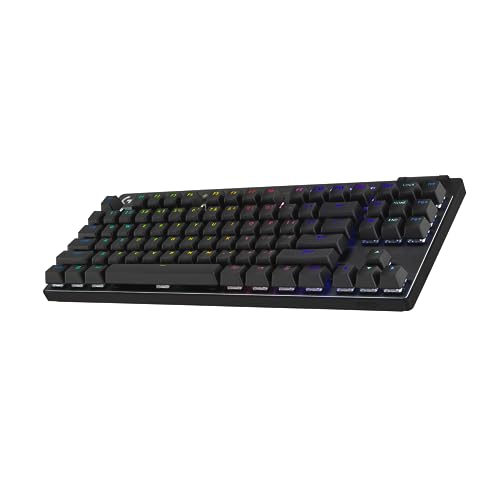
Logitech G PRO Mechanical TKL (Best Onboard-Memory Pick)
Start with who this is for: anyone whose day centres on keyboards that do not keep track of your information — wired boards that work fully with no account, no cloud profile and no companion software, judged on what they do NOT send, store or require and who is tired of keyboards that were designed for somebody else’s desk. It is a no-nonsense esports TKL built with pro players, with clicky switches and a detachable cable for travel. See the current listing for the Logitech G PRO Mechanical TKL to confirm the exact variant before ordering.
Strengths
- Compact TKL footprint is the tournament standard for a reason
- Detachable cable and sturdy build travel well between events
- Onboard memory keeps your lighting profile on any PC
Trade-offs
- This variant’s clicky switches are loud for home offices
- Micro-USB connector feels dated next to USB-C rivals
- No wireless option and no number pad
Key specs
- Layout: Tenkeyless, pro esports design
- Switches: GX Blue clicky (this variant)
- Backlight: LIGHTSYNC RGB
- Connectivity: Wired, detachable Micro-USB cable
- Extras: Onboard memory for lighting profiles
If the strengths above read like your weekly routine and the trade-offs read like somebody else’s problem, stop comparing: that match, not the badge order, is what a right purchase looks like in this category.
On the Logitech G PRO Mechanical TKL specifically — finally, judge this pick against the alternative of buying twice. The cheapest route through this category often means a disappointing first purchase replaced within a year; a mid-priced, standard-parts design like this one usually costs less across three years even when its ticket is higher on day one.
A note on pairing the Logitech G PRO Mechanical TKL with the rest of your life: because it connects via wired with a detachable Micro-USB cable, this tenkeyless esports board plays well with the way most people actually work — one main machine, occasional second device, occasional travel. If your reality is more extreme than that (three machines daily, constant venue changes), weigh the trade-offs list above accordingly, because connection juggling is where this pick’s limits will show first.
One more consideration on the Logitech G PRO Mechanical TKL: there is a value question hiding in this pick: what does the extra money over the cheapest option actually purchase? In this case it purchases the onboard memory for lighting profiles and the build consistency behind it — things you feel every session rather than admire once. Whether that trade is worth it depends on hours used per week, and the verdict line below is written for the heavier user.
Best for: compact TKL footprint is the tournament standard for a reason — the defining strength for keyboards that do not keep track of your information — wired boards that work fully with no account, no cloud profile and no companion software, judged on what they do NOT send, store or require / Not suited for: buyers for whom this matters most — this variant’s clicky switches are loud for home offices

HyperX Alloy Origins 60 (Best Compact Pick)
Some picks win on a spec sheet; this one wins on the second week. It is a dense aluminium 60% board with fast linear switches and PBT keycaps, and its case rests on how completely it serves keyboards that do not keep track of your information — wired boards that work fully with no account, no cloud profile and no companion software, judged on what they do NOT send, store or require once the new-gear novelty has worn off. See the current listing for the HyperX Alloy Origins 60 to confirm the exact variant before ordering.
Strengths
- Aluminium body feels far more premium than most boards at this size
- Linear switches and NKRO suit fast, repeated key presses in games
- Double-shot PBT keycaps will not shine smooth like ABS caps
Trade-offs
- Wired only — no Bluetooth or 2.4GHz option
- 60% layout forces arrows and F-keys onto a function layer
- NGENUITY software is Windows-focused; Mac users get basic function only
Key specs
- Layout: 60%, 61 keys
- Switches: HyperX Red linear mechanical
- Keycaps: Double-shot PBT
- Body: Full aluminium alloy body
- Connectivity: Wired USB-C (detachable)
- Software: HyperX NGENUITY for RGB and macros
In daily use, what sets this board apart is consistency: the second hour feels like the first, and the board never becomes the thing you are thinking about when you should be thinking about the work. For keyboards that do not keep track of your information — wired boards that work fully with no account, no cloud profile and no companion software, judged on what they do NOT send, store or require, that invisibility is the highest compliment a keyboard can earn.
On the HyperX Alloy Origins 60 specifically — noise, heat and light are the three side-effects nobody puts on a box. This pick manages all three conservatively — nothing here will announce itself to the next room, cook your palms or light the ceiling at night unless you ask it to, and for shared spaces that restraint is a genuine feature.
Travel and storage, briefly: a 60% gaming board survives bags and venue changes when its cable is coiled rather than yanked, its receiver or accessories travel in the same pouch, and it is never the heaviest thing in the bag resting on something fragile. Two minutes of packing discipline is the cheapest insurance in this whole guide.
One more consideration on the HyperX Alloy Origins 60: sound deserves its own sentence, because it is the thing reviews capture worst. In a real room — not a studio recording — this board’s character comes from its construction and switch choice working together, and it sits at the civilised end of its class. If your room is shared, that is not a footnote; it is the feature.
Best for: aluminium body feels far more premium than most boards at this size — the defining strength for keyboards that do not keep track of your information — wired boards that work fully with no account, no cloud profile and no companion software, judged on what they do NOT send, store or require / Not suited for: buyers for whom this matters most — wired only — no Bluetooth or 2.4GHz option

Corsair K70 RGB TKL Champion Series (Best Tournament Pick)
The case for this board is simple. For keyboards that do not keep track of your information — wired boards that work fully with no account, no cloud profile and no companion software, judged on what they do NOT send, store or require, the market splits into boards that compromise quietly and boards that do not — and this one is firmly in the second group. It is a tenkeyless tournament board with Cherry MX Speed switches in an aluminium frame. See the current listing for the Corsair K70 RGB TKL Champion Series to confirm the exact variant before ordering.
Strengths
- TKL layout frees mouse room while keeping dedicated arrows and F-row
- Cherry MX Speed switches are proven in tournament play
- Detachable cable and tournament switch are designed for travel to events
Trade-offs
- No number pad for data entry or spreadsheet work
- Wired only — no wireless freedom at the desk
- Per-key RGB at full brightness is a distraction some workplaces dislike
Key specs
- Layout: Tenkeyless Champion Series
- Switches: Cherry MX Speed
- Frame: Aluminium frame
- Backlight: Per-key RGB
- Connectivity: Wired USB-C (detachable)
- Extras: Tournament switch
The honest summary is that this pick trades breadth for depth — it does the core job of keyboards that do not keep track of your information — wired boards that work fully with no account, no cloud profile and no companion software, judged on what they do NOT send, store or require properly, with quality you can feel in every keystroke, and asks you to forgive a short, clearly listed set of compromises in return.
On the Corsair K70 RGB TKL Champion Series specifically — durability is the quiet argument for this pick. The parts that fail on keyboards are predictable: cables at the strain relief, legends wearing smooth, a single switch going scratchy, a battery swelling in year three. This design addresses more of that list than most rivals — standard parts where standard parts exist, and nothing exotic where a failure would orphan the whole board.
Long-term, the ownership story with the Corsair K70 RGB TKL Champion Series is about parts and standards. Where this design uses standard, replaceable components, a failure in year three is a five-minute fix; where it uses something proprietary, the same failure is a replacement purchase. That asymmetry — invisible in the first month — is priced into the ranking this pick received, and it is one of the reasons it sits where it does in the table.
One more consideration on the Corsair K70 RGB TKL Champion Series: compatibility deserves a plainer statement than most listings give. This tenkeyless gaming board connects via wired USB-C with a detachable cable, and that single fact decides which of your machines it serves well and which it merely tolerates. Readers with an unusual machine in the mix — an old laptop, a locked-down work computer, a tablet that is picky about accessories — should weight this paragraph heavily.
Best for: tKL layout frees mouse room while keeping dedicated arrows and F-row — the defining strength for keyboards that do not keep track of your information — wired boards that work fully with no account, no cloud profile and no companion software, judged on what they do NOT send, store or require / Not suited for: buyers for whom this matters most — no number pad for data entry or spreadsheet work

Redragon S101-3 PRO Keyboard and Mouse Combo (Best Value Combo)
Readers with this exact brief tend to split into two camps — those who want the safest answer and those who want the most character. This pick is unusual in satisfying both: it is a budget full-size keyboard-and-mouse combo with RGB backlighting and macro keys, with its compromises listed plainly below rather than hidden. See the current listing for the Redragon S101-3 PRO Keyboard and Mouse Combo to confirm the exact variant before ordering.
Strengths
- Keyboard and mouse in one box is the cheapest way to complete a setup
- Dedicated macro record keys are rare at this budget tier
- Full-size layout with numpad suits schoolwork and spreadsheets too
Trade-offs
- Membrane-style key feel is mushier than any mechanical board here
- Build materials feel budget — expect flex and lighter keycaps
- Software is basic compared with Razer, Corsair or Logitech suites
Key specs
- Layout: Full-size keyboard with RGB backlighting
- Combo: Matching gaming mouse included
- Keys: Programmable keys with macro record keys
- Software: Redragon software for macros and lighting
- Connectivity: Wired USB
Judge this pick the way owners do after a month: not by the unboxing, but by whether it ever made you think about it during work you cared about. For keyboards that do not keep track of your information — wired boards that work fully with no account, no cloud profile and no companion software, judged on what they do NOT send, store or require, it passes that test — present when you reach for it, invisible the rest of the time.
On the Redragon S101-3 PRO Keyboard and Mouse Combo specifically — think about the second year of ownership. First-year impressions are dominated by novelty; second-year satisfaction is dominated by small frictions — a cable that frays, a pairing that forgets, a finish that shows every fingerprint. This design’s materials and standards were chosen with that second year in mind, which is rarer in this category than it should be.
If more than one person will use the Redragon S101-3 PRO Keyboard and Mouse Combo, agree the ground rules early — whose profile or device slot is whose, where it charges or parks, and what gets cleaned how. Shared gear fails socially before it fails mechanically, and this design’s multi-user story is good enough that the agreement is the only hard part.
One more consideration on the Redragon S101-3 PRO Keyboard and Mouse Combo: for readers upgrading from a basic bundled keyboard or a phone’s on-screen keys, the jump this pick represents is mostly about confidence: inputs register when and how you expect, every time. That predictability is what lets your attention stay on the work, the lesson or the game instead of on the tool.
Best for: keyboard and mouse in one box is the cheapest way to complete a setup — the defining strength for keyboards that do not keep track of your information — wired boards that work fully with no account, no cloud profile and no companion software, judged on what they do NOT send, store or require / Not suited for: buyers for whom this matters most — membrane-style key feel is mushier than any mechanical board here
Comparison Table
| Pick | Badge | Form | Connectivity | Price |
|---|---|---|---|---|
| Ducky One 3 | Best No-Software Pick | board | its standard connection options | Check price on Amazon |
| Logitech K120 | Best Budget Pick | board | its standard connection options | Check price on Amazon |
| Logitech G PRO Mechanical TKL | Best Onboard-Memory Pick | tenkeyless esports board | wired with a detachable Micro-USB cable | Check price on Amazon |
| HyperX Alloy Origins 60 | Best Compact Pick | 60% gaming board | wired USB-C with a detachable cable | Check price on Amazon |
| Corsair K70 RGB TKL Champion Series | Best Tournament Pick | tenkeyless gaming board | wired USB-C with a detachable cable | Check price on Amazon |
| Redragon S101-3 PRO Keyboard and Mouse Combo | Best Value Combo | full-size budget combo | wired USB for both keyboard and mouse | Check price on Amazon |
How to Choose the Right Keyboard
Layout and size decide your desk
Full-size boards keep the number pad and a complete function row; tenkeyless (TKL) boards drop the numpad to pull your mouse closer; 75% and 65% layouts compress further; 60% boards keep only the core block and move everything else to a function layer. Choose by the keys your software uses daily, not by the photo. Data entry, CAD schedules and financial models argue for a numpad. Mouse-heavy work — gaming, design, video — argues for TKL or smaller so your shoulders stay square.
Switch type is the keyboard
On a mechanical board the switch is the typing experience. Linear switches press straight down with no bump — fast and quiet-ish, favoured for gaming. Tactile switches add a small bump you can feel — the all-round choice for typing accuracy. Clicky switches add a deliberate click — satisfying alone, antisocial in shared rooms. Scissor switches (laptop-style) are shallow and quiet; membrane boards are the soft, cheap default. If a listing offers several switches, the variant matters more than the brand name above it.
Connectivity: wired, 2.4GHz or Bluetooth
Wired is simplest and fastest, with zero battery management. 2.4GHz dongles give near-wired latency and work in BIOS menus and on consoles that reject Bluetooth. Bluetooth pairs with tablets and phones and switches between devices cleanly, but can sleep, lag or be blocked entirely by some consoles and locked-down work machines. Multi-device Easy-Switch style pairing is the feature hybrid desks actually use every day.
Keycaps and build decide year three
PBT keycaps resist the shine and wear that make ABS caps look greasy within a year; double-shot legends never rub off. An aluminium top plate or frame kills flex and adds the solid sound people describe as ‘premium’. Hot-swappable switch sockets let you replace a failed switch — or change the board’s feel — in minutes, and standard layouts let you fit the enormous world of custom keycap sets.
Backlighting, software and the extras
Backlighting is a working feature in dim rooms and a battery cost everywhere else. Per-key RGB is for gaming desks; single-colour or white backlights suit offices. Software suites (for macros and remapping) range from excellent to account-demanding bloat — QMK/VIA boards are the gold standard because they store everything on the board itself. Wrist rests, media dials and USB passthrough are worth real money only if your day actually uses them.
Software, macros and remapping
If your work repeats keystrokes — CAD commands, code snippets, spreadsheet shortcuts, Photoshop actions — remapping is worth real money. Onboard macro memory beats app-only macros because it follows the board to any machine. QMK/VIA boards offer the deepest, account-free customisation; vendor suites from the big gaming brands are close behind; basic office boards often offer a handful of reassignable keys through a lightweight app, which is enough for most people.
Noise: the spec nobody prints
There is no standard noise measurement for keyboards, so reason from construction instead. Clicky switches are loud by design. Tactile switches are moderate. Linear switches are quieter, and factory-lubed linear switches with dampening layers — now common on newer gaming boards — are quieter still. Scissor boards are the quietest of all. Desk material, keycap profile and your own typing force move the result as much as the switch does.
How Do You Set Up a New Office Keyboard for All-Day Comfort?
- Unbox and choose your connection: receiver for reliability at a fixed desk, Bluetooth if you switch between machines. Pair every device you own on day one — re-pairing later always happens mid-deadline.
- Set the board flat or with a slight negative tilt; the pop-out feet that angle a keyboard up toward you usually increase wrist extension, not comfort.
- Position the board so your elbows sit near ninety degrees with shoulders relaxed, and pull your mouse in close — a wide board plus a distant mouse is the classic shoulder-ache recipe.
- Load the manufacturer’s software once, set your macros and shortcuts, then check whether the settings live on the board or in the app; onboard storage survives a move to a new machine.
- Type for a full day before judging the feel. Scissor and tactile switches in particular feel strange for the first hours and right by the second day.
Troubleshooting quick list
- Problem: The wrong characters appear → Fix: Your device’s software layout does not match the key legends. Change the input language/layout in the operating system settings — the keyboard is sending the right codes to the wrong map.
- Problem: Backlight or features died after an update → Fix: Vendor software updates occasionally reset onboard profiles. Re-apply your profile in the software and, where offered, save it to onboard memory again.
- Problem: Notes stick or drop on a piano → Fix: Check polyphony first — dense pedalled passages exceed small note counts — then test the sustain pedal, which causes more ‘sticking note’ reports than any key fault.
- Problem: Controller pads trigger the wrong sounds → Fix: Pad banks and note maps differ between DAWs. Load the manufacturer’s template for your DAW rather than re-mapping note by note.
Maintenance is minimal but not zero: shake out and blow through the board monthly, wipe keycaps with a barely damp cloth, and keep the cable strain reliefs unstressed. Mechanical boards reward an annual deep clean — pull the caps (with a puller, not a knife), wash them in warm soapy water, and let them dry fully before refitting.
For a deeper repair walk-through on a related problem, see Best Keyboards For Rpgs Reddit.
Common Mistakes
- Buying a clicky mechanical board for a shared office because a review called the sound ‘satisfying’ — it is, for exactly one person.
- Judging a keyboard by a five-minute test. Key feel verdicts made in a shop reverse themselves by day three of real work.
- Ignoring the number pad question until the first spreadsheet lands.
- Paying for per-key RGB on a desk that faces a wall of windows in a bright office.
- Assuming ‘wireless’ means one thing — Bluetooth, 2.4GHz dongles and proprietary receivers behave very differently on locked-down work machines.
Final Recommendation
If you only read one paragraph, read this one. For most readers searching for the best keyboards that don t keep track of your information, the shortlist that matters is: Ducky One 3 (Best No-Software Pick); Logitech K120 (Best Budget Pick); Logitech G PRO Mechanical TKL (Best Onboard-Memory Pick). Pick the first if you want the safest all-round answer, the second if its badge matches your specific situation, and the third if value leads your decision.
Every pick above earned its place against the same test — keyboards that do not keep track of your information — wired boards that work fully with no account, no cloud profile and no companion software, judged on what they do NOT send, store or require — and any of the six will serve you better than a generic best-seller list pick. Before ordering, use the Amazon links to confirm the exact variant (switch type, layout or model generation), because in this category the variant is the product. Readers still torn between neighbouring briefs should compare Best Gaming Keyboards For Under $80 and Best Midi Keyboards For Ableton before deciding.
A last piece of framing before you order: in this category, the difference between the first and sixth pick is smaller than the difference between the right pick for your situation and the wrong one. Read the badge first, the strengths second, and the trade-offs last — if a pick’s trade-offs do not touch your actual week, it is your pick, whatever its position in the table.
Frequently Asked Questions
Do mechanical keyboards really type better than membrane ones?
For most people, yes — a defined actuation point and consistent key feel reduce bottoming-out force and typos over long sessions. But a good scissor board like the MX Keys S beats a bad mechanical board, and preference dominates: the honest answer is that switch type matters more than the mechanical label.
Wired, Bluetooth or 2.4GHz — which should I choose?
Wired for a fixed gaming or workstation desk, 2.4GHz for low-latency wireless that also works on consoles and in setup menus, and Bluetooth for multi-device and tablet use. Many boards offer two or three modes; buy the modes your devices actually accept.
What does hot-swappable actually get me?
Two things: repairs (a failed switch swaps in minutes with no soldering) and customisation (changing the board’s feel by changing switches). If you never plan to do either, it is a nice-to-have rather than a reason to pay more.
How long do mechanical switches last?
Quality mechanical switches are rated in the tens of millions of presses — far beyond the life of the keycaps and usually the board. In practice, boards die from spills, cables and electronics long before switches wear out.
Can one keyboard serve a Mac and a Windows PC?
Yes — look for a Mac/Windows mode switch or dual-legend keycaps and multi-device pairing. Keychron and Logitech boards handle this best; gaming boards usually work on Mac as basic keyboards but their software is Windows-only.
Do I need a wrist rest?
If your wrists bend upward or rest on the desk edge while typing, a rest used during pauses (not while actively typing) helps. Tall mechanical boards benefit most. Ergonomic split boards with built-in rests solve the problem differently.
One more comparison readers ask about often is covered in Best Keyboards For Apple.
Key Takeaways
- Best No-Software Pick: Ducky One 3 — Enthusiast build quality with PBT keycaps and excellent stabilisers
- Best Budget Pick: Logitech K120 — Spill-resistant design with drainage channels shrugs off office drinks
- Best Onboard-Memory Pick: Logitech G PRO Mechanical TKL — Compact TKL footprint is the tournament standard for a reason
- Best Compact Pick: HyperX Alloy Origins 60 — Aluminium body feels far more premium than most boards at this size
- Best Tournament Pick: Corsair K70 RGB TKL Champion Series — TKL layout frees mouse room while keeping dedicated arrows and F-row
- Best Value Combo: Redragon S101-3 PRO Keyboard and Mouse Combo — Keyboard and mouse in one box is the cheapest way to complete a setup
For best keyboards that don t keep track of your information, match the board to the job first and the headline specs second: the right switch feel, layout and connection for your desk will matter every day, long after the unboxing details are forgotten.