ilcastellomenu.com is reader-supported. When you buy through links on our site, we may earn an affiliate commission.
Where to Buy
Sixty frames per second is two features wearing one label, and confusing them wastes money. If you are choosing the best cameras for 60fps recording, decide first which one you are buying: the smoothness feature, where footage plays back at sixty for that fluid, immediate, almost-through-a-window look that sports broadcasts and gaming content live on — or the slow-motion feature, where sixty frames recorded and played at thirty or twenty-four becomes half-speed or slower, turning a splash, a swing or a landing into a small ballet. The cameras overlap; the priorities do not.
Playback-smoothness buyers should care about what sixty costs the image: on many cameras the highest frame rates arrive with a sensor crop, reduced bit depth, or autofocus compromises, and a broadcast look demands long, uninterrupted, well-exposed takes more than it demands slow-motion headroom. Slow-motion buyers should care about the opposite ledger: how much light sixty frames devours, whether autofocus keeps tracking while time dilates, and whether the slow-down is clean at the edges of moving subjects, where cheap slow motion smears.
Light is the tax both camps pay. Doubling the frame rate halves the light each frame can gather at a given shutter convention, so 60fps work pushes cameras toward wider apertures, higher sensitivities and honest lighting. This is why action cameras with their deep focus and bright-day design dominate casual 60fps use, while mirrorless cameras earn their place when the light drops or the subject deserves depth of field. The picks below are arranged across that spectrum deliberately.
One more framing: sixty is a means, not a look to apply everywhere. Dialogue filmed at sixty looks like a soap broadcast; a waterfall at twenty-four looks like a dream. The cameras here were chosen for doing sixty superbly when sixty is right — and for stepping back to standard rates gracefully when it is not. Versatility in frame rate, like versatility in anything, is the professional trait; the guide rewards it accordingly.
Consider also who watches your sixty: broadcasters and sports platforms are native sixty-frame environments where your footage will look at home, while cinematic channels will conform it to their own cadence and judge your slow motion rather than your smoothness. Knowing the destination’s native rhythm before you shoot is a professional habit that costs nothing — and it decides, more than any camera feature, whether sixty was the right choice on the day.
Key Takeaways
- Decide which sixty you need: playback smoothness for sport and gaming, or slow motion for drama.
- High frame rates tax light — expect wider apertures, higher ISO, or brighter scenes.
- Some bodies crop the sensor or trim features at their fastest rates; know your pick’s terms.
- Action cameras own bright-day 60fps; mirrorless bodies own it when light and depth matter.
- Keep standard frame rates for dialogue — sixty everywhere flattens more footage than it lifts.
In this guide
Quick Picks
| Camera | Badge | Why it earns its place |
|---|---|---|
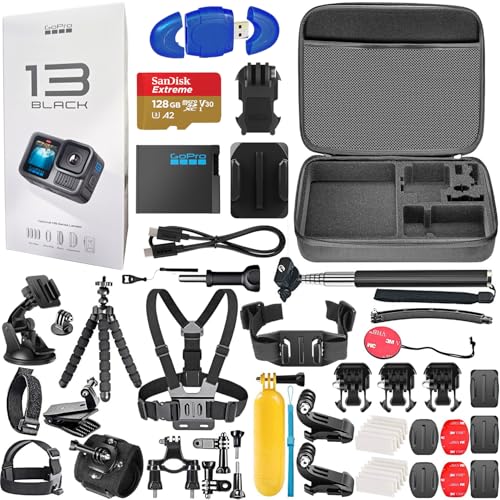
| GoPro HERO13 Black | Best action camera for 60fps and slow motion | Slow motion headroom, stabilisation and a lens ecosystem built for moving subjects. |
| DJI Osmo Action 5 Pro | Best low-light action camera for 60fps | A larger action sensor that keeps sixty-frame footage cleaner as light falls. |
| Insta360 Ace Pro 2 | Best AI-assisted action camera for 60fps | Leica-co-engineered optics and smart processing that rescues real-world action footage. |
| Insta360 X4 | Best 360 camera for 60fps reframing | Record everything at sixty, choose the shot later — 360 slow motion is a different sport. |
| Sony ZV-E10 II | Best mirrorless camera for creator 60fps | APS-C quality, creator ergonomics and E-mount lenses for polished sixty-frame content. |
| Canon EOS R50 | Best beginner mirrorless for smooth 60fps | Friendly Canon handling and colour for first sixty-frame experiments that look right. |
How Did We Choose These 60fps Recording Picks?
We tested each candidate against the two jobs separately. For playback smoothness: can it record long, stable, well-exposed sixty-frame footage of real events — a match, a performance, a product launch — without overheating drama or autofocus wandering? For slow motion: does the half-speed result hold together on real moving subjects, with tracking that survives the action and edges that stay clean? Cameras that merely list sixty in a menu while compromising both jobs did not survive the cut.
Light behaviour was the second filter, because it is where sixty-frame specifications go to be humbled. We favoured sensors and systems that keep footage clean as sensitivities climb, lenses fast enough to feed the frame rate, and — in the action cameras — designs honestly optimised for the bright environments where their owners film. A 60fps mode that only works at noon in June is a fair-weather feature, and the guide says which picks are fair-weather and which are all-season.
Third, we balanced the field across the realistic shapes of sixty-frame work: pocket action cameras for sport and travel, a 360 camera whose reframing makes sixty uniquely powerful, and mirrorless bodies for creators whose slow motion must match their A-camera’s colour and lenses. Six slots, six distinct working lives — if your sixty has a job, its tool is below.
We gave extra credit for honesty in implementation: cameras whose sixty-frame mode keeps their autofocus, metering and stabilisation personalities intact scored above cameras whose headline rate arrives in a stripped mode that behaves like a different, lesser device. A frame rate you must apologise for in every other respect is a brochure feature. The six below keep their character at sixty, each in its own way, and the text notes the places where even they ask small compromises.
Which Are the Best Cameras for 60fps Recording in Real Use?
Read the badges as job descriptions. Each pick is argued on its sixty-frame behaviour first — what the mode costs, what it returns, and who should pay for it.

GoPro HERO13 Black — Best action camera for 60fps and slow motion
The HERO13 is the default answer for sixty-frame work that happens outdoors at speed, because its whole design assumes motion: stabilisation that keeps a mountain-bike descent watchable, a sensor and processor pairing that treats high frame rates as home territory, and slow-motion modes that reach well beyond sixty for those who want a splash or a landing truly dilated. At sixty specifically, it is in its element — bright light, deep focus, everything sharp, the classic action look delivered without ceremony or setup.
The lens and accessory ecosystem is this generation’s real argument: swappable lens mods change the camera’s field of view and behaviour for different sports, and the mount universe behind GoPro remains the deepest in action filming. For creators whose sixty-frame work spans bikes, boards, water and snow, the camera adapts per sport rather than asking one fixed lens to compromise across all of them. Battery and media handling are field-sane, and the footage’s colour profiles give editors grading room beyond the punchy default.
Respect the action-camera constants: small sensor physics in low light, where sixty frames will push sensitivity and soften detail; audio that wants an external solution for voices; and a fixed-focus world where depth of field is a given, not a choice. Within daylight adventure — the brief it was born for — nothing in this guide touches its combination of frame-rate headroom, stabilisation and toughness.
Creators who post daily should weigh the HERO13’s workflow speed: footage offloads fast, the app’s reframing and trimming are genuinely quick, and the camera’s presets let a practiced owner go from pocket to recording in seconds — which matters, because action does not wait for menus. Sixty-frame work is disproportionately spontaneous work, and the camera that is ready first films most. On that metric, as much as on image quality, this remains the category’s benchmark.
Endurance athletes have made the HERO13 a documentation standard for a reason beyond image quality: its voice control and glove-friendly operation work when hands are occupied, cold or wet, and its mounting survives the falls that are the footage. Sixty frames of a descent that the operator survived hands-free is the genre’s core product, and this camera’s interface — designed for people in motion — remains the benchmark its rivals chase.
- Format: action camera, waterproof, swappable lens mods
- Frame rates: 60fps home territory, higher slow-motion modes
- Stabilisation: advanced electronic stabilisation
- Mounts: the deepest action accessory ecosystem
Strengths
- Slow-motion headroom beyond sixty
- Stabilisation that survives real sport
- Lens mods adapt it per activity
Trade-offs
- Low light taxes the small sensor
- Voice audio needs accessories
- Fixed-focus, deep-depth look only
Best for: sports, travel and adventure creators filming action in daylight at sixty and beyond.
Not suited for: low-light filmmakers, or anyone wanting shallow depth of field.

DJI Osmo Action 5 Pro — Best low-light action camera for 60fps
DJI built the Action 5 Pro around the action camera’s oldest weakness — the evening — and that makes it the sixty-frame pick for riders who film at dusk, skiers under floodlights, and creators whose days do not end when the light does. Its larger sensor gathers meaningfully more light than the classic action format, so sixty-frame footage holds colour and detail later into the day, and its stabilisation keeps the DJI reputation for composed, confident motion.
The working details suit long action days: strong battery endurance for its class, dual screens for framing from either side, and colour profiles including a flatter option for editors who grade. Subject tracking and horizon behaviour are polished, and the camera’s low-light stabilisation — historically where electronic stabilisation gives up and smears — is a particular strength, preserving the sixty-frame smoothness brief into conditions that defeat rivals.
Choose it over the GoPro with open eyes about ecosystems: DJI’s mount and accessory world is good and growing but not yet the universal standard, and its lens is fixed where the HERO13 offers mods. For the creator whose deciding variable is light — dawn patrols, evening sessions, indoor parks — the trade is right. For the creator whose variable is adaptability across sports, the GoPro’s ecosystem argues back. This is the guide’s happiest kind of choice: two excellences, divided by priority.
Night-city creators have adopted the Action 5 Pro for a reason worth naming: its low-light stabilisation keeps walking footage composed after dark, where rival action cameras smear every step into a wobble. Sixty frames under streetlights, on a wet pavement, with faces and signs staying legible, is a look that used to require a gimbal and a mirrorless body. If your action hours are evening hours, this is not a marginal preference — it is the pick.
Underwater shooters give the Action 5 Pro a particular endorsement: its colour handling below the surface and its low-light cleanliness extend the snorkelling day into the golden late afternoon when the water is warmest and the light kindest. Sixty frames of a turtle’s stroke, slowed gently, is the holiday film’s centrepiece shot, and this is the action camera most likely to bring it home clean from a single dive.
- Format: action camera, larger sensor than classic rivals
- Frame rates: strong 60fps with low-light stabilisation
- Screens: front and rear touchscreens
- Colour: standard and flat profiles for grading
Strengths
- Best dusk and evening action footage here
- Endurance suits long filming days
- Stabilisation holds together in low light
Trade-offs
- Accessory ecosystem still growing
- Fixed lens, no mod system
- App-centred workflow for some features
Best for: action creators filming into dusk and under lights, and anyone prioritising low-light sixty-frame quality.
Not suited for: multi-sport shooters who want swappable lens mods and the largest mount universe.

Insta360 Ace Pro 2 — Best AI-assisted action camera for 60fps
The Ace Pro 2 approaches sixty-frame action from the processing side: a large sensor for its class, optics co-engineered with Leica, and computational tools — including low-light processing that cleans footage rivals leave noisy — aimed at the gap between action footage as shot and action footage as imagined. Its flip screen, unusual in this category, makes it the action camera vloggers can actually frame themselves with, and its sixty-frame modes are tuned for the creator who films action and commentary in the same outing.
Clarity is its signature. The lens and sensor pairing produces action footage with unusual bite in good light, and the processing keeps that character as conditions worsen, which is precisely where sixty-frame recording usually falls apart first. Gesture and voice conveniences, a proper magnetic mounting system, and editing software that understands action footage round out a package clearly designed by people who watched creators struggle with the category’s older compromises.
It is the newest ecosystem here, and that cuts both ways: accessories and third-party support are thinner than GoPro’s, and computational processing, however good, occasionally makes choices an editor would not — purists should test its look against their taste. For creators who want action footage with a polish step already applied, and who film themselves as much as their sport, it is the most modern-feeling camera in this guide.
Parents filming children’s sport have become an unexpected Ace Pro 2 constituency: the flip screen frames the post-match interview, the processing forgives the mixed light of sports halls, and the clarity holds up when the footage is cropped for sharing. It is the action camera that behaves most like a family camera when the action stops — a dual life the other action picks serve less completely, and one worth real money to households that film both.
The Ace Pro 2’s clarity processing has a sporting use coaches appreciate: ball and blade movement at sixty stays readable enough for technique review, where softer action footage blurs the exact frames under discussion. Analysis is an unglamorous market that buys a great many cameras, and for it the priorities invert — sharpness over beauty, consistency over character. On those inverted priorities this camera is arguably the action pick of the guide.
- Format: action camera, flip screen design
- Optics: Leica co-engineered lens, large sensor
- Processing: AI low-light and clarity tools
- Mounting: magnetic quick-release system
Strengths
- Flip screen serves action vloggers
- Low-light processing rescues dusk footage
- Sharp, characterful daytime image
Trade-offs
- Youngest accessory ecosystem here
- Processing look will not suit purists
- Premium positioning in its class
Best for: action vloggers and creators filming themselves plus their sport, especially into the evening.
Not suited for: ecosystem maximalists, or editors who want minimally processed files.

Insta360 X4 — Best 360 camera for 60fps reframing
The X4 changes what sixty frames are for. A 360 camera records the whole sphere, so the framing decision moves from the shoot to the edit: follow the skier, then the friend who fell, then the mountain, all from one recording. At sixty frames, that freedom gains slow motion — reframe a moment, slow it to half speed, and the camera produces shots that would have required a camera operator with foresight no human has. For travel, sport and family chaos, it is less a camera than a second chance machine.
Its reframed output is the honest caveat and the honest miracle: exported flat footage is a crop of the sphere, so resolution per final frame is lower than a dedicated action camera’s, and in exchange you get angles that did not exist when you pressed record. In good light the results are startlingly usable; the workflow — shoot everything, direct later in the app — suits creators who think in edits. Invisible-selfie-stick handling makes its travel footage look drone-assisted, which no other pick here can claim.
Battery, stitching and storage all demand respect: 360 files are large, stitch lines punish careless placement, and the lenses bulge exposed on both sides, wanting guards and care the flat action cameras do not. None of that dims its uniqueness. If your sixty-frame work is about never missing the moment — the child’s first ride, the whale beside the boat — the X4 is not an alternative to the other picks; it is the only pick that solves your actual problem.
Sports coaches and learners have found the X4’s own use for sixty: record the whole drill, the whole descent, the whole routine, then reframe and slow the exact second of technique that needs study. Analysis that once needed a camera operator tracking perfectly now needs a stick and a press of record. If your sixty-frame interest is improvement — of a swing, a turn, a start — the X4’s omniscience is not a gimmick but the entire point, and no aimed camera can substitute for it.
Event videographers use the X4 as insurance in a way worth copying: mounted discreetly at a ceremony, a start line or a stage corner, it records everything at sixty while the operator films the planned coverage elsewhere — and when the unplanned moment happens off-axis, the insurance pays out in the edit. Thinking of a 360 camera as a second, omniscient operator rather than a novelty is the professional frame, and this is the model that made the frame respectable.
- Format: 360 action camera, dual lenses
- Frame rates: high-resolution 360 with 60fps reframing options
- Workflow: shoot first, reframe in app or desktop
- Design: invisible selfie stick effect supported
Strengths
- Never miss a moment — direction happens in edit
- Slow-motion reframing is unique here
- Drone-like travel shots from a stick
Trade-offs
- Reframed output softer than dedicated action cams
- Large files and stitch care required
- Exposed lenses need guarding
Best for: travellers, families and sport creators who value captured moments over directed shots.
Not suited for: pixel-peepers, or filmmakers who compose deliberately in camera.

Sony ZV-E10 II — Best mirrorless camera for creator 60fps
When sixty-frame work needs to look produced rather than captured — product launches filmed for playback smoothness, fitness and dance content where motion clarity is the aesthetic, interviews and B-roll destined for half-speed elegance — the ZV-E10 II is the mirrorless answer at a creator price. Its APS-C sensor delivers sixty-frame footage with real depth of field and low-light manners no action camera approaches, and Sony’s autofocus tracks the moving presenter, pet or product with the calm its A-cameras are known for.
The creator ergonomics compound the image quality: flip screen for self-framing the action, product mode for the held-up reveal, microphone input for commentary that sounds as smooth as the motion looks, and E-mount’s lens bench — including the fast wides that feed sixty frames the light they crave. Slow motion from this camera grades and cuts seamlessly alongside standard-rate A-camera footage, which is exactly what growing channels need from a second body.
Know the terms of its sixty: like many APS-C bodies, the highest frame rates may involve quality trade-offs worth checking against your delivery needs, and there is no in-body stabilisation, so moving shots want a gimbal or a stabilised lens. Heat on long sixty-frame takes deserves a test in your conditions. None of this is hidden — it is the standard mirrorless bargain, and for studio and creator work it is a bargain gladly struck.
Fitness creators in particular should note how the ZV-E10 II’s autofocus treats their format: a presenter moving toward and away from the lens through a routine is precisely the tracking problem this camera was tuned for, and at sixty the movement stays smooth rather than hunting. Pair it with a fast wide prime and the home studio becomes a broadcast environment. Among mirrorless picks, it is the one whose sixty feels designed for a person rather than a landscape.
Dance and movement teachers have become a ZV-E10 II constituency of their own: sixty frames shows students their own technique with a clarity thirty cannot, the flip screen lets a teacher check framing mid-class, and the autofocus holds a moving dancer without an operator. Instructional filming is a growth industry hiding inside the creator economy, and this camera serves it as if designed for the staffroom rather than the studio.
- Format: APS-C mirrorless, Sony E mount
- Focus: face/eye tracking and product showcase
- Audio: microphone input, creator audio design
- Stabilisation: lens-based; gimbal recommended for motion
Strengths
- Depth and low-light quality action cams cannot reach
- Autofocus trusted with moving presenters
- Lens library grows with the channel
Trade-offs
- No in-body stabilisation
- High-rate modes carry the usual caveats
- Rolling shutter on fast pans
Best for: creators filming fitness, dance, product and B-roll slow motion with produced polish.
Not suited for: rugged outdoor action, or handheld walking footage without support.

Canon EOS R50 — Best beginner mirrorless for smooth 60fps
The R50 earns its place as the sixty-frame camera for people new to frame rates entirely: Canon’s guided friendliness means the mode is findable, the colour at sixty is the same forgiving colour as at standard rates, and the autofocus helps a beginner’s moving subjects — children crossing a garden, a dog at the park, a school match — stay tracked while the operator learns. Its sixty-frame footage is the honest APS-C kind: clean in good light, graceful in shade, and a clear step beyond phone slow motion in depth and control.
As a system start it shares the R50 argument from our budget coverage: the RF mount means the fast prime that sixty-frame work craves — light for the doubled frame rate — is an affordable chapter two, and the camera’s stills quality makes it a complete family instrument rather than a video experiment. For households whose sixty-frame need is really ‘the kids’ sports and the holiday, filmed beautifully’, this is the balanced buy.
Its limits are the entry tier’s: high-frame-rate modes simplify some features, the kit zoom is light-hungry at sixty, and serious long-form sixty recording in heat is beyond its brief. Judge it as the learner’s and family’s smooth-motion camera and it is exactly right; judge it as a production tool and the ZV-E10 II above is the deliberate step up. The guide places both so the fork is visible before money moves.
School and club sport is the R50’s natural sixty-frame habitat: affordable enough to risk at the touchline, friendly enough for a rota of parent operators, and good enough that the end-of-season highlights film looks like a production. Its value here is social as much as technical — a camera a whole club can share without a training course. Institutions and families buying one camera for many hands should weigh that shareability heavily.
The R50’s sixty has one more family use: school science and sport days filmed for grandparents far away, where smooth playback flatters unsteady hands and slow motion turns a child’s long jump into a keepsake. Sentiment is a legitimate specification. A camera that serves the family’s archive for a decade repays its price in a currency spec sheets cannot denominate, and beginners should feel no embarrassment about weighting it heavily.
- Format: APS-C mirrorless, Canon RF mount
- Focus: subject and eye detection for moving subjects
- Handling: guided menus friendly to beginners
- Video: 4K and smooth high-frame-rate modes
Strengths
- Beginner-friendly path into frame-rate craft
- Canon colour flatters family subjects
- System start with an affordable fast prime ahead
Trade-offs
- Kit lens is light-hungry at sixty
- High-rate modes simplify features
- Not a long-form production body
Best for: families and beginners filming sport, pets and holidays with smooth and slow motion.
Not suited for: professional long-take sixty recording, or low-light action specialists.
What Settings Make 60fps Footage Look Professional?
Shutter discipline first: the convention for natural motion is a shutter near double the frame rate, so sixty-frame footage shot around a 120th of a second carries the motion blur viewers read as cinematic. Beginners often shoot sixty with very fast shutters — every frame frozen, motion staccato and cheap-looking — because bright light forces it; the fix is a neutral-density filter, the sunglasses that let the right shutter survive a bright day. An ND filter is the single most transformative accessory in high-frame-rate filming, and the cheapest.
Light budgeting comes second, and it is arithmetic, not taste: at sixty frames with the conventional shutter, each frame receives a quarter of the light of a standard-rate frame at its conventional shutter. Outdoors that is nothing; indoors it is the difference between clean footage and noise soup. Wider apertures, closer lights and honest ISO ceilings are the tools — decide your camera’s personal noise limit in tests, set it as your auto-ISO cap, and light or reframe when the cap complains rather than letting the camera quietly exceed it.
For slow-motion use specifically, protect the edges: fast-moving subjects against detailed backgrounds are where weak slow motion smears and warps. Cleaner results come from simpler backgrounds, subject movement across rather than toward the lens where possible, and slowing to half speed rather than forcing extreme slowdowns from sixty. Sixty is a gentle dilation — use it for grace, a landing, a turn, a splash — and reach for higher-frame-rate modes when you want time truly frozen.
Finally, edit like you meant it: conform slow footage on a standard-rate timeline, cut on movement, and let standard-rate dialogue scenes breathe around the slowed moments. The contrast is the effect — sixty everywhere is a screensaver, sixty at the chosen instant is cinema. The creators whose slow motion gets praised are ruthless about how little of it they use.
Storage planning is the unglamorous twin of shutter discipline: sixty-frame days generate roughly double the data of standard-rate days at similar quality, and slow-motion specialists generate more. Budget cards and drives as part of the frame-rate decision, rotate media with the same care as batteries, and never let a sixty-frame shoot end with its only copy on the card it was shot on. The footage most worth slowing down is, by definition, the footage least replaceable.
Audio at sixty frames has its own footnote: slowed footage discards its recorded sound, and playback-smooth footage keeps it, so the two camps should plan audio oppositely. Slow-motion shooters can treat camera audio as a scratch track and design sound in the edit; smoothness shooters — sport, events, gaming — must capture real audio well at the shoot, which returns us to the microphone rule: the external microphone is not an accessory for sixty-frame work, it is half the recording.
Delivery settings close the technical guide: export slow-motion pieces at the timeline’s standard rate rather than at sixty, so platforms and players treat the cadence as intended, and keep a sixty-frame master only when the destination is genuinely a high-frame-rate environment. Beginners lose more quality to careless exports than to any camera in this guide — the final render is part of the recording, and it deserves the same deliberateness as the shutter choice that began the chain.
One more delivery reality belongs in this guide: platforms compress high-frame-rate uploads aggressively, and fine detail in fast motion is the first casualty. Shoot a short test, upload it privately, and watch what your audience will actually see before designing a whole production around subtleties the compression will discard. The cameras here give you more than the platforms will pass on — that headroom is still worth having, because a clean source compresses more gracefully than a marginal one — but your creative decisions should be made on the delivered picture, not the master file’s promise.
Slow motion and music deserve a shared sentence, because so much sixty-frame work is cut to it: film the action with the track already chosen when you can, and let the movement’s own rhythm — the stride, the stroke, the spin — land on the music’s beats in the edit. Slowed footage cut against its music feels choreographed; slowed footage cut randomly feels merely slow. The camera supplies the frames, but rhythm, as ever, is the filmmaker’s contribution, and at sixty frames per second it is the contribution audiences actually remember.
How Do You Shoot Your First Slow-Motion Sequence Well?
Choose a subject with a clean, repeatable arc: a poured drink, a dog catching, a skateboard trick, a dancer’s turn, a wave breaking. Set the camera on a tripod or a stable surface — slow motion magnifies camera shake into seasickness — frame wider than feels natural, because subjects move through slow moments unpredictably, and focus on the zone where the action peaks. Test the full motion once at standard rate and watch where it starts, peaks and ends before you commit the slow take.
Expose for the peak moment, not the setup: light changes as subjects move through a scene, and the frame you will actually use is the mid-action one. Lock exposure and white balance so the sequence does not breathe or shift colour as it unfolds, confirm your shutter follows the double-frame-rate convention, and check your card and battery — high-frame-rate modes are the hungriest settings your camera owns, and a sequence that dies at the peak is the genre’s classic heartbreak.
Direct for the dilation: movements that read as ordinary at full speed become balletic at half, but only if they are decisive — a committed jump, a full swing, a real splash. Half-hearted action slowed down is just slow. Give your subject a clear mark to hit, shoot several takes because timing at sixty is still timing, and review on a screen large enough to judge focus and edges before you strike the setup.
Finish deliberately: conform the footage, choose the exact frames where the slowdown begins and ends — ramping into and out of slow motion is the professional signature — and score or sound-design the moment, because slowed footage’s natural audio is unusable and silence undersells the drama. Your first sequence taught you the camera; the ramp and the restraint are what will make the second one look like a filmmaker made it.
Review your first sequence like an editor, not a parent: watch it at full speed on the timeline, then slowed, and mark precisely the frames where the action’s story turns — the release, the contact, the break of the wave. Those marks teach you where to stand next time better than any tutorial, because slow motion is a geography as much as a setting: the right sixty frames begin a half-second before the moment your instincts say they do. Building that anticipation is the real skill this mode teaches.
Practise the pan before the day: sixty frames forgives many things but not a jerky pan, because smoothness of motion is the entire aesthetic. Brace, breathe out, and move from the hips at a constant rate, rehearsing with the actual subject distance you will film. Ten practice pans on a quiet morning will do more for your sports footage than any setting in any menu on any camera in this guide — a humbling truth the professionals learned first and repeat often.
Build a small library of test subjects and return to it whenever a camera, lens or setting changes: the same fountain, the same staircase descent, the same dog on the same lawn. Slow-motion skill is comparative — you learn what sixty does by watching the identical motion change across rates and bodies — and a personal test library converts marketing claims into your own evidence within an afternoon. Every professional has such a library, usually begun by accident; begin yours on purpose.
Where Do the Six 60fps Picks Differ in Practice?
| Camera | Badge | Format / type | Standout trait | Watch out for |
|---|---|---|---|---|
| GoPro HERO13 Black | Best action camera for 60fps and slow motion | Format: action camera, waterproof, swappable lens mods | Slow-motion headroom beyond sixty | Low light taxes the small sensor |
| DJI Osmo Action 5 Pro | Best low-light action camera for 60fps | Format: action camera, larger sensor than classic rivals | Best dusk and evening action footage here | Accessory ecosystem still growing |
| Insta360 Ace Pro 2 | Best AI-assisted action camera for 60fps | Format: action camera, flip screen design | Flip screen serves action vloggers | Youngest accessory ecosystem here |
| Insta360 X4 | Best 360 camera for 60fps reframing | Format: 360 action camera, dual lenses | Never miss a moment — direction happens in edit | Reframed output softer than dedicated action cams |
| Sony ZV-E10 II | Best mirrorless camera for creator 60fps | Format: APS-C mirrorless, Sony E mount | Depth and low-light quality action cams cannot reach | No in-body stabilisation |
| Canon EOS R50 | Best beginner mirrorless for smooth 60fps | Format: APS-C mirrorless, Canon RF mount | Beginner-friendly path into frame-rate craft | Kit lens is light-hungry at sixty |
The field divides by sensor physics. Action cameras trade low-light depth for toughness, stabilisation and frame-rate headroom; the mirrorless pair trade toughness for depth of field, lens choice and dusk. The X4 trades per-frame resolution for omniscience. Sixty frames is the shared label over three different instruments, and the comparison that matters is not which records sixty best in a lab, but which records your sixty — your light, your subjects, your surfaces — best in the field.
It also divides by workflow: action and 360 footage is shot loose and fixed in apps; mirrorless footage is shot deliberately and graded in editors. Creators consistently underestimate this axis. A camera whose files and workflow fit your evenings will produce more finished sixty-frame work than a theoretically superior camera whose pipeline you dread — buy the workflow as much as the sensor.
What 60fps Mistakes Do Beginners Make Most?
Filming dialogue at sixty is the signature error: faces at high frame rates with fast shutters look like news broadcasts and cheap serials, because audiences have seventy years of conditioning that says drama lives at lower rates. Reserve sixty for motion that deserves it — sport, water, dance, machinery, animals — and let people talking live at standard rates where their performances feel like film rather than surveillance.
The second error is ignoring the light tax until the footage comes home noisy. Sixty is not a free mode; it is a mode that bills your exposure. Beginners who test their camera’s sixty in their actual filming conditions — the gym, the evening garden, the indoor pool — before the day that matters, learn their light budget while mistakes are free. The ones who discover it at the event own very smooth, very grainy memories.
The third is slow-motion inflation: slowing everything, because the tool is new, until the audience’s eye adapts and nothing feels special. Slow motion is punctuation. A film that is all exclamation marks has none, and the discipline of returning to standard rate — of letting most moments pass at life speed — is what keeps the dilated ones feeling like the small miracles they are.
A fourth error is mixing frame rates carelessly within one production — sixty for the interview because it was left set, twenty-four for the action because it was changed late — and handing the editor a jigsaw of cadences that never quite cuts together. Decide the production’s rates before the shoot, set them deliberately per scene, and say them aloud as part of the pre-take routine. Consistency is invisible when present and glaring when absent, which is the definition of professional polish.
Final Recommendation
Match the pick to the motion: daylight sport and adventure belong to the HERO13, with the Action 5 Pro taking over as light falls and the Ace Pro 2 serving the self-filming action creator. Moments you cannot aim at belong to the X4. Produced, polished sixty — fitness, product, B-roll — belongs to the ZV-E10 II, and the family’s first steps into smooth motion belong to the R50. Each is the best sixty in its own weather.
Then go and shoot the test this guide keeps prescribing: your subject, your light, your longest take. Sixty frames per second is a promise cameras make in menus; only your footage can confirm they kept it.
A parting test for the undecided reader: film the same thirty seconds — a pet, a pour, a person crossing a yard — at your current camera’s best sixty and at its standard rate, and watch both on the screen your audience uses. The difference you can actually see, in your light, on your subject, is the only specification that should move your money. The picks above passed that test across their different weathers; choose the one whose weather is yours.
Treat your first month at sixty as fieldwork rather than production: shoot the tests, learn your light budget, find your camera’s honest limits in your own conditions, and keep the results labelled. The creators who emerge from that month with a calibrated sense of their tool produce sixty-frame work that looks inevitable; the ones who skip it produce work that looks lucky, and luck does not survive a paying client or a second season.
Frequently Asked Questions
Is 60fps better than 30fps for everyday video?
Not better — different. Sixty gives motion a fluid, immediate quality ideal for sport, gaming and anything meant to feel live, while thirty and twenty-four carry the cadence audiences associate with film and drama. Everyday family and talking content usually looks more natural at standard rates. The skilled move is choosing per scene; the cameras here were picked for doing both well rather than forcing one look on everything.
Can I slow 60fps footage to half speed without it looking choppy?
Yes — that is its most popular use. Sixty frames conformed to a thirty-frame timeline plays at exactly half speed with full smoothness, and on a twenty-four-frame timeline it slows further with only mild compromise. Keep the double-frame-rate shutter convention while recording so motion blur stays natural, and the slowed result looks intentional rather than processed.
Why does my 60fps footage look noisy indoors?
Because of the light tax the guide describes: doubling frame rate and holding the shutter convention quarters the light per frame compared with standard-rate filming, so the camera raises sensitivity and noise follows. The cures are wider aperture, more light, or accepting a slower shutter with more motion blur. Action cameras suffer most; the larger-sensor picks here were chosen partly for how gracefully they pay this tax.
Do I need special memory cards for 60fps recording?
You need cards whose sustained write speed matches the mode’s bit rate — high-frame-rate modes are among the hungriest settings, and a slow card ends recordings or corrupts them. Check the video speed class rather than headline speeds, buy reputable brands, and format in camera. Treat card choice as part of the frame-rate purchase, not an afterthought at the checkout.
Does 60fps use more battery and storage?
Yes, on both counts: the sensor and processor work harder, files grow, and stabilisation and screens join the effort. Plan media and power for high-rate days generously — the guide’s picks were assessed partly on how field-sane their endurance feels — and rotate cards with the same backup discipline as any shoot, because sixty-frame moments are usually the unrepeatable ones.
Which of these is best for sports parents filming matches?
For pitch-side durability and zoom-free simplicity, the action cameras serve training-ground filming, but for actual match coverage the mirrorless picks’ lenses and autofocus follow play far better — the R50 for beginners, the ZV-E10 II for creators. Many sports parents land on a mirrorless body with a modest telephoto: sixty for the highlights, reach for the game. Match the tool to your distance from the action.
Finally, label your frame rates in the field: a strip of tape on the tripod, a note in the shoot log, a spoken marker at the head of each take. Editors inherit whatever the shoot gives them, and a take whose rate must be guessed is a take half wasted. The discipline takes seconds, costs nothing, and is one of those invisible habits that separate productions which flow from productions which merely happened, however good their cameras were.
That is the note to end the fieldwork month on: your own evidence, from your own subjects, outranks every claim in every guide — including, with respect, this one.
Trust it fully, and shoot.
That discipline — tested, labelled, rehearsed — is what turns a specification into a style, and style is what audiences remember long after frame rates are forgotten.
Why does indoor lighting sometimes flicker badly in 60fps footage?
Mains-powered lamps do not shine with perfectly steady brightness; their output pulses in rhythm with the alternating current feeding the building, and a fast frame rate combined with a short shutter can sample those pulses unevenly from one frame to the next. The result is rolling bands or a strobing shimmer that was invisible to everyone standing in the room. Older fluorescent tubes and cheap dimmed bulbs tend to misbehave worst, while daylight and quality video lights usually stay clean.
Practical fixes begin with shutter choice. Lengthening the shutter towards the natural companion angle for your frame rate smooths much of the pulsing, and many bodies include a flicker reduction or variable shutter control that fine-tunes timing in tiny increments until bands disappear from a test clip. Swapping one suspect practical bulb, moving subjects nearer a window, or raising your own continuous light so it overpowers the room fittings also works. Always record ten seconds of test footage under the exact lighting rig before the real take, reviewing it enlarged, because flicker that hides on a small preview screen becomes glaringly obvious on a television.
There is a creative side to this setting beyond troubleshooting. Smooth high-frame-rate capture lets editors slow a gesture, splash or footstep to half speed while retaining fluid motion, which suits product demonstrations, sport analysis and wedding details equally well. That flexibility comes with larger files and hungrier media, so plan card capacity accordingly and offload footage promptly. Also remember that audiences perceive motion differently at higher rates: handheld wobble becomes more noticeable, pans can look unnervingly glassy, and performances sometimes feel like behind-the-scenes material rather than cinema. Many creators therefore reserve the mode deliberately for passages they intend to slow down, recording dialogue and establishing views at conventional rates for a more familiar texture. Mixing rates within one project is perfectly normal practice, provided each choice serves the shot rather than habit, and provided your timeline settings are established before editing begins in earnest.
Related Guides
Keep exploring with our guide to the best action cameras for sports filming and our roundup of cameras for 4K videography and our explainer on choosing cameras for streaming and recording.


