ilcastellomenu.com is reader-supported. When you buy through links on our site, we may earn an affiliate commission.
Where to Buy a Camera That Refuses to Choose Between Photos and Videos
The best affordable cameras for photos and videos exist because modern life refuses to separate the two. The birthday is a photograph until it becomes a song; the holiday is a video until the sunset demands a still; the new puppy is both, hourly. Every camera below is sold through Amazon, where you can check the current listing, the kit options, and delivery before you commit, and because prices wander constantly, this guide argues in tiers and trade-offs rather than figures that would be stale by the weekend. What matters is balance: a camera that treats stills and moving images as equal citizens, at a price that leaves room for the lens, the card, and the tripod.
Balance is harder to engineer than excellence in one direction. A stills camera adding video often hides the movie mode behind menus, crops the frame mysteriously, or gives up focusing after ten seconds of a child’s recital. A video camera adding stills may produce photographs that feel like screenshots, with controls arranged for someone who will never touch them. The six cameras here were chosen because the switch between the two disciplines costs the photographer almost nothing: a dial turn, a button, and the camera is suddenly fluent in the other language.
There is a second balance to strike, between the camera’s abilities and the photographer’s. Most buyers of a hybrid camera are stepping up from a phone, and the step should feel like promotion, not enrollment in a night school. The picks below automate gracefully, face detection, scene intelligence, dependable auto-exposure in both disciplines, while leaving the manual doors unlocked for the day curiosity arrives. A hybrid camera is often a household’s shared instrument, passed between partners and teenagers, and that social reality shaped this ranking as much as any specification.
Finally, a word about the word affordable. It also describes a relationship with the future: an affordable hybrid is one whose accessories, lenses, batteries, and repairs remain affordable at year three, when the warranty is a memory and the camera is simply the family’s. Systems with deep used markets and common batteries pass that test; exotic bargains with proprietary everything quietly fail it, which is why this page favors the great mainstream systems even when a niche rival photographs a chart more impressively. In hybrid land it does not mean the cheapest body on the shelf; it means the cheapest body that does not force a second purchase when your ambitions wake up. Every camera here sits inside a system or a form factor with a future, and each review states plainly where that future leads and where it ends. Buy once, cry once, photograph everything.
Key Takeaways
- True hybrid value means switching between stills and video costs seconds, not menu expeditions.
- Face and eye autofocus matters equally in both disciplines, especially for family subjects.
- A flip screen serves video and low-angle stills alike; it is the hybrid feature to insist on.
- Kit lenses decide first impressions, so judge a camera by the pair you will actually own.
- Leave budget for a fast prime; it improves photographs and video in equal measure.
In this guide
Quick Picks
| Pick | Badge | Why it balances both worlds |
|---|---|---|
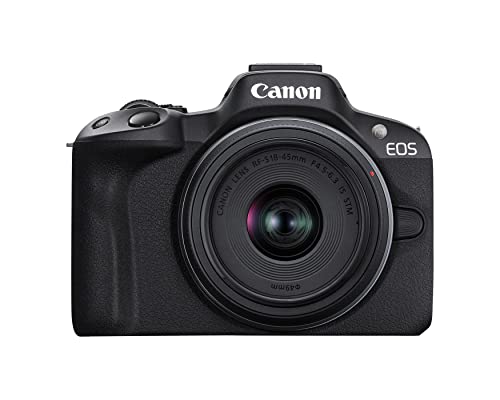
| Canon EOS R50 | Best All-Round Hybrid | Warm stills, oversampled video, and autofocus that flatters beginners in both modes. |
| Nikon Z50 II | Best for Growing Skills | Deep tools for stills and film in one refined, enthusiast-grade body. |
| Sony ZV-E10 II | Best When Video Leads | Creator video first, with stills strong enough for the family archive. |
| Canon EOS R10 | Best for Action in Both Modes | Burst stills and tracking video for sports, pets, and performances. |
| Nikon Z30 | Best for Video Conversations | Long, calm recording for lessons and talks, with honest stills on the side. |
| Canon PowerShot G7 X Mark III | Best Pocket Hybrid | One-inch stills and 4K clips from a camera that fits a coat pocket. |
How Did We Weigh Stills Against Video in These Rankings?
We scored each camera twice, once as a photographer’s tool and once as a filmmaker’s, then multiplied rather than averaged the scores, because a hybrid that fails either discipline fails the brief. Stills scoring covered autofocus reliability on faces, file quality in poor light, viewfinder and control comfort, and burst behavior for the moving subjects of ordinary life. Video scoring covered focus smoothness, recording stamina, screen articulation, audio pathways, and how the footage looks without grading, since most hybrid owners publish the camera’s own colors.
We also timed the switch. In a real hallway, with a child doing something unrepeatable, how long from photographing to filming? Cameras with a dedicated movie position on the dial, settings remembered per mode, and screens that flip without gymnastics won those seconds, and seconds are the currency of family photography. Household sharing was tested in the imagination as well: could a second person pick the camera up and succeed within a minute? The bodies with honest automatic modes and guided interfaces earned their place partly on that hospitality.
Every model was checked against the verified pool for this site, and we kept the ownership math honest: body, kit lens, one fast prime eventually, cards, a spare battery. The cameras below are the ones whose total still reads as affordable when the whole hybrid kit is counted, not merely the ones with an attractive body price and an expensive destiny.
A note on hands before the reviews begin. Hybrid cameras are held for photographs and propped for films, gripped at arm’s length and rested on tables, passed between adults and borrowed by teenagers with jam on their fingers. The bodies below were chosen partly for how they behave across that whole choreography: grips that welcome a telephoto without punishing a small hand, screens that survive being flipped a thousand times, and controls placed where a thumb falls in the dark of a theater. Specifications age; ergonomics are experienced at every single use, in both disciplines, for the life of the camera, and a body that fits its household’s hands will be used more than a superior body that does not. If you can hold candidates before buying, hold them; your hands are on the review panel too.
Which Hybrid Camera Matches the Way Your Household Shoots?

Canon EOS R50 — Best All-Round Hybrid
If the brief is one camera, two disciplines, no drama, the R50 is the answer this page gives first. Its stills carry Canon’s famously kind treatment of skin and color, so family photographs come out of the camera looking like the day felt. Its video is oversampled 4K with the same subject-tracking autofocus keeping faces sharp while a parent narrates, performs, or simply chases a toddler across a garden. The dial flips between the worlds without a settings funeral, and the camera remembers how each mode was left, a small courtesy that feels enormous in practice.
The body suits its hybrid brief physically: light enough to hold one-handed for a selfie video, grippy enough for a telephoto at the school play, with a fully articulating screen that serves the vlogger’s framing and the low-angle photograph of a crawling baby with equal grace. Beginners get a guided interface that explains itself; the day they outgrow it, the standard menus and full manual control are waiting underneath, along with the entire RF lens system and its affordable primes.
Compromises are the tier’s usual ones, stated plainly: one memory card slot, a battery that wants a spare on a full day out, and a kit lens that introduces the system politely rather than passionately. None of these touches the hybrid core. For the household or solo shooter who wants photographs and films from the same walk, the same party, the same holiday, without carrying two devices or two personalities, the R50 is the most harmonious instrument here.
- Mount: Canon RF interchangeable lenses
- Stills: people-friendly color, subject-detection autofocus
- Video: oversampled 4K with face tracking
- Screen: fully articulating for both disciplines
- Role: the household’s one-camera answer
Strengths
- Mode switching that never breaks the moment
- Photographs and footage share the same flattering color
- Guided help that retires gracefully as skill grows
Trade-offs
- Single card slot and modest battery
- Kit lens is an introduction, not a finale
- No in-body stabilization; lenses carry that duty
Best for: families, travelers, and solo shooters splitting time evenly. Not suited for: professionals needing dual-slot redundancy.

Nikon Z50 II — Best for Growing Skills
The Z50 II is the hybrid for the photographer who suspects, correctly, that they will be much better at this in two years and does not want the camera to be the ceiling. Nikon’s refined second-generation body offers a bright viewfinder for deliberate stills, subject-detection autofocus that handles people and animals in both modes, and video that goes beyond the household brief into genuinely cinematic territory, high-quality 4K, slow motion, and color tools including loadable looks that let a filmmaker develop a signature.
Its stills reward ambition in particular. Nikon’s flexible picture controls and the depth of its raw files suit a photographer learning to edit seriously, and the ergonomics, confident grip, sensible dials, encourage the manual habits that separate a growing photographer from a button-presser. On the video side, the same body films the family holiday with a polish that survives a big television, and its creator conveniences, a product-showcase style focus behavior among them, acknowledge that modern hybrid shooters also film things for audiences.
The costs of ambition are mild. The Z mount’s affordable lens shelf is smaller than its rivals’, though the essentials, wide, standard, portrait prime, telephoto, are covered and excellent. There is no in-body stabilization, so video walkers should choose stabilized lenses. Battery life is fine rather than famous. In exchange you get the hybrid with the longest runway on this page: the camera least likely to be outgrown by the person learning on it.
- Mount: Nikon Z, quality compact lenses available
- Stills: deep raw files, flexible picture controls
- Video: high-quality 4K, slow motion, loadable looks
- Viewfinder: bright finder for deliberate photography
- Role: the skills-growth hybrid
Strengths
- Ceiling high enough for years of learning
- Color tools serve a developing personal style
- Genuinely balanced excellence in both modes
Trade-offs
- Lens shelf thinner than Sony or Canon equivalents
- Stabilization must come from the lens
- Feature depth can overwhelm a true beginner briefly
Best for: learners with ambition, hybrid hobbyists, style-builders. Not suited for: buyers wanting the absolute simplest first week.

Sony ZV-E10 II — Best When Video Leads
Plenty of hybrid buyers are honest that the split is seventy-thirty toward video: the family films, the channel, the business content, with photographs as the supporting act. The ZV-E10 II is built for that ratio. Its video toolkit is the most creator-fluent here, autofocus that treats faces and held-up products as sacred, background-defocus control, a touchscreen that behaves like the phone you are upgrading from, and recording quality that makes a living-room production look funded. Streaming support extends the same body into live formats without a second purchase.
The stills, when called upon, are far better than the video-first badge suggests: a modern sensor, Sony’s mature color, and the same autofocus make family photographs and travel stills that hold up in albums and frames. What the stills shooter surrenders is furniture, not quality: no viewfinder for bright beaches, handling tuned for screens and tripods. For the seventy-thirty household that surrender is invisible, because their photographs happen at parties, desks, and golden hours where a screen serves perfectly well.
The E-mount lens library is the long argument for this camera: every hybrid future, fast primes for portraits, wide glass for rooms and real estate, long zooms for the sideline, exists at friendly prices new and used. Buy the ZV-E10 II when video pays or delights you most, and its stills will quietly cover the archive; buy it expecting a photographer’s viewfinder experience and you have misread its name, which begins, tellingly, with the letter that stands for video in Sony’s alphabet of intentions.
- Mount: Sony E, deepest affordable lens catalogue
- Video: creator-tuned 4K with product showcase focus
- Stills: modern sensor quality for family and travel
- Audio: microphone input and digital options
- Role: the video-led household hybrid
Strengths
- Video workflow no rival here matches for solo creators
- Stills quality well beyond its supporting role
- Lens options at every price, indefinitely
Trade-offs
- No viewfinder for bright-day photography
- Handheld video relies on lens stabilization
- Stills ergonomics take second place by design
Best for: creators, family filmmakers, video-led households. Not suited for: viewfinder devotees and stills-majority shooters.

Canon EOS R10 — Best for Action in Both Modes
Some households’ memories move fast: the match, the recital leap, the dog at full stretch, the karting birthday. The R10 is the hybrid for them, a body whose stills side fires rapid bursts with a buffer that respects action and whose video side tracks the same subjects with the family of detection modes, people, animals, vehicles, that Canon does so well. A joystick puts the focus point where your thumb wants it, the deeper grip welcomes a telephoto lens, and the viewfinder keeps you connected to the subject in glaring sideline light where screens wash out.
That action fluency does not exile it from quiet life. The same Canon color that flatters portraits across this page is here, the video specification covers ceremonies and performances in 4K, and the body remains compact enough to travel as the family’s one camera. Think of it as the R50’s athletic sibling: same household, faster weekends. For parents graduating from phone frustration at the sports field, the difference is not incremental; it is the difference between photographing the goal and photographing the celebration after it.
Its compromises echo its sibling’s and add one: no in-body stabilization, so video at long focal lengths wants a steady hand, a stabilized lens, or a monopod, and there is no weather sealing for the rainy fixture. A single card slot and a working-day battery complete the familiar list. If your hybrid life is mostly still and seated, the R50 above is the calmer buy; if it runs, jumps, and scores, the R10 is the one that keeps up in both disciplines.
- Mount: Canon RF, telephoto options for sidelines
- Stills: rapid bursts, joystick focus control
- Video: 4K with subject tracking for action
- Handling: deeper grip, viewfinder for bright venues
- Role: the sporty family hybrid
Strengths
- Keeps pace with sports, pets, and performances
- Controls built for gloved, hurried, real-world use
- Same flattering color as its calmer sibling
Trade-offs
- Long-lens video needs stabilization help
- No weather sealing for wet fixtures
- Single slot, working-day battery
Best for: sports families, pet owners, performance parents. Not suited for: studio sitters who never shoot a moving subject.

Nikon Z30 — Best for Video Conversations
The Z30’s hybrid proposition is conversational. It is the camera for the household whose video is mostly people talking, grandparents on a call-style recording, lessons for the family’s far-flung students, the podcast two siblings finally started, and whose stills are the honest documentation of a life: birthdays, renovations, the garden in June. For the talking formats it offers the calmest recording experience here, long sessions without heat anxiety, a tally light that ends the is-it-recording dance, continuous power for the permanent corner setup, and built-in microphones that respect a voice in a quiet room.
Its stills deserve a fair sentence, because video-first badges undersell them: the same Nikon sensor family and color produce photographs with natural skin and gentle highlight behavior, and the Z mount’s compact lenses make it a pleasant walk-around camera for the family’s designated photographer. What it lacks for stills is the viewfinder, which matters at beaches and in snow glare, and the burst machinery of the action body above. Within a home’s four walls and garden, those absences rarely speak.
Choose the Z30 when your hybrid ratio inverts the usual: video is the daily discipline, stills the occasional one, and the video in question is seated, lit, and long. It will also serve as the permanent second camera in a household that later adds a stills body, because a dedicated recording corner, always framed and powered, is a luxury families and creators alike underestimate until they have lived with one.
- Mount: Nikon Z compact lenses
- Video: long-session recording with tally light
- Stills: natural color for family documentation
- Power: continuous-power friendly for a fixed setup
- Role: the conversation and lesson camera
Strengths
- Recording stamina for talks, lessons, podcasts
- Permanent-setup convenience changes habits
- Voices and faces rendered naturally
Trade-offs
- No viewfinder for glare-heavy stills days
- Not an action camera in either discipline
- Stabilization depends on the lens chosen
Best for: teachers, podcasters, call-recording families. Not suited for: sports sidelines or bright-beach photography.

Canon PowerShot G7 X Mark III — Best Pocket Hybrid
The pocket hybrid solves a different equation: what if the best camera for both photos and videos is the one that is simply always there? The G7 X Mark III slides into a coat pocket with a one-inch sensor and a bright zoom, photographs evenings and interiors with a quality phones envy, and flips to 4K video with a microphone input when the moment turns cinematic. Its screen tilts up for the selfie video and the group photograph alike, and its dials and lens ring keep a photographer’s fingers literate.
For families, it is the camera that actually attends: the school concert filmed from a coat pocket’s worth of preparation, the restaurant photograph that does not announce itself with a lens swap, the holiday where the big camera stayed in the villa because the day was about swimming. Its video features, including livestreaming, punch absurdly above its size, making it a legitimate second camera for creators and a legitimate only camera for households whose photography is woven through daily life rather than scheduled.
Limits are physical law: a small battery, a fixed lens whose reach is your feet, autofocus tuned for scenes rather than sprinters, and no sealing. It will not photograph the far end of a football pitch or survive a downpour. But measured by images captured per week of real life, the pocket hybrid routinely out-produces the superior camera that stayed home, and that arithmetic is the most honest specification in this entire guide.
- Sensor: one-inch class, bright zoom lens
- Video: 4K with microphone input and livestreaming
- Controls: lens ring and dials for photographers
- Size: coat-pocket portable, always present
- Role: the everyday-carry hybrid
Strengths
- Presence: it attends the moments others miss
- Evening stills and video beyond any phone
- Creator features in a genuinely pocketable body
Trade-offs
- Fixed lens limits reach at events
- Small battery for full shooting days
- No weather sealing
Best for: daily-life documenters, travelers, second-camera owners. Not suited for: sideline reach or storm duty as an only camera.
How Do the Six Hybrids Compare at a Glance?
| Pick | Stills lean | Video lean | Defining trait |
|---|---|---|---|
| Canon EOS R50 | Strong | Strong | Balance with a friendly face |
| Nikon Z50 II | Strongest ceiling | Strong | Room to grow in both |
| Sony ZV-E10 II | Capable | Strongest workflow | Creator-first design |
| Canon EOS R10 | Fastest | Tracking | Action in both modes |
| Nikon Z30 | Honest | Longest sessions | Conversational calm |
| Canon PowerShot G7 X Mark III | Pocket quality | Pocket 4K | Always present |
The glance reveals the page’s philosophy: there is no single hybrid champion, only ratios. Estimate your own ratio honestly, not aspirationally, by scrolling last month’s phone library and counting. Most households discover a stills majority with video spikes at events; some discover the reverse and are surprised. Buy for the library you have, and the camera will feel tailored; buy for the library you imagine, and it will feel like someone else’s.
What Should You Verify Before Buying a Hybrid Camera?
Verify the kit lens’s behavior in both modes, because it is the lens your first year will actually use: does it focus smoothly and quietly for video, does its range cover your rooms and your sidelines, does the camera’s video crop narrow it further? Verify the audio path with your own voice in your own room if a shop allows, since hybrid buyers film people they love talking, and built-in microphones vary from adequate to apologetic. Verify the screen’s visibility in the light you shoot in, and the battery’s honesty across a day like yours, not a reviewer’s.
Verify also the household factors no specification lists: can your partner operate it, does its size fit the bag that actually leaves the house, do its files flow into the computer and editing habits you already have? A hybrid camera is infrastructure for a family’s memory, and infrastructure succeeds on compatibility, not brilliance. The cameras here were chosen to pass those household tests; your job is simply to run them against your own hallway.
How Do You Get the Best From One Camera in Both Modes?
Set the camera up twice, once per discipline, and save both personalities. Stills-you wants face detection, a comfortable burst setting, and your preferred color; video-you wants the same face detection, a shutter behavior that keeps motion natural, and the microphone levels you tested. Custom modes or per-mode memory make the switch a dial turn rather than a ritual, and that frictionlessness is what turns a camera that can do both into a camera that does do both, daily.
Shoot the unglamorous middle subjects in both modes as practice: the dog crossing the garden, the cook at the stove, the reader in the window light. Hybrid fluency is a reflex, knowing which discipline the moment wants before it finishes happening, and reflexes are built on ordinary reps. Keep the camera charged, carded, and by the door; hybrid cameras earn their keep in doorways, at the threshold between the planned photograph and the unplanned film.
What Mistakes Do Hybrid Buyers Commonly Make?
The commonest is buying a stills champion and assuming the video will follow, then discovering the crop, the focus hunting, and the absent flip screen during the one recital that mattered. The mirror mistake is buying a video specialist for a stills-majority household and missing the viewfinder every bright day for years. Both errors come from shopping by reputation instead of ratio. A third error is neglecting the lens: a hybrid kit with only a slow zoom will disappoint in the evening in both disciplines at once, a uniquely efficient form of disappointment that one fast prime prevents.
Buyers also forget that hybrid means double the files and double the storage appetite, and that family archives need a backup habit from the first card, not the first loss. And they forget the human factor: the best hybrid is the one the whole household will pick up, so a camera that intimidates its co-owners will quietly become a solo instrument and then a shelf ornament. Hospitality is a specification; weigh it.
What Does a Year With One Hybrid Camera Actually Teach You?
The first month teaches the menus, which everyone expects. The surprise lessons arrive later. By month three you learn your household’s true ratio, which is rarely the one you announced at purchase, and you start leaving the camera in the mode your life uses most, flipping only for the exceptions. By month six you learn which lens you actually live on, because the other one has dust on its rear cap, and that knowledge, not any review, writes your next purchase order. By month nine the camera has a place, by the door, in the bag, on the shelf by the kitchen, and place, more than any feature, is what separates households with rich archives from households with good intentions.
The year also teaches the disciplines to talk to each other. Photographers who film become better at sequence and patience; filmmakers who photograph become better at the single decisive frame and at light. Hybrid shooters develop a distinctive eye: they see the photograph inside the scene and the ten seconds of film around it, and they capture both without breaking the moment’s spell. That bilingual seeing is the real product a hybrid camera sells, and it cannot be downloaded as an update to a single-discipline mind.
Expect the year’s frustrations to be logistical rather than optical: the card that filled at the wedding’s first dance because the morning’s video was never offloaded, the battery that died because two disciplines drank from it. The cures are rituals, offload nightly, charge in a fixed spot, rotate two cards like library books, and they are the same rituals professionals use, scaled to a hallway. Master the rituals and the affordable hybrid stops feeling affordable in any sense that matters; it simply feels like the family camera, which is the highest title this category awards.
How Should You Configure Stills and Video Differently on the Same Body?
Stills configuration is about reaction: face and eye detection on, a drive mode that matches your subjects, single shots for the deliberate, bursts for the chaotic, and an auto sensitivity ceiling you have chosen rather than inherited, set by testing your tolerance for grain in a dim room. Save your color preference as the default and let the camera’s metering do its competent work; intervene with exposure compensation, the hybrid shooter’s most-used control, when snow, beaches, or backlight lie to the meter in their predictable ways.
Video configuration is about calm: the same face detection, but with transition speeds tamed so focus glides rather than snaps, a frame rate matched to your region’s lights and your publishing habit, and a shutter discipline that keeps motion looking natural rather than staccato. Set microphone levels with headphones once, in your real room, and mark the value; audio settings are the ones nobody should improvise at an event. Where the body offers custom modes, store the pair of personalities there, and the dial becomes the whole discipline switch this guide keeps praising.
One shared setting deserves emphasis: file organization. Hybrids fill cards with two species of file, and a household that names folders by date and event from the first month will find its archive searchable in year five, when the children ask for the video of the dog as a puppy and the photograph of the same afternoon. Cameras can set date folders automatically; turn that on, offload into the same structure, and back the whole library up to a second location. The archive is the point of the entire purchase, so administer it like it matters, because in twenty years it will matter more than the camera did.
How Well Does One Hybrid Travel?
Beautifully, if you pack like a hybrid shooter rather than two specialists sharing a suitcase. One body, the kit zoom for the day, the fast prime for the evening, a charger shared with your other devices where the standard allows, and cards enough that no evening requires a laptop ceremony. That kit photographs the cathedral at noon and films the choir at vespers, and it weighs less than either specialist kit it replaces. The pocket compact in this ranking exists for the trips where even that is too much, and many hybrid households end up owning both shapes across the years: the system for the deliberate journeys, the compact for all the others.
Travel also exposes the hybrid’s one structural tension: video eats batteries and cards at a rate stills never approach, so the traveling hybrid shooter budgets both like film stock, deliberately. Film the arrival, the market, the performance; photograph the hundred still moments between; and the same battery that would die filming everything survives the day doing both. Restraint, it turns out, is a travel feature, and the photographers who learn it come home with better material in both disciplines than the ones who recorded everything and curated nothing.
Is a Hybrid the Right First Real Camera for a Teenager?
Often it is the perfect one, because teenagers already think bilingually: their native media grammar cuts between stills and clips without noticing the border, and a hybrid camera is the first instrument that speaks their language with professional quality. The bodies here with guided interfaces teach exposure painlessly, the video modes feed the formats they actually publish, and the stills modes slow them down just enough to discover composition, the discipline their phone never asked for. A hybrid also survives the interest pivot, photography club this year, film society next, without a repurchase, which parents financing the experiment will appreciate.
Choose for durability of interest rather than ceiling of specification: the friendly all-rounder and the video-led body are the usual winners, with the pocket compact as the dark horse for the teenager whose life is motion and whose bag is a skateboard’s distance from the ground. Add the house rules that make any camera a good citizen, ask before filming people, back up to the family archive, and the hybrid becomes what cameras used to be in a household: the shared instrument on which everyone learns to see.
When Should a Hybrid Owner Add a Second Device?
When a recurring occasion keeps defeating the one camera’s singleness: the ceremony you want filmed whole while you photograph it, the performance where a wide locked shot plus a roving close shot tells the story, the holiday where two photographers in one family keep negotiating custody. Those are structural needs, and they justify the classic second device, often the first camera’s own successor, with the original demoted to the fixed wide role it can perform for a decade. Notice that none of these occasions is about quality; the second device buys simultaneity, not excellence, which is why buying it early, before the occasions recur, wastes money that a lens would have spent better.
The other legitimate trigger is specialization creep: the household filmmaker whose sessions lengthen into productions, the photographer whose sideline work demands reach and redundancy. At that point the hybrid does not get replaced; it gets promoted to the role it was secretly playing all along, the beloved generalist at the center of a small, purposeful kit. That is the happiest ending an affordable camera can have, and every body on this page is capable of earning it.
How Do You Keep a Family Archive Safe Across Both Formats?
Treat the archive as a household utility, like the water supply: unglamorous, essential, and catastrophic only when neglected. The working pattern is three copies with one elsewhere: the computer’s library, an external drive that lives in a drawer, and a cloud or off-site copy for the irreplaceable years. Automate what can be automated, because rituals that depend on memory fail in the busy months when the best material is made. Keep the folder structure boring and chronological; future searchers, including your future self, think in dates and events, not in the clever categories that seemed meaningful at the time.
Print and project the archive, too. A family’s photographs that live only as files are one forgotten password from folklore, while the printed album and the annual film, cut from the year’s clips, become objects the next generation can hold. Hybrid cameras make both from the same card, which is their quiet revolution: the album and the movie of a childhood, shot on one affordable instrument, by the people who were actually there.
How Much Does the Kit Lens Decide Your First Year?
More than the body does, which is why experienced buyers read kit configurations before body reviews. A kit zoom defines your first year’s framing vocabulary: the wide end decides whether family rooms and holiday streets fit in one frame, the long end decides whether the stage and the sideline are reachable, and its low-light manners decide whether evenings belong to you or to your phone. All the systems here offer sensible kit zooms, and all of them share the same destiny: within a year, the hybrid owner adds a fast prime and watches the kit lens become the daylight-and-travel specialist while the prime owns the house after dark.
That two-lens rhythm is the hybrid life in miniature, and planning for it at purchase time, leaving the prime’s share of the budget unspent, is the single most valuable financial habit this guide can teach. Buyers who spend the whole budget on the body and kit discover the evening problem in month two with an empty wallet; buyers who reserve the prime’s share discover the evening solution in month two instead. The cameras are identical in both stories. The planning is the product.
What If You Are Buying the Hybrid as a Gift?
Gift buyers should weight hospitality above ceiling: the camera that a newcomer succeeds with in the first hour is the one still in use at Christmas next year. That points to the friendliest bodies here, with guided interfaces and forgiving color, paired with the kit lens rather than a body-only box that cannot take a photograph until a second gift arrives. Include the unglamorous enablers in the parcel, a card, a spare battery if the budget stretches, a simple case, because a camera that cannot be used on the day it is unwrapped loses its first and best teaching moment.
Resist gifting your own abandoned system out of cupboard guilt unless it genuinely matches; a hand-me-down hybrid with a dead battery ecosystem and no flip screen teaches the recipient that cameras are chores. And if the recipient is a teenager, consider that the gift’s real content is permission: the household’s good camera, entrusted. The models here are priced so that trust does not require a family meeting, which may be their most underappreciated specification of all.
How Do Phones and Hybrids Divide the Work in a Real Household?
Mature hybrid households stop treating the phone as the enemy and assign it the jobs it wins: the instant share, the note-to-self, the document scan, the photograph whose value is its immediacy rather than its quality. The hybrid takes the planned and the precious: the portraits, the trips, the performances, the evenings. That division is not a demotion for either device; it is the first honest workflow most families ever design, and it emerges naturally within months of the hybrid’s arrival, as everyone learns which drawer each kind of memory belongs in.
The division also protects the archive. Phone photographs scatter across clouds and message threads; hybrid files, offloaded by ritual into the family library, accumulate into something an heir can inherit. Households that care about the long story, and most discover they do around the first grandchild, find the hybrid’s real purchase was never image quality at all. It was custody: one place where the family’s visual memory lives, in both its forms, photographed and filmed, findable and safe.
What Should Your First Weekend With the Hybrid Look Like?
Spend Saturday morning on stills alone: the house, the street, the people in it, in every light the day offers, reviewing at lunch with the ruthlessness of an editor and the kindness of a beginner. Spend the afternoon on video alone: one small story, a recipe, a walk, a repair, filmed in clips and assembled in the camera’s companion app or the simplest editor you own, because finishing a tiny film teaches more than starting a grand one. Sunday is the hybrid day proper: one outing, both disciplines, the dial flipping as the moments demand, and an evening review where you lay the photographs and the clips side by side and notice, perhaps with surprise, that they are telling the same day in two grammars.
Write down the weekend’s three frictions, no more, and fix them in order during the following week: the setting you hunted for, the battery moment, the focus surprise. Three fixes a week is the pace at which a camera becomes yours without becoming a hobby of menus. By the second weekend the instrument will feel less like a purchase and more like a habit, and habits, as every archive testifies, are what memories are made of.
Final Recommendation
For the even split, start with the Canon EOS R50, the most harmonious hybrid here, and add the fast prime when the kit lens starts to bore you. For the learner who wants ceiling in both disciplines, the Nikon Z50 II is the investment that keeps paying. Video-led households belong on the Sony ZV-E10 II; fast households on the Canon EOS R10; talking households on the Nikon Z30; and households whose camera must simply always be present should pocket the Canon PowerShot G7 X Mark III. Count your phone library, trust the ratio it confesses, and buy the hybrid that matches the life already being lived.
Related guides
- Best Cameras for Facebook: 6 Picks for Photos and Videos Worth Posting
- Best Cameras for Beautiful Photos: 6 Cameras Whose Pictures Stop the Scroll
- Best Cameras for 60fps Recording: Smooth Motion and Slow Motion Done Properly
- Best Cameras and Software for Beginner Photography: Start Shooting, Start Editing, Keep Both Simple
- Best Camera Bag for 2 Cameras: 6 Backpacks That Carry a Working Pair Properly
Frequently Asked Questions
Is one hybrid camera really better than a phone for both photos and video?
For the moments that matter most, yes: larger sensors hold evenings and interiors together, real lenses gather light and separate subjects, and dedicated controls keep focus on faces through chaos in both modes. The phone remains the better spontaneous notebook; the hybrid is the better instrument when you know the moment is coming, the recital, the trip, the first steps, and want both a photograph and a film of it that do the memory justice.
Which matters more for a hybrid, the body or the lens?
The pair, judged together, with the lens carrying slightly more of the image’s character. A fast prime transforms an affordable body’s evenings in stills and video simultaneously, which is why this guide repeats the advice in every ranking it publishes. Bodies date; good glass, and the habit of using it, compound.
Do I need 4K video in a family hybrid?
Not for today’s television, but usefully for tomorrow’s edits: cropping a wide ceremony shot into a close-up, stabilizing a walking clip, and archiving the family’s unrepeatable moments at the best quality the camera offers. Record the milestones in the best mode; record the ordinary Tuesdays in whatever mode keeps you filming.
How do I stop video from looking shaky and amateur?
Hold the camera with two hands and braced elbows, prefer wider focal lengths for moving shots, and let the subject move rather than chasing with zooms. Stabilized lenses help several bodies here; for deliberate walking footage, technique, short steps, bent knees, sounds comic and works genuinely. Smoothness is mostly posture, and posture is free.
What is the cheapest meaningful upgrade after buying a hybrid?
The fast prime lens, for the reasons this guide repeats like a chorus: it transforms the camera’s evenings in both disciplines, teaches composition by fixing the focal length, and holds its value if the system ever changes. After that, a spare battery and a second card, the unglamorous pair that prevents more ruined occasions than any lens ever saved. Upgrade in that order and the affordable hybrid keeps surprising you with how far the word affordable stretches.
Should I worry that a newer model will replace my camera next year?
Newer models arrive on a metronome and mostly refine edges: a menu here, a mode there. The photographs and films you make this year with any body on this page will not be retroactively diminished by next year’s launch, and the archive you build while others wait for the perfect moment is the only upgrade that compounds. Buy the camera that serves the life in front of you; the metronome is not a reason, it is a rhythm section.
Can one camera serve two photographers in one household?
Happily, if you exploit its memory settings: many bodies here store per-mode or custom configurations, so one partner’s stills setup and the other’s video setup coexist without a settings war. Add a shared charging spot and a house rule about cards, offload before formatting, and the hybrid becomes what it should be, the family’s instrument rather than one person’s possession.
Why do hybrid shooters keep two sets of settings, and how do they switch fast?
Because stills and video disagree about fundamentals. A photograph freezes motion with a fast shutter and judges exposure frame by frame; video wants the shutter tied to the frame rate — roughly double it — so movement blurs the way audiences expect, and it judges exposure as a continuous performance where a wandering aperture or ISO is visible as pulsing brightness. A hybrid shooter who changes one dial at a time between the two crafts will eventually shoot an entire ceremony at a stills shutter speed and wonder why the footage strobes. The cameras in this guide increasingly solve this with a dedicated stills/video switch that recalls two complete, independent configurations — dials, drive modes, even which buttons do what — and the discipline worth copying is to configure both sides deliberately once, then trust the switch. Custom memory modes serve the same purpose on bodies without the switch: one slot tuned for photographs, another for video, so the transition is a single click rather than a menu dive performed while the moment evaporates. Whichever mechanism your camera offers, rehearse the change at home until it is muscle memory. Hybrid shooting is won or lost in the three seconds between seeing the shot and switching crafts.
Related Guides
Keep going with our first-lens guide for hybrid shooters choosing a fast prime, family archiving habits that keep photos and videos safe for decades, and simple video technique for photographers filming their first events.


