ilcastellomenu.com is reader-supported. When you buy through links on our site, we may earn an affiliate commission.
Where to Buy
Facebook remains the family album of the internet, and the best cameras for facebook are the ones whose photographs and videos survive the journey there looking like they were meant to be seen. That journey is more demanding than it appears: the platform compresses, crops and re-serves everything, it is viewed overwhelmingly on phones in bright rooms, and its audience — your family, your customers, your community — judges a post in the first second of the scroll. Cameras for this work need punchy, honest colour, faces that stay sharp and kind, and video that arrives with its sound intact.
This guide is about posting, not streaming — the companion guide to live broadcasting lives elsewhere in this series, and the distinction matters, because the cameras that make beautiful posts are chosen on different virtues from the ones that make reliable live shows. Here we rank the stills-and-clips virtues: colour that needs no editing before it can be shared, connectivity that moves a photograph from camera to post in under a minute, vertical-friendly video for the formats the feed rewards, and sizes that suit the square and portrait crops your audience will actually see.
The six picks divide the Facebook world between them: pocket cameras for the family poster, a creator camera for the page admin and small business, a fixed-lens connoisseur for the photography group’s pride, an instant camera whose prints become the post when photographed, a system camera for the community photographer, and a gimbal for the moving clips that stop thumbs. Choose by what you actually post — the verdicts are specific about that, because Facebook punishes vague buying more honestly than any platform: it shows everyone exactly what you made.
One more piece of honesty about the audience: they will never see your camera, your settings or your effort — only the post, at phone size, for one second, between a cousin’s baby and a competitor’s advertisement. Every recommendation below was made inside that second. If a camera’s virtues cannot survive translation into it, they were not counted, however magnificent they look in a studio.
Key Takeaways
- Facebook compresses everything, so start with clean, punchy files that have quality to spare.
- Faces are the feed’s currency; cameras that flatter skin win the scroll.
- Camera-to-phone transfer speed decides whether the post happens while the moment is warm.
- Vertical and square-friendly framing matters more than cinematic width for most posts.
- Sound makes or breaks posted video — a clip with bad audio is skipped, however pretty.
- This guide covers posting; live broadcasting is a different craft with its own guide.
In this guide
Quick Picks
| Pick | Badge | Why it is here |
|---|---|---|
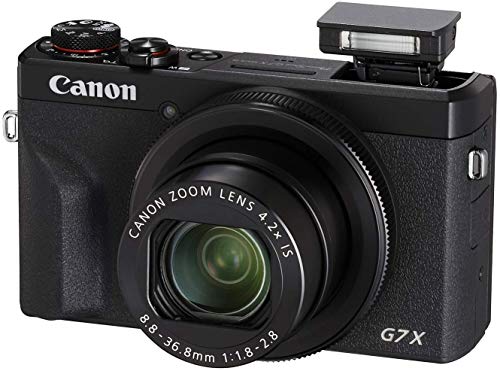
| Canon PowerShot G7 X Mark III | Best Facebook camera for most people | Pocketable, kind to faces, quick to share from, with a flip screen and video — including vertical-friendly shooting — that the feed rewards. |
| Sony ZV-1F | Best for video-first Facebook pages | Built for the filmed post: wide lens for real rooms, presenter autofocus, background blur on a button and microphones that favour the speaking voice. |
| Fujifilm X100VI | Best for photography-led posts | Film-simulation colour that makes posts look authored, a quiet fixed lens for candid community life, and files with the quality to survive compression proudly. |
| Fujifilm Instax Mini 12 | Best for posts with a physical heart | Its prints, photographed or scanned and posted, carry a warmth no filter imitates — and the gathering itself becomes content the feed loves. |
| Canon EOS R50 | Best for community and club photographers | The official-photographer camera: dependable autofocus for events, clean stills and video for the page, and lenses for the group’s every occasion. |
| DJI Osmo Pocket 3 | Best for moving clips that stop the scroll | Gimbal-smooth walk-throughs, reveals and follow clips — the motion that makes a feed post feel like a production, from a pocket. |
How Did We Choose Cameras for Facebook Posting?
We began inside the feed rather than inside the specification sheet. Each candidate’s output was imagined after the platform’s treatment — compressed, resized, viewed on a phone at arm’s length in daylight — and judged on what survives that treatment: strong colour, clear subjects, faces with life in them, and detail that reads at small sizes. Cameras whose virtues only appear at full resolution on a calibrated monitor were marked down, however distinguished, because Facebook is not that monitor.
The second filter was the path from moment to post. Wireless transfer that a tired parent or a busy shopkeeper will actually use, in-camera cropping and resizing that respects the platform’s shapes, and colour that arrives finished rather than as homework all counted heavily. A technically superior photograph that takes an evening to reach the feed loses, in this genre, to a very good photograph posted while the birthday candles are still warm in the room’s memory.
Finally we weighed the poster’s real calendar: family milestones, the small business’s weekly rhythm, the community group’s events, the creator’s daily output. Video was judged as posted video — short, vertical-friendly, sound-led — and stills as shared stills. The six survivors cover those calendars between them, and each verdict names the posting life it serves, because ‘for Facebook’ is not one job but a dozen wearing the same blue coat.
A note on what this guide deliberately did not rank: live streaming ability, which the platform also hosts, was excluded from the scoring entirely, because a camera can be a superb poster and a poor broadcaster, and conflating the two crafts produces the compromised purchases this series exists to prevent. The companion live guide ranks the streaming virtues with the same exclusivity. Readers who do both should expect to own, eventually, a tool for each — or to choose consciously which craft gets the dedicated instrument and which gets the compromise.
We should confess the bias that survived every filter, because readers deserve to know a guide’s tilt: this one favours the camera that gets used tonight over the camera that wins comparisons tomorrow. Facebook’s entire economy runs on presence — the post made, the rhythm kept, the conversation joined — and presence is a property of small, kind, ready equipment. If your posting life is rarer and more deliberate, the Fujifilm and the Canon system will out-argue our bias in their own rows; the table is honest enough to hold both truths at once.
Which Six Cameras Make the Best Facebook Posts?
The Canon compact leads for family posting, the Sony creator camera for pages and businesses that post daily, and the Fujifilm for photographers whose posts are their pride. The Instax turns gatherings into physical prints that become beloved posts themselves, the Canon system camera serves the community’s official photographer, and the DJI makes the moving clips that stop the scroll.

Canon PowerShot G7 X Mark III — Best Facebook camera for most people
The G7 X Mark III is the Facebook camera for the life most people actually post: family, food, holidays, the dog’s better angles. Its colour flatters skin without an editing session, its flip screen serves the selfie and the group shot with equal grace, and its wireless path to the phone is short enough that the photograph can be in the feed while the moment is still the room’s topic. That speed is not a convenience in this genre; it is the difference between the post that joins the conversation and the post that archives it a week later.
Video is where it quietly outclasses most pocket rivals. The footage is clean, the microphone input lets the family films and the small business’s clips sound professional, and the camera is comfortable in the vertical orientation that so much of the feed now prefers. For the page admin filming the bakery’s morning, the parent filming the recital, or the creator whose posts are clips first and photographs second, it behaves like a tool designed by someone who has actually run a page.
Its ceilings are the pocket class’s ceilings — a small sensor in dark halls, battery realism on filming days — and it will not satisfy the photographer who wants interchangeable lenses. But judged by the metric this guide is built on, the quality and speed of what reaches the feed across a whole year of ordinary posting, the little Canon is the recommendation we would hand to most households and most small pages without a second thought.
Practise the transfer path once at home until it is muscle memory — camera to phone to post in under a minute — because the skill only pays when it is faster than the moment’s decay. Owners who drill that small workflow post three times as often as owners who improvise it, and the feed, as this guide keeps insisting, rewards the rhythm more than it rewards any single photograph. The camera’s kindness to faces does the rest, daily, without being asked twice.
- Pocket body with versatile fast zoom
- Flip screen for selfies and vertical video
- Wireless transfer for fast posting
- Microphone input for posted clips
- Kind, finished colour for faces
Strengths
- Moment-to-post path is genuinely short
- Faces and food look generous unedited
- Video serves the feed’s current formats
Trade-offs
- Small sensor in the darkest venues
- Spare battery for heavy filming days
- No lens-changing growth path
Best for: family posters, page admins and small businesses posting daily.
Not suited for: photographers wanting a full interchangeable-lens system.

Sony ZV-1F — Best for video-first Facebook pages
Whole categories of Facebook now speak rather than write: the coach’s daily tip, the shopkeeper’s new-stock walk-through, the grandparent’s video letter, the community group’s announcements. The ZV-1F is the camera of that spoken feed. Its wide lens fits real rooms at arm’s length, its autofocus treats the presenter’s face as the centre of the world, and its one-button background separation gives a kitchen-table recording the produced feel that keeps thumbs from scrolling past the first sentence.
The engineering is hospitality itself: controls a non-technical owner cannot get wrong, a screen that faces the speaker, microphones arranged for voice, and a size that invites the camera to live where the posting happens rather than in a cupboard of good intentions. Pages grow on rhythm, and rhythm is built from exactly this absence of friction — the daily clip filmed in the ninety seconds between customers, posted before the next one arrives.
Stills are its honest second language: perfectly serviceable for the post that needs a photograph, not the equal of the stills-led picks here. The fixed wide lens refuses distant subjects, and there is no viewfinder for the brightest days. For the poster whose feed is motion and voice — an increasing majority of the platform’s business and community life — those are the right compromises, made by the most purpose-built posting camera in this guide.
Give the page a fixed daily appointment with it — the same ninety seconds, the same corner of the shop or kitchen — and the ZV-1F’s simplicity compounds into the most valuable asset a page can own: a recognisable ritual the audience returns for. Vary the news, never the welcome. Pages built on such rituals survive algorithm weather that buries grander productions, because the audience is not following a format; they are visiting a person, at a time, in a place, and this little camera is the door.
- Pocket body with wide fixed lens
- Presenter face autofocus as the default
- One-button background blur
- Voice-favouring microphone arrangement
- Simple controls for daily rhythm
Strengths
- Daily video posting with near-zero friction
- Arm’s-length framing suits real spaces
- Produced look without production skills
Trade-offs
- Stills are a second language
- Fixed lens refuses distant subjects
- No viewfinder for bright exteriors
Best for: coaches, shopkeepers, creators and community pages that post video daily.
Not suited for: stills-first photographers and distant-subject shooters.

Fujifilm X100VI — Best for photography-led posts
In photography groups and on the feeds of people whose posts are their signature, the X100VI produces the images that make other posters ask what they were taken with. Fujifilm’s film simulations give everyday subjects — the market, the grandchildren, the street after rain — a finished, characterful rendering that arrives post-ready and, crucially, survives the platform’s compression with its dignity intact, because strong colour and honest contrast are exactly what compression cannot easily flatten.
The camera’s manner suits the candid posting life. Fixed lens, quiet shutter, a body that looks like a keepsake rather than a rig: it photographs community events, family gatherings and street life without turning the poster into a media presence, and the resulting unposed frames are the ones feeds reward with genuine attention. The hybrid viewfinder and dials make the taking pleasurable, which across a year of posting matters as much as any file quality — pleasure is what rhythm is made of.
Its refusals are real: no zoom for the far end of the hall, a price that assumes the photography matters, availability that tests the impatient. It is not the family appliance of this guide. It is the camera for the poster whose Facebook is a portfolio in public — the photography-group regular, the documenting grandparent, the small brand built on an aesthetic — and for them it has no rival here.
Let its discipline set the page’s standard: one lens’s honest view, one simulation’s consistent colour, posts chosen rather than sprayed. Photography-led feeds grow slowly and last long, because their audiences are gathered by recognition — the scroll stops at the familiar signature — and the X100VI manufactures that signature daily without a preset ever being opened. If your Facebook is your portfolio’s public face, consistency is not a constraint here; it is the entire brand, delivered by design.
- Fixed fast lens for candid work
- Film simulations with post-ready colour
- Quiet leaf shutter for gatherings
- Hybrid viewfinder and tactile dials
- Files that hold up under compression
Strengths
- Posts look authored straight from camera
- Candid manner keeps subjects unposed
- Colour survives the platform’s treatment
Trade-offs
- No zoom for distant subjects
- Price and availability demand commitment
- Not a whole-household appliance
Best for: photography-led posters, groups and aesthetic small brands.
Not suited for: families needing one zoom for every situation.

Fujifilm Instax Mini 12 — Best for posts with a physical heart
The Instax’s Facebook career is a happy paradox: the most analog camera in this guide produces some of the platform’s most engaging posts, because a photograph of a real instant print — held in a hand, pinned at the party, propped against the birthday cake — carries a physical truth that filters spend their lives imitating. Grandparents far away receive not just an image but evidence: the print exists, the moment was kept, the family’s ritual of memory is alive and well and slightly crooked in the frame.
At the gathering itself it needs no guide at all. Point, press, pass the print around: the camera manufactures the social warmth that Facebook posts are usually trying to describe, and then — photographed by any phone in the room — becomes the post as well. Children operate it, elders understand it, and the archive it builds on fridge doors runs parallel to the feed’s, each advertising the other across the family’s geography.
The limits are the medium’s: film costs per frame, prints are small and softly imperfect, and nothing here serves a business’s product photography or a photographer’s portfolio. It is the companion pick of this guide — the second camera in the bag, the first camera out at a party — and judged on engagement, affection and the comments threads it generates, it outperforms cameras ten times its price with embarrassing regularity.
Make the print the ritual’s centre: one frame for the fridge, one for the guest, one photographed for the relatives far away — a small economy of giving that turns every gathering into both an event and a post. Families who adopt the ritual find the Instax’s film cost reclassifies itself in the household budget from photography to hospitality, which is where it always belonged. The comments on such posts, incidentally, tend to be the longest and warmest the family writes all year.
- Instant physical prints in moments
- Fully automatic, all-ages operation
- Close-up mode for details and food
- Compact, friendly party presence
- Prints photograph beautifully for posting
Strengths
- Posts carry physical warmth feeds reward
- Creates the gathering’s joy, not just its record
- Operated and loved by every generation
Trade-offs
- Film cost per frame
- Small, soft prints by design
- No use for product or portfolio work
Best for: family gatherings, parties and memory-keeping posters.
Not suited for: businesses and photographers needing digital files.

Canon EOS R50 — Best for community and club photographers
Every club, congregation, team and society has one: the person whose photographs become the page. The R50 is that person’s camera at a sane price. Its autofocus finds faces across a hall with a reliability that makes volunteer photography look professional, its stills carry the newsletter and the poster as happily as the feed, and its video covers the announcement clip and the event highlights without a second device. For the community poster, it collapses a bag of compromises into one friendly body.
The RF lens system is the long argument for groups whose occasions vary: the standard zoom for the fete, a fast prime for the candlelit service, a modest telephoto for the sports day — each bought once, shared across years of postings, and each making the page look more like the community’s memory deserves. Canon’s colour keeps people kind in the mixed light of real halls, and the controls forgive the rotating cast of volunteers who will inevitably hold it.
Its limits are a starter system’s honest ones — low-light ceilings below the flagships, no in-body stabilisation — and they arrive, in community work, remarkably rarely. For the poster whose Facebook is a public service as much as a pleasure, the R50 is the recommendation with the longest service life in this guide: the camera the group will still be thanking in five years of albums.
Community photographers should set the page’s house style on day one — the same colour settings, the same framing habits for the group’s recurring occasions — so that five years of albums read as one community’s memory rather than as a relay of different cameras. The R50’s consistency across volunteers makes that house style achievable, and a recognisable archive is a genuine civic asset: it is how a club, a congregation or a team looks to its own future members searching the page at midnight.
- APS-C sensor in Canon’s RF system
- Face and eye autofocus for halls and events
- Clean stills and video for pages
- Friendly controls for volunteer operators
- Lens range for every community occasion
Strengths
- Volunteer-proof autofocus and colour
- One camera serves the whole page
- Lenses grow with the group’s ambitions
Trade-offs
- Low-light ceiling below flagships
- No in-body stabilisation
- Outgrowable by advancing enthusiasts
Best for: club, church, team and society page photographers.
Not suited for: pocket-only posters and pure video creators.

DJI Osmo Pocket 3 — Best for moving clips that stop the scroll
The feed’s scarcest resource is the stopped thumb, and movement — smooth, confident movement — is what stops it. The Pocket 3 gives every poster the production glide that used to require a rig: the walk through the newly dressed shop, the follow shot down the wedding aisle’s aftermath, the slow reveal of the renovated room or the finished cake. Its gimbal erases the handheld judder that marks amateur clips, and its tracking keeps the subject composed while the operator simply walks the rehearsed path.
It is equally the travel poster’s secret: pocketable enough to be present for the market, the viewpoint and the street performance, quick enough to film in seconds, and capable of the rotating-screen switch between the wide post and the vertical story without breaking stride. The resulting clips cut happily beside phone footage while visibly elevating it, which is exactly the mixture most real feeds are made of.
Its boundaries are a fixed lens, fair-weather construction and dialogue that still wants its wireless microphone companion for serious speaking posts. It will not replace the stills camera in this guide’s other rows. But as the second device — the motion department of a one-person page — it transforms a feed’s production value more per gram than anything else here, and pages that adopt it tend to be recognised by their movement within a month.
Walk every recurring post before you film it: the shop tour’s path, the venue reveal’s doorway, the market route at opening time. The Pocket’s glide forgives much, but the pages whose movement feels professional are the ones whose operators rehearsed the geography until the camera’s job was merely to float along a decision already made. Two rehearsals per location, done once, pay out on every post that location ever produces — the best exchange rate in this entire guide.
- Mechanical gimbal for smooth movement
- Subject tracking for follow clips
- Rotating screen for wide and vertical posts
- Wireless microphone options for dialogue
- Pocket size and instant readiness
Strengths
- Production glide without rigs or crew
- Travel and venue clips of real polish
- Elevates phone footage it intercuts with
Trade-offs
- Fixed lens and fair-weather limits
- Serious dialogue wants its microphone
- Stills are not its purpose
Best for: business walk-throughs, travel posters and event pages.
Not suited for: stills-led posters needing one do-everything camera.
How Should You Shoot Photographs That Survive Facebook’s Compression?
Feed the platform quality it can afford to keep. Compression punishes noise, mush and muddy colour first, so the kindest gift you can give a post is a clean, well-exposed original: shoot in the best light the moment offers, keep sensitivity honest, and let the cameras in this guide do what their colour science does — render faces and food with saturation and clarity that have something to spare after the platform takes its cut. A photograph that begins marginal arrives invisible; a photograph that begins generous arrives merely good, which in the feed is triumph.
Framing for the feed is the second discipline. Compose with the crop in mind — the subject large enough to read at phone size, faces away from the edges that interfaces cover, and vertical or square shapes considered at the moment of shooting rather than amputated afterwards. The flip screens and guides on several picks here exist for exactly this foresight. A post designed for its destination outperforms a masterpiece surprised by it, every day of the scroll.
Finally, post the photograph while it is still news to its audience. The feed is a river, not a gallery, and the birthday picture posted during the birthday joins a living conversation of comments and reactions, while the same picture posted next week is an archive entry. The fast transfer paths ranked in this guide are therefore not conveniences but editorial tools — the difference between publishing and filing, between the post the family gathers around and the one they scroll past.
How Do You Make Posted Videos People Actually Finish?
Win the first two seconds or lose the viewer honestly. Open on the face, the finished dish, the before-and-after’s after — whatever the clip’s promise is — and let the context arrive afterwards, because the feed’s audience decides with a thumb that has a hundred other offers. The cameras here help by being ready instantly and framing faces kindly, but the discipline is editorial: every posted clip is a headline first and a story second, and the posters who accept that get watched.
Sound carries the middle of the clip the way the opening frame carries its start. Voices recorded closely and clearly — the microphone inputs on the Canon and the wireless options on the DJI exist for this — hold attention through the ordinary moments that pretty pictures alone cannot. Captions, added in the platform’s own tools, rescue the majority who watch muted, and a clip that respects both the listener and the muted watcher doubles its finished views without costing its maker anything but the habit.
Length is the final courtesy: say the thing, show the thing, stop. Posted video’s sweet spot for most pages is well under the length its makers instinctively produce, and the discipline of cutting the walk to the door, the pause before the news and the second demonstration is what separates pages that grow from pages that merely post. The camera cannot teach that discipline, but the ones in this guide at least never give you a technical excuse to avoid it.
What Posting Rhythm Grows a Page or a Family Audience?
Rhythm beats intensity in every feed ever studied by its participants. The page that posts one good photograph or clip most days becomes part of its audience’s routine, while the page that floods monthly and vanishes is treated as an occasional leaflet. The cameras in this guide were chosen partly for how little friction stands between their owners and that rhythm: pocketable bodies, finished colour, fast transfer — the infrastructure of showing up. Build the habit the equipment was designed for and the audience compounds quietly.
Vary the grammar within the rhythm: the still photograph for the milestone, the clip for the process, the instant print’s photograph for the warmth, the gimbal’s glide for the reveal. Audiences follow pages the way they follow conversations — for a voice, not a format — and the voice emerges from consistent subjects treated with varied attention. The community photographer’s album, the baker’s morning clip, the grandparent’s Sunday portrait: each is a small promise kept on schedule.
Answer the comments as if they were the point, because they are. Facebook’s social contract rewards the poster who converses, and the photographs in this guide will start more conversations than their owners expect — about the recipe, the renovation, the relative in the third row. A page is a room, not a billboard, and the camera’s job ends where the hosting begins. Post, reply, and let the feed do what it was built for before it was built for anything else.
How Should Businesses and Creators Choose Between These Picks?
Start from the post you make most, not the post you admire most. The shop whose rhythm is the daily spoken update belongs with the ZV-1F or the G7 X and a microphone; the brand built on beautiful stills belongs with the Fujifilm or the Canon system; the venue whose posts are walk-throughs belongs with the Pocket 3 in the pocket and one of the stills cameras for the milestones. Misalignment between the camera and the calendar is the commonest business error in this guide’s whole subject — the portfolio camera bought for a talking feed, the vlog camera bought for a stills brand.
Budget the system, not the body: the microphone, the small light for the counter’s shadow side, the spare battery, and the hour of learning the transfer path all belong in the same purchase decision as the camera, because the post that fails for want of any of them fails completely. The picks here were chosen to keep that system small — several need almost nothing added — but none of them repeal the arithmetic that a page is a production, however miniature.
Finally, protect the asset you are actually building, which is not the camera but the archive and the audience. Back up the originals off the platform, keep the posting rhythm through quiet months, and let the camera be replaced in its season without drama. Pages outlive devices; the six above are simply the devices most likely to serve a page’s next two years with the least friction and the most pleasure — which, in the economics of attention, is the whole game.
How Do You Photograph Food and Products for a Feed?
Food and products are the feed’s commercial backbone, and they obey one law above all: light from the side, close and kind. A window beside the table or the counter does more for a dish or a handmade product than any camera upgrade, because side light models texture — the crust, the glaze, the grain — while overhead light flattens it into a catalogue of regrets. The compacts in this guide, with their close focus and fast lenses, are built for exactly that window seat; use it before you use any setting.
Compose for the square and the scroll: the subject large, the background quiet, one honest prop at most. Feeds punish clutter at phone sizes, and the photograph that whispers at a monitor shouts nothing at all on a bus. Shoot the hero frame, then the detail, then the human hand that gives it scale and life — the trio every successful food and product page eventually converges on — and post them in that order across the week rather than in one breath.
Keep the colour honest. Audiences forgive a small business almost anything except a product that arrives looking different from its post, and the cameras here render colour faithfully enough that honesty is also the easiest policy. Edit for brightness and crop, not for transformation, and the page builds the only asset that compounds in commerce: the customer’s belief that what they saw is what they will get.
How Do You Keep a Facebook Archive Safe Beyond the Platform?
Treat the platform as the exhibition, never as the vault. The photographs that matter — the milestones, the community’s record, the business’s best work — should live first in your own archive: the camera’s cards emptied weekly to a named folder, that folder backed up to a second place, and the year’s best printed while printing is easy. Platforms change terms, compress harder and occasionally lose things; a family’s memory should not be a tenant of any company’s roadmap, however friendly the landlord currently feels.
The habit costs ten minutes a week and one honest folder structure: year, month, occasion, with the people’s names spelled as they spell them. Future relatives searching that archive will bless the discipline, and the poster who keeps it discovers a second dividend immediately — the archive becomes a source of posts itself, the anniversary photograph and the then-and-now pairing that feeds reward with their warmest engagement. Your past, properly kept, is your page’s most reliable content department.
Teach the household the system as you build it, because archives die of single ownership. The community photographer’s successor, the business’s second pair of hands, the child who will one day keep the family’s record — each should know where the originals live and what the passwords guard. A camera from this guide will be replaced in its season; the archive it fed, kept properly, is the permanent collection. Buy for the posts, by all means — but keep for the decades.
What Separates Pages That Grow From Pages That Post?
Attention to the audience’s actual behaviour, observed without vanity. The growing page reads its own responses the way a shopkeeper reads a room: which subjects drew comments rather than applause, which hour the community is awake, which recurring post has become a small institution. It then feeds those truths with the camera — more of the workshop series, fewer of the polished announcements — until the page’s content and the community’s appetite are the same thing described twice. The cameras in this guide serve that loop by making every format cheap to test.
Consistency of presence, secondly, outperforms every growth trick ever sold. The algorithm’s affections are weather; the audience’s habits are climate, and climate is built by the daily post that arrives like a neighbour’s knock. Pages that survive platform changes are the ones whose followers would come looking if the feed ever forgot them — a loyalty no camera creates, but which the right camera, by removing friction, makes it possible to earn. That is the deepest reason this guide ranked readiness beside quality throughout.
And last, a willingness to be a host rather than a broadcaster: asking, answering, crediting, celebrating the audience’s own photographs and news. The community that talks back is the community that stays, and the poster who treats the camera as the start of conversations rather than as a printing press for announcements will outgrow, in time, pages with ten times the equipment. Buy the camera that gets you posting daily, then spend the saved effort on the people. It was always the people.
How Do the Six Compare for Facebook Posting?
Compare by posting life: the Canon compact for the family feed, the Sony for the spoken page, the Fujifilm for the photographer’s signature, the Instax for warmth, the R50 for the community’s record, and the Pocket 3 for motion. Most posters will find their calendar in one row and their second camera in another.
| Pick | Badge | At a glance |
|---|---|---|
| Canon PowerShot G7 X Mark III | Best Facebook camera for most people | Pocket poster; kind faces, fast sharing, feed-friendly video. |
| Sony ZV-1F | Best for video-first Facebook pages | Video-first poster; pages that speak to camera daily. |
| Fujifilm X100VI | Best for photography-led posts | Photographer’s poster; authored colour that survives the feed. |
| Fujifilm Instax Mini 12 | Best for posts with a physical heart | Instant joy; prints that become the post and the party’s memory. |
| Canon EOS R50 | Best for community and club photographers | Community workhorse; the club page’s official camera. |
| DJI Osmo Pocket 3 | Best for moving clips that stop the scroll | Pocket gimbal; moving posts with production smoothness. |
What Mistakes Do Facebook Posters Make With Cameras?
Buying a magnificent camera and posting from the phone anyway is the genre’s founding comedy: the system too heavy, too slow or too precious for the daily rhythm, while the feed fills with whatever the pocket produced. This guide ranked transfer speed and readiness beside image quality precisely because the post that happens beats the photograph that merely exists. If your honest posting life is spontaneous and daily, buy the pocketable pick and let the flagship fantasy go with our blessing.
The second mistake is posting the unedited worst version of a good moment: the backlit face, the cluttered frame, the clip whose first three seconds are a doorway. Thirty seconds of care — a step to the side, a crop, a trimmed opening — is the difference between the post that honours its subject and the one that merely mentions them. The cameras here make that care easy with their screens, guides and forgiving colour; the habit itself remains, as ever, the photographer’s to build.
The third mistake is treating the feed as a billboard: all announcement, no conversation, photographs posted and abandoned while the comments — the actual community — wait unanswered. Cameras cannot fix that, but the right camera exposes it, by removing every technical excuse until only the hosting remains. Post warmly, reply promptly, credit the people in the frame, and the page becomes what the platform’s name always promised: a book of faces that know each other.
A fourth mistake is letting the archive live only on the platform: years of family and community photographs held at a company’s pleasure, compressed past printing and one policy change from inconvenience. The companion section on keeping your own archive is not housekeeping but the difference between posting and publishing — one is a moment in a feed, the other is a record your grandchildren can hold. Spend the ten minutes a week; the feed will forget by Friday, and that is precisely why the vault matters.
Finally, do not buy a camera to impress the feed’s other photographers when your audience is your family, your customers or your club. The gear conversation and the audience conversation happen in different rooms, and only one of them comments on your posts. Every verdict in this guide was written for the second room. Choose for the people who will actually gather around your photographs, and the small blue audience that matters will reward the choice in the only currency it has: attention, affection and time.
Final Recommendation
For most posters, the Canon PowerShot G7 X Mark III is the Facebook camera: kind faces, fast sharing, real video, no friction. Spoken pages should take the Sony ZV-1F, photography-led feeds the Fujifilm X100VI, community pages the Canon EOS R50, and every bag gains joy from the Instax Mini 12 and motion from the Osmo Pocket 3. Choose by the posts you actually make, keep the rhythm the equipment was built for, and remember the distinction this guide began with.
If your Facebook ambition is not posting but broadcasting — going live to an audience in real time — that is a different craft with different cameras, and it has its own guide in this series covering webcams, streaming bodies and the discipline of the live hour. For the photographed and filmed post, the six above are the answer. Now go and post the photograph while the moment is still warm enough to comment on.
Keep the vault, keep the rhythm, and keep the faces kind. The rest of Facebook — the reach, the comments, the community — is downstream of those three small fidelities, practised with whichever of these six cameras your posting life honestly resembles.
So set the pairing up tonight, post one honest photograph of the life actually in front of you, and answer the first comment like a host rather than a publisher. The feed, the family and the page will take the hint from there — they have been waiting for exactly that signal, at phone size, in the first second of the scroll.
Post the small true thing today rather than the grand true thing next month. The feed forgives modest and punishes absent, and so, in the end, does every audience that ever gathered around a family’s photographs.
Your people are scrolling now, between the baby and the advertisement, with one second to spare. Spend it on them with a camera that was ready.
Ready, kind and already paired to the phone in your other hand — that is the whole specification, and the six above are its current champions.
Choose tonight, pair it tomorrow, and let the first post be the beginning of a rhythm rather than an occasion.
Rhythms, kept kindly, are what pages and families are both made of in the end.
Keep yours, and the comments will keep arriving like neighbours at a door that is reliably, warmly open.
Open is the operative word, for the door, the page and the camera bag alike.
Leave all three open this week, and watch what walks in.
Something good usually does, camera in hand or not.
Photograph it when it does, and post it, warmly, before the kettle on the stove boils for the evening tea together.
Frequently Asked Questions
Do I need a camera for Facebook, or is a phone enough?
A phone is enough for casual posting, and this guide will not pretend otherwise. A dedicated camera earns its place when the posts matter beyond the casual — a business’s daily presence, a community’s record, a photographer’s signature, a family’s milestones — because it brings kinder faces in bad light, real microphones for clips, faster rhythm through better tools, and an archive independent of the phone’s fate. The picks here start where the phone’s compromises start costing you audience.
What resolution do Facebook photos need?
Far less than cameras provide, which is liberating: every pick here oversupplies the platform comfortably. What the feed rewards is not resolution but clarity at small sizes — strong subjects, honest colour, faces with life — plus clean files that survive compression. Spend your attention on light and framing rather than on megapixels, and let any camera in this guide handle the arithmetic without being consulted.
Should I post vertical or horizontal video?
Match the destination: vertical for stories, reels-style placements and much of the mobile feed; horizontal for videos destined for televisions, groups that watch on desktops, and anything you will reuse elsewhere. Several picks here — the Pocket 3 with its rotating screen, the compacts with their flip screens — make the switch painless. The error is not choosing one; it is never choosing at all, and letting the camera’s default decide your page’s shape by accident.
How do I move photos from these cameras to Facebook quickly?
All the digital picks here offer wireless transfer to a phone app, from which posting takes under a minute once the path is practised. Set the pairing up at home, not at the event; send the smaller sharing size the app offers, since the platform will compress regardless; and post from the phone while the moment is current. The Instax path is charmingly different: photograph the print itself, in good light, and post that — the texture is the point.
Can I use these cameras for Facebook Live as well?
Some can serve double duty through various connections, but live broadcasting makes different demands — sustained streaming, streaming software, chat awareness, presenter tracking — and deserves its own equipment decisions. This series’ companion guide to Facebook Live covers exactly that, with webcams and streaming cameras chosen for the live hour. If live is your main ambition, read that guide first; if posting is, you are already home.
What makes a Facebook post get comments rather than just likes?
A face, a question and a story, in any order. Photographs of people the audience knows, captions that ask something genuine, and posts that arrive while the moment is shared all invite conversation; announcements and perfection do not. The cameras here serve the first half of that formula — the faces, kindly and quickly — and the second half is hosting. Post like a person, reply like a host, and the comments will do what they have always done.
Related Guides
For the live-broadcasting side of the platform, and neighbouring posting crafts, see our companion guides: best cameras for faebook live best cameras for everyday use best cameras for youtube videos


