Disclosure: As an Amazon Associate, ilcastellomenu.com earns from qualifying purchases. Links on this page are affiliate links; they cost you nothing extra. Prices and availability change often, so check the current Amazon listing before you buy.
Reading hdmi switch reviews from several brands side by side is the fastest way to discover an uncomfortable truth about this category: on paper, the products look almost identical. Similar input counts, similar little black boxes, similar remotes, similar promises. In the hand and in the living room they are anything but identical, because everything that decides daily satisfaction — how decisively the box renegotiates when you change sources, whether the remote feels like a tool or a toy, whether the automatic switching behaves like a butler or a toddler — lives below the specification sheet. This roundup reviews the main designs on the market as a group, explains how we separate them, and matches each to the buyer it genuinely serves.
Our approach is deliberately class-based. Rather than pretending any single model is perfect, we review the recognised design families from the established accessories brands — UGREEN, Kinivo, Cable Matters, TESmart, Zettaguard and Fosmon — and judge each on the things owners actually live with: switching behaviour, control design, build, handshake manners with real sources, and the shape of stack it was born to serve. Where a family does something better than the field, we say so. Where it cuts a corner, we say that too, because a roundup that praises everything helps no one.
Key Takeaways From These HDMI Switch Reviews
- Best all-round design family: the polished mid-range switches, typified by UGREEN, balance remote control, build and manners best for a typical living room.
- Best for hands-off households: automation-first designs, typified by Kinivo, where nobody wants to learn the system.
- Best for desks and specification shoppers: connectivity-trade designs, typified by Cable Matters, documented clearly and built to be ignored.
- Best for big stacks: the high-input-count designs, typified by TESmart, for collectors and media cupboards.
- Best value: the honest entry-to-mid designs, typified by Zettaguard, with every essential feature present.
- Best compact option: the small manual designs, typified by Fosmon, for a monitor and two sources.
- Across all of them: buy one input more than you own today, and treat the cable bundle as part of the product.
In this guide
How We Review an HDMI Switch
Reviewing a switch means reviewing behaviour, not benchmarks. The first test is the changeover ritual: select a different source and watch what happens. A good design produces the same short, predictable pause every time, then a stable picture that stays put. A weak design occasionally renegotiates twice, flashes, or needs a second command. The second test is the household test: can a person who did not install the system get their programme on screen, unaided, in the dark? That test grades the remote, the indicators and the automation together, and it fails more products than any technical measurement. The third test is the bad-neighbour test: introduce the device that never sleeps, the console that wakes the screen on its own, the computer that renegotiates its output whenever it feels like it — and see whether the switch keeps order or surrenders to whichever source shouts loudest.
The fourth test is physical. Ports are gripped, cables are wiggled as a vacuum cleaner would wiggle them, the box is nudged the way a stack gets nudged during dusting. A switch that slides, twists or loosens its grip in a week of this will do worse in a year of real life. The fifth test is the morning-after test: cut the power, restore it, and see whether the system returns to a sane state without a technician. None of these tests needs laboratory equipment. All of them predict ownership better than a feature list, and they are the standard applied to every design reviewed below.
One more principle governs this roundup: format support is treated as a matching exercise, not a contest. A switch should comfortably cover the most demanding combination of resolution, refresh and audio that your own sources and display actually use, with modest headroom. Beyond that point, extra stated support is not a virtue you can see, hear or use. We therefore do not rank designs by headline formats; we rank them by behaviour, and we tell you plainly which buyer’s format list each design family is built to satisfy.
the single-product deep dive in this cluster
how to choose an hdmi switch, step by step
The Designs, Reviewed
Six design families cover nearly everything a buyer will meet. They overlap in the middle of the market and diverge at the edges, which is why the reviews below spend as much time on who should skip each design as on who should buy it. A switch that is wrong for your room is wrong at any price, and every family here is wrong for someone.

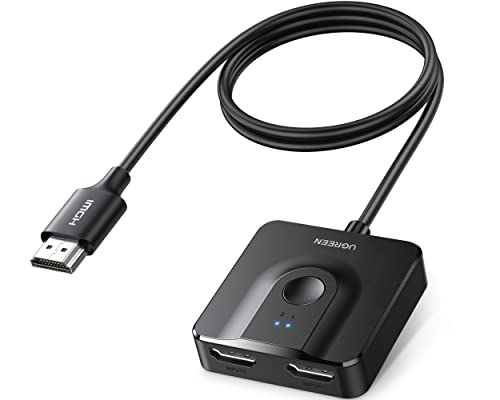
UGREEN HDMI Switch — Reviewed: The Centre of the Market, Done Properly
UGREEN’s switch family is the one we would hand to a buyer who asked for “just a good one” and refused to elaborate. The casings feel a class above the generic boxes, the numbering is consistent between box and remote, and the changeover behaviour is the predictable kind — the same short pause, every time, with no renegotiation drama. In the household test it scores well: the remote is a real remote, the indicators are legible from a sofa, and the automatic mode behaves sensibly without bullying the manual override. In the bad-neighbour test it holds order as well as anything in its class, provided the insomniac device is placed thoughtfully.
Its trade-offs are the trade-offs of the middle: it does not scale to collector-sized stacks, and it is not the cheapest way to add inputs to a bedroom television. Owners who need either extreme should look elsewhere in this roundup. Everyone between the extremes gets the category’s most balanced execution. Best for: the typical living-room stack — two consoles, a streaming device, a spare port. Not suited for: very large stacks or the tightest budgets. Mid-range in tier, and the benchmark the rest of this list is measured against.

Kinivo HDMI Switch — Reviewed: Automation With Manners
Kinivo’s designs are what happens when a maker decides the best switch is the one nobody operates. The automatic switching is the headline and, with well-behaved sources, it is genuinely delightful: power a console and the television follows; finish and the screen falls back. The remote exists for the exceptions, and it is a proper one. Where this family earns its review marks is in how rarely the automation needs correcting in a normal household — the common case simply works, day after day, for users who never learn the word “input”.
The honest caveat is the known gremlin of the whole category: a source that keeps its output alive in standby will hold this automation’s attention like a toddler holding a microphone. Kinivo’s manual override settles the argument, but households built around a known insomniac streaming box should expect to use it. Best for: busy family televisions and mixed-ability households. Not suited for: desks, where automation is surplus and a button is faster. Accessible-to-mid tier, selling ease of life rather than specifications.

Cable Matters HDMI Switch — Reviewed: The Infrastructure Choice
Cable Matters reviews like a piece of infrastructure, and we mean that as praise. The designs are plainly labelled, the documentation reads like it was written by the people who built the thing, and the behaviour in every test is unglamorous consistency: clean changeovers, no surprises after a power cut, ports that grip like they mean it. On a desk — where this family feels most at home — it disappears into the setup and stays disappeared, which is the highest compliment a connectivity product can earn. Specification shoppers will also appreciate that what the maker claims is what the box does, stated in checkable language.
What it does not do is charm. The living-room ceremony — plush automation, sofa-first remote design — is present but not the family’s religion, and a household choosing purely on hands-off magic may find the traditionalist designs warmer. Best for: desks, offices, mixed computer-and-console stacks, and buyers who verify specifications before buying. Not suited for: buyers whose top priority is the most theatrical automatic experience. Mid tier, priced like equipment because it is equipment.

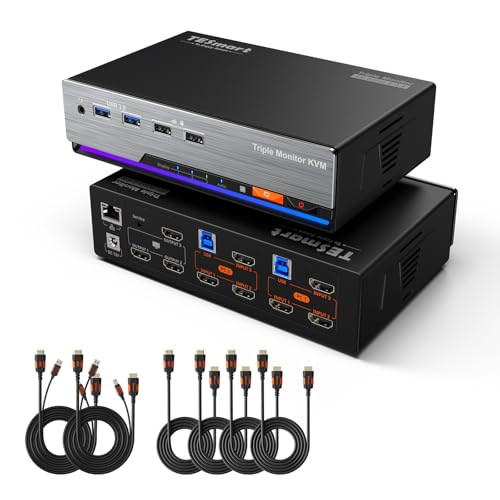
TESmart HDMI Switch — Reviewed: Capacity for Serious Stacks
Reviewing TESmart’s family means reviewing headroom. These designs assume your source count is a growing number: consoles from multiple generations, a pair of computers, a media server, a disc player, something on the test bench this week. The input counts, the control options and the cupboard-friendly thinking all point the same way — this is switching as system design. In our behaviour tests the family’s larger models handle the morning-after test particularly well, returning a complex stack to order without persuasion, and the bad-neighbour test benefits from control options that let the owner impose a hierarchy rather than accept one.
The trade-off is proportionality. On a two-source television, a TESmart-class box is a media-room answer to a bedroom question: more money, more box, more capability than the room will ever call on. Best for: collectors, media cupboards, retro-plus-modern console shelves, test benches. Not suited for: simple setups, where its virtues are invisible. Premium tier within the standalone switch category, earned through capacity and control.

Zettaguard HDMI Switch — Reviewed: The Honest Value Play
Zettaguard’s family is the review that keeps the rest honest. Everything essential is present — multiple inputs, a remote, automatic switching, clear indicators — and the changeover behaviour in ordinary use is perfectly respectable. The savings versus the mid-range show up where you would expect: casing materials that feel lighter, a remote that feels like a remote’s younger sibling, and less mass to resist cable drag, so placement matters more. None of that prevents it from solving the actual problem — too many sources, too few ports — completely, for a secondary room or a first purchase.
Where we would hesitate is at the demanding edge: the longest cable runs, the fussiest format combinations, the stack that will grow for a decade. Those buyers are paying for certainty and should buy it. Best for: bedroom and spare-room televisions, first-time buyers, modest stacks. Not suited for: flagship-format living rooms or forever stacks. Entry-to-mid tier, and a perfectly rational place to start.
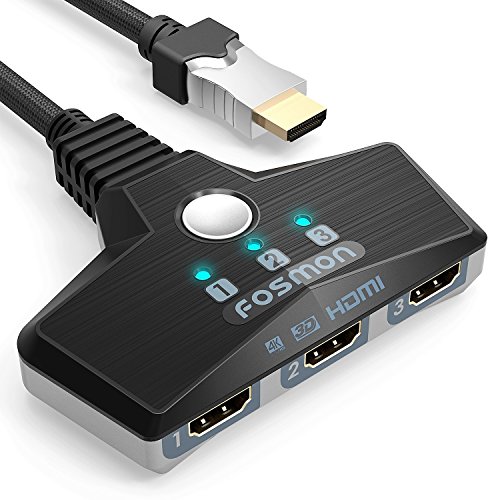
Fosmon HDMI Switch — Reviewed: Small Box, Small Brief, Done Well
Fosmon’s compact designs review well precisely because their brief is narrow and they honour it. Two or three sources, one small display, a button within reach — a monitor shared by a laptop and a console, a kitchen or bedroom television with a player and a stick. The boxes are small enough to vanish, the operation is obvious enough to need no manual, and the changeover is as clean as the category offers at this scale. Asking more of them than their brief — a growing stack, a remote-controlled living room — is how disappointment is manufactured, and it is the buyer’s error, not the product’s.
Best for: single-monitor desks, small televisions, two-or-three-source setups. Not suited for: anyone whose source count has a growth trend. Entry tier, and within its brief, genuinely recommendable rather than merely cheap.
Head-to-Head: Where the Families Actually Differ
Set side by side, the six families separate on four questions. First, control philosophy: Kinivo automates, Fosmon keeps it manual and near, UGREEN and Zettaguard balance both, Cable Matters prioritises certainty, TESmart offers control depth for systems. Second, scale: Fosmon and Zettaguard serve the small end, UGREEN, Kinivo and Cable Matters the broad middle, TESmart the large end. Third, room: living rooms reward remote and automation, desks reward reach and documentation, cupboards reward power discipline and state recovery. Fourth, temperament: some households want the system to decide, others want to decide themselves, and no review score can settle that argument for you. The right purchase is the family whose answers to those four questions match your answers — which is why this roundup refuses to crown a single winner and instead keeps pointing at the match.
What the Reviews Agree On
Across every design family, the same ownership lessons repeat so reliably that they deserve their own section. Cables are destiny: the switch gets blamed for cable failures with metronomic regularity, and every reviewer of this category eventually becomes a cable evangelist — buy decent leads, keep them as short as the layout honestly allows, and suspect them first. Input headroom is the cheapest wisdom: nobody regrets the spare port, everybody regrets the full box the month a new console arrives. Handshakes are the real specification: HDCP cooperation, CEC behaviour and the audio return path to a soundbar matter more to daily happiness than any headline format, because they are the parts you interact with every single day. And placement is a feature: a switch installed where its sensor can see, its cables hang slack and its button can be reached will review well in your home whatever its badge; the finest box installed badly will not.
Matching a Design to Your Stack: Four Worked Examples
The Two-Console Family Television
Two consoles, a streaming stick, four users of four technical levels. The automation-first family wins this home: power a console and the screen follows, the remote settles the rest, and nobody learns anything. The insomniac-device caveat applies — park the streaming stick, if it never sleeps, on the input the automation treats as home base, and the system will feel designed rather than accidental.
The Work-From-Home Monitor
A docking laptop by day, a personal desktop and a console by night, one excellent monitor. The infrastructure family wins: documented, decisive, desk-placed, operated by fingertip. Automation matters little because the operator is always present and always the same person; certainty matters entirely.
The Collector’s Shelf
Consoles across three decades, a media server, a disc player, one great television. The capacity family wins, with external power and a labelling session treated as part of the installation. The review lesson from this room is that the switch is the cheapest component in the stack and the one everything passes through — underbuying here taxes every other device.
The Bedroom Television
A player, a stick, maybe a console at weekends. The value family wins without a fight: every essential feature, no ceremony, and the money saved buys the decent cables that will make it behave. This is also the room where the compact manual family shines if the set is small and the sources are two.
Setup and Care, Reviewed as Part of the Product
Every design in this roundup installs the same way — sources into the numbered inputs, one output cable to the display, power if the model takes it, then a one-source-at-a-time test — and the full procedure lives in this cluster’s setup guide. What differs by family is the finishing work. Automation-first designs reward ten minutes spent arranging which device is the household’s home base. Compact desk designs reward cable dressing, because their lightness makes them the most likely to be dragged by a stiff lead. Capacity designs reward labelling and a written map of the stack, kept with the manuals nobody keeps. In all cases, the review period of any switch should end with the same ritual: power everything down, power it back up in a random order, and confirm the system finds a sane state. A switch that passes that test in your home will pass the next five years of evenings.
Care, thereafter, is nearly nothing. Dust the box when you dust the stack. Keep cables from hanging off ports at an angle. When a problem appears — and across years, one will — run the category’s standard diagnosis before blaming the badge: wait out the handshake, toggle away and back, reseat the cable, swap the cable, test the source directly. The reviews above were written under that discipline, and it is why so many “faulty switch” stories end as cable stories: the box is the most visible suspect and the least frequent culprit.
The Bottom Line of This Roundup
If you read only one paragraph: the mid-range all-rounder family is the default recommendation for a normal living room; the automation-first family is the recommendation for households that share; the infrastructure family owns the desk; the capacity family owns the collection; the value family owns the second television; and the compact family owns the small corner. Every one of those recommendations assumes the direction is right — sources into one display — and that the cables are worthy of the box. Get those two things right and any design in this roundup will make its owner quietly satisfied, which in this category is the entire point.
A Closer Look at the Handshakes Every Review Tests
HDCP: The Invisible Bouncer
HDCP is the copy-protection conversation that happens silently between a source, anything in the middle, and the display, every time protected content plays. When all parties cooperate, you never learn the initials exist. When one link in the chain handles the conversation badly, the symptom is theatrical: a film that refuses to start, a stream that plays on one input and not another, a screen that announces a problem in the middle of a Friday night. In review terms, this is why we weight “it just works with ordinary sources” so heavily and treat it as a design quality rather than luck. A switch family with a long record of uneventful HDCP behaviour across televisions and players has earned that record one handshake at a time, and it is the least glamorous, most valuable thing a review can report.
CEC: One Remote to Run the Room
CEC is the feature that lets devices send small commands along the HDMI cable — volume, power, input selection — so one remote can run a cooperative system. Switches sit in the middle of those conversations, and families differ in how faithfully they relay them. The practical review finding is not that one brand “has CEC” and another does not; it is that behaviour varies with the combination of television, source and switch, and the same setup can be flawless with one display and quirky with another. Buyers building a one-remote household should therefore treat CEC as a test-on-arrival item: set the system up, try the tricks you actually use, and adjust expectations or settings while the purchase is fresh. The switches reviewed here all live in the real world of CEC — capable, combination-dependent, and best judged in your chain rather than on a chart.
ARC and eARC: Where the Soundbar Belongs
The audio return channel questions in this category are almost always layout questions. The television sends sound back to a soundbar or receiver through its ARC or eARC port; the switch feeds sources into a different port; the two paths coexist without meeting. Reviews only enter the picture when a buyer’s layout breaks that pattern — a soundbar that is itself being used as the hub, a display whose return port is also its best input, a switch expected to carry audio duties it was never designed for. Our standing advice, repeated in every article of this cluster, is to draw the chain before buying. Nine layout problems in ten dissolve on paper, in pencil, before they can become returns.
Long-Term Ownership: What a Year With Each Family Feels Like
Reviews are written in weeks; ownership is measured in years, so this roundup closes its comparisons with the year-two report for each family archetype. The all-rounder designs age the most gracefully in ordinary homes, because their virtue is the absence of incidents: changeovers stay predictable, the remote survives, the box stays where it was put. The automation-first designs age in proportion to the household’s source discipline — add a badly sleeping device in month eight and you will have one argumentative week, settle it with the override and input arrangement, and return to peace. The infrastructure designs age invisibly, which their owners consider the point; their year-two report is usually that they forgot the switch was there until they read a roundup like this one.
The capacity designs age as systems do: the switch itself remains willing while the stack around it grows into the headroom, and owners report the particular satisfaction of adding a device in year two with a free, labelled port waiting for it. The value designs age honestly — this is the family where year two may bring a remote that feels tired or a port that wants a firmer hand — and their owners, having paid value prices for value service, generally report the exchange as fair. The compact designs age exactly as long as their brief stays small; the household that adds a third and fourth source to a two-source corner will replace the box, and will do so having learned precisely what it needs, which was the compact box’s educational purpose all along.
Two ownership habits benefit every family equally. The first is the annual cable audit: behind any stack, cables get kinked by furniture moves, chewed by vacuum cleaners and quietly replaced by inferior spares during some forgotten troubleshooting session, and a five-minute inspection each year prevents the slow decline that owners misattribute to the switch. The second is keeping the system’s map — which source lives on which input, where the soundbar’s return path runs — written down somewhere findable. Systems documented once are maintained in minutes; systems held in one person’s memory are renegotiated at every fault, usually at the least convenient hour of the week.
How the Families Handle the Four Rooms: A Summary Matrix in Words
Roundups usually end comparisons with a grid; this one ends with sentences, because the differences that matter are behavioural. In the family living room, the ranking runs automation-first, all-rounder, value, infrastructure, capacity, compact — not because the later families fail there, but because the room rewards forgiveness above all and the first two are built from it. At the desk, the ranking inverts: infrastructure first for its documentation and decisiveness, all-rounder second, compact third for small corners, and the living-room families trail because their signature features — remotes, automation — are furniture in a room where your hand is already on the desk. In the media cupboard, capacity leads by a distance, all-rounder and infrastructure follow as the stack size allows, and the small families simply run out of inputs. In the second television’s room, value and compact tie at the top, because the brief is small and both honour it completely.
Notice what that matrix implies: there is no family that wins everywhere, and the differences between adjacent ranks in any room are smaller than the difference between a well-installed switch and a badly installed one. Placement, cables and a ten-minute setup ritual move any of these designs further than a badge upgrade moves a neglected installation. That is the least commercial conclusion a roundup can reach, and it happens to be the true one: buy the family that matches your room, install it like you mean it, and the reviews you write in your head a year later will be kind ones.
Switching Stories: Three Evenings That Explain the Category
The Film That Would Not Start
Evening one: a protected film refuses to play through a newly installed switch, though the same player works directly into the television. The household blames the box. The actual culprit, found by the standard diagnosis, is the cable between player and switch — an elderly lead from a drawer, fine for the player’s old duties, not fine for this conversation. A cable swap ends the story. The review lesson is permanent: in this category, the chain is the product, and the newest, shiniest component is statistically the least likely link to be at fault.
The Console That Owned the Television
Evening two: a console that wakes eagerly and announces itself loudly keeps seizing the screen from a film in progress. The automation is not broken; it is obedient — it was told to follow whichever source wakes, and one source wakes like a fire alarm. The fix takes four minutes: the console moves to a lower-priority input, its screen-waking setting is tamed, and the household learns the category’s central social rule. A switch mediates between devices with different manners; the owner’s job is seating arrangements, and every family in this roundup gives you the tools — override, priority, arrangement — to seat them well.
The Power Cut at Midnight
Evening three: a storm blips the power, the whole stack reboots in darkness, and the household discovers which of its systems has manners. The well-chosen switch returns to a known input, the television finds it, the soundbar’s return path re-establishes, and the only evidence by morning is a blinking clock. This unglamorous test — the morning-after test from our review method — is the one that separates systems from piles of equipment, and it is why the capacity and infrastructure families, designed by people who think about recovery, earn their keep in homes that never consciously think about it at all.
What Owners Ask After the First Month: The Review Follow-Up
“Can I Add a Second Switch Later?”
Owners of growing stacks ask this first, and the honest answer is that chaining switches — one switch feeding another — works in the simple sense and complicates everything else: two handshakes to negotiate, two remotes to keep track of, two places for a bad cable to hide. The cleaner growth path is the one this roundup has recommended from the start: buy the headroom at the first purchase. If you are already at a full box, replacing it with a larger family member is a tidier upgrade than stacking a second box on its output, and the retired switch will find grateful work on a smaller television elsewhere in the house.
“Should the Switch Stay Powered All the Time?”
Yes, as a rule. A switch that is awake when a source wakes can follow the household’s rhythm — the automation sees the event, the display gets its signal promptly, the morning-after recovery works as designed. Owners who switch the whole stack off at the wall each night are not harming anything, but they should expect the full renegotiation ritual at every power-up, in whatever order the devices happen to wake. The standby appetite of a small switch is modest; the convenience of an always-ready junction is the product working as intended.
“Why Does One Source Take Longer to Appear?”
Because changeover time is a property of the pair, not the box. Some sources negotiate briskly; others — computers resuming from sleep are the famous case — conduct a longer conversation with the display about what they are and what they can do. Reviews that blame the switch for a slow source are measuring the source. The practical advice is arrangement: put your slowest-negotiating device on the input you select when you have a moment, and your fastest on the input used for impatient channel-hopping, and the same hardware will feel quicker without changing at all.
“Is It Worth Moving Up a Family at Replacement Time?”
Only if your room changed. The household that bought a compact box for a two-source corner and now runs four sources has outgrown a brief, not a badge — the capacity or all-rounder family is the right replacement because the stack demands it. The household replacing a value box on the same modest television, after years of uneventful service, should buy its successor from the same family without a flicker of doubt. Upgrades in this category are justified by new requirements, never by age, fashion or the arrival of a newer box with a shinier paragraph of marketing.
The Reviewer’s Notebook: Small Observations That Never Fit a Score
Every roundup accumulates observations too small for a verdict and too true to discard, so we close the comparisons with ours. Indicator lights should be visible but not theatrical: in a dark room, a switch that glows like a landing strip will be taped over within a month, and the tape will take the household’s respect for the system with it. Remotes should be findable by shape in a sofa’s geography, which favours the slightly larger, honest remote over the credit-card novelty that vanishes between cushions. Ports should be spaced for human fingers, not for a render: cables in this category are thick, plugs are wide, and a box whose inputs crowd each other makes every rewire a knuckle puzzle. A switch should also survive being understood by a guest. The systems that age best are the ones a visiting grandparent, a babysitter or a new partner can operate after one sentence of instruction — “press the button until your thing appears” — and every design family in this roundup passes that test when it is installed and labelled with that sentence in mind.
Finally, a word about the aesthetics nobody admits to weighing. A switch lives in the most looked-at square metre of the home, under the screen the household gathers around. A tidy box, dressed cables and a labelled underside will never appear in a specification table, yet they are a real part of why some installations feel like systems and others feel like incidents. The families reviewed here all offer at least one design that can sit in the open without apology. Choose it, dress its cables once, and the most-seen corner of your home gets calmer — a benefit no benchmark measures and every owner notices.
Reading Owner Feedback Like a Reviewer
Since no reviewer can live with every switch in every home, the last skill this roundup teaches is how to read the crowd’s evidence well. Weight reports that describe a chain — the television, the sources, the symptom, the fix — over reports that offer a verdict without a story, because behaviour in this category is chain behaviour. Treat “stopped working” reports with gentle suspicion until you know whether a cable was ever swapped during the diagnosis; a striking share of them resolve, in the follow-up comments, into cable confessions. Look for the time dimension: a design whose complaints cluster in the first week is usually describing installation friction, while a design whose complaints arrive at month nine is telling you something about durability, and the two should steer you differently. Notice, too, which family a complaint belongs to before you let it move you: a compact box criticised for lacking inputs for a five-source stack is not a flawed product, it is a mismatched purchase, and its review tells you about the buyer rather than the box.
Above all, read for your own scenario. The report that matters is the one from the household shaped like yours — the same room, the same kind of sources, the same cast of users. A roundup like this one can rank families by room and explain why; the crowd can confirm how a specific model behaved in a specific chain; but the final, deciding evidence is always the match between a described setup and the one behind your own television. Buy for that match, install with the discipline this cluster’s setup guide lays out, and your switch will join the most satisfying category of technology in the home: the kind you stop thinking about entirely.
One Last Comparison: The Switch You Buy Versus the Switch You Need
There is a temptation, standing in front of this category’s wall of near-identical boxes, to buy the switch that impresses rather than the switch that fits: the most inputs, the longest feature list, the grandest promises. Resist it with the roundup’s whole argument behind you. The switch you need is defined by a count you can do on your fingers, a room you can describe in a sentence, and a cast of users you know by name. Every family reviewed here contains a design that fits that definition honourably, and the most expensive mistake in the category is not buying a modest box — it is buying an elaborate one for a simple room and then fighting its surplus features for years. Fit first, badge second, and let the spare input be your only extravagance.
That is the entire philosophy of this roundup in one sentence, and it has survived every design family, every room and every evening of testing we have described: the best-reviewed switch is the one that was chosen for the home it actually lives in.
The Roundup’s Confession: What Reviews Cannot Tell You
Honesty requires a roundup to end by marking its own limits. Reviews can rank families by room, describe behaviour in scenarios and warn about the category’s known gremlins — but the deciding evidence about a specific switch in your specific chain exists only in your home, because the chain itself is one of the variables. That is why every article in this cluster repeats the same closing advice in different words: buy from a maker whose record you can check, install by the ritual, judge the configured system after its calibration week, and let your own evenings cast the final vote. A review that claims more certainty than that is selling something. This one would rather hand you the method and the map, and let your living room — the only laboratory that matters — deliver the verdict.
And that confession, properly understood, is not a weakness of the roundup but its final recommendation: treat every review — this one included — as a map of the territory, then walk the territory. The families are ranked, the gremlins are named, the rooms are described. What remains is yours, and it is the part that was always going to decide.
The Second-Pass Review: Consistency, Fit and Fine Print
Consistency is the quiet test
Single impressive results are easy; a good hdmi switch repeats them on an ordinary day, with ordinary materials, when you are in a hurry. Across the picks in this review, the models that earned their place did so by being predictable: the same setup producing the same outcome, with controls that behave identically every time. In a desk or bench that doubles as a workspace for two completely different hobbies, predictability is worth more than a peak performance figure you will rarely reach. When you read the individual assessments above, treat consistency comments as the highest-value signal in each one.
Fit and feel, judged honestly
Specifications can tell you a hdmi switch will fit; only handling tells you whether it feels right doing it. Weight distribution, control placement, surface finish and the force needed for routine adjustments all shape whether you reach for the product gladly or work around it. When picks such as Kinivo HDMI Switch, Cable Matters HDMI Switch and TESmart HDMI Switch are on your shortlist, run this check against each listing in turn. If your shortlist comes down to two similar models, this tactile layer is usually the honest tie-breaker, and it is personal: a control layout one reviewer calls cramped, a smaller-handed owner may call perfect. Where possible, judge fit against your own hands, desk and habits, not the reviewer’s.
The detail that dates a design
Every Monitors generation has a detail that quietly dates it: a port standard on its way out, a control app that has stopped receiving updates, a consumable format being phased away. When reviewing a hdmi switch, that detail matters because it decides how gracefully the product ages. A model built on current standards and widely stocked consumables will still be serviceable when a flashier rival is orphaned by its own ecosystem. Check the age of the design, not just its feature list, and favour the product whose supporting ecosystem is still actively maintained.
What the box should contain — and what it should not need
Unboxing is a small but telling review checkpoint for a hdmi switch: the essentials for the first session should be in the box, the instructions should match the actual unit, and nothing vital should depend on an immediate second purchase. If a pick requires an accessory to perform its core job, that dependency is flagged in its assessment above, because it changes both the real cost and the first-day experience. Equally, beware bundles padded with extras you will never use; in a desk or bench that doubles as a workspace for two completely different hobbies, unused bundle clutter is a cost paid in storage, not a bonus.
Reading the assessments against your own routine
These reviews were written against a general routine, and your routine is the final filter. Map each pick’s stated strengths onto your busiest realistic day with a hdmi switch: if a pick’s best quality serves a task you do rarely, it is not the pick for you, however strong the assessment. If a pick’s noted limitation sits in a corner of the workflow you never visit, discount it. This translation step — from review conditions to your conditions in a desk or bench that doubles as a workspace for two completely different hobbies — is where a good review becomes a good decision rather than a borrowed opinion.
Verify the listing, not just the product
A review can only judge the hdmi switch in front of it, but what arrives at your door depends on the listing you order from. Before choosing, confirm that the listing names the exact model, generation and bundle contents you think you are buying, because Monitors listings often group variants under one page. When picks such as Kinivo HDMI Switch, Cable Matters HDMI Switch and TESmart HDMI Switch are on your shortlist, run this check against each listing in turn. Check which accessories are in the box and which are sold separately, and note the seller’s returns terms while you are there. Ten minutes of listing hygiene prevents the most common review-versus-reality mismatch: a good product judged by the wrong variant.
Keep the notes with the product’s paperwork; they become the baseline every later adjustment is judged against.
Write the conclusion of that check down before you order, so the decision survives contact with a tempting listing.
That single habit separates owners who stay pleased with their choice from owners who quietly start shopping again within a season.
Treat it as part of the purchase itself, not as homework to do after the box arrives.
Frequently Asked Questions
Which HDMI switch is best overall?
There is no honest single answer, because “overall” hides the room. For a typical living-room stack, the polished mid-range designs typified by UGREEN balance build, remote control and changeover manners best. For a shared family television, automation-first designs typified by Kinivo ask the least of their users. For a desk, the documented infrastructure designs typified by Cable Matters disappear most completely. Match the family to the room first; the specific model within the family is the smaller decision.
Do more expensive switches switch faster?
Not in any way you can bank on. The changeover pause is mostly the display and the new source renegotiating their handshake, and it varies by television and source as much as by switch. What better designs buy is consistency — the same clean pause every time, without failed negotiations that need a second command. Judge reviews and owner reports for that pattern of reliability rather than for raw speed claims, which measure a chain, not a box.
Are budget HDMI switches worth buying?
For modest stacks and secondary rooms, yes — the honest value designs include every essential feature and behave perfectly respectably with ordinary sources and sensible cables. The compromises live in casing, remote feel and long-term port grip, not in missing function. Where budget designs stop being the right answer is at the demanding edge: long cable runs, the fussiest format combinations, or a stack you intend to grow for years. Buy certainty when you need certainty; otherwise the value tier is a rational purchase, not a false economy.
How many inputs do most people need?
Most living rooms settle at three to five sources once a streaming device, a console or two, a player and a laptop connection are counted. The durable advice from every review cycle is to count what you own, add the one device you can already imagine buying, and purchase that capacity. Input count cannot be expanded later — a full switch is replaced, not upgraded — which makes the spare port the best-value feature in the entire category relative to its cost.
Can a switch damage my TV or console?
A switch is a passive participant in a digital handshake; it does not amplify, convert or push power into your display or sources beyond the normal signalling the HDMI connection itself uses. The realistic risks in this category are mechanical, not electrical: stiff cables levering on ports, a feather-light box dragged by cable weight, or a display’s own port worn by years of manual swapping — which a switch actually prevents. Sensible placement and cables with slack are the whole safety brief.
Why do reviews disagree about the same switch?
Because a switch’s behaviour emerges from the whole chain — the television’s handshake manners, each source’s sleep habits, the cables, even the order devices wake. The same box can be invisible in one home and argumentative in another whose streaming box never sleeps. That is why good reviews describe behaviour in scenarios rather than declaring universal verdicts, and why your reading should weight reports from setups resembling yours: same kind of display role, same kind of sources, same room.