Disclosure: As an Amazon Associate, ilcastellomenu.com earns from qualifying purchases. Links on this page are affiliate links; they cost you nothing extra. Prices and availability change often, so check the current Amazon listing before you buy.
Weighing hdmi switch pros and cons honestly means resisting the two lazy verdicts this little box usually gets: the enthusiast’s claim that every home needs one, and the sceptic’s claim that it is a gadget in search of a problem. The truth is situational, and it is knowable in advance. An HDMI switch takes several sources — consoles, computers, streaming devices, players — and lets one television or monitor show one of them at a time, selected by button, remote or automatically. For a household whose sources outnumber its screen’s inputs, the pros are daily and concrete. For a household with one source and four empty ports, the cons are equally concrete: it would be a layer of complexity purchased to solve an absence. This article lays out both sides in full, then shows you how to tell which side your own living room falls on.
Quick Verdict and Key Takeaways
Worth it if: your sources outnumber or outgrow your display’s inputs, the ports are hard to reach, or several people share one screen and its parade of devices. Not worth it if: you use a single source, your receiver already hubs everything, or what you actually want is one picture on several screens — that is a splitter’s job, and no switch will ever do it.
- The headline pro: every source you own, available on your best screen, without touching a cable.
- The headline con: one more handshake in the chain, and with it one more place for a format or control argument to surface.
- The most underrated pro: a switch protects your display’s own ports from years of plugging wear.
- The most underrated con: automatic switching can be bullied by a source that never truly sleeps.
- The deciding factor is rarely the switch itself — it is the shape of your stack and the cast of people using it.
In this guide
The Pros
Pro: Every Source, One Screen, No Cable Swapping
This is the reason the category exists, and in the right home it is not a convenience but a transformation. Without a switch, the household with three sources and two inputs lives a life of small humiliations: the console unplugged to make room for the laptop, the player exiled to a drawer, the streaming stick borrowed by another room because connecting it means a crouch behind the television with a phone torch in your teeth. With a switch, every source is connected permanently, and changing between them is a button press measured in seconds. The benefit compounds with every device the household owns and every person who uses the screen, because the friction it removes was never paid once — it was paid nightly, by whoever wanted the exiled device.
Pro: Your Display’s Ports Stop Wearing Out
HDMI ports are not designed for a life of daily plugging and unplugging, and the ports on a wall-mounted or stand-bound television are awkward enough that each swap is a small act of faith performed by touch. A switch converts that wear pattern completely: cables are plugged into the display once, at installation, and the daily traffic moves to the switch’s ports — ports on an inexpensive, reachable, replaceable box rather than on the most expensive screen in the house. Owners rarely cite this pro when they buy, and frequently cite it years later when a friend’s television loses a port to a decade of swaps. It is the quietest benefit in this article and one of the most durable.
Pro: One Short, Managed Run to the Screen
A switch tidies the physics of a setup. Instead of every source trailing its own long cable to the display — around the furniture, up the wall, into a nest behind the set — the sources cluster near the switch, and a single output cable makes the journey to the screen. For wall-mounted televisions this can be the difference between one discreet run and a waterfall of leads. For desks it means the monitor’s cable management survives the addition of a console. Tidiness is sometimes dismissed as an aesthetic luxury; in practice it is a maintenance feature, because a system you can see is a system you can troubleshoot, and a nest helps nobody at midnight.
Pro: Control That Fits the Room — Including No Control at All
The category offers a control style for every geography: a button for the desk, a remote for the sofa, automation for the household that wants the system to follow whoever pressed power. The automatic mode, when the stack’s devices sleep honestly, is a genuine quality-of-life feature — the television simply shows the thing that was just turned on, and input menus vanish from the household’s vocabulary. Crucially, the better designs pair automation with an override that always wins, so the human remains the final authority. Few accessories at this size offer that range of interaction models, and it means the “pro” here is not a specific feature but a fit: whatever your room’s shape, a switch exists that operates the way the room already works.
Pro: It Is Small, Silent, Cool and Undemanding
A switch asks almost nothing of its home. It has no fan, makes no noise, produces no meaningful heat, sips power, and occupies less shelf than a paperback. It needs no account, no app, no subscription, no updates, no network. In an era when every new device in the stack arrives with a setup wizard and a privacy policy, the switch’s dumb reliability is a feature in itself: it will behave the same in five years as it does today, in a power cut’s aftermath as on a calm evening, for a technical owner and for a guest who has never seen it before. Longevity of behaviour is a pro that specification sheets cannot express and owners feel constantly.
Pro: One Purchase Serves Every Kind of Source Impartially
The switch does not care what a source is. A games console, a work laptop, a streaming stick, a disc player, a media server, a retro machine behind its own converter — all are equal citizens on numbered inputs. That impartiality makes the switch one of the few future-resistant purchases in the stack: the next device, whatever it is, will speak HDMI and will find a port waiting, provided you bought the spare input every guide in this cluster recommends. Technologies around it will churn; the junction remains.
The Cons
Con: One More Handshake, One More Place for Arguments
Every link in an HDMI chain must agree with its neighbours — on format, on the HDCP copy-protection conversation, on timing. Adding a switch adds a participant to every one of those negotiations, and while a good switch negotiates politely, the chain’s overall fussiness genuinely rises. The symptoms, when they come, are the category’s familiar liturgy: a black screen that needs a toggle away and back, a source that renegotiates to plainer settings, a film that refuses until a cable is reseated. None of this is common with established brands and decent cables, and all of it is diagnosable with this cluster’s troubleshooting order — but honesty requires saying that a direct connection has fewer conversations in it than a switched one, and a household that values absolute minimalism in its signal path is entitled to count that as a real cost.
Con: Only One Source at a Time — Forever
The switch’s defining limitation is not a flaw to be patched but the product’s very shape: one display shows one source. It cannot put a console on the television and a monitor simultaneously, cannot show a match in two rooms, cannot merge two pictures. Buyers who half-wanted those things — and they are numerous, because the switch and the splitter look alike and sit side by side in shops — experience this as the product failing at a job it never claimed. The con belongs in this list because the confusion is real and common: if any part of your wish involves several screens at once, the switch’s pros are irrelevant to you, and the splitter side of this cluster is your correct reading.
Con: CEC Tricks May Not All Survive the Trip
Households that have built a one-remote life on CEC — devices waking each other, volume travelling from the television remote to the player — will find that a switch sits in the middle of those conversations, and that relaying quality varies by design and by the combination of equipment. Some tricks survive intact; some become intermittent; the same switch can behave differently with a different television. This is rarely a deal-breaker and often fixable in settings, but it is a genuine con for the one-remote household to weigh: the convenience a switch adds at the input layer can tax a little convenience at the control layer, and only your own chain can tell you the exchange rate.
Con: Automatic Switching Has a Known Bully
The automatic feature’s weakness deserves its own entry because it is the complaint behind a large share of the category’s unhappy reviews. Some sources — streaming boxes that idle with their output alive, computers that wake for maintenance — never present themselves as “off”. An automatic switch watching for activity reads them as permanently demanding the screen, and may keep returning to them or refuse to leave them. Good designs mitigate with priorities and overrides, and the fix is usually arrangement and settings rather than replacement. But a household whose central device is a known insomniac should buy with its eyes open: you will use the override, and the automation you paid for will be a part-time feature.
Con: It Needs Power, a Home and Decent Cables
A switch is not a passive dongle; it is a small appliance with requirements. It needs a power source — its own supply, in the designs this cluster recommends for anything beyond the simplest setups. It needs a physical home within honest cable reach of the display and every source, placed so its sensor can see or its button can be reached. And it inherits the chain’s cable discipline: ask it to run on the longest, oldest, most kinked leads in the house and it will be blamed for their failures. None of these requirements is heavy, but together they mean the purchase is a small installation project, not a plug-and-forget trinket — and buyers who skip the installation thinking are the ones who meet the cons in this list personally.
Con: A Cheap Switch Can Be Worse Than No Switch
The category’s floor is low, and below a certain quality line the product inverts: ports that loosen, renegotiations that fail often enough to become a ritual, automation without manners, a casing so light that cables drag it off the shelf. A household that buys at that floor to save a small amount may conclude that switches are junk, when in fact it has only proven that junk is junk. This con is really advice wearing a frown: the price differences inside this category are modest, the established brands’ designs are the category’s actual product, and the unbranded floor is a different, worse product that happens to share a name and a shape.
What the Trade-Offs Mean for You
For the Multi-Console Household
The pros win, and it is not close. Your stack is exactly the shape the product was invented for, the nightly friction it removes is real, and the cons are manageable with an established brand, a spare input and ten minutes of arrangement. The one decision that matters is automation temperament: if your streaming device never sleeps, buy the design whose override you like best, because you will use it.
For the Desk With One Monitor and Two Machines
The pros win on a smaller scale. A button-controlled switch beside the keyboard converts a cable crawl into a two-second gesture, repeated daily. The cons shrink here — short cables, one user, no sofa logistics — and the main risk is buying a living-room design whose remote you will lose in a drawer while its box hides out of reach. Buy for the desk’s geography and the trade is all upside.
For the One-Source Minimalist
The cons win, honestly. With a single source and free ports, a switch adds handshakes, a power draw and a box, and removes nothing — there is no friction in your life for it to remove. Skip it without regret, and revisit the question on the day a second source arrives, because that day changes the entire calculation and this article will be waiting.
For the Two-Screen Dreamer
Neither side applies, because the product is wrong for the wish. If the dream is the same picture in two places, read the splitter cluster. If the dream is different pictures on two screens from two sources, that is a second display input problem — or a second display. The switch’s pros and cons are both irrelevant to a job it cannot do, and recognising that early is the most valuable paragraph in this article for you.
Three Designs That Embody the Pros
Abstract pros become concrete when attached to real design families, so here are the three archetypes this cluster recommends most often, stated with their trade-offs attached — because in a pros-and-cons article, a pick without its con is an advertisement, not a judgement.

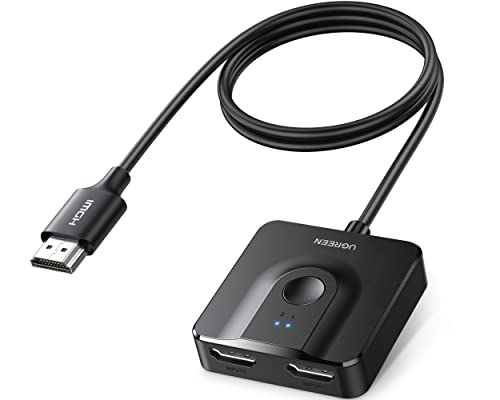
UGREEN HDMI Switch — The Balanced Case
The all-rounder is the pro list made physical: permanent connection for a typical stack, a remote and automation with an override, build that protects ports by staying planted. Its con is the middle’s con — it will not scale to a collector’s shelf, and a two-source household is paying for balance it may not need. Best for: the typical living room. Not suited for: extremes of count or budget.

Kinivo HDMI Switch — The Automation Case
The automation-first design concentrates the category’s most delightful pro — a system that follows the household — and its most famous con, vulnerability to the device that never sleeps, in a single product. Buy it with the override in mind and both sides of that sentence become manageable. Best for: shared family televisions. Not suited for: desks, where its talents are furniture.

Cable Matters HDMI Switch — The Infrastructure Case
The documented, decisive desk design embodies the quiet pros: port protection, certainty, a system that recovers from power cuts without a technician. Its con is a lack of ceremony — it will not charm a living room the way the automation-first designs do. Best for: monitors shared by computers and a console. Not suited for: buyers shopping for sofa magic first.
How a Switch Compares With the Alternatives
Context sharpens verdicts, so here is the switch weighed against the three things that compete for its job. Against manual cable swapping, the switch wins on every axis except price and absolute signal-path purity — and swapping’s hidden costs, port wear and nightly friction, are exactly the switch’s headline pros. Against an AV receiver used as a hub, the switch loses on audio ambition and wins on everything else: size, heat, simplicity, and suitability for the soundbar households that now dominate living rooms. Against a new display with more inputs, the switch wins on cost by an enormous margin and loses only when the old screen was due for replacement anyway. The pattern across all three comparisons is the same: the switch is the proportionate answer to a specific problem — too many sources for one screen — and it looks weak only when judged against problems it never claimed to solve.
How to Buy Smart, Given Both Sides
Buying smart means buying so the pros arrive and the cons stay theoretical. Choose an established accessories brand, because handshake manners are the product and they are earned. Count your sources and add one. Match the control style to the room’s geography, and insist on a manual override behind any automation. Choose external power when runs are long or sources are fussy. Sketch the sound layout — soundbar on the display’s ARC or eARC port, switch on another input — before ordering. Let the same order include cables worthy of the chain if yours are old or unknown. And install by the ritual in this cluster’s setup guide: one source at a time, labels on, a power-cycle test before the first film night. Each of those steps neutralises a specific con from the list above; together they are why well-bought switches generate so few complaints.
Setup and Care That Reduce the Cons
Most of the cons in this article are not properties of the product but of its installation, and they shrink under a little care. Place the box where its control method works — sensor visible to the sofa, button reachable at the desk — and where cables hang slack instead of levering on ports. Arrange the inputs socially: the everyday source on the number thumbs learn first, the insomniac device where the automation treats it as home base, the eager waker’s screen-waking setting tamed in its own menus. Keep the map written down. When a fault appears, run the standard diagnosis — wait, toggle, reseat, swap the cable, test the source directly — before concluding anything, because in this category the cable is the usual culprit and the switch is usually innocent. A switch installed and kept this way delivers its pros at full strength and its cons at a whisper.
The Costs Nobody Puts in the Specification Table
Beyond the formal cons, ownership carries softer costs worth naming in an honest accounting. There is the remote cost: one more small object in the household’s remote ecology, with batteries and a talent for sofas. There is the explanation cost: every shared system must be taught, once, to every user and guest, and the teaching is the owner’s job. There is the shelf cost: a box, its power supply and a small congregation of cables occupy the most contested real estate in the home, beneath the screen. And there is the diagnostic cost: when something in the chain misbehaves — as all chains eventually do — there is one more suspect to eliminate before the true culprit confesses. None of these costs is large. Together they explain why the one-source minimalist of the earlier section is right to abstain: the pros of a switch are paid in the currency of removed friction, and a household must actually have the friction for the exchange to favour buying.
Set against them, the softer pros deserve equal billing. There is the guest pro: a visitor can be told “press this until your thing appears” and the system is learned. There is the future pro: the spare input waiting silently for a device that has not been bought yet, converting a future installation into a thirty-second plug-in. There is the calm pro: a stack that returns to a known state after a power cut, asking nothing of anyone at midnight. And there is the dignity pro, which owners mention more than any specification: never again crouching behind a television with a torch, at the exact moment the household sat down to watch something. Weigh the soft columns alongside the hard ones; in this category they are often the deciding ones.
Bottom Line
The pros of an HDMI switch are concrete, daily and compounding: every source connected, no cable swapping, ports protected, a single tidy run to the screen, control that fits the room, and a small silent box that asks for nothing. The cons are real but conditional: an extra handshake, one-source-at-a-time by design, CEC quirks that vary by chain, automation that a sleepless device can bully, and a modest installation discipline. Households whose shape matches the product — several sources, one good screen — will find the pros overwhelming and the cons manageable. Households that do not match it should spend their money elsewhere with this article’s blessing. That is not a fence-sitting verdict; it is the correct one, and the sections above exist so you can tell, in five minutes, which household is yours.
Scoring the Sides: A Household Self-Test
If the pros and cons above still feel evenly matched, score your own household against these statements and let arithmetic break the tie. Give yourself a point on the pro side for each that is true: your display’s inputs are all occupied or one swap away from it; at least one source currently lives unplugged or in another room; the display’s ports are hard to reach; more than one person uses the screen; a new source is likely within the year; the screen is wall-mounted; you have ever lost an evening’s start to a cable expedition. Give yourself a point on the con side for each of these: you use exactly one source and expect to for years; your receiver already hubs the stack with inputs to spare; your one-remote CEC arrangement is precious and finely tuned; your central streaming device is famous for never sleeping and you refuse to manage it; what you actually dream about is the same picture on two screens. Three or more pro points with a con score below them is a clear buy. A con majority is a clear skip. A tie means the deciding factor is the spare input’s future — and in this cluster’s experience, households that tie almost always add a source within the year and wish they had bought the box while the installation was fresh in mind.
How the Balance Shifts Over Time
A pros-and-cons list is a snapshot, but ownership is a film, and the balance between the sides moves as a household lives with the box. In the first week, the cons are at their loudest: the installation hour, the settings visits, the evening spent teaching the automation which device is allowed to bully it. This is the period that generates the category’s sceptical reviews, and it is real — the switch asks for its tribute up front. From the second week onward, the exchange reverses. The pros become invisible precisely because they are constant: sources simply appear, ports go untouched, the input menu fades from memory. Owners stop being able to list the pros, not because they vanished but because a benefit experienced daily becomes the water the fish swims in. The cons, meanwhile, shrink to their irreducible core — the occasional renegotiation pause, the rare cable fault to diagnose — and most households discover those were always a fair price.
The balance can shift back, and honesty requires naming when. Add a badly behaved source and the automation con returns for an evening of rearrangement. Move house and the installation tribute is paid again, though smaller, because the system’s map travels with you. Replace the display and every handshake in the chain is renegotiated with a stranger, which is a week of calibration, not a verdict on the switch. The pattern across all of these is the same: the cons are events, the pros are conditions. Events are vivid and conditions are quiet, which is why pros-and-cons lists written in the first week read so differently from the ones their owners would write in the second year — and why this article has tried, throughout, to write the second year’s version.
The Two Myths That Distort This Category’s Reputation
Myth One: A Switch Degrades the Picture
The most persistent myth in the category holds that passing a signal through a switch must cost picture quality, the way copying a copy once did. The mechanism of a switch gives the myth nothing to stand on: the box passes the selected source’s digital signal to the display without processing, converting or re-encoding it. What owners occasionally experience — and misreport as degradation — is a chain settling at a plainer format than expected, because a cable could not carry the demanding combination or a source renegotiated its settings when the chain changed. Both are configuration matters with configuration fixes, and both are covered by this cluster’s setup and troubleshooting guidance. Judged correctly, “the switch softened my picture” almost always resolves into “my chain renegotiated, and here is the setting that restored it”.
Myth Two: More Inputs Always Means a Better Switch
The second myth flatters large boxes: that input count is a quality score. Count is a fit specification, not a virtue. A five-source household in a sixteen-input media box has not bought a better switch; it has bought a larger one, with a longer remote journey through inputs it will never populate and a price that could have gone to the cables that actually determine behaviour. The correct ambition is the count your stack needs plus one — no more, because the surplus inputs are not headroom but furniture, and no fewer, because the missing input is the one con in this article that no setting can fix.
What Owners Say a Year Later, Translated
Long-term owner reports in this category follow a pattern so consistent that it deserves translation into plain buying language. “Forgot it was there” is the highest grade, and it belongs to households whose stack matched the product: enough inputs, the right control for the room, cables that never made the news. “Works fine, remote could be better” is the mid-grade, and it usually traces to a control decision made by brochure rather than geography — the box is right, its interface with the humans is slightly wrong, and the household adapts around it for years. “It keeps switching by itself” is never, on investigation, a haunting: it is the insomniac-device con from this article, arriving on schedule in a home that bought automation without an override habit. And “returned it, bought a splitter” is the category’s saddest sentence, because it means the direction question — the first question in every article of this cluster — was answered after the purchase instead of before it. Read those four sentences as a map and they point, every time, to the same small set of decisions this article has been making on your behalf: direction, count, control, cables, arrangement. Make them deliberately and your year-later report will be the first kind, the forgetting kind, which in this category is the sound of a perfect score.
The Environmental and Longevity Ledger
One more honest column belongs in a modern pros-and-cons accounting: what the purchase does to the household’s pile of stuff over time. On the pro side, a switch extends the useful life of everything around it. The display’s ports survive years longer. The display itself — often perfectly good except for its input count — is not replaced early for want of ports, which is the single largest avoided purchase in the whole calculation. Sources that would have been retired for inconvenience stay in service. The switch itself is a long-lived, repairable-by-replacement, low-power object with no battery to swell and no software to abandon it. On the con side, it is one more manufactured object with one more power supply, and a household that buys the wrong one twice — too small, then right — has spent the category’s modest price two times and generated a spare box for the drawer. Even that failure has a soft landing in this category: the undersized switch almost always finds a second life on a smaller television, in a bedroom, or in another household entirely, because the need it serves is everywhere. Few electronics purchases can say as much, and it is a fitting final entry in the ledger: this is a product whose mistakes are inheritable and whose successes are invisible, which is about as benign as consumer technology gets.
A Final Word on Proportion
Every judgement in this article reduces, in the end, to proportion. A switch is a small answer, and it is a great one exactly when the problem is its size: a handful of sources, one beloved screen, a nightly friction measured in crouches and cable swaps. Asked to be a home cinema’s brain, a multi-room distribution system or a cure for a dying display, it will disappoint — not because it is weak, but because the question was wrong. The households that love their switches are the ones that asked the small question and let the small answer be complete. If that is your household, the pros in this article are not marketing; they are a description of your next year of evenings. Buy the box, install it once, label it kindly, and go back to watching the screen instead of managing it.
Edge Cases Where the Verdict Flips
The Household That Is About to Move
Moving house flips the usual calculus in the switch’s favour, twice. First, the stack will be rebuilt from nothing anyway, so the installation tribute — the con that weighs on settled households — is already being paid to the movers’ gods; adding a switch to the rebuild costs almost nothing extra. Second, the new room’s geometry is unknown, and a switch is the most adaptable citizen in the stack: it lets one run reach the screen wherever the screen lands, and it absorbs whichever arrangement of sources the new furniture dictates. Households mid-move should buy the switch as part of the rebuild, with the spare input sized generously, because the new room will have opinions about sources that the old room never expressed.
The Household Caring for Simplicity
For households where simplicity is a care requirement — an elderly parent, a relative for whom every menu is a barrier — the verdict flips toward the automation-first end of the category and stays there. The pro that matters is not convenience but access: a system that shows the right thing when a device is turned on, with no input vocabulary to learn, keeps entertainment within independent reach. The con to manage is the same insomniac device, and the management is a one-time arrangement by whoever sets the system up. In this household, choose the switch by its behaviour on the worst day, not the average one, and the pros-and-cons list resolves into a single line: it lets someone watch what they love without asking for help.
The Renter With a Forbidden Wall
Renters who cannot mount, drill or chase cables live with displays on stands and sources in exile more than any other group, and for them the switch’s pros arrive undiluted: no installation, no marks, full reversibility, and a tidier single run to a screen that sits wherever the lease allows. The con column, for this household, is nearly empty — the box leaves with them, the ports it protected belong to a television they own, and the only discipline required is the labelling that makes the system operable by flatmates. If any reader of this article should buy without a second thought, it is this one.
Proportion, patience through the first week, and the direction question answered before the purchase: hold those three and the balance of this article tips, for most multi-source households, decisively toward the pros — not because the cons were exaggerated away, but because every one of them has a known, cheap, one-time answer, while the pros renew themselves every single evening.
The Pros and Cons, Restated as a Shopping Rule
If this entire accounting must survive as one rule for the shop floor, it is this: buy the switch when the friction is real, buy it from a maker with manners, buy it one input larger than today, and install it like a system rather than an accessory. Under that rule the pros in this article are not hopes — they are the documented behaviour of the product in matched households — and the cons shrink to their honest residue: a brief pause when sources change, a device class that does one thing and declines, politely and permanently, to do the other. Households that follow the rule rarely write reviews. Households that break it write the ones the rest of us learn from.
The Shortest Possible Version of This Article
For the reader who has reached this point and wants the whole argument in one breath: the pros are that everything you own reaches your best screen without a cable ever moving again; the cons are that a small junction joins every negotiation in the chain and must be chosen, powered and placed with a little care. Households with the problem will find that exchange overwhelmingly favourable. Households without it should keep their money and their simpler chain. Everything above this paragraph is evidence; this paragraph is the verdict the evidence supports.
Weigh them in your own household’s scales — with its sources counted, its users named and its evenings imagined honestly — and the balance will settle where it should. That is all any pros-and-cons article can legitimately promise, and in this category, it is enough.
One breath, honestly held, is sometimes the most useful form a long argument can take — provided the evidence above it was actually weighed, as yours now has been.
Held honestly, in a matched household, it settles the matter — and the settling, not the box, is what you were shopping for all along.
HDMI Switch Pros and Cons: The Final Tally
Counted one last time, without fear or favour: on the pro side, permanence, protection, tidiness, fit and a small silent box that asks for nothing; on the con side, one extra handshake, one source at a time, a few control quirks that vary by chain, and an hour of installation honesty. The tally does not change by being repeated — it changes by household, which is why this article spent its length teaching you to weigh it in yours.
When the Advantages Flip: Edge Cases and Trade-Offs in Daily Use
The advantage that depends on your habits
The headline advantage of a hdmi switch is real, but it is not automatic: it only pays out if your habits match it. Used the way it was designed, in a home where children, pets and visitors all interact with the setup, the strengths described earlier compound quietly — less friction, fewer workarounds, a smoother routine. Used against its grain, the same design choices become the source of the complaints in the cons column. Before deciding, be honest about which user you are on an ordinary tired weekday, not the organised version of yourself you plan to become next month.
Where the drawbacks bite hardest
The disadvantages of a hdmi switch are not evenly distributed across owners. They concentrate in specific situations: tight spaces, shared rooms, heavy daily loads, or workflows that change direction mid-task. If your routine involves any of those, the cons deserve double weight in your decision, because you will meet them weekly rather than rarely. Conversely, an owner whose setup avoids those situations entirely may never encounter the most-criticised weakness at all, which is why verdicts on the same hdmi switch can sound like descriptions of two different products.
The maintenance trade-off nobody advertises
Almost every hdmi switch trades purchase-day simplicity for a small ongoing maintenance obligation: cleaning, recalibrating, replacing a wear part, updating firmware or simply keeping accessories together. The trade is usually worth it, but it is not free, and it scales with how hard you use the product. In a home where children, pets and visitors all interact with the setup, skipped maintenance shows up first as small annoyances — a control that feels off, a result that drifts, a noise that was not there before — long before it causes a real failure. Budget the minutes, not just the money.
When the alternative is genuinely better
There are owners for whom skipping the hdmi switch altogether is the right call, and naming them is part of an honest pros-and-cons account. If your need is occasional, borrowed or built into something you already own, or if your space cannot give the product the conditions it needs, the alternative route avoids both the cost and the clutter. The pros only outweigh the cons when the problem the hdmi switch solves is a recurring one in your week. A problem you meet twice a year rarely justifies a permanent new resident in the Monitors category.
How the balance shifts over a year of ownership
The pros-and-cons ledger of a hdmi switch is not static. In the first month, novelty inflates the pros; by the sixth month, the honest picture is about reliability, running costs and whether the product has earned a permanent place in your routine. Wear parts, consumable availability and the maker’s support responsiveness all matter more at month ten than at day ten. When you read owner feedback, weight the long-term reports accordingly: a complaint about a part that failed after a year tells you more than a first-week rave about unboxing.
The compromise candidate
Many buyers end up choosing neither the strongest nor the cheapest hdmi switch but the one whose weaknesses fall where they personally care least. That is a rational strategy, not a failure of research. List the cons of your final two candidates side by side and ask which set you would rather live with daily in a home where children, pets and visitors all interact with the setup. The product whose drawbacks sit in your blind spots will feel like the better product for years, even if a comparison table scores the other one higher on paper.
If a candidate fails this check, strike it from the list without regret and let the remaining options compete on merit.
Your future self, mid-task on a busy day, is the person this check is really for.
Keep the notes with the product’s paperwork; they become the baseline every later adjustment is judged against.
Write the conclusion of that check down before you order, so the decision survives contact with a tempting listing.
That single habit separates owners who stay pleased with their choice from owners who quietly start shopping again within a season.
Frequently Asked Questions
What is the biggest advantage of an HDMI switch?
Permanence. Every source stays connected to your best screen all the time, and changing between them becomes a button press instead of a cable operation behind the television. That single change removes a nightly friction, ends the exile of whichever device used to lose the port contest, and — as a quiet bonus — stops the wear that constant swapping inflicts on the display’s own inputs. Most owners describe the benefit not as a feature but as the absence of an annoyance they had stopped noticing they had.
What is the biggest disadvantage?
The extra handshake. A switch joins every negotiation between source and display — format, copy protection, timing — and a chain with more participants has more ways to be fussy: an occasional black screen needing a toggle, a source that renegotiates its settings, a CEC trick that stops working. With an established brand and decent cables these are rare and diagnosable, but they are the honest price of the convenience, and households that prize an absolutely minimal signal path are entitled to weigh it heavily.
Can an HDMI switch show two sources at once?
No. A switch shows exactly one selected source on its single display; that is its definition, not a missing feature. Showing one source on several displays at once is a splitter’s job, and showing two sources side by side on one screen is a feature some displays themselves offer, unrelated to switching. A large share of disappointment in this category comes from expecting one of those behaviours from a switch, which is why this cluster returns to the direction question — many sources to one screen, or one source to many screens — in every article.
Do HDMI switches cause lag for gaming?
A switch passes the selected source’s signal through without processing, converting or buffering it in any meaningful way, so it is not a device that adds a processing stage to a game’s path. What it can do, if mismatched, is become the chain’s ceiling — a switch whose stated support does not cover the format combination a console and display share may cause the console to settle for a plainer mode. Match the switch to your chain’s most demanding real combination, keep cables short and sound, and the switch is transparent to play.
Is an automatic HDMI switch a good idea?
For shared households with well-behaved devices, it is the category’s most delightful feature: the screen follows whoever powered something on, and nobody learns the input menu. Its weakness is equally specific — a source that never fully sleeps can hold the automation’s attention. The mature buying advice is to choose automatic designs that include a decisive manual override, arrange the insomniac device thoughtfully, and expect to spend one evening teaching the system your household’s habits. After that evening, most owners would not go back.
Are expensive switches worth it over cheap ones?
The gap buys certainty rather than spectacle: cleaner renegotiations, ports that keep their grip, automation with manners, predictable recovery after power cuts, and a maker whose handshake behaviour has a checkable record. For a small, simple setup, an honest value design from an established brand delivers the pros perfectly well. For long runs, demanding format chains or a stack that will grow for years, the certainty is the product, and underbuying it is the category’s most reliable false economy.