Disclosure: As an Amazon Associate, ilcastellomenu.com earns from qualifying purchases. Links on this page are affiliate links; they cost you nothing extra. Prices and availability change often, so check the current Amazon listing before you buy.
The hdmi switch vs hdmi splitter question is the most consequential either/or in this corner of home entertainment, because the two devices look alike, cost alike, sit on the same shelf — and do exactly opposite things. Quick verdict: choose a switch when you have several sources and one screen, and want to pick which source that screen shows. Choose a splitter when you have one source and several screens, and want that source shown on all of them at once. Everything else in this comparison — handshakes, sound, gaming, desks, living rooms — is commentary on that single axis of direction. Read the axis correctly and you cannot buy wrong; misread it and no quality of product will save the purchase, which is why this article returns to it from every angle until it is unmissable.
Key Takeaways
- Switch: many sources in, one display out, one source shown at a time, chosen by you.
- Splitter: one source in, many displays out, the same picture on every display simultaneously.
- A switch cannot show one source on two screens; a splitter cannot choose between sources. Neither substitutes for the other.
- Both pass signals through without improving them, and both inherit the chain’s rules: cables matter, HDCP must cooperate everywhere, and the least capable link sets the ceiling.
- Some homes legitimately need both — a switch feeding a splitter — but that is an advanced layout to build deliberately, not a first purchase.
- Decide by counting what you have too much of: sources, or screens.
In this guide
The Comparison at a Glance
Direction: a switch gathers; a splitter distributes. Inputs and outputs: a switch has several inputs and one output; a splitter has one input and several outputs. What the screens show: through a switch, the single screen shows one selected source; through a splitter, every screen shows the same source. Control: a switch is operated — button, remote, automation — because choosing is its job; a splitter is mostly set-and-forget, because it has nothing to choose. Typical home: the switch belongs to the crowded stack and the shared screen; the splitter belongs to the match shown in two rooms, the console mirrored to a second display, the presentation sent to screen and projector together. Failure mode when mis-bought: the switch owner discovers the second screen stays dark; the splitter owner discovers every screen is condemned to show the same thing. Price of the error: one return, and the small humiliation of having bought a mirror image.
Direction: The One Difference That Decides Everything
Follow a signal. In a switch household, signals flow inward and converge: the console, the laptop, the streaming stick and the player each send their picture toward one junction, which forwards exactly one of them — the chosen one — to the television. The unchosen sources are not degraded or delayed; they are simply not shown, waiting with their pictures ready. In a splitter household, the signal flows outward and multiplies: one source sends its picture to a junction, which forwards an identical copy to every connected display at once. No choosing occurs, because there is nothing to choose between; the splitter’s whole art is faithful copying. Hold those two pictures in mind — convergence versus distribution — and every scenario in this article sorts itself. Verdict for this criterion: there is no winner, only a direction, and your stack already knows which one it needs.
What Each Does to Picture and Sound
Both devices are conduits, not processors: neither upscales, sharpens, converts or enriches what passes through it. Their difference in this criterion is about negotiation. A switch negotiates between the display and one source at a time — whichever is selected — so the chain’s behaviour is the selected pair’s behaviour. A splitter negotiates between one source and several displays at once, and the source must satisfy all of them simultaneously; where the displays differ in capability, the shared picture settles at what every screen can accept, because a copy sent to all must be a copy all can show. Sound follows the same logic: through a switch, the selected source’s audio travels to the display and onward to a soundbar by the display’s return path; through a splitter, the same audio accompanies the same picture everywhere. Verdict: for picture and sound purity the two tie; for flexibility of negotiation, the switch’s one-at-a-time conversations are the more forgiving arrangement.
Handshakes and Compatibility: HDCP, CEC, ARC and eARC
Both devices live inside the same three conversations, but they sit in different seats. HDCP, the copy-protection handshake, must succeed along every active path: through a switch, that is source-to-display for the selected source; through a splitter, it is source-to-every-display, which is why a splitter chain with one uncooperative screen can refuse protected content everywhere. CEC, the command channel behind one-remote tricks, relays through a switch between the display and the selected source; through a splitter, commands and multiple displays create a more complicated conversation, and households built on delicate CEC arrangements should test a splitter’s behaviour with their exact combination before committing. ARC and eARC, the audio return paths, belong to the display-to-soundbar relationship and are untouched by a switch feeding an ordinary input; in splitter layouts feeding several displays, the return path exists only where a display and soundbar are actually paired, and the layout drawing matters even more. Verdict: the switch is the simpler citizen in all three conversations; the splitter asks more of the chain and rewards a drawn plan.
Control and Daily Life
Here the devices’ personalities diverge completely, because only one of them has a daily job. A switch is operated constantly — every change of source is its moment — so its control design is a primary feature: remote for the sofa, button for the desk, automation for the household that wants the screen to follow whoever powered a device on, with an override for the device that never sleeps. A splitter, once installed, is operated almost never: it copies, continuously and indifferently, and its owner’s interactions with it approach zero for years at a time. Neither personality is better; they are answers to different questions. But the daily-life verdict has a practical edge: a household buying a splitter expecting to “switch the second TV to something else sometimes” has misunderstood the product at the level of its soul, and should re-read the direction section before the box is opened. Verdict: interactivity belongs to the switch; invisibility belongs to the splitter; wanting the other’s personality is the classic mis-purchase.
how to choose an hdmi splitter
Strengths and Trade-Offs of Each Side
The Switch’s Strengths
- Every source permanently connected to the best screen; nothing exiled to a drawer.
- Changeover is a button press — or, with automation, a non-event.
- Protects the display’s own ports from swapping wear.
- Negotiates with one source at a time, the most forgiving arrangement for mixed equipment.
The Switch’s Trade-Offs
- One source on the screen at a time, by definition and forever.
- It is operated daily, so a poor control fit is a daily tax.
- Automation can be bullied by a source that never truly sleeps.
The Splitter’s Strengths
- The same picture on every connected display, simultaneously and continuously.
- Set-and-forget: no operation, no remote, no teaching the household anything.
- One source serves several rooms, screens or a screen-and-projector pair as a single system.
The Splitter’s Trade-Offs
- Every display shows the same thing; there is no choosing, ever.
- The shared picture settles at what all displays can accept, so a weaker screen can set the ceiling for stronger ones.
- Every display joins the copy-protection conversation, so one uncooperative screen can affect them all.
Who Each Option Suits — and Who Should Skip Each
The switch suits the crowded stack: households whose sources have outnumbered their screen’s inputs, desks where machines and a console share one monitor, collectors whose shelves hold decades of machines, and anyone whose nightly ritual currently involves a cable and a crouch. Skip the switch if your screens outnumber your sources in your actual wish, or if a receiver already hubs the stack. The splitter suits the distributed picture: the match on the living-room and kitchen screens at once, the console mirrored to a second display, the single media source feeding a room’s screen and projector, the household where one programme should simply be everywhere. Skip the splitter if any part of the wish involves different pictures on different screens, or choosing between sources at the screen — those wishes belong to switches, second inputs and second sources, not to a copying device.
How to Decide: Questions That Branch to the Answer
Ask, in order. Do you have more sources than screens, or more screens than sources? Sources: lean switch. Screens: lean splitter. When you picture the perfect evening, is one screen showing the thing you chose — or is every screen showing the same thing? Chosen: switch. Same: splitter. Do the screens ever need to disagree? If yes, no splitter will serve you, and the answer is a switch per screen or a different architecture entirely. Is there exactly one source that matters and several places it should appear? Splitter, without a rival. Are there several sources and exactly one place they should appear? Switch, without a rival. And the tie-breaker for the genuinely mixed household: which frustration do you already have — the exiled device, or the programme trapped in one room? Buy for the frustration that exists, and let the other device wait for the frustration that may never come.
Where to Buy: Representative Designs on Each Side
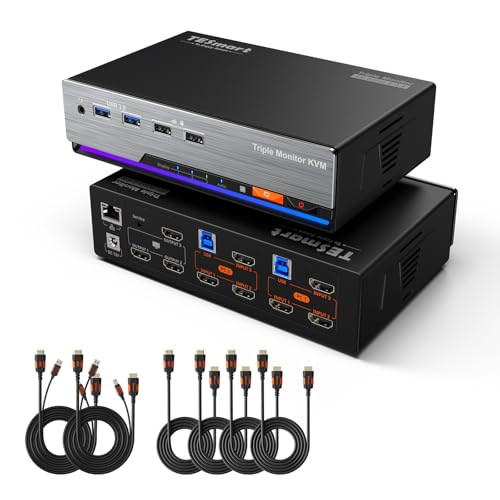
On the switch side, the families this cluster recommends are the all-rounder for the typical living room, the automation-first design for shared households, the documented infrastructure design for desks, and the capacity design for collections. On the splitter side, the parallel guidance lives in this cluster’s splitter articles: honest distribution designs from established accessories brands, matched to your display count and checked for clean copy-protection behaviour across every screen you intend to feed. Confirm exact configurations on current listings before buying either.

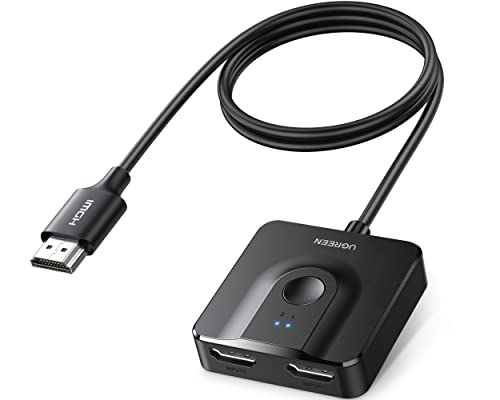
UGREEN HDMI Switch — The Switch Side’s Default
Balanced controls and manners for the crowded living-room stack. Best for: several sources, one television. Not suited for: any wish involving a second screen lit at the same time.

Kinivo HDMI Switch — The Switch Side for Shared Households
Automation that follows the household, with an override for its exceptions. Best for: family screens with several users. Not suited for: mirroring a picture to another room.

Cable Matters HDMI Switch — The Switch Side for Desks
Documented, decisive changeovers between machines on one monitor. Best for: work-and-play desks. Not suited for: showing the desktop on two monitors at once — that sentence describes its mirror image.
Final Recommendation by Use Case
Several sources, one screen, nightly choosing: switch, and it is not close. One source, several screens, same picture everywhere: splitter, and it is not close. A desk with two machines and one monitor: switch. A console that must appear on the television and a monitor together: splitter. A household that honestly has both problems — a crowded stack and a second room that wants the same programme — may one day run a switch feeding a splitter, sources gathered first and the chosen one distributed second; build that layout deliberately, in that order, after each device has proven itself alone. And the household with neither problem should buy neither device, with this comparison’s blessing: the correct answer to a direction question is sometimes to stay exactly where you are.
Scenario by Scenario: The Axis at Work
The Match in Two Rooms
A household wants the football on the living-room television and the kitchen screen simultaneously, so nobody misses a goal while cooking. Count the wish: one source, two screens, same picture. That is distribution — a splitter, completely and without a rival. A switch in this home would be a small tragedy: the kitchen screen dark, the cook exiled from the match, and a perfectly good product blamed for a direction it never claimed. Verdict: splitter, by the shape of the wish itself.
The Three Consoles and One Great Television
Three generations of consoles, one excellent screen, a household that plays something different every night. Count the wish: many sources, one screen, constant choosing. That is convergence — a switch, with automation if the household is shared and a spare input for the generation already being saved for. A splitter here would show the same console on a second screen nobody asked for, while the other two machines stayed exiled. Verdict: switch, by the same shape.
The Desk With a Laptop, a Desktop and a Monitor
Work arrives on a laptop, life happens on a desktop, and one good monitor serves both. Sources: two. Screens: one. Choosing: twice a day, every day. A switch — specifically the desk-shaped, button-controlled kind — converts a cable crawl into a gesture. The splitter’s mirror temptation appears when the same worker dreams of the laptop appearing on the monitor and the television together for a presentation; that dream, counted honestly, is one source and two screens, and it belongs to the other device. Many desks eventually contain both wishes on different days, which is why this scenario fools more buyers than any other: name the wish you have this month, buy for it, and let the other wish apply for its own budget later.
The Presentation Room
One laptop, a wall screen and a projector, an audience that must see the same slides on both. Distribution again — a splitter — with the negotiation caveat from earlier sections kept in view: the shared picture settles where both displays can follow, so the laptop’s output should be set for the room rather than for the finest screen in it. A switch in this room would be a choosing device with nothing to choose, standing between the laptop and an audience like a door in a corridor. Verdict: splitter, and set the source for the weaker display.
Cost, Complexity and Failure: The Practical Differences
Set the two side by side as purchases rather than concepts and a second set of differences appears. A switch’s complexity lives in its operation: it must be controlled well, every day, by everyone, so its true cost includes the household’s learning and the installer’s arrangement of personalities — the waker, the insomniac, the renegotiator. Its failures are behavioural: a jumped input, a refused handshake, a remote that cannot see. A splitter’s complexity lives in its negotiation: it must satisfy every display at once, forever, so its true cost includes the discipline of matching displays and setting the source for the common level. Its failures are constitutional: a picture that settles lower than the best screen could show, or a protected stream refused because one screen in the set would not cooperate. Neither list is longer than the other; they are differently shaped, like the devices. Households that fear daily fiddling should note that the splitter, once proven, asks for nothing ever again. Households that fear compromise should note that the switch never asks any screen to settle for another screen’s limits. Choose your anxieties as carefully as your device.
The Combined Layout: When the Answer Is Both, in That Order
Some architectures honestly require the pair, and they all share the same grammar: gather first, distribute second. Sources flow into a switch, which chooses; the switch’s single output flows into a splitter, which copies the chosen picture to every screen. A media room with four sources and two displays lives this way, as does a household whose games night is watched in two rooms. Building it well means staging: install and prove the switch alone until its behaviour is boring, then add the splitter and re-prove the whole chain, because every fault in a combined layout has two households of suspects. It also means accepting the splitter’s constitutional rule with open eyes — every screen in the distributed set shares one negotiated picture — and setting the sources accordingly. What the combined layout must never be is an accident: two boxes bought in one order by a household that needed one, chained together to justify both. If you cannot state, in one sentence, which problem each device solves in your home, you do not have a combined layout. You have a return waiting to happen.
Why the Confusion Persists — and How to Never Have It Again
The switch-splitter confusion survives because everything except the function conspires to hide it. The boxes share a silhouette, a shelf, a price neighbourhood and a vocabulary of ports and cables. Their names differ by a syllable’s weight. Their listings borrow each other’s adjectives. Even their owners describe them identically — “the little box that does the HDMI thing” — until the evening the difference becomes the whole story. The permanent cure is to stop naming the devices by their boxes and start naming them by their verbs. A switch chooses. A splitter copies. When you shop, shop for the verb your evening needs: if the evening involves deciding what the screen shows, you are buying choosing; if it involves the same showing appearing elsewhere, you are buying copying. Teach that sentence to the household and the category will never confuse any of you again — which, given that these two are among the most returned-for-confusion products in home entertainment, is a sentence worth the shelf space it takes.
Installation Compared: An Hour With Each
Install a switch and you spend the hour on diplomacy: connecting sources one at a time, visiting their settings, arranging personalities, teaching the household its one sentence. The work is social as much as electrical, and its product is a system with a map. Install a splitter and you spend the hour on surveying: proving each display’s cooperation in turn, setting the source to the level every screen accepts, and confirming that protected content plays on the least cooperative screen, not merely the finest. The work is constitutional rather than social, and its product is a picture with a treaty behind it. Both hours end with the same ritual — a full power-cycle, witnessed calmly — and both devices then recede, the switch into daily use and the splitter into total obscurity. If the prospect of one of those hours sounds pleasant and the other sounds like a chore, that preference is itself data: households tend to maintain happily the kind of system they enjoyed installing, and to neglect the other kind into intermittent mystery.
The Verdict for the Undecided, Compressed
If this long comparison must shrink to a pocket rule, it is this: count what overflows. Sources overflowing one screen — switch. One source overflowing into several rooms — splitter. Both overflowing — both devices, gathered first and distributed second, built in stages. Neither overflowing — neither device, and spend the money on the evening you were trying to improve. The rule has no exceptions in either direction, because it is not a preference but a description of what the two machines are. Everything else in this article — the handshakes, the sound paths, the control personalities, the failure shapes — exists to help you live well with the device the rule selects. Selection itself takes ten seconds, and it is the ten seconds on which the whole purchase stands.
A Brief Field Guide to Other Look-Alikes
While the axis is in hand, three neighbouring devices deserve a sentence each so they stop being mistaken for either contestant. An AV receiver is, among its larger duties, a switch with amplification — it gathers sources and forwards one, with sound as its first language; households building toward serious audio may find their switch inside it. A capture device takes one source and copies it onward to a computer for recording or streaming while passing it to a display — distribution’s specialist cousin, bought for the copy that leaves the room entirely. And a matrix device, beyond this comparison’s scope, routes several sources to several displays independently — choosing and copying at once, at a complexity and price that announce themselves honestly. None of these rescues a mis-bought switch or splitter, because each answers its own verb. The field guide’s lesson is the comparison’s lesson, widened: in this whole family of little boxes, the verb is the product, and the box is merely where the verb lives.
What Owners of Each Say After a Year
Long-term reports divide as cleanly as the devices. Switch owners talk about evenings: the changeover that stopped being an event, the exiled console that came home, the grandparent who operates the system unaided. Their regrets are the choosing article’s regrets — a count bought too exactly, a box placed where its remote could not see. Splitter owners talk about occasions: the final watched in two rooms, the presentation that simply appeared on both screens, the system that has not been thought about since its installation afternoon. Their regrets are constitutional — a mismatched display admitted to the set, a source set for the finest screen and sulking on the plainest. Notice that neither group’s regrets include the other device. Correctly directed purchases do not generate cross-category envy, because each device, in its own direction, is complete. The year-later evidence therefore endorses this article’s whole method: the satisfaction was decided by the axis, on the day of purchase, and everything since has been commentary.
The Two Mistakes, Dramatised Once More So They Never Happen to You
The Dark Second Screen
Friday, a big match, a switch bought in a hurry because the listing’s photograph showed a box with many ports. The main television blazes; the kitchen screen, connected hopefully to a second “output” that was in fact an input, stays dark through the first half. The post-mortem takes one minute and one port count: several in, one out — a choosing device asked to copy. The fix is a different box, not a better one, and the lesson costs exactly one spoiled half of football. Read the ports, and let this household’s Friday stand in for yours.
The Television Condemned to One Programme
Sunday, a splitter installed by a household that wanted the children on the console in one room and a film in the other — and discovered, simultaneously, in both rooms, the same picture, because copying is all the device has ever known how to do. The children’s disappointment and the adults’ are mirror images, which is fitting. The fix is a choosing device where choosing was the wish, and the lesson is the same lesson wearing the other coat: the verb was wrong, not the product. Between these two small dramas lies the entire content of this comparison, and both households, interviewed later, gave the same review of their eventual correct purchase: it does exactly what it says, in the direction it says it in.
And If Your Wish Is Genuinely Neither
A minority of readers arrive at this comparison carrying a wish that neither verb fits, and honesty requires walking them to their actual shelf. If the wish is different sources on different screens at the same time, independently chosen, the product family is the matrix — or, more simply and often more wisely, a second source: two modest players in two rooms outperform one elaborate routing scheme in most homes, on cost, on simplicity and on the household’s ability to understand its own system at midnight. If the wish is one source recorded or streamed beyond the house, the capture family owns it. If the wish is a single screen that shows two sources side by side, that is a feature of certain displays themselves, and no junction box of either verb will conjure it into a screen that lacks it. Naming the true wish is the whole skill this article has been teaching; where the wish belongs to another shelf, the comparison’s best service is to say so plainly and save you both purchases.
Choose the verb, then the box, then — and only then — the badge. Households that shop in that order do not write confused reviews, do not queue at returns desks, and do not keep a dark screen as a monument to a syllable. Their evenings simply work, in whichever direction their evenings run.
The Axis, One Final Time, in the Form of a Shopping Trip
Imagine the purchase as a conversation with a competent shopkeeper who asks only two questions. First: “What is crowding what?” If devices are queueing for a screen, she reaches for the switch shelf without glancing at the other. If a programme is trapped in one room while screens elsewhere stand dark, she reaches for the splitter shelf with the same certainty. Second: “Show me the evening you want.” You describe it — the consoles taking turns on the great screen, or the match blooming in two rooms at once — and she nods, because the evening you described contains the verb, and the verb contains the product. No third question exists. Notice what she never asked: which brand you prefer, which banner impressed you, which box photographed best. Those questions belong to the second purchase — the refinement within a direction — and households that answer them first are the ones whose stories fill the earlier sections of this article. Be the customer who answers the two real questions, and the rest of the comparison becomes what it should have been all along: pleasant reading, not a rescue manual.
A Note on Buying Either Device Well
Whichever direction the axis selects, the virtues of a good purchase are the same, and this comparison closes by honouring them once, together. Buy from an established accessories maker, because both devices are handshake machines and manners are a track record. Buy the count your layout needs with the headroom your near future can name — spare input on a switch, spare output on a splitter — because both devices are replaced, not expanded, when they fill. Respect the cables as part of the product in either direction: they carry every negotiation these boxes conduct. Draw the chain before ordering, sound path included, because nine layout problems in ten dissolve in pencil. And install by the relevant guide’s ritual in this cluster — one link proven at a time, a power-cycle witnessed in daylight — so the finished system, whichever verb it performs, performs it invisibly. Direction decides the device; discipline decides the experience; and the households that get both right are, a year later, the ones with nothing to report.
Many in, one out — or one in, many out. Say it once, in the shop, before the boxes start looking alike, and you will buy the right one the first time. That sentence is the comparison; the rest was evidence.
One More Axis-Honest Admission: What Neither Device Does for Sound Alone
Readers sometimes arrive at this comparison through a sound problem — a soundbar that serves one device beautifully and ignores the rest — and deserve a direct answer before the verdict sections resume. Neither contestant is a sound product. A switch gathers sources before the display, and the display’s return path then carries the chosen source’s sound to the soundbar as it always did; a splitter copies picture and sound together to every screen, with the return path existing only at a display actually paired with a bar. If your problem is purely that sound lives in the wrong place, the fix is a layout drawing and possibly a different hub, not a winner of this comparison. Both devices will happily join a corrected layout — the switch upstream of the screen, the splitter downstream of a source — but neither should be bought as a remedy for an audio route it does not sit on. Direction, once again: of the signal, of the sound, and of the wish.
The Comparison’s Postscript: A Word to the Household That Needs Neither, Yet
Comparisons are written for buyers, but this one ends with a paragraph for the comfortable: the household whose single source and single screen are in perfect equilibrium. Your presence here is not wasted. You now own the axis, and the axis is a forecasting tool — because equilibrium in this category is a season, not a state. A console will be gifted, a second room will want the match, a laptop will take up residence, a screen will multiply. When the season turns, it will turn on a specific evening with a specific wish, and the wish will have a direction. You will know, instantly and without a search engine, which shelf your answer lives on — and you will buy it once, in the right direction, while your neighbours are still reading the port counts on two identical black boxes. That is the whole value of having read a comparison before needing it.
Two Households, Revisited Five Years On
Return, finally, to the two dramatised households from earlier in this comparison, five years after their corrected purchases, because longevity is the comparison’s last evidence. The match household’s splitter has been thought about, by its owners’ own estimate, perhaps four times since installation — twice when a screen was replaced and the treaty of displays had to be renegotiated, twice when guests asked how the kitchen sees the match. It has simply copied, through seasons of football, with the fidelity of a household utility. The console household’s switch, meanwhile, has been operated thousands of times and thought about almost as rarely: it absorbed a new console generation into its spare input, survived two house moves by being the first thing reconnected and the thing that made the new room feel finished, and taught three children and one grandparent the one-sentence curriculum. Neither household has bought the other device. Neither has needed to. That is the axis, vindicated at the only timescale that finally matters — not the evening of purchase, but the half-decade of evenings after it.
The Axis Abroad: How Other Rooms in the House Vote
Walk the axis through a whole home and it calls every room correctly. The bedroom with a player and a stick under one small television votes switch, quietly, at compact scale. The children’s room, where one console must appear on the screen and nowhere else, votes switch again. The open-plan floor, where cooking and watching are one continuous evening, votes splitter for the programme that must be everywhere at once. The study, with its two machines and one serious monitor, votes switch at fingertip scale. The guest room, with a television and whatever a visitor brings, votes switch with a guest input kept ready. Only the room that wants a programme multiplied votes the other way — and in most houses that is one room, on some evenings, which is why the switch outsells its mirror in ordinary homes while the splitter remains irreplaceable in its own. Your home’s vote, room by room, is the most concrete form the decision can take: tally the rooms, and the household’s answer stops being an opinion and becomes a census.
HDMI Switch vs HDMI Splitter: The Whole Comparison in One Breath
A switch chooses among many sources for one screen; a splitter copies one source to many screens. The switch is operated daily and negotiates one conversation at a time; the splitter is installed once and negotiates with every screen at once. Buy the verb your evening needs — choosing or copying — from a maker with manners, with the count your layout names and the cables your chain deserves. Everything else in this long comparison is evidence for that breath, and the breath, taken honestly, is sufficient.
The Comparison Applied to Its Own Author’s Hallway
Comparisons should survive contact with their writers’ homes, so here is this one applied without mercy to a real-shaped hallway problem: a television in the lounge, a monitor in the study, three sources that live between them, and a recurring family wish to watch the big match in the lounge while a second screen in the kitchen keeps the cook company. Count it coldly. The study’s wish — machines choosing on one monitor — is a switch, and a small one. The match wish — one programme, two rooms — is a splitter, and only a splitter. The lounge’s crowded stack is a switch again, larger, with the splitter fed from its output on match days. Three wishes, three verdicts, two device types, one combined layout on exactly the occasions that need it. No single box could have answered all three, and no amount of brand research could have changed that — because the wishes, not the products, were the specification. Write your wishes down as plainly as that hallway’s, and your own comparison will grade itself.
Wishes first, verbs second, boxes third, badges last. A household that shops in that order will find this comparison waiting for it on the far side of the purchase — not as a warning it narrowly escaped, but as the explanation of why its evenings simply work, in whichever direction they run, on every screen it owns.
And on the day the season turns in your own home — a new console, a second room, a programme that suddenly belongs everywhere — you will not need this article again. You will need ten seconds, one sentence, and the right shelf.
Head-to-Head in Real Rooms: Situations That Break the Tie
The hybrid answer and when it fails
Faced with a close comparison, many buyers try to split the difference — using each option where it seems strongest. Sometimes that works; often it doubles the clutter, the learning curve and the maintenance while delivering neither side’s full advantage. A hybrid only makes sense when the two use cases are genuinely separate in your week, with their own spaces and their own moments. If both options would live in the same spot serving the same task, commit to one. A decisive single hdmi switch setup, well chosen, beats a hesitant double setup in almost every real room.
What would change the verdict
An honest comparison names its own tipping points. If your space grew, your load doubled, your budget for consumables tightened, or another person with different habits joined the setup, the recommendation in this match-up could flip — and it should. Identify which of those variables is most likely to change in your life over the next two years, and choose the hdmi switch option that stays right if it does. Buying for the situation you are drifting towards, rather than the snapshot of today, is the difference between a comparison that ages well and one you re-litigate every season.
A five-minute decision drill
If you are still torn, run this drill. Write down the three tasks you will do most with a hdmi switch, score each option out of five for each task based on the comparison above, then delete the task you do least often and score again. Most people find the winner changes — or confirms itself — once the rarest task stops distorting the result. Finish by asking which option you would recommend to a friend in a household where the gear gets used hard on weekends and barely touched midweek whose habits match yours. The answer you give for someone else is usually the honest one for yourself.
Start from the task, not the badge
Comparisons between these options collapse into confusion when they start from brand loyalty or headline numbers. Start instead from the task you repeat most: the session length, the load, the space and the other gear involved. In a household where the gear gets used hard on weekends and barely touched midweek, one side of this match-up usually reveals itself as the natural fit within minutes of honest task analysis, because the two designs optimise for different centres of gravity. The loser of this comparison is rarely a bad product; it is a product optimised for somebody else’s routine.
The scenario where the favourite loses
Every head-to-head has a scenario that embarrasses the popular pick, and finding it is the fastest way to test your own leanings. Picture the busiest, messiest version of your week — extra people, extra load, no time to tidy or adjust — and ask which hdmi switch option copes with grace and which one needs conditions to be just right. If the favourite only wins on your best days, it is the wrong choice, because purchases have to survive ordinary days. Deliberately stress-testing the comparison this way exposes assumptions that feature tables keep hidden.
Total commitment, not just the unit
Choosing a side in this comparison also chooses an ecosystem: the accessories, consumables, spares and upgrade paths that follow the hdmi switch home. One option may look leaner today while quietly committing you to a narrower, pricier ecosystem tomorrow; the other may ask more upfront and reward you with common, interchangeable extras. List what each side obliges you to buy, store and replace over the next two years, in a household where the gear gets used hard on weekends and barely touched midweek, and compare those lists as carefully as the products themselves. Ecosystem regret is slower than product regret, but it lasts longer.
Five honest minutes at this stage is worth more than five hours of comparison browsing.
If a candidate fails this check, strike it from the list without regret and let the remaining options compete on merit.
Your future self, mid-task on a busy day, is the person this check is really for.
Keep the notes with the product’s paperwork; they become the baseline every later adjustment is judged against.
Write the conclusion of that check down before you order, so the decision survives contact with a tempting listing.
That single habit separates owners who stay pleased with their choice from owners who quietly start shopping again within a season.
Frequently Asked Questions
Can an HDMI switch show one source on two TVs?
No. A switch has one output and shows one selected source on its single display. Showing one source on two televisions at the same time is precisely a splitter’s definition: one input, several outputs, the same picture everywhere. The confusion is understandable — the boxes look alike — but the direction is opposite, and no setting, adapter or arrangement of a switch will make it distribute. If the second television matters to the wish, the splitter is the purchase.
Can an HDMI splitter let me choose between two consoles?
No. A splitter has one input; it copies whatever that input receives to all its outputs. Choosing between consoles is a switch’s definition: several inputs, one output, one selected source shown. A splitter placed after a switch can distribute the switch’s chosen source to several screens — the advanced combined layout — but the choosing itself is always done by a switch, never by the splitter. Buy the choosing device for choosing and the copying device for copying.
Which is better for gaming?
It depends on the gaming wish, not the game. A switch serves the gamer with several machines and one great screen or monitor: consoles across generations and a PC, all permanently connected, swapped by button, with the signal passed through unprocessed. A splitter serves the gamer who wants the same play on two displays at once — a television and a monitor, or two rooms for an audience. Match the device to the wish, ensure its stated support covers the most demanding combination your console and display share, and keep the cables worthy of the chain.
Do I need both a switch and a splitter?
Only if you genuinely have both problems: several sources competing for attention, and a chosen picture that must appear on several screens. The combined layout runs sources into the switch, and the switch’s output into the splitter, which distributes the selected source. Build it in stages — switch proven alone first, splitter added second — because a two-device chain doubles the handshakes to diagnose when something misbehaves. Most households need exactly one of the two; needing both is a real but minority architecture, usually in media rooms and multi-room setups.
Will a splitter reduce quality on my main TV?
A splitter passes the source’s signal through as copies; it does not process or enrich it. The honest caveat is negotiation: the source must satisfy every connected display at once, so if one screen in the set accepts less than your main television can show, the shared picture may settle at the common level all screens accept. For identical or similarly capable displays this is a non-issue. For mixed sets, it is the splitter’s defining trade-off, and it should be weighed before buying rather than discovered after.
How can I tell a switch and a splitter apart when shopping?
Count the ports and read their labels, not the product’s headline. Several inputs with one output is a switch — it will say IN many times and OUT once. One input with several outputs is a splitter. Product names in this category are not reliable witnesses, and photographs of near-identical black boxes are worse. The port count never lies: it is the direction of the device, printed in hardware, and thirty seconds spent counting it is the cheapest insurance in this entire comparison.