ilcastellomenu.com is reader-supported. When you buy through links on our site, we may earn an affiliate commission.
Where to Buy
Yes, the search term is misspelled — faebook live is how a surprising number of people type it at midnight before their first broadcast — but the need underneath it is precise and unforgiving. The best cameras for facebook live are not the cameras that make beautiful recordings; they are the cameras that perform in real time, in front of an audience that can leave with one tap, while the broadcaster is simultaneously the presenter, the producer and the technical support. Live is a different craft from posting, and this guide — the companion to our posting guide — ranks only the live virtues.
Those virtues are specific: a clean, reliable feed into the streaming software or phone, autofocus that holds a moving presenter without hunting on air, tracking that follows a demonstrator around a workshop or kitchen, exposure that survives a cloud crossing the window mid-sentence, and connections simple enough to be trusted at one minute to airtime. Resolution matters least of the list, because the platform’s live pipeline compresses everything and the audience watches on phones; presence, stability and sound matter most, because those are what a live viewer actually experiences.
The six picks divide the live world honestly: three dedicated webcams for desk and studio streamers, a tracking camera that acts as its own cameraman, a mirrorless body for broadcasters who want a produced look, and a pocket gimbal for going live while moving through the world. Each verdict names the show it serves — the lesson, the service, the sale, the tour — because in live streaming the format is the equipment list, and buying for the wrong format is the one mistake the first broadcast will expose publicly.
A word about nerves, since every first broadcaster arrives with them: the audience cannot see your heart rate, only your preparation. The broadcasters who look calm are not calmer people; they are people whose checklist absorbed the anxiety in advance, whose rehearsal already survived the disasters, and whose camera — chosen from a list like this one — has never once given them a reason to glance at it mid-sentence. Calm is an equipment decision before it is a personality trait.
Key Takeaways
- Live rewards reliability over resolution; the audience forgives soft and never forgives frozen.
- Autofocus and tracking are on-air colleagues — choose them like crew, not like features.
- Your face, lit kindly and framed steadily, is the entire set for most successful live shows.
- Test the whole chain — camera, software, connection — before the audience is invited.
- Sound carries live broadcasts even more than recordings, because there is no edit to save it.
- Posting and streaming are different crafts; this guide ranks streaming only.
In this guide
Quick Picks
| Pick | Badge | Why it is here |
|---|---|---|
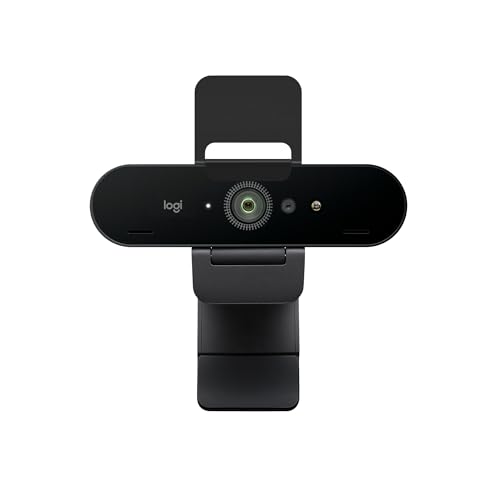
| Logitech Brio 4K | Best webcam for most Facebook Live shows | A plug-and-perform 4K webcam with kind autofocus, good low-light manners and the reliability that made it the default desk broadcast camera. |
| OBSBOT Tiny 2 | Best for presenters who move | A gimbal webcam that physically tracks you around the room — the whiteboard teacher’s, demonstrator’s and fitness instructor’s own cameraman. |
| Elgato Facecam | Best for streamers who want control | A fixed-focus, studio-minded webcam with a quality lens and deep software control — the broadcaster’s camera for a consistent, produced image. |
| Logitech StreamCam | Best friendly all-rounder for new broadcasters | A forgiving webcam with good autofocus, vertical-friendly mounting and kind colour — the gentle first camera for a weekly live habit. |
| Sony ZV-E10 II | Best broadcast-quality step-up | A mirrorless camera that streams with a produced, shallow-focus look, superb presenter autofocus and real lenses — for shows that must look like television. |
| DJI Osmo Pocket 3 | Best for live shows that move through the world | Go live from the market, the venue tour or the event floor with gimbal-smooth movement — the broadcast that leaves the desk behind. |
How Did We Choose Cameras for Facebook Live?
We began with the broadcast chain rather than the camera alone, because live failures are chain failures: the camera that needs a driver ritual, the connection that drops when the laptop sleeps, the software that sees a black rectangle at airtime. Each pick was judged on how simply and repeatably it presents itself to a computer or phone as a trustworthy video source, how it behaves across a full hour of continuous duty, and how gracefully it recovers from the small disasters — the unplugged cable, the restarted app — that live producers meet monthly.
The second filter was on-air behaviour. Presenter autofocus that breathes or hunts is a public embarrassment in real time, so we favoured cameras whose face tracking is calm, whose auto exposure adjusts in gentle steps rather than visible lurches, and whose colour flatters skin under the mixed household and studio lighting that real broadcasts use. Tracking cameras earned special scrutiny: a broadcaster who moves — the teacher at the whiteboard, the cook at the stove, the maker at the bench — needs a cameraman, and two picks here are exactly that.
Finally we weighed the show formats our readers actually broadcast: lessons and sermons, product demonstrations and shop sales, community announcements, interviews, fitness and craft instruction, and mobile tours. The six survivors map onto those formats with very little overlap, which made the verdicts easy to write honestly — each camera here is the best answer to a named kind of live show, and the wrong answers for the others are stated in the same breath.
One exclusion deserves a sentence of its own: several excellent recording cameras from our wider pool were set aside because their streaming path — the drivers, the connections, the hour-long behaviour as a live source — is a workaround rather than a design. Live broadcasting has no patience for workarounds at airtime. Every pick above was chosen because being a live camera is its job, not its hobby, and the distinction is the whole guide in miniature.
Which Six Cameras Should You Go Live With?
The Logitech Brio leads for the classic desk broadcast, the OBSBOT for presenters who move, and the Elgato for streamers who want manual control and a produced image. The StreamCam is the friendly all-rounder, the Sony mirrorless is the broadcast-quality step-up, and the DJI takes the show out of the room entirely. Match the camera to the show; the show is the specification.

Logitech Brio 4K — Best webcam for most Facebook Live shows
The Brio 4K is the camera the live world reaches for when the show must simply work: plug it in, and the streaming software sees a sharp, well-mannered presenter with autofocus that behaves, exposure that copes with the window behind the desk, and a field of view that can be narrowed from room to face as the format demands. For the teacher, the consultant, the community leader and the small business whose live show is a person talking well, it removes the camera from the list of things to think about — the highest praise live equipment can earn.
Its virtues are the unglamorous live ones compounded. The image stays clean in ordinary room light where cheaper webcams turn to porridge, the colour flatters without a lighting rig, the mount fits monitors and tripods without negotiation, and the whole device survives being packed, travelled and replugged weekly without developing opinions. Broadcasters build rituals around reliability, and the Brio has been the centre of more successful rituals than any webcam in this guide.
The honest limits are a webcam’s limits: a small sensor that a lit mirrorless body will outclass for sheer image beauty, fixed focus behaviour that suits a desk rather than a stage, and microphones you should replace with a proper one for any show where the voice is the product. Within the desk broadcast’s borders — which contain most of the world’s Facebook Live — the Brio is not merely adequate but definitive, and it is the first recommendation we give every new broadcaster who asks.
Set its framing per format and leave it there: the narrower view for the talking show, the wider for the two-person interview, each stored as the streaming software’s preset so airtime never begins with a negotiation. Broadcasters who treat the Brio as infrastructure — mounted, framed, lit once and then forgotten — discover its real specification, which no box prints: it disappears, and a disappeared camera is the foundation every confident live performance is built on.
- 4K-capable webcam with USB connection
- Autofocus and light correction for rooms
- Adjustable field of view for framing
- Monitor and tripod mounting options
- Works with standard streaming software
Strengths
- Reliability that broadcast rituals are built on
- Professional image from ordinary room light
- Zero-fuss setup before every show
Trade-offs
- Small sensor beside mirrorless rivals
- Desk formats suit it better than stages
- Voice deserves a separate microphone
Best for: teachers, consultants, community leaders and desk-based sellers.
Not suited for: stage presenters and filmmakers chasing a cinema image.

OBSBOT Tiny 2 — Best for presenters who move
Most live shows are filmed by nobody, and the Tiny 2 exists for the shows that suffer most from that: the lesson that walks to the whiteboard, the craft demonstration that moves between bench and shelf, the fitness class that cannot be taught from a chair. Its gimbal physically turns to follow the presenter, reframing as they move, zooming with a gesture, and returning to position on command — a cameraman’s basic grammar performed by a device the size of a matchbox, all broadcast long.
The tracking is the product, and it is genuinely good: face and body following that survives turns and partial occlusions, hand gestures that start, stop and frame the shot without touching a keyboard, and an image from its larger-than-webcam sensor that holds up in the room light real studios have. For the solo broadcaster, that combination changes what formats are possible — the demonstration, the workout and the workshop tour stop being compromises and become the show’s advantage over a static rival.
Its costs are price, a learning curve for the gesture vocabulary, and the moving parts’ need for a stable perch and a little respect. Presenters who never leave a chair gain nothing from its talents and should buy the Brio’s simplicity instead. But for the broadcaster whose body is part of the content — and Facebook Live is full of them, teaching, making, moving — the Tiny 2 is not an upgrade to a webcam. It is the hiring of a colleague, at a webcam’s salary, who never sleeps through a show.
Rehearse the gestures like lines: the palm that stops the tracking, the sign that calls the close-up, the walk to the whiteboard and back at performance pace. The first show with a tracking camera always contains one comic moment of the presenter negotiating with their own cameraman; professionals simply schedule that comedy in rehearsal. Two practice broadcasts and the Tiny becomes invisible too — a colleague whose competence the audience notices only as an absence of the usual live awkwardness.
- Motorised gimbal with presenter tracking
- Gesture control for framing hands-free
- Larger sensor than typical webcams
- Voice and remote control options
- Compact body for desks and studios
Strengths
- Follows moving presenters automatically
- Unlocks demonstration and fitness formats
- Image quality above the webcam class
Trade-offs
- Premium price for a webcam
- Gestures take a show or two to learn
- Needs a stable perch for the gimbal
Best for: teachers, demonstrators, fitness and craft instructors who move.
Not suited for: seated talkers who never leave the desk frame.

Elgato Facecam — Best for streamers who want control
The Facecam is the webcam for broadcasters who think like producers. Where rivals automate everything, it offers a fixed-focus lens of genuine quality — set the distance once, and the image stays exactly as sharp at the end of the show as at the start, with no autofocus breathing to apologise for — and software control deep enough to lock exposure, colour and framing into a repeatable house style. For the streamer whose live show is a brand, that repeatability is the product: the same face, the same light, the same frame, every broadcast, recognised in the feed before the title is read.
The image rewards the control. Its lens and sensor combination produces a crisp, honest picture that flatters a lit face and exposes an unlit room without mercy — which is the correct incentive structure for a serious broadcaster, because it makes the small lighting investment this guide keeps recommending visibly worth it. Streamers graduating from the anything-works phase find the Facecam is where their show starts to look intentional.
Its demands are the other side of its virtues: it expects a tripod or mount rather than balancing on a monitor’s goodwill, it has no microphone worth using, and its fixed focus suits a presenter at a set distance rather than a wanderer. Buy it when the show has a home studio, a lighting decision and an audience worth consistency — the Facecam is the connoisseur’s webcam, and connoisseurship, in live work, is simply professionalism with better taste.
Its consistency invites a matching discipline in everything around it: the same chair height, the same background arrangement, the same opening frame, until the show’s first second is a signature the feed recognises mid-scroll. Streamers who build that signature find their regulars arriving from the thumbnail alone. The Facecam cannot create the discipline, but it is the only webcam here designed to reward it perfectly, broadcast after broadcast, without drift or mood.
- Fixed-focus quality lens
- Deep software control of image settings
- Studio-minded design for tripods and mounts
- Crisp image for lit presenters
- Built for streaming software workflows
Strengths
- Perfectly consistent image, show after show
- No autofocus hunting, ever
- Rewards a lit studio handsomely
Trade-offs
- No usable built-in microphone
- Expects a mount and a lighting decision
- Fixed focus suits set distances
Best for: established streamers and branded shows with a home studio.
Not suited for: mobile presenters and the lighting-averse.

Logitech StreamCam — Best friendly all-rounder for new broadcasters
The StreamCam is the broadcaster’s first camera in the best sense: forgiving of rooms, of faces and of beginners. Its autofocus keeps a presenter kindly sharp without drama, its colour treats household light as a friend, and its mount turns sideways for the vertical formats that community and mobile-first audiences increasingly watch — a small mechanical kindness that saves its owner from the sideways-neck broadcasts that mark a page as amateur. For the weekly show — the church update, the club’s announcements, the shop’s Saturday sale — it simply works, pleasantly, every time.
It occupies the sensible middle of this guide deliberately. Sharper and calmer than the bargain webcams, simpler and cheaper than the tracking and studio specialists, it asks nothing of its owner beyond a USB socket and a subject. New broadcasters need their early shows to be about the audience rather than the equipment, because the audience habit is built or lost in the first month, and the StreamCam’s whole design conspires to keep the equipment invisible during exactly that month.
Its ceilings are the middle’s ceilings: low light will find its sensor’s limits sooner than the Brio’s, the produced-image crowd will want the Facecam’s control, and movers will want the Tiny’s tracking. None of that diminishes its role as the recommendation for the broadcaster who needs to start this week, on a sane budget, with a camera that will still be a perfectly good second angle when the show outgrows it.
New broadcasters should exploit its forgiveness to build the habit before the polish: go live weekly from the first week, at the camera’s default kindness, and let the early shows be about finding the audience and the format. The StreamCam will not embarrass a beginner in public, which is precisely the permission a first month of broadcasting needs. Upgrade the light before the camera, the microphone before the light — and discover, around show ten, that the little Logitech is still not the weakest part of the production.
- Webcam with autofocus and kind colour
- Mount rotates for vertical formats
- USB connection for simple setups
- Good image in ordinary room light
- Compact, travel-friendly body
Strengths
- Forgiving for beginners and rooms
- Vertical formats handled gracefully
- Invisible equipment during early shows
Trade-offs
- Low-light ceiling below the Brio
- Less control than the Facecam
- No tracking for moving presenters
Best for: new broadcasters, community pages and weekly shows.
Not suited for: dark studios and presenters who roam.

Sony ZV-E10 II — Best broadcast-quality step-up
When a live show outgrows the webcam’s honesty and wants television’s flattery, the ZV-E10 II is the step up. Connected as the broadcast’s camera, it brings what no webcam can: a large sensor’s gentle handling of room light, real lenses that separate the presenter from the background with that produced blur audiences read as professional, and Sony’s presenter autofocus, which holds an eye through movement, product demonstrations and the two-person interview without a focus puller. The show stops looking like a video call and starts looking like a programme.
The creator engineering serves the live hour specifically: a screen that lets the solo broadcaster confirm the frame, product-focus behaviour for the seller who holds goods to the lens, colour that can be finished in-camera for a consistent brand look, and microphone options that treat the show’s voice with production respect. Paired with a decent light and a proper microphone, it produces the broadcasts that sponsors, venues and serious communities commission.
The step up has step-up costs: setup complexity beside a webcam’s plug-and-go, heat and battery discipline across the longest shows, a lens budget on top of the body, and streaming connections that reward a rehearsed workflow. This is not the first camera for a first broadcast. It is the camera for the broadcaster whose audience has arrived and whose show deserves to look like it — the graduation this guide’s other picks prepare their owners for.
Build its broadcast configuration as a saved, labelled setup — streaming connection tested, audio path stored, the show’s lens and colour chosen — and rehearse the full assembly until it takes minutes rather than an hour. Mirrorless streaming fails socially before it fails technically: the audience that watches a presenter troubleshoot in the opening minutes does not return. Professionals treat setup as part of the show’s production, and this camera, prepared so, delivers a programme; unprepared, it delivers a lesson in why the webcams above exist.
- APS-C mirrorless body with lens choice
- Presenter eye autofocus and product mode
- USB and HDMI streaming workflows
- Microphone input for production audio
- Colour options for a consistent brand look
Strengths
- Television look no webcam can match
- Autofocus worthy of moving demonstrations
- Grows with lenses, lights and ambition
Trade-offs
- Setup and workflow more demanding
- Battery and heat discipline on long shows
- Costs assume a serious show
Best for: established sellers, teachers and shows with a real audience.
Not suited for: first-time broadcasters wanting plug-and-go simplicity.

DJI Osmo Pocket 3 — Best for live shows that move through the world
Some live shows are places rather than people: the property tour, the market walk, the festival floor, the workshop revealed room by room. The Pocket 3 is those shows’ camera. Its gimbal turns a walking broadcast from a seasick ordeal into a glide, its tracking keeps a guide or a product centred while the operator navigates the space, and its pocket size means the live show can start wherever the audience’s curiosity is — which, for tours and events, is the entire editorial proposition.
The production values travel with it. Faces are held kindly, movement is smoothed mechanically rather than by hopeful software, and the wireless microphone companions keep the guide’s voice clear over the location’s ambience — the combination that separates the professional mobile broadcast from the shaky phone tour it competes with in the feed. Venues and clients notice the difference before they can name it, which is exactly how production value is supposed to work.
Its limits define its role honestly: battery and connection discipline matter more outdoors, weather can cancel what a studio would survive, and the fixed lens frames the world as it finds it. It is the mobile specialist in a guide of desk and studio instruments — irreplaceable for the show that moves, unnecessary for the show that sits. Broadcasters whose format is the tour, the floor or the street should buy it first and let the desk cameras wait.
Scout the live route as a location manager would: where the signal thins, where the sun will blind the lens at the broadcast hour, where the crowd thickens and the voice will fight the ambience. A walked rehearsal with the broadcast phone in hand answers all four, and the show that follows inherits the answers invisibly. Mobile live is the format where preparation is least visible and most decisive — the audience sees a glide; only the broadcaster knows it was a map.
- Mechanical gimbal for walking broadcasts
- Subject tracking for guides and products
- Pocket size for location shows
- Wireless microphone ecosystem
- Quick start for spontaneous lives
Strengths
- Mobile shows with production smoothness
- Voice stays clear over location sound
- Starts anywhere the story is
Trade-offs
- Battery and data discipline outdoors
- Weather can cancel the show
- Fixed lens frames as it finds
Best for: property tours, market walks, event floors and travel lives.
Not suited for: desk shows and long seated formats.
How Do You Set Up a Facebook Live Broadcast That Does Not Fail?
Rehearse the chain, not just the content. The camera, the streaming software or app, the audio path and the internet connection are one instrument, and it must be played end-to-end before the audience is invited — ideally in an unlisted or practice broadcast at the same hour of day, from the same chair, with the same lighting the real show will use. Most live failures are not equipment failures but first performances of an unrehearsed chain, and the professional’s secret is embarrassingly simple: their first performance happened in private, yesterday.
Build the setup ritual into a checklist that lives beside the camera: lens cleaned, framing confirmed on the actual preview, microphone levels spoken at performance volume, notifications silenced, the household informed, the water glass placed. Live broadcasting punishes improvisation in its infrastructure so that it can reward improvisation in its content — the jokes, the answers, the spontaneity the audience came for are only safe when everything underneath them is boringly prepared.
Finally, plan the failure you can afford. A second device ready to continue the show, a pinned comment explaining a restart, a calm sentence practised for the frozen moment — these convert disasters into anecdotes and signal to the audience that they are in professional hands. Live viewers forgive almost any technical accident once; what they do not forgive is panic. The cameras in this guide minimise the accidents; the checklist handles the rest, and together they are the whole engineering of trust.
How Should You Light and Frame a Live Presenter?
Light the face like it is the entire budget, because to the audience it is. One soft source, large and close, placed just off the camera’s axis, transforms every camera in this guide more than an upgrade would — skin smooths, eyes catch light, the small sensors of webcams stop struggling and start flattering. A window with a sheer curtain is that source for daytime shows; an inexpensive panel with diffusion is its evening twin. The second light, if any, exists only to separate the presenter from the background with a hint of depth.
Frame for the relationship you want: chest-up for the confessional and the lesson, a little wider for the demonstrator whose hands work, and the rule of thirds applied gently so the presenter addresses the audience rather than the ceiling. Check the background like a producer — the plant, the bookshelf and the door that someone will walk through are all cast members of your show, and the audience will read them as statements about you whether you cast them deliberately or not.
Then lock it down. The consistent frame, repeated across broadcasts, becomes the show’s visual signature — the feed’s scrollers recognise it before they read the title — and consistency is available free to every broadcaster who resists redecorating weekly. The Facecam’s locked settings and the Brio’s repeatable framing serve exactly this signature. Choose your frame as you would choose a logo: once, carefully, and then for a year.
How Do You Run the Live Hour Itself?
Open like you mean it: the first thirty seconds decide the audience’s size, because the platform invites your followers while you are finding your opening sentence. Begin with the promise — what this show will give, show or answer — greet the arriving names as the comments wake, and repeat the promise once for the latecomers before settling into the material. Broadcasters who warm up on air train their audiences to arrive late; broadcasters who start on time with value train audiences to arrive early, which is the entire growth mechanic of live work.
Conduct the comments as a second presenter. Read questions aloud with their askers’ names, answer in the flow rather than in a segregated segment where possible, and let the audience’s reactions visibly steer the show within its plan — that responsiveness is the one thing live can do that recordings cannot, and it is why the audience came. A moderator, even an informal one, transforms the presenter’s hour by filtering and surfacing the best of the chat; solo broadcasters should at least arrange the screen so a glance gathers the room’s mood.
Close with a destination: the next show’s appointment, the page’s group, the product’s page, the question you want answered in the comments after the broadcast ends. Live audiences evaporate by design; the broadcaster’s craft is giving the evaporation a direction. Then stay a moment after the formal end for the loyal — the post-show minute, unscripted and warm, is where communities are actually built, one remembered name at a time.
What Internet and Audio Setup Does Live Actually Need?
Bandwidth honesty first: a live show needs a stable connection more than a fast one, and stability is bought with a cable wherever the show has a home — wired connections forgive what wireless cannot — plus a rehearsal at the broadcast hour, when the neighbourhood’s usage resembles the real thing. Position the router, close the household’s competing demands for the hour, and know your fallback: the phone’s data, hotspot-ready, has saved more professional broadcasts than any camera in this guide.
Audio is the live show’s invisible half, and it obeys the recording rule with interest: the microphone belongs near the mouth, because there is no edit in which to rescue a distant voice. A lapel or a close desktop microphone transforms every camera here, including the mirrorless flagship, more than any lens — and monitoring, where the setup allows, catches the hum, the echo and the neighbour’s mower while they are still fixable by a sentence’s pause rather than by an apology after the show.
Power and heat close the checklist: cameras and laptops plugged in rather than trusted to batteries for the long show, airflow unembarrassed around hardworking devices, and the whole chain left running in rehearsal for the show’s full length at least once. Live equipment rarely fails in the first ten minutes; it fails in minute forty of the final, and the only audit that finds those failures is duration itself. Rehearse long, broadcast calm.
How Do You Grow a Live Audience Across a Season?
Show up like weather: the same day, the same hour, the same promise, until the appointment exists in your audience’s week independent of any notification. Live growth is overwhelmingly a scheduling phenomenon wearing a content costume — the shows that compound are the ones a viewer can plan around, recommend with a time attached, and miss with genuine regret. The cameras in this guide serve that compounding by making the weekly production sustainable for a solo broadcaster, which is the unspoken reason reliability outranked beauty throughout.
Make each show advertise the next from inside itself: the question teased for next week, the guest announced, the series named so the audience understands they are inside an ongoing story rather than a sequence of accidents. Clips cut from the live hour — the answer, the demonstration, the moment — posted through the week with the next appointment attached, turn one broadcast into a small campaign, and the posting craft from our companion guide becomes the live show’s marketing department.
Finally, honour the regulars by name and by memory. Live communities are villages, and villages run on recognition: the question remembered from last month, the newcomer’s welcome, the milestone noticed aloud. No camera in this guide can do that work, and every camera in this guide exists to free the broadcaster’s attention for it — which is, in the end, the entire technical philosophy of live streaming equipment stated in one sentence. Automate the picture; spend yourself on the people.
What Should Your First Month of Live Shows Look Like?
Small, regular and deliberately unambitious in everything except consistency. Week one is the private rehearsal, disasters included and catalogued. Week two is the first public show, kept short, on the subject you know best, with the promise kept modest and therefore kept. Weeks three and four repeat the appointment with one improvement each — the light moved, the opening tightened, the microphone closer — because a month of single fixes compounds into a production, while a month of total reinventions compounds into a new set of beginners’ mistakes wearing better clothes.
Review every broadcast the next day with a notebook and a friend’s honesty. Note where the audience arrived, where it thinned, which segment the comments woke for, and which technical moment you felt in your stomach. The platform’s own replay is the finest broadcasting school in existence, tuition-free and brutally personalised, and the broadcasters who study theirs improve at a rate the merely talented never match. The cameras in this guide will faithfully record the evidence; the notebook is where it becomes education.
By the month’s end, decide the show’s identity in one sentence — who it is for, what it gives, when it happens — and let that sentence govern the next season’s purchases, formats and guests. Equipment bought before the sentence exists is decoration; equipment bought after it is investment. Most of the six cameras above will still be the right answer after the sentence is written, which is the quiet design of this guide: buy for the show you can already describe, and describe it before the second show, not the twentieth.
How Do Interviews and Guests Change the Live Setup?
A second person doubles the show’s life and its technical appetite in the same gesture. Framing must widen or track, audio must serve two voices at two distances from the microphone, and the camera’s autofocus must be trusted — or instructed — not to play favourites between faces. The Brio’s wider view, the Tiny’s ability to reframe between speakers, and the Sony’s calm eye detection each answer a dialect of that problem, which is why interview-heavy shows should choose their camera by the conversation’s shape rather than by the solo show’s habits.
Remote guests add the chain’s second front: their camera, their light and their connection arrive as variables you cannot rehearse away, only prepare for. Send the guest a one-page ritual of their own — the window in front of them, not behind; the camera at eye height; the test call yesterday, not at airtime — and keep your own setup forgiving enough to carry a weaker guest feed gracefully. Audiences forgive a guest’s roughness when the host’s side is impeccable; they forgive nothing when both sides wobble.
Build the interview’s rhythm as deliberately as its setup: the guest introduced with their name spelled for the comments, questions shared in advance for everything except the spontaneity you have agreed to protect, and a closing that returns the audience to the show’s own promise. Live interviews are where communities meet their wider world, and the broadcaster who hosts them well becomes a curator in the audience’s eyes — a promotion no camera can buy and every camera in this guide can support, once the hosting is worthy of it.
How Do the Six Compare for Going Live?
Compare by show format: the Brio for the seated talker, the Tiny 2 for the mover, the Facecam for the branded studio, the StreamCam for the gentle start, the Sony for the produced programme, and the Pocket 3 for the show that walks. The format chooses the camera; the camera merely agrees.
| Pick | Badge | At a glance |
|---|---|---|
| Logitech Brio 4K | Best webcam for most Facebook Live shows | Desk broadcast default; plug in, look professional, go live. |
| OBSBOT Tiny 2 | Best for presenters who move | Tracking gimbal webcam; follows the presenter like a crew member. |
| Elgato Facecam | Best for streamers who want control | Studio webcam; manual control and a consistent produced image. |
| Logitech StreamCam | Best friendly all-rounder for new broadcasters | Friendly starter webcam; forgiving image, easy weekly rhythm. |
| Sony ZV-E10 II | Best broadcast-quality step-up | Mirrorless streaming body; television look for flagship shows. |
| DJI Osmo Pocket 3 | Best for live shows that move through the world | Pocket gimbal for mobile live shows, tours and event floors. |
What Mistakes Ruin First Facebook Live Broadcasts?
Going live for the first time in public is the founding error: the unrehearsed chain, the untested audio, the framing discovered by the audience. Every professional in this guide’s research did their first broadcast to nobody — a practice run, unlisted or among friends — and treated the disasters found there as tuition paid in private. The audience’s first impression is a non-renewable resource; spend your beginner’s luck where nobody is watching, and debut with a show that has already happened once.
The second mistake is buying the camera and neglecting the chain: the finest webcam in this guide cannot rescue a show whose internet stutters, whose audio echoes from the room’s far wall, or whose lighting makes the presenter a silhouette with opinions. Live quality is a system property. Spend across the system — light, microphone, connection, rehearsal — in that rough order, and let the camera be the last upgrade rather than the first, once the show’s format has proven it deserves one.
The third mistake is broadcasting without a hosting plan: no opening promise, no comment rhythm, no close, just a camera pointed at a person hoping the hour fills itself. Live is a performed format with a grammar, and audiences leave unhosted shows the way guests leave a house where nobody greets them. Write the run of show on one card — promise, segments, questions, close — and keep it beside the camera until the grammar is in your bones. The equipment in this guide will handle the picture; the hosting is gloriously, irreducibly yours.
A fourth mistake is neglecting the replay: broadcasting the same fixable flaws weekly because the show felt fine from the presenter’s chair. The replay is the audience’s truth — the audio dip you did not hear, the three minutes where the framing cut your hands, the segment where the comments quietly stopped. Watch it within a day, fix one thing, and let the season be a staircase. Broadcasters are made in the replay exactly as filmmakers are made in the edit.
Do not mistake a quiet chat for a failed show, either. Early broadcasts to a handful of viewers are the profession’s normal childhood, and the handful who stay for a well-hosted hour are worth more than a crowd that sampled a chaotic one. Host the three people in the comments as if they were three hundred — because the replay will be watched by people deciding whether the show deserves their hour next week, and it will show them exactly how you treat an audience when nobody is watching. That is the audition that matters.
Final Recommendation
For most new broadcasters, the Logitech Brio 4K is the answer: reliable, flattering and invisible, so the show can be about the show. Presenters who move should hire the OBSBOT Tiny 2 as their cameraman, branded studios should lock in the Elgato Facecam’s consistency, gentle starters the StreamCam, and established shows ready to look like television should graduate to the Sony ZV-E10 II — with the Osmo Pocket 3 waiting for the day the show walks out of the room and into the world.
Whichever you choose, rehearse in private, light the face, put the microphone close, and start on time with a promise. Facebook Live rewards exactly those unglamorous fidelities with the only currency it mints: an audience that returns. And if you typed the platform’s name wrong on your way here — you are in good company, and now, with the right camera, you are also ready.
Start the staircase this week: one private rehearsal, one honest replay, one fix. The audience that matters is patient with broadcasters who visibly improve, and improvement, unlike talent, can be scheduled.
Book the rehearsal before you announce the show, and announce the show before you feel ready — the two appointments, in that order, are how every durable live programme in history has begun. Your audience is already out there, scrolling, with an hour a week to give somebody. Give them a reason to give it to you, on time, lit kindly, sounding clear.
The camera will hold your face steady while you find your voice. That division of labour — machine for the picture, human for the presence — is the entire craft, and it starts with the next rehearsal you schedule.
Schedule it tonight, while the intention is warm and the calendar is still empty enough to be kind.
Kindness, in scheduling as in lighting, is a professional skill — and your future audience will feel both kinds.
Feel it they will, from the first steady frame of the first honest show.
Make that show this week, privately first and publicly second, and the season has begun.
Seasons are only ever begun, never announced into existence.
Begin yours with the rehearsal nobody sees, and let the audience meet only the broadcaster it produced.
That broadcaster is calmer, clearer and considerably more watchable than the one who skipped it.
Watchable, in the live economy, is the whole fortune.
Spend it wisely, one steady, well-lit show at a time, every week.
Frequently Asked Questions
I typed ‘faebook live’ — is this the right guide?
It is. The misspelling is one of the commonest ways the search gets typed, usually in a hurry before a first broadcast, and it leads here: a guide to cameras for broadcasting live on Facebook, ranked on streaming virtues — reliability, tracking, presenter autofocus and simple connections. If what you actually wanted was cameras for posting photographs and clips rather than broadcasting, our companion guide to Facebook posting covers that craft instead.
Can I go live on Facebook with just a webcam?
Yes — for seated formats, a webcam from this guide plus a decent microphone and a lit face is a complete professional setup, and most successful regular shows run on exactly that. Add a camera like the ZV-E10 II only when the show’s format or audience outgrows the webcam’s image, and add tracking or a gimbal when the format starts to move. The audience judges presence and sound far more than they judge the sensor’s pedigree.
What internet speed do I need for Facebook Live?
A stable connection matters more than a headline speed: the show needs a consistent upload stream for its whole duration, without the dips that wireless congestion causes at busy hours. Use a wired connection where the show lives, test at the real broadcast hour during rehearsal, and keep a phone hotspot ready as the fallback that has saved many shows. If the rehearsal stutters, fix the connection before inviting the audience — no camera in this guide can out-perform a failing network.
Why does my live picture look worse than my recordings?
Because live is a harder pipeline: the platform encodes in real time and compresses for thousands of simultaneous viewers, and your camera’s image is only one ingredient beside light and connection. The remedies are the guide’s refrains — more and softer light on the face, a stable wired connection, a camera whose exposure behaves gently — and realistic expectations: a clean, kind, steady live image beats a sharp one that freezes, in every audience metric that matters.
Do I need a separate microphone for live streaming?
For any show where the voice carries the content — lessons, sermons, sales, interviews — yes, treat it as part of the camera purchase. Webcam and camera microphones sit too far from the mouth and gather the room along with the voice; a lapel or close desktop microphone is the single largest quality jump available to a live show at any budget. Monitor the sound in rehearsal at performance volume, because live offers no second take in which to fix it.
How long should a Facebook Live show run?
Long enough to serve its promise and no longer: most regular shows find their rhythm between twenty minutes and an hour, with the audience’s peak arriving early and the loyal core staying for the close. Consistency of schedule matters more than length — the same time, the same day, the same promise — because live audiences are appointment audiences. Track when your viewers actually leave across several shows and let that evidence, not a rule, set your length.
Related Guides
The posting craft and the wider streaming world continue in our companion guides: best cameras for facebook best cameras for live streaming best webcams for streaming


