ilcastellomenu.com is reader-supported. When you buy through links on our site, we may earn an affiliate commission.
Where to Buy
Let us start with the sentence this whole guide depends on: if you want to publish genuine 360-degree imagery to Google — Street View contributions, virtual tours in a business profile, or Photospheres that a viewer can drag around — you need a camera that captures the full sphere in the first place. The best cameras for google 360 work therefore begin with one true 360 camera, and this guide will not pretend otherwise. Around that anchor, though, sits a supporting cast that real tour photographers use every week, and each supporting pick below is labelled with its honest job.
Google’s ecosystem rewards complete, well-stitched spheres. A business tour that lets a customer stand in the doorway and look at the ceiling, the counter, and the street behind them builds a kind of trust flat photographs cannot. Property walkthroughs, holiday rentals, showrooms, cafés, and trailheads all gain from that look-around feeling, and the capture tool has to deliver clean stitching, reliable location tagging, and files that upload without a fight.
Where to buy and what to buy first depends on which Google job you mean. Publishing a connected virtual tour of premises calls for the spherical camera and a monopod. Adding a single Photosphere of a viewpoint calls for the same camera used casually. Supplementing a listing with smooth walkthrough video and detail stills — the material that makes a profile feel alive — is where the gimbal cameras, action cameras, and compacts in this list earn their places, reframing wide footage and covering angles a sphere renders poorly.
Why not simply use a phone? Phone-captured panoramas stitched in software can produce a sphere, and for a one-off experiment they cost nothing. But the seams show, the resolution drops exactly where viewers pinch to look closer, and the workflow collapses the moment you need twenty viewpoints along a corridor rather than one heroic attempt in a car park. Dedicated hardware exists because tours are a volume business.
This guide therefore ranks one anchor and five specialists. The anchor does the spherical capture Google actually ingests as 360. The specialists handle the moving walkthrough, the wide reframed stills, the close detail a sphere smears, and the backup angle. Read the roles before the rankings: a buyer who understands which job each camera performs will build a better tour kit than one who buys six gadgets all claiming to do everything.
One more piece of honesty about workflow. Google-facing 360 work is half capture and half plumbing — GPS accuracy, consistent height, level horizons, and tidy uploading decide whether a tour feels professional. The later sections cover that plumbing in detail, because a modest camera used with discipline publishes better tours than a flagship waved around hopefully.
Key Takeaways
- Only a true 360 camera publishes real spherical imagery to Google — here, that is the Insta360 X4 alone.
- Supporting cameras earn their place through reframing, walkthrough video, and detail stills, not through pretending to be spherical.
- Consistent camera height and level horizons matter more to tour quality than a small resolution advantage.
- Accurate GPS tagging at capture saves hours when connecting viewpoints into a tour.
- A monopod with a small footprint keeps the photographer’s feet and shadow out of the sphere.
- Shoot more viewpoints than you think you need; gaps in a tour cannot be filled afterwards.
In this guide
Quick Picks
| Pick | Badge | Why it is here |
|---|---|---|
| Insta360 X4 | Best true 360 camera — the anchor of this guide | The only pick that captures the complete sphere Google presents as 360, with high-resolution video and stills and a mature publishing app. |
| DJI Osmo Pocket 3 | Best walkthrough camera to accompany a tour | A gimbal-stabilised camera that glides between viewpoints, filming the smooth connecting video a listing needs beside its spheres. |
| GoPro HERO13 Black | Best wide-angle reframing and backup camera | Ultra-wide, rugged capture whose footage can be reframed into flat stills and clips that support the same Google listing. |
| Insta360 Ace Pro 2 | Best action camera for low-light supporting footage | A flip-screen action camera with strong low-light video, for evening venues and reframed listing clips. |
| Canon PowerShot G7 X Mark III | Best detail stills camera for the same listing | A 1-inch-sensor compact that photographs the details spheres soften — signage, menus, textures, and products. |
| Sony ZV-1F | Best presenter camera for profile videos | A fixed wide lens and face-tracking autofocus for the owner-fronted videos that make a Google profile personal. |
How Did We Choose Cameras for Google 360 Work?
The first test was spherical honesty. A camera either records the entire sphere in a form Google can present as 360, or it does something else — and something else can still be valuable, but never under a false label. That rule put the Insta360 X4 alone in the anchor role and forced every other pick to justify itself by a real, named contribution to a tour workflow.
For the anchor, we judged stitching quality, resolution headroom, and the maturity of the export path toward Google-facing formats. Viewers explore a sphere by cropping into it, so the effective sharpness of any one direction is a fraction of the headline number; headroom is not vanity but the difference between a readable menu board and a smudge. Reliable location data mattered equally, because a tour is a chain and every link needs coordinates.
Supporting picks were judged as specialists. Could the gimbal camera walk a corridor without bobbing? Could the action camera’s wide footage be reframed into honest flat stills and clips for the same listing? Could the compact resolve the detail — the fire exit sign, the product label, the texture of the brickwork — that a sphere softens? Each yes earned a place; vague versatility earned nothing.
Finally, we considered the operator. Much Google 360 work is done by the business owner, an estate agent, or a local guide rather than a professional crew. Equipment that demands a laptop, a stitching suite, and a free afternoon per tour will simply stop being used, so app-based workflows and forgiving automation scored heavily across the whole list.

Insta360 X4 — Best true 360 camera — the anchor of this guide
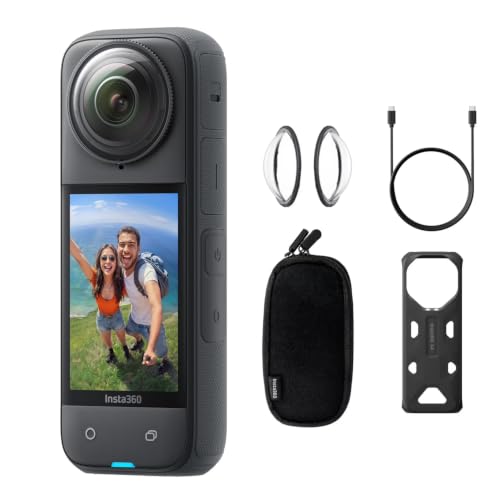
The X4 is the camera this keyword actually asks for. Two fisheye lenses record everything around, above, and below the body, and the software stitches the overlap into a seamless sphere you can publish as a Photosphere, cut into a virtual tour, or reframe into conventional footage later. Its headline video resolution is high enough that a viewer dragging the scene on a phone sees texture rather than mush, and its still capture gives tour work the crisp frames that video grabs never quite match.
For Google-facing work the details around the sensor matter as much as the sensor. The companion app handles stitching, levelling, and export without a desktop suite, location can ride along from the phone so viewpoints land on the map where they were truly taken, and the camera’s small body on a slim monopod nearly vanishes from its own picture — the nadir hole shrinks to a patch you can cover with a logo or a discreet floor plate. Battery swaps are quick, which matters when a tour runs to forty viewpoints in a cold building.
Be clear about what ownership involves. Spherical files are large, stitching takes time, and the discipline of height, spacing, and level horizons described later in this guide is not optional decoration — it is the difference between a tour and a headache. The X4 also spoils its owner for flat cameras, because reframing after the fact is addictive: shoot the whole room now, choose the angle at leisure. For the Google 360 job itself, nothing else in this pool is a substitute, and this guide will not pretend the gap is small.
- Capture: full spherical video and stills from dual fisheye lenses
- Resolution: high-resolution 360 video with detailed still modes
- Workflow: app stitching, levelling, and export for publishing
- Mounting: standard thread for monopods and selfie sticks that vanish in stitch
- Power: removable battery for long tour sessions
Strengths
- The only genuine spherical capture in this guide
- Reframing lets one capture serve tours and flat content
- App workflow suits owners and agents, not just professionals
Trade-offs
- Large files and stitching time are part of every job
- Tour quality still depends on operator discipline
- Two exposed fisheye lenses demand careful handling between shots
Best for: anyone publishing real 360 tours or Photospheres to Google — businesses, agents, and local guides.
Not suited for: buyers who only need flat walkthrough video and will never publish a sphere.

DJI Osmo Pocket 3 — Best walkthrough camera to accompany a tour
A virtual tour tells a visitor where things are; a walkthrough video tells them how the place feels to move through. The Pocket 3, with its mechanical gimbal holding the lens level while the operator walks, films the journey from the street door to the back garden in one unbroken, floating shot. Placed on a Google profile beside the spherical tour, that video does the persuading the spheres cannot: no dragging, no clicking, just the route unfolding at walking pace.
Its rotating screen and face tracking make it a one-person crew. An agent can open the front door, talk to the camera, and walk the property without a colleague behind a tripod, and the gimbal irons out the bob and sway that make handheld property videos feel seasick. The larger sensor in this generation holds up indoors, where tours live and where small action cameras begin to smear — window light, warm lamps, and the far end of a showroom all stay clean.
Its role must stay honest: the Pocket 3 captures a very good flat frame, not a sphere, and no setting turns its footage into Google 360 imagery. Buy it as the tour’s narrator. It also moonlights as the interview camera — testimonials at the counter, the chef explaining the menu — which rounds out a business profile in ways spheres never will. As a second camera in a 360 kit, it has no rival in this pool for usefulness per gram.
- Stabilisation: mechanical 3-axis gimbal for walk-through footage
- Sensor: larger 1-inch class sensor for indoor clarity
- Screen: rotating touchscreen for solo presenting
- Tracking: face and subject tracking for walk-and-talk pieces
- Role: flat video only — not a spherical capture device
Strengths
- Gliding walkthroughs that make listings feel spacious
- Solo-friendly: one operator films and presents
- Strong indoor quality where tours are actually shot
Trade-offs
- Cannot capture or publish 360 imagery of any kind
- Gimbal motors dislike rain and rough knocks
- Best results still need a slow, practised walking pace
Best for: agents and owners pairing a spherical tour with a smooth guided walkthrough video.
Not suited for: anyone expecting it to contribute viewpoints to the 360 tour itself.

GoPro HERO13 Black — Best wide-angle reframing and backup camera
The HERO13 Black earns its place through width and toughness rather than spheres. Its very wide field of view and tall sensor options let an operator capture a whole forecourt, workshop, or climbing wall in one frame, then crop and reframe that master into the flat photographs and short clips a Google profile displays alongside its tour. Where the X4 sees everything including the ceiling, the GoPro sees a generous slice in higher effective detail — and listings need both kinds of seeing.
Ruggedness opens locations the rest of the kit should avoid. Mount it at a harbour wall for the approach shot, on a helmet for the trail centre’s descent, or above a food truck’s hatch in the rain; it shrugs off weather that would send the gimbal home. For outdoor businesses — activity centres, farms, marinas — the honest Google package is often spheres of the buildings from the X4 plus GoPro coverage of the grounds and the action, and this camera carries the second half without complaint.
Know its limits before assigning it tour work. It does not stitch a sphere, its stills from video are a reframing convenience rather than a match for a dedicated stills camera, and indoor low light is not its favourite territory. Battery discipline matters on a long site day. Used as the kit’s wide, waterproof witness, though, it covers the angles that make a Google presence feel complete rather than merely correct.
- Lens: ultra-wide with interchangeable lens mod options
- Sensor: tall-format capture for flexible reframing
- Build: waterproof and rugged for outdoor mounting
- Stabilisation: advanced electronic smoothing for moving shots
- Role: flat wide capture — reframed stills and clips, not spheres
Strengths
- Widest flat view here; one frame covers a whole forecourt
- Weatherproof mounting anywhere the tour goes outdoors
- Reframing after capture rescues compositions on deadline
Trade-offs
- No spherical capture — cannot feed the 360 tour
- Indoor image quality trails the Pocket 3
- Wide distortion needs correcting for architectural subjects
Best for: outdoor businesses adding wide, rugged supporting coverage to an X4-based tour.
Not suited for: indoor-only tours, or buyers seeking a second spherical camera.

Insta360 Ace Pro 2 — Best action camera for low-light supporting footage
Evening is when restaurants, bars, gyms, and venues look their best and photograph their worst. The Ace Pro 2 was built with low-light video as a headline talent, and in a Google 360 kit it becomes the camera for the dusk shift: the courtyard strung with lights, the cocktail bar’s glow, the climbing gym after school. Its footage reframes into listing clips and stills that flatter the hour when customers actually decide to visit.
The flip-up screen distinguishes it from the GoPro in presenter work. An owner describing tonight’s menu to camera can see herself, frame the shot, and record a clean piece for the profile without help, and the magnetic mounting system makes repositioning between the pass and the bar a two-second job. Stabilisation is electronic and accomplished, smoothing the walk from door to terrace into something watchable.
Like the GoPro, it must be labelled honestly: this is a wide flat camera, not a 360 device, and its contribution to a Google presence is supporting media rather than tour viewpoints. It is also the pick most at home in a mixed kit — spheres from the X4, glide from the Pocket 3, and the Ace Pro 2 handling the moody evening material the other two would rather avoid. For venues whose trade begins at sunset, that specialism is worth more than a second spherical body.
- Video: low-light-optimised action camera recording
- Screen: flip-up display for self-framing and presenting
- Mounting: magnetic quick-release system
- Stabilisation: electronic smoothing with horizon levelling
- Role: flat supporting footage and reframed stills only
Strengths
- Evening and indoor venue footage stays clean and warm
- Flip screen makes solo presenting simple
- Quick mounts speed up multi-angle listing shoots
Trade-offs
- Not a 360 camera in any mode
- Electronic stabilisation crops the frame slightly
- Small body means modest battery for long sessions
Best for: hospitality and evening venues adding atmospheric supporting video to their tour.
Not suited for: daytime property tours where the Pocket 3 already covers the role.

Canon PowerShot G7 X Mark III — Best detail stills camera for the same listing
Drag into any published sphere and zoom toward the menu board: this is where 360 imagery pays for its completeness with softness. The G7 X Mark III exists in this kit to answer that weakness. Its larger sensor and proper zoom produce the flat detail photographs a complete Google profile needs beside its tour — the readable menu, the joinery in the showroom, the label on the bottle, the texture of the stone wall the sphere could only gesture at.
It is also the kit’s portrait and product camera. The owner behind the counter, the signature dish, the three bestsellers on the shelf: these human and commercial details convert browsers into visitors, and the Canon’s bright lens blurs backgrounds just enough to make a small business look considered rather than documented. The tilting screen helps with flat-lay shots of products from directly above, a staple of retail profiles.
No reframing gymnastics are claimed for it: the G7 X shoots excellent conventional photographs and video, full stop. In a disciplined Google workflow that is a virtue, because its files drop straight into the profile with no stitching or export queue. Buy it when the listing’s flat photography is currently the weak layer — which, once a good tour exists, it almost always is.
- Sensor: 1-inch class sensor for detailed stills
- Lens: zoom with bright aperture for indoor work
- Screen: tilts for overhead product shots and selfies
- Video: high-resolution clips for short profile videos
- Role: conventional stills and video — no spherical capture
Strengths
- Resolves the fine detail that spheres soften
- Portraits and products make the business feel human
- Files publish immediately with no processing queue
Trade-offs
- Contributes nothing to the 360 tour itself
- No weather sealing for outdoor detail work
- Zoom range is modest for large premises
Best for: businesses whose flat listing photos lag behind their new virtual tour.
Not suited for: buyers wanting any form of immersive capture from this camera.

Sony ZV-1F — Best presenter camera for profile videos
Profiles with a face outperform profiles without one, and the ZV-1F is the easiest way to put the owner’s face on a Google presence. Its wide fixed lens frames a presenter with the premises visible around them, the flip screen shows the shot as it records, and face-and-eye autofocus holds focus while they gesture at the shelves behind them. A welcome video, a weekly special, a how-to filmed at the workbench — this camera turns those from a production into a habit.
The background-blur switch deserves its mention: one press gives the soft, professional look that separates a considered welcome video from a security-camera clip, with no lens knowledge required. The directional microphone favours the presenter’s voice over room noise, which in a café or workshop is the difference between watchable and abandoned at four seconds.
Its honesty label is the simplest here: a fixed-lens vlogging camera, contributing flat presenter video and stills to the same Google profile the X4 anchors. It will not widen into a sphere, reframe dramatically, or zoom across a showroom. Within its lane it is close to foolproof, and for the many small businesses whose owner is the brand, that lane may carry more commercial weight than the tour itself.
- Lens: fixed wide-angle for presenter framing
- Screen: fully articulating for self-recording
- Focus: face and eye autofocus with product showcase mode
- Audio: directional built-in microphone
- Role: flat presenter video and stills — not immersive media
Strengths
- Owner-fronted videos become a five-minute job
- One-press background blur looks instantly professional
- Autofocus removes the need for a camera operator
Trade-offs
- Fixed lens cannot zoom to details across a room
- No contribution to spherical content
- Wide lens distorts faces placed at the frame edges
Best for: owner-led businesses adding welcome and update videos beside their tour.
Not suited for: multi-room premises needing zoom or any immersive role.
How Does a Google Virtual Tour Actually Get Captured?
Walk the route first without a camera. A tour is a chain of viewpoints a visitor clicks through, so decide where a person would naturally pause — the doorway, the counter, the junction of two rooms, the bottom and top of the stairs — and mark those spots. Viewpoints belong close enough together that each is visible from the last; long jumps disorient visitors and break the feeling of walking. Outdoors, add the approach from the street, because the tour begins where the customer’s journey does.
Set the X4 on a monopod at a consistent height, roughly an adult’s eye level, and keep that height for every viewpoint in the building. Consistency is invisible when done right and nauseating when done wrong: a tour that bobs between waist and ceiling heights feels like being carried by an indecisive ghost. Level the camera, step out of its sight — behind a door, around a corner, below a counter line — trigger it remotely, and check each sphere before moving on. Reshooting a room costs a minute; discovering the gap at upload costs a return visit.
Mind the nadir and the light. The small hole beneath the camera is where the monopod’s feet and your shadow want to live; a slim stand and a tidy floor patch keep it discreet, and many publishers place a small logo disc there in editing. Shoot interiors when the light is kind — bright overcast or lights fully on — and keep window exposure consistent between neighbouring viewpoints so the chain does not flicker as visitors walk it. Finally, tag locations as you go or photograph a notes sheet per room; forty untitled spheres in a folder is an archive, not a tour.
What Else Makes a Google Profile Worth Visiting?
The tour earns the click; everything else earns the visit. Businesses that treat their profile as a small magazine — fresh flat photographs each season, a welcome video from the owner, detail shots of new stock — convert explorers into customers at a rate a bare tour cannot match. That is the economic logic behind this guide’s supporting cast: the Pocket 3’s walkthrough, the Canon’s details, the Sony’s presenter pieces, and the action cameras’ outdoor energy are not consolation prizes for failing to be spherical. They are the layers that make the spherical layer pay.
Keep the layers honest in your own mind when planning. Spheres answer where; walkthroughs answer what it feels like; details answer what exactly; presenters answer who. A profile missing the who layer feels like a warehouse, and one missing the where layer feels like a brochure. Most small premises need one camera from each layer they can afford, in the order this guide lists them, rather than two cameras competing for the same job.
Refresh rhythm matters more than launch perfection. Republish the tour when the premises change, not when the camera improves; add the seasonal flat photographs when the window display changes; film the presenter piece when there is news. Google surfaces reward signs of life, and customers forgive a modest tour from a business that is visibly alive far sooner than a flawless tour of a room that no longer exists.
Which Businesses Gain Most from a Spherical Tour?
Hospitality understood the value first. A café’s corner table by the window, a hotel room’s actual proportions, a rental cottage’s garden gate — these are decisions customers make by imagining themselves inside a space, and a sphere is an imagination machine. Properties that photograph worse than they feel benefit most: the narrow restaurant that is cosy rather than cramped, the workshop whose organised clutter reads as expertise in person and as mess in a flat frame. The tour lets the room argue its own case.
Retail and showrooms follow closely. A customer who has virtually stood among the sofas arrives with the visit half-decided; staff report that tour visitors ask better questions and browse longer, because the orientation work happened at home. For estate and letting agents the maths is bluntest of all — every viewing filtered by an honest tour is a wasted trip prevented, for both the viewer who would have hated the stairs and the agent who would have driven across town to learn it.
Outdoor and activity businesses need the supporting cast as much as the spheres. A riding school, a marina, or a farm attraction is a landscape with buildings in it, and landscapes are where reframed action-camera coverage and walkthrough video carry the persuasion. The sphere covers the yard and the barn; the GoPro covers the trail; the Pocket 3 walks the visitor from the car park to the tack room. Judged as a set, that combination answers the only question an outdoor customer really asks: what will my day there feel like?
The businesses that gain least are those whose value is invisible — the accountant, the solicitor, the software studio. Their profiles still benefit from a tidy entrance sphere and a presenter video of the people involved, because trust is their product and faces build it. Even there, the honest order holds: one sphere for orientation, then the human layers, and no pretence that a deeper tour would say more.
How Do You Shoot Interiors That Stitch Cleanly?
Stitching software joins the two fisheye views along seams, and seams forgive almost everything except movement and closeness. Keep furniture, door frames, and especially people away from the seam lines where you can, and never let a person stand near the camera — a close subject crosses the seam and returns wearing the room’s strangest tailoring. Shoot empty rooms; if the business must show life, add the life in the flat photographs where anatomy behaves.
Exposure consistency is the interior discipline. Walk the room’s light before shooting: bright windows beside dark corners will fight the camera’s metering, and neighbouring viewpoints exposed differently make the published chain flicker as visitors move. Switching on every light in the building, shooting at the day’s steadier hours, and letting the camera settle before triggering all cost minutes and save the tour. Blinds half-closed against a blazing window often stitch kinder than a heroic exposure ever will.
Tripod shadows and monopod feet haunt the bottom of every sphere, so plan the floor as carefully as the walls. A slim monopod footprint on a rug reads as texture; the same footprint on pale tile reads as equipment. Some publishers shoot the final viewpoint of each room twice — once normally, once with the stand shifted — but for most small businesses the honest answer is a small branded disc placed over the nadir in editing, which viewers accept as naturally as a logo on a map pin.
Height discipline returns here as a stitching issue, not just a comfort one. A level camera stitches straighter lines; a tilted one bends door frames along the seam and makes viewers faintly seasick without knowing why. Use the app’s level indicator, wait for the settle, and reshoot any viewpoint where a vertical edge crosses the seam at a drunken angle. The camera forgives many things, but geometry is not among them.
What Should You Do After the Tour Goes Live?
Publication is the midpoint, not the finish. Walk the live tour on your own phone the day it appears, standing outside the premises if you can, because that is the customer’s exact situation: bright light, small screen, one thumb, deciding. Check that the entrance sphere is the one a stranger needs first, that the chain walks in the order the building does, and that nothing in the first view — the skip by the door, the ladder from the refit — undermines the welcome.
Then connect the layers. Pin the walkthrough video where profile visitors will find it, refresh the flat photographs that now look tired beside the spheres, and make sure the detail shots answer the questions your staff actually get asked — parking, step-free access, the size of the dog-friendly corner. A tour raises the standard of everything beside it, which is an argument for publishing it: it shames the rest of the profile into currency.
Measure modestly and patiently. Profile views, direction requests, and calls in the weeks after a tour tell you whether the investment is working, but they move with season and weather as much as with photography. The more reliable signal is qualitative: customers who arrive saying they already know the layout, visitors who mention the room they saw online. When strangers start navigating your premises like regulars, the sphere has done its job.
Finally, diary the reshoot triggers rather than a reshoot date. New layout, new branding, new garden room — those are the moments. Cameras will improve every year and tempt you with sharper spheres, but a tour’s job is to depict your rooms truthfully, and truth expires when the rooms change, not when the technology does.
How Much Does a Google 360 Kit Really Need to Cost?
The honest architecture is one anchor plus patience. The X4 alone publishes real tours; everything else in this guide improves the profile around the tour and can be added in the order the business feels the gaps. That sequencing matters commercially: a café that buys the anchor and shoots its tour this month gains the benefit immediately, while the walkthrough camera and the detail camera can arrive with next quarter’s budget and slot into a workflow that already exists.
Beware the opposite architecture — several flat cameras and no anchor — which spends the same money and publishes no sphere at all. It is the most common purchasing error in this niche, born of product pages that let ‘wide’, ‘immersive’, and ‘360-ready’ blur into one another. This guide’s labels exist to prevent it: if the deliverable is a Google tour, the first purchase is spherical, and there is no second sentence to that paragraph.
Running costs deserve their line: monopod, spare battery, storage for spherical files, and the hours of the person shooting. The hours dominate. A disciplined operator with the workflow in this guide produces a small tour in an afternoon; an undisciplined one produces a folder of spheres and a lingering sense of grievance. Budget for learning the discipline — it is the kit’s most expensive component and its most valuable one.
How Do You Photograph People and Privacy in a Public Tour?
Tours depict places that people inhabit, and the sphere does not distinguish between the premises and the person. Shoot public-facing tours at the premises’ quiet hours where you can; where people are unavoidable, keep them distant, moving, and unidentifiable, and remember that faces and number plates are the two details every publisher learns to check in the stitch before upload. The supporting cameras raise the same duty in miniature: the walkthrough that catches a customer’s close-up needs the same courtesy as any filming.
Staff deserve a specific conversation. A tour photographs the workplace as it is, including the noticeboard, the rota, and the desk’s small archaeology; walk the route with the team before the shoot, tidy what should be tidied, and agree what the camera may linger on. Businesses that treat the tour as a staff event get better tours — the premises look cared for because the people in them were consulted, which is not a coincidence.
Customers grant tours a social licence that flat photography never needed: the visitor clicking through your rooms trusts that what they see is the place, honestly lit and currently true. Keeping that licence — reshooting when the rooms change, never staging a space the business does not have — is the ethics of the medium in one sentence, and it is also, not coincidentally, what makes tours convert browsers into visitors who arrive already trusting you.
What Does the Future of Google 360 Work Look Like?
Capture keeps getting easier and standards keep rising to meet it. Spheres that once needed a specialist now come from a camera in a coat pocket, which means the competitive ground has moved from owning the technology to using it well: consistent tours, honest premises, living profiles with fresh flat layers. The businesses that win the map in the next years are the ones treating their presence as a publication with an editor’s rhythm, not a project with a launch date.
Reframing is the quiet revolution riding along. A spherical master is an archive of every angle, and owners increasingly mine last season’s tour for this season’s flat photographs and clips. Shooting the X4’s capture generously — more viewpoints, tidier light — builds a visual bank the whole profile draws on, which raises the anchor camera’s value well beyond the tour it was bought for.
None of this changes the guide’s central discipline. Spherical for the tour, honest labels for everything else, height and light and location cared for at capture. Tools will keep arriving; the geography of trust that a good tour builds is made of those unglamorous consistencies, and they were the craft before the apps and will remain the craft after them.
How Do You Shoot a Tour of a Large or Multi-Floor Premises?
Divide the building into floors and zones, and shoot each as its own chain with deliberate links at the stairs and lifts — the vertical journeys are where visitors get lost, so give the stairwell its own viewpoints rather than treating it as a gap between floors. Keep the height discipline absolute across the whole building; a tour that changes level-feel between floors makes visitors queasy in a way they blame on the premises.
Logistics scale with size: batteries rotate, viewpoints are ticked off a printed plan, and the shoot is scheduled against the building’s quiet hours zone by zone. Large tours reward the operator who treats the day like a survey — measured, noted, and finished zone by zone — over the artist who wanders. The X4’s quick battery swaps and app workflow were ranked with this working day in mind.
How Do You Add a Tour to an Existing Listing Gracefully?
Publish the chain complete rather than in instalments: a partial tour that ends at a locked door teaches visitors to distrust the rest of the profile. Announce it where the business already talks to customers, link it from the website’s visit page, and refresh the flat photographs in the same week so the whole presence rises together — the detail and presenter cameras in this guide exist for exactly that coordinated lift.
Then watch the first month’s behaviour with a notebook rather than a dashboard: the questions customers ask, the rooms they mention, the directions they request. A tour’s real analytics are spoken. Feed what you hear back into the profile — the photograph of the room everyone asks about, the video answering the question everyone emails — and the listing becomes a conversation the business is visibly winning.
How Do You Choose a Monopod and Support for Spherical Work?
The monopod is the 360 camera’s tripod, plinth, and invisibility cloak in one: slim enough to vanish into the stitch’s nadir, tall enough to hold the camera at the agreed eye level, and steady enough that a long exposure in a dim interior does not sway into a smear. Carbon or aluminium matters less than the foot — a small, stable base that stands on a showroom floor without a sandbag’s drama — and a quick-release that lets the camera move between the monopod and the handheld stick without a ceremony.
Carry a mini tripod as the monopod’s understudy for the low viewpoints: the garden path at flower height, the car interior, the table-level shot in the café. Tours gain texture from a few changes of height — deliberate, labelled changes, not the accidental bobbing the discipline sections forbid. The support kit for serious Google work is small, light, and entirely unglamorous, which is how you know it is professional.
Which Camera Does Which Google Job?
The table is the guide in one glance: one spherical anchor, five honest specialists. If a seller describes any of the five as a 360 camera, walk away from the seller, not just the camera.
| Pick | Role | What to know |
|---|---|---|
| Insta360 X4 | The spherical anchor | If the budget allows one camera for Google 360, it is this one. |
| DJI Osmo Pocket 3 | The walkthrough narrator | Films the journey between the viewpoints the X4 captures. |
| GoPro HERO13 Black | The wide witness | Covers grounds and action while the X4 covers interiors as spheres. |
| Insta360 Ace Pro 2 | The dusk specialist | Owns the golden-hour and lamplight material in a tour kit. |
| Canon PowerShot G7 X Mark III | The detail camera | Menus, products, and faces — everything a sphere renders softly. |
| Sony ZV-1F | The presenter | Puts a human face on the profile the tour describes. |
Budget order follows the same logic. Buy the anchor first and learn its discipline; add the walkthrough camera when the tour exists; add detail and presenter cameras when the profile’s flat layers start to look thin beside it. A kit assembled in that order is always balanced, at every stage of spending.
How Do You Publish a Tour Without the Usual Headaches?
Most failed tours fail in the plumbing, not the photography. Work through these steps in order and the upload becomes the boring part, as it should be.
Prepare the premises like a guest is arriving
Open blinds, switch on every light, hide cables and clutter, and decide which doors stand open. A sphere records everything including the mop bucket, and retouching a 360 image is far harder than moving the bucket before you shoot.
Shoot viewpoints in walking order
Capture the chain in the sequence a visitor will travel it, naming or noting each position as you go. Order at capture becomes order at upload, and reconstructing a route from shuffled files is the single most common cause of abandoned tours.
Check three spheres before you leave
Inspect the first viewpoint, a middle one, and the last, zooming into the stitch lines and the far corners. Catching a dirty lens or a tilted horizon on site costs minutes; catching it at your desk costs the whole shoot.
Stitch and level in the app the same day
Process the capture while the building is still in your memory, levelling horizons and confirming each file carries the right location. Memory is a genuine part of this workflow — which sphere was the stockroom fades faster than you expect.
Connect the chain and walk it as a stranger
Link viewpoints into the tour, then click through it at the pace of a first-time visitor who knows nothing. Every jump that confuses you will confuse them more. Fix gaps by publishing an extra viewpoint, not by hoping nobody notices.
Publish, then look at the profile on a phone in bright daylight — the way customers will. If the entrance sphere reads clearly and the chain walks smoothly, the job is done; resist polishing the fourth decimal while the flat photographs still show last year’s stock.
What Mistakes Ruin Google 360 Projects?
Believing a wide lens is a 360 camera
Ultra-wide is not spherical. A wide photograph shows a slice of the room; a sphere shows the room, including behind the viewer. Projects that begin with this confusion end with a refund request or a quietly abandoned listing, which is why this guide labels every supporting pick so plainly.
Varying the camera height between viewpoints
A tour shot at whatever height felt convenient becomes a seasick ride. Pick one height — eye level is the convention — and keep it from the pavement to the stockroom, indoors and out.
Standing in the sphere
The photographer reflected in the window, shadowed across the floor, or hiding visibly behind the door appears in more published tours than anyone admits. Remote triggering and a planned hiding place are professional basics, not refinements.
Shooting too few viewpoints
Sparse chains force visitors to leap across rooms, and the spell breaks. Viewpoints are cheap once you are on site with the camera levelled; shoot the extra positions at every doorway and junction, and delete generously later.
Publishing the tour and neglecting the profile
A brilliant tour beside two-year-old flat photographs and no owner presence underperforms a modest tour in a living profile. The tour is one layer of the presence, and the supporting cameras in this guide exist to keep the other layers alive.
Final Recommendation
Buy the Insta360 X4 if Google 360 is the job. It is the only camera here that performs it, it performs it very well, and every other recommendation in this guide is scaffolding around that fact. Learn its height discipline, its stitching workflow, and its appetite for viewpoints, and you can publish tours that make premises feel visitable from a phone screen.
Build outward in the order the jobs appear: the Pocket 3 for the walkthrough that gives the tour a voice, the G7 X Mark III for details the spheres soften, the ZV-1F when the owner is ready to appear, and the action cameras when the business lives outdoors or after dark. Each addition should answer a layer of the profile that currently feels thin.
Above all, keep the labels honest in your own planning. Spherical, walkthrough, detail, presenter: four different promises to a customer. A kit that knows which camera made which promise produces a Google presence with nothing to apologise for — and that, in the end, is what the look-around visitor is deciding to trust.
Frequently Asked Questions
Can I publish phone panoramas to Google instead?
You can contribute a stitched panorama, and for a single viewpoint it may pass. Seams, softness, and unreliable location data limit it quickly, and a multi-room tour becomes an ordeal. The X4 exists precisely where phone stitching stops being fun.
Do the supporting cameras upload as 360 by accident or setting?
No. None of the five supporting picks captures a sphere in any mode, and no app setting changes that. They contribute flat video and stills to the same profile, which is valuable — but it is a different contribution, and this guide keeps the two separate throughout.
How many viewpoints does a small business tour need?
A café might need six: street, doorway, counter, seating, back room, terrace. A showroom might need twenty. The rule is visibility — each viewpoint should be reachable by an obvious click from the last — rather than a magic number.
What height should the 360 camera sit at?
Around adult eye level, held constant across the whole tour. Consistency matters more than the exact figure; a chain that changes height between rooms feels wrong to visitors even when they cannot name why.
How often should a tour be reshot?
When the premises change materially — a refit, a new layout, a rebrand — not when a newer camera launches. Customers are navigating your rooms, not grading your equipment, and a current tour from an older camera beats a beautiful tour of a room that no longer exists.
Related Guides
Build the rest of your capture kit with our guides to walkthrough video, real-estate photography, and vlogging cameras: Best Cameras for Real Estate Virtual Tours Best Cameras for Indoor Real Estate Photography Best Cameras for Video Blogs


