ilcastellomenu.com is reader-supported. When you buy through links on our site, we may earn an affiliate commission.
Where to Buy
Everything in this guide was chosen against one hard line: a total video setup that respects a ceiling of three hundred, counting the camera itself in its commonly discounted or previous-generation form. Amazon is the natural hunting ground because this tier lives and dies by seasonal pricing — models drift above and below the line month to month, so the check-price habit matters more here than in any premium guide. If you are searching for the best camera video cameras under 300, start by deciding which kind of filming you actually do, because this budget no longer buys one camera that does everything; it buys one camera that does your thing properly.
That specialisation is the real story of the tier. A decade ago this money bought a mediocre camcorder that was mediocre at everything. Today it buys a genuinely good action camera, a genuinely good vlogging compact, or a genuinely good desk camera — each excellent inside its lane and helpless outside it. The six picks below are organised by lane, not by specification, and the happiest buyers at this price are the ones who name their lane honestly before spending anything.
One more budget truth: leave a slice for the unglamorous extras. A fast memory card, a spare battery and a small tripod or mount will improve your footage more than the difference between two rival cameras ever will, and several picks below were chosen precisely because their bundles quietly include what rivals charge extra for.
Do not overlook the humble virtue of buying the camera your filming partner, spouse or channel co-host also understands. Shared equipment gets used; mysterious equipment gets avoided. Several picks here earned their places partly because a second person can pick them up and produce a competent clip within minutes, and for family and small-team filming that handover quality quietly decides which camera documents the year.
Key Takeaways
- Specialise: at this ceiling, a camera that owns one job beats a camera that attempts five.
- Previous-generation flagships drifting down in price are the tier’s best-kept secret.
- Bundled batteries, cases and mounts can be worth more than a small specification lead.
- Every small sensor here loves light; a cheap lamp improves footage more than settings menus do.
- Check current pricing before deciding — this tier’s models cross the line in both directions seasonally.
In this guide
Quick Picks
| Camera | Badge | Why it earns its place |
|---|---|---|
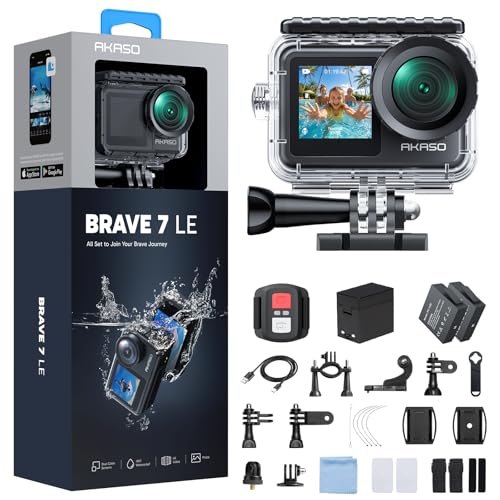
| AKASO Brave 7 LE | Best true-budget action camera | The only pick here that sits comfortably inside the ceiling with mounts and a waterproof case included. |
| Sony ZV-1F | Best vlogging camera near the ceiling | A fixed-lens vlogging camera whose autofocus and product-showcase mode feel borrowed from pricier Sonys. |
| GoPro HERO12 Black | Best stabilisation near the ceiling | Previous-generation flagship whose stabilisation and durability still embarrass most of this price tier. |
| Logitech StreamCam | Best desk video camera | A premium webcam that turns a home desk into a presentable studio corner for calls, lessons and streams. |
| Elgato Facecam | Best streamer webcam | A fixed-focus webcam built for streamers who want manual control and an uncompressed-looking picture. |
| OBSBOT Tiny 2 | Best tracking camera for presenters | A motorised webcam that physically follows you around the room — a presenter camera like nothing else here. |
How Did We Choose Cameras for This Budget?
We ranked candidates by finished-video quality rather than specification drama: could an ordinary owner, filming ordinary subjects in ordinary light, produce clips they would happily share without editing heroics? That test elevates autofocus reliability, stabilisation, honest colour and painless file transfer, and it demotes headline resolutions that collapse into mush the moment light drops or motion starts.
We also audited the true cost of ownership. A camera priced attractively as a bare body but needing a case, a second battery and a mount before its first outing is not the same proposition as a slightly humbler model shipped as a complete kit. Where a pick commonly sells above the line in its newest form, we say so plainly and explain the sale or previous-generation route that brings it into the guide’s territory — pretending otherwise would make the whole exercise fiction.
Finally, we favoured cameras with living ecosystems: mounts that exist, batteries you can still buy, apps that still update. Cheap cameras from vanished brands become e-waste the first time an accessory breaks, and a bargain that cannot be repaired or expanded is rarely a bargain for long.
Durability evidence weighed heavily too, because a budget camera that dies in month four is the most expensive camera in any guide. We favoured bodies with proven sealing, replaceable batteries and lens protection options, and we treated enthusiastic owner communities as evidence: a camera surrounded by tutorials, mounts and spare parts is a camera whose problems have known solutions, which is its own form of reliability.
Lastly, we checked each pick against the others for genuine difference. A guide whose six cameras are six shades of the same compromise helps nobody; this one deliberately spans action, vlogging, desk and presentation filming so that the reader’s real decision — which kind of filmmaker am I, this year — happens on the page rather than after the purchase.
Which Video Cameras Under This Ceiling Deserve Your Money?
Six cameras, six different definitions of filming. Read for your lane first and specification second.

AKASO Brave 7 LE — Best true-budget action camera
The Brave 7 LE is the honest answer to what this budget actually buys in an action camera, and it is more than sceptics expect. AKASO sells it as a complete kit rather than a bare body: the waterproof housing, mounts and a second battery tend to ride along, which matters enormously at this tier because accessories are where cheap cameras quietly become expensive ones. The front-facing second screen sounds like a gimmick until you try to frame a selfie shot on a kayak; then it becomes the feature you use every single outing.
Video quality is respectable rather than remarkable. In bright daylight the footage is colourful and detailed enough for family archives and social clips, and the electronic stabilisation smooths walking and cycling footage convincingly. Push it into dusk or a dim hall and the small sensor shows its limits, with noise creeping in and fine detail softening. That is not a flaw unique to this camera; it is the physics every model in this round-up negotiates, and the Brave simply negotiates it at the lowest entry cost.
Handling is glove-hostile but learner-friendly. The menus are plain, the touchscreen responds adequately when dry, and the companion app handles transfers without drama. Battery life per charge is modest, which is exactly why the bundled spare matters: swap rather than wait. For a first action camera, a holiday camera a teenager can borrow, or a second angle you are willing to mount somewhere risky, the value case is difficult to argue with.
Ownership over months is where this camera quietly wins people over. The batteries are cheap enough to own three, the housing seals survive sandy pockets and rainy sidelines, and the footage offloads to any computer without proprietary rituals. Owners develop a fondness for equipment they need not protect, and the Brave invites exactly that relationship — it gets taken places a precious camera would be left behind, and presence, in family filming, beats perfection almost every time.
Set expectations for the app and the menus and you will not be disappointed by either. Transfers of short clips are painless; long recordings are better moved by card reader. The touchscreen prefers deliberate taps to swipes. Treat the camera as an appliance rather than a gadget and its compromises read as engineering priorities — money spent on the kit and the sensor instead of on software theatre.
One practical ritual improves this camera more than any setting: clean the housing lens before every outing. Water spots and sunscreen smears are the true authors of most disappointing budget action footage, and they cost nothing to prevent. Owners who adopt the ritual, and who shoot shorter clips at the stabilisation-friendly settings rather than marathon recordings at maximum specification, consistently produce the clips that make sceptics ask which expensive camera filmed them.
Children and grandparents deserve a mention in this camera’s favour. The interface forgives random button presses, the body forgives random drops, and the price forgives the loss that family lending occasionally becomes. A camera the whole household may borrow without a briefing is a camera that documents the whole household, and that documentary generosity is a feature no laboratory measures.
- Form factor: compact action camera with front and rear screens
- Video: 4K recording with electronic image stabilisation
- Water resistance: waterproof with the supplied housing fitted
- Power: removable batteries, spares commonly bundled
- Mounting: standard action-camera accessory ecosystem
Strengths
- Complete starter kit keeps total spend genuinely low
- Front screen makes self-framing simple
- Waterproof housing included rather than upsold
Trade-offs
- Low-light footage softens quickly
- Touchscreen is unusable with wet or gloved hands
- App polish trails the bigger brands
Best for: first-time action camera owners, holiday filming, and risky second-angle mounts where loss would sting less.
Not suited for: creators who need clean low-light video or professional colour grading headroom.

Sony ZV-1F — Best vlogging camera near the ceiling
Sony built the ZV-1F around a single insight: most beginner vloggers film themselves at arm’s length, indoors, while talking. Everything follows from that. The fixed wide lens is chosen for exactly that distance, the autofocus hunts faces and eyes with a persistence that still embarrasses rivals, and the product-showcase setting snaps focus to whatever you hold up to the lens, then returns to your face when you lower it. For review channels, unboxings and craft demonstrations, that one behaviour is worth more than a specification sheet of resolutions.
The trade is reach. A fixed lens means your feet are the zoom, and wildlife, sport or stage work from the back row are simply outside this camera’s world. Within its world, though, the experience is unusually frictionless: the vari-angle screen flips for self-monitoring, the built-in microphone with its windscreen handles breezy doorsteps better than expected, and the background-defocus switch gives talking-head footage a separation that phones achieve only computationally.
Street pricing for this model moves around the guide’s ceiling depending on season and bundle, so treat it as the stretch pick: the one to grab when it dips, rather than a guaranteed fixture under the line. What you are paying for is certainty. A new creator’s scarcest resource is not resolution but finished videos, and a camera that removes focusing anxiety, framing guesswork and audio worry converts directly into published work.
The colour science deserves a mention, because beginners consistently underestimate how much of a video’s appeal is complexion. Sony tunes this camera to render skin kindly straight out of the body, with a softening option for those who want it and honest tones for those who do not. That kindness saves new creators from the grading spiral, where hours vanish into correcting footage that a better-tuned camera would have delivered finished.
Battery life and heat are the working limits to plan around. Talking-head sessions are easily covered, but a full day of travel vlogging asks for a spare battery or a power bank, and long continuous recordings in warm rooms should be rehearsed before an important shoot. These are professional habits applied to a beginner camera, and learning them on forgiving hardware is precisely how creators grow into bigger rigs.
Think of this camera as a finishing school for on-camera confidence. Because framing, focus and exposure largely handle themselves, its owner spends their attention on the only thing audiences actually remember: what was said and how naturally it was delivered. Many creators keep a ZV-series camera long after graduating to larger rigs, as the second angle or the travel body, because a tool that removes friction never fully becomes obsolete.
The flip screen changes the psychology of filming alone. Seeing yourself framed removes the nagging uncertainty that ruins takes, and the camera’s face priority means the visible frame is also the focused frame. Solo creators describe finishing shoots faster with this class of camera than with technically superior rigs that demand an external monitor and a focus puller they do not employ.
- Form factor: pocketable compact with fully articulating screen
- Lens: fixed wide-angle, designed for arm’s-length filming
- Autofocus: face and eye priority with product-showcase mode
- Audio: built-in directional microphone, windscreen supplied
- Extras: background defocus switch and skin-smoothing options
Strengths
- Autofocus you can genuinely stop thinking about
- Product-showcase focus suits review channels perfectly
- Screen and microphone are vlogger-first designs
Trade-offs
- No zoom of any kind
- Battery endurance is merely adequate
- Sits at or above the ceiling outside sale periods
Best for: solo vloggers, product reviewers and anyone filming themselves talking indoors or out.
Not suited for: subjects you cannot walk closer to, or two-camera stage recordings from a distance.

GoPro HERO12 Black — Best stabilisation near the ceiling
Buying last year’s flagship is the oldest trick in this category, and the HERO12 Black is its current proof. When newer models arrive, the outgoing GoPro drifts toward this guide’s ceiling while keeping the stabilisation, durability and accessory ecosystem that made it the default action camera. The stabilisation deserves its reputation: mountain-bike descents, skiing tumbles and running footage emerge eerily level, and the horizon-lock behaviour turns chaotic motion into watchable film.
The HERO12 also answers the battery complaint that dogged its predecessors, stretching recording time noticeably in moderate resolutions, and its taller sensor format gives editors room to crop vertical clips for social platforms from the same master footage. That reframing flexibility is a genuine workflow gift for creators publishing to several platforms from one ride, one dive or one match.
GoPro’s ecosystem cuts both ways. Mounts, cases and mods are everywhere and cheap, but the companion software and subscription prompts can irritate owners who simply want files off a card. The camera also runs warm in its highest modes on still days. None of that dethrones it here: near the ceiling, nothing else in this guide survives the same abuse while delivering footage this steady.
The editing story matters with this camera. Its taller capture format was designed for an era when one recording must become a widescreen video, a vertical clip and a square post, and owners who publish across platforms feel that foresight weekly. Pair it with the reframing tools in GoPro’s software and a single descent becomes a small content library, which is a kind of value no specification table captures.
Durability testing by owners is almost a sport in itself: these bodies survive drops, dunks and dust that retire lesser cameras, and the second-hand market is full of examples still working after seasons of abuse. Buy used from a seller with returns, check the lens cover for scratches and the seals for grit, and you may land the best pure filming tool in this entire guide for the least money.
A word on sound: action cameras live in wind, and wind is audio’s natural predator. The HERO12’s wind handling is among the better efforts in its class, yet owners filming commentary at speed still reach for media mods or separate recorders. Budget for that honestly if your riding or sailing videos include your own narration, and the camera’s one soft spot stops being a surprise.
Mount it somewhere brave. The defining GoPro footage is not the helmet shot everyone has but the unusual angle nobody else attempted: under the board, on the dog’s harness, at the waterline as the wave arrives. The camera’s size, sealing and cheap mounts license experiments that a costly body would never be risked on, and experimentation is where memorable clips come from.
- Form factor: rugged action camera, waterproof without housing
- Video: high-resolution recording with advanced stabilisation
- Sensor format: tall capture area for vertical reframing
- Mounting: the widest action accessory ecosystem available
- Power: improved endurance over earlier generations
Strengths
- Stabilisation that flatters violent motion
- Waterproof straight out of the box
- Used and sale pricing often reaches this tier
Trade-offs
- Highest modes generate noticeable heat
- Software pushes subscription extras
- Touchscreen remains fiddly with gloves
Best for: cyclists, skiers, surfers and travellers who film movement first and everything else second.
Not suited for: long static recordings in hot, still conditions or owners allergic to app ecosystems.

Logitech StreamCam — Best desk video camera
Not every video camera needs to leave the house. The StreamCam exists for the camera that films you at your desk — for work calls where looking credible matters, online lessons, live selling and starter streaming — and it treats that job with unusual seriousness. The lens and sensor pairing produces a noticeably cleaner, more dimensional image than the cameras built into laptops, with autofocus that follows natural leaning and gesturing instead of hunting.
The cleverest detail is physical: the mount rotates the camera between horizontal and vertical capture without adapters, acknowledging that a modern desk camera serves landscape meetings in the morning and vertical social video in the afternoon. The dual microphones are serviceable for speech, and the companion software handles framing and exposure in language non-technical owners understand.
Like every small-sensor camera, the StreamCam is a light snob. In a dim room its advantage over a laptop camera narrows; add even a modest desk lamp angled at your face and it pulls away again. It also ties you to a computer, obviously — this is a studio fixture, not a holiday companion. Judged as the best video you can bolt to a monitor within this budget, though, it has very few peers.
Consider the StreamCam as furniture for a remote career. It improves every meeting, interview and recorded lesson without asking its owner to learn photography, and that invisibility is its luxury. Colleagues will not compliment the camera; they will simply register that you look sharp, well lit and easy to watch, which in distributed teams quietly compounds into credibility.
The vertical rotation earns its keep in unexpected places: filming a phone-screen demonstration, recording a vertical announcement, or framing a narrow desk without amputating the background. Small mechanical kindnesses like this separate designed products from assembled ones, and the StreamCam is full of them, from the privacy shutter to the cable length that actually reaches a tower under a desk.
The StreamCam also moonlights gracefully. Unclip it from the monitor, mount it on a small tripod, and it becomes a product-demonstration or document camera for sellers and teachers, framing hands and objects with the same calm autofocus it applies to faces. Equipment that covers two duties in a home office earns its drawer space twice, and few webcams manage the second duty without adapters and swearing.
For households sharing one good desk, this camera settles arguments. It flatters every member of the family equally, stores its settings politely, and asks nothing between users. Equipment that serves a household without becoming one person’s fragile project tends to survive, and survival — being present and working for the school interview, the job call and the grandparent chat alike — is the whole point of a desk camera.
- Form factor: monitor-mount USB webcam
- Orientation: rotates between landscape and portrait capture
- Autofocus: continuous, tuned for faces at desk distance
- Audio: dual built-in microphones for speech
- Software: companion app for framing and exposure control
Strengths
- Instant credibility upgrade for calls and lessons
- Physical rotation for vertical video
- Autofocus behaves at conversational distances
Trade-offs
- Performance depends heavily on room lighting
- Desk-bound by design
- Microphones suit speech, not music
Best for: remote workers, online teachers and starter streamers whose filming happens at one desk.
Not suited for: anyone needing a camera that travels, records standalone or films a room full of people.

Elgato Facecam — Best streamer webcam
Elgato took the opposite path from most webcam makers: no autofocus to hunt, no microphone to disappoint, no gimmicks at all. The Facecam is fixed-focus, set for the distance streamers actually sit from their monitors, and it pours its budget into the sensor, the lens and a clean signal path. The result is a picture with a crispness that viewers notice even when they cannot name why, especially under the controlled lighting of a streaming corner.
Control is the other half of the appeal. The companion software exposes exposure, white balance and framing in a way that stays set between sessions, so a streamer’s opening shot looks identical every night. For anyone building a recognisable channel aesthetic, that repeatability beats a dozen automatic modes that reinterpret the room each time the light changes.
The omissions are deliberate but real. There is no microphone at all, so budget for a USB microphone if your headset does not already cover speech, and the fixed focus punishes anyone who leans dramatically toward or away from the screen. It is a specialist’s camera in the best sense: narrower than the StreamCam, deeper where it counts for its chosen audience.
Streamers who graduate to this camera usually describe the same revelation: their picture stopped changing. Automatic webcams reinterpret exposure and colour whenever a cloud crosses the window or a game scene brightens, and audiences feel that instability without naming it. Locking the image down turns a stream into a place, and places build habits in viewers. That is the Facecam’s real product — not sharpness, but sameness.
It also disciplines its owner usefully. Because there is no microphone, streamers buy a proper one sooner. Because focus is fixed, they arrange their chair and monitor distance once, properly. Because settings persist, they stop fiddling and start broadcasting. Constraints that push a setup toward professionalism are features wearing stern expressions, and this camera is pleasantly full of them.
New owners should spend their first session on lighting rather than settings. A single soft light placed high and to one side, a dimmer background, and the camera’s honest sensor will outperform an evening of menu exploration under a bare ceiling bulb. The Facecam rewards that investment disproportionately, because its pipeline preserves the modelling that good light creates instead of smearing it with aggressive processing.
There is a confidence trick this camera plays on its owner: because the image is stable and flattering, the streamer stops monitoring themselves and starts performing. Self-consciousness is the tax automatic webcams levy with every exposure shift and focus hunt. Removing the tax does not show up in any specification, yet regular viewers feel the difference within a single broadcast.
- Form factor: USB webcam with privacy-conscious design
- Focus: fixed, optimised for typical desk distances
- Control: full manual exposure and white balance via software
- Audio: none built in — pair with a separate microphone
- Mounting: standard monitor mount plus tripod thread
Strengths
- Consistent, controllable picture night after night
- Excellent lens and sensor for the tier
- Settings persist between sessions
Trade-offs
- No microphone whatsoever
- Fixed focus limits leaning and movement
- Needs deliberate lighting to show its best
Best for: streamers and presenters with a fixed desk setup and a separate microphone.
Not suited for: plug-and-forget users, or anyone whose calls happen at varying distances.

OBSBOT Tiny 2 — Best tracking camera for presenters
The Tiny 2 answers a problem the other desk cameras cannot: what happens when the presenter stands up. Its motorised gimbal physically pans and tilts to keep you framed while you pace a classroom, demonstrate a product on a workbench, coach a workout or cook along a counter. Watching it track is mildly uncanny for the first session and completely ordinary by the third, which is the mark of a feature graduating into infrastructure.
Gesture and voice control complete the hands-free idea — start or stop tracking, zoom, or switch framing without returning to the keyboard. For teachers recording lessons alone, that independence changes what is filmable. Image quality from the large-for-its-class sensor is strong in ordinary room light, and the tracking rarely loses a subject who stays within sane speeds.
Price is the friction: the Tiny 2 lives at the top of, and sometimes above, this guide’s ceiling, so it qualifies as the deliberate splurge for people whose work is presenting. The gimbal is also a moving part in a category of solid-state rivals, deserving gentler treatment in a bag. For a static seated streamer it is over-engineering; for a moving presenter it is the only pick here actually solving the problem.
The tracking intelligence handles the common presentation patterns gracefully: walking between a whiteboard and a desk, stepping aside to reveal a product, sitting back down to take questions. It loses the plot mainly when subjects leave the room entirely or sprint, neither of which describes most lessons or demonstrations. Framing presets let a teacher move between a wide classroom view and a close desk view with gestures alone.
There is also a dignity argument for this camera. Presenters film better when they are not performing for a fixed rectangle — when they can use a room naturally and trust the frame to follow. Students and customers respond to that ease. If your income involves being watched while you move, the Tiny 2 stops being a gadget and becomes the cheapest camera operator you will ever employ.
Setup discipline repays itself here: place the camera near eye level, teach it your gestures in the actual room lighting, and mark the floor positions where you habitually stand. Five minutes of choreography buys months of invisible operation. Presenters who skip the rehearsal and blame the tracking are usually asking the camera to improvise a partnership that a short rehearsal would have made fluent.
Recording lessons or demonstrations for absent audiences is where the tracking truly pays rent. A static camera forces a choice between a wide shot that renders details tiny and a close shot that amputates movement. The Tiny 2 dissolves the choice by reframing continuously, so a cooking instructor can chop at the counter in useful close-up and step back to the stove without touching a control or breaking a sentence.
- Form factor: motorised pan-and-tilt USB webcam
- Tracking: AI subject following with gesture control
- Sensor: larger than typical webcam class
- Control: voice commands plus companion software
- Use pattern: standing presentation and demonstration
Strengths
- Follows a moving presenter automatically
- Hands-free gesture and voice control
- Strong image in ordinary room lighting
Trade-offs
- Priced at or above the guide ceiling
- Moving gimbal needs careful handling
- Overkill for seated-only filming
Best for: teachers, demonstrators, fitness instructors and presenters who move while filming.
Not suited for: seated streamers, rough travel, or buyers who need every penny of the budget elsewhere.
How Do the Six Compare Side by Side?
The table compresses each pick to its essence. Notice how rarely the six compete directly — that is the budget working as intended.
| Camera | Type | Standout strength | Watch out for |
|---|---|---|---|
| AKASO Brave 7 LE | Action camera, dual screens | Kit value and underwater readiness | Stabilisation a step behind the premium brands |
| Sony ZV-1F | Fixed-lens vlogging compact | Autofocus and face priority | Fixed wide lens, no zoom |
| GoPro HERO12 Black | Action camera, flagship lineage | Stabilisation and ruggedness | Subscription nudges and small touchscreen |
| Logitech StreamCam | USB webcam for streaming | Desk image quality and mounting | Needs good light to shine |
| Elgato Facecam | USB webcam, streamer focused | Image control and low compression | Fixed focus, no microphone |
| OBSBOT Tiny 2 | PTZ tracking webcam | Physical subject tracking | Premium pricing for the tier |
What Should You Understand Before Buying Video at This Price?
Begin with light, because every camera here is built around a small sensor and small sensors are honest about physics. In daylight, all six produce footage their owners enjoy. Indoors at night, they diverge: the desk cameras can lean on room lamps you control, the vlogging compact manages with face priority and a fast fixed lens, and the action cameras simply endure, trading cleanliness for the fact that they were present at all. If your filming life happens after dark, weight low-light behaviour above every other criterion and accept compromises elsewhere.
Resolution headlines deserve suspicion at this tier. A well-implemented 1080p pipeline with good stabilisation and colour will look better on a television than a noisy, wobbling nominal 4K feed, and it will fill memory cards a quarter as fast. Judge sample footage by motion and skin tones, not by the number on the box, and remember that platforms compress uploads anyway — steadiness and clarity survive compression; brittle detail does not.
Audio is the silent budget-killer. Built-in microphones have improved, but wind, room echo and handling noise still separate amateur clips from watchable ones more than any lens does. Several picks assume you will add a microphone later; if your filming is speech-led, protect part of the budget for that from day one rather than treating it as an upgrade fantasy.
Think about where files go. App-based transfers suit short clips; card readers suit long sessions. Cloud-tied ecosystems suit some owners and infuriate others. The best camera here is partly the one whose footage pipeline matches your patience, because a camera whose clips are annoying to retrieve becomes a camera that stays in a drawer.
Consider the second-hand market with clear eyes, because this budget is where it shines brightest. Outgoing flagships, barely used vlogging compacts and ex-demo webcams circulate constantly as owners upgrade, and a camera with a scratched body but a clean lens and honest seller is often the best filming tool this money can buy. Insist on return rights, inspect the lens and seals, record a test clip in the seller’s presence or on arrival, and the used route becomes a strategy rather than a gamble.
How Do You Get the Best Footage From a Budget Video Camera?
Stabilise yourself before blaming the camera. Brace elbows against your body, pan by rotating your whole torso slowly, and let the camera’s stabilisation polish motion you have already made smooth. Electronic systems correct shake brilliantly but punish jerky intention; the steadiest budget footage comes from calm operators using modest settings.
Expose for faces. On any pick with exposure control, tap or lock exposure on your subject’s face rather than letting a bright window or sky dictate the scene. Slightly underexposing protects highlights you cannot recover, while shadows can usually be lifted a little in editing. When filming people — which is most filming — this single habit outperforms every filter and preset.
Record more light than you think you need. Open curtains, face windows instead of backing onto them, and move lamps rather than raising sensitivity settings. At this sensor size, added light is added quality in the most literal sense, and it costs nothing but a minute of rearrangement before you press record.
Finally, shoot short and often. Budget cameras reward editors: capture scenes in deliberate clips with a breath of stillness at each end, and cull ruthlessly the same day. Your future self, facing a trip’s worth of footage, will bless the discipline far more than any feature on any box.
Learn your camera’s one unforgivable weakness and route around it permanently. Every pick here has one: a fixed lens, a hungry battery, a light-shy sensor, a missing microphone. Amateurs keep colliding with the weakness and cursing it; working creators design their habits around it once — carrying the spare, placing the lamp, standing closer — and then forget it exists. That act of design, more than any purchase, is what separates footage that looks budgeted from footage that simply looks good.
Why Does This Budget Tier Reward Specialists So Strongly?
Follow the money inside a camera and the specialisation stops looking like marketing. A sensor, a lens, a processor and a body share a fixed pool of cost. A generalist spreads that pool thinly across zoom range, weather sealing, screen quality and software, ending adequate everywhere. A specialist concentrates the same pool: the action camera buys sealing and stabilisation, the vlogging compact buys autofocus and a fast fixed lens, the webcam buys a clean signal path and optics tuned for two metres. Concentration is what three hundred buys you; diffusion is what it punishes.
This is also why cross-type comparisons mislead. Asking whether the GoPro or the Sony is ‘better’ is asking whether a wetsuit is better than a blazer — the answer lives entirely in the occasion. Buyers who internalise this stop hunting for the mythical best camera and start auditing their own filming: where, when, of whom, in what light, ending on which screen. Six honest answers to those questions point at one pick in this guide with almost embarrassing clarity.
There is a second, quieter reward: specialists hold their value and their usefulness. A good action camera remains a good action camera for years because water and gravity do not upgrade annually. A good desk camera outlives several laptops. The tier’s bargains are not really the cheapest boxes on the shelf; they are the focused tools that keep doing one job beautifully long after a diffuse rival feels obsolete at all of its jobs at once.
How Should You Split a Small Budget Between Camera and Everything Else?
A useful rule for this tier is to let the camera claim roughly two-thirds of the total and defend the remaining third fiercely for the supporting cast. Out of that third, light comes first for indoor filming — a single decent lamp transforms every pick in this guide — followed by power, meaning spare batteries or a power bank, followed by storage on fast, reputable cards. Mounts and grips come last, bought after a month of filming reveals which angles you actually attempt, rather than before, when every accessory looks essential.
Resist the upgrade itch for at least a season. Budget cameras expose their owner’s habits slowly: the settings you truly use, the focal situations you truly meet, the battery endurance your longest real session demands. Filming for three months before buying anything else converts guesswork into a shopping list written by experience. Many owners discover the camera was never the bottleneck — their light, their audio or their editing patience was — and fixing the true bottleneck costs less than replacing a camera that was quietly adequate all along.
Finally, keep the receipts and the return windows in mind as part of the budget itself. A camera bought from a seller with a generous returns policy is effectively cheaper than the same camera bought without one, because the risk of a mismatch has been priced and transferred. At a tier where personal fit matters this much, that transferred risk is real money.
What Does a Sensible First Month With a New Video Camera Look Like?
Week one belongs to defaults. Film your ordinary subjects with everything automatic, in your ordinary rooms and weather, and keep a ruthless little notebook of what annoyed you: the clip that focused on the wrong face, the recording that died early, the audio the wind ate. Annoyances recorded honestly become your personal specification sheet, worth more than any reviewer’s, because they describe your filming rather than filming in general.
Week two, change exactly one variable per outing — a lamp’s position, a resolution setting, a mounting height — and compare results on the biggest screen you own. Small cameras hide their sins on phone displays and confess them on televisions, so judge there. By week’s end you will know which settings are your defaults and which menu items you will never touch again, and that knowledge is the real unboxing.
Weeks three and four are for the supporting cast: buy the battery, card, light or microphone your notebook demanded, in that order of evidence, and resist everything it did not mention. End the month by filming the same subject you filmed on day one. The difference between those two clips — steadier, cleaner, better lit, better framed — is the return on a month of attention, and it will exceed the difference between any two cameras in this guide.
Which Accessories Actually Earn Their Money at This Level?
A miniature tripod with a ball head is the universal donor of this category: it serves the vlogging compact at a café table, the action camera at a trailhead, and even the webcams when a monitor mount puts the lens at the wrong height. Buy one with metal threads and legs that splay flat, and it will outlive three cameras. Beside it, a short extension pole doubles as selfie stick, monopod and improvised boom, and costs less than a family pizza.
Storage deserves boring respectability. Two mid-sized cards from a reputable maker beat one enormous card from an unknown one, because cards fail and formats get forgotten in cameras left in drawers. A small hard case that holds camera, cards, batteries and cables in one grabbable unit quietly increases how often the camera leaves the house — and leaving the house, in the end, is the entire hobby.
Skip, for now, the cinematic temptations: gimbals for cameras that already stabilise well, filter sets for lenses you have not yet learned, and lighting rigs elaborate enough to need their own furniture. This tier rewards momentum over apparatus. Every accessory above passed one test — it removes a friction you have already felt. Anything that merely decorates a specification list can wait for the month your notebook asks for it by name.
What Mistakes Do Buyers Make at This Price Point?
The classic error is buying for the filming you fantasise about instead of the filming you did last month. Count your recent clips: if ninety per cent were birthdays, desk calls and dog walks, an underwater action camera is a costume, not a tool. The second error is spending the entire budget on the camera body and nothing on cards, batteries or light, then blaming the camera for dead batteries and corrupt bargain cards.
Third, buyers chase the newest model when the outgoing flagship beside it — better built, better supported, discounted — is the smarter purchase at this exact tier. Fourth, they ignore return windows: budget cameras vary enough that a weekend of real filming is worth more than a month of reviews, ours included. Buy from sellers whose returns let you test honestly, and use the window ruthlessly.
A fifth mistake deserves its own warning: filming everything at maximum settings. The highest resolutions and frame rates on budget hardware bring heat, hunger for storage and stabilisation compromises that quietly degrade the very footage they promised to elevate. Experienced owners treat maximum settings as spices — a slow-motion clip here, a hero shot there — and run their everyday filming at the balanced settings where the camera is happiest and most reliable.
Final Recommendation
If one recommendation must stand: match the lane, then buy the best citizen of it. The AKASO Brave 7 LE is the safest first purchase in the guide — complete, cheap and cheerful. The GoPro HERO12 Black is the connoisseur’s route, a discounted flagship for people who film motion. The Sony ZV-1F owns arm’s-length talking, the StreamCam owns the tidy desk, the Facecam owns the serious stream corner, and the OBSBOT Tiny 2 owns the room you walk around in. None of them does the others’ jobs, and that, at this price, is not a limitation — it is the deal.
Whichever lane you choose, buy it from a seller with an honest returns policy and spend the first weekend filming the life you actually lead — the school run, the desk, the dog, the dinner. A camera that survives that audition with your affection intact is the right camera, whatever any guide says. The six above have passed that audition for thousands of owners in their respective lanes; the remaining task is simply recognising which lane is yours.
One last encouragement: the distance between amateur and professional video at this price is no longer equipment, and that is genuinely new. It is intention — knowing your lane, lighting your subject, steadying your hands and finishing what you film. The cameras above simply refuse to stand between that intention and the finished clip, which is all any honest tool has ever done.
Related guides
- Best Cameras for House Outside: Outdoor Coverage with Honest Indoor Boundaries
- Best Cameras for Digital Grain: 6 Picks for a Film-Like Look In Camera
Frequently Asked Questions
Can a camera at this price really record good 4K?
Yes, in good light, several picks here produce 4K footage that looks excellent on televisions and platforms. The honest caveat is that their 4K advantage shrinks in dim conditions, where noise and stabilisation cropping eat the detail the resolution promised. Many experienced owners deliberately film in 1080p indoors for cleaner results and save 4K for daylight.
Is a cheap action camera or a cheap vlogging camera better for family holidays?
For holidays centred on pools, beaches, rides and general chaos, the action camera wins on durability and forgiveness. For holidays you narrate — talking to the lens, reviewing food, filming relatives’ faces across a table — the vlogging compact’s autofocus and screen produce warmer, more personal footage. Count which kind of clip fills your phone now; that ratio is your answer.
Do I need a separate microphone at this budget?
If people speak to the camera outdoors or in echoing rooms, a modest microphone will improve your videos more than any other accessory at this tier. If your filming is mostly ambient — sport, scenery, pets, events — built-in audio is acceptable and the money is better spent on batteries and cards. Speech is what microphones rescue; scenery rarely needs rescuing.
Why do some picks sometimes cost more than the guide’s ceiling?
This tier is defined by street pricing, which moves with seasons, bundles and model replacements. A camera included for its discounted or previous-generation reality may show a higher figure in a quiet month. Treat the ceiling as a buying target: set a price alert, consider the outgoing model, and never feel obliged to overpay because a guide listed the camera.
How long will a budget video camera remain useful?
Cameras with standard mounts, replaceable batteries and app support typically serve for years, because video standards change slowly and platforms compress everything anyway. The risks are abandoned apps and unavailable batteries, which is why this guide favoured living ecosystems. Buy the supported bargain over the orphaned one every time.
Related Guides
Keep exploring with best action cameras for vlogging best affordable 4K cameras for YouTube best beginner cameras for video.


