ilcastellomenu.com is reader-supported. When you buy through links on our site, we may earn an affiliate commission.
Where to Buy
A camera for Instagram lives two lives at once. It must shoot the still photograph that stops a thumb in the feed, and the vertical 4K video that the same platform now rewards more generously — often in the same thirty seconds, in the same café light, with the creator as photographer, subject and crew. The best cameras for instagram and 4k videos are built for that doubling: fast to deploy, kind to skin, and fluent in both orientations.
The phone is the obvious rival, and this guide respects it: for many creators the phone remains the right tool. A dedicated camera earns its bag space when it does what phones cannot — creamy subject separation, honest low-light video, a lens that flatters faces, audio that sounds like a person rather than a room, and files that survive editing without dissolving. Every pick below clears that bar in a different way and at a different size.
Two are creator-first mirrorless and compact cameras designed around self-shooting. One is a gimbal camera that makes walking footage look professionally crewed. One is a premium compact for stills-led creators whose video is a strong second act. One wraps the world in 360 degrees and lets the edit choose the frame afterwards. And one is the waterproof action camera for creators whose feed involves weather, water or speed.
Where to buy should be the last decision, not the first. The first is format honesty: if your audience lives in Reels and Shorts, vertical video quality and a rotating screen outrank almost everything; if the grid still carries your account, stills quality and colour lead. This guide labels each pick by the format it serves best, because a camera bought for the wrong format is an expensive lesson in self-knowledge.
A word on colour, because Instagram is a colour platform wearing a photography costume. The creators who grow are recognisable in a half-second of scrolling, and that recognition is usually a consistent palette plus a consistent face-framing. The cameras below were judged heavily on the colour they produce with minimal editing — the creator’s scarcest resource is not money but turnaround.
Key Takeaways
- Decide your lead format first: vertical video and the grid reward different cameras.
- A flip or rotating screen is the self-shooter’s non-negotiable feature.
- Colour straight from the camera is a turnaround advantage money cannot buy later.
- Audio separates professional-feeling reels from phone footage more than resolution.
- Small cameras get carried, and carried cameras make the content.
- 4K matters for cropping vertical from horizontal and for future-proof edits.
In this guide
Quick Picks
| Pick | Badge | Why it is here |
|---|---|---|
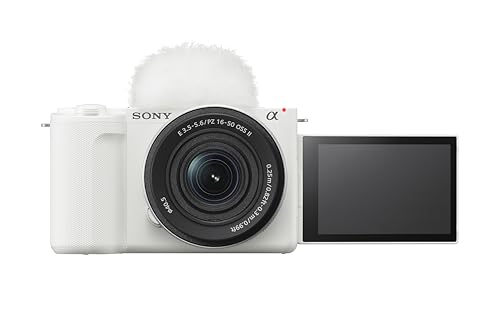
| Sony ZV-E10 II | Best Instagram camera overall | Creator-designed mirrorless with superb autofocus, 4K video and lens choice for growing accounts. |
| DJI Osmo Pocket 3 | Best for Reels and walking content | A mechanical gimbal and rotating screen that make vertical video look professionally crewed. |
| Canon PowerShot G7 X Mark III | Best compact for photo-and-video creators | A pocketable compact with a fast lens, clean 4K and live-streaming friendliness. |
| Sony ZV-1F | Best simple camera for new creators | A fixed-lens, ultra-simple vlogging compact that removes every excuse to start. |
| Insta360 X4 | Best 360 camera for creative reframing | Shoot everything in 360, choose the frame in editing — impossible angles for distinctive feeds. |
| GoPro HERO13 Black | Best for outdoor and adventure feeds | Waterproof, stabilised and mountable everywhere — 4K content from places other cameras fear. |
How Did We Choose Cameras for Instagram and 4K Video?
Self-shooting ergonomics came first: screens that face the creator, autofocus that finds and holds an eye without an operator, and controls that make sense at arm’s length. A camera that needs a crew is a fine camera but a poor Instagram camera, because the platform’s production reality is one person, one tripod or one outstretched hand, and light that will not wait.
Video quality was judged as creators actually use it: 4K that stays clean in café light, stabilisation that survives a walking monologue, and colour that keeps skin human under mixed bulbs. We also valued vertical fluency — rotating screens, vertical guides, easy 9:16 workflows — because reframing horizontal footage for Reels is a tax the best picks here minimise or abolish.
Stills were not forgotten. The grid remains the portfolio a new follower inspects, so each pick had to produce feed-worthy photographs with pleasing colour and enough resolution for the platform’s crops. The premium compact in this list leads on stills deliberately, for creators whose account is photography-first and whose video is growing rather than dominant.
Finally, ecosystem and audio: microphone inputs or quality wireless options, apps that move files to the phone without a laptop ceremony, and batteries that survive a content day. Instagram punishes friction; the camera that adds the least friction between idea and post wins days, and days are the algorithm’s real currency.

Sony ZV-E10 II — Best Instagram camera overall
The ZV-E10 II was designed by people who studied creators rather than photographers, and it shows in every decision: the screen flips for self-framing, the autofocus locks onto the creator’s eye and stays there through gestures and product lifts, the tally light ends the is-it-recording anxiety, and the 4K video is clean in the mixed light where content actually happens. It is the most complete answer here to the brief’s double demand.
- Format: APS-C mirrorless, creator-focused
- Screen: fully articulating for self-shooting
- Focus: fast eye autofocus for video
- Video: high-quality 4K recording
- Mount: Sony E, vast lens catalogue
Its growth path is the clincher. Start with the kit lens, add the small wide prime every talking-head creator eventually buys, and the same body carries an account from bedroom beginnings to brand-deal production. The stills are genuinely good rather than adequate, the colour needs little persuasion, and the app workflow moves a vertical cut to the phone in the time a kettle boils. For a creator buying one camera to do everything, this is the sensible summit.
Strengths
- Autofocus that frees the solo creator
- Lens system grows with the account
- Stills and video both properly served
Trade-offs
- No in-body stabilisation; use supported lenses or a tripod
- Rolling shutter on whip pans
- Menus reward an initial setup session
Best for: Creators building a serious account on one camera.
Not suited for: Pure action and travel vloggers needing waterproofing.

DJI Osmo Pocket 3 — Best for Reels and walking content
For the creator whose content moves — city walks, market tours, day-in-the-life reels — the Pocket 3 is close to magic. Its gimbal irons walking footage into glide, its screen rotates into vertical shooting with a flick, and its sensor is large enough that cafés and evenings stay clean rather than crunchy. It starts in seconds, fits the pocket it is named for, and its wireless microphone option makes the audio as professional as the movement.
- Format: pocket gimbal camera
- Stabilisation: three-axis mechanical gimbal
- Screen: rotating touchscreen, vertical-native
- Audio: wireless microphone ecosystem
- Sensor: large format for its size class
The discipline is knowing its lane. It is a video-first instrument whose stills are capable souvenirs rather than grid-leading photographs, so photography-led creators should pair it with a stills camera or choose elsewhere in this list. But as a Reels machine it has no equal here: the footage looks budgeted, the workflow is the fastest in the guide, and its sheer carry-ability means the content day starts whenever the creator leaves the house.
Strengths
- Gimbal glide without a crew or rig
- Vertical shooting is a screen flick
- Fastest idea-to-post workflow here
Trade-offs
- Stills are secondary to its video
- Fixed lens limits framing variety
- Not weatherproof in real rain
Best for: Video-led creators, walkers and daily vloggers.
Not suited for: Photography-first accounts leading with stills.

Canon PowerShot G7 X Mark III — Best compact for photo-and-video creators
The G7 X Mark III is the camera a generation of creators learned on, and its formula remains right: a bright lens that flatters faces and blurs backgrounds honestly, a flip-up screen for self-framing, 4K video with a microphone input, and a body that disappears into the bag a creator was already carrying. Its stills have the Canon colour that skin loves, which matters on a platform where faces are the content.
- Format: premium compact, one-inch class sensor
- Lens: fast built-in zoom
- Screen: tilts up for self-shooting
- Video: 4K with microphone input
- Extras: live-streaming support built in
Its compromises are the compact’s eternal ones — autofocus a step behind the Sony’s tenacity, battery life measured in content sessions rather than days — and its fans accept them for the form factor. This is the camera that gets taken to the restaurant, the trip and the event where a mirrorless rig would stay home, and Instagram history is written by cameras that were present. Presence, again, is the first virtue.
Strengths
- Pocketable with a genuinely fast lens
- Canon colour flatters faces in both formats
- Microphone input and streaming support
Trade-offs
- Autofocus less sticky than the Sony
- Battery suits sessions, not marathons
- Fixed lens ends at its zoom’s reach
Best for: Creators wanting one pocketable camera for both formats.
Not suited for: Long-form video producers needing endurance.

Sony ZV-1F — Best simple camera for new creators
The ZV-1F exists for the creator at the beginning, when the obstacles are psychological as much as technical. It has one wide lens — the selfie-and-scene framing already chosen — a screen that faces its owner, a button that blurs the background, and a product-showcase focus mode that snaps to held-up objects. There is almost nothing to learn, and that is the entire point: the first hundred posts matter more than the perfect hundred-and-first.
- Format: compact vlogging camera
- Lens: fixed ultra-wide for self-framing
- Features: background-defocus and product modes
- Screen: fully articulating touchscreen
- Audio: directional built-in microphone
Its ceiling is real — the fixed lens and smaller sensor cap its growth — and this guide will not pretend otherwise. But accounts are built on published work, and the ZV-1F publishes. Creators who outgrow it will know precisely why, which makes it a better education than a complicated camera abandoned in a drawer. As a first rung, honestly labelled, it earns its place.
Strengths
- Simplest possible start for new creators
- Wide lens frames solo shooting perfectly
- Product mode suits review and unboxing content
Trade-offs
- Fixed lens and sensor limit growth
- No viewfinder or zoom flexibility
- Stills are the weakest here
Best for: New creators who need to start publishing now.
Not suited for: Established creators planning to grow a system.

Insta360 X4 — Best 360 camera for creative reframing
The X4 plays a different game: it records the whole sphere in high resolution, and the creator chooses the shot afterwards — a forward walk, a selfie angle, a tiny-planet swirl — from the same take. For travel and action creators this abolishes the missed moment and produces the impossible camera moves that make a feed recognisable. Its reframing app is genuinely creator-grade, and single-lens mode covers conventional action footage when 360 is unnecessary.
- Format: 360 action camera, waterproof
- Capture: full-sphere high-resolution video
- Editing: AI-assisted reframing app
- Modes: single-lens action mode included
- Mounts: invisible selfie-stick effect
The costs are workflow and stills. Reframing takes editing time that direct cameras do not demand, and its photographs are a side dish rather than a main. Creators whose signature is movement and novelty will pay that tax gladly; talking-head creators should not. Judged as a distinctiveness engine for travel, sport and spectacle accounts, it has no rival in this guide.
Strengths
- Never miss the angle; reframe later
- Invisible-stick shots look drone-like
- Waterproof for action content
Trade-offs
- Reframing adds real editing time
- Stills are secondary
- Files are large and hungry
Best for: Travel and action creators wanting signature angles.
Not suited for: Talking-head and photography-led accounts.

GoPro HERO13 Black — Best for outdoor and adventure feeds
Some feeds are built on weather: surf mornings, trail runs, ski lines, festival mud. The HERO13 is their camera — waterproof without a case, stabilised through violence, mountable on boards, helmets, chests and handlebars, and supported by an app workflow that pushes vertical clips to the phone quickly. Its interchangeable lens mods widen or specialise the view, and its footage cuts happily beside phone clips in a travel reel.
- Format: waterproof action camera
- Stabilisation: advanced electronic smoothing
- Lenses: interchangeable lens mods
- Video: high-resolution with slow motion
- Mounts: the largest action ecosystem
Faces at conversational distance are not its gift — the wide lens and small sensor serve spectacle over intimacy — so adventure creators usually pair it with a phone or compact for the talking pieces. Within its spectacle brief it is superb, and its durability changes creator behaviour: the shot that risks the camera becomes the shot that gets posted, which on an adventure feed is the whole business model.
Strengths
- Waterproof and shrug-off durable
- Mounts for every adventure surface
- Fast app workflow to vertical posts
Trade-offs
- Wide look flatters scenes, not faces
- Stills are functional, not leading
- Small screen and controls are fiddly
Best for: Adventure, sport and travel-action creators.
Not suited for: Beauty, food and talking-head accounts.
Vertical or Horizontal: How Should Creators Shoot in 4K?
Shoot for the destination and keep the master honest. Content born for Reels should be shot vertically where the camera allows — the Pocket 3’s rotating screen and the Sonys’ guides make this native — because vertical-native footage uses the full sensor and frames faces properly. Content with a YouTube or archive future should be shot horizontal in 4K, where the resolution buys a clean vertical crop from the centre or a tracked subject, at some cost in width.
The professional habit is deciding before the shoot, not in the edit. Mixed days produce mixed masters and a week of reframing compromises. Pick the lead platform per piece of content, shoot it properly, and let the secondary platform accept the adaptation — audiences forgive a crop; they do not forgive the blurry, awkward master that serves neither format.
What Makes a Reel Look Professional?
Three things, in order of audience perception: audio that sounds close and clear, light that flatters the face, and movement that feels intentional. Resolution runs a distant fourth, which is why this guide weights microphones, screens and stabilisation so heavily. A softly lit, well-recorded vertical clip from the ZV-1F will outperform a harsh, echoing 4K spectacle from a flagship, because viewers experience production value through ears and faces first.
Consistency finishes the job: the same framing distance, the same colour family, the same opening beat. Recognisability is the algorithm’s hidden mechanic — a follower should know the creator before the caption loads — and cameras with reliable colour and autofocus make that consistency cheap to maintain across a hundred posts.
How Important Is Autofocus for Solo Creators?
It is the crew member the solo creator cannot hire. Eye autofocus that holds through turns, gestures and product demonstrations lets the creator perform instead of monitoring, and performance is the content. Every mirrorless and compact pick here was tested in the ranking by that standard; the Sony pair lead it, the Canon follows honestly, and the gimbal and action cameras sidestep it with depth of field and width.
Learn the failure modes anyway: busy backgrounds, sunglasses, and rapid exits from frame defeat all systems occasionally. A tap-to-track habit and a quick manual-focus fallback separate creators who lose takes from creators who lose seconds.
What Audio Setup Suits Instagram Video?
Start with proximity: any microphone near the mouth beats any camera microphone across a room. The picks here span the solutions — the ZV-1F’s directional built-in for beginnings, wired and wireless inputs on the Sony and Canon, DJI’s wireless ecosystem for the Pocket 3. Choose by movement: static talking heads can use a wired lavalier; walking content wants wireless; group content wants the recorder-and-clap discipline borrowed from film sets.
Monitor when the camera allows, and always record a ten-second test in the actual location. Café refrigeration, street traffic and room echo are invisible until playback, and the re-shoot they force costs more than every microphone in this paragraph combined.
How Do You Light Faces for the Feed?
Face a window, or place the light where a window would be: large, soft and slightly above eye level. Ring lights are the cliché because they work at desk distance, but a soft panel or a shaded window flatters more and costs less in catchlight weirdness. The fast lenses and larger sensors in this guide exist to make modest light sufficient — the café corner, the evening kitchen — where phones smear and dedicated cameras keep skin’s texture and colour.
Avoid mixed colour temperatures on the face: daylight from the left and tungsten from the right splits skin into two complexions no edit fully reconciles. Turn one source off, or gel your light to match the room, and the colour consistency this guide keeps praising becomes achievable on any pick here.
How Should Creators Handle Colour and Filters?
Choose a palette and live in it. The cameras’ built-in colour profiles — Canon’s warmth, Sony’s neutrality, the compacts’ creator tunings — are starting points; a light personal preset applied to everything is the signature. Heavy platform filters over camera files usually degrade what the camera did well, so treat them as seasoning for stories rather than the grid’s foundation.
Shoot a few test posts before committing the account’s look, and judge them on a phone in daylight, where the audience lives — not on a calibrated monitor at midnight. Colour decisions made for the real viewing condition survive contact with the feed; laboratory perfection often does not.
What Is a Sustainable Content Workflow?
Batch by location and light, not by idea alone: one café session yields a week of reels when outfits, angles and topics rotate through a shot list. The small cameras here — Pocket 3, G7 X, ZV-1F — exist for that economy, turning spare hours into inventory. Transfer and rough-cut the same day while memory labels the takes; editing debt compounds faster than content debt.
Keep a simple template: hook in the first second, value in the middle, a face and a sentence to close. Templates sound like the enemy of creativity until the hundredth post, when they are revealed as its infrastructure. The camera’s job in the system is reliability — charged, present, focused — and every pick here was ranked partly on how faithfully it performs that unglamorous role.
Stills for the Grid: What Still Matters?
Composition and colour, at platform scale. The grid is viewed as thumbnails and judged in aggregate, so a consistent palette and a recognisable framing distance matter more than per-pixel sharpness. The G7 X and ZV-E10 II lead this guide’s stills for exactly those virtues — pleasing colour, honest background separation, and files that crop to the platform’s ratios without collapsing.
Shoot stills deliberately on content days rather than extracting frames from video. Frame grabs are improving but still surrender shutter control, depth and colour intent. Ten composed photographs from a session out-post a hundred extracted frames, and the grid’s quiet authority still decides which accounts look like brands.
How Do You Grow from Phone to Camera Without Losing Momentum?
Keep publishing on the phone while the camera is learned, and migrate one content type at a time: talking heads first, where autofocus and audio leap furthest; then the walk-and-talk; the stills last, because phone photography is the hardest habit to beat. A two-week overlap protects the posting rhythm that the algorithm — and the audience — actually reward.
Expect the first camera posts to underperform while the workflow finds its speed, and refuse to conclude the camera was a mistake. The gains compound in production value and in the creator’s own seriousness: people who buy a camera for their account tend, measurably, to become people who run their account like a production.
What Accessories Actually Help Creators?
A small tripod with a phone-and-camera head, a microphone matched to the content type, and a spare battery: the complete honest list for most accounts. Add a mini soft light for indoor creators and a waterproof case where the content swims. Everything beyond that list should be bought in response to a specific repeated problem, not in anticipation of a hypothetical one.
The accessory trap is real in creator culture, where unboxings monetise acquisition itself. Resist by the ninety-day rule: a tool must be missed on three separate shoots before it is bought. The cameras in this guide were chosen to minimise the missing list from the start.
How Do You Film Products and Unboxings?
Overhead or forty-five degrees, the product lit more carefully than the presenter, and focus that snaps to the object when it is raised — the product-showcase modes on the Sony and DJI picks exist precisely for this choreography. Keep hands groomed and movements slow; the platform’s shoppers read production care as product quality, fairly or not.
For stills, the same session yields the grid post: one hero frame, one in-hand scale frame, one detail. Creators who plan the pair of formats together halve their production time, which is why this guide insists on judging cameras as double-format instruments rather than video machines with a photo mode attached.
What Should a Creator’s First Upgrade Be?
After the camera: the microphone, then the light, then the lens — in that order, because audiences hear upgrades first, see light second, and perceive lens character last. The ZV-E10 II’s lens path makes the third step pleasant when it comes; the fixed-lens picks trade that path for simplicity, which their buyers chose knowingly.
Resist upgrading the body for at least a year of consistent posting. The account’s growth in that year will teach precisely which limitation matters — low light, reach, endurance — and the second camera bought from that knowledge is a tool, while the second camera bought from restlessness is a hobby expense.
How Do You Stay Consistent Without Getting Boring?
Fix the frame and vary the world. A recognisable setup — same desk geometry, same walking format, same opening composition — lets the content’s substance supply the novelty, and the audience’s pattern-recognition does the branding for free. The cameras here support that fixity with stored settings and custom modes; use them, so the hundredth session starts where the ninety-ninth ended.
Boredom is a creator-side feeling long before it is an audience-side fact. The format that feels stale at post fifty is often just becoming legible to new followers. Change one variable at a time — a new location series, a new lens — and let the data, not the restlessness, conduct the evolution.
One Last Word on Presence
Every camera in this guide will be outperformed, eventually, by a creator with a phone and something to say. The equipment case rests on narrower ground: separation, sound, low light and the professional feeling that makes brands and audiences take an account seriously. Choose the pick that removes your own most frequent frustration — the missed focus, the dead battery, the crunchy evening footage — and then return to the only metric that has ever mattered on the platform: publishing the next piece, and the next, with a camera that is present for all of them.
How Do You Shoot Talking-Head Videos That Hold Attention?
Frame the face in the upper third, leave the eyes a comfortable distance from the top of the frame, and put the camera at eye level or a fraction above — the geometry every successful creator converges on, because it mimics an attentive conversation partner. The flip screens on the Sony and Canon picks make that geometry a ten-second setup rather than a guessing game, and eye autofocus holds the performance’s focus while the creator thinks about the words instead of the machine.
Then light the face before decorating the background. Viewers read the face for sincerity and the background for context, in that order, and a softly lit face against a plain wall outperforms a harshly lit face against a styled set in every retention graph ever published. The fast lenses in this guide exist for exactly this economy: modest rooms, modest light, professional result.
What Settings Should Creators Lock In?
Fix the frame rate to the platform’s expectation and the shutter to its natural partner, set white balance manually per location, and store the whole recipe in a custom mode so session fifty starts identically to session five. Auto white balance drifting mid-take is the silent amateur marker in creator video — skin warming and cooling as clouds pass — and it is entirely preventable by the discipline of setting it from a grey card or a known preset at each new location.
Exposure deserves the same commitment. Let the camera meter the scene by all means, then lock the result once the face is right, because auto exposure breathing during a gesture toward a window teaches audiences to distrust the footage subconsciously. The picks here all make locking easy; the habit is the creator’s contribution, and it separates channels more reliably than any sensor difference in this guide.
How Do You Film Food and Cooking Content?
Overhead for the process, forty-five degrees for the steam and the face, and light from the side that makes textures cast tiny shadows — food photography’s whole grammar, executable by every camera here. The G7 X’s fast lens and pleasing colour flatter finished dishes; the ZV-E10 II with a small prime handles the dim evening kitchen where home cooking actually happens; the Pocket 3 glides over a market stall like a tiny crane delivering establishing shots.
Sound is food content’s secret sense: the sizzle, the chop, the pour. Record it deliberately with the microphone close and the room’s extractor fan off, even if the final edit buries it under music, because a silent kitchen reads as a showroom rather than a meal. Creators who master food sound own a sensory channel their competitors are not even broadcasting on.
How Do You Create Travel Content with These Cameras?
Build the day’s kit around the story’s shape: the Pocket 3 or HERO13 for movement and weather, the G7 X or ZV-E10 II for faces, food and evenings, and the phone for the map, the translation and the emergency frame. Two small cameras beat one large one in travel, because the second is the backup, the second angle and the one that fits the jacket when the first is charging. This guide’s list was assembled with that pairing logic in plain sight.
Shoot the transitions — the station, the night bus window, the first sight of the street — because travel content lives in its connective tissue, and the famous sights are the part the audience has already seen from forty other accounts. The creator’s particular morning-after face at the viewpoint is the exclusive content; the cameras here were chosen to be present for it without a production’s ceremony.
How Do You Handle Brand Deals and Sponsored Content?
With production value that respects the audience’s intelligence and disclosure that respects their trust. The camera’s role is consistency: the sponsored piece must look and sound like the channel, because a sudden production lurch reads as an advertisement wearing content’s clothes, and audiences punish the disguise rather than the sponsorship. Keep the same framing, colour and audio chain, and let the product be the only new variable in the frame.
Deliver stills alongside video where the kit allows — the ZV-E10 II and G7 X make the pair painless — because brands increasingly buy the grid post and the reel as one package, and the creator who supplies both from one session owns a pricing advantage. Professionalism in this market is a workflow before it is a rate card.
What Does a Creator’s Backup Routine Look Like?
Two copies before the card is formatted, one of them off the laptop — the cloud folder, the drive at home — because content is inventory and inventory unbacked is inventory at risk. The routine takes four minutes at a session’s end: offload, verify by opening three files, copy to the second location, and only then charge batteries and clear the workspace for tomorrow. Creators lose irreplaceable travel and event footage to skipped evenings of exactly this discipline.
Label by date and project from the first month, while the archive is small enough to forgive informality. The channel that will exist in three years is built on today’s folder names, and the sponsored retrospective, the anniversary compilation and the licensing enquiry all arrive asking for footage that only a labelled archive can find.
How Do You Appear Natural on Camera?
By giving the lens a person to be. Talk to one imagined follower — specifically, with their likely objection in mind — rather than to an audience, because audiences are abstractions and abstractions make presenters perform. The cameras help more than their brochures admit: a flip screen that shows a face rather than a data overlay, a tally light that ends the recording doubt, and autofocus that removes the last technical excuse for stiffness.
Repetition finishes the education. The hundredth talking-head piece is relaxed because the fiftieth was endured, and no camera in this guide — or any other — sells the shortcut. What the right camera sells is the removal of every obstacle except practice, which is why this guide ranks friction so heavily: the creator who starts easily, starts often.
How Should Creators Use B-Roll?
As evidence and as rhythm: the hands doing the thing while the voice explains it, the street that proves the city, the product in the life it claims to improve. Shoot B-roll at the session’s end with a written list, in the same light family as the main piece, and shoot twice what the edit will use — B-roll is the cheapest insurance against a talking piece that runs long or a claim that needs showing rather than saying.
The gimbal and action picks here are B-roll specialists by design, and even the talking-head cameras should borrow their lesson: movement in B-roll should be motivated — a reveal, a follow, an arrival — rather than decorative floating. Thirty seconds of purposeful B-roll lifts a piece further than three minutes of drifting gloss.
What Metrics Should Guide a Creator’s Gear Decisions?
Watch where the audience leaves. Retention dips at the same production moment across several posts — the echoing room, the soft focus, the dark evening footage — are purchase orders written by data, naming the microphone, the light or the lens that the channel actually needs. Gear bought from that evidence integrates instantly; gear bought from envy of other channels’ setups usually photographs beautifully on the unboxing and changes nothing.
Revisit the evidence quarterly and let one upgrade at a time prove itself across a month of posts. The discipline mirrors this guide’s own ranking method — judge by the work’s recurring problem, not by the specification’s maximum — and it is why the creators who grow steadily tend to own surprisingly short equipment lists.
How Do You Shoot Shorts and Fast-Cut Content?
Short-form vertical video rewards a different discipline from the considered reel: hooks framed in the first frame, captions planned into the composition by leaving the lower third calm, and a camera that starts instantly when the moment does. The Pocket 3’s wake speed and the ZV-1F’s simplicity serve the format’s spontaneity, while the ZV-E10 II’s autofocus serves its talking pieces. Shoot the same idea twice — once performed to camera, once as a demonstrated process — because the edit’s choice between them is the format’s basic creative act.
Keep a hooks library rather than a content calendar alone: the openings that retained, filed by type, so each new piece begins from evidence. The camera’s consistency across months makes those comparisons honest, which is one more reason this guide advises fixing settings and signatures early — the channel becomes a laboratory only when its instruments stop changing.
How Do You Collaborate and Film Other People?
Guest pieces and interviews expose every weakness a solo workflow hides: two faces to focus, two voices to record, a frame that must flatter a person who did not choose the lighting. The mirrorless picks earn their place here — eye autofocus that can be trusted with a guest, a screen the operator can monitor, audio inputs for a second microphone — and the session’s etiquette matters as much as its settings: show the guest a flattering test frame early, and their performance relaxes into the camera’s company.
Record more than the conversation. The arrival, the laughter between answers, the hands at work — collaboration content lives in its margins, and the B-roll discipline this guide describes elsewhere applies with double force when the guest will never return for pickups.
What Does a Creator Owe the Audience’s Trust?
Footage that does not lie about the life it depicts, beyond the ordinary courtesies of framing and editing. The cameras here can flatter ruthlessly — shallow depth erasing the messy room, colour profiles gilding an ordinary afternoon — and the line between polish and deception is the creator’s to patrol. Audiences forgive production; they do not forgive discovering that the product, the result or the lifestyle was fabricated, and the discovery always arrives.
Build the channel’s authority on the unfakeable assets: consistency, demonstrated process, and the willingness to show the failed attempt. Those assets are camera-independent, which is precisely why this guide ends its equipment argument where it began — the best camera is the one that gets out of the truth’s way fastest.
A Short Note on Trends
Formats will keep rotating — the platform’s favoured ratio, length and aesthetic have all changed within living memory and will change again. The cameras in this guide were chosen for the constants underneath the rotation: faces, voices, light and movement, recorded honestly by a tool the creator actually carries. Buy for the constants, adapt to the rotations, and the equipment will outlast several cycles of fashion without apology.
How Do You Protect a Posting Streak on Busy Weeks?
Bank content against the week that will go wrong, because it always does: two finished pieces in reserve, one evergreen piece that fits any gap, and a camera kit that lives charged and packed so a found hour becomes a session without preparation. The small picks in this guide are streak insurance by design — the creator whose camera is in the jacket does not break the chain for want of a studio.
Treat the streak as an asset with a maintenance cost, not a vanity metric. The reserve pieces are bought with one disciplined batch session a month, and they free every other week from desperation, which the audience can smell in the work long before the creator admits it is there.
What Should Creators Do When Growth Stalls?
Audit the work before the equipment. A stall is usually a content diagnosis — the topics exhausted, the hooks repeated, the face tired of its own format — and a new camera treats none of those, though the industry will happily sell the attempt. Change one content variable, publish through the discomfort for a month, and read the retention evidence with the honesty this guide keeps recommending.
If the audit does name a production fault — the evening footage, the echo, the focus — then upgrade precisely that link and nothing else. The creators who emerge from stalls own their original camera and a sharper idea, which is the correct order of assets at every stage of the platform.
In One Sentence
Choose the camera that removes your most frequent frustration, keep its settings fixed and its battery charged, and spend everything else — money, time, attention — on the next piece of content and the one after that, because the feed has never once rewarded the camera that stayed in its box.
And Finally
Presence, patience and a charged battery will carry the account further than any specification compared anywhere in this long and honest guide.
How Do the Six Instagram and 4K Cameras Compare?
| Pick | Badge | Standout trait | Watch out for |
|---|---|---|---|
| Sony ZV-E10 II | Best Instagram camera overall | Complete creator toolkit in one body | Stabilisation comes from lens or support |
| DJI Osmo Pocket 3 | Best for Reels and walking content | Professional movement from a pocket | A video specialist, not a stills leader |
| Canon PowerShot G7 X Mark III | Best compact for photo-and-video creators | Pocket presence with face-friendly colour | Session-length battery and focus |
| Sony ZV-1F | Best simple camera for new creators | Zero-friction starting point | A first rung, not a destination |
| Insta360 X4 | Best 360 camera for creative reframing | Post-shoot framing freedom | Editing time is the price |
| GoPro HERO13 Black | Best for outdoor and adventure feeds | Content from places cameras fear | Intimacy is not its strength |
How Do You Shoot a Week of Content in One Session?
Write the shot list by location
Group the week’s ideas by where they happen — desk, café, street, home — and order the session by light, best first. A list on paper beats inspiration on the day, and the session’s economy depends on never returning to a finished location.
Fix the camera setup once
Frame rate, colour profile, vertical or horizontal decision per piece, microphone checked with a recorded test. Settings changed mid-session are inconsistencies the edit will pay for; settings fixed at the start are a house style.
Rotate outfits and angles, not settings
Variety for the feed comes from wardrobe, framing distance and topic. Shoot each piece with a deliberate opening frame — the hook is composed, not discovered in editing — and capture one still photograph per video piece for the grid.
Record the audio pieces first
Talking content degrades as the creator tires and locations get noisier. Capture the voice-led pieces while energy and quiet last, and let the wordless B-roll — walks, details, product hands — fill the session’s later, louder hours.
Transfer, back up and rough-cut the same day
Label takes while memory knows which was the good one, apply the house preset to a first assembly, and schedule the week’s posts from evidence rather than hope. The session is finished when the week is scheduled, not when the shooting stops.
What Mistakes Do Creators Make with Cameras?
Buying for specifications instead of formats
A cinema specification on a vertical platform is wasted money. Decide the lead format first and let it choose the camera, the screen type and the lens — the order this guide follows throughout.
Neglecting audio while upgrading video
Viewers forgive soft footage and abandon bad sound. The microphone upgrade precedes the body upgrade in every honest creator budget, including the ones in this guide.
Shooting everything handheld and moving
Constant motion and shake read as amateur regardless of resolution. Stabilise, lock the frame for talking pieces, and reserve movement for the content that is actually going somewhere.
Changing the look every week
A new filter, framing and palette per post prevents recognition, and recognition is growth. Fix the visual signature and let the topics vary; the audience’s memory is the brand.
Letting the camera slow the posting rhythm
A workflow that takes a day per post loses to a phone that posts in an hour. Simplify settings, batch sessions, and choose the camera whose friction you can sustain daily.
Final Recommendation
For the creator buying one camera to carry an account, the Sony ZV-E10 II is the recommendation: autofocus, 4K, lenses and stills in the most complete creator package here. Video-led and walking creators should choose the DJI Osmo Pocket 3 and never look back; pocket-minimalists the Canon G7 X Mark III; beginners the ZV-1F; and the adventure and 360 specialists have their own clear champions in the HERO13 and X4.
Whichever pick you choose, spend the next money on the microphone and the light, and the next effort on the posting rhythm. Instagram rewards the creator whose camera is a habit rather than an event — and every camera in this guide was chosen to become exactly that.
Related guides
Frequently Asked Questions
Is a dedicated camera still worth it for Instagram?
Yes, when it solves a real limitation: low-light video, subject separation, audio quality or a professional look for brand work. If the phone is not limiting the content, the phone remains the right camera — this guide’s picks are for creators who have found the limit.
Should I shoot Reels vertically or crop from 4K?
Shoot vertically when the piece is born for Reels — the framing and full sensor quality are better. Shoot horizontal 4K when the piece also lives on YouTube or in an archive, and accept the crop. Decide per piece before shooting, not in the edit.
What matters more, 4K or good lighting?
Lighting, decisively. A well-lit face in modest resolution outperforms a murky 4K frame with audiences every time. Buy the camera for its sensor and lens, then spend the effort on the window, the soft light and the microphone.
Which pick is best for a photography-first account?
The Canon G7 X Mark III for pocketable stills with lovely colour, or the Sony ZV-E10 II if the account will grow into lenses and serious video. Both treat the grid as a first-class citizen rather than an afterthought.
Can one camera do both the grid and Reels well?
Yes — that double duty defined this guide’s ranking. The ZV-E10 II is the most balanced double act; the G7 X follows closely in a smaller body. The specialists — Pocket 3, X4, HERO13 — lead one format and support the other.
How important is a flip screen really?
For solo creators, it is close to non-negotiable: framing, focus confirmation and confidence all depend on seeing yourself. Every pick here offers a workable self-view solution, which is not a coincidence but a selection criterion.
Related Guides
Grow the channel with our guides on affordable YouTube cameras and home video setups. best affordable 4k cameras for youtube best cameras for home video best cameras for internet streaming


