ilcastellomenu.com is reader-supported. When you buy through links on our site, we may earn an affiliate commission.
Where to Buy
Asking for the best cameras for videos for YouTube is really asking what a channel needs, because YouTube is not one job but a thousand. A cooking channel films hands and steam at arm’s length; a tech reviewer lives at a desk under controlled light; a documentary maker chases weather and interviews; a teacher records the same corner of a room two hundred times a year. This guide treats YouTube generally — the shared foundations of image, sound and workflow that every genre builds on — rather than any single niche, and the picks are arranged by the kind of channel life they suit.
Two neighbouring guides on this site go narrower, and this one deliberately does not repeat them. Travel YouTube, where the camera must survive journeys and film a moving creator in unfamiliar places, has its own dedicated treatment; so does personal video blogging, the diary-style filming of a life as it happens. What remains — and it is most of YouTube — is the channel as a small studio with a publishing schedule: repeatable setups, dependable autofocus, audio a returning audience can relax into, and files that move from card to upload without eating the creator’s week. Judge these six cameras by that studio standard.
The economics of channels shape the ranking as firmly as image quality does. A camera that saves ten minutes per video repays its price across a year of uploads, while a magnificent body that fights its operator at every setup quietly kills channels by friction. Reliability, flip screens, clean audio inputs and honest battery behaviour therefore sit beside sensors in our scoring. The best YouTube camera is rarely the best camera; it is the one whose footage looks intentional, whose sound respects the viewer, and whose owner still enjoys pressing record in month nine.
Key Takeaways
- Choose for your channel’s actual format — desk, kitchen, workshop, street or studio — rather than for specifications in the abstract.
- Returning viewers forgive modest images sooner than poor sound, so a microphone input matters as much as the sensor.
- A flip screen and dependable face autofocus let a solo creator operate as a crew of one.
- Repeatability beats brilliance: a setup that rebuilds in five minutes keeps a publishing schedule alive.
- Desk-bound channels can choose a dedicated streaming camera and spend the savings on light and audio.
- Buy the camera your next fifty videos need, not the one a single ambitious project dreams about.
In this guide
Quick Picks
| Camera | Badge | Why it earns its place |
|---|---|---|
| Sony ZV-E10 II | Best all-round YouTube camera | Creator-first APS-C body with flip screen, strong autofocus and a real microphone path. |
| Canon EOS R50 | Best for colour and beginner-friendly growth | Warm Canon colour, friendly controls and RF lenses for channels starting seriously. |
| DJI Osmo Pocket 3 | Best pocket camera for filming anywhere | Gimbal-stabilised pocket camera with a bright screen for creators who film on the move. |
| Sony ZV-1F | Best simple camera for talking-head channels | Fixed wide lens and one-button simplicity for presenters who hate setup. |
| Canon PowerShot G7 X Mark III | Best premium compact for mixed formats | Zoom flexibility and lovely colour in a pocket body for channels that film everywhere at home. |
| Logitech Brio 4K | Best desk streaming camera | A high-end webcam for channels built on livestreams, lessons and screen work. |
How Did We Choose Cameras for YouTube in General?
We scored each body against the channel calendar rather than the test chart. Could a solo creator set it up alone, frame themselves accurately, trust focus while demonstrating something with their hands, and hear their own audio while recording? Could it repeat that performance weekly without thermal sulks, menu expeditions or file formats that slow the edit? Cameras that demand a crew, a manual study week or a prayer before each upload slid down the order regardless of their image pedigree.
Genre breadth formed the second test. A general YouTube pick should handle a talking head at noon, a product demonstration at dusk and an interview across a table without changing personality, because real channels wander across those formats as they grow. We also weighed the upgrade ecosystem — lenses, microphones, lights that mount and integrate — since a channel’s camera is the centre of a slowly built studio, and dead-end systems tax creators exactly when their audience starts paying attention.
What Makes a Camera Right for a Channel, Not Just a Video?
Consistency is the unglamorous core of channel craft. Viewers subscribe to a feeling of reliability — the same framing, the same sound signature, the same colour mood arriving every Tuesday — and the camera’s job is to make that consistency effortless. Features that serve it are deeply unsexy: remembered settings, a screen the presenter can actually see, tally lights that end the ‘was that recording?’ anxiety, and file naming that keeps a year’s footage findable. A creator choosing between two bodies should ask which one disappears into the routine more completely.
Audio deserves its reputation as the retention feature. Audience research inside every creator community repeats the same finding: people leave videos with irritating sound long before they leave videos with ordinary images. So the general YouTube standard in this guide requires a proper microphone path and headphone checking on every system pick, and treats the streaming specialist’s built-in audio intelligence as its own category of merit. Spend the camera decision and the microphone decision together; the channel will sound like it, literally, for years.

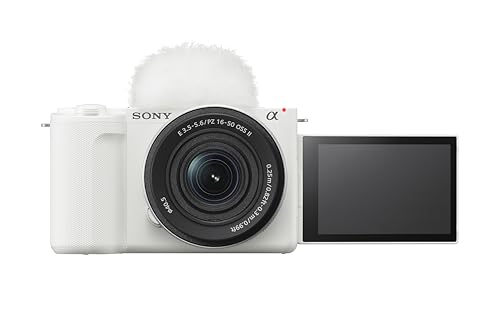
Sony ZV-E10 II — Best all-round YouTube camera
If one camera in this guide deserves the default recommendation for a new or growing channel, it is the ZV-E10 II. Sony designed the ZV line around the solo creator’s actual day: a flip screen for self-framing, autofocus that holds a face while hands demonstrate a product, a directional microphone option for quick setups and a proper input when the channel graduates to a real microphone. Its APS-C sensor delivers the soft backgrounds and low-light manners that make a spare-room studio look like a destination rather than an apology.
The interchangeable lens mount is its long-term argument. Start with the kit zoom for general work, add one fast prime when the talking-head look needs lifting, and the same body serves the channel for years of formats — reviews, tutorials, interviews, event coverage. Creator conveniences that sound like gimmicks, such as product-showcase focus behaviour, turn out to be weekly time-savers for review channels, and its livestreaming ability via a simple connection covers the channel’s first broadcasts without extra hardware.
Working habits benefit from its size. The body lives on a small tripod at the desk’s corner, ready in seconds, which quietly converts ‘I should film that’ into an uploaded video before motivation cools. Battery and thermal behaviour suit typical video lengths comfortably; the marathon recordist should still plan power like a professional. Its stills are perfectly serviceable for thumbnails, sparing a young channel a second camera for the job that decides whether anyone clicks at all.
Concede the full-frame bodies below their low-light and depth advantages, and the Canon its colour charm, yet for the broad middle of YouTube — the channels filming at desks, benches and kitchen counters every week — this is the body whose compromises land where creators feel them least. Buy it, light the corner properly, and spend the saved money on the microphone; the audience will hear the wisdom of that allocation in every upload.
- Format: APS-C creator mirrorless
- Screen: flip for solo framing
- Audio: mic input plus directional options
- Streaming: simple direct connection for live shows
- Role: the channel’s everyday main camera
Strengths
- Solo operation without friction
- Lenses grow with the channel
- Thumbnails from the same body
Trade-offs
- Low light below full-frame rivals
- Marathon recording needs power planning
- Kit lens is a starting point, not a destiny
A repair channel’s turnaround illustrates its worth: filming moved from a phone balanced on paint tins to this body on a desk arm, and the presenter’s setup time fell to minutes. Uploads doubled, not because the audience demanded more, but because the friction that rationed them had quietly left the room.
Long-form creators add a footnote its brochure misses: the body’s file behaviour across a filming day — clean spanned clips, sensible naming, thumbnails that make a card of footage navigable at midnight — quietly determines whether a creator edits tonight or procrastinates into tomorrow. Channels are built in that midnight decision far more than in any launch video, and equipment that lowers the activation energy of editing is, functionally, a publishing strategy disguised as a camera.
Best for: new and growing channels filming reviews, tutorials and talking-head formats. Not suited for: cinematic documentary work in very low light

Canon EOS R50 — Best for colour and beginner-friendly growth
Canon’s R50 courts the creator who wants footage that looks pleasant straight from the camera, with the least grading homework. Its colour rendering flatters faces — the currency of YouTube — and its guided interfaces let a beginner produce intentional-looking video while the manual controls wait patiently for the day confidence arrives. For family channels, education creators and anyone whose face is the channel’s logo, that kindness at the start matters more than a spec-sheet duel.
The flip screen, reliable face tracking and compact body make it a natural solo tool, while the RF mount opens the same growth story as its Sony rival: kit zoom now, a bright prime for the signature look later, perhaps a wider lens when the channel starts filming spaces. Its video quality in ordinary room light is genuinely handsome, and its stills give thumbnail-makers a capable tool, including the expressive faces-on-thumbnails genre that the platform’s culture rewards.
Audio provision follows the expected pattern of input and monitoring expectations for its class, and creators should budget the microphone alongside the body as this guide insists everywhere. Heat behaviour suits typical creator sessions; the all-day livestream marathon deserves the usual test before a sponsored broadcast rides on it. Canon’s menu logic will feel like home to the many creators arriving from the brand’s compacts and phones-era habits.
Choose it over the Sony when colour warmth and interface friendliness top your list, or when a household already owns Canon lenses. Choose the Sony for its slightly deeper creator-specific feature set. Either decision is defensible; what is not defensible is buying neither and filming a serious channel on a webcam the audience can hear straining. The R50 is the friendly door into looking like you mean it.
- Format: APS-C mirrorless, RF mount
- Colour: warm, face-flattering rendering
- Screen: vari-angle for presenters
- Controls: guided help over manual depth
- Role: beginner-serious channel main camera
Strengths
- Faces look good with zero grading
- Beginners produce intentional footage early
- RF lenses provide a growth path
Trade-offs
- Creator extras fewer than Sony’s
- Long live marathons need a heat test
- Microphone is a separate budget line
A teacher’s channel shows its effect plainly: the same lessons, the same room, yet comments shifted from questions about the subject to compliments about clarity — and watch time followed. Production quality is a signal of respect for the viewer’s hour, and audiences repay it before they can articulate why.
Its guided modes deserve respect rather than embarrassment: a creator filming their fortieth video while tired uses them the way a professional uses autopilot — not from inability, but to spend attention where it earns. The R50’s assistance is honest, visible and easy to dismiss when the shot demands manual thought, which is exactly the relationship a growing channel should have with automation: a scaffold with the decency to come away cleanly.
Best for: education, family and presenter-led channels wanting warm colour easily. Not suited for: low-light event coverage as a main camera

DJI Osmo Pocket 3 — Best pocket camera for filming anywhere
Some channels cannot be tied to a desk: the market reviewer, the campus interviewer, the maker whose workshop is wherever the project is. The Osmo Pocket 3 packs a stabilised camera into a device that rides in a jacket, ready before an opportunity finishes introducing itself. Its mechanical gimbal produces walking footage with a glide that electronic stabilisation imitates but rarely matches, and its rotating screen flips between filming the world and filming the presenter with a physical satisfaction that encourages both.
Image quality from its larger-than-phone sensor surprises creators who meet it expecting a gadget: faces hold together in mixed light, colours stay confident, and the built-in audio — especially with its wireless microphone pairing — covers vox pops and walk-and-talks respectably. For channels built on presence and immediacy, it collapses the production to a pocket and a personality. Many established creators carry one as the second camera that captures the between-scenes material their main body would have missed while being set up.
Its boundaries are honest ones. The fixed lens dictates framing by footwork, low light is competent rather than heroic, and it will never take the lenses or the deliberate studio role of the system cameras here. Weather asks for care rather than the action cameras’ indifference. Treat it as a specialist in spontaneity: the camera for channels whose value is being there, moving, when the thing happens.
For a creator choosing a first serious camera for a mobile format — city guides filmed on foot, event channels, interview series — it may be the most rational purchase in this guide, because it removes the two frictions that kill mobile channels: setup time and shaky footage. The desk-bound should buy the Sony or Canon instead and let this be the graduation gift the channel buys itself when it starts leaving the studio.
- Format: pocket gimbal camera
- Stabilisation: mechanical, for walking glide
- Screen: rotating, presenter and world modes
- Audio: wireless microphone pairing available
- Role: mobile and spontaneous channel work
Strengths
- Filming starts in seconds, anywhere
- Walking footage glides professionally
- Second-camera gold for bigger channels
Trade-offs
- Fixed lens, framing by footwork
- Weather needs care and a case
- Not a studio system camera
A street-food channel’s signature opening — a glide through the market crowd arriving at the stall — was shot on this pocket device after the creator’s mirrorless kit proved too slow to deploy between locations. The sequence the audience loves most required the smallest camera in the building, which is a lesson about matching tools to formats, not budgets.
Event channels discovered its other gift: it is small enough to be the camera that is actually in the bag at the conference, the launch, the community day where next month’s three videos live. The best footage at such events belongs to whoever was ready in the corridor conversation, and readiness is a function of what a creator can carry all day without resenting it. This pocket gimbal has built more channels’ back catalogues than many a flagship.
Best for: mobile formats, interviews on location and as a big channel’s second camera. Not suited for: desk studios needing interchangeable lenses

Sony ZV-1F — Best simple camera for talking-head channels
A certain kind of creator wants exactly one decision between an idea and a recording: press the button. The ZV-1F serves that creator with unusual purity. Its fixed wide lens frames a presenter and their desk from a small tripod, its screen flips for framing checks, and its controls assume the operator would rather be thinking about the script. Commentary channels, reaction formats, study-with-me tutors and video-diary series have all been built on less camera than this, and none of them needed a lens collection to find an audience.
The wide lens doubles as a room strategy: it includes the presenter’s environment — shelves, instruments, the organised chaos that gives a channel its visual identity — without requiring a bigger room. Background softening at close range lends production value, and the directional microphone favours the presenter’s voice over the household behind the door. For renters filming in one multipurpose room, this little body converts a corner into a set with the least possible furniture rearrangement.
Limits arrive where simplicity always collects its fee. The lens cannot zoom toward a detail, so demonstrations of small objects need the camera moved closer or a different pick entirely; low light asks the lamp to work; and the growing channel will eventually hear the call of interchangeable lenses. None of that diminishes its role as the lowest-friction respectable start in this guide — the camera for the creator whose ideas are ready before their technical patience is.
Pair it with a decent lamp and a quiet room and it will carry a commentary channel astonishingly far. Its used-market afterlife is also kind: when the channel graduates to the ZV-E10 II above, the ZV-1F becomes the second angle, the travel spare or the gift that starts someone else’s channel. Equipment that keeps working after its promotion rarely counts as a mistake.
- Format: fixed-lens creator compact
- Lens: wide, for presenter plus room
- Screen: flips for framing checks
- Audio: directional microphone for voices
- Role: lowest-friction talking-head camera
Strengths
- One button between idea and upload
- Includes the room that brands the channel
- Becomes a second angle after graduation
Trade-offs
- No zoom for small demonstrations
- Lamps must help in dim rooms
- Growth eventually wants lenses
A study-together channel — hours of quiet co-working with a presenter in frame — was built entirely on this compact, its simplicity matching the format’s calm. The creator credits the camera’s invisibility: equipment that never interrupts is, for some formats, the entire production philosophy.
Presenters who film standing in kitchens and workshops praise a trait rarely reviewed: it forgives being knocked. A compact body on a small tripod at elbow height in a working room will be bumped, and this one’s response — a forgiving lens, a shrug, a return to work — suits the domestic studio’s physics. Pair it with the household rule that the camera corner is a no-pile zone and it will serve for years of episodes.
Best for: commentary, tutoring and presenter channels wanting zero setup friction. Not suited for: product close-ups or lens-hungry formats

Canon PowerShot G7 X Mark III — Best premium compact for mixed formats
Between the fixed-lens simplicity of the ZV-1F and the system commitment of the mirrorless pair sits the G7 X Mark III, the compact for channels whose filming wanders the whole house. Its zoom covers the presenter at the desk, the hands at the workbench and the wider room for a room-tour episode, all from a body that returns to a pocket when the video ends. Canon’s colour gives faces and food — the two great subjects of domestic YouTube — a warmth that audiences describe as appetising without knowing why.
Lifestyle, cooking and craft channels feel its design most directly. The tilting screen supports overhead-adjacent angles and low workbench shots, the lens’s brightness keeps kitchens looking like kitchens rather than caves, and its livestreaming capability covers a channel’s first live sessions from the same device. It is the camera of the creator whose studio is a home and whose production must pack away before dinner, a constraint more channels live under than the industry admits.
Compromises mirror its position: no lens changes, autofocus a step behind the newest system bodies during frantic demonstrations, and audio that improves markedly with an external microphone where the format allows one. Battery life suits episode filming rather than all-day events. Yet as a single-device answer for a mixed domestic channel, it asks the least reorganisation of a household’s life, and that domestic diplomacy is a real feature.
Choose it when the channel’s formats are varied, the filming spaces are ordinary rooms and the creator values a camera that behaves like a good appliance — present, capable, undemanding. It is also the natural upgrade for the phone-filming channel that is not ready to become a lens collector, delivering the unmistakable step in image and sound while keeping the production in one pocketable piece.
- Format: premium zoom compact
- Zoom: presenter, hands and room in one lens
- Screen: tilts for bench and table angles
- Streaming: built-in live capability
- Role: mixed domestic channel camera
Strengths
- One body covers a whole house of formats
- Food and faces get Canon warmth
- Packs away before dinner, daily
Trade-offs
- Focus a step behind system bodies
- External microphone still improves audio
- Episode-length battery, not event-length
A small-batch baking channel films everything on one: the presenter’s introduction, the dough at the bench, the oven reveal. The creator’s entire studio packs into a drawer, which she cites as the reason the channel survived two house moves and a baby — continuity of production is a business feature no sensor chart lists.
Its zoom quietly teaches composition, too: the creator who must choose between the wide room and the tight detail with one lens learns framing as a decision rather than a crop, a discipline that transfers upward when a system camera eventually joins the studio. Channels that began on this compact often show a visual tidiness their peers lack — the habit of deciding what the shot is before pressing record, learned from a lens that made them.
Best for: cooking, craft and lifestyle channels filming across a home. Not suited for: fast demonstration work needing flagship autofocus

Logitech Brio 4K — Best desk streaming camera
A significant nation of YouTube is filmed entirely at one desk: livestreamed lessons, podcast recordings, gaming commentary, software tuition, the long conversational formats where the creator never stands up. For those channels the Brio 4K is not a compromise but the correct tool — a camera that lives on the monitor, wakes with the computer, frames its owner identically every session and streams or records with a consistency the interchangeable-lens bodies must work to match. Its 4K headroom lets a creator punch into a tighter frame in software while keeping the delivered image clean.
Desk production has its own quality ladder, and this camera climbs the visible rungs: faces stay sharp and correctly exposed as daylight wanders, the field of view adjusts between the intimate close-up and the wider room-inclusive shot, and its microphone pair handles the solo voice respectably until a dedicated microphone takes over. Paired with one good lamp — the single highest-value purchase in desk production — it produces the calm, professional sameness that livestream audiences settle into for hours.
Honesty about scope: it films a desk. The moment a channel’s format walks into the kitchen, the street or the workshop, a second camera from this list becomes necessary, and the Brio retires to its streaming throne without complaint. It also ties production to the computer’s health and software, a dependency the standalone bodies avoid. Within its kingdom, though, it is superb — and its price leaves budget for the light, microphone and acoustic softening that desk audiences actually perceive as quality.
Recommend it to the streamer, the online teacher and the podcast-first channel as either the main camera or the always-ready second angle in a larger studio. In a guide of general YouTube advice, it represents the principle that the best camera is the one matched to the format’s real geography — and for a third of the platform, that geography is a chair, a desk and a ring of light.
- Format: premium USB webcam
- Resolution: 4K headroom for software reframing
- View: adjustable field for close or wide desk shots
- Mounting: lives on the monitor, always ready
- Role: livestreams, lessons and podcast desks
Strengths
- Identical framing every single session
- Savings fund light and microphone
- Instant readiness kills setup friction
Trade-offs
- Films a desk and only a desk
- Depends on computer and software
- No standalone recording away from the PC
A language tutor’s channel runs three live lessons daily on one, the camera’s absolute sameness becoming part of the students’ routine — same framing, same warmth, same teacher. Production invisible enough to disappear is the desk format’s highest achievement, and this unglamorous box delivers it.
Teachers add the decisive operational note: it is already on when the students arrive. No warm-up, no driver negotiation performed in front of a live audience, no framing drift between Monday’s lesson and Friday’s. In live education, the first ninety seconds decide whether an audience settles, and a camera that removes itself from those ninety seconds entirely is worth more than a resolution figure to the people who teach for a living.
Best for: streamers, online teachers and podcast-format channels. Not suited for: any format that leaves the desk
How Do the Six YouTube Cameras Compare for a Working Channel?
| Camera | Format | Channel strength | Signature job |
|---|---|---|---|
| Sony ZV-E10 II | APS-C creator body | Everyday channel production | The repair channel’s desk |
| Canon EOS R50 | APS-C mirrorless | Warm colour and friendly growth | The teacher’s clearer lessons |
| DJI Osmo Pocket 3 | Pocket gimbal | Spontaneity and walking glide | The market glide opening |
| Sony ZV-1F | Creator compact | Talking heads with zero friction | The quiet study channel |
| Canon PowerShot G7 X Mark III | Premium compact | Mixed formats across a house | The drawer-sized baking studio |
| Logitech Brio 4K | USB webcam | Desk streaming consistency | The thrice-daily live lessons |
Sort the table by where the channel lives. Desk-bound formats can stop at the streaming camera and invest in light; presenter formats divide between the fixed-lens simplicity of the ZV-1F and the growth path of the two mirrorless bodies; mobile formats belong to the pocket gimbal; mixed domestic channels suit the zoom compact. The mistake the table exists to prevent is buying across those geographies — a system camera’s complexity for a desk channel, a webcam’s captivity for a channel about to discover location filming. Geography first, then gear.
A final sorting thought: every row in this table is somebody’s correct first camera and somebody else’s correct fifth. The platform’s history is full of channels that began on the humblest row here and of studios that keep the humblest row in daily service beside flagships. Geography of format, honesty about workflow and respect for sound — those three judgements, made well, matter more than which row a channel starts on.
How Much Does Audio Actually Matter on YouTube?
More than any other single factor a creator controls. Viewers describe the effect imprecisely — a video ‘feels professional’ or ‘is hard to watch’ — yet controlled comparisons inside creator communities keep landing on sound as the difference. Echoing rooms, distant voices and level jumps between clips tax the listener continuously, and the tax is paid in abandoned videos. A microphone placed close to the presenter, a room softened by ordinary furnishings, and levels checked on headphones before recording solve most of it for less than a lens costs.
Build the audio habit into the setup ritual: record ten seconds, listen back, then begin. That tiny ceremony catches the forgotten microphone, the buzzing cable and the washing machine’s spin cycle before they colonise an hour of footage. Channels that adopt it sound mature within a month, whatever camera they own — which is precisely why this general guide ranks audio architecture alongside sensors when judging bodies for the platform.
What Lighting Setup Serves Most Channels?
One large, soft source placed near the camera and slightly above the presenter’s eyeline flatters almost every face and format, and it should be a channel’s first lighting purchase. Softness is the operative word: a lamp through diffusion, a panel with a softbox, or daylight from a big window all wrap the face kindly, while small hard sources carve shadows that read as amateur on camera. Add a dimmer background light or a practical lamp in frame and the flat talking head gains the depth that viewers register as production value.
Consistency matters as much as quality. A channel filmed at varying hours under wandering daylight changes mood between episodes in ways audiences feel as restlessness; a fixed artificial setup delivers the same Tuesday forever. Position the key light, mark its stand’s feet with tape, note the camera’s exposure settings, and the studio rebuilds identically in minutes. The cameras in this guide all reward that discipline — and punish its absence with equal honesty.
How Should a Solo Creator Frame and Focus Alone?
Use the flip screen as a crew member: compose the frame with the chair, the backdrop and the product space all visible, then sit in the presenter’s position and check eyeline, headroom and background accidents before recording a word. Mark the chair’s position and the tripod’s feet so tomorrow’s setup matches today’s to the centimetre. Autofocus with face and eye priority then holds the performance, freeing the creator to think about the material instead of the machinery — the entire point of the creator-focused bodies ranked above.
Record a ten-second test and watch it at full size whenever anything changes — new lens, moved light, different room. Small screens lie kindly; the monitor tells the truth about focus softness, background clutter and the picture frame slowly sliding behind your head. Solo creators who build the test into their ritual ship consistent videos; those who skip it discover their mistakes in the comments, which is the most expensive classroom on the platform.
What Upload Workflow Keeps a Channel Consistent?
Consistency is a workflow before it is a virtue. The channels that publish for years run a boring, beautiful pipeline: cards copied to the same folder structure every time, footage backed up before editing begins, a template project with the channel’s intro, levels and captions already set, and exports checked on a phone — where most viewers will actually watch — before uploading. Each step removes a decision, and decisions are what exhaust creators into silence around month four.
Batching multiplies the effect. Filming three videos in one setup session amortises the lighting and framing work across a week of uploads, and editing them in one sitting keeps the channel’s sound and colour uniform. The camera’s contribution is reliability across those batches: settings that persist, batteries that behave predictably, files that arrive in the editor without conversion rituals. Judge any future camera purchase partly by whether it strengthens or frays that pipeline, because the pipeline is the channel’s real engine.
When Should a Channel Upgrade Its Camera?
Upgrade when a named limitation is costing viewers or videos: focus that loses demonstrations, low light that confines filming to one hour of the day, audio that caps the channel’s professionalism, a setup so laborious that uploads slip. Those are business cases, and they justify money. The upgrade that fails is the speculative one — the flagship bought for a format the channel has not tested, whose complexity then taxes every ordinary video. Pilot the new format on the current camera first; if the audience responds and the camera genuinely strains, the upgrade has earned its budget.
Keep the old camera working after the upgrade. Yesterday’s main body becomes the second angle, the overhead shot, the spare that saves a filming day when the new body is elsewhere — multi-camera texture that makes a channel look established overnight. The six picks here were chosen partly for that afterlife: each remains useful in a growing studio long after a successor takes the main tripod, which is how sensible channels build a kit instead of a series of replacements.
How Do Thumbnails and Titles Fit the Camera Decision?
Experienced creators plan the thumbnail while filming, because the frame that sells the video and the frame that tells it are cousins. A camera with capable stills — or a video mode clean enough to yield frame grabs — lets the presenter shoot thumbnail expressions in the same light and costume as the video, keeping the promise between the click and the content honest. Set a moment at the end of each session for those expressions; thirty seconds then saves a reshoot in different light that viewers subconsciously distrust.
Titles and thumbnails also discipline the filming itself. A creator who knows the video’s promise films toward it — the demonstration arrives earlier, the presenter’s framing leaves room for the composition, the key moment is captured cleanly rather than mentioned in passing. The camera is the last link in that chain of intention, and the bodies above were chosen to execute intention reliably: focus where the presenter points the story, exposure that holds the important face, sound that carries the important sentence.
How Do You Make a Small Room Look Like a Studio?
Distance and layers do what square metres cannot. Move the presenter as far from the background as the room allows, then give that background one deliberate element — a shelf, a plant, a lamp glowing practically in frame — so the eye reads depth instead of a wall. A modest background blur from a faster lens or a closer camera position completes the separation, and suddenly the spare room has a foreground, a subject and a world behind them: the three layers every professional set is built from.
Colour discipline finishes the illusion. Choose the room’s two or three recurring colours — wardrobe, backdrop, the channel’s props — and evict the accidental ones from the frame’s edges. Viewers read that control as production value without identifying it, the same way they read a tidy desk as competence. The cameras in this guide render a controlled room beautifully; their harder task, which no purchase can solve, is a room that has not been thought about at all.
What Analytics Should Influence a Channel’s Camera Use?
Watch where viewers leave, and let the pattern interrogate the production. Departures in the first seconds usually indict the opening frame and sound rather than the content; a sag during demonstrations often means the camera could not show the hands clearly; comments praising how ‘easy’ a video feels usually trace back to steady framing and calm audio. The camera’s settings and position are variables in every one of those patterns, adjustable a week at a time like any other part of the format.
Resist rebuilding the studio after every dip. Change one production variable, hold it for several uploads, and let the audience’s behaviour deliver its verdict at a sample size that means something. Channels that treat their camera setup as an experiment with a notebook — lens, distance, light position, microphone placement, each logged — improve with a steadiness that gear-chasing never achieves, because they are learning their own audience instead of imitating someone else’s.
How Should a Channel Handle Its First Brand Deal Filming?
A sponsored video is a production with a second audience — the brand reading over the viewer’s shoulder — and the camera work should rise to meet it without changing the channel’s accent. Film the product in the channel’s real setup, with the same light and sound the audience trusts, and capture cleaner close-ups than an ordinary episode attempts, because the sponsor’s approval process will pause on exactly those frames. Keep the raw footage and the project files until the campaign closes; brands return with questions, and the creator who can answer from the archive looks like a studio rather than a hobby.
Disclose, deliver and then debrief. Note what the production demanded that the everyday setup strained against — a second angle, a longer recording, a location the desk camera could not visit — because that strain list is the most honest upgrade plan a channel ever writes. Brand work, handled professionally, funds the studio’s growth in the correct order: the limitations that paying work exposed, in the sequence it exposed them.
What Separates Channels That Last Five Years?
Ergonomics, mostly — of the body, the room and the routine. The lasting channel’s camera sits at the right height without adjustment, its presenter can see themselves without craning, its chair and light and microphone return to their marks like stage furniture. Filming asks nothing of the creator’s willpower on the day, because every decision was made once, kindly, in advance. Audiences experience that ease as confidence; creators experience it as the difference between a practice and a chore.
The second separator is an honest relationship with ‘good enough’. Lasting channels publish the video the format promised, on the day it was promised, and let the hundredth episode carry the lessons of the ninety-ninth rather than reshooting the ninety-ninth into a nervous masterpiece. The cameras in this guide were chosen to serve that philosophy: reliable, repeatable, and humble enough to disappear behind the work they were bought to make possible.
What Mistakes Do New Channels Make Choosing a Camera?
Buying the camera of a creator in a different genre leads the list: the documentary flagship purchased for a desk channel, the pocket camera expected to run a studio. Genre geography, set out in this guide’s comparison, should make the shortlist before any review is read. The second error is spending the whole budget on the body and filming in an echoing, dim room with the camera’s own microphone — an allocation every audience can hear. Light and audio are not accessories to the camera decision; they are the larger half of it.
Finally, beware the setup that takes longer than the video. Channels die of friction more often than of image quality, and a rig that needs twenty minutes of assembly will eventually meet a busy week and lose. The test for any purchase is Tuesday-night realism: can this be filming, correctly, five minutes after the idea arrives, in month nine, when the novelty has worn off? The six bodies above pass that test for their respective formats — which is, in the end, why they are the list.
Related guides
- Best Cameras for YouTube Videos With Mic Inputs: Audio-First Picks With Monitoring and XLR Paths
- Best Cameras for YouTube DIY Videos for Beginners: Overhead Angles and Workshop-Proof Picks
- Best Cameras to Use for YouTube Videos: Daily-Driven Picks for a One-Person Workflow
Frequently Asked Questions
Is a phone good enough to start a YouTube channel?
For the first videos, absolutely — the phone teaches format, pacing and audience response at no cost. Upgrade when its named limits bite: focus you cannot trust during demonstrations, audio that caps professionalism, or setup friction that delays uploads. The picks here are ordered as graduation paths, not as entry fees.
Which single camera suits the widest range of channels?
The ZV-E10 II, for its balance of solo-friendly design, lens growth and audio provision across presenter, review and tutorial formats. Channels with a fixed specialism should still choose by geography — the desk streamer and the mobile interviewer are better served by their dedicated picks than by any all-rounder.
How is this guide different from the vlogging and travel ones?
Those treat filming a life and filming a journey — personal, mobile, diary-shaped work. This guide covers YouTube as a publishing studio across all genres: repeatable setups, channel workflow, audio and consistency for series that return weekly. A creator whose channel is a personal travel diary should start with those narrower guides instead.
Do YouTube videos need 4K?
Most viewing happens on phones and laptops where a well-lit, well-recorded standard image outperforms a careless higher-resolution one. Resolution headroom helps reframing and future-proofing, yet light, sound and focus decide whether viewers stay. Buy capability in that order and the resolution question mostly answers itself.
What microphone should pair with these cameras?
The one that can sit closest to the presenter: a lavalier for movement, a shotgun on a stand for a fixed desk, a USB or interface microphone for streaming desks. Proximity beats price in microphone physics. Whatever you choose, monitor it on headphones during a test recording before every real session.
How long should a channel’s camera last?
Years, if bought for the format rather than the moment. The system bodies here grow through lenses, and every pick retains a second-angle or specialist role after an upgrade. Channels replace cameras when formats change or limitations start costing uploads — not on the industry’s release calendar.
Why Do Channels Outlive Their First Camera?
A channel is a promise repeated weekly, and the camera is simply the promise’s most visible tool. The creators who last are rarely those who began with the finest equipment; they are the ones whose setup let them publish when tired, busy or uninspired — the Tuesdays that decide everything. That is why this guide scored friction, repeatability and sound alongside image quality, and why its recommendations sound almost conservative. Excitement is a launch strategy; reliability is a career.
Choose by the geography of your format, light the corner properly, put a real microphone near the presenter, and let the routine carry the channel through its first hundred videos. Somewhere in that hundred, the audience arrives, the format sharpens, and the next camera decision makes itself — clearly, specifically, and with revenue to fund it. That is the order successful channels have always grown in, and the six cameras above are arranged to serve each stage of it.
There is a quiet milestone every channel reaches when the equipment stops being the conversation. Comments ask about the subject instead of the setup, the creator’s own notes turn from settings to ideas, and filming days are remembered for what was said rather than for what the camera did. Every recommendation in this guide points at that milestone. Choose the body that gets your channel there soonest, and then — this is the entire secret — stop choosing, and publish.
A channel’s camera also quietly shapes the creator’s own development, because a tool that rewards preparation teaches preparation. The setup rituals, the test recordings, the logged experiments — these compound into a professional temperament that outlasts any single platform or format. Creators who began by choosing a camera thoughtfully often trace their later discipline to that first decision to treat the work as a studio rather than a lottery ticket. The audience sees videos; the camera built the person who makes them.
Final Recommendation
For the broad middle of YouTube, start with the ZV-E10 II; for warm colour and a gentle learning curve, the EOS R50. Mobile formats belong to the Osmo Pocket 3, zero-friction talking heads to the ZV-1F, mixed domestic channels to the G7 X Mark III, and pure desk streaming to the Brio 4K. Each is the right answer somewhere on the platform — the guide’s work has been matching them to the somewheres.
Whichever you choose, spend the same week on the lamp, the microphone and the ten-second test habit. A channel is judged by its hundredth video, not its first, and the equipment that matters most is the equipment still being happily used when that hundredth upload is filmed. Set up once, set up kindly, and then go and make the videos — the audience is considerably more interested in those than in the camera that recorded them.
Related Guides
Narrow the choice with our companion guides to cameras for travel YouTube channels , cameras for personal video blogs and vlogging , setting up a first home studio for filming.


