ilcastellomenu.com is reader-supported. When you buy through links on our site, we may earn an affiliate commission.
Where to Buy
A YouTube live is a peculiar performance: part broadcast, part conversation, part endurance event, conducted in front of an audience that can leave with a thumb-flick and tell you so in the chat. The best cameras for live streaming youtube are the ones that survive that format’s specific demands — hours of continuous operation without overheating or sulking, autofocus that holds a face while its owner reads superchats, an image clean enough to look professional beside the platform’s biggest channels, and a setup simple enough that ‘going live’ never becomes a production meeting with yourself.
This guide is written for creators at every rung: the first-timer streaming from a bedroom desk, the gaming or commentary channel upgrading from a bundled webcam, the educator whose live lessons are becoming a series, the IRL streamer taking the show outdoors. The six picks divide that territory deliberately — dedicated creator bodies, a vlogging compact, two generations of serious webcam, a tracking camera that operates itself, and a gimbal camera for streams that walk.
YouTube’s own machinery shapes the choices more than most guides admit. The platform rewards watch time and consistency, which means your camera’s real job is to make weekly (or daily) streaming sustainable: fast to set up, pleasant to sit in front of, reliable across a three-hour session, and forgiving of the imperfect rooms most creators actually have. A marginally sharper camera that makes streaming feel like a chore will lose you more audience than a slightly softer one that gets you live on schedule, smiling.
The rest of the chain matters, and this guide will keep saying so: light, microphone, upload stability and the discipline of a fixed streaming corner. But the camera is the chain’s face — literally — and choosing the right one for your format is the decision this article exists to make well. Read the verdicts against your format first: desk talker, gamer with facecam, teacher, product reviewer, roaming creator. The ranking rearranges itself honestly for each.
One promise about method: no pick here is recommended on a specification alone. Each has been judged on the lived realities of YouTube live work — thermal behaviour in hour two, autofocus manners when you lean in to read chat, how the picture survives the platform’s compression, and whether the setup still feels inviting on the fiftieth stream, when novelty has left and only habit remains.
How the guide is organised: the platform’s demands first, then the six picks by format, then the lighting, corner-building and performance guidance that determines whether any camera’s promise survives contact with a real channel. If you already know your format, the verdict lines in each review will route you in under a minute.
Key Takeaways
- YouTube live rewards sustainability: the camera that gets you live on schedule beats the sharper one that feels like a chore.
- Thermal stamina is a headline feature — a camera that overheats in hour two is a short-stream camera.
- Autofocus must hold a face that leans, turns and reads chat; test for that, not for spec-sheet speed.
- Match the pick to the format: desk, gaming facecam, teaching, product demos, or roaming IRL.
- Light and microphone upgrades out-perform camera upgrades for audience-perceived quality.
- A fixed streaming corner — camera mounted, light placed, settings saved — is the real consistency machine.
- Record every stream locally at full quality — the archive becomes clips, evidence and back catalogue.
In this guide
Quick Picks: For YouTube Lives, From First Stream to Full-Time Channel
| Pick | Badge | Why it earns its place |
|---|---|---|
| Sony ZV-E10 II | Best Overall for YouTube Live | A creator body built around faces and products: superb autofocus, 4K headroom, and streaming manners for days. |
| Elgato Facecam | Best Purpose-Built Streaming Webcam | A webcam designed by streaming people: fixed-focus honesty, strong software control, no battery or thermal drama. |
| OBSBOT Tiny 2 | Best for Presenters Who Move | The tracking 4K webcam that follows you to the whiteboard and back — a camera operator in a matchbox. |
| Sony ZV-1F | Simplest Complete Starter | A fixed-lens vlogging compact that streams and records with zero lens decisions — the gentle on-ramp. |
| Logitech Brio 4K | Best 4K Webcam All-Rounder | Sharp 4K with field-of-view choices and years-proven reliability — the professional’s default face camera. |
| DJI Osmo Pocket 3 | Best for IRL and Roaming YouTube | Gimbal-smooth 4K that streams from streets, markets and events — the IRL creator’s pocket studio. |
How Did We Choose Cameras for YouTube’s Particular Demands?
Endurance came first. We weighted continuous-operation behaviour — heat management, power options, the ability to run from mains or USB power indefinitely — above peak image quality, because a YouTube live is a marathon format and the platform’s successful creators stream for hours. Cameras that record beautifully for twenty minutes and then negotiate are vlogging tools wearing a streaming costume, and the reviews separate the two honestly.
Second, autofocus as the audience experiences it. YouTube faces talk, laugh, lean toward chat, hold products to the lens and turn to second monitors; the systems here were judged on how gracefully they hold a face through that vocabulary, how their eye detection behaves with glasses and varied skin tones and lighting, and whether their focus breathing or hunting becomes a mannerism viewers start to notice. Product-showcase focus — the ability to grab an object held to camera and return to the face — earned its own marks, because review and unboxing formats live on it.
Third, the pipeline reality. Most creators stream through software on a computer, so clean HDMI or high-quality USB output, sensible latency, and drivers that simply work with the major streaming applications mattered as much as sensors. A camera that fights your software is a camera that makes you late, and late is a metric YouTube’s audience punishes immediately.
Finally, we priced the whole seat: the camera plus the lens, light and microphone its picture assumes. Several picks below are bargains precisely because they arrive complete — fixed lens, webcam simplicity — while the interchangeable-lens bodies ask for a lens budget that the reviews state plainly rather than hiding in the accessories paragraph.
A last methodological note: we have assumed the mainstream streaming-software workflow throughout, because that is where YouTube live actually happens. Creators running hardware switchers, multi-camera studios or platform-native mobile lives will find the same cameras ranked by the same virtues — stamina, focus, honesty of picture — with the weights shifted, and the verdict lines are written to survive that re-weighting.
What Does YouTube Itself Require and Reward in a Live Camera?
The platform’s technical floor is lower than creators fear: a stable 1080p feed satisfies the overwhelming majority of viewers, most of whom watch on phones and laptops where compression, not your sensor, sets the ceiling. What the platform rewards is behavioural — streams that start on time, run long, hold attention and recur on a schedule subscribers can memorise. Your camera serves those metrics by being ready in minutes, comfortable for hours and consistent enough that regulars feel at home in your frame from the first second.
That said, capture headroom has real uses even when delivery is 1080p. A 4K-capable camera lets streaming software crop, reframe and apply a gentle digital zoom without the picture dissolving; it lets the same session’s recording become edited videos and shorts with quality to spare. Several picks here are recommended partly as dual-purpose machines — live camera by night, content camera by day — because most growing channels cannot afford specialists for each job.
Mobile and IRL streaming rearranges the requirements again: data stability replaces upload cables, battery systems replace mains power, and stabilisation becomes the headline feature. The guide’s roaming pick is judged on that separate rubric, and desk-bound readers should not let its charms distract them — a gimbal camera on a desk is a sports car in a garage, impressive and entirely beside the point.
A word on schedules, because cameras serve them: YouTube’s audience builds habits around creators who appear at predictable times, and the platform’s notifications amplify the pattern. Your camera’s contribution to a schedule is the minutes between ‘I should stream’ and ‘we are live’ — measure your setup ritual honestly, and if it exceeds ten minutes, fix the ritual before upgrading anything, because the schedule is the growth strategy and the ritual is its tax.
Why Do So Many Webcam Upgrades Disappoint Their Buyers?
Because the webcam was rarely the bottleneck. The typical disappointing upgrade goes like this: a creator replaces a bundled webcam with a serious camera, keeps the same dim room, the same distant laptop microphone and the same overhead ceiling light — and discovers the expensive picture looks merely like a sharper version of the same unflattering scene. The camera faithfully rendered a badly lit, badly sounded room at higher resolution. The disappointment is real, and it was purchased honestly; it just was not the camera’s fault.
The correct order of operations is light, then sound, then camera. A large, soft light source near the camera transforms every pick in this guide, including the humblest webcam here, into something that reads as ‘professional’ to an audience that cannot name why. A microphone near your mouth does the same for the ears. Then the camera upgrade lands on a prepared stage and delivers the transformation its box promised — which is why this guide’s how-to sections spend so long off-camera.
None of this argues against upgrading; it argues for sequencing. If the budget forces one purchase this month, let the format decide: a teacher whose board-work is illegible needs the tracking camera’s framing; a commentator whose face is a smudge in a dark room needs the light first, whatever the forums say. Diagnosis before prescription is the whole of the law in streaming upgrades.
There is a subtler version of the same trap: upgrading the camera to fix a confidence problem. A creator who feels exposed on camera imagines a better lens will armour them; what actually armours them is the tenth stream, the moderated chat and the light that makes them look like themselves on a good day. Buy equipment for the show’s problems, and let the show’s reps solve the host’s — in that order, channels survive.
Which Six Cameras Should YouTube Streamers Choose Between?
All six picks are linked from our verified pool. They run from a complete vlogging compact to a mirrorless creator body, with webcams and a gimbal between — because YouTube’s formats are that various, and pretending one camera serves them all would be a disservice dressed as decisiveness.
One structural note before the reviews: the two webcams and the tracking camera are complete answers that end at the desk, while the three camera-bodied picks are platforms that continue into recorded content, photography and future formats. Neither shape is superior — but know which you are buying, because channels outgrow shapes at different speeds.

Sony ZV-E10 II — Best Overall for YouTube Live
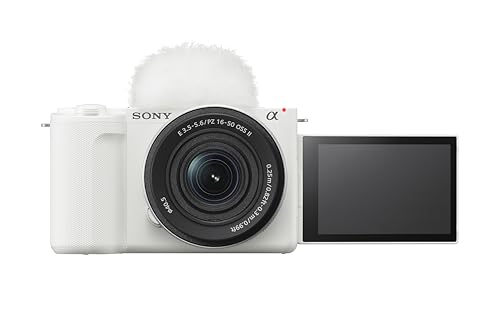
The ZV-E10 II is what a camera looks like when a manufacturer studies streamers instead of imagining them. Its autofocus is the headline: eye detection that holds through laughter, leans and chat-reading glances, plus the product-showcase behaviour that grabs a held-up object and returns to your face the moment you lower it — a trick review, beauty and unboxing channels use dozens of times per stream. Its 4K capture feeds streaming software a clean, croppable image, its colour profiles include streamer-friendly looks that need no grading, and it connects to a computer as a high-quality webcam or through capture with equal ease.
The streaming life it enables is the sustainable kind. It runs from USB power for indefinite sessions, manages heat across long lives better than its predecessor class, and its control layout — a prominent record button, a background-defocus switch for the lens-dependent trick, a tally light that tells you the truth — respects the fact that its operator is also its star. The craft is in the lens pairing: a fast wide prime for the desk transforms its low-light manners, while the kit zoom serves brighter rooms and tighter budgets, and the reviews’ honesty requires saying the body deserves the prime eventually.
One more streamer-specific virtue deserves daylight: its vertical and short-form friendliness. YouTube’s ecosystem now feeds lives into clips and Shorts, and a body whose files and framing serve both masters lets a single session populate a week of channel content. Creators planning that flywheel — live long, clip smart, post daily — will find this Sony the natural hub of the whole operation, which is a role no webcam in this guide can audition for.
- Sensor: 26MP APS-C
- 4K video with strong streaming output options
- Product Showcase and eye autofocus
- USB streaming and USB power
- Interchangeable E-mount lenses
Strengths
- Autofocus that understands streamer behaviour
- Sustainable long-session operation
- Grows with lenses as the channel grows
Trade-offs
- No in-body stabilisation — desk or tripod manners required
- Lens budget is part of the true price
- No viewfinder for outdoor stills work
Best for: Desk creators, reviewers, educators and anyone building a long-term YouTube live channel.
Not suited for: Handheld roaming streams or stabilisation-dependent formats.

Elgato Facecam — Best Purpose-Built Streaming Webcam
Elgato built the Facecam by asking what a webcam would be if streaming were its only job: a good sensor behind a proper prime lens, fixed focus set for desk distances so it never hunts, uncompressed-feeling image quality over USB, and software that exposes the controls streamers actually touch — exposure, white balance, field of view — with settings that persist between sessions. It produces a crisp, honest 1080p that flatters no one and betrays no one, and for gaming facecams, commentary and desk talk it remains the connoisseur’s webcam: the one bought after the gimmicks have been tried.
Its streaming temperament is zero-drama. There is nothing to charge, nothing to overheat, no focus motor to misbehave in hour three; it simply presents you, sharply, at the size your overlay wants. The craft it demands is environmental: because the lens is honest and the focus fixed, your chair position, light and background are the production values, and Facecam owners tend to become quietly excellent at all three. Streamers who want their face small in a corner over gameplay will find it almost excessively good; streamers who fill the frame will find it exactly good enough, every single time.
Gaming streamers should note its overlay manners specifically: it holds a small facecam window with a legibility that survives the platform’s compression at small sizes, where softer webcams turn faces into folklore. Readability at thumbnail scale is an unglamorous specification that never appears on boxes, and it is the one your audience’s eyes actually grade you on, three hours a night.
- Output: 1080p high-quality USB video
- Fixed-focus prime lens set for desks
- Elgato Camera Hub software control
- No battery, no thermal limits
- Compact monitor-mount design
Strengths
- Set-and-forget reliability for daily streams
- Never hunts focus mid-sentence
- Software controls streamers actually use
Trade-offs
- 1080p ceiling — no 4K cropping headroom
- Fixed focus punishes wandering from your chair
- Needs your lighting to shine
Best for: Gamers, commentators and desk streamers wanting professional consistency without camera fuss.
Not suited for: Full-frame talkers wanting 4K headroom or shallow depth of field.

OBSBOT Tiny 2 — Best for Presenters Who Move
Some YouTube lives are lectures, demonstrations, workouts and workshops — formats where the creator’s body is the content and a static frame is a cage. The Tiny 2’s gimbal head uncages them: it pans, tilts and zooms to follow you across the room, reframing intelligently as you move from desk to board to demonstration table, under gesture or voice command so your hands never leave the lesson. Its 4K sensor feeds the tracking real cropping room, its low-light picture leads the webcam class, and for teachers building live courses it converts a spare room into a studio with a crew of zero.
Performing for a tracking camera is a learnable stagecraft. You discover its following speed and choreograph your movement inside it; you mark the floor positions where framing flatters; you learn which gestures it reads at your lighting level and use them like a conductor’s cues. Within a few streams the apparatus vanishes from your attention, which is precisely when audiences start describing the production as ‘professional’ without knowing why. Pair it with a wireless microphone — audio must follow you as faithfully as the frame does — and the one-person studio is complete.
Course creators add a second use: the same tracking that follows a live lesson lets the camera record demonstrations unattended between streams, turning one device into the studio’s always-ready second crew member. Equipment that works on the days you do not stream changes the economics of a premium webcam entirely — it stops being a live accessory and becomes production infrastructure.
- Sensor: 4K, large for its class
- Two-axis gimbal auto-tracking and zoom
- Gesture and voice control
- USB-C to computer
- Strong low-light performance
Strengths
- Follows movement no static camera can
- Turns solo teaching into produced television
- Excellent image among webcams
Trade-offs
- Premium webcam pricing
- Tracking has limits with clutter and second people
- Desk or tripod bound by design
Best for: Teachers, fitness instructors, demonstrators and workshop streamers.
Not suited for: Seated talkers who never leave the chair — its talents would nap.

Sony ZV-1F — Simplest Complete Starter
The ZV-1F is the camera for the creator whose enemy is friction. It is a complete, fixed-lens vlogging machine: a wide lens suited to arm’s-length framing, face-priority everything, a defocus button for instant background separation, and streaming via a simple USB connection. There are no lenses to buy, no sensor-cleaning anxieties, no mount systems to research at midnight — you charge it, mount it on the little tripod every creator accumulates, and your face appears on YouTube looking like someone who has done this for years. For first channels and casual streamers, that removal of decisions is worth more than specifications.
Its honest limits draw its true portrait. The fixed lens fixes your framing geography; the small sensor asks your lighting to be kind; the focus system, while eager for faces, lacks the flagship behaviours of its bigger sibling above. But the ZV-1F’s owners tend to stream more, not less, because the setup lives ready on the desk and the ritual is ninety seconds long. Channels are built on published streams, not on perfect ones, and this little camera is a publishing machine — the correct first camera for anyone whose alternative is another month of researching cameras instead of streaming.
Parents equipping a teenager’s first channel will read this pick correctly: it is the camera least likely to be abandoned in frustration, because there is almost nothing to set wrongly. In households, that mercy outranks image quality in the first year — the channel that survives its awkward opening season is the only channel that ever gets good, and survival is a feature this little Sony manufactures deliberately.
- Lens: fixed wide-angle, vlogging-tuned
- Face-priority autofocus and exposure
- Background defocus mode
- USB streaming connection
- Ultra-compact, tripod-friendly
Strengths
- Zero-decision setup; live in minutes
- Complete package — no lens budget lurking
- Forgiving for absolute beginners
Trade-offs
- Fixed lens fixes your framing
- Small sensor needs decent light
- Not a growth platform like interchangeable bodies
Best for: First-time streamers, casual channels, vloggers who stream from the desk.
Not suited for: Ambitious productions or low-light rooms on a lens budget strike.

Logitech Brio 4K — Best 4K Webcam All-Rounder
The Brio 4K occupies the sensible centre of webcam streaming: a 4K sensor whose headroom lets software crop to a tight 1080p face or a wider desk view from one mounting position, adjustable fields of view for different formats, and Logitech’s mature software and driver story, which means it simply works with the streaming stack you already run. Professionals who appear on other people’s streams — podcast guests, webinar regulars, remote experts — choose it because it makes them look like the office they want to be hired by, and channels that stream talking-head content find it covers the job for years without a thought.
Its craft curriculum is the streamer’s fundamentals taught by an honest lens: because the Brio neither beautifies nor forgives, owners learn light placement, background curation and microphone discipline faster than owners of flattering cameras do. The picture it returns for that discipline is genuinely good — crisp, colour-honest, stable across marathon sessions, with none of the thermal or battery subplots of camera-based setups. It will not follow you, flatter you or film your holiday; at the desk, for the spoken formats that dominate YouTube live hours, it is a complete answer wearing a webcam’s modest clothes.
Its age in the market is, paradoxically, a credential: the Brio’s foibles are documented in a thousand forum threads, its behaviour in every streaming application is known, and no update will surprise its owner mid-season. Streamers building businesses on their uptime learn to love thoroughly mapped equipment, and few cameras in this guide are mapped more thoroughly than this one.
- Sensor: 4K with digital zoom
- Adjustable field of view
- USB plug-and-play with major platforms
- Privacy shutter
- HDR and exposure automation
Strengths
- 4K headroom from a fit-and-forget webcam
- Works with everything, immediately
- Marathon-session reliability
Trade-offs
- No tracking or movement
- Needs good light for its best picture
- Desk-bound by definition
Best for: Talking-head channels, podcasters, professionals streaming from a desk daily.
Not suited for: Movement formats or cinematic depth-of-field chasers.

DJI Osmo Pocket 3 — Best for IRL and Roaming YouTube
IRL streaming — the genre where the world is the set — needs a camera that walks. The Pocket 3’s three-axis gimbal turns footsteps into dolly shots, its large sensor keeps dusk streets and night markets presentable, its tracking holds the creator’s face during walking monologues, and DJI’s app ecosystem carries the stream out through the phone in your other pocket. Travel streamers, property-tour hosts, event wanderers and market explorers get footage that looks produced rather than survived, from a device smaller than the microphone setups of the desk streamers above.
The IRL craft is expedition discipline: data and battery logistics planned like a shoot, because they are one; a route scouted for connectivity as much as for scenery; audio solved with DJI’s wireless pairing so commentary survives street noise; and a streaming manner that narrates continuously, since the genre’s audience is buying companionship as much as pictures. Back at the desk, the same Pocket becomes a superb static or second camera, which softens its specialist price — but buy it for the walking, because walking is what it is for, and nothing else in this guide does it at all.
Festival and event creators add a tactical note: the Pocket’s discreet size changes what hosts permit. Where a rig reads as a film crew and invites negotiation, the little gimbal reads as a toy and walks in — while delivering the technically superior picture. In access-driven genres, being underestimated is a production advantage, and this camera weaponises it charmingly.
- Sensor: 1-inch class, 4K
- Three-axis gimbal stabilisation
- Face and subject tracking
- Streaming via DJI app and phone
- Wireless microphone ecosystem
Strengths
- Walking streams of filmic smoothness
- Low-light strength unusual in pocket devices
- Doubles as a travel content camera
Trade-offs
- Data and battery planning are constant companions
- Small screen — phone monitoring preferred
- Desk streamers pay for talents they will not use
Best for: IRL, travel, tours and event-roaming YouTube creators.
Not suited for: Desk-bound formats or set-and-forget seekers.
How Do the Six YouTube Live Options Compare?
The table scores each pick on the streamer’s real axes: how it is operated, what it does to your workload, and where its ceiling sits when the stream runs long.
A pattern hides in the table worth stating: the cheaper picks cost attention in specific, learnable ways, while the dearer ones cost money to return that attention to you. Neither currency is wrong to spend — but spend the one your channel actually has, which for most beginners is attention, and for most full-timers is money.
| Pick | Sensor / Format | Standout trait | Watch out for |
|---|---|---|---|
| Sony ZV-E10 II | Mirrorless creator body | Full control, lens growth | Stabilisation and lens budget |
| Elgato Facecam | Streaming webcam | Zero daily fuss | 1080p ceiling, fixed focus |
| OBSBOT Tiny 2 | Tracking webcam | Operates itself | Premium price, movement limits |
| Sony ZV-1F | Vlogging compact | Minutes to first stream | Fixed lens, small sensor |
| Logitech Brio 4K | Webcam | Fit and forget for years | Static desk framing only |
| DJI Osmo Pocket 3 | Gimbal camera | Roams anywhere | Logistics of data and power |
How Do You Light a YouTube Live Setup Without a Studio?
One large, soft source, placed near the camera and slightly above your eyeline, does eighty percent of studio lighting’s work. ‘Large and soft’ means a diffused panel, a softbox, or a window with a curtain playing diffuser — the physics is that big sources wrap faces kindly and small bare bulbs carve them cruelly. Add a dim practical light behind you for depth, keep the room’s overhead light off or low, and your existing camera — any pick in this guide — will look a class more expensive by Friday.
Colour discipline completes the effect: one colour temperature in the room, ideally matching your key light, because mixed orange-and-blue light is the visual signature of amateur streams and no white-balance setting can fully forgive it. Then lock exposure and white balance rather than letting them wander mid-stream; consistency across a three-hour broadcast reads to audiences as professionalism more reliably than resolution does.
What Should Your First Ten Streams Teach You?
Treat the first ten lives as a paid apprenticeship where the currency is embarrassment, spent privately in front of tiny audiences. Stream on schedule even when the numbers are small, because the skills being built — talking to chat while thinking, recovering from technical hiccups without panic, pacing a show across two hours — only grow under live conditions. Record every session, watch the recordings at double speed with a notebook, and fix one thing per stream: the hum, the framing, the dead air after questions, the outro that forgets the call to action.
By stream ten, patterns will have announced themselves: the segment chat loves, the hour your audience actually attends, the topic that brings strangers. Those patterns, not camera specifications, are the channel’s real market research. Creators who endure the apprenticeship with any camera in this guide emerge with a show; creators who spend it shopping emerge with a showroom.
How Does a Streamer Grow From One Camera to a Two-Camera Show?
The second camera is YouTube live’s classic graduation: a wide shot for context, a close shot for emphasis, and software switching between them. The sensible path uses this guide’s own ladder — your first camera becomes the wide or the second angle when a better face camera arrives, which is why buying a first camera with a future role (the ZV-E10 II as tomorrow’s wide shot, the Brio as the permanent guest cam) beats buying a dead-end. Plan the succession when you buy the first, and the studio grows without waste.
Switching itself is a performance skill with a learning curve the audience can hear: cuts on sentences, not mid-word; holds long enough to feel intentional; the wide shot as home base the show returns to. Practise the grammar on unlisted streams until the switching disappears into the show’s rhythm — viewers should remember what you said, never how you cut, and that invisibility is the graduation certificate.
What Analytics Should Actually Change Your Camera Setup?
Watch time and retention graphs are camera feedback in disguise. A retention dip in the first minute across many streams often traces to a slow, fiddly start — the setup ritual the fixed corner exists to abolish. Mid-stream dips around your demonstrations suggest framing or focus failures the tracking and product-focus picks exist to solve. Chat complaints, counted honestly over a month, are a bug tracker for your lighting and audio. Let the data assign your upgrade order and you will never buy a camera to fix a microphone’s problem again.
The corollary is discipline about what data cannot tell you: a single bad stream is weather, not climate, and creators who rebuild their rig after every wobble never develop the consistency audiences reward. Change one variable per fortnight, measure, and keep a log — the streamer’s version of the scientific method, run on the cheapest laboratory there is: your own scheduled show.
How Do You Keep Streaming Sustainable Across a Whole Year?
Burnout ends more channels than bad cameras do, so treat sustainability as an equipment specification. The setup must be physically kind — chair, eyeline, light that does not cook you — and operationally brief, because a streamer who dreads the setup ritual will find reasons to skip weeks, and skipped weeks are the algorithm’s only unforgivable sin. Every pick in this guide was weighed partly on this: how it feels on the fiftieth ordinary Tuesday, when the channel is a job and the job must be pleasant enough to keep.
Build rest into the production itself: segments that let you stand, sip, and reset; a co-host or mod team that carries chat while you breathe; a season structure with planned breaks announced like a television show’s. The camera that supports all this best is the one you forget is there — which returns us, by a long road, to the first principle of this guide: on YouTube, the best camera is the one that makes streaming a habit rather than an event.
Why Do Audiences Forgive Picture Flaws but Never Audio Flaws?
Streaming research and every moderator’s experience tell the same story: viewers tolerate soft focus, modest resolution and even the occasional freeze with good humour, but they leave bad audio in under a minute and rarely return. The evolutionary logic is plain — we are built to monitor voices — and the production consequence is a budget rule this guide has repeated deliberately: the microphone is a camera accessory, purchased with the camera, positioned with the same care, and rehearsed with the same rigour.
The camera’s role in audio is mostly negative: choose bodies and setups whose fans, focus motors and handling noises stay out of the recording, monitor through headphones for the first minute of every stream, and treat a sudden chat chorus of ‘buzzing?’ as the fire alarm it is. Streamers who internalise the hierarchy stop apologising for their picture and start being complimented on their sound — the compliment that actually correlates with subscribers.
What Should a Gaming Streamer Specifically Demand From a Facecam?
The gaming facecam lives a double life: small in the corner during play, full-frame during queues, breaks and just-chatting segments. It must therefore be legible at thumbnail size and respectable at full size, hold focus on a face that swivels between monitors, and survive the room’s RGB lighting carnival without colour chaos. The Facecam’s fixed-focus honesty and the Brio’s cropping headroom serve the two ends of that bargain, while the ZV-E10 II serves streamers whose just-chatting segments have become the main event.
Frame rate deserves the gaming streamer’s specific attention: matching the facecam’s cadence to the broadcast’s keeps motion feeling unified, and software handles the details once the camera supplies a clean signal. Test the whole chain in your actual overlay at your actual stream size — the corner window is where your audience reads your reactions, and reactions are the product a gaming channel sells.
How Should a Creator Choose Between This Guide and a Phone?
The honest competitor to every pick here is the phone already in your pocket, whose camera is excellent and whose streaming apps are effortless. The phone’s case collapses on three fronts: it is also your chat monitor, your alert screen and your lifeline, and surrendering it to the tripod for three hours creates a single point of failure shaped exactly like your evening; its thermal behaviour under sustained streaming loads is the weakest in this conversation; and its lens and mount options end where these cameras’ begin. Streamers graduate from phones not because phones are bad, but because a dedicated camera returns the phone to its other jobs.
Keep the phone in the production, though — as the chat screen under the lens, the backup recorder, the hotspot of last resort. The mature YouTube setup is an ecology, not a duel, and the creators who thrive are the ones who assign each device the job it is genuinely best at, which is a fair summary of this entire guide’s philosophy.
How Do You Set Up a Streaming Corner That Is Always Ready?
Permanence is the trick professionals use and beginners resist: a corner where the camera stays mounted, the light stays placed, the microphone stays plugged and the software profile stays saved, so that going live is a five-minute ritual rather than a forty-minute construction project. Every cable you do not have to find is a stream that starts on time; every setting you do not have to rediscover is confidence in the first minute, when audiences decide whether to stay.
Build the corner in layers and label them like a theatre: power (one switch that wakes the rig), picture (camera, light, the background you have curated once and stopped apologising for), sound (microphone position marked, levels taped), and network (the cable or the proven Wi-Fi, tested at stream o’clock). Photograph the finished corner and tape the photograph inside a cupboard door; when something is moved for cleaning, the picture restores your studio exactly.
Keep a small ‘live kit’ box at the corner’s edge — spare cable, gaffer tape, lens cloth, the backup earbuds for monitoring — because streams generate small emergencies on a schedule, and the streamer who solves them without leaving the chair looks, to the audience, like a broadcaster. Broadcasters get subscribers; the corner is how solo creators become broadcasters.
Add the streamer’s five-minute warning to the ritual: a private checklist glance — water within reach, phone silenced, door sign up, chat window placed, first segment’s notes open — performed while the starting-soon screen plays. Audiences never see this discipline; they experience it as the calm of a host who was clearly ready before they arrived, which is the emotional signature of every channel they subscribe to.
How Should You Handle Chat, Moderation and the Performance Itself?
A camera guide that ignores the performance would be lying about what streams are. Position chat where your eyeline stays near the lens — audiences feel eye contact even through a screen, and the near-lens glance is the streamer’s core physical skill, learned by placing the chat window on the streaming monitor directly beneath the camera. Acknowledge viewers by name early and often; the first thirty seconds of any viewer’s stay decide the next thirty minutes.
Moderation is production, not administration: appoint moderators before you need them, write the channel’s few rules plainly, and let the mods enforce them so your on-camera self stays warm. The camera’s contribution to all this is negative capability — a setup so reliable and unobtrusive that your whole attention can go to the humans. That, in the end, is what every pick in this guide is actually for.
End the stream like a broadcaster, too: a deliberate close that thanks the room, names the next stream’s time, and raids or hands off where the platform encourages it. The camera keeps rolling through all of it — which is why its reliability in the final minute matters as much as in the first, and why this guide weighted stamina over spectacle from the start.
What Mistakes Do YouTube Streamers Make With Their Cameras?
Streaming the first test live to subscribers. Every setup in this guide can run an unlisted rehearsal; use it, at full length, on the real network, before the premiere. The audience’s first impression should be of your show, not of your troubleshooting.
Letting autofocus hunt during the show. A face-detection failure that pulses twice a minute becomes the only thing chat discusses. Test your lighting and settings against your real movements — leans, turns, product holds — and fix focus behaviour in rehearsal, where it is a setting rather than a spectacle.
Buying the camera before the light and microphone, then blaming it. The order exists for a reason: light transforms the picture, the microphone transforms the retention, and the camera polishes both. Streamers who reverse the order own expensive evidence of the correct one.
Chasing depth of field that fights the format. A razor-thin focus plane looks cinematic in stills and exhausting in a three-hour live, where every lean leaves your face soft. Moderate apertures, honest focus and a tidy background beat the blur-flex for audience comfort across a whole stream.
Treating each stream as a new setup. Rebuilding the rig weekly guarantees inconsistency and late starts. The fixed corner, the saved profile and the checklist are unglamorous — and they are the entire difference between channels that stream fifty weeks a year and channels that stream in bursts of enthusiasm.
Ignoring the recording while optimising the stream. Your lives become your back catalogue, your clips and your evidence in every dispute; a setup tuned only for the live moment wastes the asset. Record locally at the best quality your chain allows, archive by date with the stream’s title, and future-you — editing at midnight — will send thanks backwards through time.
Speaking to the room instead of the lens. The audience is not in your room; they are behind the glass, and the streamers who thrive are the ones who learn to feel accompanied by a lens. Every camera here supports that intimacy equally — it is a performance habit, not a purchase, and it is available free from your very first stream.
Final Recommendation
For the majority of YouTube live creators — desk-based, ambitious, building for the long term — the Sony ZV-E10 II is the complete answer: autofocus that understands the job, 4K headroom, sustainable long sessions and a lens mount that grows with the channel. Pair it with one fast prime and a proper light and the setup is, for most formats, finished.
The specialists divide the remaining formats cleanly. The Elgato Facecam is the zero-drama desk and gaming choice; the OBSBOT Tiny 2 owns presenters who move; the Sony ZV-1F is the friction-free first camera; the Logitech Brio 4K is the professional’s fit-and-forget face; and the DJI Osmo Pocket 3 takes the show outdoors and walking. Each is the best in this guide at exactly one thing, and the verdicts say which.
Whichever you choose, spend the following month on the unglamorous multipliers: the light, the microphone, the fixed corner, the rehearsal habit. YouTube’s audience cannot see your camera’s specifications — they can only see the show your camera makes sustainable, and sustainability is what this guide has been selling all along.
Related guides
- Best Device for Viewing Cameras: Six Screens and Setups That Make Feeds Easy to Watch
- Best Cameras for YouTube Skit Channels: Fast Setups, Many Characters, Dialogue First
- Best Cameras for MangoCam: Six Picks for Live Creator Streaming From Home
Frequently Asked Questions
Is 1080p enough for YouTube live in practice?
For the great majority of channels, yes — most viewers watch on devices and connections where 1080p is the effective ceiling, and content and consistency drive growth. 4K capture still earns its place as reframing headroom and as recording quality for edited videos made from the same session.
Why do some cameras overheat during long streams?
Recording and processing video generates heat that compact bodies dissipate slowly, especially while also charging. Streamer-oriented bodies manage this with design and settings — outputting a clean feed without recording internally, for instance. Judge any camera for live work by its behaviour in hour two, not minute ten.
Do I need a capture card with these cameras?
The webcams and the USB-streaming bodies need none. The mirrorless route can also use USB webcam modes at good quality on recent models, while a capture card unlocks the camera’s fullest output and lowest fuss in software. Start with USB; add the card when the channel’s income argues for it.
What microphone should pair with these cameras?
The one that sits closest to your mouth: a USB dynamic microphone for desks, a wireless lavalier for movers and roamers. Proximity beats price in streaming audio — a modest microphone near your face outperforms an expensive one across the room, on every camera in this guide.
Can I stream YouTube from a camera without a computer?
Some ecosystems allow direct or phone-mediated streaming — the Pocket 3 through DJI’s app, for instance — but the mainstream YouTube live workflow still runs through a computer or phone with streaming software for overlays, alerts and chat management. Choose the camera for the workflow you will actually run weekly.
How important is eye autofocus really?
For formats where you move, demonstrate or read chat, it is the difference between a camera you trust and one you supervise. For a seated talker in a fixed chair, simpler focus systems suffice. Buy the autofocus your format exercises, not the one demonstrations show off.
When should a channel upgrade from a webcam to a mirrorless camera?
When the webcam’s specific limits — low-light smearing, no depth control, no lens options, recording quality for edited videos — are visibly costing the show, and after the light and microphone are already solved. Upgraded in that order, the mirrorless body feels like a revelation; upgraded before, it feels like a rumour.
Can I use my camera’s Wi-Fi to stream?
Treat camera Wi-Fi as a convenience for transferring clips, not as the live pipeline: a wired USB or capture connection, on a tested network, is the professional default for a reason. The exceptions are purpose-built roaming setups like the Pocket 3’s, where the phone-as-modem chain has been rehearsed as thoroughly as the picture.
How long should a beginner’s streams be?
Long enough to practise the full arc — opening, middle, interaction, close — and short enough to review honestly afterwards; for most beginners that is sixty to ninety minutes. Duration is a skill built like stamina, and the camera you choose should be one whose company you can stand for the whole session by week one.
Related Guides
Keep exploring with best cameras for live streaming mevo and best cameras for livestream and best cameras for low light livestream.


