ilcastellomenu.com is reader-supported. When you buy through links on our site, we may earn an affiliate commission.
Where to Buy
Searches for the best cameras for MangoCam lead to a simple underlying need: a camera for live online modelling and creator streaming that looks flattering for hours at a time, behaves predictably in a bedroom or small studio, and protects the person in front of it when the broadcast ends. MangoCam is one of several platforms where independent models and streamers perform live for a tipping audience, and the camera requirements there are the same as on any mainstream live platform — sharp, warm, reliable video, quick setup, and privacy you can verify with your own eyes.
Live work punishes equipment differently from recorded work. There is no edit, no second take and no colour grade between you and the audience; the camera’s exposure decisions, autofocus behaviour and colour science are the broadcast, in real time, for sessions that can run far longer than a recorded video. A camera that overheats, hunts for focus or slowly drifts orange across an evening will quietly tax your income the whole time it does so.
Privacy deserves the same engineering seriousness as image quality, and this guide treats it that way. Physical lens covers, honest indicator lights, cameras that stop existing the moment you unplug them, and software that does not phone home with surprises all matter when the camera lives in your personal space. Every pick here was assessed on how completely it can be silenced and covered between sessions — because a streaming camera’s most important state is off.
What follows is a practical buyer’s guide for working streamers and models: six cameras spanning simple webcams, a tracking camera, a streamer-focused fixed-lens model and two mirrorless-grade options for performers whose broadcasts are becoming productions. Long hours live in a small private room change what matters here — comfort through a marathon stream will matter more than any headline resolution.
Key Takeaways
- Live broadcasting has no edit bay: autofocus, exposure and colour must be right in real time.
- A physical privacy shutter or a camera you unplug beats any software promise.
- Long sessions demand cool-running cameras and a power plan, not battery hope.
- Warm, truthful colour keeps skin looking healthy through hours under the same light.
- Tracking cameras free you to move, gesture and perform without leaving the frame.
- Your lighting will improve the broadcast more than any camera upgrade — buy it first.
In this guide
Quick Picks: Six Cameras for Live Creator Streaming
| Pick | Badge | Why it earns its place |
|---|---|---|
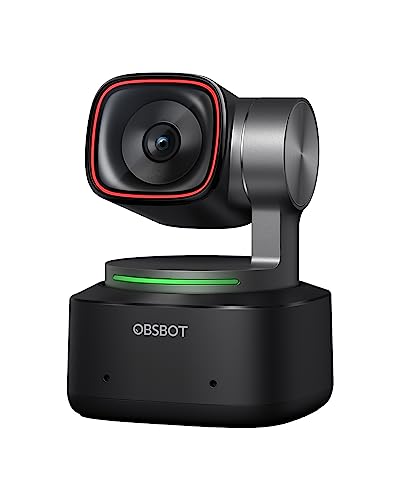
| OBSBOT Tiny 2 | Best for Performers Who Move | A gimbal that follows you around the room, with a sleep mode that turns the lens away when you are done. |
| Logitech Brio 4K | Best Simple Pro Webcam | Crisp 4K, dependable exposure and a clip-on privacy cover for total peace of mind. |
| Elgato Facecam | Best Fixed-Focus Broadcast Look | No focus hunting ever, honest colour, and settings that stay exactly where you left them. |
| Sony ZV-E10 II | Best Broadcast-Quality Upgrade | A real camera’s sensor and lenses for streamers whose show has become a production. |
| Logitech StreamCam | Best Friendly All-Rounder | Smooth 1080p, pleasant design and painless setup for new streamers. |
| DJI Osmo Pocket 3 | Best for Multi-Room Streams | A stabilised camera that carries the broadcast from desk to doorway without a cable tether. |
How Did We Choose Cameras for Live Streaming Work?
We judged for the live condition first: sustained operation. Each pick was assessed on how it behaves in hour three, not minute three — whether exposure stays settled, whether the body warms and throttles, whether autofocus remains confident when the performer is tired, animated or moving between a chair and standing positions. Streaming income is earned in long sessions, and equipment that fades across them fails the only test that matters.
Colour came second, because live colour cannot be corrected later. We favoured cameras whose default rendering keeps skin warm and healthy under the mixed household lighting most home studios actually have, and whose white balance can be locked so a costume change or a passing cloud does not repaint the performer mid-broadcast.
Third, we audited privacy as a feature set rather than a feeling: physical shutters or covers, sleep behaviours that turn a lens physically away, indicator lights that cannot be disabled by software, and the simple option of unplugging a USB device entirely. A streaming camera shares your home; its off state deserves the same scrutiny as its picture.
Finally, we considered the performer’s working reality: setup speed between sessions, compatibility with the common streaming software used to reach platforms like MangoCam, microphone arrangements, and the total cost of a rig that earns money from its first week rather than its first upgrade.
Why Does Live Streaming Demand More From a Camera Than Recording?
Recording forgives. A focus slip becomes a cut, a colour drift becomes a grade, a noisy frame becomes a deleted take. Live broadcasting keeps every mistake in front of a paying audience in the moment it happens, and the audience’s generosity — measured in attention and tips — responds to production quality they feel rather than analyse. A steady, sharp, warmly lit performer simply holds a room better than a grainy, hunting one saying the same words.
Endurance is the second demand. Consumer cameras are designed around clips; streaming asks for marathons. Heat management, continuous power and stable USB behaviour across hours separate the professional tools in this list from the meeting webcams that were never meant to broadcast an evening. Several picks below earn their ranking on thermal and power manners alone.
The third demand is performative freedom. A streamer who must sit statue-still inside a narrow frame performs with one hand tied. Tracking, generous fields of view and depth of field that forgives movement all return body language to the broadcast — and body language is a substantial part of what a live audience is present for.
Which Six Cameras Serve Live Creators Best?
The list runs from plug-and-play webcams to a mirrorless production camera, because streamers’ rooms, hours and ambitions differ. New performers should start in the list’s first half, where simplicity protects the broadcast; established performers building a signature look will find their upgrade in the second half. Privacy notes appear in every review, because in this category they are specifications, not afterthoughts.

OBSBOT Tiny 2 — Best for Performers Who Move
The Tiny 2 treats the room as your stage rather than your cage. Its motorised gimbal tracks you smoothly as you stand, turn, fetch a prop or dance, keeping the framing composed while you forget the camera exists — which is precisely the state a good live performance needs. For streamers whose act involves movement, this is not a luxury feature; it is the difference between broadcasting your whole performance and the third of it that happened to cross a fixed frame.
The image supports the freedom. A larger sensor than webcams typically carry keeps evening broadcasts clean, gesture controls let you command tracking without touching the computer mid-show, and framing presets return you to a composed shot on command. The companion software stays reasonably light, and the camera still works as a standard webcam if you prefer it locked and simple.
Its privacy behaviour deserves explicit praise: the camera has a sleep posture that physically turns the lens away, so “off” is something you can see from across the room rather than trust from an icon. Combined with unplugging the USB cable — the universal off switch — a performer can make this camera’s silence absolute in seconds. Moving parts remain the long-term wear consideration, and tracking can occasionally choose a poster over a person, but for moving performers nothing else here competes.
Session endurance is solid provided you power it properly and let the gimbal’s motion stay within its smooth, unhurried character. Streamers who perform seated will be paying for choreography they never use; streamers who move will wonder how they ever worked without it.
There is a confidence dividend to being followed. Performers who trust the frame stop checking the preview monitor, and the broadcast’s energy shifts from self-conscious to present — a change audiences register immediately without knowing its cause. Many streamers describe the first tracked session as the first time the show felt like performing rather than operating, and that feeling, repeated nightly, is worth more than the resolution line on the box.
- Motorised gimbal with subject tracking
- Larger sensor for cleaner evening video
- Gesture and voice control
- Sleep mode turns the lens away
- USB-C connection, webcam-standard output
Strengths
- Performer stays framed while moving freely
- Visible, physical privacy posture when idle
- Image quality above the webcam class
Trade-offs
- Premium price for the gimbal mechanics
- Tracking occasionally locks the wrong subject
- Seated performers may never use its best trick
Best for: Models and streamers whose broadcasts involve standing, moving and performing.
Not suited for: Strictly seated, static broadcasts on a budget.

Logitech Brio 4K — Best Simple Pro Webcam
The Brio’s streaming appeal is its steadiness of character. It produces a crisp image up to 4K, holds exposure calmly when you lean toward the light or away from it, and lets you choose a field of view that frames a seated performance tightly or a standing one generously. For a performer who wants professional presence without a production rig, it remains the benchmark webcam.
Long sessions suit it. The camera runs from USB power indefinitely, does not overheat into softness, and wakes reliably when the computer does — small mercies that compound across a working week of broadcasts. Settings such as zoom and framing can be stored so the composition you tuned on a quiet afternoon is the composition that greets your audience at night.
Privacy is handled the satisfyingly physical way: the included cover closes over the lens, and the device itself is a USB peripheral that goes dark the instant it is unplugged. There is no battery keeping it alive, no wireless radio keeping it company. For performers who share their home with the camera, that simplicity is a genuine feature and one we weighed heavily.
Its ceiling is the webcam ceiling: a modest sensor that good lighting flatters and poor lighting exposes, and autofocus that occasionally breathes during animated conversation. Streamers who light their room properly — as this guide keeps urging — will find the Brio’s ceiling comfortably above their needs for a long time.
Longevity flatters the Brio’s case as well. Webcams of this class routinely serve through several computers, because the standards they speak change slowly and the hardware has no battery to age. For a working streamer, a camera bought once and forgotten — in the good sense — frees budget and attention for the parts of the show the audience actually remembers: the set, the light, the performance itself.
- Resolution: up to 4K at 30fps
- Adjustable field of view
- Physical privacy cover included
- USB powered, no battery to manage
- Settings persist between sessions
Strengths
- Calm, professional image for hours at a time
- Privacy you can see and touch
- Zero-fuss setup on any streaming computer
Trade-offs
- Small sensor depends on decent lighting
- No tracking; framing is fixed once set
- Autofocus can breathe when you move a lot
Best for: Seated streamers wanting a professional, low-maintenance broadcast.
Not suited for: Performers who move around the room while live.

Elgato Facecam — Best Fixed-Focus Broadcast Look
The Facecam’s fixed focus sounds like a limitation until you watch a long broadcast from an autofocus camera slowly pulsing as its subject sways. This lens simply does not hunt: set your chair distance, lock your exposure and white balance in the software, and the image your audience sees at hour one is the image at hour four, unchanged. For performers, that predictability reads as polish.
The rendering supports the effect. Colour is honest rather than filtered, detail is crisp without the sharpening artefacts that make skin look harsh, and settings save to the camera itself so a software reinstall does not cost you your look. Elgato’s streaming ecosystem is mature, and the camera behaves impeccably in the broadcast software most performers already use.
Two deliberate omissions define its terms: there is no microphone, and the fixed focus assumes a consistent working distance. Streamers need their own audio solution — most serious ones already have one — and performers who alternate between desk and standing positions should choose a tracking or autofocus pick instead. Privacy, meanwhile, is simple: a lens cap and an unplugged cable, with no camera-side processing to wonder about.
Buy it when your broadcast position is settled and your lighting is deliberate. Under those conditions the Facecam produces the most “produced” webcam image in this guide, night after night, without asking for attention in return.
Streamers who broadcast to a schedule will recognise another of its virtues: repeatability. A show that looks identical every night builds a visual brand the way a television studio does, and the Facecam’s stored settings make that identity portable — a borrowed laptop, a fresh install, a new room with the same light, and the broadcast still looks like your broadcast. Consistency is an underrated form of professionalism in a medium built on regulars.
- Fixed-focus lens tuned for desk distance
- Settings stored on the camera
- Honest, unfiltered colour
- No microphone by design
- USB-C, streaming-software friendly
Strengths
- An image that never drifts or hunts mid-show
- Professional, natural skin rendering
- Your look survives software changes
Trade-offs
- Requires your own microphone and good light
- Fixed working distance punishes roaming
- Weak fit for casual, occasional streaming
Best for: Established seated streamers with a set position and their own audio.
Not suited for: Moving performers or one-device simplicity seekers.

Sony ZV-E10 II — Best Broadcast-Quality Upgrade
When a streamer’s broadcast becomes a production — a signature set, considered lighting, an audience that notices production value — the ZV-E10 II is the step that changes what the show can look like. A large APS-C sensor and real lenses deliver the shallow depth of field, low-light cleanliness and colour depth that separate a professional broadcast from a webcam feed at a glance.
It streams over USB to standard software while also recording internally, which opens a second business: the same session that entertains live can be captured cleanly for edited clips and promotional material, with no second camera in the room. Eye autofocus is confident across a performer’s range of movement within the frame, and Sony’s lens range lets the look evolve from bright and clean to genuinely cinematic as the production grows.
The responsibilities are real. Long broadcasts need a continuous power solution rather than batteries, the streaming settings deserve an afternoon of deliberate configuration, and thermal behaviour should be tested at your chosen settings before a paying audience depends on them. Privacy is straightforward — a lens cap, a powered-down body, a camera with no interest in operating uninvited — but the rig’s complexity means “off” is a small routine rather than one cable.
For performers whose income justifies production values, this is the guide’s ceiling and its recommendation. For everyone else, it is the aspirational benchmark that the webcams above are sensibly measured against.
Consider the archive this camera quietly builds. Sessions recorded internally at full quality become a library — highlight reels, promotional edits, content for other platforms — that compounds in value as the audience grows. Webcam streamers who want that library must capture a compressed feed; the ZV-E10 II owner simply keeps the card. For performers building a business rather than a broadcast habit, that difference eventually justifies the rig on its own.
- Sensor: APS-C, interchangeable lenses
- USB streaming plus internal recording
- Confident eye autofocus
- Creator colour profiles
- Continuous power options for long sessions
Strengths
- Broadcast image quality beyond any webcam
- One rig serves live shows and recorded content
- Lens choices let the look mature with the show
Trade-offs
- Setup, power and cooling need planning
- Total rig cost climbs with lenses
- Overkill for a simple seated broadcast
Best for: Full-time streamers investing in a signature production look.
Not suited for: Beginners or anyone wanting plug-and-play simplicity.

Logitech StreamCam — Best Friendly All-Rounder
New streamers face a confidence problem before a technical one: the first broadcasts are nerve-wracking enough without equipment that needs persuading. The StreamCam’s contribution is friendliness — smooth 1080p video, a pleasant fabric-wrapped design that looks like furniture rather than surveillance, and setup that amounts to plugging in a USB-C cable and appearing, framed and lit, in your software.
The quality is honestly matched to the job. At streaming bitrates, its clean 1080p image under decent light is difficult to distinguish from far pricier feeds, and its face-based auto-framing keeps a seated performer centred through the natural shifting of a long conversation. Rotating the camera gives true vertical video for the short-form clips that funnel new viewers toward the live room.
Privacy is uncomplicated: no battery, no wireless, a lens you can cover and a cable you can pull. Its limits are the familiar compact ones — dim rooms soften the picture sooner than the larger-sensor picks, and there is no 4K headroom for cropped reframing. A new performer will outgrow those limits around the time the audience justifies an upgrade, which is exactly the service a first camera should perform.
Consider it the low-risk first step: inexpensive enough to start this week, good enough to build an audience with, and honest about the day it hands over to something bigger.
Its gentleness extends to the learning curve of broadcasting itself. Because the StreamCam asks so little, a new performer can spend their first month studying the skills that actually build an audience — pacing, conversation, reading a room — instead of studying a manual. Equipment that stays out of the way during the fragile early broadcasts is not a compromise; it is the correct allocation of a beginner’s attention.
- Smooth 1080p video
- USB-C plug-and-play
- Rotates for vertical clips
- Face-based auto-framing
- Friendly, room-friendly design
Strengths
- Starts a streaming career without friction
- Clean image at real streaming bitrates
- Vertical video for audience-building clips
Trade-offs
- Dim-room softness arrives early
- No 4K or tracking headroom
- A first camera, by design
Best for: New models and streamers starting their first regular broadcasts.
Not suited for: Established performers needing a signature look.

DJI Osmo Pocket 3 — Best for Multi-Room Streams
Some broadcasts refuse to stay at a desk: a cooking segment, a house tour, a get-ready routine that travels from bathroom mirror to wardrobe to window light. The Pocket 3 carries a stream through all of it on a gimbal that keeps the horizon level and the framing composed, with face tracking that follows the performer rather than the furniture.
The sensor is the quiet star — large for the camera’s size, clean in the warm low light of real homes, and capable of a look that guests on the broadcast routinely mistake for a much larger rig. Wireless microphone options keep audio consistent while you move, solving the problem that strands most multi-room attempts: the voice fading with distance from a desk mic.
Used as a streaming camera it connects over USB or works within DJI’s ecosystem, and between sessions it powers fully down — a pocketable device in a drawer is as private as a camera can be. Its compromises are session-based: it must be mounted or held rather than living permanently aimed, battery planning matters for long mobile broadcasts, and its framing at desk distance is tighter than a wide webcam’s.
For performers whose show is a place rather than a chair, it is the most liberating tool in this guide. For desk-bound streamers, it is a superb second camera that also covers every away-from-desk moment of a creator’s week.
Travel performers find a particular freedom here: the entire broadcast rig fits in a handbag, sets up on a hotel desk in minutes and produces footage indistinguishable from the home show. A streamer whose audience follows them between cities keeps the visual continuity that regulars reward, without couriering a studio’s worth of equipment or trusting venue lighting to a lesser sensor.
- One-inch-class sensor, 3-axis gimbal
- Face tracking while moving
- Wireless microphone options
- Webcam mode over USB
- Fully pocketable between sessions
Strengths
- Broadcasts that move through real spaces
- Excellent image in warm home light
- Powers down and put away completely
Trade-offs
- Per-session setup rather than a fixed station
- Battery planning for long mobile shows
- Tighter desk framing than wide webcams
Best for: Streamers whose shows move around the home or travel.
Not suited for: A permanent desk-only broadcast station.
How Do the Six Compare for a Working Streamer?
The honest comparison is about your show’s shape, not sensor sizes: how you move, how long you broadcast, and how you want to be seen when you are not broadcasting at all.
| Pick | Type | Standout trait | Watch out for |
|---|---|---|---|
| OBSBOT Tiny 2 | Tracking webcam | Follows a moving performer | Gimbal cost; seated users underuse it |
| Logitech Brio 4K | Webcam | Calm 4K with a physical cover | Fixed framing; light-dependent |
| Elgato Facecam | Webcam | Fixed focus, locked-in look | Needs your mic and lighting |
| Sony ZV-E10 II | Mirrorless | Production-grade broadcast image | Power and setup planning |
| Logitech StreamCam | Webcam | Friendly start, clean 1080p | Dim rooms; no headroom |
| DJI Osmo Pocket 3 | Gimbal camera | Streams from anywhere in the home | Battery and mounting per session |
What Privacy Habits Should Every Home Streamer Build?
Treat the camera’s off state as part of the performance setup. When the broadcast ends, the ritual should be automatic: end the stream, confirm the software has released the camera, close the physical cover or let the tracking camera turn away, and — for the truly certain — unplug the USB cable or put the device in a drawer. A ritual performed identically every night removes the low-grade anxiety that a camera in a personal space can otherwise generate.
Keep the streaming computer’s house in order as well. Camera permissions reviewed occasionally, software updated from official sources, and a separate user account or even a separate machine for broadcasting are all cheap hygiene that keeps the personal and the professional from leaking into each other. The audience should receive exactly the window you intend to open, and nothing adjacent to it.
Finally, remember that privacy includes the room itself. A camera’s field of view is a publication decision: frame what you mean to share, check what the edges contain — documents, photographs, addresses on parcels — and let the background be as deliberate as the performance. The wide lenses that flatter a small room also publish more of it.
How Do You Light a Streaming Room That Flatters for Hours?
One large, soft light in front of you and slightly above eye level does most of the work, rendering skin kindly and giving every camera in this guide an easier exposure to hold. Add a gentle fill or a practical lamp behind you for depth, and the broadcast gains the dimensional look that separates a produced show from a video call — without any change of camera.
Consistency matters as much as quality. Lock your camera’s white balance to your lights rather than letting it wander, keep the room’s other light sources stable during a session, and resist the coloured novelty lighting that shifts skin tones into territory no audience finds healthy-looking. Accent colour belongs in the background, at a distance from your face.
Comfort is a lighting specification too. A light you will actually use for four hours — cool-running, glare-free from your seat, positioned so you are not squinting into it — outperforms a theoretically perfect light that gives you a headache by hour two. Streaming is endurance work; equip for the performer as well as the picture.
What Mistakes Undermine a New Streamer’s Broadcast?
Broadcasting from the room’s worst angle because it is where the desk already stood. The camera’s position, the light’s position and the background compose the entire visual product; rearranging a room once, deliberately, pays out across every future session, while a careless frame taxes each one.
Letting settings float. Auto-everything feels safe and produces the drifting exposure and colour that make long broadcasts look amateur. Lock what can be locked, test the locked result in a private recording, and let consistency become your signature.
Neglecting audio while upgrading video. Audiences leave bad sound faster than soft pictures, and a performer who is hard to hear is hard to tip. A modest microphone placed close beats a camera tier, every single time, in the economics of a live room.
Skipping the private rehearsal. A short test broadcast or local recording before each new setup — checking framing edges, exposure across your costume’s tones, the off-state ritual — prevents the public discovery of private mistakes. Professionals rehearse; streaming is a profession.
How Should a Streamer Set Up the Room Before the First Broadcast?
Begin with the frame and work backwards. Sit where you will perform, have the camera at its working height, and study the preview as a stranger would: what does the background say, where does the eye land, what sits at the edges that you did not intend to publish? Most first-room mistakes are visible in that single honest look — the doorway that shows the rest of the home, the mirror doubling the scene, the window that will silhouette you at certain hours.
Then fix the light to the frame you have chosen, not the other way round. Your key light belongs near the camera, angled toward your performance position, at a height that models your face without casting the room into gloom. Test it at the hour you will actually broadcast; a room lit beautifully at noon can be a cave at nine, and streaming schedules are usually written in evenings.
Soundproof the schedule rather than the walls. Household noise — other people’s evenings, appliances, traffic at a window — enters a broadcast more honestly than any camera flaw. Choosing broadcast hours with the home’s rhythms in mind, closing one door, and placing the microphone close will do more for perceived production quality than acoustic foam ever will.
Finally, rehearse the whole loop once in private: start the software, check the framing, perform five minutes, end the stream, execute the privacy ritual. A first broadcast that follows a rehearsed routine lets the performer spend their nerves on the audience, where nerves belong, instead of on the equipment.
What Does a Sustainable Streaming Schedule Ask of Your Equipment?
Regular hours are the engine of a streaming income, and they convert camera ownership from gadgetry into shift work. Equipment for shift work is judged on mean time between annoyances: the webcam that never vanishes from the software list, the rig whose settings survive a week untouched, the power arrangement that does not involve a battery’s mood. Every pick in this guide was chosen partly on that unglamorous metric.
Heat is the schedule’s silent enemy. A camera or capture chain that runs warm will eventually protect itself at the worst possible moment — mid-broadcast, mid-evening, mid-generosity. Ventilation around the rig, conservative streaming settings and a test session at full length before the schedule depends on them are the professional countermeasures, and they cost nothing but foresight.
Redundancy deserves one line in the budget. A spare cable, a backup webcam of even modest quality, a second way to light the room — streaming income has no sick days, and the performer whose show survives a failure earns a reputation for reliability that audiences reward with exactly the loyalty the schedule was built to create.
Treat your own endurance as equipment too. A chair that supports a long session, a light that does not strain your eyes, a camera position that does not demand a performer’s posture become a statue’s — the sustainable schedule is built from these mercies as much as from any sensor.
How Do You Grow From a Webcam Broadcast to a Production?
Grow in the order the audience perceives. They notice light first, then sound, then framing, then — distantly — resolution. A streamer who upgrades in that order finds each step visibly rewarded in the room’s response, while a streamer who buys a flagship camera into a dark, echoing room has purchased an expensive way to document the real problems.
The mirrorless step, when it comes, should arrive as a system rather than a swap: the body, the lens that defines the new look, continuous power, and a rehearsal period at the new settings before the regular audience sees them. The ZV-E10 II section of this guide describes that destination; the path to it runs through months of profitable broadcasts on simpler gear, and there is no shame in the path — it is how the destination gets paid for.
Keep the old camera in service as the second angle or the backup. Production growth in streaming rarely replaces equipment; it layers it. The webcam that started the show becomes the wide shot, the spare, the travel rig — a working asset whose cost was recovered long ago.
And keep the show’s identity larger than its equipment. Audiences follow a performer, not a sensor; the streamers who endure are the ones whose rooms would be recognisable with any camera in this guide switched off and another switched on. Buy gear to serve that identity, never to substitute for it.
Why Does Colour Temperature Matter More on Live Camera Than in Recorded Video?
A recorded video passes through an editor’s hands, where a white-balance mistake is a slider adjustment. A live broadcast passes through nothing at all, which makes the colour of your light and the camera’s interpretation of it a permanent part of the show’s identity. Skin under a warm household bulb, rendered by a camera whose auto white balance keeps second-guessing the room, can drift through several unflattering territories in a single evening — healthy at eight, sunburned at nine, grey by ten — while the performer, watching a small preview, notices none of it until the comments begin.
The countermeasure is to remove the camera’s discretion. Choose your lighting deliberately — ideally one consistent colour temperature across the key and fill — then set the camera’s white balance to match it manually and leave it there. Every pick in this guide allows some version of that lock, and the broadcast that results has a signature stability: your regulars may never articulate it, but the face they greet each night is the same face, in the same light, with the same warmth they remember. In a medium that trades on familiarity, that chromatic reliability is a commercial asset, not a technical nicety.
Costumes and set changes complicate the picture in a way worth rehearsing. A deep red backdrop, a pale outfit, a dark one — each can tug an automatic system toward a new interpretation of your skin. With white balance locked, the room changes around a constant you; with it floating, you change with the room. Perform a private test across your wardrobe’s extremes before the audience funds the experiment, and note which colours your particular camera flatters or fights, because that knowledge quietly shapes a working wardrobe.
Monitors deserve suspicion in this process. The preview on a cheap second screen may misrepresent the colour your audience receives on their phones, which are, in aggregate, far better calibrated than a bargain monitor. Judge your broadcast’s colour from a phone on the platform itself during rehearsals — that is the screen the paying audience holds, and it is the only review that counts.
How Should a Streamer Think About Framing, Distance and Presence?
The camera’s distance writes the relationship. Close framing is intimate and conversational, the visual equivalent of leaning in; it flatters conversation-led shows and makes a small room feel like a private one shared with each viewer individually. Wider framing is presentational — it admits gesture, movement, costume and set, and suits performers whose show is partly physical. Neither is superior, but they are different products, and the camera choice follows from the decision: fixed webcams serve the intimate frame with the least friction, while tracking and gimbal cameras exist to make the wider, mobile frame reliable.
Eye level is the grammar both frames share. A camera notably below your eyes broadcasts up at you, a camera notably above looks down; both angles carry social meanings audiences read unconsciously, and neither is the neutral, peer-to-peer gaze that a live room thrives on. Spend the small money and the ten minutes to put the lens at your eye height in your working position — seated or standing — and the broadcast’s tone improves in a way viewers describe as “you seem more real tonight,” which is the entire business in one sentence.
Presence also lives in what the frame excludes. A tight, deliberate composition tells the audience the show is a place with rules and intention; a careless one suggests a window left open by accident. Before each broadcast, read your own frame the way a new viewer would — the edges, the background, the light’s story — because in live work the frame is the venue, and you are judged as its host from the first second.
Finally, let framing serve stamina. A composition that requires you to hold a position, crane toward a microphone or monitor your own edges will tax a long session exactly when generosity matters most. The right frame is the one you can inhabit for hours without thinking about it, which is why the ergonomic picks in this guide — tracking that forgives movement, focus that forgives swaying — keep winning working performers over technically superior but demanding alternatives.
What Role Does Audio Play Beside These Cameras?
A live audience forgives a soft image in a warm room far sooner than it forgives a voice it must strain to follow. Streaming is companionship at a distance, and companionship is carried by voice — the laugh, the aside, the conversation that makes a room full of strangers feel individually addressed. Every camera decision in this guide should therefore be made with one ear on the microphone plan, because the two purchases are a single system in the audience’s experience.
The practical hierarchy is proximity before price. A modest microphone near your mouth will outperform an expensive one across the room, every night, in every acoustic. Webcam microphones — including the decent ones on the Logitech picks — are built for meeting clarity at a desk, and they serve a seated, close broadcast acceptably; the moment a show involves distance, movement or music, a dedicated microphone stops being an upgrade and becomes the product. The Pocket 3’s wireless ecosystem and the Facecam’s deliberate mic-lessness both acknowledge this truth from opposite ends.
Room tone is the other half of the audio picture. Hard walls, bare floors and a whirring computer fan compose a background that no microphone fully escapes, and the camera’s placement often dictates the microphone’s. Soft furnishings near the broadcast corner, a computer positioned so its fan breathes away from the mic, and a test recording listened to on headphones — not speakers — will reveal the room’s true voice before your audience has to.
Budget honesty completes the picture: for most new streamers, the correct first-year spend is a good-enough camera from this list’s first half and a genuinely good microphone, in that pairing, rather than a flagship camera whose built-in audio quietly caps the show. Grow the camera later, when the voice is already earning.
How Do You Test a Streaming Camera Before Your Audience Does?
Record locally what the audience would receive. Every streaming program can capture a private session, and twenty unlisted minutes — performing your real material, in your real light, at your real broadcast hour — will tell you more about a camera than a week of specification reading. Watch the recording on a phone, at conversational distance, with the scepticism of a viewer who owes you nothing: that is the exact tribunal your broadcast faces nightly.
Test the failure modes deliberately, because live work finds them eventually. Move through your full performance range and watch where tracking loses you; wear your palest and darkest outfits and watch the exposure decide; let the session run to full length and learn whether heat, focus or your own comfort gives out first. A camera whose weaknesses you have met in rehearsal holds no surprises for a paying room, and a performer who has rehearsed the recovery — the gesture that reacquires tracking, the preset that restores framing — turns a glitch into a moment of visible professionalism.
Test the silence, too. End the rehearsal the way you will end real broadcasts and walk the privacy ritual physically: software closed, indicator dark, cover on, cable out. If any step feels uncertain, redesign it until it does not. The confidence that your space is your own again is part of what you are buying with any camera in this guide, and it should be verified, not assumed.
What Should Streamers Budget Beyond the Camera Itself?
The camera is the visible purchase; the rig around it is the real one. A realistic first budget holds four companions beside the body: the key light that decides how the camera’s sensor gets to look, the microphone that carries the show’s companionship, the mount or arm that puts the lens at eye level and keeps it there, and the unglamorous consumables — cables with slack, a spare of the one that matters, a power strip that ends the nightly crawl behind the desk. Streamers who price only the camera discover the rig’s true cost across their first month, in the least convenient order.
Sequence the spending by audience perception, as this guide has advised throughout: light, sound, framing, then sensor. That order has a second virtue — each stage is independently useful with whatever camera you already own, so a budget interrupted by life still leaves the broadcast better than it found it. The performer who buys in perception order never owns an expensive component waiting for its supporting cast.
Finally, hold a small reserve for the replacement you cannot schedule. Cables fail, mounts loosen, a webcam meets the floor. A working streamer’s reserve is not pessimism; it is the difference between a cancelled week and an anecdote told on air the next night, to an audience that admires a professional who never disappears.
Final Recommendation
Match the camera to the shape of your show. Moving performers should start with the OBSBOT Tiny 2 and enjoy being followed; seated performers who value calm professionalism should take the Logitech Brio 4K, or the Elgato Facecam if a fixed position and their own microphone let its locked-in look shine. New streamers can begin confidently on the Logitech StreamCam this week rather than saving for permission to start.
Graduate to the Sony ZV-E10 II when the broadcast’s income justifies a production look and you are ready to run power, settings and sessions like a studio. Keep the DJI Osmo Pocket 3 in view if your show travels around your home or your life — it is the only pick here that treats the whole house as the set.
Whichever you choose, close the cover when you finish tonight. A camera that serves your work and respects your privacy in equal measure is the whole brief for this category — and every pick above was chosen, tested and ranked precisely because it can do both jobs well, night after night, season after season, without ever asking for attention itself.
Frequently Asked Questions
What does “cameras for MangoCam” actually mean?
MangoCam is a live-streaming platform where models and creators broadcast to an audience, so the search really means: which camera should I broadcast live with? Any camera that works with standard streaming software works for the platform — the picks here were chosen for live endurance, flattering colour, movement options and privacy features that suit performing from home.
Do I need 4K to stream successfully?
No. Platforms compress live video heavily, and a clean, well-lit 1080p broadcast routinely looks better to viewers than a noisy 4K one. Higher resolution helps if you also record sessions for edited clips, which is one reason the Brio 4K and the ZV-E10 II earn their places — but light and focus will decide your broadcast’s look long before resolution does.
How can I be sure the camera is really off between sessions?
Layer your certainty: end the stream in software, look for the indicator light to go dark, close the physical cover or let the camera turn away, and unplug USB devices or store battery cameras in a drawer. Any one layer suffices technically; the ritual of two or three makes the assurance emotional as well, which matters in a personal space.
Which pick is best if I move around a lot during broadcasts?
The OBSBOT Tiny 2 for movement within one room, since its gimbal follows you hands-free, and the DJI Osmo Pocket 3 for movement between rooms, since it carries stabilisation and wireless audio with it. Fixed webcams serve seated shows better and cost less.
What should I buy first: a better camera or better lighting?
Lighting, unless your current camera cannot sustain a session at all. A soft key light transforms every camera in this guide, including the one you already own, and it improves your own working comfort under it. Buy the camera second, with the light already revealing what your next camera actually needs to fix.
How long can these cameras stream continuously?
The webcams here are built for it: USB-powered, they run as long as the computer does, with no battery to exhaust — one reason they anchor most working streamers’ rigs. The Pocket 3 works in webcam mode while powered over USB for long sessions. The ZV-E10 II streams for extended periods on continuous power, though you should test your chosen streaming resolution in a full-length private session first, since sustained high settings are the most demanding thermal case any camera faces.
Can one camera serve streaming and recorded content?
Yes — the Sony ZV-E10 II is built for exactly that double life, streaming live while recording internally for later edits. The Pocket 3 also splits the difference for creators whose recorded content is mobile. Pure webcams stream beautifully but leave recording quality to the platform’s compression.
Related Guides
Broadcasters casting a wider net should see best cameras for streaming, the meeting-focused best cameras for microsoft teams and our best cameras for vlogging roundup.


