ilcastellomenu.com is reader-supported. When you buy through links on our site, we may earn an affiliate commission.
Where to Buy
A makeup vlog is a peculiar kind of broadcast: one person, one chair, one ring of light, and an audience close enough to count your lashes. The best cameras for makeup vlogs are not the most powerful cameras in the world — they are the ones that make a face look trustworthy at arm’s length, keep focus glued to your eyes while your hands wave palettes through the frame, and get out of the way so completely that filming a tutorial feels like talking to a friend who happens to remember everything.
Your viewers judge with their thumbs. A tutorial earns its watch time in the first ten seconds, and those seconds are graded on how your skin looks, how clearly the product reads when you hold it up, and whether the focus hunts while you are mid-sentence about a shade name. Cameras in this category live or die on unglamorous behaviours: autofocus that ignores a raised brush, exposure that does not panic when a pale powder compact crosses the frame, colour that keeps foundation shades truthful so a viewer can order the right one.
This guide is written for filming at home — a bedroom corner, a vanity desk, a spare-room studio — rather than for professional client work. The priorities shift accordingly: flip screens over viewfinders, microphones that forgive a small room, setup speed over ultimate resolution, and a price that a growing channel can carry. If you shoot clients for a living, our companion guide for working artists is the better read; if your chair faces a camera more often than a customer, you are in the right place.
One promise before the rankings: every pick here was judged on footage of faces, not on specification tables. A vlog camera’s spec sheet is a list of promises; its behaviour at a vanity desk at nine in the evening, under the light you actually own, is the product you are buying.
Key Takeaways
- Face-priority autofocus and exposure matter more than resolution for tutorial footage.
- A fully articulating screen you can read from the chair is the feature you will use most.
- Wide lenses suit vanity desks; you need your face, hands and products in one frame.
- Product-focus transitions turn awkward refocusing pauses into clean, watchable cuts.
- Truthful colour sells the right foundation shade and keeps returns and comments kind.
- The best vlog camera is the one already set up when an idea arrives.
In this guide
Quick Picks: Six Cameras for Filming Makeup at Home
| Pick | Badge | Why it earns its place |
|---|---|---|
| Sony ZV-E10 II | Best Overall for Growing Channels | Interchangeable lenses, product showcase focus and creator-first controls in a body that scales with you. |
| Canon PowerShot G7 X Mark III | Best All-in-One Starter | The classic beauty-vlog compact: flattering colour, flip screen and nothing else to buy. |
| Sony ZV-1F | Best Simple Wide-Angle Pick | An ultra-wide fixed lens that fits face, hands and desk in frame, made for solo filming. |
| DJI Osmo Pocket 3 | Best for Movement and GRWM | A gimbal that follows you from vanity to mirror to doorway without a tripod shuffle. |
| Canon EOS R50 | Best Step-Up Image Quality | Canon colour and real lens choice for creators ready to graduate from a compact. |
| Sony RX100 VII | Best Premium Compact | A zoom that reaches detail shots and a sensor that flatters, in a pocket-sized body. |
How Did We Choose Cameras for the Vanity Desk?
We filmed the way vloggers film: seated, close, hands busy. The first test was the product hold — raise a compact toward the lens, hold it through a sentence, lower it — repeated until each camera confessed how it handles the single most common move in beauty content. Cameras that snapped focus to the product and returned to the face without hunting earned their ranking; cameras that breathed, pulsed or chose the background lost it, whatever their other virtues.
The second test was colour honesty under home light. Ring lights, daylight windows and warm bedroom bulbs all took turns, and we watched how each camera rendered a row of foundation swatches on a forearm. A vlog camera that shifts shades teaches its audience to distrust it, and the comments section will eventually say so. The picks here kept swatches recognisable as themselves across the lighting a home creator actually has.
Third came the solo-operator audit: can one person, seated, start recording, check framing, adjust exposure and stop again without standing up or opening a manual? Flip screens, touch controls that respond to a fingertip rather than a stylus, tally lights visible from the front, and remotes or phone apps all counted. A vlog is a performance; the camera must never become a second performer demanding attention.
Finally, we priced the whole habit, not the body: the lens you will want next, the microphone the camera’s audio makes necessary or optional, the batteries a filming afternoon consumes. A cheap body with expensive appetites is not cheap, and the verdicts below say where each pick’s real cost curve bends.
Why Does the Product-Hold Shot Decide a Vlog Camera’s Fate?
Watch any successful makeup tutorial with the sound off and count the choreography: face, product, face, product, a hundred times an hour. That rhythm is the genre’s grammar, and the audience reads focus errors in it the way readers notice typos — each one small, together corrosive. A camera that handles the transition invisibly lets the viewer’s attention stay on the shade, the texture, the claim being made; a camera that hunts makes the viewer watch the camera instead.
The technical divide is between cameras that merely detect faces and cameras designed around this exact dance. Product showcase modes, tap-to-focus that behaves predictably, and lenses whose minimum focus distance accommodates an arm’s-length hold all belong to the second group. So does a screen bright enough to confirm focus from the chair, because the creator who cannot see the hunt cannot fix it until the edit, when fixing means reshooting.
There is a trust dividend, too. Viewers buy what vloggers show them, and a product rendered sharply and truthfully at the moment of recommendation converts attention into the affiliate income that funds the channel. The camera that nails the product hold is, quite literally, the one that pays for the next camera.
Which Six Cameras Should a Makeup Vlogger Consider?
Two philosophies divide the list. The compacts — G7 X, ZV-1F, RX100 VII — bet that simplicity films more videos: fixed lenses, instant setup, nothing to assemble. The system cameras and the Pocket 3 bet that growth rewards flexibility: lenses, gimbals and upgrade paths. Neither bet is wrong; they suit different channels at different ages, and the verdicts are written to match you to yours.

Sony ZV-E10 II — Best Overall for Growing Channels
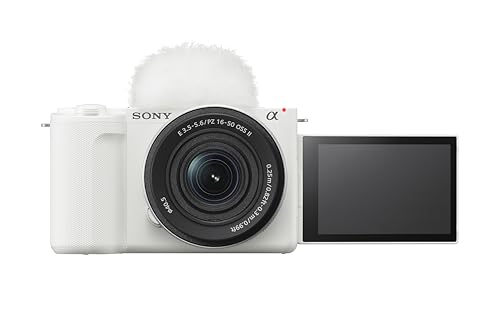
The ZV-E10 II is the camera a makeup channel grows into and then stops outgrowing. Its product showcase mode performs the genre’s central move — face to product to face — with a smoothness that looks edited even when it is not, and its interchangeable-lens mount means the soft, bright, blurred-background look that defines aspirational beauty content is one fast prime away rather than one new camera away.
Daily filming life with it is considered in ways creators feel immediately. The flip screen is bright and honest; the directional microphone hears your voice rather than the room; the tally lamp tells you from the chair that you are recording, which every vlogger who has performed a perfect take to a sleeping camera will recognise as a feature worth money. Colour profiles include skin-flattering options that keep foundation shades truthful while making the presenter look rested — a combination that sounds simple and is not.
The honest costs are the ecosystem costs. The kit lens is a starting point, not the destination; budget for the prime that delivers the blurred background your favourite channels have, and for the batteries a long filming session cycles through. Creators who make that investment own a rig that will not embarrass them at any subscriber count, which is precisely the point of choosing it first.
It also moonlights beyond the vanity. The same body shoots the product photography for your thumbnails, the B-roll of a shopping haul and the travel vlog when a brand flies you somewhere — a versatility that keeps it earning between tutorials. For a channel becoming a business, that breadth is the argument.
Longevity is its final argument. Channels change formats — tutorials become reviews, reviews become documentaries of a growing brand — and a lens-mount camera absorbs those changes by swapping glass rather than identity. The audience’s eye, trained on your colour and your framing, never has to relearn your face because the camera company released a new compact. In a medium where familiarity is the product, that continuity is worth more than any single feature on the specification list.
- Sensor: APS-C, interchangeable E-mount lenses
- Product showcase focus mode
- Directional three-capsule microphone
- Fully articulating touchscreen
- Front tally lamp for solo filming
Strengths
- The product-hold transition, solved elegantly
- Lens upgrade path to the classic beauty look
- Creator details that remove daily friction
Trade-offs
- Real cost includes the prime lens you will want
- No in-body stabilisation; desk or tripod filming assumed
- Menus reward an initial setup afternoon
Best for: Creators filming weekly who intend the channel to become an income.
Not suited for: Anyone wanting a camera that is finished the day it arrives.

Canon PowerShot G7 X Mark III — Best All-in-One Starter
Entire generations of beauty creators started on this camera’s predecessors, and the Mark III keeps the formula intact: Canon’s warm, kind colour, a lens fast enough to flatter in bedroom light, a screen that flips up for framing, and a body that asks nothing of you beyond charging it. For a first serious vlog camera, the absence of decisions is the feature — you film, you learn your angles and your audience, and the camera never becomes the reason a video did not happen.
The footage has the genre’s native look. Skin renders smooth but textured, the background of a bedroom falls away pleasantly at the wide end, and the microphone input lets you add a proper mic when the channel’s audio ambitions grow — an upgrade path hidden inside a supposedly simple compact. Live-streaming support means the same camera handles the chatty GRWM broadcast when your audience asks for one.
Its limits arrive on a predictable schedule. The autofocus, while capable, lacks the product-showcase choreography of the Sony, so product holds need a steadier hand and an occasional tap. Low light beyond a ring light’s reach softens the image sooner than the larger-sensor picks. Most creators meet these limits around the time the channel can afford the upgrade — which is to say, the G7 X times its own replacement almost politely.
Resale and second-life value soften that transition: a used G7 X is always in demand from the next cohort of beginners, and many graduates keep theirs as the travel and backup camera. Few purchases in a creator’s early kit hold their usefulness this gracefully.
There is a social reason this camera keeps winning beginners: your audience has seen its look before and trusts it. The soft, bright, warm presentation it produces is the visual dialect of beauty YouTube’s founding generation, and new viewers read it instantly as “a real tutorial” rather than an experiment. Starting inside a visual language your audience already speaks removes one whole layer of persuasion from your first year of uploads.
- One-inch sensor with fast fixed zoom
- Canon colour, flattering to skin
- Flip-up touchscreen
- Microphone input for future upgrades
- Compact, single-device simplicity
Strengths
- Nothing to assemble; film the day it arrives
- The classic beauty-vlog look, natively
- Mic input extends its working life
Trade-offs
- Product holds need manual help
- Low-light ceiling below larger sensors
- Fixed lens caps your creative growth
Best for: New and early creators who want the proven starter and zero fuss.
Not suited for: Channels already filming daily at a professional standard.

Sony ZV-1F — Best Simple Wide-Angle Pick
The ZV-1F makes one decision for you and makes it well: the lens is very wide, always. At a vanity desk that width is liberation — your face, both hands, the palette on the desk and a hint of the room behind you all fit in frame from a distance your arms can reach to adjust. Creators in small spaces, where the camera cannot retreat further than the desk allows, will feel the problem this camera solves within one filming session.
Simplicity is engineered into every interaction. The lens is fixed-focus in spirit — deep depth of field keeps you and your products acceptably sharp together, which quietly eliminates the focus hunting that ruins chatty footage — and the controls emphasise the few things a solo vlogger touches: record, defocus background, product mode. Skin tones come out bright and friendly, tuned for the presenter-audience relationship rather than the cinema.
The trade is creative range. There is no zoom to punch into a detail shot of a liner wing, no lens to swap when your style evolves, and the small sensor leans on your lighting when the evening closes in. Vloggers whose format is the seated talk-through — reviews, routines, story-times with products — will rarely feel those walls. Vloggers dreaming of cinematic beauty films should read the R50’s section instead.
For the right channel, though, the ZV-1F’s constraints are a discipline: the format stays consistent, the setup never changes, and the audience’s eye learns your frame the way it learns a friend’s kitchen table. Consistency is a growth strategy, and this camera enforces it kindly.
Dorm rooms, shared flats and box-room studios are this camera’s home turf, and it treats their constraints with respect rather than apology. Because everything sits in focus together, a roommate crossing the background or a cat claiming the desk’s corner stays a charming detail instead of a focus emergency. Creators whose filming environment they do not fully control — which is most young creators — will find that forgiveness quietly protects their publishing schedule.
- Ultra-wide fixed lens for small spaces
- Deep depth of field; minimal focus fuss
- Background defocus button
- Bright, friendly skin-tone tuning
- Very light, tripod-friendly body
Strengths
- Fits a whole vanity scene in frame at arm’s length
- Nearly impossible to film an out-of-focus take
- Fastest setup in this guide
Trade-offs
- No zoom for detail close-ups
- Small sensor wants your lighting’s help
- Fixed lens; the camera is the whole journey
Best for: Seated talk-through formats filmed in small rooms.
Not suited for: Detail-heavy tutorials or cinematic beauty films.

DJI Osmo Pocket 3 — Best for Movement and GRWM
Get-ready-with-me content broke the vanity desk’s monopoly, and the Pocket 3 is the camera that followed the format into the bathroom mirror, the wardrobe and the doorway. Its gimbal keeps footage level while you move through a routine, the rotating screen reframes from selfie to mirror without a mount change, and face tracking holds you centred while your hands are occupied with everything a morning routine involves.
At the desk it refuses to be a compromise. The one-inch-class sensor delivers the cleanest low-light image among the compact picks here, colours stay truthful for shade-matching content, and the wireless microphone ecosystem in its creator bundles solves audio with a elegance that wired setups envy. Creators filming in real homes — children audible, deliveries arriving, light changing — find the Pocket 3’s steadiness under chaos genuinely liberating.
Its vlogging personality differs from the others in one respect: it wants to be held or mounted afresh each session rather than living permanently on the desk, so the ritual of filming includes a small setup the fixed cameras skip. The field of view, while generous, frames tighter than the ZV-1F’s at desk distance. Neither point diminishes it; they simply describe a camera optimised for a moving life that also sits down beautifully.
Travel seals the case for many creators. Brand trips, hotel GRWMs and event coverage all fit in the same jacket pocket, and the footage matches your home output closely enough that the channel’s look survives the road. If your content calendar includes anywhere beyond your own four walls, start your shortlist here.
Night-time routines deserve a mention of their own. The evening GRWM — skincare, the wind-down, the honest end-of-day face — happens in the worst light a home offers, and the Pocket 3’s sensor keeps those videos clean where phone footage turns to mush. Audiences increasingly love the unpolished hours of a creator’s day; a camera that can film them beautifully turns authenticity from a risk into a catalogue.
- One-inch-class sensor, 3-axis gimbal
- Face tracking while moving
- Rotating touchscreen for mirror shots
- Wireless microphone options
- Pocketable travel body
Strengths
- Movement footage no fixed camera can match
- Excellent low-light image for its size
- Home and travel content in one device
Trade-offs
- Per-session setup versus a fixed desk camera
- Tighter desk framing than the widest rivals
- Gimbal care: it dislikes drops and dust
Best for: GRWM and lifestyle creators whose routines move around the home.
Not suited for: A permanently mounted, always-ready desk station.

Canon EOS R50 — Best Step-Up Image Quality
There comes a video in every compact owner’s life where the background refuses to blur, the evening light turns to grain, and the comment “what camera do you use?” starts to feel like a ceiling. The R50 is the graduation that answers it: Canon’s beloved colour science on a larger sensor, behind interchangeable lenses, in a body whose menus a compact graduate will find immediately legible.
The step-up shows first in the beauty details. A fast prime opens the classic look — creamy background, luminous skin, catchlights with shape — and the larger sensor keeps late-evening filming sessions clean when a compact would smear. Eye autofocus is confident and sticky, and the vari-angle screen supports both the seated tutorial and the standing outfit-adjacent content that beauty channels increasingly mix in.
Graduation has homework. You are now choosing lenses, minding a bigger body on the desk, and spending accordingly; the camera rewards a creator who films often enough to amortise the learning curve. Buy it when the compact’s limits are costing you visible quality in published videos, not when a forum suggests you might someday feel limited — the R50 will still be the right answer when the need is real, and cheaper by then besides.
It also future-proofs the channel’s photography: thumbnails, product shots and portfolio stills all upgrade in the same purchase. For creators whose business is becoming visual in every direction, that breadth makes the R50 less an expense than a consolidation.
Brand work is where the graduation pays its first invoice. Sponsors and agencies reviewing a creator’s media kit may never ask about equipment, but they absolutely judge the footage in the showreel, and the R50’s combination of clean files and classic colour passes that silent audition in a way compacts occasionally fail. The camera does not get you the deal — the audience does — yet it removes the quiet doubt that production quality sometimes plants in a brand manager’s mind.
- Sensor: 24MP APS-C, RF lenses
- Canon colour science
- Confident eye autofocus
- Vari-angle touchscreen
- Strong stills for thumbnails and products
Strengths
- The classic beauty look, fully unlocked
- Clean evening footage
- One body upgrades video and photography together
Trade-offs
- Lens decisions and costs now exist
- Larger desk footprint than the compacts
- Kit lens only hints at the camera’s ceiling
Best for: Compact graduates ready for the interchangeable-lens look.
Not suited for: Beginners who would film less with a more complex tool.

Sony RX100 VII — Best Premium Compact
The RX100 VII is the compact for creators who refuse to choose between the vanity and the close-up. Its zoom range reaches from a comfortable seated frame to a genuine detail shot — the wing of a liner, the texture of a cream, a swatch at macro-ish distances — without the camera leaving its tripod. For tutorial formats that live on detail, that reach replaces the second camera or the awkward lean-in that lesser compacts demand.
Sony’s autofocus pedigree shows in its tracking: eyes are found and held with a tenacity inherited from the company’s flagship line, and the image from its one-inch sensor carries the clean, detailed character that makes product colours read accurately. The pop-up viewfinder, a rarity in this class, rescues outdoor filming — the garden GRWM, the travel routine — where screens wash out in sunlight.
Premium is the operative word in every sense. The price buys capability and also buys complexity: menus run deep, small controls reward small fingers, and the microphone needs an external solution for serious audio, via a mount that adds back some of the bulk the body saved. Creators who film detail-driven tutorials daily will call it worth it; casual vloggers should let the G7 X save them money and decisions.
Think of it as the compact endgame — the most capability that fits in a pocket, priced for people who know exactly which of its talents they are paying for. If that description fits your channel’s next year, few cameras anywhere serve it better.
Second-hand and longevity maths favour it, too. Premium compacts from respected lines hold value stubbornly, because the audience for a do-everything pocket camera renews itself every year. Buy the RX100 VII when your format justifies it and it is among the safer places a creator can park equipment money — the rare case where the connoisseur’s choice is also the accountant’s.
- One-inch sensor, versatile zoom range
- Flagship-grade eye tracking
- Pop-up viewfinder for bright locations
- Detail reach for close-up tutorial shots
- Pocketable premium build
Strengths
- Zoom covers wide tutorials and fine details
- Autofocus confidence in every format
- Outdoor filming rescued by the viewfinder
Trade-offs
- Premium price for a compact
- Deep menus; small controls
- Serious audio still needs an external mic
Best for: Detail-driven tutorial channels wanting compact convenience.
Not suited for: Budget starters or simplicity seekers.
How Do the Six Compare From the Chair?
Forget bench tests; this is the comparison that matters at a vanity desk — what each camera does for the person filming alone, and where it first asks for patience.
| Pick | Type | Standout trait | Watch out for |
|---|---|---|---|
| Sony ZV-E10 II | Mirrorless | Product showcase focus and lens growth | Budget for the prime lens |
| Canon G7 X Mark III | Compact | Instant, flattering, nothing to assemble | Product holds need a steady hand |
| Sony ZV-1F | Compact | Ultra-wide frame for tiny rooms | No zoom, no lens future |
| DJI Osmo Pocket 3 | Gimbal camera | Tracks you through a moving routine | Setup ritual each session |
| Canon EOS R50 | Mirrorless | Canon colour with real lenses | Complexity arrives with capability |
| Sony RX100 VII | Compact | Zoom reach for detail shots | Premium price, deep menus |
What Lighting and Audio Setup Makes Any of These Cameras Look Expensive?
A ring light earned its place in beauty culture honestly: it flatters skin, puts catchlights in eyes and forgives a multitude of camera sins. But the creators whose footage looks expensive usually run a large, soft key light slightly to one side — a panel or softbox that models the face with gentle shadow — and keep the ring for its sparkle rather than its flatness. Every camera in this guide rewards that softness; the smaller sensors, in particular, look a class richer under it.
Audio separates the amateur hour from the watchable channel more ruthlessly than any image specification. A vlog is a conversation, and viewers leave conversations they strain to hear. A modest lavalier or desk microphone, close to your mouth and away from the room’s echoes, upgrades perceived quality more than a camera tier ever will — and it makes your product claims land with the clarity that sells them.
Background is the third leg. A tidy, softly lit backdrop at a little distance from your chair gives the camera’s depth cues something to work with and gives the audience’s eye a calm place to rest between close-ups. None of this requires a studio; it requires intention, applied to the corner you already have.
How Should a Beginner Sequence the First Year of Filming?
Months one to three belong to volume and honesty. Film with whatever pick fits the budget, publish on a rhythm you can keep, and study your own footage the way you study your favourite creators’: where does focus wander, where does the light flatten you, which angles make products unreadable? A beginner’s camera questions answer themselves from evidence within a dozen videos, and the answers are personal in ways no guide can pre-compute.
Months four to eight belong to the chain around the camera: light first, audio second, background third. Each upgrade lifts every future video and survives every future camera, which is why they precede a body upgrade in any sane budget. By the end of this phase, most creators discover their starter camera looks dramatically better than the day it arrived — because the camera was never the whole picture.
The final third of the year is when a step-up earns its discussion, and by then you will know your format’s true demands: the detail reach of the RX100 VII, the lens future of the ZV-E10 II, the movement of the Pocket 3. Buying from evidence rather than aspiration is the habit that separates channels that compound from channels that collect equipment.
What Mistakes Make Makeup Vlogs Look Amateur Regardless of Camera?
Filming against the light. A bright window behind you turns your face into the darkest object in frame, and no camera’s exposure compensation fully rescues a tutorial whose presenter is a silhouette. Face the light, or draw the curtain and let your own lighting rule the room.
Trusting the flip screen’s brightness. Screens flatter exposure; footage that looked luminous on a small display can arrive in the edit dull and grey. Learn your camera’s exposure aids, glance at them until they become reflex, and remember that a slightly bright take grades down more gracefully than a dark one grades up.
Letting the background narrate a different video. An unmade bed, a laundry pile, a flickering television — the audience reads the whole frame, not just your face. The wide lenses in this guide show more of your room, which makes tidiness a filming skill rather than a housekeeping preference.
Skipping the test frame. Thirty seconds of test footage — a product hold, a sentence at normal volume, a look at the screen’s focus confirmation — prevents the special heartbreak of a perfect performance recorded softly, darkly or silently. Professionals test; the cameras here make testing fast enough that skipping it is pure optimism.
How Do You Frame a Vanity Desk So the Camera Flatters You?
Distance is the first framing decision and the one beginners get wrong in both directions. Sit too close and the wide lenses in this guide stretch your features toward the edges of the frame; sit too far and the tutorial loses the intimacy that makes viewers feel taught rather than lectured. The working distance for most of these cameras is roughly an arm’s length to a metre — near enough that a product hold fills the frame, far enough that your face sits in the lens’s polite central zone.
Height is the second decision. A camera perched slightly above eye level, tilting down a few degrees, produces the angle audiences read as the classic beauty frame: eyes open, jawline defined, the desk’s contents visible without dominating. A camera below eye level flatters no one and broadcasts the ceiling. Books, a small tripod or a monitor arm all achieve the height; what matters is that it stays there between sessions, so your framing becomes a signature rather than an accident that changes weekly.
Leave deliberate space at the frame’s edges. Products enter from somewhere, hands gesture outward, and a composition with breathing room lets those movements feel performed rather than cramped. Wide-angle picks make this easy; tighter setups should be checked with your largest palette in hand, because the video you frame for your face alone will crop the very objects the tutorial exists to show.
Finally, record a framing test at the start of every session and actually watch it. Ten seconds of playback catches the creeping tripod, the shifted chair and the new background clutter before they cost you a full take — the cheapest insurance in the whole production process.
What Does a Sustainable Filming Routine Look Like Week to Week?
The channels that last treat filming as a shift, not an inspiration. A fixed filming block — same days, same hour, the camera already mounted and the lights already positioned — converts motivation into mere attendance. Every pick in this guide supports that model, but the fixed compacts support it best: a G7 X or ZV-1F living on its tripod reduces the session’s startup cost to sitting down, which is why so many high-volume creators keep a simple camera as the daily driver even after buying a flagship.
Batch the similar work inside the block. Film the week’s tutorials back to back while the light and your makeup base are consistent, capture thumbnails in the same sitting while the finished looks are on your face, and record the chatty segments last when you are warmed up and the audience in your head feels present. The camera does not care about this discipline, but the algorithm and your own stamina both reward it measurably.
Protect the routine’s edges. A card formatted the night before, batteries on the charger as a household habit, a notebook page of video ideas kept beside the vanity so the block never starts with a blank mind — these small systems are the difference between a creator and a person who owns a camera. Equipment guides rarely say it plainly: the routine is the product, and the camera is its most replaceable part.
Review one metric weekly and ignore the rest. Watch time, returning viewers or comments that mention a product by name — pick the number that matches your current goal and let it judge your filming choices, including whether the camera you own is truly the bottleneck. Most months, honestly reviewed, it will not be.
How Should You Handle Comments About Your Skin, Your Light and Your Camera?
Audience feedback about image quality arrives disguised as everything else: “you look tired today” usually means your light moved; “this shade looks different on me” usually means a white-balance drift; “your old videos looked better” occasionally means a new camera’s colour needs its preset rebuilt. Learning to translate comments into technical causes turns the audience into a free quality-control department — one that watches every frame you publish with an attention no friend would volunteer.
Keep a small log of what changed when the comments change. Camera settings, light positions, filming hour, even the season’s daylight through your window all belong in it. Vloggers who log can answer the audience’s confusion with a fix in the next video, which viewers experience as being heard — among the strongest loyalty mechanics the platform offers.
And keep perspective about the rest. A makeup channel’s comments will always contain opinions about faces that no camera can address, and chasing them with equipment purchases is the fastest route to an expensive, unhappy kit shelf. Buy cameras for the footage problems you can name; let the unnameable ones roll past like weather.
Why Do Some Channels Look Better on Older Cameras Than Others on New Ones?
Because the image is a chain and the camera is one link. Light quality, lens choice, framing distance, exposure discipline, colour consistency and the presenter’s ease all multiply together, and a creator who has mastered five links with a modest camera will out-film a novice who owns the finest body in this guide and has mastered one. This is not a consolation for small budgets; it is the observable economics of the genre, visible on any trending page.
Familiarity is the hidden multiplier. A camera used daily for a year is operated by reflex — settings changed mid-sentence, exposure corrected without looking, focus behaviour predicted before it happens. That fluency appears on screen as confidence, and confidence is the quality audiences actually subscribe to. Every camera change spends some of that fluency, which is why this guide keeps advising creators to buy for the long term and then stay.
The practical takeaway is a purchasing temperament: choose the camera whose weaknesses you can live with for years, invest the difference in the other links of the chain, and let time — the one upgrade nobody can buy — do its compounding work on your footage.
How Do You Film Honest Product Reviews Your Audience Can Trust?
Review credibility is built from what the camera refuses to hide. Filming a foundation test in light that flatters the presenter but lies about the product is the genre’s original sin, and audiences have learned to detect it: the too-smooth skin, the exposure that brightens mysteriously when the sponsored product appears. The cameras in this guide were chosen partly for colour honesty, but honesty is ultimately a settings discipline — locked exposure and white balance during a test, so the product, not the camera’s automation, accounts for any change on screen.
Show the application at a distance that reveals texture. A tutorial can be cinematic; a review must be evidentiary, and the detail reach of the RX100 VII or a prime lens on the system cameras earns its keep precisely here, holding pores, separation and wear patterns visible through a full day’s check-ins. Viewers forgive a creator many things; they do not forgive discovering a texture at home that the review’s footage concealed.
Wear tests deserve a fixed ritual: same framing at application, midday and evening, same light where the day allows, no filter arriving quietly in later segments. The Pocket 3’s portability serves this format beautifully, carrying the check-ins out of the studio and into real life, which is where foundations actually succeed or fail.
End reviews with the verdict your footage supports rather than the one the brand hoped for, and let the camera’s honesty become your channel’s brand. In a genre crowded with enthusiasm, a creator whose lens tells the truth owns an asset no sponsor can buy and no algorithm change can devalue.
What Should You Know About Filming Vertical and Short-Form Makeup Content?
The short vertical video has become the discovery engine for makeup channels, and it films by different rules than the long tutorial. The frame is tight, the hook is a transformation or a claim delivered in the first breath, and the camera’s job is to be instantly ready and unreasonably close. Wide lenses and gimbals shine here: the ZV-1F’s breadth keeps a tight crop feeling spacious, while the Pocket 3 rotates into the format as if it were born there — because it was.
Framing discipline matters more, not less, at fifteen seconds. Compose for the face and the product, keep text-safe space in the frame’s centre, and light for the crop you will actually publish rather than the one you filmed. Creators who shoot vertical natively, instead of cropping landscape footage as an afterthought, produce shorts that feel made rather than salvaged, and the watch-through rates testify to the difference.
Treat shorts as trailers for the channel’s substance. A short that demonstrates one honest thing — a shade’s true colour, a technique’s decisive step — earns the follow that the long tutorial then rewards. The camera that serves both formats without a rebuild of your setup is worth a premium to a one-person channel, which is why versatility threads through every verdict in this guide.
How Does a Camera Choice Affect the Business Side of a Beauty Channel?
Affiliate income, sponsorship rates and platform revenue all pass through the footage first. A product shown sharply and truthfully converts; a brand reviewing your channel for a campaign reads production quality as a proxy for professionalism; and the platform’s own recommendation systems reward the watch time that clear, comfortable footage retains. The camera is therefore not a hobby expense but the channel’s core production asset, and it should be budgeted, maintained and occasionally insured like one.
That framing clarifies the upgrade question that haunts creators. An upgrade is justified when the current camera measurably costs the business — focus failures in published videos, low-light limits excluding evening formats, a lens ceiling blocking the detail content your audience requests. It is not justified by a launch event. Channels that upgrade on evidence find each purchase pays for itself; channels that upgrade on envy find the shelf filling and the metrics unmoved.
Keep the receipts, literally and figuratively. Track which videos each camera generation produced and what they earned, and your next purchase becomes an investment decision with a history instead of a hope. The creators who build durable businesses from a vanity desk share this habit more reliably than they share any particular camera.
How Do You Keep Filming When Motivation Dips and the Room Feels Stale?
Every long-running channel meets the month where the vanity corner feels like a cell and the camera like an accuser. The equipment answer is smaller than the emotional one, but it exists: reduce friction until filming is easier than skipping. That is the deep reason the simple compacts anchor so many durable channels — a camera that is mounted, charged and framed asks only for your presence, and presence on a low day still produces a video, while a complex rig produces an excuse.
Rotate one variable when staleness creeps in. A new filming angle from the same chair, a window-light session instead of the ring light, a guest face to work on — each refreshes the footage without disturbing the system that makes filming sustainable. The versatile picks here, the Pocket 3 especially, exist to make those rotations cheap: same channel, same creator, a frame the audience has not memorised yet.
And remember what the back catalogue proves on the days you doubt it: your audience subscribed to a person learning in public, not to a camera’s specification sheet. The videos that built the channel were filmed with less than you own now. Whatever pick from this guide sits on your desk, it is already more camera than your story requires — the rest is showing up, which was always the actual job.
Final Recommendation
Start where your channel actually is. New creators should take the Canon G7 X Mark III or the Sony ZV-1F — the first for the classic all-round beauty look, the second for tiny rooms and talk-through formats — and spend the savings on light and a microphone. The channel that films will outgrow the channel that shops, every time.
Grow into the Sony ZV-E10 II when publishing becomes routine: its product focus, lens path and creator ergonomics make it the best long-term home in this guide. Choose the DJI Osmo Pocket 3 if your format moves — GRWMs, routines, travel — and the Canon EOS R50 if Canon colour and stills photography pull you toward a system. The Sony RX100 VII is the connoisseur’s compact, worth its premium to detail-led tutorial channels and to few others.
Above all, keep the camera set up. The vanity-desk creators who win are not the ones with the finest sensors; they are the ones whose ideas become videos the same day, in light that flatters, with focus that behaves and colour that tells the truth about every shade they touch. Every pick here can be that camera for somebody. Pick yours, charge it tonight, and film this week.
Related guides
Frequently Asked Questions
Is a phone good enough to start a makeup vlog?
For the first handful of videos, honestly yes — modern phones film faces kindly and cost nothing. The cameras here earn their place when you need reliable product focus, truthful colour under your own lights, a flip screen that is not also your notification centre, and footage that holds up as the channel professionalises. Upgrade when a specific phone limitation starts appearing in published videos.
How important is 4K for makeup tutorials?
Less than focus and light. Most viewing happens on phones, and platforms compress aggressively. Where higher resolution quietly helps is cropping: filming wide and reframing a detail shot in the edit. If a camera offers it without other compromises, take it; never buy it at the expense of autofocus quality.
Which of these is best in a very small room?
The Sony ZV-1F, designed for exactly that constraint: its ultra-wide lens fits a full vanity scene from a short distance, and its deep focus keeps everything acceptably sharp. The Pocket 3 is the runner-up when the small room also involves moving around it.
Do I need a separate microphone with these cameras?
Eventually, for most channels — but not on day one. The ZV-E10 II’s directional mic and the Pocket 3’s wireless options carry a channel furthest unaided. When comments begin praising your content and mentioning your audio in the same breath, that is the microphone’s cue to enter the budget.
What lens should ZV-E10 II or R50 owners buy first for beauty content?
A fast, moderately wide prime. It delivers the blurred background and low-light cleanliness that define the aspirational tutorial look, and it transforms either body more than any other single purchase. Buy it before a second battery, a cage or any other accessory the internet suggests.
Should my vlog camera also be my photography camera?
If you shoot thumbnails, product flat-lays and the occasional portfolio still, a shared body saves money and keeps your colour consistent across the channel’s whole visual identity — one reason the R50 and ZV-E10 II score so well here. Dedicated compacts film beautifully but ask stills to share their compromises. Decide by your publishing mix: video-only channels can stay compact forever, while visually diversified creators usually end up with a system body at the centre.
How do I keep foundation shades looking truthful on camera?
Lock your white balance to your lighting instead of letting it float, film a swatch test under your actual setup light, and learn your camera’s small colour lean so you can compensate. The picks here were chosen partly for colour honesty — the rest is the discipline of consistency.
Related Guides
Filming faces for a living instead? Read best cameras for makeup artist next, then compare the freelance angle in best cameras for mua and the broader best cameras for vlogging.


