ilcastellomenu.com is reader-supported. When you buy through links on our site, we may earn an affiliate commission.
Where to Buy
Developers buy cameras for unglamorous reasons, and the best cameras for web developers honour that: you need to look credible on a client call at 9 a.m., stream a pair-programming session without your face turning into a watercolour, and record a conference talk from a desk already crowded with monitors, a mechanical keyboard and strong opinions about both. Nobody in this workflow is chasing cinema. The camera’s job is to make a competent person look like themselves — sharp enough that expressions survive a grid of video tiles, honest enough that nobody wonders if a filter is doing the talking, and boring enough that it never once becomes the reason a meeting starts late.
This guide is deliberately practical. Webcams dominate the top of the list because a developer’s camera lives above a monitor and works inside Slack huddles, Meet calls, OBS scenes and Loom recordings, often all in the same hour. Two mirrorless picks appear at the end for developers whose streaming or course-recording has become a genuine second job, where a camera is a business asset rather than a peripheral. Everything is judged on desk reality: USB manners, software behaviour, how a face reads beside a screen-share, and whether the thing still works after an operating-system update rearranges the furniture.
One distinction before the list: a sister guide covers vodcasting, where cameras serve a recorded programme with guests and a set. This page serves the working desk — standups, interviews, demos, open-source streams and the occasional webinar — where the code on the shared screen is the star and the face in the corner is the narrator. Different job, different shortlist, deliberately different verdicts.
Key Takeaways
- A developer’s camera is a peripheral first and a creative tool second.
- Looking like yourself, reliably, beats looking cinematic occasionally.
- The Logitech Brio 4K remains the default answer for a serious desk.
- Elgato’s Facecam trades automation for a locked, repeatable image.
- OBSBOT’s Tiny 2 suits developers who present standing or demo hardware.
- Mirrorless money only makes sense once streaming earns real income.
In this guide
Quick Picks
| Camera | Badge | Why it earns its place |
|---|---|---|
| Logitech Brio 4K | The desk default | Sharp, dependable and fluent in every meeting app. |
| Logitech StreamCam | Creator-leaning webcam | Vertical-friendly and happiest inside streaming software. |
| Elgato Facecam | Locked-look streamer | Fixed focus and saved settings for identical frames daily. |
| OBSBOT Tiny 2 | Tracking presenter | Follows a developer who stands, demos and gestures. |
| Sony ZV-E10 II | Course-creator step-up | Mirrorless depth for tutorials that sell. |
| Canon EOS R50 | Friendly mirrorless | Approachable image upgrade for part-time streamers. |
How Did We Judge Cameras for a Working Developer’s Desk?
We started where developers start: the call grid. On a team call your video is a postage stamp among twelve, compressed by the platform and viewed on a laptop in a bright room; a camera earns its keep there by rendering a face crisply at small sizes, holding exposure steady when a window’s light shifts mid-standup, and never — ever — presenting the spinning beachball of a crashed driver to a waiting client. Reliability inside ordinary software outranked every imaging virtue, because a developer’s reputation rides on being the person whose setup simply works.
Second came the screen-share partnership. In pairing sessions, demos and streams, your face occupies a corner while code owns the display, so the camera must behave at small sizes and unusual crops: a face that stays recognisable in a circular overlay, framing that survives being squeezed into a stream layout, and colours that do not fight the IDE theme for the viewer’s attention. We also valued cameras whose settings live in software the developer already tolerates, because nobody’s sprint planning includes a firmware safari.
Finally, we applied the peripheral test: could this camera be installed on a Friday and forgotten by Monday’s standup? Cable behaviour, mount stability on real monitors — curved, thin-bezelled, stacked — and dignity under operating-system updates all counted. The mirrorless picks were excused from the forgetting test only because they audition for a second job: paid streaming and recorded courses, where a capture chain’s extra ceremony is billable rather than annoying.
Why Do Developers Need Less Camera Than Creators Think?
Because the audience’s attention is contractually elsewhere. In a pairing session, viewers watch the cursor, the diff and the failing test; your face is a trust signal in the corner, confirming a human is thinking. In a client call, your face is a competence signal, and competence reads as steadiness, clarity and good light — not shallow depth of field. Marketing aimed at lifestyle creators sells a look; developers need a signal, and signals are cheaper than looks, which is the happiest sentence in this entire guide.
The corollary is liberating for budgets across a team. Money not spent on a flagship body buys the things calls actually reward: a lamp that ends the cave-dweller look, a microphone arm that keeps audio off the desk’s keyboard thunder, and a monitor light that lets evening standups happen without squinting. The picks below are ordered by how completely they deliver the signal — and the webcams deliver nearly all of it before the mirrorless pair deliver the rest.
Which Cameras Belong on a Developer’s Desk?
Four desk-native cameras for calls, pairing and streaming, then two mirrorless bodies for developers whose recording has become revenue.

Logitech Brio 4K — The desk default
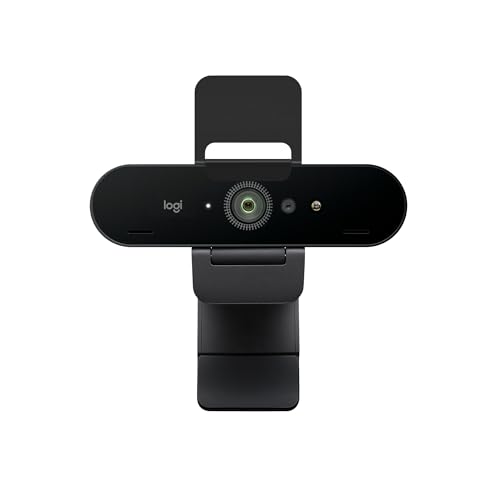
Ask a room of senior engineers what camera sits above their monitor and the Brio is the answer you will hear most, for reasons that compound quietly. It is sharp enough that a face stays a face in the corner of a screen-share, its field of view can be set in software to suit a solo desk or a pairing partner pulled up beside you, and its relationship with meeting software is the longest and least dramatic in the business. Developers prize boring excellence in infrastructure; the Brio is boring excellence with a lens.
Daily life with it is a study in not thinking. It wakes with the machine, presents itself identically to the standup app, the interview platform and the recording tool, and holds its exposure manners when the afternoon sun invades a home office. Its privacy shutter answers the modern anxiety of the always-mounted camera with a physical gesture rather than a software promise — a detail developers, of all people, appreciate on architectural grounds alone. Mount it once, and the camera leaves your mental stack for years.
Its ceiling is the webcam ceiling, honestly stated. In a dim room it depends on your lighting like every small sensor does, and it will not give a paid course the creamy separation a mirrorless body sells. But measure it against the actual job — standups, pairing, client demos, the occasional all-hands — and the Brio does not merely pass; it defines the pass mark. Most developers should buy this tier, add light, and return their attention to problems that compile.
- Format: USB webcam, monitor mount
- Framing: software field-of-view options
- Software life: identical face in every app
- Privacy: physical shutter, no faith required
- Role: the whole job for most desks
Strengths
- The most dependable call image in its class
- Settings live where developers expect them
- Installs once and leaves the mental stack
Trade-offs
- Dim rooms need a lamp’s help
- No mirrorless background separation
- Premium webcam tier, priced like it
Its representative moment is unglamorous and perfect: a production incident call at midnight, twelve faces in a grid, the Brio’s owner calm and clearly visible while he narrates the rollback. Nobody comments on the camera, because in an incident the highest compliment technology earns is silence. Tools that behave under pressure become part of an engineer’s professional identity, and this one has been absorbed into thousands of them.
Remote interview candidates should note its second career as an honesty device. A crisp, unfiltered image in a hiring call reads as confidence — what you see is the engineer you are getting — and several hiring managers privately admit that a candidate who looks present and prepared starts the technical conversation a half-step ahead. A camera cannot pass the interview for you, but it can stop taxing you before it starts.
Best for: working developers wanting the default serious desk camera. Not suited for: paid course production or very dim offices without lighting

Logitech StreamCam — Creator-leaning webcam
The StreamCam is the Brio’s younger sibling who went into content. It keeps the family virtues — painless USB life, Logitech’s software fluency — and adds a presenter’s instincts: a mount that rotates for vertical framing, an affinity for streaming layouts, and an image tuned for the solo broadcaster rather than the meeting grid. For the developer who streams open-source work on weekends, records short explainer clips for a team channel, or maintains a small but real audience alongside the day job, it threads the needle between peripheral and performer.
That vertical trick matters more each year. Short technical clips — a sixty-second bug anatomy, a library announcement, a conference talk teaser — live in vertical formats on the platforms where developers actually scroll, and a camera that reframes for them without a crop’s quality loss saves real editing time. The StreamCam also sits happily in the capture software streamers already use, so a developer’s OBS scenes can treat it as a citizen rather than a guest requiring negotiation.
Its compromises are a matter of emphasis. For pure meeting life, the Brio’s sharper, more corporate polish serves better; the StreamCam’s talents spend themselves on stages a standup never visits. Its cable and mount assume a streamer’s desk arrangement, which most desks satisfy, but stacked-monitor minimalists should check the geometry before committing. Choose it when your camera’s second shift — the stream, the clips, the channel — is real and recurring, not aspirational.
- Format: USB webcam, rotating mount
- Signature move: native vertical framing
- Software: at home inside streaming capture tools
- Audience: developer-creators with a real second shift
- Desk note: check stacked-monitor geometry
Strengths
- Vertical clips without the crop penalty
- Streaming software treats it as family
- Logitech reliability underneath the flair
Trade-offs
- Meetings alone do not need its talents
- Brio out-polishes it for pure calls
- Mount geometry suits streamers first
Its emblematic scene is a Saturday open-source stream: a maintainer working through a stubborn issue live, face framed in the corner, chat scrolling, the StreamCam quietly holding its side of the broadcast while the code takes the stage. When the clip of the breakthrough is later cut vertically for sharing, the camera’s foresight pays out — the moment was framed for both futures from the start.
Developer advocates and DevRel professionals form its keenest constituency, because their job description literally includes being recognisable across formats. A face that appears identically competent in a meeting, a stream and a phone-shaped clip is a personal brand asset, and the StreamCam is built to be that asset’s quiet infrastructure.
Best for: developers who stream, clip and present beyond the meeting grid. Not suited for: meeting-only desks or buyers wanting the sharpest corporate polish

Elgato Facecam — Locked-look streamer
Developers understand the Facecam’s philosophy instinctively, because it is the philosophy of good configuration: set it deliberately, save it, and stop letting automation redecorate. Its fixed focus removes autofocus from the equation entirely — the chair zone is sharp, the bookshelf is sharp, nothing hunts while you think — and its image settings persist as a chosen state rather than a daily negotiation. For streamers and course recorders who sit in one place and value an identical frame across a hundred sessions, that determinism is not a limitation; it is the feature.
The streaming ecosystem around it reinforces the appeal. Elgato’s tools assume a desk where the camera is one instrument among several — lights, a stream deck, capture software — all obeying a single operator’s saved scenes. A developer running a polished OSS stream or a recurring live-coding show can build a scene where face, code and overlays arrive together at one button press, the Facecam delivering its memorised look without a warm-up act. Reproducibility, the virtue developers worship in builds, applied to a face.
Its terms must be accepted with open eyes. Fixed focus is a contract: stay within the honoured distance band, because leaning into the lens for emphasis or slumping beyond the chair’s usual geography will soften the image in ways autofocus rivals forgive. It also asks for honest light, since its exposure philosophy leans manual. Developers who enjoy tuning a setup once and deeply will thrive; developers who want the camera to think for them should take the Brio’s automation instead and never feel judged for it.
- Format: USB desk camera, fixed focus
- Philosophy: configure once, trust forever
- Ecosystem: scenes with lights and capture tools
- Sharp zone: the seated presenter’s geography
- Ideal operator: a tuner, not a delegator
Strengths
- No autofocus hunting, ever
- An identical frame across a whole season
- Plays conductor in an Elgato desk orchestra
Trade-offs
- Leaning out of the zone softens the shot
- Wants deliberate lighting
- Rewards setup time some will not spend
Its signature user is a live-coding streamer whose broadcast opens with a ritual viewers could set clocks by: same frame, same shelf, same calm face, then the IDE blooms to full screen. Regulars describe the comfort of that sameness without knowing its source. Behind the curtain sits the Facecam’s saved configuration, doing the least glamorous and most valuable work in streaming — making today look like yesterday, so the code can be the only surprise.
There is an accessibility to its determinism for neurodivergent developers, mentioned in reader letters more than once: a camera that never changes its mind removes one source of on-call self-consciousness, letting its owner spend their social budget on the conversation instead of on wondering how they look. Predictability is kindness, in interfaces and in cameras alike.
Best for: streamers and course recorders wanting a locked, repeatable desk image. Not suited for: hands-off buyers or presenters who roam while talking

OBSBOT Tiny 2 — Tracking presenter
Some developers’ work will not sit down. Hardware hackers demo boards at a bench, robotics enthusiasts narrate from a workshop, streamers sketch architectures on a whiteboard mid-explanation — and a fixed webcam frames all of them like a school photograph while the action happens elsewhere. The Tiny 2 mounts a tracking gimbal in a webcam’s footprint, panning and tilting to keep its presenter centred as they move through a small studio’s geography. It is the only pick here that watches back, and for the right desk that changes everything.
Gesture control suits the solo technical presenter particularly well. Starting a track, reframing or pausing can be done with a hand signal from the whiteboard, without breaking a derivation to walk to the keyboard — the flow state that live technical explanation depends on survives intact. In recorded tutorials, the same tracking lets a developer pace while thinking, which many do involuntarily; the camera absorbs the habit instead of punishing it, and the resulting videos feel like a colleague thinking aloud rather than a hostage reading a statement.
Keep its stage in proportion. A desk, a bench and a whiteboard are its theatre; a lecture hall is not, and in a plain seated standup its talents idle while a simpler camera does the same job for less fuss. Its small sensor shares the webcam family’s lighting appetite. And some presenters find being followed faintly theatrical until habituation sets in — usually by the third stream, when the convenience has thoroughly out-argued the self-consciousness.
- Format: gimbal webcam with tracking
- Stage: desk, bench and whiteboard roaming
- Control: gestures from across the setup
- Best audience: hardware and teaching presenters
- Lighting: a well-lit room, as with all webcams
Strengths
- Framing follows the work, not the chair
- Whiteboard segments without a camera operator
- Gesture control preserves explanation flow
Trade-offs
- Seated-only callers pay for idle talents
- Small stage; not a lecture-hall tool
- Being followed takes a stream to get used to
Its defining footage comes from an electronics stream: the host solders at the bench, stands to fetch a component from shelves, returns and holds the finished board to the lens — one continuous, centred frame, the Tiny 2 gliding like an attentive lab partner. Comments asked about the camera operator. There wasn’t one, which is the entire review in a sentence.
Conference speakers rehearsing talks at home form a second parish. Pacing a practice run in front of the tracking frame teaches stage movement honestly — you can watch exactly where you drift, stall or turn away — making the little gimbal a rehearsal coach whose tuition ends the day the talk is given, long before its streaming career does.
Best for: developers who demo hardware, teach standing or pace while thinking. Not suited for: seated-only meeting life or large presentation spaces

Sony ZV-E10 II — Course-creator step-up
There is a recognisable moment when a developer’s camera stops being a peripheral: the first course sale, the first sponsored tutorial series, the channel whose income now appears in a tax conversation. The ZV-E10 II is built for that moment. As a mirrorless body feeding a capture device, it gives recorded teaching the depth and polish that justify a price tag — the instructor’s face gently separated from a bookshelf background, product and hardware close-ups rendered with intent, and a lens mount that lets the framing change as the curriculum does.
Its creator-first design shortens the mirrorless learning curve for people whose expertise lies elsewhere. The vari-angle screen serves the solo instructor checking framing between takes; the autofocus follows a face through an animated explanation without wandering to the whiteboard; and Sony’s ecosystem means the lens a course needs next semester exists at several budget levels. For a developer-educator, the system behaves like good tooling: opinionated where beginners need opinions, extensible where professionals need reach.
The step-up’s costs are operational, and they should be budgeted as such. A capture path, a dummy power supply for long recording days, a mount that holds a real camera above a monitor — the chain has links a webcam never dreams of, and each link is a thing that can be unplugged by a cat. Developers who record occasionally should weigh whether the polish survives contact with that ceremony. Those recording weekly for revenue will find the ceremony becomes routine within a month, and the footage starts selling the courses while they sleep.
- Format: APS-C mirrorless, capture-fed
- Trigger: courses or sponsorships earning real money
- Screen: vari-angle for solo instruction checks
- Lenses: E-mount choices at many tiers
- Operations: a chain with links to manage
Strengths
- Recorded teaching that justifies its price
- Creator design softens the mirrorless curve
- A system that grows with the curriculum
Trade-offs
- Capture chain adds daily ceremony
- Wasted on meetings alone
- Long days need a power plan
Its emblematic owner teaches a popular framework course from a converted box room, the Sony holding her in a frame that looks like a studio’s while her screen-share does the technical talking. Students cite the course’s clarity in reviews, meaning the code explanations — but clarity is partly visual trust, and the camera’s polish is woven through every star of that reputation. Revenue followed the trust, as it tends to.
Developers building a personal brand toward consulting will recognise the same arithmetic. A recognisably professional frame in talks, podcasts-as-guest and recorded keynotes compounds into the impression of an established practice, and the ZV-E10 II is the tier where that impression becomes purchasable without flagship extravagance.
Best for: developers whose tutorials, courses or brand earn camera money back. Not suited for: meeting-only desks or occasional recorders

Canon EOS R50 — Friendly mirrorless
Not every developer stepping up to mirrorless wants a production department; some want their stream to look nicer on Fridays. The R50 is the gentle version of the upgrade: a compact mirrorless body whose guided menus coach rather than interrogate, whose autofocus finds a face and keeps it without a cinematography vocabulary, and whose footage straight from the camera flatters a tired developer at the end of a sprint week. Fed into a capture device, it lifts a stream or a recorded talk visibly above webcam territory while asking the least mirrorless ceremony of any pick here.
Its double life suits the developer demographic precisely. The same body photographs the team offsite, the new hardware on the desk and the family on weekends, so its cost is amortised across a whole life rather than charged to the stream alone. Canon’s RF lenses let an owner add one brighter lens later — the classic single upgrade that transforms evening recording — without replacing the body or relearning a system, a roadmap even the busiest engineer can hold in their head.
Respect the remaining mirrorless realities and it will not surprise you. It still needs the capture path and power planning its Sony counterpart does; it still sits on a mount, not a monitor clip; and its talents are surplus to requirements in a pure standup life. As the friendly on-ramp for a part-time streamer — the developer whose Friday build streams and community talks are growing an audience the webcams can no longer flatter — it is the warmest door into the bigger-camera world.
- Format: APS-C mirrorless, RF mount
- Menus: guided, coaching, unintimidating
- Double life: stream, team photos, family
- Upgrade path: one bright lens transforms evenings
- Ceremony: the least of any mirrorless here
Strengths
- The friendliest mirrorless learning curve
- Footage that flatters without grading
- Earns its keep beyond the stream
Trade-offs
- Capture and power planning still apply
- Surplus for meeting-only life
- A mount, not a monitor clip
Its characteristic scene is a community tech talk recorded at a kitchen table the night before a meetup, the R50 on a small tripod where the fruit bowl usually lives, its owner rehearsing into a face-tracking frame that forgives every glance down at the notes. The talk lands well; the recording circulates; the camera returns to photographing a birthday by Sunday. Versatility at this tier is not a compromise — it is the entire value proposition for people with one desk and many lives.
Junior developers eyeing a first big-camera purchase for a growing channel will find its second-hand ecosystem friendly in a few years, too: bodies bought by upgraders flow steadily into resale, and lenses hold their usefulness across Canon’s range. Buying into a system with a healthy second life is the closest thing consumer electronics offers to a savings account.
Best for: part-time streamers and talk-givers wanting a gentle mirrorless step. Not suited for: pure meeting desks or zero-ceremony setups
How Do the Six Developer Cameras Compare on a Real Desk?
| Camera | Primary job | Setup ceremony | Outgrows it when |
|---|---|---|---|
| Logitech Brio 4K | Calls and pairing | Minutes, once | Recording becomes revenue |
| Logitech StreamCam | Streams and clips | Minutes, once | A course needs mirrorless polish |
| Elgato Facecam | Locked stream look | An evening of tuning | You start roaming on camera |
| OBSBOT Tiny 2 | Standing demos | Minutes plus trust | The stage outgrows the desk |
| Sony ZV-E10 II | Courses that sell | A capture chain to run | Rarely; it is the destination |
| Canon EOS R50 | Friendly step-up | A capture chain, gently | Full production ambitions arrive |
The ceremony column deserves a developer’s respect, because it is measured in the only currency desks cannot print: attention at 9 a.m. Every pick above the mirrorless line asks for that attention once and then never again, which is why they, and not the prettier bodies, are the correct default for people whose job is something else.
How Should a Developer Light a Face Beside Two Monitors?
Monitor glow is not lighting; it is a rumour of lighting, bluish and shifting with every window you drag across the screen. A single soft source in front of you — a panel, a lamp with a shade, daylight from a window you face rather than back onto — does more for a developer’s call presence than any camera upgrade in this guide. Position it slightly above eye line and off to one side, and the face gains the modelling that reads as awake, senior and trustworthy in a grid of tired rectangles.
Evening workers should mind the second source: themselves. A monitor blasting a light theme at midnight paints its owner in screen-light that no camera can civilise, so a modest desk lamp left on through evening calls is a professional courtesy to everyone watching. None of this requires a studio; it requires admitting that cameras photograph light, not intentions, and giving yours something decent to photograph.
What Does a Good Pair-Programming Camera Setup Look Like?
Two faces, one shared screen and a social contract. Frame the camera wide enough that a pairing partner pulled up on a second chair does not become a half-face at the edge, or accept the solo frame and let the partner join by voice with their own camera in the call — the remote era’s normal arrangement. The Brio’s software framing earns its keep precisely here, widening for a guest and tightening for solo work without anyone standing up mid-session to wrestle a mount.
Audio etiquette dominates the pairing picture, literally: one microphone, positioned for the primary speaker, with keyboard noise treated as the enemy it is. The camera’s contribution is simpler — stay mounted, stay consistent, and never be the reason a pairing session opens with five minutes of device troubleshooting while the mental model of the codebase evaporates. In pairing, flow is sacred and the camera’s holiness is measured by its absence from the conversation about the setup.
What Mistakes Do Developers Make Buying Desk Cameras?
Buying for the stream they imagine instead of the calls they attend is the founding error — a flagship mirrorless purchased for a Twitch career that exists mainly as a bookmark, while the daily standup still happens through a laptop’s dreadful built-in camera because the big rig is too much ceremony for a Tuesday. Match the purchase to the calendar you actually keep. Second is ignoring the mount: curved ultrawides, thin bezels and stacked displays all defeat clips designed for a simpler era, so check the physical marriage before the imaging one.
Third is forgetting that platforms compress. A camera’s showroom sharpness is partly incinerated by every meeting app’s bandwidth mercy, which is why the mid-tier webcams punch so far above their spec sheets in real calls — and why the mirrorless step only pays where you control the pipeline: recordings, streams and uploads that carry your full image to the audience uncompressed by a meeting grid.
Frequently Asked Questions
Will a better camera actually change how I come across at work?
Within limits that surprise most buyers, yes — not by beautifying you, but by removing the static of a poor image from every judgement colleagues make. A clear, well-lit, steady face is read as prepared and senior; a murky, juddering one taxes even excellent work with an unfair discount. The camera cannot add competence, but it can stop subtracting it.
Do I need 4K for video calls?
Meeting platforms will compress your feed regardless, so resolution alone is not the prize. The better cameras here earn their tier through sensors, exposure manners and processing that survive that compression gracefully — the face stays a face at postage-stamp size. Judge by the grid, not the badge on the box.
Webcam or mirrorless for a first streaming setup?
Webcam, almost without exception, until the stream has an audience and a schedule. A StreamCam or Facecam inside good streaming software produces broadcasts that shame nobody, and the hours saved on ceremony go into the content that decides whether streaming survives its first month. Graduate to the Sony or Canon here when viewers, sponsors or course buyers give you a business reason written in money.
How do I stop looking washed out beside my monitors?
Face a light source rather than competing with one. A modest panel or lamp in front of you, monitors’ brightness tamed to match the room, and a camera exposure set for your face rather than the screens will end the ghost impression. Every pick in this guide benefits; none can repeal the physics on your behalf.
Is a tracking camera worth it for standups?
For seated standups, no — the Tiny 2’s talents would idle, and the Brio’s stillness serves better. Its value ignites for developers who stand, demo hardware, teach at a whiteboard or rehearse talks, where framing that follows the work replaces a camera operator the desk never had.
What should a remote interview candidate buy?
The Brio tier, plus light, plus a rehearsal. Interview loops are marathons of other people’s impressions, and a dependable, honest image removes one variable from a process with quite enough variables already. Spend the mirrorless money after the offer letter, on the course you will now have the confidence to record.
Final Recommendation
Match the camera to the calendar. Meetings, pairing and interviews fill it: the Logitech Brio 4K, lit decently, ends the search for most developers. Streaming and clipping join the week: the Logitech StreamCam, or the Elgato Facecam if a locked, tuned look suits your temperament. Standing demos and whiteboard teaching: the OBSBOT Tiny 2, following faithfully. Recording that earns: the Sony ZV-E10 II for course-grade polish, or Canon’s EOS R50 for the gentlest mirrorless on-ramp. Buy the tier your actual week describes, and your camera will do what all great developer tools do — disappear into the work.
One last piece of desk wisdom: whatever you buy, spend ten minutes the same evening joining a call with a friend and asking the only review question that matters — do I look like myself on a good day? When the answer is yes, close the shopping tabs, mute the comparison videos, and go back to the code. The camera has finished its job by becoming forgettable, and so, happily, have you.
How Do You Survive the Camera After an OS or App Update?
Every developer knows the ritual dread: an overnight update, a morning standup, and a camera that has forgotten its settings, its name or its will to live. The defence is documentation, written while things work. Photograph your framing, note the software settings that produced it, and keep one paragraph in your notes describing the whole chain — camera, mount height, light position, app preferences — so a broken morning becomes a five-minute restoration instead of an archaeological dig conducted live in front of your team.
Choose cameras with this morning in mind and the dread shrinks. The webcam picks here have survived a decade of platform churn precisely because their makers treat driver and firmware maintenance as a permanent obligation rather than a launch feature; obscure cameras with abandoned support pages become e-waste at the first incompatible update. A developer, of all buyers, should price maintainership into a peripheral: the cheapest camera is the one still working after the third operating system it has met.
There is a team-level version of the same wisdom. Engineering organisations that standardise on one or two desk cameras — the Brio appears in such standards constantly — gain an internal knowledge base no vendor can sell: the Slack thread where the Linux quirk was solved, the wiki page with the mount that fits the office monitors, the spare in the drawer that ends a new starter’s first-week anxiety. Standardisation is unfashionable advice in a consumer guide, but developers will recognise it as the same argument that governs their choice of laptops, editors and cloud providers.
What About Privacy, Shutters and the Always-Watched Feeling?
A camera mounted permanently at face height in a home deserves a privacy answer stronger than a settings toggle. Physical shutters, indicator lights you can verify from across the room, and the simple habit of a lens cap during deep-work hours all protect the boundary between being reachable and being observed. Developers review other people’s code for exactly these properties — defaults, indicators, failure modes — and should review their own desks with the same rigour they would demand of any vendor.
The subtler privacy is social rather than technical. A home office camera frames a slice of a life: the hallway behind you, the family member who forgets the standup exists, the delivery at the door. Framing discipline — a camera angled to a considered background, a household that knows the recording light’s meaning — protects the people who never consented to your employer’s all-hands meeting. The picks here, with their controllable fields of view, are partly chosen because they let you show a face and a bookshelf, not a household.
Employers occasionally enter this conversation with stipends and standards, and the developer’s answer should be cheerful specificity: name the camera, the mount and the light that make remote presence professional, and accept the stipend for exactly those. Vague allowances buy vague desks. A named standard — this guide’s top pick is a defensible one in most organisations — turns a perk into infrastructure, which is what remote work actually runs on.
How Does a Camera Fit a Multi-Monitor, Standing-Desk Reality?
Modern developer desks move: they rise for the afternoon, sprout a second monitor in a reorganisation, and migrate between rooms as households renegotiate space. A camera setup that only works in one exact geometry will be abandoned by October. Favour mounts that grip a range of bezels, cables long enough to survive the desk’s full travel, and a framing wide enough to forgive the camera ending up six inches from its January position. Then mark the sweet spot — a strip of tape on the monitor’s back is the classic — so restoration after any move takes seconds.
Standing hours deserve a framing thought of their own. A camera aimed at a seated face will decapitate a standing one, so the standing-desk developer either tilts the mount as part of the rising ritual, chooses a wider field of view that covers both heights at a small cost in closeness, or adopts the tracking pick and lets the gimbal arbitrate. None of these is wrong; the wrong answer is discovering the problem live, on a call with a client, while your chin performs a solo in the bottom of the frame.
Cable management, that unglamorous religion, completes the picture. A camera cable routed with the monitor’s own loom, given slack for the desk’s travel and kept out of the keyboard tray’s guillotine, will survive years; a cable draped hopefully across the desk’s edge will be yanked, trapped and replaced, usually mid-quarter. Developers understand strain relief in every other context — grant the camera the same engineering respect and it will repay you in the only currency peripherals trade in: mornings where nothing needs fixing.
What Should a Developer’s First Recorded Talk Teach Them?
Record a twenty-minute talk before anyone invites you to give one, and watch it with the sound off first. The silent pass exposes everything a camera controls: whether your face stays framed when you glance at notes, whether your hands leave the shot to gesture at a diagram the audience cannot see, whether the background performs any unauthorised theatre behind you. Then watch with sound and forgive the camera entirely, because the remaining problems — pacing, filler words, the demo that runs long — belong to the speaker, and knowing which problems are whose is the beginning of getting good on video.
That rehearsal also calibrates buying better than any review. If the silent pass is clean on a webcam, a mirrorless upgrade is a luxury you may schedule for when revenue justifies it; if the frame, focus or light genuinely sabotaged the talk, the rehearsal has written your shopping list in order of pain. Developers trust benchmarks over brochures in every other domain, and a personal benchmark — your desk, your light, your face, your actual talk — outperforms every comparison video filmed in someone else’s studio.
Keep the rehearsal file. A year of streams later, it becomes the most encouraging artefact on your drive: visible proof that presence is a learnable skill, that the camera was never the ceiling, and that the awkward engineer in the first recording and the confident speaker in the fiftieth are the same person separated mainly by practice the equipment merely witnessed.
How Do You Handle the Camera on Days You Would Rather Not Be Seen?
Remote culture is slowly learning what every camera owner already knows: some days a face is not available — illness in the house, a deadline’s tunnel vision, plain human tiredness — and a healthy team treats camera-off as information rather than offence. The picks in this guide support that culture quietly: shutters that close with a click, avatars and still images that meeting software substitutes gracefully, and setups that return to life in seconds when the human does. Buy a camera that respects your off days and you will use it more willingly on the on ones.
There is a craft to the partial presence, too. A well-framed camera lets a tired developer contribute from a little further back, light softened, without broadcasting exhaustion to a grid of colleagues; framing and light are, among other things, kindness settings. The goal of all this equipment was never surveillance-grade visibility. It was the ability to be present at the level the day allows, clearly and on your own terms — which is, in the end, the most developer-friendly specification of all.
What Does a Team Gain When Everyone’s Camera Stops Being the Problem?
Standups shorten, for a start, because the first two minutes stop being a roll-call of audio-visual apologies. Design reviews deepen, because a reviewer whose face is clearly visible reads as a colleague thinking rather than a voice issuing verdicts from a grey rectangle, and authors defend their work less reflexively to a human they can see. Distributed teams run on such micro-trust, accumulated in hundreds of small calls, and the humble desk camera — standardised, lit, forgotten — is one of its load-bearing technologies.
Onboarding changes character, too. A new starter who can see the whole team’s faces clearly learns names, alliances and humour weeks faster than one squinting at a grid of silhouettes, and mentors report that pairing over a decent camera feels measurably closer to the shoulder-to-shoulder original. None of this appears in a camera’s specification table, yet engineering managers who have run both kinds of team will pay for the difference without blinking, because they have watched retention and velocity quietly follow the quality of being seen.
So if you lead a team, treat this guide as a policy draft: one dependable camera, one honest light, one rehearsal before the first client call. If you are the developer equipping yourself, treat it as permission to stop researching after the Brio tier and spend the saved evenings on the work the camera exists to show. Either way, the destination is the same — a desk where the technology has become too boring to discuss, which is where all the interesting discussions finally get room to happen.
One closing ritual for the evening the new camera arrives: mount it, light it, and record a sixty-second introduction of yourself — name, role, one project you are proud of — then save the file with the date. It becomes your calibration baseline for every future desk change, your emergency introduction for the conference that asks at short notice, and, years from now, a small time capsule of the engineer you were when being seen clearly stopped being an accident and became part of the craft you practise daily.
Then join tomorrow’s standup a minute early, camera on, and enjoy the strangest compliment good infrastructure ever receives: nobody mentions it at all, the meeting starts on time, and the only thing anyone looks at is the work you came to show them — which was the entire specification, written in invisible ink, behind every pick on this page from the first line onward.
Keep that baseline habit when the desk changes — new room, new monitor, new job — because each move quietly re-rolls the dice on framing and light, and sixty seconds of recalibration restores the presence you built. Developers automate every other regression test in their lives; the face deserves the same courtesy, especially since its test suite runs in public, in front of the exact audience whose trust the whole apparatus exists to earn and keep.
And if a colleague asks, months from now, how your calls came to look so settled while theirs still resemble witness protection footage, lend them this page and your spare lamp for a week. Knowledge hoarded is a team bottleneck; knowledge lent becomes the standard everyone quietly rises to, until the whole grid looks like people who enjoy being seen doing work they are proud of — the only employer brand a camera can honestly help build.
That rising standard, multiplied across a team and a year, is worth more than any single promotion case built on heroic individual output — because it changes how an entire group of engineers is perceived by everyone who meets them through a screen, which in modern software is nearly everyone who will ever meet them at all, including the clients, founders and future teammates deciding whether this is a group of people they want to build something serious alongside in the coming years ahead.
Buy once, mount it properly, light it honestly, document the settings, and then spend the following years being judged — fairly at last — on the quality of your thinking rather than the quality of your laptop’s afterthought camera, which is all any developer has ever asked a peripheral to arrange on their behalf.
The standup starts in nine minutes. Your camera is already ready, which means, for the first time in your remote career, so are you — and that small, repeatable readiness is the whole product, the whole review and the whole recommendation, delivered daily.
Ship it, as your team would say, and get back to the sprint — the camera will hold the frame while you hold the roadmap, and neither of you needs to think about the other again until the next desk, the next role or the next beautifully ordinary standup arrives on the calendar.
Consider the whole purchase a tiny infrastructure project, scoped like one: requirements written from your calendar, a rollout measured in one evening, documentation saved beside your other setup notes, and a review date a season away when you will ask the only question that ever mattered — did being seen clearly change the work, the meetings or the opportunities that followed from both?
Related Guides
Developers whose desk time is a recorded programme rather than a workday should read our guide to cameras for vodcasting and interview shows, while presenters framing themselves solo can compare vlogging cameras chosen for their flip screens, and streamers building a first scene will find arranging a developer streaming desk a useful companion.


