ilcastellomenu.com is reader-supported. When you buy through links on our site, we may earn an affiliate commission.
Where to Buy
A streaming camera has the cruellest job in imaging: it must make a person look good, live, for hours, in a room that was never designed as a studio, with no retakes and no editor to save it. The best cameras for internet streaming are therefore judged on a different scale from photographic cameras — consistency over spectacle, automation over artistry, and the grace to keep a face believable under a desk lamp at hour three of a broadcast.
The field divides into three honest families. Dedicated webcams plug in and work, with software that handles framing and exposure while the streamer thinks about the audience. AI-tracking cameras follow a presenter around a room like a tiny camera operator. And mirrorless cameras, connected by USB or a capture device, deliver the shallow depth and low-light quality that make a stream look like a television programme — at the cost of setup, heat management and money.
This guide ranks six cameras across those families and labels each by the stream it serves: the gamer at a desk, the teacher presenting to a class, the fitness instructor moving through a room, the podcaster building a studio, the professional whose meetings are now broadcasts. Streaming has absorbed all of those occasions, and the right camera differs by occasion more than by budget.
Where to buy matters less than the chain the camera joins. A stream is a system — camera, light, microphone, software, upload bandwidth — and its quality is set by the weakest link, which is almost never the camera after a modest point. This guide therefore spends as much time on lighting, audio and software discipline as on the cameras themselves, because that is where streams are actually improved.
A final framing thought: viewers forgive a modest image far longer than they forgive bad sound or a face lit like a cave. Buy the camera that fits your format, then spend the remaining budget and attention down the chain. Every pick below will carry a stream professionally once its partners are in place.
Key Takeaways
- Consistency beats spectacle live: automation and reliability outrank resolution.
- A mirrorless camera gives the broadcast look; a webcam gives the broadcast schedule.
- AI tracking suits presenters who move; fixed framing suits desk streamers.
- Lighting improves a stream more than any camera upgrade after a modest point.
- Audio remains the stream’s weakest link — budget for the microphone second.
- Test the full chain at streaming length before the audience does.
In this guide
Quick Picks
| Pick | Badge | Why it is here |
|---|---|---|
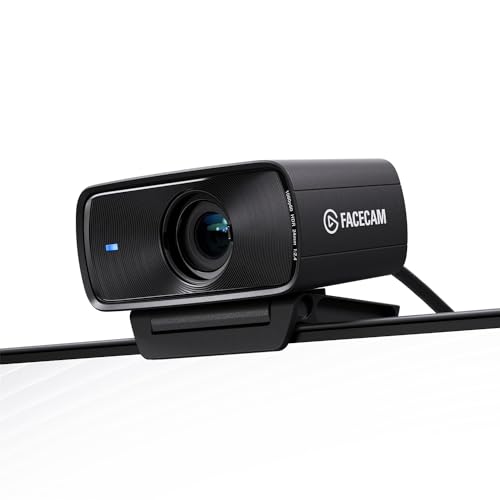
| Elgato Facecam | Best streaming webcam overall | A fixed-focus, software-tuned webcam built purely for streamers, with honest colour and no gimmicks. |
| OBSBOT Tiny 2 | Best AI tracking streaming camera | A gimbal webcam that follows presenters, zooms on gesture and frames like a camera operator. |
| Logitech Brio 4K | Best 4K webcam for professionals | High-resolution webcam with adjustable field of view and reliable business-grade behaviour. |
| Logitech StreamCam | Best webcam for content creators | Creator-oriented webcam with vertical mode, smooth frame rates and friendly software. |
| Sony ZV-E10 II | Best mirrorless camera for streaming | Interchangeable-lens quality, superb autofocus and USB streaming for the broadcast look. |
| Canon EOS R50 | Best value mirrorless for streaming | Canon’s kind colour and easy USB streaming at the gentlest mirrorless entry price. |
How Did We Choose Cameras for Internet Streaming?
Sustained performance came first. A streaming camera works for hours, not moments, so we favoured devices with a record of cool, stable operation, clean USB behaviour, and software that does not collapse mid-broadcast. Overheating, driver drama and mysterious disconnects are not quirks in this genre; they are the product failing at its only job.
Automation quality came second: exposure that does not hunt when a cloud crosses the window, white balance that holds a face steady, autofocus or fixed-focus depth that keeps a presenter sharp through natural movement. The best streaming cameras make a hundred small decisions per minute correctly, freeing the human to make the one decision that matters — what to say next.
Image character was judged in streaming conditions, not studio ones: mixed household light, a monitor’s glow, a window behind. Cameras that keep skin plausible and backgrounds calm under those insults ranked above cameras with superior laboratory numbers and worse living-room manners. Compression by the platform destroys fine detail anyway; what survives is contrast, colour and a face that looks alive.
Finally, the ecosystem: mounting, software control, compatibility with the major streaming applications, and the honesty of the upgrade path. A webcam that grows with software updates and a mirrorless body that joins a lens system both earned credit, because streaming setups evolve monthly and stranded equipment is the genre’s commonest waste.

Elgato Facecam — Best streaming webcam overall
The Facecam is what happens when a webcam is designed by streaming people rather than peripheral people. Its fixed-focus lens removes autofocus hunting from the genre entirely — set the distance, and the presenter is sharp from lean-in to lean-back — while its software gives manual control over exposure, white balance and field of view that most webcams hide. The image has a deliberate, broadcast steadiness that viewers read as professionalism without knowing why.
- Format: dedicated streaming webcam, USB
- Focus: fixed focus tuned for desk distances
- Software: detailed manual camera controls
- Mount: standard tripod thread and monitor mount
- Design: built for long streaming sessions
It suits the desk-bound streamer completely: gamers, podcasters, remote professionals whose stage is a chair’s radius. Its low-light manners are honest rather than miraculous, which is the correct trade — pair it with one decent light, as this guide keeps advising, and the combination outperforms cameras twice its price in the dark. For a set-and-forget broadcast desk, it is the reference pick.
Strengths
- No autofocus hunting, ever
- Manual software controls streamers actually use
- Broadcast-steady colour and exposure
Trade-offs
- Needs a real light to shine after dark
- Fixed focus limits room-scale presenting
- Premium webcam pricing
Best for: Desk streamers, gamers and podcasters wanting set-and-forget quality.
Not suited for: Presenters who move around a room.

OBSBOT Tiny 2 — Best AI tracking streaming camera
The Tiny 2 is the camera for streamers whose bodies are part of the content: teachers at a whiteboard, fitness instructors, demonstrators, presenters who pace. Its gimbal tracks the subject around the room, gesture controls start tracking and zoom without touching a keyboard, and its sensor is large enough by webcam standards that the image survives the movement with dignity. It is, functionally, a tiny crew member.
- Format: AI gimbal webcam, USB
- Tracking: subject following with gesture control
- Sensor: large for the webcam class
- Voice control: hands-free commands supported
- Mount: magnetic and tripod options
The discipline is choreography: teach the camera your gestures in rehearsal, mark the floor positions where framing is kindest, and let the tracking serve the presentation rather than perform for its own sake. Streamers who present standing will find it transformative; desk streamers should save the money, because a gimbal that never moves is an expensive fixed camera. Match the tool to the format, as ever.
Strengths
- Follows presenters like an operator
- Gesture and voice control mid-stream
- Strong image for a moving camera
Trade-offs
- Desk streamers waste its talents
- Tracking needs rehearsal to look natural
- Software features reward setup time
Best for: Teachers, fitness and demonstration streamers who move.
Not suited for: Seated desk broadcasters.

Logitech Brio 4K — Best 4K webcam for professionals
The Brio is the professional’s default for a reason: it behaves. Its 4K sensor allows digital zoom and reframing without collapse, its field of view adjusts between the tight head-and-shoulders of a meeting and the wider frame of a presentation, and its light correction keeps faces plausible in the backlit offices where professional streaming actually happens. It is the camera least likely to embarrass anyone in a boardroom context.
- Format: 4K USB webcam
- Field of view: adjustable framing options
- Light handling: automatic exposure correction
- Compatibility: broad platform and OS support
- Mount: monitor mount and tripod thread
Streamers should note what the resolution is really for: not 4K broadcasting, which platforms compress anyway, but cropping freedom — a 1080p window moved within a 4K frame, reframed per segment without touching the camera. Used that way the Brio is a small production switcher on top of the monitor. Used as a spec-sheet trophy it is merely a good webcam, which it also is.
Strengths
- Cropping freedom from the 4K frame
- Adjustable field of view per format
- Business-grade reliability and support
Trade-offs
- Autofocus and colour trail the Facecam’s tuning
- Needs good light at tighter crops
- Cable and mount are functional, not elegant
Best for: Professionals streaming meetings, webinars and classes.
Not suited for: Low-light entertainers needing character.

Logitech StreamCam — Best webcam for content creators
The StreamCam was Logitech’s letter to creators, and its priorities show: smooth motion for energetic presenters, a mount that rotates into vertical for the platforms that want it, subject-tracking framing in software, and colours tuned to flatter rather than to measure. For the streamer who also cuts clips for social platforms, it is the most format-fluent webcam here.
- Format: creator USB webcam
- Motion: high frame-rate modes for smooth action
- Mount: rotates for vertical capture
- Software: creator-focused companion app
- Audio: built-in dual microphones as backup
Its ceiling is the webcam ceiling — a small sensor that wants light — and its autofocus occasionally hunts where the Facecam’s fixed focus cannot. But within the genre’s honest limits it is the friendliest tool here, particularly for younger creators whose stream is one stop in a multi-platform day. Buy the light this guide keeps prescribing and the StreamCam rewards it immediately.
Strengths
- Vertical mode for clip platforms
- Smooth motion for energetic formats
- Friendly software for beginners
Trade-offs
- Small sensor wants generous light
- Autofocus can hunt in busy scenes
- Less manual control than the Facecam
Best for: Creators streaming and clipping across platforms.
Not suited for: Presenters needing deep manual control.

Sony ZV-E10 II — Best mirrorless camera for streaming
When a stream must look like television — the shallow depth, the low-light grace, the lens character — the ZV-E10 II is the sensible mirrorless route. It streams over USB without a capture card in most setups, its autofocus holds a presenter’s eye through movement that defeats webcams, and the E-mount lens shelf lets the look evolve from kit zoom to fast prime as the channel’s ambitions and income grow.
- Format: APS-C mirrorless, USB streaming
- Focus: real-time eye autofocus
- Mount: Sony E lenses for the broadcast look
- Video: clean 4K for recording too
- Power: USB power options for long sessions
The mirrorless tax is real and should be budgeted honestly: a dummy battery or reliable USB power for marathon sessions, heat awareness in warm rooms, a lens budget, and a setup ritual before each broadcast. Channels that accept the tax get the genre’s best image per pound; channels that resent it should buy the Facecam and spend the difference on the light and microphone that matter more. Both decisions are professional; only the dishonest middle — mirrorless bought, ritual resented — fails.
Strengths
- Broadcast depth and low-light quality
- Autofocus webcams cannot match
- Records 4K content when not streaming
Trade-offs
- Setup ritual before every session
- Power and heat need managing
- Total cost includes the lens
Best for: Streamers building a studio-grade channel.
Not suited for: Plug-and-play minimalists.

Canon EOS R50 — Best value mirrorless for streaming
The R50 brings Canon’s face-flattering colour to streaming at the price where mirrorless curiosity becomes reasonable. It connects over USB, focuses willingly, and renders skin in mixed room light with the warmth that makes long streams easy to watch. For educators, community streamers and businesses whose broadcasts are people talking to people, that colour is a feature no specification captures.
- Format: APS-C mirrorless, compact
- Streaming: USB webcam functionality
- Colour: warm, flattering Canon rendering
- Focus: capable subject detection
- Mount: Canon RF lenses and adapters
Its limits mirror its price: thermal care on the longest hot sessions, a lens shelf younger than Sony’s, and controls aimed at simplicity. As a streaming-first body in a temperate room with a sensible schedule, none of that disqualifies it — and as a hybrid that also shoots the channel’s photographs and recorded videos, it may be the best-value instrument in this entire guide.
Strengths
- Kind colour for people-led streams
- Gentle entry into mirrorless quality
- Hybrid stills and video talent
Trade-offs
- Heat care on marathon sessions
- Younger lens ecosystem
- Entry-level control depth
Best for: Value-conscious streamers wanting mirrorless colour.
Not suited for: All-day broadcast operations in warm rooms.
Webcam, Tracking Camera or Mirrorless: Which Family Fits?
By format, not by aspiration. The seated streamer with a fixed frame gains nothing from tracking and little from mirrorless depth that a light cannot give a good webcam; the Facecam class exists for them. The standing presenter gains a crew member from the Tiny 2’s gimbal and loses nothing but money if the format never moves. The studio builder gains the broadcast look from mirrorless and pays for it in ritual, which is a fair trade only when the look is the product.
Most streamers should start one family below their ambition and let the audience’s growth promote them. The webcam months teach framing, light and audio at forgiving prices, and every lesson transfers upward intact when the mirrorless arrives — while the mirrorless bought first often teaches the same lessons at flagship cost, in public, during a launch week.
How Do You Light a Stream?
One large, soft source at forty-five degrees to the face, slightly above eye level, is the whole foundation. It can be a window with a sheer curtain or a modest panel with diffusion; what matters is size and position, not price. Add a dimmer practical light behind for depth — a lamp in frame — and the stream acquires the layered look that separates broadcasts from video calls, using equipment most homes already own.
Kill the competing sources. The ceiling light that casts eye sockets into shadow, the monitor’s shifting glow on one cheek, the window behind that turns the presenter into a silhouette — each is a small sabotage. The cameras here expose for the face they can see; give them a face lit by one kind master and their automation becomes an ally instead of a negotiator between enemies.
What Audio Setup Does a Stream Deserve?
A dedicated microphone, close to the mouth, monitored on headphones at least at the start of every session. USB microphones serve most streamers excellently; the camera’s own microphone is an emergency backup in every pick here, including the ones whose makers describe it generously. Room treatment follows: soft furnishings, a rug, curtains — the echo of a bare room is the sound of amateur, and it costs almost nothing to fix.
Set levels once, properly, with the loudest laugh and the quietest aside both tested, then leave them alone. Viewers ride volume controls for consistency but abandon streams for distortion and inaudibility, and no camera choice in this guide can compensate for either. Audio is the stream’s foundation; the camera is its face.
How Do You Set Up Streaming Software Like a Professional?
Scenes, not improvisation: a starting-soon scene, the main frame, a be-right-back scene, and an ending scene, each composed and saved before the audience exists. The discipline sounds theatrical until the first mid-stream emergency — a doorbell, a crash, a coughing fit — when the be-right-back scene pays for the whole system in one keystroke. Every camera here feeds the major applications cleanly; the professionalism is in the preparation around them.
Record locally while streaming whenever the machine allows. The local recording is the clip library, the insurance against a platform glitch, and the evidence when a highlight moment needs re-posting at full quality. Storage is cheap; the unrepeatable live moment is not, and streamers learn this exactly once, the hard way, unless a guide talks them out of it.
What Internet Connection Does Streaming Actually Need?
Stable upload, above all: a wired connection wherever the desk allows it, because Wi-Fi’s variability is the dropped frame’s best friend. Test the upload at the streaming hour, not at midnight’s emptiness, and set the stream’s bitrate to a comfortable fraction of the real number rather than its brochure maximum. The camera’s contribution to this discipline is nil, which is precisely the point — streams fail at their weakest link, and the link is rarely the lens.
Have the failure plan rehearsed: the phone hotspot tested, the lower-bitrate profile saved, the audience message composed. Live broadcasting is a performance of reliability, and the streamers who survive technical weather with their humour intact are the ones whose preparation made the weather boring.
How Do You Look Natural on a Live Camera?
Look at the lens when making the point, and at the screen when reading the room — the two gazes of streaming, alternated deliberately. Presenters who stare at their own image perform for a mirror; presenters who never check chat perform for an empty room. The cameras’ positions help: mount at eye level, close enough that the lens and the chat window are neighbours, so the gaze shift reads as conversation rather than distraction.
Energy must be manufactured honestly for a lens: slightly more deliberate pacing, slightly clearer articulation, and the discipline of addressing one imagined viewer rather than a statistical crowd. It feels theatrical from the chair and reads as natural from the sofa, which is the only direction that matters.
How Long Can These Cameras Stream?
The webcams here are built for the marathon and will run as long as the computer does. The mirrorless bodies need their terms respected: reliable power rather than a battery’s promise, airflow in warm rooms, and sensible sensor breaks in the longest sessions. Streamers planning all-day broadcasts should build the schedule around those terms — or choose the webcam family, whose entire design brief is endurance.
Test at length in private. A camera that performs for a twenty-minute review may misbehave at hour four, and the audience’s session is the worst laboratory. Run the full chain — camera, light, software, recording — for a complete private broadcast before the public one, and fix what the hours reveal.
What Is the Streamer’s Upgrade Path?
Light first, microphone second, camera third — the order this guide has repeated because the evidence keeps repeating it. Within cameras, the path runs webcam to tracking or mirrorless according to format, and every step reuses the previous step’s lessons and most of its accessories. The streamers who upgrade in that order look professional at every stage; the ones who reverse it look expensive and amateur simultaneously, which is the genre’s most avoidable tragedy.
Software skills outlast all of it. Scenes, audio processing, framing judgment and the calm to run a broadcast alone are the streamer’s permanent equipment, and they transfer between cameras untouched. Buy hardware to serve skills you are building, and the setup will always look like a decision rather than an accumulation.
How Do You Stream Games, Classes and Events Differently?
Games want the face small and the gameplay sovereign: a corner frame, a camera that behaves without attention, and audio that balances voice over game. Classes want the presenter large, the tracking camera in its element, and slides treated as a scene rather than a screen-share afterthought. Events want redundancy — a second camera angle, a backup recorder, a rehearsed failure plan — because their moments do not repeat.
The six picks map onto those formats almost one to one, which is why this guide insists on format-first choosing. A camera is only ever best for a stream, never best in the abstract, and the stream’s shape is knowable before a single purchase is made.
One Last Word on Liveness
Streaming’s magic is mutual presence: the audience is there, now, and the camera is the window they look through. Choose the window that stays clean for hours, lights a face kindly, and never makes the broadcast about itself. Then go live regularly, because the genre’s only real credential is the archive of broadcasts actually made — and every camera in this guide is ready when you are.
How Do You Stream from a Small or Shared Room?
By treating the frame as a set with borders. Choose the one corner whose background can be controlled — a plain wall, a shelf arranged once and left alone, a curtain that ends the room’s chaos at the frame’s edge — and light it as this guide prescribes. Small rooms punish wide lenses and reward the tighter fields the Brio and Facecam offer, because the frame that excludes the laundry pile is a production decision, not a deception.
Acoustics matter more in small rooms, not less: hard walls sit close to every microphone. The rug, the curtains and the soft chair are audio equipment here, and a streamer in a shared home should also negotiate the schedule’s diplomacy — the household that knows the broadcast hours becomes the broadcast’s quietest crew. Professional streaming from a spare corner is entirely achievable; it is achieved by borders, soft furnishings and treaties.
What Camera Settings Matter Most Live?
White balance locked, exposure locked or gently automatic, and the frame rate matched to the platform and the room’s lighting frequency — the trio that prevents the three classic live artefacts: colour drift, brightness breathing and flicker. Flicker deserves its paragraph: artificial light pulses with the mains, and a mismatched shutter or frame rate turns that pulse into a visible strobe across the whole broadcast. The fix is a setting, discovered in the private test this guide mandates, not a purchase.
Sharpness and beauty filters deserve restraint. Platform compression will soften the image anyway; aggressive in-camera sharpening gives it artefacts to amplify, and beauty smoothing at strength reads as plastic within minutes. The professional stream looks like a person in good light, which is a lighting achievement wearing a camera’s clothes.
How Do You Run a Two-Camera Stream?
With the second camera answering a question the first cannot: the hands at work, the product on the desk, the wide room shot for the segment change, the pet’s celebrated corner. Switching between two honest angles makes a solo broadcast feel produced, and the software’s scenes make the switching a keystroke rather than a performance. The picks here pair naturally — a Facecam’s desk frame with a Tiny 2’s room view, a mirrorless hero angle with a webcam’s utility shot.
Discipline governs the temptation: cut on a reason — a topic change, a demonstration, a reaction — and hold each angle long enough to feel intentional. A two-camera stream cut nervously reads worse than a one-camera stream held calmly, because the audience’s trust is in the broadcaster’s composure, and the cameras merely report it.
How Do You Stream Outdoors or On Location?
By respecting power, light and connection in that order. Battery or a serious power bank for the camera and the encoder, shade or a diffuser for the presenter’s face against a sky that outshines every subject, and a connection tested at the location at the broadcast hour — the three foundations, none of which a camera upgrade supplies. The action-adjacent webcams and the creator bodies with outdoor manners serve best, but the location stream is a logistics discipline wearing a camera’s name.
Wind is the location stream’s audio assassin. A microphone shielded, close and monitored through headphones is the difference between a broadcast and a weather report nobody ordered. Rehearse the full chain in the actual place, because location streaming’s failures are all environmental and all previewed faithfully by one honest rehearsal.
What Should a Business Streamer Prioritise?
Being understood and looking employable. The professional context forgives a modest camera completely and forgives nothing about inaudible speech, a silhouette’s face or a background that contradicts the message. The Brio’s reliability and light correction, or a Facecam beside one good light, cover the brief entirely for most professionals; the mirrorless step belongs to those whose broadcast is the product — trainers, presenters, executives whose presence is the brand.
Consistency across a team is the business’s second brief: the same framing guidance, the same background discipline, the same audio standard, so a company’s streams look like one organisation thinking rather than thirty individuals improvising. A one-page house style for cameras achieves more than a fleet purchase, and it is the cheapest paragraph in this guide.
How Do You Handle Guests and Interviews on Stream?
By making the guest’s image and audio your responsibility before it is their problem: send the framing guidance, test the connection in advance, and record the guest’s side locally where the tools allow, because the platform’s recording of a struggling connection preserves the struggle. The host’s camera should be the calm constant — locked settings, steady light — against which the guest’s variability reads as circumstance rather than chaos.
Frame the conversation as a conversation: matched shot sizes, eyelines that meet across the edit, and reactions held a breath longer than instinct suggests. Interview streams live on the listener’s face, and the camera that holds it kindly — the mirrorless picks for depth, the Facecam for steadiness — earns the segment.
How Do You Keep a Stream’s Look Consistent for Years?
Document the setup like a recipe: camera model and settings, light position measured in steps and angles, background arrangement photographed, software profile exported and backed up. Channels break their own look accidentally — a moved light, a software reset, a new desk — and the recipe is what restores in an hour what took a year to evolve. The streamers whose look is a brand asset treat the document as one.
When upgrading, change one component and live with it for a month of broadcasts before judging. The audience experiences change as risk; the streamer experiences it as novelty, and the recipe’s discipline arbitrates between the two feelings with evidence instead of taste.
What Role Does the Second Monitor Play?
The streamer’s cockpit deserves a sentence of respect: chat, scenes, levels and the preview arranged so the broadcaster’s eyes travel inches, not across the room. Camera placement should respect that cockpit — lens near the chat window, as this guide advises — so the performance’s gaze and the operation’s gaze stop competing. Many streams look amateur purely because the host is visibly operating a machine in another direction from the audience.
Practise the operations until they are choreography: the scene switch, the mute, the guest’s admission, performed without a glance or a pause in speech. The audience should experience a conversation that happens to be flawless, not a technical demonstration that happens to include talking.
How Do You Stream Games with a Facecam Well?
Small, honest and out of the way: the face frame belongs in the corner the game’s interface can spare, lit a touch brighter than feels natural to survive its small size, and framed tight enough that expressions read at thumbnail scale. The camera should be the Facecam class — set, forget, no hunting while the gameplay demands the streamer’s whole attention — and the audio balance rehearsed so the voice rides the game rather than wrestling it.
Cut the facecam entirely for the cinematic sequences and restore it for the reactions; the restraint reads as production confidence. The streamer’s face is a commentary instrument, and like all instruments it gains by silence at the right moments.
A Note on Burnout and the Always-On Camera
The streaming camera is the first that watches its owner professionally, at home, for years, and its discipline includes switching off completely. Keep the broadcast space or at least the broadcast ritual bounded — the light that goes on for the stream and off after it, the camera covered or unplugged in private hours — because a home that always feels observed stops being one. The equipment in this guide will serve a decade of broadcasts; the broadcaster must be paced to match, and pacing is a production decision like any other in these pages.
How Do You Grow a Stream Without Changing Cameras?
By changing everything the audience actually notices first: the opening thirty seconds, the title’s promise kept, the segment rhythm, the community’s rituals. Production growth at the mature stage is editorial, not optical — the camera that was sufficient at a hundred viewers remains sufficient at ten thousand, because viewers bond with reliability and recognition, both of which a stable setup protects. Streamers who re-platform their image annually spend their growth budget on re-learning their own tools.
When a genuine format change arrives — the move to presenting standing, the second location, the interview series — let it choose the one new component, as this guide’s format-first method prescribes. Growth by format is strategy; growth by catalogue is shopping wearing strategy’s coat.
What About Streaming to Several Platforms at Once?
Multistreaming multiplies reach and divides attention, and the camera’s role in it is neutrality: a clean, standard feed that every platform’s encoder can digest without surprises. The discipline is in the chat and the promises — a streamer reading three chats serves none of them well past a certain size, so choose the home platform honestly and let the others be broadcasts rather than conversations.
Record the local master regardless, as this guide advises, because the multistream’s fragments belong to the platforms while the master belongs to the archive. The setup that survives platform politics is the one whose value was never stored on any platform: the recipe, the ritual and the recording.
How Do You Sound-Check and Frame-Check in Ninety Seconds?
With a ritual so practised it survives nerves: record ten seconds of test at performance energy, play it back on headphones, read the frame for the three classic faults — the object growing from the head, the bright window competing, the chin cut by the frame’s ambition — and fix exactly what the test shows. Ninety seconds is enough for a ritual and useless for improvisation, which is why the ritual must be built in calm weeks and merely executed in live ones.
Write the ritual on a card taped near the monitor until it is reflex. Professional broadcasters run checklists with decades of experience behind them; the solo streamer’s card is the same humility at a smaller scale, and it prevents the specific embarrassment of discovering a silent microphone from the chat’s third message.
How Do You Choose a Stream Camera for a Child or Teen Creator?
With a parent’s priorities in front of a creator’s: a webcam-class camera that works without accounts or complexity, positioned in a shared space by family agreement, with the platform’s safety settings configured by an adult before the first broadcast. The Facecam and StreamCam classes serve well precisely because they are appliances — the creative energy goes to the content, the safeguarding stays with the grown-ups, and no mirrorless ritual invites unsupervised experimentation with expensive glass.
Agree the broadcast hours, the audience rules and the recording’s keeping as a family treaty, reviewed as the young streamer grows. The camera is the least consequential part of a young person’s streaming safety, and treating it as such — a simple tool inside a thoughtful structure — is the genuinely protective choice.
What Is the Role of the Preview Monitor’s Position?
Worth its own paragraph because it silently directs every broadcast: the preview and chat should sit as close to the lens as furniture allows, ideally directly beneath it, so the presenter’s working gaze and the audience’s received gaze differ by degrees rather than by a turned head. Webcams perched on the streaming monitor achieve this by accident of design; mirrorless rigs on tripods behind desks must achieve it by intention, with the chat display moved to the camera’s neighbourhood.
Test the geometry by recording a minute of mock conversation and watching only the eyes. If they converse with the viewer, the geometry is right; if they interview the desk’s far corner, no resolution in this guide will rescue the intimacy the stream was bought for.
How Should a Streamer Handle a Technical Failure Live?
Like a broadcaster: acknowledge it in one sentence, switch to the prepared scene, fix it in the order of audience pain — audio first, picture second, cosmetics never — and narrate nothing of the panic. The audience’s loyalty is astonishingly available to a calm host with a be-right-back screen and a voice that keeps talking; it evaporates only when the host abandons them to silence and a frozen frame.
Afterwards, write the failure into the recipe: what broke, what the fix was, what would prevent it. The streamers with reputations for reliability are not the ones whose equipment never fails; they are the ones whose failures became procedures, visibly, in public, with humour.
How Do You Decide Between One Good Camera and Two Modest Ones?
By the formats honesty. A single mirrorless serves one angle superbly; two webcams serve two angles adequately, and programmes with segments — the desk and the demonstration, the host and the room — gain more from the second angle than from the first angle splendour. Solo talking formats gain nothing from a second camera that has nothing to show, and should concentrate the budget without guilt.
The deciding question is editorial: does the broadcast change its visual subject? If it does, angles are content and deserve budget. If it does not, the audience is watching a person, and the person deserves the light, the microphone and the one good camera, in that order, as this guide has argued from its first page to this one.
What Does a Streaming Setup Cost in Attention?
More than in money, across a year: the updates, the re-seating of a moved light, the software that rearranged its menus, the cable that chose the launch morning to retire. Simpler chains levy less of this tax, which is the unspoken reason so many veteran streamers run webcam setups that newcomers mistake for poverty. They are not poor; they are conserving the only budget that cannot be replenished mid-season.
Audit the setup quarterly with that currency in mind: every component should justify its maintenance in audience-visible quality, and the component that cannot should be simplified without sentiment. The stream that results is the one still broadcasting, calmly, in year three.
In Short
Format first, light second, microphone third, camera fourth — and reliability above every item on the list, because a live audience can only love the broadcast that actually happens.
How Do You Warm Up an Audience Before the Content?
The first five minutes are a broadcast within the broadcast: the regulars arriving, the chat waking, the host visibly settling into the light and the ritual. Design them — a consistent opening frame, a welcome that names the session purpose, a question the chat can answer while the room fills — because retention graphs are decided disproportionately in those minutes, and a cold open into content wastes the gathering the schedule worked to create.
The camera serves the warm-up by being already right: no visible adjustments, no apologetic first minutes of exposure hunting. This is the recipe and the locked settings earning their keep in public, and it is why this guide treats preparation as a creative act rather than an administrative one.
A Final Word on Presence
Every streamer in history has been, at the start, a person talking to a lens in a room, hoping the lens would eventually feel like people. The cameras in this guide shorten that apprenticeship by removing its technical static — the hunting focus, the drifting colour, the dark face — until only the human apprenticeship remains. Choose the one that removes your static, keep its recipe, and broadcast until the lens feels like the room it has become.
And Finally
Go live this week, with the camera you have and the light you can arrange, and let the broadcasts themselves write the shopping list this guide has tried to write in advance. The archive of streams actually made is the only credential the medium has ever recognised, and every camera recommended here is ready to help you build it, one reliable hour at a time, starting now.
One Sentence for the Road
Buy for the stream you actually broadcast, light it like you mean it, mic it like it matters — because it does — and keep the recipe card taped beside the monitor until the whole beautiful ritual runs itself without a single thought wasted on machinery.
Truly Finally
The audience is waiting, the light is arrangeable, and the camera decision, honestly made from this guide, will not be the thing that holds the broadcast back.
How Do the Six Streaming Cameras Compare?
| Pick | Badge | Standout trait | Watch out for |
|---|---|---|---|
| Elgato Facecam | Best streaming webcam overall | Desk-broadcast steadiness by design | A light is part of the package |
| OBSBOT Tiny 2 | Best AI tracking streaming camera | A camera operator in a webcam | Overkill at a desk |
| Logitech Brio 4K | Best 4K webcam for professionals | Reframing freedom and reliability | Light-dependent at its best settings |
| Logitech StreamCam | Best webcam for content creators | Format fluency for creators | Light and focus discipline required |
| Sony ZV-E10 II | Best mirrorless camera for streaming | The television look, live | A ritual, not a plug |
| Canon EOS R50 | Best value mirrorless for streaming | Mirrorless colour at a friendly price | Session length needs awareness |
How Do You Set Up a Stream from Zero?
Fix the frame and the light first
Position the camera at eye level, compose the background deliberately, and place one large soft light before touching any software. The frame and the light are the stream; everything after is plumbing.
Connect and configure the camera
Install the companion software, set exposure and white balance manually where the camera allows, and save the profile. Automation is the backup, not the plan, wherever manual control exists.
Build the scenes before going live
Starting, main, break and ending scenes, with the local recording enabled and the audio levels tested at a laugh and a whisper. Preparation is the difference between a broadcast and an incident.
Run a private full-length test
Stream unlisted for the planned duration, watch it back critically, and fix the light, level or framing fault it reveals. The audience should never be the test department.
Go live on a schedule and keep it
Regularity builds the audience that production value then serves. Publish the schedule, honour it with the reliability the equipment was chosen for, and review each broadcast’s first five minutes for one improvement.
What Mistakes Ruin Otherwise Good Streams?
Buying the camera before the light
A flagship in a dark room loses to a webcam beside a soft light every night of the week. Follow the order: light, microphone, camera, and let each purchase prove the next one’s necessity.
Streaming over unstable Wi-Fi at maximum bitrate
Dropped frames read as carelessness regardless of cause. Wire the connection, test at the real hour, and set the bitrate the connection sustains rather than the one it advertises.
Trusting the camera’s microphone
Room echo and distance mark a stream as amateur within seconds. A dedicated microphone, closely placed and monitored, is the cheapest professionalism in the entire setup.
Never test-streaming at full length
Heat, drivers and software fail at hour three, not minute three. The private marathon test is unglamorous and decisive, and skipping it outsources quality control to the audience.
Performing for the mirror image
Staring at your own preview breaks the audience’s eye contact. Look at the lens for the point and the chat for the room, and disable the self-view if it keeps stealing your gaze.
Final Recommendation
For most streamers, the Elgato Facecam is the recommendation: a desk broadcast that simply works, hour after hour, with a light beside it. Presenters who move should choose the OBSBOT Tiny 2 without hesitation; professionals who reframe should take the Brio; creators clipping across platforms the StreamCam; and studio builders ready for the ritual should step up to the Sony ZV-E10 II or the Canon EOS R50 for the broadcast look.
Whichever camera you choose, wire the connection, buy the light, place the microphone, and test at length. Streaming rewards the reliable with an intimacy no other medium offers — and every pick in this guide was chosen to be reliable in exactly the hours when reliability is the whole show.
Related guides
- Best Cameras for Web Developers: Desk Webcams and Streamer Picks for Calls, Pairing and Live Coding
- Best Cameras for Vodcasting: Desk Cameras and Mirrorless Picks for Long, Guest-Driven Conversations
- Best Cameras for Teams Meetings: 6 Webcams and Room Picks for Microsoft Teams
- Best Cameras for Streaming Live Games
- Best Cameras for Live Streaming: Mevo Start, Mevo Core and the Honest Alternatives
Frequently Asked Questions
Is a webcam enough for professional streaming?
For desk-based formats, absolutely — the Facecam and Brio in this guide carry professional broadcasts daily. The mirrorless step buys depth and low-light character, which some formats need and many do not. Judge by the stream’s format, not by other streamers’ shelves.
Do I need 4K for streaming?
Platforms compress streams heavily, so 4K’s real value is cropping freedom in a 1080p frame, as the Brio demonstrates. A clean, well-lit 1080p image beats a noisy 4K one with audiences every time.
How do I stop my mirrorless camera overheating?
Give it reliable power, airflow, and sensible session lengths, and test at full duration before broadcasting. Rooms and formats differ; the private marathon test tells you your own camera’s honest limits.
Webcam microphone or separate microphone?
Separate, always, for anything beyond the casual. Every camera microphone here is a backup. A modest dedicated microphone placed close transforms perceived quality more than any camera upgrade in this guide.
Can I stream from a camera and record at the same time?
Yes, and you should: the local recording is your clip library and your insurance. All the setups described here support simultaneous local recording through standard streaming software.
What is the best first upgrade for a new streamer?
A large, soft light — then a microphone — then, only then, a camera from this guide. The order is unfashionable and undefeated.
Related Guides
Creators should also read our Instagram and 4K guide and the affordable YouTube camera roundup. best cameras for instagram and 4k videos best affordable 4k cameras for youtube best cameras for home video


