ilcastellomenu.com is reader-supported. When you buy through links on our site, we may earn an affiliate commission.
Where to Buy
A vodcast is a podcast that grew eyes, and the best cameras for vodcasting are chosen by rules the video world keeps forgetting: the camera never moves, the recording never stops being long, and the audience came for voices. Vodcasting — video podcasting from a fixed desk or studio table — rewards cameras that can stare at a seated host for two unbroken hours without overheating theatrics, focus drift or a fan auditioning for the show. It punishes glamorous travel cameras whose talents all involve motion. If your programme is conversation, this guide speaks your language: fixed setups, multiple guests, clean feeds into recording software, and above all the humility to remember that in a vodcast, audio is king and the camera is court staff.
That hierarchy shapes every pick below. Some are webcams, because a webcam bolted above a monitor and forgotten for a year is a legitimate professional choice for a weekly interview show. Others are mirrorless bodies feeding a capture device, because a flagship conversation programme with sponsors and a set deserves a sensor’s depth. What unites them is desk manners: they start reliably, they hold focus on a seated face through laughter and leaning, they play nicely with the microphones and mixers that actually carry the show, and they do not demand a camera operator in a room where the chemistry is the product.
A neighbouring guide in this series covers cameras for web developers — a different desk, a different day, built around meetings and code streams. This page is about programmes: scheduled, recorded, published conversations with an audience who will notice a frozen frame in minute forty far more than a soft corner in minute four. Reliability across a long take is the whole audition.
Key Takeaways
- In vodcasting the microphone budget should always outrank the camera budget.
- Fixed desks forgive webcams everything and reward their forgettability.
- Long sessions are the real test — comfort over hours beats showroom sparkle.
- The OBSBOT Tiny 2 follows a gesturing host so framing survives animated stories.
- Mirrorless picks earn their place when a set, sponsors or a second angle arrive.
- Every pick here feeds recording or streaming software without drama.
In this guide
Quick Picks
| Camera | Badge | Why it earns its place |
|---|---|---|
| Logitech Brio 4K | Set-and-forget webcam | Clamps on, looks sharp, and disappears from your worries. |
| OBSBOT Tiny 2 | Tracking for solo hosts | A tiny gimbal that keeps an animated host framed alone. |
| Elgato Facecam | Streamer’s desk camera | Fixed-focus honesty built for software-driven shows. |
| Sony Alpha 7 IV | Flagship conversation body | Full-frame depth for a set that means business. |
| Panasonic LUMIX S5II | Long-session workhorse | Built with video endurance as a headline virtue. |
| Canon EOS R6 Mark II | Guest-chair favourite | Face tracking and colour guests look expensive in. |
How Did We Choose Cameras for a Fixed Desk and a Long Take?
We auditioned candidates the way a producer would: seated, talking, for a long time. The first test was endurance behaviour — a vodcast camera must treat a two-hour recording as an ordinary Tuesday, delivering a clean feed through USB or a capture device without the session becoming a negotiation. The second was seated autofocus: hosts lean in for emphasis, rock back laughing, turn toward a guest and return, and the camera must follow those small journeys without hunting expeditions across the bookshelf behind them.
The third test was invisibility. In conversation, any camera that demands attention — a menu dive to restart a feed, a fan loud enough to reach the microphones, a status light pattern nobody can interpret — taxes the very chemistry the programme sells. We favoured cameras that a host can forget between the intro and the outro, because forgotten cameras produce remembered conversations. Software manners mattered equally: a vodcast camera lives inside recording and streaming applications, and the ones that present themselves cleanly to those tools save their owners a weekly ration of dread.
Finally, we scored upgrade paths in the order vodcasts actually grow. First comes a second angle for the guest, then a wider room shot, then a set. Cameras that begin as a solo desk solution and later serve as the second or third angle in that grown-up rig protect their owners’ money across the show’s whole biography — a producer’s virtue that pure spec comparisons rarely capture.
Why Does Audio Outrank Video in Every Vodcast Decision?
Listeners forgive a modest picture for hours; they abandon hollow, echoing or distorted voices in minutes, because a vodcast is consumed with podcast ears even when eyes are available. Many viewers play the video in a background tab, glance up for reactions, and judge the programme almost entirely by how intimate and clear the conversation sounds. That reality should order every budget: a great microphone per chair, a treated corner of the room, and then — with whatever remains — a camera from this page. The ranking below assumes that order has been honoured.
Camera choice still matters to sound in two quiet ways. A camera with a fan or a fussy recording habit can leak noise into sensitive microphones across a small desk, and a camera whose feed drops mid-session forces edits that chop a conversation’s rhythm into visible scars. The picks here were chosen partly for their manners around microphones: they sit still, run cool-headed and keep their mechanical opinions to themselves while the humans talk.
Which Cameras Run a Vodcast Desk Best?
Three desk-native cameras that disappear into a weekly routine, and three mirrorless bodies for shows whose sets have outgrown a monitor clamp.

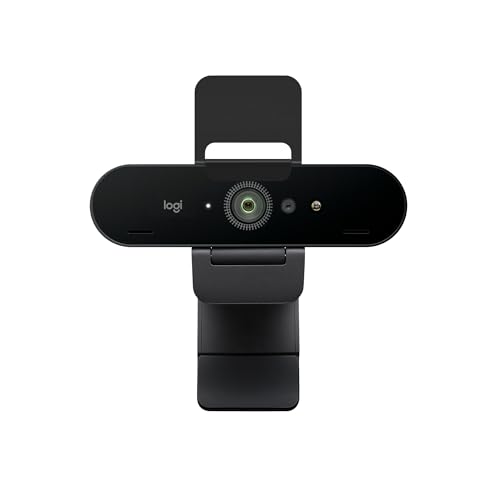
Logitech Brio 4K — Set-and-forget webcam
The Brio’s vodcasting genius is that it asks for almost nothing after installation day. Clamp it above the monitor, aim it once, set its field of view in software — wide for a two-shot across a small table, tighter for a solo host — and it becomes furniture: present at every recording, demanding no ritual, producing a crisp image that guests on remote calls mistake for a far more elaborate rig. For a weekly interview programme recorded through conferencing or streaming software, that forgettability is not a compromise; it is the entire professional requirement, met at a desk-native tier.
Its flexibility lives in software rather than hardware, which suits desk life. Framing adjustments, zoom steps and exposure preferences are dialled from an app while the host stays seated, so the awkward dance of standing, tilting, sitting and re-checking never enters the pre-show routine. A host recording three episodes back-to-back — the batching rhythm that keeps vodcasts sustainable — feels that convenience compound: the setup that took four minutes in January takes forty seconds by March, and the saved willpower goes into better questions.
The honest limits are a webcam’s birthright. Its small sensor leans on your room’s lighting, so a dim office will look like a dim office until a lamp joins the desk; its depth of field keeps everything politely in focus, which means the bookshelf behind you is a co-star whether you cast it or not. Shows that want a cinematic blur between host and background must graduate to the mirrorless picks below. Shows that want to exist, weekly, without a production meeting, start here and often stay for years.
- Format: USB webcam, monitor clamp
- Framing: software field-of-view choices from the chair
- Session style: batch-record friendly, zero ritual
- Lighting need: a decent desk lamp completes it
- Growth role: becomes the guest or producer angle later
Strengths
- The lowest-friction weekly recording life here
- Sharp enough to fool callers about your rig
- Adjustments happen without leaving the chair
Trade-offs
- Room light does the heavy lifting
- No cinematic background separation
- A webcam’s ceiling is a real ceiling
Its signature programme is a Tuesday-night interview show recorded from a spare-room desk, guest beaming in from another timezone, the Brio holding a calm two-shot of the host while the conversation wanders gloriously off the question list. Nobody in the comments asks about the camera for forty episodes. In vodcasting, that silence is the review every producer dreams of: the technology vanished, the talk remained.
Multi-host households discover a second virtue: anyone can run it. A partner, a producer or a visiting co-host can start a recording without a tutorial, because the Brio’s whole interface is the software they already know. Shows survive holidays, illnesses and schedule chaos when the camera refuses to be a specialist skill, and survival — across a hundred Tuesdays — is the metric that separates programmes from pilots.
Best for: weekly interview and solo shows wanting zero-friction desk recording. Not suited for: cinematic sets or dim rooms without a lamp budget

OBSBOT Tiny 2 — Tracking for solo hosts
Some hosts talk with their whole bodies — standing to sketch on a whiteboard mid-argument, pacing while a story builds, leaning out of frame to fetch the book under discussion. A fixed webcam frames such a presenter like a portrait and loses them at the exact moment the energy peaks. The Tiny 2 answers with a motorised gimbal in a webcam’s body: it pans and tilts to keep its host centred, following movement around a small studio with a discretion that feels less like surveillance and more like a tiny, loyal camera operator who never blinks.
Gesture control completes the solo illusion. A host alone in the room can start or stop tracking, or nudge the framing, with hand signals rather than a walk back to the keyboard — a small mercy that preserves the performance’s flow during long recordings. For vodcasters who demonstrate products, cook while conversing or teach physical skills between interview segments, that freedom redraws what a one-person programme can attempt without hiring help.
Its boundaries are size and setting. The Tiny 2 is a desk-and-small-room instrument; a cavernous studio or a panel of four guests exceeds the stage its tracking was choreographed for, and multi-guest shows should look to the wider mirrorless picks. Its small sensor shares the webcam family’s appetite for decent light. Within its intended theatre — one animated host, one desk, one whiteboard’s worth of roaming — it delivers a production value that viewers consistently overestimate, guessing at crew members who do not exist.
- Format: gimbal webcam with subject tracking
- Signature move: follows a moving host automatically
- Control: hand gestures for solo operation
- Stage size: desk and small studio roaming
- Lighting need: happiest in a well-lit room
Strengths
- Framing survives the most animated hosting style
- A camera operator’s instincts in a webcam body
- Gesture control keeps solo shows flowing
Trade-offs
- Multi-guest panels outgrow its stage
- Small-sensor light appetite, like all webcams
- Tracking is a habit some hosts must learn to trust
Its emblematic episode is a business coach’s vodcast where the argument literally walks: she rises mid-sentence, crosses to a flip chart, diagrams the idea while still talking, and returns to her chair for the summary — one unbroken frame throughout, the Tiny 2 gliding after her like a dance partner. Viewers wrote in to ask who filmed it. The answer, a camera the size of a matchbox, is the best advertisement tracking technology has ever made for itself.
Solo educators building a vodcast beside a teaching practice find a second dividend: the same tracking that serves the show serves live workshops and office hours, so the device earns across a whole working week rather than a single recording slot. Equipment that pays rent on multiple days is the kind small studios should collect, and the Tiny 2 collects its share charmingly.
Best for: solo hosts who move, demonstrate and teach while talking. Not suited for: four-guest panels or cavernous studio spaces

Elgato Facecam — Streamer’s desk camera
Elgato built the Facecam inside the streaming ecosystem rather than the photography one, and vodcasters inherit the benefits. Its philosophy is fixed-focus honesty: set the camera at desk distance, and the host’s chair zone stays sharp without autofocus hunting — a meaningful mercy during long conversations where lesser cameras periodically decide the bookshelf deserves its moment. Paired with Elgato’s software habits, it behaves like a studio appliance: predictable, adjustable from the desk, and designed to feed streaming and recording applications a clean, consistent picture week after week.
That predictability is a producer’s drug. A Facecam show looks the same in episode eighty as in episode eight, because so little about the image is left to automation’s daily moods. Hosts who record in mixed light — a window on one side, a practical lamp on the other — appreciate an image pipeline that can be tuned once, saved, and trusted. For programmes whose brand is a familiar face in a familiar frame, consistency is not boring; it is the visual equivalent of a theme tune.
Know its terms before adopting it. Fixed focus means the sharp zone has edges: lean far back in triumph or crowd the lens for a whisper and the image will tell on you, which disciplined seated hosts rarely do and theatrical stand-up hosts should avoid. Like its webcam siblings it wants real light in the room rather than a monitor’s glow. And its world is the desk — it will not double as a travel camera the way a mirrorless body can. Within the desk’s borders, it is a professional’s quiet favourite.
- Format: USB desk camera, fixed focus
- Focus philosophy: the chair zone stays sharp, no hunting
- Software: tuned once, saved, trusted weekly
- Brand effect: episode-to-episode visual consistency
- Stage: the desk, exclusively and proudly
Strengths
- No autofocus hunting during long conversations
- A repeatable look sponsors and regulars recognise
- Built for streaming software from birth
Trade-offs
- Fixed focus punishes theatrical leaning
- Needs honest room lighting
- Desk-only; no second life on location
Its natural habitat is a nightly commentary vodcast recorded after the day job, host settling into a chair whose position is marked by muscle memory, the Facecam delivering the identical frame it delivered yesterday. That sameness becomes a ritual comfort for regular viewers — the same face, the same shelf, the same opening line — and rituals are what turn casual listeners into the audience that shows up before the notification does.
Producers of multi-show networks value a colder virtue: interchangeability. Any host can sit at any Facecam desk and produce the network’s house look without a technician’s visit, which makes scheduling across a small studio radically easier. Standardised cameras are how tiny operations impersonate large ones, and the Facecam is the standard-bearer of that impersonation in this roundup.
Best for: streaming-native shows wanting a locked, repeatable desk look. Not suited for: stand-up hosting styles or location filming

Sony Alpha 7 IV — Flagship conversation body
When a vodcast graduates to a set — backdrop, two chairs, a table with a logo’s worth of intention — the camera graduates too, and the Alpha 7 IV is the graduation most often chosen. Its full-frame image gives conversation the visual grammar of television: a host rendered with gentle depth, the set behind them present but softened, skin tones that survive mixed practical lighting with their dignity intact. Fed through a capture device into the recording chain, it turns a spare room into a place sponsors photograph for their own social feeds.
Long-session manners separate it from showier bodies. Seated autofocus tracks a face through laughter, glasses adjustments and the lean-in that signals a story’s climax, then settles without drama. The body was designed in an era when hybrid creators demanded video endurance as a core promise, and vodcasters benefit from that design pressure every time a conversation runs long because it deserves to — the interview that finds its real subject in minute seventy is exactly the one a lesser setup would have interrupted.
The invoice is total-system shaped. Lenses, a capture path, a sturdier mount and lighting worthy of the sensor all join the budget, and the show that buys an Alpha 7 IV before it buys per-chair microphones has its priorities upside down — this guide will keep repeating that sentence in different costumes. Bought in the right order, though, it is the camera a successful vodcast keeps for the rest of its natural life, migrating gracefully from main angle to guest angle when an even grander production eventually arrives.
- Format: full-frame mirrorless, capture-fed workflow
- Look: television depth for a permanent set
- Focus: seated faces tracked through animation
- Session style: built for conversations that run long
- Growth role: main angle today, guest angle someday
Strengths
- The set looks like a programme, not a call
- Focus that survives laughter and leaning
- A body a successful show never outgrows
Trade-offs
- The whole system joins the budget
- Overkill for a monitor-desk solo show
- Demands lighting worthy of its sensor
Its defining production is a two-chair interview series filmed in a converted garage, backdrop lit like dusk, the Sony holding the host while its sibling angle covers the guest. A visiting author, midway through a story about her father’s workshop, leans into the light and the camera simply stays with her — no hunt, no drift — and the clip that later travels across the internet carries that unbroken intimacy as its production signature.
There is a hiring effect, too, that producers mention quietly. Guests with publicists — authors on tours, founders, minor celebrities — say yes more readily to sets that look like programmes, and a full-frame main camera is a large part of that look. The Alpha 7 IV can thus pay for its tier in access: better guests, longer conversations, and the compounding reputation of a show that treats its visitors like television treats them.
Best for: established vodcasts with a set, sponsors and a guest chair. Not suited for: first-season budgets or audio-starved shopping lists

Panasonic LUMIX S5II — Long-session workhorse
Panasonic rebuilt its full-frame line around video credibility, and the S5II wears that priority in ways vodcasters feel weekly. It is the pick for marathon recording days — the conference-adjacent show that banks six interviews in a day, the roundtable that runs long because the argument is good — where a camera’s composure across hours matters more than any single frame’s beauty. Its video tooling speaks a production language: monitoring aids, flexible recording options and a general sense that the body expects to be worked by people who record for a living.
On a set it behaves like crew rather than talent. The image has a dependable, gradeable character that editors appreciate across a season of episodes, and the body’s autofocus — renewed as a headline feature of this generation — follows seated conversation without the family hesitations older Panasonic owners remember. Paired with the L-mount’s lens selection, it lets a growing production standardise on one system for main, guest and wide angles, simplifying spares, batteries and the producer’s mental inventory.
Its compromises are ecosystem-shaped rather than performance-shaped. The L-mount catalogue, while healthy, asks a little more shopping care than the biggest systems, and the body’s video-first personality may feel like more machinery than a simple two-chair show requires. Hosts upgrading from webcams should also budget the capture and mounting companions every mirrorless pick here demands. For the production that records in bulk and edits in batches, those are fair trades for a workhorse temperament.
- Format: full-frame mirrorless, L-mount
- Session style: marathon recording days
- Image: dependable, editor-friendly character
- System: one mount for main, guest and wide
- Temperament: crew, not talent
Strengths
- Composure across the longest recording days
- Video-first tooling a producer respects
- Standardises a multi-angle rig on one mount
Trade-offs
- Lens shopping needs more care than bigger systems
- More machinery than a simple show requires
- Capture and mounting costs ride along
Its emblematic day is a festival-side recording marathon: a small set in a borrowed green room, six guests in sequence, the S5II rolling through every conversation while a producer swaps chairs, cards and coffee. At day’s end the footage is uniformly calm, as if each interview had the day to itself. Reliability of that order is invisible in any single episode and unmistakable across a season — the quality audiences describe, vaguely and correctly, as professional.
Roundtable formats reveal another strength. A camera this composed can hold the wide master shot for a four-voice argument, its image steady in character while the conversation heats up, giving the editor a trustworthy spine to cut against. Shows live or die on their wide shot’s dependability, and the Panasonic’s owners speak of it the way drummers speak of a bass player who never rushes.
Best for: bulk-recording productions and roundtables needing a tireless wide or main angle. Not suited for: minimal solo desks or buyers wanting the largest lens catalogue

Canon EOS R6 Mark II — Guest-chair favourite
Every vodcast set has a chair where the light is less kind and the guest is less predictable, and the R6 Mark II is the camera producers point at that chair. Its face and eye tracking holds a visitor through the full theatre of being interviewed — the turn toward the host, the laugh that throws a head back, the lean-in confidence — while Canon’s colour renders skin with the flattery that makes guests share their own episode. A guest who loves how they looked becomes a guest who returns, and returning guests are a programme’s compounding interest.
As a main camera it brings the same gifts to the host’s side, plus a photographer’s body for the stills a modern show constantly needs: episode artwork, behind-the-scenes frames, the guest portrait for the announcement post. Its video endurance suits the long-form conversation format, and its handling — dials where a working hand expects them — suits producers who adjust exposure between segments without entering menus or breaking the room’s spell.
The cautions are the familiar flagship ones, with a Canon accent. The system around it — RF lenses, capture path, support — prices like the professional tool it is, and its talents are wasted on a show still recording in an echoing kitchen, where the microphone chapter of the budget should have been written first. Deployed on a real set with real audio, though, it gives a vodcast the visual confidence of a programme that expects to be taken seriously, and expectations, in media, have a way of fulfilling themselves.
- Format: full-frame mirrorless, RF mount
- Guest gift: face tracking plus flattering colour
- Stills role: episode artwork from the same body
- Handling: dials for between-segment adjustments
- Session style: long conversations, calmly held
Strengths
- Guests look like the best version of themselves
- Tracking that survives interview theatre
- One body for video and episode stills
Trade-offs
- Professional system pricing throughout
- Wasted where audio is still an afterthought
- More body than a solo desk can justify
Its signature moment comes from a reunion episode: two former bandmates, decades apart, meeting again across the table while the Canon holds each face through tears and laughter in turn. The clip’s comments fill with viewers saying the conversation felt like being in the room — the highest praise vodcasting knows, delivered by a camera whose entire contribution was never once reminding anyone it was there.
Producers running guest-heavy formats also value its between-segment temperament. A dial turned, a frame checked, the next guest welcomed — the body cooperates at the speed of hospitality, and hospitality, backstage, is a technical discipline as much as a social one. Cameras that slow the welcome cool the conversation before it starts; this one keeps the door swinging warmly.
Best for: guest-driven shows on real sets where faces must look their best for hours. Not suited for: echoing kitchens, tiny budgets or webcam-simple workflows
How Do the Six Vodcast Cameras Compare at the Desk?
| Camera | Native habitat | Session virtue | Remember before buying |
|---|---|---|---|
| Logitech Brio 4K | Monitor-top solo desk | Zero-ritual weekly starts | Feed it real light |
| OBSBOT Tiny 2 | Animated solo studio | Tracks a roaming host | Small rooms only |
| Elgato Facecam | Streaming desk | Identical frame every episode | Fixed focus, seated discipline |
| Sony Alpha 7 IV | Two-chair set | Television depth for hours | System costs follow |
| Panasonic LUMIX S5II | Marathon recording days | Composure in bulk sessions | Capture path required |
| Canon EOS R6 Mark II | Guest chair | Faces flattered and tracked | Professional pricing |
Notice the table’s hidden argument: the first three rows sell absence of friction, the last three sell presence of image. A vodcast should buy friction’s absence first and image’s presence later, in that order, because a beautiful camera on a cancelled show records nothing at all.
How Do You Build a Two-Angle Vodcast Without a Crew?
Start with the wide truth: one camera that sees the whole table is the editor’s insurance, because any moment — the laugh, the revelation, the disagreement — exists somewhere in that frame. Add the second angle on the guest, where unpredictability lives, and let the host’s close-up wait for the third camera the show may never need. Solo producers run this rig by setting both cameras before the guest arrives, checking frames on a monitor, and then performing the hardest production skill of all: forgetting the machinery and having a conversation.
Matching the two angles matters more than matching their badges. White balance set deliberately on both, similar heights relative to each face, and lighting that treats both chairs fairly will make a webcam-and-mirrorless pair cut together more gracefully than two flagships aimed carelessly. Record a thirty-second test with a stand-in in each chair — a partner, a coat on a hanger in a pinch — and watch it before the real guest ever sits down; the test is where mismatched angles go to be fixed cheaply.
What Does a Recording Session Checklist Look Like for Long Takes?
Power first: every camera on mains or a proven dummy supply, because a battery’s optimism is not a production plan. Storage second: cards or drives with room for twice the planned conversation, since the best interviews double their scheduled length precisely when nobody wants to stop them. Audio third, and loudest in the checklist’s heart: record a sentence from every chair, play it back through headphones, and only then welcome the guest — the thirty-second ritual that has saved more episodes than every camera feature combined.
Close the checklist with the room itself. Phones silenced, notifications banished from any screen in shot, a door sign if the household respects one, water within reach of both chairs so nobody performs thirst through minute fifty. Long takes are ecosystems; the camera is merely the most expensive organism in one, and the checklist is how a solo producer keeps the whole ecosystem calm enough for honesty to happen on cue.
What Mistakes End Vodcast Recordings Most Often?
Trusting a single recording path is the classic catastrophe: one application, one drive, one chance, and a crash at minute eighty that converts a career-best conversation into a cautionary tale. Record a backup — the camera’s own card alongside the software feed, a separate audio recorder under the table — because redundancy is the cheapest insurance in all of media. Second is the unmonitored guest microphone, discovered silent only in the edit; the checklist above exists because this mistake is immortal and must be ritually slain weekly.
A subtler killer is set amnesia: the camera nudged during cleaning, the chair moved for a party, the lamp borrowed by a teenager, until episode forty looks like a different programme from episode thirty-nine and regulars feel the wrongness without naming it. Photograph your set from the doorway after every good session. That single image, consulted during setup, is the continuity department of every one-person production ever run from a spare room.
Frequently Asked Questions
Is a webcam really enough for a serious vodcast?
For a conversation-led show recorded through streaming or conferencing software, yes — the Brio and Facecam in this guide front programmes audiences take entirely seriously, because the writing, hosting and audio carry the authority. Upgrade to mirrorless when the set, the sponsors or your own visual ambition demand it, not when insecurity does.
How do I feed a mirrorless camera into my recording software?
The common route is a capture device between the camera’s video output and the computer, presenting the camera to your software as a webcam source. Set the camera’s output clean — no overlays — power it from the mains, and test the full chain for a full-length dummy session before a guest depends on it. Every mirrorless pick here is chosen partly for how gracefully it lives in that chain.
What matters more for guests: camera or microphone?
The microphone, by a distance that embarrasses camera marketing. A guest sounding intimate and clear on a webcam picture will be invited back by the audience’s loyalty; a guest looking cinematic while sounding like a stairwell will not. Buy per-chair audio first, treat the room second, and let this page’s cameras compete for what remains.
Can one camera cover a two-person vodcast?
Yes, framed wide enough for both chairs, and many respected shows never add a second angle. The wide single frame suits conversation’s honesty — no cutting tricks, nowhere for a reaction to hide. Add the guest angle when editing pace becomes your bottleneck, not before, and keep the original wide camera as the master it already is.
Why does the Tiny 2 suit solo hosts better than panels?
Its tracking choreography is built around one moving subject in a modest space. A panel spreads attention across four faces and a wider stage than its gimbal was designed to patrol. Solo demonstrators, teachers and animated storytellers are its parish; roundtables should choose the Panasonic or a fixed wide mirrorless frame instead.
How long should a camera cope with recording?
Judge by your longest real conversation, then double it. Vodcasts find their subjects late, guests arrive with second stories, and reunion episodes ignore schedules entirely. Every pick here was chosen for session composure measured in hours, powered from the mains, because the take you cannot afford to interrupt is the only take that matters.
Final Recommendation
Build in the order programmes actually grow. Solo and starting out: the Logitech Brio 4K for a frictionless weekly habit, the Elgato Facecam for a locked streaming look, or the OBSBOT Tiny 2 if your hosting style refuses to sit still. Graduating to a set: the Sony Alpha 7 IV as the main angle, the Canon EOS R6 Mark II flattering the guest chair, and the Panasonic LUMIX S5II holding marathon days and wide masters with a workhorse’s calm. At every step, let the microphone budget lead and the camera budget follow — that ordering, more than any single model, is the sound of a vodcast that lasts.
And keep the producer’s perspective when temptation strikes in a shop full of beautiful bodies: your audience will never meet your camera. They will meet a voice, a face and a conversation that either holds them or loses them. Choose the camera that protects the conversation longest and bothers it least, and you will have understood everything this guide knows.
How Do You Light a Vodcast Set Without Turning It Into a Television Studio?
Conversation lighting has one commandment: faces first, drama never. A large, soft source in front of the host and guest — a window tamed by a curtain, a softbox, a lamp bounced off a pale wall — flatters skin, keeps eyes lively and lets every camera in this guide, webcam or full-frame, perform near its best. The set behind the chairs can fall gently darker; audiences read that falloff as intimacy rather than underexposure, provided the faces themselves are modelled kindly and consistently from episode to episode.
Consistency is where home studios quietly fail. A window that lights Monday’s recording like spring will light Thursday’s like a thunderstorm, and a series whose look swings with the weather feels amateur no matter how fine its cameras are. Serious vodcasters eventually close the curtain and build their light entirely from fixtures they control, trading the window’s free beauty for the repeatability a programme’s brand requires. That trade, unglamorous as it sounds, is one of the true graduation moments in a show’s life.
Guests deserve a lighting thought of their own. The visitor’s chair often sits at the set’s edge, where the host’s careful key light arrives weaker and less flattering; a small fill source dedicated to that chair — even a modest panel — equalises the two faces and tells the guest, wordlessly, that they matter as much as the regular. Hospitality is partly photons. Shows that light their guests generously get recommended in green rooms, and green-room recommendations are a guest-booking economy no publicist can buy.
What Does the Edit Teach You About Your Camera Choice?
Editors develop the profession’s clearest opinions about cameras, because they live with the footage longest. They will tell you that the best vodcast camera is the one whose files arrive predictable: consistent colour between angles, no surprise sharpening, no frame that suddenly shifts exposure mid-sentence because an automatic habit woke up. Lock what can be locked — white balance above all — and every pick in this guide becomes a better editing citizen than a fancier camera left to improvise.
They will also tell you that audio sync is a camera virtue in disguise. A clean feed recorded alongside a camera’s own scratch audio gives the editor a waveform to align the good microphones against, turning a fiddly hour into a two-minute formality. Programmes that publish weekly survive on such formalities. When you test a camera before a season, test the whole journey — record, transfer, sync, cut, export — because a camera is only ever as good as the pipeline it feeds.
Finally, editors beg for restraint in angles. Two well-chosen frames cut with confidence read as television; five restless angles read as a wedding video. The cameras in this guide reward that restraint by holding a frame beautifully for an hour, which is harder and more valuable than any trick movement. Let the conversation supply the motion, the faces supply the close-ups’ meaning, and the edit supply nothing but punctuation.
How Should a Vodcast Grow From One Chair to a Full Set?
Season one is a chair, a camera and a promise kept weekly. The equipment’s job in that season is to disappear, and the webcam picks exist for exactly that apprenticeship. Resist decorating: a plant and a shelf of honest books out-perform any backdrop bought in a hurry, and the audience bonds with a real room faster than with a set pretending to be somewhere else. The show’s identity in season one is its host’s reliability, and reliability is a production value no lens can rent you.
Season two usually adds the guest chair and the second angle — the moment the mirrorless picks enter, one at a time, while the faithful webcam retires to the wide or producer position rather than the cupboard. This migration path is why this guide mixes tiers in a single list: a vodcast’s cameras should form a relay team across seasons, each handing duties to the next without any purchase being wasted. Plan that relay when you buy the first camera and the show’s whole equipment biography becomes cheaper.
Season three, if the audience wills it, is the set: matched chairs, considered light, perhaps the third angle and a producer’s monitor. By then the programme owns cameras the way a theatre owns lights — as infrastructure, maintained rather than admired. Looking back, hosts consistently say the webcam years taught them the hosting, the mirrorless years merely photographed it better. Keep that ordering in your budget and in your patience, and the growth will feel like harvest rather than debt.
Why Do Regulars Care More About Ritual Than Resolution?
A vodcast’s audience builds a relationship with a room. The same framing, the same opening wide shot, the same lamp glow behind the host’s left shoulder — these repetitions become the programme’s furniture in the viewer’s imagination, and furniture is comfort. Radical visual upgrades can paradoxically unsettle that comfort, which is why wise producers introduce a new camera inside the same framing and lighting first, letting regulars absorb the improvement as a feeling rather than a disruption.
This is also why the humble picks hold their value for years in real programmes. A Brio that has framed four hundred episodes is not merely a webcam; it is the shape of the show in its audience’s memory, and replacing it casually would be a branding decision disguised as a technical one. Equipment in a long-running vodcast accrues meaning the way a pub’s furniture does, and producers who respect that meaning upgrade deliberately, rarely and usually invisibly.
New shows should steal this wisdom early: decide your frame as if you will live in it for years, because you may. Choose the camera position, the background and the chair arrangement with the care of a shopkeeper choosing a storefront, then let the cameras in this guide compete to serve that frame. The programme that knows what it looks like can survive almost any equipment change; the one still searching will mistake every new camera for a new identity, and audiences can smell the searching.
How Do You Welcome a Nervous Guest Into a Camera’s Gaze?
Most guests are not media-trained; they are experts, neighbours or minor heroes who agreed to talk and now face a lens like a job interview. The host’s first production duty is camouflage: seat the guest, hand them water, start the conversation before announcing the recording has begun, and let the first five minutes be warm-up the audience never sees. Cameras chosen for invisibility — the quiet webcam, the unblinking mirrorless on its fixed frame — support that camouflage by never reminding the room they exist.
Show the guest their frame once, briefly, if they ask — many settle visibly when they see they look like themselves rather than a security-camera suspect — then turn every screen away and talk. Eye contact is the host’s camera technique now; the guest will look where the host looks, so a host who gazes at the lens during questions teaches the guest to play to an audience they cannot see, while a host who watches the guest produces the intimate two-shot chemistry vodcasts are loved for.
End the session as carefully as it began. Keep recording while the guest relaxes after the formal outro, with their cheerful consent, because post-interview laughter has rescued more episode endings than any scripted sign-off. Thank them in the room before thanking them in the credits. Programmes grow through guests telling other guests that the experience felt safe, and safety, in a studio, is built from a hundred small behaviours of which camera choice is only the most purchasable.
What Should You Practise Before the First Real Guest Sits Down?
Record three full-length dummy episodes with a friend, a partner or a very patient houseplant taking the guest chair, and keep every minute. The first dummy exposes the technical sins — the silent channel, the drifting focus, the frame that crops a taller guest — while the stakes are friendship rather than reputation. The second dummy refines the choreography: where the water sits, when the host checks the recording light, how the outro lands. The third should bore you slightly, because boredom in rehearsal is the signature of a system that finally runs itself.
Watch those dummies at double speed with a notebook and grade only three things: whether both faces stay framed and lit, whether the voices sound like people in a room rather than a tunnel, and whether you would trust this setup with the guest you most want. Fix failures in that order — frame, voice, trust — and resist buying anything until a dummy proves the current kit cannot be fixed by moving a lamp or a chair. Most first-season vodcasts are one rehearsal away from looking professional with equipment they already own, plus, perhaps, the one honest camera from this page that their dummy exposed as genuinely missing.
Keep the dummy episodes, too, in a private folder labelled with the show’s birth date. A year later, when a mirrorless rig has replaced the webcam and the set has its own postcode, those clumsy rehearsals will be the most encouraging documents you own — proof that the programme was always the conversation, and that every camera since has merely been learning to listen more beautifully on the audience’s behalf, one quiet, unblinking frame at a time.
That is the standard to hold against any future purchase, in a shop or at midnight online: will this camera listen better than the one that already heard your first hundred conversations? If the honest answer is merely that it will look newer, close the tab, water the guest-chair plant, and go and write better questions instead — the upgrade your programme is actually waiting for.
Better questions, in the end, are the only upgrade that compounds forever. Cameras plateau, microphones plateau, lighting plateaus — but a host who keeps learning to ask the question a guest has waited their whole career to answer will make even a humble webcam look like the wisest purchase in the building, season after season, while grander rigs gather dust in studios where the curiosity ran out before the equipment budget did. Choose from this page the camera that protects your curiosity longest, and let the conversations do the rest of the talking for your programme.
Record the first real episode within a week of the last rehearsal, while the checklist still lives in your hands rather than your memory, and publish it before perfectionism negotiates a delay — a vodcast becomes real in public, one honest conversation at a time, and every camera recommended above was chosen to be ready exactly when you finally are.
The audience is already out there, commuting, cooking and walking dogs, waiting for a voice worth keeping company with. Give them yours, framed steadily, lit kindly and recorded without interruption, and the modest machinery behind it will have done everything this guide ever asked of a camera.
Start with the chair you already own, the lamp you already like and the guest who already said yes before you finished asking — the rest is framing.
Everything else is conversation.
Everything else — the set, the schedule, the second angle, the sponsors — arrives in its own season, and a programme patient enough to grow in that order rarely has to buy the same lesson, or the same camera, twice in its life.
Related Guides
Desk workers whose filming is meetings and code rather than programmes should read our guide to cameras for web developers and streamers, while new hosts building their first corner can use setting up a two-chair recording space at home, and interviewers refining their craft will find lighting a conversation set without a crew useful.


