ilcastellomenu.com is reader-supported. When you buy through links on our site, we may earn an affiliate commission.
Where to Buy
If you searched for the best cameras for live streaming Mevo, you probably already know the pitch: a small camera, a phone app, a button that says go live, and a multi-camera studio that fits in a jacket pocket. Mevo built its name on removing everything between a creator and a broadcast — no capture cards, no laptop, no engineer. This guide takes that ecosystem seriously on its own terms, reviews its two current cameras honestly, and then does the thing Mevo’s own marketing will not: it places the credible alternatives beside them, because your stream deserves the right tool rather than the famous one.
Transparency first, because this article’s structure depends on it. Our verified camera pool for this site contains no Mevo products at all, so both Mevo picks below are prose-only: we review them from knowledge of the platform, we link nothing, and we invent no listings. The four alternatives that follow are pool-verified and linked. If that asymmetry bothers you, let it — it is the honest shape of this market, and pretending otherwise would make a tidier page and a worse guide.
What Mevo actually sells is a workflow, and it should be judged as one. The cameras are wide-angle streaming appliances designed to be controlled from a phone or tablet: frame the shot, let the app’s virtual cuts punch in on faces and details, stream directly to the major platforms over Wi-Fi, and — with the multicam subscription world Mevo inhabits — combine several cameras into a switched production that one person runs from a chair. For churches, schools, podcasters, small venues and solo creators, that workflow is a genuine revolution in effort.
The alternatives answer with different philosophies. The tracking webcam follows you around the room by itself. The gimbal camera walks with you and streams from anywhere. The 4K webcam bets on image quality at a desk. The action camera bets on toughness and a huge accessory world. Each philosophy wins some streams and loses others, and the verdicts below are written per use case — sermon, classroom, podcast, product demo, roaming event — because ‘best’ in streaming is a sentence that needs its second half.
One more framing: streaming quality is a chain, and the camera is one link. Upload bandwidth, lighting, audio and platform settings each cap your broadcast harder than most camera differences do. This guide returns to that chain repeatedly, because a modest camera on good light and clean audio out-streams a flagship in a dark room with echoing sound — a truth every platform’s top creators demonstrate nightly.
A roadmap, briefly: the Mevo ecosystem is explained first, on its merits and its terms; the two Mevo cameras are reviewed next; the four alternatives follow, each mapped to the streamers it serves better; and the closing sections cover setup, budgeting and the mistakes that end more streaming programmes than any camera choice ever has.
Key Takeaways
- Mevo is a workflow, not just a camera: phone-controlled, app-switched, direct-to-platform streaming.
- Both Mevo picks here are prose-only — our verified pool has no Mevo, and we say so rather than fake a link.
- Multicam Mevo productions shine for churches, schools and seated shows run by one operator.
- Alternatives win specific battles: tracking for solo presenters, gimbal for roaming, 4K webcam for desks.
- Lighting and audio cap your stream before the camera does; budget for them alongside any pick.
- Subscription features are part of Mevo’s true cost — read the ecosystem’s ongoing terms before committing.
- Rehearse the full show privately, at the real hour, on the real network, before any public premiere.
In this guide
Quick Picks: The Mevo Ecosystem, Judged Fairly, With Its Rivals Beside It
| Pick | Badge | Why it earns its place |
|---|---|---|
| Mevo Start (Prose-Only) | The Mevo Entry Point | The affordable door into the Mevo ecosystem: 1080p, app-controlled, multicam-ready — prose-only here, as our pool carries no Mevo. |
| Mevo Core (Prose-Only) | The Mevo Flagship | Interchangeable Micro Four Thirds lenses, 4K sensor and pro audio routes — Mevo’s serious camera, prose-only in this guide. |
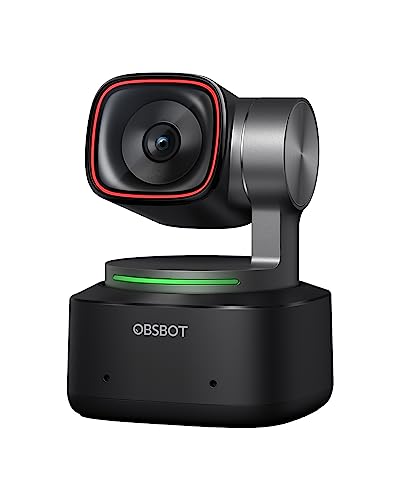
| OBSBOT Tiny 2 | Best Solo Tracking Camera | A 4K webcam that pans, tilts and zooms to follow you — the one-person studio that operates itself. |
| DJI Osmo Pocket 3 | Best Roaming Streamer | A gimbal-stabilised pocket camera that streams while walking — for content that refuses to sit down. |
| Logitech Brio 4K | Best Desk Streaming Webcam | The professional’s desk camera: sharp 4K, honest colour and set-and-forget reliability for talking-head streams. |
| GoPro HERO13 Black | Best for Extreme and Outdoor Streams | Waterproof, mountable everywhere and stream-capable — for broadcasts from boats, bikes and building sites. |
How Did We Judge a Streaming Ecosystem Against Standalone Cameras?
Our first criterion was the operator’s evening, not the spec sheet. Streaming cameras are run live, by people who are often also the talent, the sound engineer and the host. We judged setup time from bag to broadcast, the sanity of the control app, how the system behaves when Wi-Fi wobbles, and whether one person can plausibly run the show while also being in it. Mevo’s entire design brief is this criterion, which is why it headlines the guide despite its prose-only status here.
Second, image honesty. Streaming platforms compress aggressively, which forgives many camera sins and exposes others: poor low-light behaviour turns to mush under compression, while clean, well-lit 1080p survives beautifully. We favoured cameras whose pictures remain dignified after the platform’s compression has had its way, and we say plainly where 4K capture matters (cropping room, punch-ins, future-proofing) and where it is merely a brochure number the stream never shows.
Third, the ecosystem ledger. Mevo’s multicam magic lives partly behind subscription tiers; the alternatives charge once and ask nothing monthly, but demand more of the operator or a computer’s help. Neither model is a scam; they are different shapes of cost — money monthly versus effort nightly — and the right choice depends on whether your stream is a weekly institution (where subscriptions amortise) or an occasional broadcast (where they sting).
Finally, audio pathways. Every pick was judged on how it hears the room: built-in microphones for the simplest setups, and the routes — wireless mics, USB audio, mixer feeds — by which serious streams get their sound. A streaming camera without a credible audio plan is a silent-film machine with excellent resolution, and the reviews treat it as such.
We also applied a rule this keyword makes necessary: no pick was rewarded for a feature its target user cannot reach. A streaming camera whose best tricks require a broadcast engineer fails the volunteer test however impressive the demonstration, and a pocket camera was not penalised for lacking a switching desk it never promised. Each tool was judged at its own job — the only fairness streaming equipment ever asks for.
What Exactly Is Mevo, and Why Do Streamers Swear By It?
Mevo, now part of the Logitech family, makes cameras designed from a blank page for live streaming rather than adapted to it. The cameras are small, wide and wireless-first: they connect to the Mevo app on a phone or tablet, which becomes the production desk — framing, virtual close-ups from the wide sensor, graphics, and the go-live button for the major platforms. The multicam app extends the idea: several Mevo cameras (and even phones) become sources in a switched show, cut live by one operator tapping thumbnails, with the polish of a television gallery at a school-play budget.
The congregation-and-classroom effect explains the devotion. A volunteer with a tablet can produce a service or a school concert that looks directed — wide shot, speaker close-up, choir wide — without a video team, a capture rack or a laptop’s fanfare. Recordings land as files for later editing, streams go out live simultaneously, and the whole rig packs into a small case that lives in a cupboard between Sundays. For institutions, that combination of polish and volunteer-proofing is the product; the camera hardware is merely its delivery mechanism.
The honest debits belong in the same paragraph as the praise. The ecosystem’s best features live behind ongoing subscription decisions that have shifted over the years, so buyers must read the current terms with adult attention. The cameras are specialists: wide, fixed viewpoints that the app crops intelligently, rather than optical zoom cameras that roam. And low-light performance is serviceable rather than glorious — a candlelit service will test it in ways a lit stage will not. None of this diminishes the concept; all of it shapes who should buy in.
A note on the company’s ownership, since buyers research it: Mevo sits within Logitech’s creator portfolio, alongside the desk cameras that appear later in this guide as alternatives — a reminder that the streaming market’s tribes are less separate than their fan communities suggest, and that the right question was never which tribe, but which workflow your Tuesdays actually need.
When Does a Single Great Camera Beat a Switched Multicam Show?
Multicam switching is television grammar, and television grammar suits television-shaped content: seated speakers, staged performances, panels, services — anything with a fixed geography the cuts can map. The moment your content moves — a cooking demonstration roaming a kitchen, a workshop tour, a festival walkabout, a fitness class — the switched show fights you, and a single camera that follows, stabilises or simply goes where the action is will produce the better broadcast with a tenth of the operator stress.
Solo creators face a second version of the same question. A switched show needs an operator; if the operator is also the talent, the cuts happen late, the framing drifts, and the performance suffers in ways viewers feel as amateurism even when the picture is sharp. The tracking webcam and the gimbal camera exist to dissolve that dilemma — one follows you, the other moves with you — and for the growing class of one-person broadcasts, they are frequently the honest answer that Mevo’s marketing politely ignores.
None of this is an argument against Mevo; it is an argument for matching the grammar to the content. Buy the switched studio for the seated institution. Buy the follower or the roamer for the moving individual. The mistake is buying either for the other’s job and blaming the camera for a decision made at the shopping stage.
There is a middle path worth naming for growing programmes: begin with one camera of the grammar your content will keep — a Mevo wide shot for the institution, a tracker for the teacher — and let success argue for expansion. Programmes that start with a full switched rig often discover their content was a monologue; programmes that start honest discover their second camera’s necessity from evidence, and buy it with an audience already waiting.
Which Six Streaming Cameras Deserve Your Attention?
Two Mevo cameras first — prose-only, reviewed straight — then four linked alternatives from our verified pool, each owning a streaming philosophy Mevo does not. Read the verdicts against your content’s geography: seated and switched, solo and tracked, roaming, or desk-bound.
Prices are discussed as shapes rather than figures throughout — entry point, flagship, subscription-bearing — because streaming economics move with tiers and seasons, and a number printed here would be a lie by spring. The shapes, however, are stable, and they are what your committee or your household budget actually needs to weigh.
Mevo Start (Prose-Only) — The Mevo Entry Point
The Mevo Start is the ecosystem’s invitation: a compact streaming camera that captures a wide 1080p view, connects wirelessly to the Mevo app, and goes live to the major platforms with a simplicity that has converted thousands of institutions from ‘we should stream that’ to streaming every week. Its sensor’s width is the trick — the app punches in virtual close-ups from the wide frame, so a single Start on a tripod at the back of a hall can alternate between the wide shot and the speaker’s face under a volunteer’s thumb. Battery operation frees it from cable runs, and its price of entry is the gentlest in the Mevo world. We list it prose-only: our verified pool contains no Mevo listing, so we recommend the product and decline to invent a link.
Living with the Start teaches the ecosystem’s grammar quickly. Placement is destiny — the wide lens wants a considered position, close enough that the virtual crops stay clean, high enough to see over heads. Lighting decides its dignity: in a decently lit hall it looks professional; in a dim one, compression and noise conspire, and the fix is a lamp rather than a setting. Its built-in audio serves speech in small rooms respectably, while larger spaces ask for the wireless or wired audio routes the platform supports. As one camera of a future multicam rig, it also buys into the upgrade path — Starts remain useful as the wide or choir angle when a Core arrives as the main camera.
A word about who should not buy it, offered in the ecosystem’s defence: if your content is a single talking head at a desk, the Start is an elegant solution to a problem a webcam solves cheaper, and if your venue is a candlelit chapel, its low-light manners will make you wish for the Core’s lenses every single week. Ecosystems reward the correctly matched; the Start’s ideal owner runs a real room, with real occasions, on a volunteer’s rota.
- Output: 1080p streaming (platform specification)
- Control: Mevo app on phone or tablet
- Wireless streaming direct to major platforms
- Battery-powered for flexible placement
- Multicam-capable within the Mevo ecosystem
Strengths
- Simplest route to a directed-looking stream
- Volunteer-friendly app control
- Grows into a multicam rig as a second angle
Trade-offs
- Prose-only here — no verified listing in our pool
- Virtual crops soften compared with optical zoom
- Best features live within a subscription ecosystem
Best for: Churches, schools and creators starting a regular seated stream.
Not suited for: Roaming content, optical-zoom needs, or subscription-averse buyers.
Mevo Core (Prose-Only) — The Mevo Flagship
The Mevo Core is what happens when the Mevo idea grows up: a streaming camera built around a Micro Four Thirds sensor and interchangeable lenses, so the fixed wide view of the Start gives way to real optics — a fast prime for the candlelit venue, a zoom for the hall whose camera position is fixed by architecture. It records and streams at higher quality, offers professional touches like an HDMI output and proper audio inputs, and remains, at heart, an app-controlled Mevo: the same volunteer-friendly production desk, now fed by a genuinely photographic front end. For institutions whose streams have become flagship communications — the cathedral, the conference, the school whose concerts are watched by grandparents on three continents — the Core is the ecosystem’s summit. Prose-only here, for the same pool reason as its sibling.
The Core changes the craft conversation from placement to photography. Lens choice becomes a creative decision: depth of field to separate a speaker from a busy background, focal length to flatter rather than surveil, low-light glass to redeem the dim venue the Start merely survives. Its larger sensor holds up under platform compression with noticeably more grace, and its recording quality gives editors real material for the highlight clips that now promote every institution. The debits are the flagship’s usual ones — cost, complexity creep, and the same subscription landscape beneath — plus the honest note that its talents are wasted on a brightly lit talking head that the Start handles identically.
Venue managers should note its permanence potential: the Core installs happily as fixed infrastructure — mounted, cabled, integrated with the house audio — in a way the pocket alternatives never will. A camera that becomes part of the building changes the institution’s habits around it; streams stop being events and become simply what the hall does, which is the end-state every streaming programme is quietly aiming for.
- Sensor: Micro Four Thirds, interchangeable lenses
- Higher-resolution recording and streaming
- HDMI output and pro audio connections
- App-controlled Mevo production workflow
- Mains or battery operation
Strengths
- Real lenses transform framing and low light
- Best image quality in the Mevo ecosystem
- Professional connectivity for venues
Trade-offs
- Prose-only here — verify listings and terms yourself
- Costs flagship money; overkill for simple streams
- Lens choice adds decisions volunteers must learn
Best for: Institutions whose stream is a flagship channel, and dim or demanding venues.
Not suited for: Casual streamers or bright, simple talking-head setups.

OBSBOT Tiny 2 — Best Solo Tracking Camera
The Tiny 2 answers the solo streamer’s oldest problem — who is working the camera — by abolishing it. Mounted on a monitor or tripod, its gimbal head tracks you around the room with unsettling competence: stand, walk to the whiteboard, demonstrate the product on the side table, and the frame follows, zooming intelligently to keep you composed. Its 4K sensor gives the tracking room to crop without crumbling, its low-light behaviour embarrasses most webcams, and gesture and voice controls let you command it mid-sentence without breaking eye contact with your audience. For teachers, presenters, fitness instructors and demonstrators, it is the closest thing to hiring a camera operator that fits in a coat pocket.
The craft with the Tiny 2 is choreography rather than operation. You learn its tracking limits by rehearsing your movement vocabulary — how fast it follows, where it loses you against busy backgrounds, which gestures it reads reliably — and then you perform inside that vocabulary so fluently that viewers stop noticing the camera entirely. Lighting still rules: its sensor is good, not magical, and a lit presenter on the Tiny 2 out-streams a dim one on any camera in this guide. Paired with a proper microphone, it constitutes a complete solo studio whose entire setup time is measured in seconds.
Its privacy manners deserve a line, because tracked cameras raise eyebrows in shared spaces: the Tiny 2 announces itself, can be gesture-paused, and lives obviously on its perch rather than hiding. Classrooms and clinics that adopt it find the etiquette manageable precisely because the device is honest about what it is — a visible operator, not a covert observer — and that honesty is part of the design’s intelligence.
- Sensor: 4K, large for a webcam
- Two-axis gimbal tracking with auto-zoom
- Gesture and voice control
- USB-C connection to computer
- Strong low-light performance for its class
Strengths
- Operates itself while you present
- Tracking turns rooms into studios
- Excellent image for a webcam-class device
Trade-offs
- Needs a computer in the chain — not a standalone streamer
- Tracking can be fooled by clutter and second people
- Desk or tripod bound; not a roaming camera
Best for: Solo teachers, presenters, demonstrators and streamers who move.
Not suited for: Standalone phone-app workflows or multi-camera switched shows.

DJI Osmo Pocket 3 — Best Roaming Streamer
The Pocket 3 is the anti-Mevo: instead of planting cameras around a seated event, it puts one superb camera in a moving hand. Its three-axis gimbal renders walking footage eerily smooth, its one-inch-class sensor gathers light that shames phones, its autofocus and subject tracking keep a vlogger framed while narrating a market, a campus or a coastline, and it can stream live through DJI’s ecosystem when the story cannot wait for an edit. Creators whose content is a journey — travel, property tours, festival coverage, behind-the-scenes access — will find it the most liberating tool in this guide.
Streaming with it is a reporter’s craft. You think in sequences — establishing wide, walking middle, close detail — while the gimbal forgives your footfalls; you manage battery and connectivity as a field kit, with the phone as monitor and modem; and you learn its microphone arrangements, from the excellent built-ins to DJI’s wireless mic pairing, because roaming audio is where amateur streams die. Indoors it moonlights as a superb static camera on a mini tripod. What it will never be is a switched studio: one Pocket is one viewpoint, gloriously mobile, and the stream’s grammar is the walk rather than the cut.
Battery strategy defines its professional use: the camera itself runs long enough for most outings, but the streaming chain — phone as monitor and modem — drains faster than the camera does, so the field kit is really a power kit with a camera attached. Creators who solve that with a power bank and a cable routine stop thinking about it entirely, which is when the Pocket’s liberation actually begins.
- Sensor: 1-inch class, 4K
- Three-axis gimbal stabilisation
- Active subject tracking
- Live streaming via DJI app ecosystem
- Wireless microphone pairing available
Strengths
- Walking footage of uncanny smoothness
- Low-light quality phones cannot match
- A complete roaming studio in a pocket
Trade-offs
- One viewpoint — no multicam switching
- Streaming depends on phone and network
- Small screen; monitor via phone for precision
Best for: Travel, tours, events coverage and creators whose content moves.
Not suited for: Seated institutional shows needing switched angles.

Logitech Brio 4K — Best Desk Streaming Webcam
Not every stream roams or switches; most, by hours, are a person at a desk talking to other people, and for that dominant genre the Brio 4K remains a benchmark. Its 4K sensor allows a crisp 1080p stream with digital zoom headroom, its colour and exposure behave like a colleague rather than a casino, and its build and software ecosystem are the definition of set-and-forget: mount it, light yourself decently, and it will make you look professionally present for years of calls, webinars, podcasts and desk streams. In a guide full of exotic answers, it is the conventional one — and convention, at a desk, is a compliment.
The craft it rewards is the desk studio’s real curriculum: light placement, background discipline, microphone proximity, and the framing that puts your eyes at the upper third with headroom a broadcast director would approve. The Brio’s honest picture exposes sloppy versions of all four and flatters good ones, which makes it a quiet teacher. Its debits are the desk’s boundaries — it goes nowhere, tracks nothing, and needs a computer — but within those boundaries it is the pick least likely to be replaced, because desk streamers upgrade their lights and microphones for years before they outgrow this camera.
There is a longevity argument that desk streamers understand instinctively: the Brio’s class of product tends to serve through several computers, several jobs and several homes for the same creator. Cost-per-year, it is frequently the cheapest camera a professional ever owns — a boring sentence that explains its presence in more serious studios than any other pick here.
- Sensor: 4K with digital zoom headroom
- Adjustable field of view
- USB connection, broad software support
- Privacy shutter included
- Strong auto exposure and colour
Strengths
- Professional desk presence, zero fuss
- 4K headroom for cropped 1080p streams
- Reliability measured in years
Trade-offs
- Desk-bound and computer-dependent
- No tracking or movement
- Needs your lighting to look its best
Best for: Desk streamers, podcasters, webinar hosts and professionals on camera daily.
Not suited for: Rooms that move, stages, or standalone streaming.

GoPro HERO13 Black — Best for Extreme and Outdoor Streams
Some streams happen where cameras fear to tread: the kayak launch, the climbing gym, the marathon’s lead bike, the workshop’s dusty corner. The HERO13 Black is the streaming answer for those coordinates — waterproof, impact-tolerant, mountable to almost anything humanity has bolted a bracket to, and capable of live streaming through GoPro’s app while its stabilisation irons out the violence of real motion. Its wide lens swallows scenes whole, its accessory ecosystem is the deepest in action imaging, and its recordings double as superb conventional footage when the stream ends.
Field-streaming with it is logistics: connectivity is the fragile link outdoors, so the craft is planning the network (venue Wi-Fi, phone hotspot, or recording now and streaming the premiere later), managing batteries across a long event, and protecting the lens that salt, dust and rain all target. Audio outdoors belongs to wind management — muffs, placement, or a separate recorder for the commentary that matters. Judged as a studio camera it would be absurd; judged as the only camera that can stream from the middle of the river, it has no rival in this guide at all.
Event organisers have quietly adopted it as the volunteer’s camera: hand it to a marshal at the finish line, a coach on the sideline, a ranger at the viewpoint, and the stream gains angles no fixed rig could justify. Its cheapness relative to its toughness is the point — this is the camera you can afford to have everywhere, including the places ‘everywhere’ usually excludes.
- Video: high-resolution with HyperSmooth stabilisation
- Waterproof without housing
- Live streaming via GoPro app
- Vast mounting ecosystem
- Interchangeable lens mods available
Strengths
- Streams from places nothing else here survives
- Stabilisation for violent motion
- Doubles as a superb action recorder
Trade-offs
- Streaming depends on app and network quality
- Wide fixed lens suits scenes, not portraits
- Audio needs help in wind
Best for: Outdoor, sports and adventure streams, and hostile environments.
Not suited for: Desk polish, seated shows, or low-light interiors.
How Do the Six Streaming Philosophies Compare?
The table compares approaches rather than specifications: what runs the show, where the camera lives, and the price — in money, effort or subscription — that each philosophy charges.
Notice what the table cannot show: the operator’s learning curve. The Mevo column is learned in an afternoon by a willing volunteer; the roaming and tracking columns are learned by the performer over a month of broadcasts. Both curves are climbable — choose the one whose climber you actually have.
| Pick | Sensor / Format | Standout trait | Watch out for |
|---|---|---|---|
| Mevo Start (Prose-Only) | Switched single/multicam | App on phone or tablet | Fixed wide position; subscription tiers |
| Mevo Core (Prose-Only) | Switched multicam, pro | App plus real lenses | Flagship cost; lens decisions |
| OBSBOT Tiny 2 | Solo tracked | Itself — gimbal follows you | Computer required; desk/tripod bound |
| DJI Osmo Pocket 3 | Roaming single | The moving operator | One viewpoint; network dependent |
| Logitech Brio 4K | Desk talking-head | You, seated, lit | Stationary; computer required |
| GoPro HERO13 Black | Extreme single | The mounted adventurer | Audio and connectivity need planning |
What Does a Mevo Multicam Setup Actually Look Like in Practice?
Picture the school hall on concert night. Two Starts ride tripods at the back corners, a third sits near the stage for the close angle, and the music teacher’s tablet shows all three as thumbnails above a big red go-live button. The wide establishes the choir; a tap cuts to the stage camera for the soloist; the app’s punch-in frames the pianist’s hands from the wide shot. Parents at home watch a directed programme. The entire crew is one teacher, the entire rig fits a small case, and the recording waits on the cameras for the school’s archive afterwards.
Now picture the same evening honestly, including the rehearsal where the hall’s Wi-Fi proved to be a rumour and a range extender joined the kit, where the back-left camera’s battery plan was written on tape, where the soloist’s close-up was reframed after the dress run showed a music stand eating her face. Multicam’s magic is real, and it is built from such unglamorous rehearsals — which is why this guide keeps steering institutions toward systems whose rehearsals a volunteer can actually run.
How Much Should You Budget for the Rest of the Streaming Chain?
Price the chain before the camera, because the chain is where streams are actually won. A serviceable light or two transforms every pick here more than a model upgrade would; a proper microphone — wireless for the Mevo and roaming setups, USB or XLR for desks — transforms it more again, because audiences forgive soft pictures and abandon bad sound within a minute. Add the unglamorous lines: tripods that do not wobble, cables that reach, a network you have tested at the event’s hour, and any subscription tier your chosen ecosystem’s best features require.
A sane allocation for a new institutional setup often lands near half on the camera system and half on everything around it — the reverse of most first drafts of the budget. Streamers who invert that ratio deliberately, buying the simpler camera and the better light, produce the broadcasts that make other institutions ask what camera they used. The answer, awkwardly, is ‘the modest one, properly lit’ — which is the most useful sentence in streaming.
How Do You Choose a Streaming Camera When the Platform Keeps Changing the Rules?
Platforms revise resolutions, bitrates and recommended settings with the seasons, and a camera bought for one platform’s current specification is a hostage. The durable purchases in this guide share a trait: their value lives in physics rather than settings — lenses, sensors, stabilisation, tracking, ecosystem simplicity. Those virtues survive every platform changelog, while the camera bought for a single magic number is obsolete the day the number moves.
The same logic applies to the ecosystem question. A subscription platform will evolve its tiers; a standalone camera will evolve nothing at all. Neither is safe in the abstract — the skill is matching the risk to your horizon. Institutions streaming for a decade can ride an ecosystem’s changes as a cost of polish; creators whose format may pivot next quarter should own tools that pivot with them, even at the price of more nightly effort.
What Does the Audience Actually Notice in a Stream?
Research and common experience agree on the hierarchy, and it is not the camera’s. Audiences notice, in order: whether they can hear clearly, whether the picture is steady and lit well enough to read faces, whether the framing feels intentional, and only then the fine grain of resolution. This is liberating news for buyers — it means the mid-priced camera with a microphone budget and a lighting habit beats the flagship in a dark echoing room, reliably, measurably, every single week.
It also means your improvement path after buying any pick here is already written: fix sound, then light, then framing discipline, then — and only then — consider camera upgrades. Streamers who follow that order sound like professionals within a month. Streamers who reverse it own beautiful cameras and unwatchable archives, and their chat windows say so with a cruelty no review would dare.
How Should a Small Organisation Govern a Streaming Programme?
Treat the stream as a publication, not a gadget. Assign an owner, a deputy and a rota; write the one-page runbook — setup, checks, go-live, shutdown, where the recording lives; agree the safeguarding rules for filming minors and congregations before the first broadcast, not after the first complaint. The cameras in this guide were chosen partly for how kindly they treat this governance: systems a rota can run are systems that survive the founder’s holiday, illness and eventual handover.
Review the programme termly with the same honesty as any ministry or department: watch a recording together, count what the audience numbers actually say, and retire features nobody uses — including, occasionally, the stream itself for occasions that were better unstreamed. Governance sounds heavy for a camera guide, but institutions do not fail at streaming for lack of resolution. They fail for lack of a rota, and succeed on the strength of one.
Why Do So Many Streams Look Worse Than the Same Camera’s Recordings?
Because the stream is the recording after three negotiations the file never faces: the encoder’s real-time compromises, the network’s moment-to-moment generosity, and the platform’s transcoding for a hundred different viewer devices. A camera’s recorded file shows its ceiling; the stream shows the system’s average under load. This is why the rehearsal doctrine in this guide insists on judging the broadcast itself, on a phone, over the real network — the recording will flatter you, and flattery is not feedback.
The practical responses are all unglamorous: give the encoder headroom by streaming at a bitrate your upload sustains on its worst evening, not its best; prefer a slightly lower resolution delivered cleanly over a heroic one delivered in blocks; and keep the scene’s motion within your bitrate’s means — a static, well-lit shot survives compression that shreds a confetti storm. Streamers who internalise this stop chasing camera upgrades and start producing broadcasts that simply look calm, which audiences experience as quality.
How Do You Set Up Your First Stream Without Embarrassing Yourself?
Rehearse privately, on an unlisted or test stream, at the same time of day and on the same network as the real event. Run the whole show at performance length: batteries reveal their true endurance, networks reveal their evening congestion, apps reveal the update they were saving, and you reveal which cable is one metre too short. Every professional streamer has a private graveyard of test broadcasts; the audience simply never sees them, which is the entire point.
Build the pre-flight checklist on paper: camera charged and mounted, lens clean, framing checked on the actual viewing device (a phone, where most of your audience lives), audio monitored through headphones for ten honest seconds, titles and descriptions set, and a human assigned to watch the stream itself — not the room — with authority to wave at you. Streams fail in the gap between what the room hears and what the audience hears; the watcher closes that gap.
Afterwards, watch your own recording with a notebook. Note the three worst moments and fix exactly those before the next broadcast. Streaming craft compounds like interest: small, specific corrections, applied weekly, turn an amateur show into an institution’s pride within a term — on any camera in this guide.
Write the runbook while the rehearsal is fresh: the order of powering up, the exact app screens, the framing marks on the tripod, the phone number of the person who knows the Wi-Fi password. Future-you, arriving flustered twenty minutes before a service, will read that page like scripture — because in the only sense that matters, it is.
How Should Churches and Schools Choose Between Mevo and the Alternatives?
Start with the operator, not the occasion. If your stream will be run by rotating volunteers of varying confidence, Mevo’s app-switched simplicity is not a luxury; it is the difference between a stream that happens weekly and one that happens when the one technical person is in town. Choose the Start for bright, simple rooms; consider the Core where the room is dim, large or lens-demanding; and read the current subscription terms as a committee, with the treasurer present, because the ecosystem’s ongoing shape is a governance decision as much as a technical one.
If instead your content is a single presenter — the online lesson, the recorded-then-streamed talk, the solo service leader during a closure — the tracking webcam or a desk setup serves better and charges nothing monthly. And if your institution’s life happens outdoors and in motion, the roaming picks own that territory outright. The institutions that stream happiest are the ones that chose for their actual calendar rather than for the most impressive demonstration video.
Whichever system the committee chooses, pilot it at one real but low-stakes occasion — the midweek meeting, the rehearsal, the friendly — before the flagship event. Pilots convert opinions into evidence, and committees that have watched one honest pilot argue about facts instead of fears.
What Mistakes Do New Streamers Make With Good Cameras?
Buying the camera and neglecting the network. A stream is a promise your upload bandwidth must keep for two unbroken hours; test it at the event’s time, on the event’s day-type, and treat a wired connection or a proven extender as part of the camera budget. More first streams die of Wi-Fi than of every camera fault combined.
Judging the picture in the room instead of on the stream. The audience sees the compressed, phone-sized, possibly sunlit version. Monitor the actual broadcast on a phone with the sound up, and light and frame for that rectangle — faces larger, contrasts kinder, backgrounds quieter than the room suggests.
Treating audio as the camera’s job. Built-in microphones are for convenience, not for halls. The distance between the speaker and the microphone is the single largest determinant of stream quality after the network; close that distance with wireless or wired audio and every camera in this guide sounds twice its price.
Falling for resolution the platform discards. A 4K badge does not survive a 1080p pipeline, but the cropping room and punch-in quality behind that badge might matter enormously. Buy the capability you will use — tracking, lenses, stabilisation, ecosystem — not the number you will not.
Skipping the rehearsal because the system is ‘simple’. Simple systems fail simply: a flat battery, a logged-out account, an app update. The private test stream is the cheapest insurance in broadcasting, and the professionals’ universal habit is the strongest hint this guide can offer.
Announcing a streaming programme before the third successful private rehearsal. Institutions and creators alike have launched to an audience of disappointed regulars because the first public stream was also the first full test. Premiere quietly, archive the evidence, and let the fourth broadcast be the one you advertise — nobody can tell it is the fourth, and everybody can tell when it is the first.
Letting the most technical volunteer design the system alone. The rota that must run it includes the least technical person who will ever hold the tablet; design for their Tuesday, document for their memory, and the programme survives every holiday and handover the calendar invents.
Final Recommendation
If your stream is a seated institution — services, concerts, lessons, meetings — run by one operator or a rota of volunteers, Mevo remains the concept to beat: the Start for most rooms, the Core where light, distance or ambition demand real lenses. We cannot link either under our pool rules, and we recommend investigating both anyway, subscription terms read carefully and all.
If your stream is a person rather than a place, the alternatives take over: the OBSBOT Tiny 2 for the presenter who moves, the DJI Osmo Pocket 3 for the creator who roams, the Logitech Brio 4K for the desk that streams daily, and the GoPro HERO13 Black for everywhere cameras are not supposed to live. Each is linked, verified and excellent at exactly one philosophy of broadcasting.
Choose the philosophy before the product, fund the light and the microphone before the upgrade, and rehearse in private before you premiere in public. Do those three things and any camera in this guide will make you look like you have been streaming for years.
And a closing honesty, since this guide began with one: if you arrived wanting permission to buy the Mevo, you have it — for the right room and the right rota, it is a genuinely beloved tool, and its owners’ loyalty is earned weekly. If you arrived wanting permission to choose something else, you have that too, with four linked reasons sitting below the Mevos in this very article. Either way, stream the rehearsal first.
Related guides
Frequently Asked Questions
Why are the Mevo cameras not linked in this guide?
Our links come only from a verified product pool for this site, and that pool contains no Mevo models. Rather than omit the ecosystem the keyword asks about — or invent a listing — we review both Mevo cameras prose-only and link the verified alternatives. Current Mevo listings and terms are easy to check directly.
Is Mevo’s subscription worth it?
For weekly institutional streams using multicam switching and the platform’s production features, most operators judge it so — the cost of a video team dwarfs it. For occasional or single-camera streams, the maths weakens. Read the current tiers against your actual feature use before committing; ecosystems change their terms over time.
Can one Mevo camera really replace a camera operator?
For seated content, largely yes: the wide frame plus app punch-ins covers the wide-and-close grammar of simple shows. It cannot follow action, reframe creatively or rescue bad placement — the operator’s judgement moves from the camera to the setup, where a volunteer can supply it in advance.
Which pick is best for a solo teacher streaming lessons?
The OBSBOT Tiny 2, because it follows you to the board and back while you teach, with no operator and no computer-side switching. Pair it with a wireless microphone and a decent light and the setup rivals small production teams for lesson-shaped content.
Do I need 4K for streaming?
Rarely for the stream itself, which platforms usually deliver at 1080p or below — but 4K capture buys clean punch-ins, cropping room and better recordings for later editing. Buy it as production headroom, not as a broadcast resolution, and it earns its keep.
What internet speed does a good stream need?
A stable upload comfortably above your chosen bitrate, sustained for the whole event — stability matters more than headline speed. Test at the real time and place, prefer wired connections for fixed rigs, and keep a phone hotspot as the documented plan B.
Can these cameras record and stream at the same time?
The Mevo cameras and the GoPro are designed around that dual duty, and the webcam-based picks record through your computer software. Recording every stream is a habit worth forming: the archive becomes your highlight reels, your safeguarding record and your second chance when a live moment glitches.
Can I use a Mevo camera without the app ecosystem at all?
The Core’s HDMI output gives it a life as a conventional camera feeding other production tools, which hedges the ecosystem bet for larger venues. The Start is more thoroughly an app appliance — buy it for the ecosystem, happily and knowingly, rather than hoping to escape it later.
Which of these is easiest for a complete beginner?
For a seated room, the Mevo Start’s app is the gentlest first production desk ever made. For a solo presenter, the OBSBOT’s self-operation is gentler still, because there is no desk at all. Beginners should choose by which of those two sentences describes their stream, and ignore every other consideration until the third broadcast.
Related Guides
Keep exploring with best cameras for live streaming youtube and best cameras for livestream and best cameras for internet streaming.


