ilcastellomenu.com is reader-supported. When you buy through links on our site, we may earn an affiliate commission.
Where to Buy
Homeowners asking for the best channel for wireless video surveillance cameras are usually standing in front of a screen that says a camera is offline, again, at the exact moment they wanted it online. The good news hidden inside that frustration is that the answer is rarely a new camera. Wireless cameras live or die by the invisible geography of your home’s Wi-Fi, and the channel your router uses, the slice of the 2.4GHz band where your network talks, decides whether six cameras share a quiet country lane or a rush-hour motorway.
The short answer deserves to arrive early: on the 2.4GHz band, which is where almost every camera in this guide prefers to live, only three channels are truly separate from one another, channels 1, 6 and 11. Everything else overlaps a neighbour. Choosing among those three, based on which is least crowded in your particular airspace, is the single most effective free upgrade a camera system can receive, and the rest of this guide teaches how to survey the crowding, make the choice, and set up the six recommended cameras so they stay connected through winter evenings and neighbourhood streaming hours alike.
The six cameras below were chosen as citizens of that 2.4GHz world: indoor and outdoor models from our verified pool that sip bandwidth politely, reconnect gracefully after an outage and make sensible demands on a home network. Judge them alongside the channel advice rather than instead of it, because the finest camera on a drowned channel will still miss its moment, and a modest camera on a clear channel will quietly never miss one.
Key Takeaways
- On 2.4GHz, only channels 1, 6 and 11 do not overlap; start there, always.
- Cameras belong on 2.4GHz for its reach through walls, not on faster 5GHz.
- Survey your neighbours’ channels before choosing; the emptiest of the three wins.
- Fix the router’s channel instead of letting it wander nightly.
- A mesh node or access point near distant cameras beats a stronger router far away.
- Most “faulty camera” stories are channel stories in disguise.
In this guide
Quick Picks
| Camera | Badge | Why it earns its place |
|---|---|---|
| Wyze Cam v4 | The value camera that rewards a clean channel | Colour night vision and local recording, happiest on an uncongested 2.4GHz lane. |
| Blink Outdoor 4 | The light-sipping outdoor camera | Event clips rather than constant streaming keep its network appetite tiny. |
| Ring Indoor Cam (2nd Gen) | The polite indoor citizen | A privacy shutter and modest demands suit busy family networks. |
| TP-Link Tapo C210 | The budget room watcher | Pan-and-tilt coverage with card recording that keeps working when the internet sulks. |
| eufy Indoor Cam E220 | The local-storage indoor pick | Sharp indoor pictures with home-based storage options that ease network pressure. |
| Google Nest Cam Indoor (Wired, 3rd Gen) | The smart-home anchor camera | Polished alerts and integration for homes already living in Google’s ecosystem. |
How Did We Judge Cameras by Their Network Manners?
A camera’s network manners matter as much as its lens once a household owns several, so the judging here weighed behaviour on a shared home network alongside picture quality. Cameras that record events rather than streaming constantly, that buffer locally when the connection dips, and that reconnect without demanding a ladder and a reset button after every router reboot were favoured, because those habits decide whether a system feels like security or like a second job in tech support.
Bandwidth honesty received the same scrutiny as image claims. A camera advertising a sharp picture should disclose, in its behaviour if not its box, what that picture costs the network when several cameras fire at once, and the picks below were chosen because their appetites stay proportionate to domestic broadband. The channel guidance in this guide will carry any of them; it simply refuses to let a network-hungry outlier pretend the resulting congestion is the router’s fault.
Finally, every pick had to forgive the average home’s realities: a router in a cupboard, thick walls, neighbours with networks of their own, and an owner who will set the system up once and expect it to behave for years. Cameras needing laboratory network conditions need not apply, and none did.
Why Do Channels 1, 6 and 11 Rule the 2.4GHz Band?
Picture the 2.4GHz band as a row of overlapping umbrellas rather than a row of separate rooms. Each Wi-Fi channel is wide enough to shade its neighbours, so a network on channel 3 is also, partially, a network on channels 1, 2, 4 and 5, interfering with all of them while being interfered with in return. Only channels 1, 6 and 11 sit far enough apart that their umbrellas do not touch, which is why every professional installer recites those three numbers the way sailors recite the points of a compass.
Overlap is not a subtle tax. When two networks on overlapping channels transmit at once, their radios cannot cleanly hear one another’s turn-taking signals, so packets collide, retries multiply and the effective speed of both networks falls far below what either could achieve alone. Cameras suffer first and loudest in that environment because video is a continuous, impatient kind of traffic, and a camera retrying its way through a congested channel is the camera that shows offline, buffers at the crucial second or delivers its alert after the visitor has left.
The practical doctrine follows immediately. Set your router to whichever of 1, 6 or 11 is least used around you, fix it there rather than trusting automatic selection, and understand that a neighbour on channel 4 is not being rude, merely uneducated, and is damaging their own cameras as faithfully as yours. Where a whole street has been professionally advised, the three clean channels divide the airspace like three quiet lanes, and everyone’s cameras behave as though the neighbourhood were emptier than it is.
Why Do Cameras Belong on 2.4GHz When 5GHz Is Faster?
Because cameras do not need speed; they need reach and reliability, and physics gives those gifts to the slower band. The 2.4GHz signal travels further and passes through walls, floors and brickwork with far less loss than 5GHz, whose speed evaporates with distance and obstacles. A camera on a garage wall or at a garden gate may see a strong, steady 2.4GHz signal from a router that its 5GHz network cannot reach at all, and a steady modest stream beats a theoretical fast one that drops every hour.
Bandwidth arithmetic settles any remaining doubt. A security camera’s live view and event clips consume a small, steady sip of data compared with the gulps of a video call or a game download, so the enormous capacity of 5GHz buys a camera nothing it can drink. What it buys the rest of the household is room: keeping cameras on 2.4GHz leaves the fast band clear for laptops, televisions and phones, a division of labour that makes every device in the house behave better simultaneously.
Many routers helpfully broadcast both bands under one network name and steer devices between them, which is convenient for phones and occasionally confusing for cameras during setup. If a camera refuses to join during installation, the classic remedy is to walk it, and the phone setting it up, to the far end of the garden where only 2.4GHz reaches, complete the pairing there, and let the camera keep the band it was born on. Installers have performed that small pilgrimage in a thousand hallways, and it works because the physics in this section is not a suggestion.
Which Are the Best Cameras to Run on the Best Channel for Wireless Video Surveillance Cameras?
Six linked cameras follow, each introduced with the network personality that makes it a good citizen of a well-chosen channel.

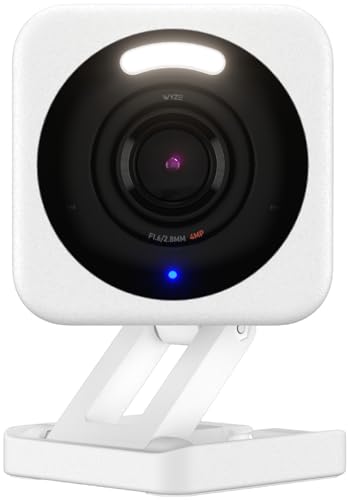
Wyze Cam v4 — The value camera that rewards a clean channel
The Wyze Cam v4 is the camera this guide’s channel sermon was written for, because its bargain price buys a picture, colour night vision included, that far more expensive cameras respect, provided the network underneath it is not a brawl. On a clear 1, 6 or 11, its live view opens promptly, its spotlight-assisted night clips arrive intact, and its local card recording quietly insures the archive against any evening the internet spends sulking.
Its network personality is that of a steady tenant rather than a demanding one. It holds a 2.4GHz connection through ordinary household walls with the stubbornness its owners praise in reviews, and it asks the router for a modest, predictable stream rather than theatrical bursts. Households building a first multi-camera system often start here, at the door and the drive, and discover that two or three of these on a well-chosen channel behave better than a single premium camera drowning on a crowded one.
- Band: 2.4GHz Wi-Fi, reach over speed
- Recording: local card plus optional cloud plans
- Night work: colour night vision with spotlight
- Placement: sheltered outdoor and indoor posts
- Role: the first cameras of a growing system
Strengths
- Picture quality embarrasses its price class
- Local recording survives internet outages
- Steady tenant on a shared home network
Trade-offs
- Wired power limits mounting adventures
- Full features lean partly on a subscription
- Crowded channels expose it like any camera
Treat its setup as the system’s founding ritual. Pair it after the router’s channel has been fixed, not before, position it, then walk away and test the live view at the evening hour when the neighbourhood’s networks all wake up together. Owners who perform that small ceremony report a camera that simply works for seasons, which at this price is a sentence worth framing.
As the system grows around it, the v4 also teaches the household its own network geography: the corner where its signal thins is the corner where every later camera will struggle, and the mesh node or channel change that rescues it becomes infrastructure the whole fleet inherits. Few bargains educate their owners so usefully while guarding the door.
Best for: first systems, doors, drives and anyone pairing value with a tidy network. Not suited for: mounting beyond power’s reach or owners allergic to any subscription options

Blink Outdoor 4 — The light-sipping outdoor camera
If network congestion is the disease, the Blink Outdoor 4 is the camera that barely eats. It sleeps on batteries for long seasons, wakes for events, sends a clip and returns to silence, so its total demand on your chosen channel across a whole day can be less than a single minute of a streaming camera’s appetite. For households whose broadband is modest or whose camera count is ambitious, that frugality is a system-level feature disguised as a battery feature.
Its conversation with the network runs through a sync module, a small hub that speaks to the cameras in a low-energy dialect and handles the Wi-Fi relationship on their behalf. That arrangement asks the owner to place the module with a little thought, within good range of both router and cameras, and repays the thought with outdoor cameras that can live on fences and trees far beyond the reach a Wi-Fi-hungry design would allow.
- Band: via sync module to 2.4GHz Wi-Fi
- Appetite: event clips only, minimal channel use
- Power: long-life batteries, no cable at all
- Night work: infrared recording after dark
- Role: perimeter posts far from the router’s comfort
Strengths
- Barely troubles the channel it lives on
- Mounts where no other camera here can
- Battery seasons match its network frugality
Trade-offs
- Live viewing is a treat, not a habit
- Full features lean on a subscription
- The sync module needs a thoughtful home
Consider it the answer to the channel problem’s hardest version: the camera that must live at the bottom of the garden. A streaming design would fight the distance and the neighbours’ channels all day; the Blink simply whispers a few clips through whatever air it finds and sleeps through the congestion wars entirely. Systems with several perimeter posts often standardise on it for exactly that peace.
Its discipline does ask the owner to accept event-based faith. You will not idly watch the fence line over breakfast, and the camera’s silence between events must be read as health rather than absence. Owners who make that mental adjustment gain the cheapest-to-run outdoor coverage in this guide, in batteries and bandwidth alike.
Best for: fences, gates, sheds and big camera counts on modest networks. Not suited for: owners who want continuous live views of the garden

Ring Indoor Cam (2nd Gen) — The polite indoor citizen
Indoor cameras live in the network’s parlour, close to the router and closer to the household’s sensibilities, and the Ring Indoor Cam’s defining feature addresses the second of those: a physical privacy cover that closes over the lens and mutes the microphone with a click you can see. In a guide about invisible infrastructure, a visible, mechanical promise that the camera is off earns its mention, because a camera the household trusts is a camera that stays plugged in.
On the network it is an undemanding guest, a wired indoor camera drawing a modest stream on 2.4GHz and integrating with the wider Ring household of doorbells and alarms that many homes already run. Its alerts arrive with the polish of a mature ecosystem, and its presence near the router means it rarely tests the channel lessons of this guide, which is itself a kind of recommendation: the parlour camera should be the boring one.
- Band: 2.4GHz Wi-Fi, indoor range
- Privacy: physical cover for lens and microphone
- Power: mains, always ready
- Ecosystem: Ring app and household devices
- Role: halls, living spaces and pet watching
Strengths
- Privacy cover settles household politics
- Ecosystem alerts are polished and prompt
- Undemanding on the home network
Trade-offs
- Best features sit behind a subscription
- Indoor only; no weather ambitions
- Ecosystem loyalty is part of the price
Its second domestic virtue is diplomacy with guests and family. A camera that can be visibly closed when grandparents visit or when the living room becomes a birthday party avoids the slow resentment that unplugs indoor cameras in so many homes by their second month. Security that survives socially is security that survives, and the little cover is this pick’s contribution to that larger truth.
Place it for the doorway it watches rather than the room it sits in, keep it on the same fixed channel as the rest of the fleet, and it will repay the household with years of unremarkable, reliable service, the highest praise an indoor camera can earn.
Best for: Ring households, living spaces and privacy-conscious families. Not suited for: outdoor posts or owners avoiding subscriptions entirely

TP-Link Tapo C210 — The budget room watcher
The Tapo C210 brings a motorised head to the network conversation: one camera that pans and tilts across a whole room consumes one connection, one channel’s small sip, where three fixed cameras would consume three. For flats, small shops and single-room duties, that economy of connections matters as much as its economy of price, and its memory card recording means the room stays documented even on evenings the broadband itself has given up.
Its manners on a home network are those of a contented lodger. It holds its 2.4GHz link through the ordinary obstacles of indoor life, reconnects after outages without ceremony, and asks nothing exotic of the router beyond the fixed, uncrowded channel this guide keeps prescribing. Owners pairing it with a budget router in a small home routinely report the least eventful setup in this entire list, which is a compliment of the highest order in networking.
- Band: 2.4GHz Wi-Fi, indoor distances
- Coverage: pan and tilt from one connection
- Recording: memory card inside the camera
- Night work: infrared across the room
- Role: flats, nurseries, offices and small shops
Strengths
- One connection covers a whole room
- Card recording outlasts internet outages
- Gentle demands on modest routers
Trade-offs
- Indoor design excludes porches and eaves
- Motors are audible in quiet rooms
- Monochrome only after dark
Small businesses give it a second career. A café or a studio flat’s worth of space, one shelf, one socket and one camera sweeping the till, the door and the stock corner in infrared all night, is a security arrangement whose total network footprint would not trouble a bedsit’s router. The channel lessons still apply, a neighbour’s overlapping network can bully any camera, but the C210’s modest needs make it the most forgiving pupil in this guide’s classroom.
Renters, finally, should note how completely it respects their constraints: no drilling required, no hub, no contract, and it leaves in a box when the tenancy does, taking its recordings’ home with it on its card. In a category that loves permanence, that portability is a feature with a constituency of millions.
Best for: flats, renters, small shops and one-room coverage on any budget. Not suited for: outdoor duty or silent bedrooms

eufy Indoor Cam E220 — The local-storage indoor pick
The E220’s network philosophy is localism. It records sharp indoor pictures, pans to follow a pet or a person across the room, and offers storage arrangements centred on the home rather than the cloud, which means its relationship with your Wi-Fi can be about alerts and live checks rather than about uploading every recorded minute through your chosen channel to a distant server. On a congested network, that difference in philosophy is felt as speed.
Its picture flatters the rooms it guards. Faces at conversational distances, a child’s expression, a pet’s crime in progress, arrive with a detail that makes indoor footage worth keeping, and its infrared night mode keeps the hallway legible after lights-out. As a network citizen it is a mid-weight tenant, hungrier than the event-only Blink, lighter than a constantly uploading design, and happiest, like everything in this guide, on a fixed channel with elbow room.
- Band: 2.4GHz Wi-Fi, indoor range
- Storage: local-centred options ease uploads
- Coverage: pan and tilt following movement
- Night work: infrared for unlit rooms
- Role: detailed indoor watching with local leanings
Strengths
- Local storage philosophy lightens network load
- Indoor detail is genuinely identifying
- Subscription pressure is lower than rivals
Trade-offs
- Indoor body, no outdoor assignments
- Home hub options add setup thought
- App ecosystem is its own island
Households wary of subscriptions find their champion here, and the network benefits compound the financial ones: footage that lives at home does not queue for upload behind the evening’s streaming, and alerts generated locally can arrive with a promptness cloud round-trips struggle to match. On the crowded-channel evenings this guide exists to fix, the E220’s local habits make it the indoor camera least likely to be the one buffering.
Give it the same founding courtesies as the rest of the fleet, a fixed channel, a position with honest signal, a week of checking its night work, and it will serve as the indoor anchor of a system whose other cameras handle the weather. Anchors are not glamorous, and systems fail without them.
Best for: subscription-wary households wanting detailed indoor coverage. Not suited for: outdoor posts or single-app households loyal elsewhere
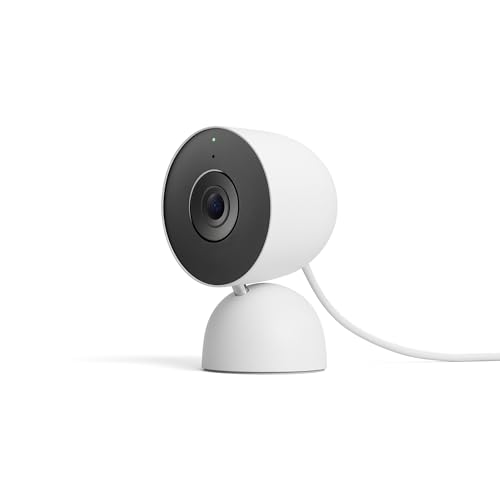
Google Nest Cam Indoor (Wired, 3rd Gen) — The smart-home anchor camera
The Nest Cam Indoor is the pick for homes already furnished with Google’s voice, routines and displays, where a camera’s highest virtue is belonging. Its alerts distinguish the meaningful from the mundane with the confidence of a mature platform, its picture is polished, and its wired design means it is always awake, always connected and never negotiating a battery’s decline in the middle of the night it was needed.
That belonging extends to the network. Inside a Google-centred home, the camera cooperates with the household’s displays and speakers, showing its view where the family already looks, and its demands on the 2.4GHz band are the predictable, steady kind that a fixed channel serves without drama. It is, deliberately, the least surprising camera in this guide, and surprise is a quality security systems are better without.
- Band: Wi-Fi with a steady, predictable appetite
- Power: wired, permanently awake
- Alerts: platform-mature person and event awareness
- Ecosystem: Google Home displays and routines
- Role: the anchor camera of a Google household
Strengths
- Integration makes its footage effortless to reach
- Alerts are discerning rather than noisy
- Wired readiness, no battery calendar
Trade-offs
- Full history features lean on a subscription
- Value fades outside Google’s ecosystem
- Indoor assignment only
Think of it as the camera that turns a network into a household system. A door camera may catch the visitor, but the Nest on the hall table is the one the family actually consults, on the kitchen display, by voice, in the flow of ordinary life, and that consultability is a network feature in human terms: information that cannot be reached might as well not have been recorded.
Owners outside Google’s garden should let the E220 or the Ring pick argue for their ecosystems instead, because this camera’s premium is precisely its belonging. Inside the garden, on the fixed channel this guide prescribes, it is the calm centre of the fleet.
Best for: Google Home households wanting a polished indoor anchor. Not suited for: other ecosystems or subscription-free purists
How Do the Six Cameras Compare as Network Citizens?
| Camera | Network appetite | Outage behaviour | Watch it struggle when |
|---|---|---|---|
| Wyze Cam v4 | Steady, modest stream | Card keeps recording locally | Power cannot reach the post |
| Blink Outdoor 4 | Tiny, event clips only | Sleeps and retries quietly | You want live viewing on demand |
| Ring Indoor Cam (2nd Gen) | Light indoor stream | Reconnects inside its ecosystem | Subscriptions are unwelcome |
| TP-Link Tapo C210 | One link for a whole room | Card recording carries on | The post moves outdoors |
| eufy Indoor Cam E220 | Local-leaning, mid-weight | Home storage keeps working | Your household lives in another app |
| Google Nest Cam Indoor (Wired, 3rd Gen) | Predictable and steady | Wired readiness resumes fast | Your home runs a rival ecosystem |
Notice that the outage column, not the appetite column, predicts owner happiness across a year: networks fail in small ways constantly, and cameras are loved for how they behave in the minute after.
How Do You Survey Your Airspace and Pick Your Channel?
Begin with a free Wi-Fi analyser application on a phone, the kind that lists every nearby network with its channel and strength, and walk the house with it at the hour your cameras matter most, which is the evening when every neighbour is home and streaming. You are looking for a simple picture: which of channels 1, 6 and 11 already carry strong networks near your router and near your furthest camera, and which of the three is comparatively empty in your particular slice of street.
Choose the emptiest of the three, weighting the strength of rivals over their mere existence. A faint network from two streets away on channel 6 matters less than a powerful one through the party wall on channel 1, because interference is a conversation between loud neighbours, not a census of whispers. Where all three carry strong rivals, pick the channel whose strongest rival is weakest at your furthest camera’s position, since that camera, not the one beside the router, is where your system will fail first.
Then fix the choice. Enter the router’s settings, set the 2.4GHz channel explicitly to your winner, set the channel width to the narrower, politer setting where the option exists, because wide channels on 2.4GHz are umbrellas doubled in size, and disable any nightly automatic optimisation that will helpfully wander your network back into the crowd. Reboot, let every camera rejoin, and test each live view that same evening. The whole ceremony takes less time than a single call to a camera maker’s support line, and it prevents a hundred future ones.
Where Should the Router and Any Mesh Nodes Actually Live?
Routers radiate like light bulbs, dimming with distance and shadowed by dense materials, so the founding rule is elevation and centrality: high on a shelf, toward the middle of the home, out of the cupboard whose door has been absorbing half its voice since installation day. Metal appliances, mirrors, fish tanks and masonry chimneys are all quiet saboteurs, and a router moved one metre away from a fridge can gain a room’s worth of coverage without a single setting being touched.
For cameras at the property’s edges, the honest solution is a second voice rather than a louder first one. A mesh node or wired access point placed between the router and the far cameras gives those cameras a nearby conversation instead of a shouted one, and because mesh systems share the same channel plan, the 1-6-11 discipline still governs the whole. Place the node where it itself enjoys a strong signal, halfway in signal terms rather than in metres, because a node repeating a weak signal merely distributes weakness with confidence.
Test the result from the camera’s point of view, not the phone’s. Phones have better radios and more forgiving software than cameras, so a phone showing full signal at the gate does not acquit the gate camera’s position. Use each camera’s own live view and, where the app offers it, its reported signal strength, across several evenings, and treat a camera that only fails at 8 p.m. as a congestion case for the channel cure rather than a range case for new hardware.
How Many Cameras Can One Channel Honestly Carry?
Fewer than the box art implies and more than pessimists claim, because the true unit is simultaneous activity rather than camera count. Six cameras asleep or watching empty rooms consume almost nothing; two cameras streaming live views while a third uploads a long event can crowd a bruised channel by themselves. Event-based fleets, led by designs like the Blink in this guide, scale gracefully into double figures on ordinary broadband, while always-streaming habits should be budgeted like guests at a dinner table.
Resolution is the owner’s throttle. A camera set to its sharpest stream for a quiet hallway is spending channel capacity on information nobody will ever zoom into, and stepping secondary cameras down a level buys headroom the whole fleet can feel on busy evenings. Keep the door and the drive at full quality where identification lives, let the garden shed’s watcher run leaner, and the system gains the steadiness that owners usually try to buy with a new router.
Upload speed, finally, is the ceiling nobody reads. Cameras send their footage upward, toward apps and clouds, and many home connections offer a fraction as much upload as download. Count your cameras’ combined upward appetite against that figure honestly, especially where several cloud-recording cameras share a rural connection, because a channel can be perfectly chosen and the pipe beyond the router still too narrow for the fleet’s ambitions.
What Mistakes Make Owners Blame Good Cameras?
Leaving the router on automatic is the original sin this guide exists to absolve. Automatic selection sounds intelligent and often is, once, on the day of installation; thereafter it may hop channels nightly, strand cameras that rejoin slowly, and settle repeatedly on crowded choices because its brief survey happened at noon. A fixed, surveyed channel chosen by the method above outperforms the algorithm across a year in almost every real street.
Chasing 5GHz for cameras runs second. Owners see the faster band and promote their cameras to it, then watch range and reliability quietly deteriorate behind walls the speed cannot penetrate. Keep cameras on the reaching band, keep the fast band for the devices that can drink from it, and the whole household’s network behaves like a well-run hotel where every guest is in the right room.
Finally, owners stack new cameras onto an unexamined network and diagnose hardware. The sixth camera is accused of being faulty when the channel was already full at five, and returns departments receive innocent cameras by the pallet. Survey first, fix the channel, place the node, and only then judge the camera, in that order, and most ghosts in this particular machine simply leave.
What Other Devices Are Fighting Your Cameras for the Air?
The 2.4GHz band is a public park used by far more than Wi-Fi. Microwave ovens leak into it enthusiastically, which is why some cameras stutter at lunchtime in kitchens within range of the oven’s door. Older cordless phones, baby monitors, wireless video senders and a small nation of Bluetooth gadgets all take their walks in the same park, and while modern versions play politely, a single elderly device transmitting continuously can bruise a channel more thoroughly than three neighbouring networks combined.
Diagnosis follows the pattern of the failures. A camera that falters when the microwave runs has identified its bully; a baby monitor moved to another room can return an entire camera to health; a neighbour’s new gadget cannot be moved, which is when the channel change earns its keep by walking your whole network to a quieter corner of the park. Keep a small notebook of when failures happen for one week, and the pattern will usually name the culprit more honestly than any guess.
Your own household’s habits belong in the same audit. A game console downloading at dinner, a backup service uploading a photo library at midnight, a doorbell and four cameras all waking for the same delivery: these are legitimate citizens whose combined rush hour is the system’s real peak. Stagger the backups to the small hours, let the console download when it likes but know that it does, and the cameras’ evening becomes measurably calmer without a single purchase.
How Do Flats and Terraced Streets Change the Survey?
Dense housing multiplies everything this guide has said. A flat may survey thirty networks before breakfast, with strong rivals on all three honest channels and a party wall conducting a neighbour’s router like a speaking tube. In that airspace the goal shifts from finding an empty channel, which does not exist, to finding the least-bad one and then shrinking your own cameras’ needs: event-based designs, local recording and stepped-down secondary streams stop being thrift and become survival.
Geometry helps the dense dweller in one specific way: height and interior placement matter more than channel artistry. A router moved from the floor behind the television to a high central shelf can rise above the worst of the horizontal crowd, and cameras placed on interior walls rather than party walls gain a building’s worth of shielding from the loudest rival next door. In flats, carpentry is networking, and the shelf is a settings page you can touch.
Detached houses enjoy the opposite fortune and should not squander it. With few rivals, almost any of the three channels will serve, which tempts owners to skip the survey and the fixing, until the one new neighbour, the farm’s new tenant or the annexe’s new router arrives and the automatic setting begins its nightly wandering. Survey anyway, fix anyway, and the rural system gains the same boring reliability the flat-dweller is working so much harder to buy.
How Should You Maintain the Network After the System Works?
Networks drift like gardens. Routers receive updates that reset cherished settings, neighbours install equipment, a new appliance joins the park, and the channel that was emptiest in spring can be a thoroughfare by Christmas. The maintenance rhythm is light but real: glance at the analyser survey each season, confirm the router still sits on its assigned channel after any update or power cut, and re-run the evening live-view test on the furthest camera whenever anything in the house’s wireless life changes.
Keep a one-page record of the system’s decisions, the chosen channel and why, the router’s settings that matter, the node positions and each camera’s post, because the person troubleshooting in two years, possibly a tired version of yourself at midnight, deserves better than archaeology. That page, taped inside the router’s cupboard, is the least glamorous and most valuable document in the entire installation.
Resist, finally, the urge to improve a working system for entertainment. Every unnecessary change re-rolls the dice on a fleet that had settled, and the professional’s contentment, a network that is merely, durably fine, is the correct ambition for infrastructure. Spend the saved tinkering hours reviewing footage of nothing happening, which is, after all, the product.
What Should Renters Do When the Router Is Not Theirs to Command?
Renters often inherit a landlord’s router, a locked-down box from an internet provider, or a house-share arrangement where the settings page is somebody else’s property. The channel cure may be negotiable, a polite request to the router’s owner, armed with this guide’s survey evidence, succeeds more often than renters expect, because landlords also own cameras that fail. Where the settings truly cannot be touched, the renter’s doctrine shifts to the levers that remain in their hands.
Proximity is the first lever: cameras placed in the same half of the home as the router, on interior walls, live in stronger air whatever channel it occupies. Event-based and locally recording designs are the second, since they forgive congestion by needing so little of the network’s attention. A small mesh kit of one’s own, connected to the house router by cable where permitted, is the third and strongest, creating a personal, surveyed, fixed-channel network for the cameras inside a building whose main network remains somebody else’s weather.
None of this requires drilling, permanence or conflict, which is why the camera picks in this guide lean portable: shelf-sitters, battery posts and card-recording designs that leave with the tenancy. A renter’s system, properly built, is a suitcase of quiet infrastructure that makes the next flat behave from its first evening.
How Do You Add a Seventh Camera Without Breaking the Six That Work?
Add cameras the way careful cooks add chilli: one at a time, with a pause to taste. Install the newcomer, let it live through several evenings including a weekend peak, and watch whether the veterans’ behaviour changes, because a fleet’s congestion failure rarely blames the camera that caused it. If the system stays calm, proceed; if the furthest camera begins its buffering complaint, the answer is a node, a resolution step-down or a channel re-survey, performed before the eighth camera is even ordered.
Keep the fleet record current as you grow, noting each camera’s post, its stream setting and the date it joined, so that when a problem arrives you can ask the only useful question: what changed? Systems fail at their changes, not at their steady states, and the owner who can name the last change owns the diagnosis before the support forum has finished asking whether the router has been rebooted.
Why Does the Problem Always Appear in the Evening?
Because the evening is when the air fills. Neighbours return and their networks begin carrying dinners’ worth of streaming, your own household’s televisions, calls and downloads join them, the microwave starts its shift, and the total demand on the three honest channels peaks within the same two hours that darkness makes cameras matter most. A system tested only at noon has been examined in an empty theatre and pronounced ready for opening night, which is why every test in this guide insists on the evening performance.
The hopeful reading of that pattern is that a system which survives the evening peak has survived the worst its environment can ordinarily offer, storms of interference aside. Tune for the peak, therefore, and the remaining twenty-two hours are a formality the fleet will pass in its sleep. Owners who internalise that single idea stop chasing daytime ghosts and start making the one set of changes, survey, channel, placement, that the peak actually respects.
What Does a Professional Installer Do That This Guide Has Not Mentioned?
Very little that is secret, and that is the encouraging truth. The professional’s advantages are a practiced survey habit, a ladder they are willing to climb twice, and the discipline to test at the peak hour rather than at the convenient one. Their channel choice follows the same three numbers, their node placement follows the same halfway-in-signal rule, and their paperwork, the one-page record this guide recommends, is usually better kept than the amateur’s, which is a difference of habit rather than of knowledge.
Where a professional genuinely earns their fee is the pathological property: the stone cottage with metre walls, the farmyard of metal barns, the flat above three businesses whose networks never sleep. Such places may need wired backhaul between access points, outdoor-rated bridges or cameras moved onto infrastructure this guide’s scope does not pretend to design. Recognising that your property has graduated to that league, after honestly trying the survey, the fixed channel and the node, is itself a piece of expertise this guide is happy to hand over.
Frequently Asked Questions
So which channel should I actually choose, 1, 6 or 11?
The one your survey finds emptiest at your furthest camera’s position during the evening peak. There is no universally correct number, because the right channel is a property of your street’s airspace, not of the technology. If the survey shows a genuine tie, choose 1 or 11 over 6 only because the middle channel collects strays from both sides in some neighbourhoods; otherwise trust the measurements over any rule of thumb, including this one.
Will changing the channel disconnect my other devices?
Briefly, yes, and harmlessly. Every device rejoins the network on its new channel within moments, phones and laptops without any intervention at all. Cameras occasionally need a power cycle to notice the move, which is why this guide suggests changing the channel before installing cameras where possible, and testing every live view the same evening when changing it afterwards.
My router offers a wide channel setting. Should I use it?
On 2.4GHz, generally no. The wide setting doubles the channel’s footprint, overlapping both clean neighbours at once and inviting the collisions this guide exists to prevent, while the speed it promises is speed cameras cannot use. Reserve width for the 5GHz band where space is plentiful, and keep the camera band narrow, separate and calm.
Does a mesh system change the channel advice?
It changes the geometry, not the arithmetic. Mesh nodes still operate within the same 1, 6 and 11 discipline on 2.4GHz, and a good mesh applies that discipline across its nodes automatically. What mesh adds is proximity: a node near the far cameras gives them a strong local signal, which, combined with a surveyed channel, is the complete cure for most flaky camera systems.
How can I tell whether my problem is channel or range?
By its timing and its geography. Channel congestion fails at busy hours and affects cameras unevenly depending on neighbours, while range fails at one distant position at all hours. Test the suspect camera near the router for an evening: if it behaves there, the post’s signal or its airspace is the problem, and the survey plus a node will say which. If it misbehaves beside the router, suspect the camera or its power supply instead.
My cameras worked for a year and then began failing. What changed?
Something in the air changed, because cameras themselves rarely deteriorate in unison. A neighbour’s new router, your own router’s update resetting its channel to automatic, a new appliance leaking interference or a tree’s summer growth thickening between node and camera are the usual authors. Return to the survey with fresh eyes, compare it against the record in the router cupboard, and restore the conditions that worked before shopping for replacements that would inherit the same changed air.
Should cameras have their own separate network?
For most homes, a guest network or a dedicated 2.4GHz network name is a tidy optional refinement rather than a necessity: it keeps cameras corralled, simplifies the band steering during setup and pleases the security-minded. The channel discipline matters far more than the network’s name, so build the separation if your router makes it easy, and lose no sleep if it does not.
Final Recommendation
Fix the air before buying the cameras: survey one evening, choose the emptiest of channels 1, 6 and 11, fix it in the router, keep cameras on 2.4GHz, and give distant posts a mesh node rather than a louder router. On that foundation, build the fleet from this guide’s citizens: the Wyze v4 at the doors, the Blink Outdoor 4 whispering from the perimeter, the Tapo C210 sweeping a room per connection, the E220 keeping indoor footage local, and the Ring or Nest anchor chosen by the ecosystem your household already calls home.
Share the survey habit with one neighbour if the street is friendly, because two households coordinating their channels can give each other cleaner air than either can seize alone, and a street that quietly divides 1, 6 and 11 among its routers becomes a neighbourhood where everyone’s cameras, doorbells and calls simply work.
Give the finished system one full week before declaring victory, and spend that week the way an installer does: check the furthest camera’s live view each evening, glance at any camera that missed an event, and confirm after the first router reboot, power flicker or software update that every member of the fleet found its way home to the fixed channel unaccompanied. A system that survives its first week of ordinary domestic chaos has given you the only reliability evidence that matters, which is evidence from your own house, your own air and your own neighbours.
Expect the first survey to feel anticlimactic, because the fix it produces is invisible: nothing new arrives in the post, nothing gleams on the wall, and yet the cameras simply stop failing. Infrastructure victories are like that, measured in the absence of incidents, and owners who learn to savour them become the people whose systems, cameras and networks alike, are still boringly excellent five winters from now.
One last piece of housekeeping for the notebook: write down the evening you fixed the channel and what the survey showed, because six months from now, when a neighbour asks why your cameras never fail, or when you are adding a camera to a new extension, that small record will read like the founding document of a reliable system. Infrastructure that is understood stays reliable; infrastructure that merely happens to work is a loan the airspace eventually recalls.
That order of operations, channel first and cameras second, is the entire secret this keyword was hunting for. The best channel for wireless video surveillance cameras is not a number printed on a box; it is the quietest of three honest lanes in your own airspace, chosen on evidence and defended by a fixed setting, and a system built on it will still be behaving on the winter evening when the neighbour’s new router arrives and everyone else’s cameras begin, mysteriously, to fail.
Related Guides
Go deeper with mesh wifi placement for large homes, solve night problems with cctv cameras for night vision, or plan additions through security cameras that work without a subscription.


