ilcastellomenu.com is reader-supported. When you buy through links on our site, we may earn an affiliate commission.
Where to Buy
A Skype call is an unforgiving stage: one face, one voice, one small window on somebody else’s screen, and nowhere for a bad camera to hide. The best computer cameras for skype are therefore not the cameras with the longest specification sheets, but the ones that make a person look like themselves — skin the right colour, eyes alive, background honest — while asking almost nothing of the person in front of them. Most Skype cameras are bought by or for people who did not choose to become video technicians: a parent, a grandparent, a remote colleague, a student far from home. Forgiveness is the first specification.
The list’s shape reflects the verified pool this guide may link. Four picks are true webcams — purpose-built computer cameras with the microphones, mounts and plug-and-play manners Skype rewards — and they carry links. Two further routes are covered in prose: pressing a proper camera into service through a capture device, with its limits stated plainly, and using the smartphone already in your pocket as the camera, which for many households is the best answer of all. Skype itself treats any standards-compliant USB camera as a citizen, so the contest here is about image character, audio and daily ease rather than compatibility badges. Readers equipping a whole household should also expect the answer to differ by chair: the camera that flatters a working parent in a study is rarely the camera a grandparent needs in a kitchen, and this guide’s per-pick verdicts are written for those chairs rather than for an average caller who does not exist.
One population deserves naming before the reviews, because it decides so many purchases: the gift buyer. A remarkable share of Skype cameras are bought by adult children for parents, by grandparents for students, by employers for staff — which means the recipient’s patience, not the buyer’s enthusiasm, sets the product’s real requirements. Where this guide’s verdicts split along that line, it says so in the open, because a camera that delights its purchaser and bewilders its user has failed at the only job it was hired for.
A word about what Skype does to pictures, because it governs every judgement below. The service compresses video to fit real networks, which means it spends its limited bitrate on faces and movement and quietly discards fine background detail. A camera that delivers a clean, well-exposed, honestly coloured face at the resolutions calls actually use will beat a specification monster whose talents the compression throws away. Buy for the call your family actually sees, not for the brochure.
Key Takeaways
- Skype compresses hard, so a clean face beats a huge resolution.
- The microphone inside the camera decides half the call’s quality.
- Automatic exposure and white balance are the beginner’s best friends.
- Four true webcams are linked; two alternative routes are honestly prose-only.
- Light in front of the face matters more than any camera upgrade.
- Plug-and-play manners matter most for relatives far from tech support.
In this guide
Quick Picks
| Camera | Badge | Why it earns its place |
|---|---|---|
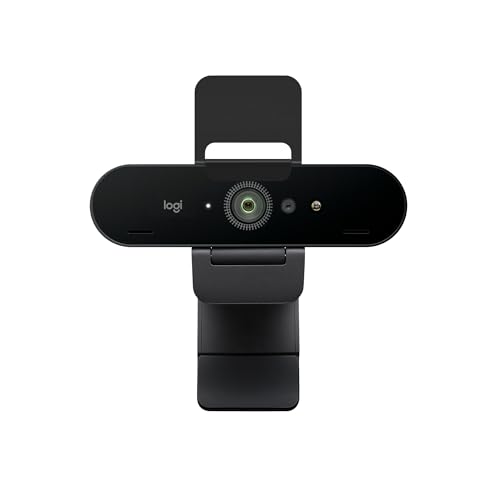
| Logitech Brio 4K | The flagship face camera | Logitech’s premium webcam with a wide, bright image, strong autofocus and microphones that flatter ordinary rooms. |
| OBSBOT Tiny 2 | The camera that follows you | A motorised webcam that pans and tilts to keep its owner framed, for callers who move while they talk. |
| Logitech StreamCam | The friendly all-rounder | A compact USB-C webcam with an easy manner, honest colour and a mount that suits laptops and desks alike. |
| Elgato Facecam | The fixed-focus perfectionist | A webcam built around a prime lens and fixed focus, delivering a consistently sharp, natural picture for a seated caller. |
| A Mirrorless Camera Over a Capture Device | The beautiful but demanding alternative | A prose-only route: superb image quality through a capture card or clean USB output, with setup and limits stated honestly. |
| Your Smartphone as the Camera | The zero-purchase answer | Also prose-only: modern phones make excellent Skype cameras through continuity features or webcam apps, using hardware already owned. |
How Did We Judge Cameras for Calls Rather Than for Content?
Streaming culture has bent webcam reviewing toward creators — ring lights, green screens, broadcast software. Skype asks different questions, so this guide judged by four call-specific tests. First, the face test: at the distance a laptop or monitor actually imposes, does the camera render skin as skin, hold focus on eyes rather than ears, and survive the mixed lighting of a real room — window on one side, ceiling bulb above — without surrendering to either?
Second, the voice test. In most Skype setups the camera’s microphone is the microphone, and its quality decides whether a grandparent sounds present or submerged. Picks were judged on how their built-in microphones handle ordinary rooms: hard kitchens, soft bedrooms, the echo of a home office with wooden floors. Third, the forgiveness test: what happens when the owner does nothing — no settings, no software, no lighting design. A Skype camera that needs configuration will spend its life unconfigured, so default behaviour carried unusual weight in these rankings.
Fourth, the mount test, because calls happen on laptops carried between rooms, on monitors in studies, on televisions in living rooms. A camera that clips securely, tilts honestly and stays where it is aimed serves its owner daily; one that sags mid-call teaches its owner to dread the green button. Every pick below passed that physical audit in its class, and the prose-only routes were judged by the same tests with their extra friction admitted in the open.
What Does Skype Actually Do to Your Picture?
Understanding the pipe explains the picks. A Skype call adapts constantly to the network between the callers: resolution and frame rate rise and fall with bandwidth, and the encoder protects the moving, detailed centre of the frame — the face — at the expense of everything else. Two consequences follow. Cameras whose strength is a clean, noise-free image at ordinary resolutions shine, because compression amplifies noise into crawling artefacts, while a pristine signal survives the squeeze with dignity. And headline resolution matters less than brochure writers claim, since the call will spend much of its life below the camera’s maximum anyway.
Frame rate and exposure behaviour matter more than their modest billing. A camera that holds a steady, bright exposure while its owner shifts in a chair reads as calm and professional; one that hunts — brightening, darkening, refocusing on a bookshelf — reads as distraction, and on a family call it reads as distance. Autofocus character belongs in the same paragraph: gentle, decisive focus is invisible, while nervous focus is the only thing the other end remembers.
Audio passes through its own gauntlet of echo cancellation and noise suppression inside Skype itself, which forgives some microphone sins and punishes others. A microphone that captures a dry, close voice gives the software good material; a distant, roomy capture gives it echoes to fight, and the fight is audible. This is why the reviews below treat each webcam’s microphones as a headline feature rather than a footnote, and why camera placement — near the face, not across the desk — recurs throughout this guide.
Why Does Light Beat Resolution on Every Call?
Because cameras eat light and complain in noise when starved. The single most effective Skype upgrade costs nothing: turn around. A caller facing a window, or a lamp placed behind the screen, presents the camera with a lit face and an easy exposure; a caller with the window behind them presents a silhouette contest no sensor in this guide can win. Webcam sensors are small, their low-light noise is the compression’s favourite food, and every pick below performs a class better when its owner performs that one rotation.
Colour follows light’s quality. Mixed sources — blue window daylight against a warm ceiling bulb — split a face into two weather systems, and automatic white balance can only elect one of them. The cameras here were judged partly on how gracefully they make that election, but the owner’s cheaper fix is consistency: one dominant light, preferably in front, preferably soft. A desk lamp bounced off a wall has improved more Skype calls than any product launch in the category’s history.
None of this excuses a poor camera; it sequences the purchases honestly. Fix the light first, judge the incumbent camera again under kind conditions, and only then let the picks below compete for the job. Several readers will discover their old webcam was innocent. The rest will upgrade with the light already solved, and their new camera will look like the miracle the old one never had the chance to be.
Which Are the Best Computer Cameras for Skype, From Plug-and-Play to Improvised?
Four linked webcams span the flagship, the tracker, the all-rounder and the perfectionist. Two prose-only routes follow for owners whose best camera is not a webcam at all — a mirrorless body with conditions attached, and the phone in their pocket with almost none. Badges name temperaments; the right pick is the one whose temperament matches the caller.

Logitech Brio 4K — The flagship face camera
The Brio is Logitech’s statement webcam, and on Skype its statement is composure. The image is wide and bright with the kind of autofocus that settles on a face and stays there, its exposure manners are unflappable in mixed room light, and its dual microphones capture a voice with a closeness that Skype’s own processing rewards. For the caller whose professional reputation travels through a small window — the consultant, the tutor, the remote executive — it is the safe pair of hands this category offers.
Its 4K headline deserves the guide’s compression sermon applied honestly: Skype will rarely transmit anything near that resolution, and the Brio’s real gifts lie elsewhere — in the sensor’s clean low-light behaviour, the generous field of view that can be narrowed in software to flatter a small room, and the sheer headroom that keeps the picture composed when the call’s bandwidth dips. Buy it for those virtues and the resolution is a bonus; buy it for the number and the network will disappoint you on the camera’s behalf.
- Class: flagship USB webcam with premium sensor
- Focus: autofocus that settles and stays on faces
- Audio: dual built-in microphones with clear voice capture
- Mount: monitor clip with tripod thread beneath
- Role: the professional’s default Skype camera
Strengths
- Composed, bright image in difficult mixed light
- Voice capture that survives Skype’s processing gracefully
- Adjustable field of view suits rooms of any size
Trade-offs
- Premium price for talents compression partly discards
- Best results invite its companion software’s attention
- Overkill for occasional family calls
Its defining scene is the backlit home office at 4 p.m., sun through the window behind the chair, where lesser webcams render a silhouette with a voice. The Brio’s exposure discipline and sensor headroom keep the face in the conversation, and its owner never learns how close the call came to looking amateur. Insurance of that kind is what flagship money buys in this category — not spectacle, but the absence of incidents.
Relatives-and-simplicity buyers should read on before defaulting to the flagship: the Brio rewards an owner who will open its settings once, and while its defaults are good, its price buys headroom a monthly family call will never invoice. Professionals, tutors and anyone interviewed through a screen for a living will feel the difference weekly.
Best for: professionals, tutors and frequent callers whose on-screen presence carries their work. Not suited for: occasional callers who need the simplest possible gift for a relative

OBSBOT Tiny 2 — The camera that follows you
The Tiny 2 puts its webcam on a motorised gimbal and teaches it to follow its owner around the room. Stand to demonstrate, pace while thinking, move to the whiteboard and back — the little camera pans and tilts to keep the caller framed, with gesture controls for the moments a keyboard is out of reach. For Skype’s population of teachers, demonstrators, physiotherapists, cooking relatives and restless thinkers, that tracking converts the call from a portrait sitting into a conversation with a body in it.
The tracking would be a gimmick if the camera underneath were weak; it is not. The Tiny 2’s image is bright and sharp in the way its maker’s camera heritage promises, its autofocus cooperates with the gimbal rather than fighting it, and its microphones hold a voice respectably as its owner moves — the scenario where fixed cameras’ audio usually falls apart. Voice control and gestures feel theatrical on day one and indispensable by day ten, which is the biography of most good interface ideas.
- Class: motorised tracking webcam on a two-axis gimbal
- Framing: automatic subject tracking with gesture control
- Image: bright, sharp sensor suited to dim rooms
- Audio: built-in microphones tuned for a moving speaker
- Role: the presenter’s and teacher’s Skype camera
Strengths
- Keeps a moving caller framed without a camera operator
- Strong image quality backs up the tracking party trick
- Gestures and voice commands free the hands mid-call
Trade-offs
- Moving parts and software exceed a simple webcam’s needs
- Seated, still callers pay for talents they never use
- Desk footprint and setup exceed a clip-on camera’s
Watch it serve a language tutor and the category’s future flickers: the tutor stands, writes a verb on the board, sits, holds a book to the lens, and the frame simply… attends, the way a camera operator would. Skype lessons, remote fitness sessions and family calls with toddlers — a subject class no fixed frame has ever contained — all change character when the camera agrees to follow.
The honest boundary is temperament. Callers who sit, talk and value invisibility from their equipment should buy the Logitech or Elgato below and let the Tiny 2’s talents go to the movers. Technology that performs should be bought by people whose calls need a performance.
Best for: teachers, presenters, demonstrators and anyone whose calls involve standing and moving. Not suited for: still, seated callers who want the plainest possible webcam

Logitech StreamCam — The friendly all-rounder
The StreamCam is the webcam this guide would mail to a relative. Its manner is easy from the first minute: a USB-C connection, a mount that perches on a laptop lid or a monitor without negotiation, automatic exposure and white balance that behave like a sensible adult, and an image with Logitech’s characteristic honesty — faces rendered as faces, colours rendered as colours, nothing dramatised. It was designed with creators in mind, but its virtues translate directly to calls: consistency, kindness, no fuss.
Its vertical-video talents and creator software are surplus for Skype, and the review should say so plainly; what the Skype buyer is purchasing is the sensor and the manners. Full HD at smooth frame rates is precisely the territory Skype’s compression treats kindly, the dual microphones are voiced for a single speaker at desk distance, and the whole package has the rounded, unintimidating industrial design of an object a non-technical owner will not be afraid to adjust.
- Class: compact USB-C webcam for laptops and monitors
- Image: full HD with smooth motion and honest colour
- Audio: dual front-facing microphones for one speaker
- Mount: versatile clip that also accepts a tripod
- Role: the giftable, dependable family Skype camera
Strengths
- Defaults so good the settings may never be opened
- Friendly size and mount suit laptops carried room to room
- Image character flatters without cosmetics
Trade-offs
- Creator features exceed what Skype will ever request
- USB-C connection may need an adapter on older machines
- Low-light performance is good, not flagship-class
Its scene is the Sunday call, repeated fifty-two times a year without incident: the camera lives on the family laptop, the laptop migrates between kitchen table and sofa, and the picture simply works in both places, in morning and lamplight. Reliability at that rhythm is a feature no specification table captures, and it is why the all-rounder, rather than the flagship, is this guide’s default recommendation for family Skype.
Professionals presenting to clients should weigh the Brio’s headroom; movers should weigh the Tiny 2’s tracking. Everyone else — which is most of Skype — should start here and spend the savings on the lamp this guide keeps prescribing.
Best for: families, students and everyday callers who want a camera that simply works every time. Not suited for: presenters who move, or buyers wanting flagship low-light headroom

Elgato Facecam — The fixed-focus perfectionist
The Facecam makes a bet the rest of the category avoids: it deletes autofocus entirely. Its prime lens is fixed at a focus distance tuned for a person at a desk, which means the picture can never hunt, never breathe, never decide mid-sentence that the bookshelf was more interesting. For the seated Skype caller — which is to say, for most of the working world’s calls — that deletion buys an eerie consistency: the same sharp, natural image at minute one and minute ninety, in any light the room honestly provides.
Elgato builds for streamers, so the Facecam’s software offers unusually deep control over exposure, colour and framing for owners who want it, while its default behaviour remains call-worthy for owners who do not. Its sensor and lens pairing produce a picture with a photographic rather than electronic character — faces hold their texture, backgrounds fall where they fall — and its all-metal seriousness of build suits desks where equipment is expected to look grown-up. Note its honest gap: it carries no microphone, on the streamer’s assumption of a separate audio chain, so Skype buyers must pair it with a headset or desk microphone — a cost this review counts openly rather than discovering later.
- Class: premium webcam with fixed-focus prime lens
- Focus: fixed at desk distance — hunting is impossible
- Audio: none built in; requires headset or separate microphone
- Software: deep manual control for owners who want it
- Role: the seated professional’s consistency machine
Strengths
- Immovable focus guarantees a permanently sharp caller
- Natural, photographic image character
- Manual controls reward owners who fine-tune once
Trade-offs
- No built-in microphone — an extra purchase is mandatory
- Fixed focus punishes callers who lean far or stand
- Streamer pricing for a call camera
Its ideal owner is identifiable in one sentence: a professional who sits in the same chair, at the same desk, for calls that matter, and who already owns a decent headset. For that owner the Facecam removes the last variable from their on-screen presence, and the absence of a microphone stops being a flaw and becomes a division of labour — camera for eyes, headset for ears, each doing one thing properly.
Everyone else should treat the microphone gap as the disqualifier it honestly is. A gift camera that arrives unable to hear its owner is a prank, not a present, and family buyers belong with the Logitechs above.
Best for: seated professionals with a headset who want a permanently consistent, sharp image. Not suited for: gift buyers or anyone needing built-in microphones
A Mirrorless Camera Over a Capture Device — The beautiful but demanding alternative
This route is covered in prose because it is a method, not a product in this guide’s pool: take a proper camera — the mirrorless body a household already owns for photography — and feed its picture into the computer as a webcam. Done well, the result humiliates every webcam on this page: a large sensor’s low-light grace, a real lens’s depth, colours with a photographic pedigree. Skype’s compression will discard much of that glory, but what survives still looks like cinema next to a webcam’s honest competence.
Now the limits, stated as plainly as the coordinator of any honest guide should insist. The camera must offer either a clean HDMI output paired with a capture device, or a manufacturer’s USB webcam utility — support varies by model and era, and some bodies crop, cap the resolution, or refuse to charge while streaming, so the exact camera’s documentation is the authority, not this paragraph. Heat and battery discipline enter the call: long sessions may need mains power adapters and dummy batteries, autofocus behaviour designed for photography can hunt in conversation, and the whole apparatus — tripod or desk mount, cables, capture device — occupies a desk like a small film set. It is a route for enthusiasts and professionals whose image is their business card, not for a relative’s kitchen-table laptop.
- Class: existing mirrorless/DSLR camera plus capture path
- Requirement: clean HDMI out with capture device, or maker’s USB utility
- Image: large-sensor quality no webcam here can match
- Friction: power, heat, mounting and model-specific limits
- Role: the enthusiast’s and image-professional’s alternative
Strengths
- Image quality in another league from any webcam
- Real lenses offer depth and framing webcams cannot
- Uses a camera the household may already own
Trade-offs
- Setup complexity dwarfs every webcam in this guide
- Power and heat management needed for long calls
- Model support varies; some bodies simply cannot do it
The verdict is sequencing: exhaust the webcams first. If a Brio-class picture still feels like the weak link in a professional practice — after the light is fixed, which it must be for this route too — then the mirrorless path is a legitimate studio upgrade. Bought as a first Skype camera, it is a film set purchased to make phone calls, and its owner will feel the absurdity by the third setup.
One population should ignore that sequencing: photographers. For them the camera, the lenses and the tripod already exist, the capture device is the only purchase, and the learning curve is a manual they have half-read already. Their Skype image becomes a quiet advertisement for their day job, which is the route working exactly as intended.
Best for: photographers and image professionals who already own a suitable camera. Not suited for: anyone buying a first Skype setup or equipping a non-technical relative
Your Smartphone as the Camera — The zero-purchase answer
The final pick is also prose-only, because the product is already in your pocket. Modern smartphones carry cameras and microphones that embarrass mid-range webcams, and both major phone platforms now offer routes to use them as the computer’s camera: continuity features that pair a phone with a computer from the same maker, and webcam applications that bridge the rest. For households whose Skype life is a weekly family call, this route delivers flagship-adjacent pictures for the price of a small stand.
The mechanics matter more than the software choice. The phone must sit at eye level, near the screen it serves, steady enough that its owner forgets it — a small tripod or a stack of books both qualify, a hand does not. It should be plugged in, because a camera that dies at minute forty of a birthday call becomes the family’s story for the wrong reason, and its notifications should be silenced by a do-not-disturb mode, because the camera is also the phone and the phone will otherwise perform its other duties mid-conversation. Attend to those three disciplines and the improvised camera behaves like a purchased one.
- Class: smartphone plus continuity feature or webcam app
- Image: flagship phone camera and microphone quality
- Cost: a stand; the hardware is already owned
- Discipline: eye-level mount, mains power, notifications silenced
- Role: the occasional caller’s best-value camera
Strengths
- Picture and voice quality beyond most webcams
- No purchase beyond a stand for most households
- Familiar device — no new interface for a relative to learn
Trade-offs
- The phone is unavailable for phoning while it serves
- Setup ritual repeats at every call unless a stand stays parked
- Compatibility depends on the phone and computer pairing
Its natural owner is the occasional caller with a good phone and no desire to own a webcam: the grandparent whose tablet handles family calls, the student whose laptop camera failed, the professional whose travel kit is already full. For daily callers, the ritual of mounting and silencing the phone eventually taxes more than a webcam costs, and the dedicated picks above reclaim their case.
As a diagnostic, though, the phone route is unbeatable and free: run one call through it before buying anything. If the family’s complaint was picture quality, the phone proves what a good camera does to the call — and calibrates exactly how much webcam the household actually needs to buy.
Best for: occasional callers with a modern phone who want excellent quality without buying a webcam. Not suited for: daily callers who need a permanently ready, dedicated camera
How Do the Six Skype Camera Routes Compare Side by Side?
| Route | Picture character | Audio | Daily ease |
|---|---|---|---|
| Logitech Brio 4K | Bright, composed, flagship-clean | Dual microphones built in | Set once, forget |
| OBSBOT Tiny 2 | Sharp, with a following frame | Built in, movement-aware | Rewards the demonstrator |
| Logitech StreamCam | Honest, friendly, consistent | Dual microphones built in | The family default |
| Elgato Facecam | Photographic, permanently sharp | None — bring your own | For the seated and equipped |
| A Mirrorless Camera Over a Capture Device | Cinematic, unmatched | Separate microphone advised | A ritual per call |
| Your Smartphone as the Camera | Flagship phone quality | Phone microphone, excellent | A stand and three disciplines |
The pattern across the table is a trade between permanence and improvisation: the more a route asks at setup, the more it can give on screen — and Skype, which compresses generously, narrows the gap more than buyers expect.
How Do You Set Up a Skype Camera So a Relative Cannot Break It?
Design for the least technical person on the call, because they are the system’s true operator. Mount the camera once, at eye level, centred on the screen its owner actually uses, and secure the cable so a tugged laptop does not re-aim the picture at the ceiling. Open Skype’s video settings together — ideally on a test call with you — select the new camera and microphone by name, and then commit the family’s cardinal sin of configuration: change nothing else, ever, and write the camera’s name on a label stuck to its side so future troubleshooting starts from facts.
Lighting gets the same one-time treatment. Arrange the lamp or the chair’s orientation during the test call, while both ends can judge the result, and make the arrangement the room’s default rather than a special occasion’s ceremony. A relative who must perform three adjustments before every call will quietly stop calling; a relative who presses one green button and appears, lit and audible, will call weekly. The entire ergonomics of family Skype reduce to that sentence.
Finish with the failure rehearsal. Unplug the camera and watch Skype fall back to the laptop’s built-in camera, so the relative learns the symptom and the remedy — plug it back in, check the setting still names it — while you are present to coach. Systems that have rehearsed their failure do not fear it, and the five minutes spent here will save a dozen future calls from dying in configuration screens.
How Much of a Skype Call Is Actually the Microphone?
Half, by any honest accounting — and the half that carries emotion. A slightly soft picture reads as atmosphere; a voice that echoes, clips or swims in room noise reads as absence, and callers hang up from audio failures far sooner than from visual ones. The microphones built into this guide’s linked webcams are all voiced for the same scenario — one speaker, desk distance, ordinary room — and their differences are matters of degree: the Brio’s pair sounds closest and calmest, the StreamCam’s the friendliest, the Tiny 2’s the most impressive given that its owner refuses to sit still.
Room acoustics tax every one of them equally. Bare walls, wooden floors and a high ceiling turn any microphone’s capture into a cave recording, and Skype’s echo cancellation, fighting a battle it was not designed for, adds its own watery artefacts. The cures are domestic rather than electronic: a rug, curtains drawn during the call, a bookshelf behind the caller, or simply a smaller room. Callers who record a ten-second test in Skype’s settings and actually listen to it — a discipline almost nobody performs — can hear their room’s verdict and fix the room before blaming the camera.
Headsets remain the cheat code. A modest headset places a microphone centimetres from the mouth and headphones at the ears, deleting echo, room and distance from the equation in one purchase, and it rescues even the Facecam’s deliberate microphone absence into a virtue: camera for the eyes, headset for the ears, each excellent at its single job. Households holding long, important calls — the weekly family parliament, the remote medical consultation — should treat a headset as part of the camera budget rather than an accessory to it.
How Do Group and Family Calls Change the Camera Choice?
A group call reframes everything — literally. Three grandchildren and a dog do not fit the narrow, flattering frame that serves a solo professional, and the camera’s field of view becomes the specification that matters. Wider views, like the Brio’s adjustable framing at its broadest, gather a sofa’s worth of family; the Tiny 2’s tracking performs a different miracle, following whichever child currently holds the floor. Solo callers should optimise for the face; households should optimise for the gathering, and the two optimisations genuinely select different picks from this guide’s table.
Distance changes the audio equation too. A family arranged across a sofa sits two metres from the camera, where built-in microphones capture the room as much as the voices. In that geometry the honest upgrades are arrangement before equipment: move the camera and screen closer to the sofa’s front edge, accept a slightly tighter frame, and let the microphone work at the distance it was voiced for. Where the gathering is permanent — the television-based family call — a camera placed atop the television with the household arranged for it beats a better camera placed wherever the cable reached.
Children deserve their own sentence, because they are Skype’s most honest critics: they address the person, not the equipment, and they wander. A call designed around children succeeds by framing wide, forgiving focus, and keeping the session’s technology invisible — which is why the forgiving defaults of the StreamCam and the following frame of the Tiny 2 dominate this guide’s family recommendations, while the perfectionist Facecam waits for the children’s bedtime and the adults’ serious calls.
What Should Privacy-Conscious Callers Look For?
A camera pointed at a life deserves an off switch its owner trusts. The physical forms of trust, in descending order: a lens shutter or cap that visibly closes the eye, a camera that can be unplugged or folded away, and only then software settings. Several designs in this category include privacy covers or encourage them as accessories, and the habit matters more than the mechanism — a caller who closes the shutter after every call has solved the problem regardless of headlines about software.
Indicator lights are the second covenant: a camera should announce, in hardware, when its sensor is live, and owners should learn where that light lives on their model and glance at it the way drivers glance at mirrors. Skype itself shows your own video in a preview window, which is the third check — if you can see yourself, the camera is working; if the room can see you when you cannot see yourself, something is wrong and the shutter habit becomes the remedy.
Households with children should extend the conversation beyond hardware. The family call camera frames a room that may contain school uniforms, address labels, visitors who did not consent to a broadcast. A thirty-second framing audit — what exactly does the other end see? — performed once at setup, protects everyone the camera can reach, and it costs nothing but the honesty to look at your own background through a grandmother’s eyes.
How Does Your Internet Connection Share the Blame?
Many cameras are executed for the network’s crimes. Skype’s adaptive video means a congested connection — a household streaming films in two other rooms, an upload saturated by a cloud backup — presents as a camera that will not focus, will not brighten, will not sharpen, because the service is discarding the camera’s good work to keep the call alive. The diagnostic is to run one call at a quiet network hour before judging any hardware: cameras acquitted by the quiet-hour test should be sentenced to a router conversation instead.
Upload speed is the direction that matters and the direction households measure least. The camera’s picture travels up, and a connection whose upload is a fraction of its download will ration exactly the stream this guide is about. Wired connections to the calling computer remain the unglamorous gold standard; where wires cannot go, the calling room’s position relative to the router decides more than any setting buried in Skype’s menus.
None of this rehabilitates a genuinely poor camera — the quiet-hour test cuts both ways, and a camera that still looks tired on an empty network has confessed. The point is sequence: light first, network second, hardware third. Buyers who follow that order spend once; buyers who reverse it own three webcams and the same bad call.
What Mistakes Do Skype Camera Buyers Keep Making?
Buying resolution tops the list, for the reasons the compression section laid out: the network discards the flagship numbers, while the unglamorous virtues — exposure manners, microphone quality, mounting sanity — survive every call. Second comes ignoring the microphone, as if a camera were a silent-film device; the Facecam’s review in this guide counts its missing microphone as a headline fact precisely because buyers elsewhere discover it in the first call’s opening minute.
Third, mounting the camera wherever it lands — atop a towering monitor, angled up from a desk — and accepting the unflattering geometry as the camera’s fault. Eye level is a feature the owner supplies, and a small stand or a stack of books supplies it for any pick here. Fourth, gifting complexity: the tracking marvel or the mirrorless rig delivered to a relative who needed the StreamCam’s manners, after which the marvellous device lives in a drawer and the calls revert to a laptop’s worst camera.
The final mistake is skipping the test call. Every route in this guide — webcam, phone, capture device — reveals its one true flaw within five minutes of honest use, and a purchase tested the day it arrives can still be exchanged, re-aimed or re-lit. The untested purchase is discovered at a birthday, in front of an audience, which is the most expensive laboratory in consumer electronics.
How Do You Run a Test Call That Actually Predicts the Real One?
Use Skype’s own echo and video test facilities first, alone, and be brutally attentive: record the test message and listen for the room in your voice, watch the preview while you perform the call’s real movements — leaning back, reaching for coffee, turning to a second screen — and note every moment the focus hunts or the exposure swings. Then recruit the call’s actual other end for a five-minute rehearsal at the real call’s time of day, because light at 10 a.m. and light at 7 p.m. are different directors and only the rehearsal knows which one employs you.
Rehearse the failure modes too. Mute and unmute until the controls are muscle memory; switch the camera off and on; practise the sentence “you have frozen, I am still here” so it exists before it is needed. Elderly relatives especially benefit from a rehearsal whose entire curriculum is recovery — most abandoned family Skype setups died not from bad pictures but from one unrecovered confusion that taught a grandparent the green button was a trap.
Keep the rehearsal’s settings sacred afterwards. The configuration that passed the test — camera named in Skype’s settings, lamp in its place, chair in its orientation — is a small system, and systems survive by being left alone. Write the camera’s name and the lamp’s position on the same label this guide prescribed earlier; future-you, troubleshooting by phone from another city, will bless present-you for the documentation.
What About Skype on the Living-Room Television?
The television is family Skype’s natural theatre — the whole household visible, the callers life-sized — and it rearranges this guide’s advice around distance. The camera sits atop the screen, metres from the sofa, which flatters wide fields of view and punishes narrow ones; voices travel the same metres to a microphone voiced for a desk, which flatters headsets nobody wears on a sofa and punishes built-in microphones honestly. Households serious about television calls should weight the Brio’s framing breadth and consider a separate wireless microphone arrangement, accepting that the living room is a small cinema with cinema’s audio problems.
The compensating glory is presence. Grandparents on a television are in the room in a way no laptop achieves, children perform for the big screen as for a stage, and the call becomes an event the household gathers for rather than a chore one person performs at a desk. If that gathering is the family’s actual Skype life, optimise for it without apology — the desk-call rankings in this guide are a map of a different country, and the television household should read the picks through its own geography: field of view first, microphone reach second, resolution a distant third.
Final Recommendation
Most households should buy the Logitech StreamCam and stop thinking: its manners, microphones and honest picture are what Skype actually transmits. Professionals whose presence is their product should step up to the Logitech Brio 4K for its composure in bad light, teachers and movers to the OBSBOT Tiny 2 for its following frame, and seated headset-owners to the Elgato Facecam for its immovable focus — remembering its missing microphone. Before any purchase, run one call through a smartphone to calibrate what good looks like; and owners of suitable mirrorless cameras should read the capture route’s limits twice before building it.
Whatever you choose, spend the remaining effort on the two free upgrades: face the light, and raise the camera to eye level. Skype will compress the rest of your ambitions equally, and the caller who is lit and level beats the caller who is merely expensive, every Sunday of the year.
How Should You Dress and Frame Yourself for Calls That Matter?
The camera’s honesty extends to wardrobes. Fine stripes and tight checks shimmer under compression as the encoder struggles to spend its bitrate on a moving pattern, so solids in mid-tones are the professional’s quiet uniform; pure white blooms under automatic exposure and pure black swallows the face’s modelling, and both extremes tax exactly the systems this guide praised for their manners. Jewellery that catches the key light sparkles distractingly at small window sizes — the call’s other end sees the sparkle, not the jewel.
Framing carries its own etiquette. The flattering, trustworthy composition leaves a hand’s width above the head, cuts at mid-chest rather than at the neck, and keeps the eyes on the upper third of the frame — close enough that expressions read at phone size, distant enough that a thoughtful lean does not become a forehead inspection. Backgrounds should be honest and unbusy: a real room, softly out of focus by distance rather than by software blur, which still announces itself around hair and shoulders in ways colleagues notice and politely never mention.
Eye contact is the final craft, and it is mechanical: look at the camera when listening matters most, not at the beloved face on the screen. The discipline feels unnatural for exactly one call, after which the other end’s sense of being attended to — the entire social product a Skype camera exists to deliver — rises out of all proportion to the effort. Every pick in this guide supports that discipline equally; none can perform it for you.
Related guides
Frequently Asked Questions
Does Skype need a 4K webcam?
No. Skype adapts its video to the network and spends most calls well below 4K, so the flagship resolution of a camera like the Brio serves as headroom rather than transmitted detail. Clean exposure, honest colour and good microphones influence the received call far more than the sensor’s maximum resolution.
Why do I look dark or orange on Skype calls?
Almost always because of light, not the camera. A window behind you silhouettes your face; mixed window and ceiling light splits its colour. Face the main light source, make one light dominant, and every camera in this guide improves immediately — the fix is a rotation, not a purchase.
Can I use my phone instead of buying a webcam?
Yes, and for occasional calls it may be the best option here: continuity features and webcam apps let a modern phone serve as the computer’s camera with excellent picture and sound. Mount it at eye level, keep it plugged in, silence its notifications, and remember it cannot take a call while it is being the camera.
Do I need a separate microphone with a webcam?
Usually not — the Logitech and OBSBOT picks here carry capable built-in microphones. The exception in this guide is the Elgato Facecam, which has none and must be paired with a headset or desk microphone. In echoing rooms, any camera benefits from a headset, which also improves what you hear.
Will any USB webcam work with Skype?
Skype accepts standard USB video-class cameras without special drivers, which covers every webcam in this guide. Where a camera offers companion software, it refines the picture rather than enabling it. The practical checks are the mount, the microphone and the light — not compatibility badges.
Where should the camera sit for the most flattering call?
At eye level, centred on the screen, roughly an arm’s length away, with the main light in front of your face. That geometry flatters every face, keeps eye contact believable, and lets autofocus and exposure systems in any of these cameras do their calmest work.
How Long Should a Good Skype Camera Last?
Years longer than the computer beneath it, if it is treated as furniture rather than as a gadget. Webcams have no consumables and few moving parts — the Tiny 2’s gimbal excepted — so their lifespan is decided by connections and courtesy: a cable left unstrained, a mount unstressed, a lens wiped with cloth rather than with the corner of a shirt. Software support matters more than hardware wear; the makers represented among this guide’s linked picks maintain their companion applications across operating-system generations, which is one of the quieter arguments for buying a name in this category. Expect a good webcam to serve through two laptops, and judge any purchase that assumes otherwise as a pricing error rather than a technology limit.
Related Guides
Continue with webcams for professional webcasts and presentations, improve the room with lighting a home office for video calls, or compare cameras for remote teaching and tutoring.


