Disclosure: This article contains affiliate links. If you buy through a link on this page, we may earn an affiliate commission at no extra cost to you.
Samsung sells more Android phones than anyone else, and that is both the good news and the problem. The Galaxy catalog runs from a budget A-series handset that costs less than a nice dinner for two all the way up to a folding phone that opens into a small tablet, and nearly every model name sounds like every other model name. Galaxy S24, S24 Plus, S24 Ultra, Z Fold, Z Flip, A55, A35, A15 — if you have ever stared at a carrier store wall wondering which of these is actually the right phone for you, this guide is built to answer that question properly.
We have organized the six phones below by the way people actually shop. There is the all-out flagship for the person who wants the best camera and the S Pen. There is the standard flagship for everyone who wants premium without the premium-plus size and price tier. There are two foldables, because folding phones are no longer a science experiment — they are a genuine choice with genuine trade-offs. And there are two A-series phones, because the honest truth is that a large share of buyers are better served by a mid-range or budget Samsung than by a flagship they will never push hard.
One thing to understand before the picks: Samsung’s three lines are not simply “good, better, best.” They are built around different priorities. The S line is the mainstream flagship range. The Z line is the foldable range, where the folding screen itself is the headline feature and some conventional specs take a back seat to make room for the hinge. The A line is the value range, where Samsung keeps the essentials — a good screen, a big battery, years of updates — and trims the expensive extras. Knowing which line matches your life matters more than knowing which single model tops a benchmark chart.
What to look for in a Samsung phone
Which line fits you: S, Z, or A
Start with the line, not the model. The Galaxy S series is Samsung’s flagship family: the fastest processors, the best cameras, the brightest screens, wireless charging, water resistance, and the longest software support Samsung offers. If you keep a phone for four or five years and use the camera heavily, this is your line. The Galaxy Z series folds. The Z Fold opens like a book into a tablet-sized inner screen built for multitasking, reading, and documents. The Z Flip folds a normal phone in half so it fits into small pockets and stands on its own for hands-free photos and video calls. The Galaxy A series is the sensible-money line: screens and batteries that are genuinely good, cameras that are fine in daylight, and processors that handle everyday apps without drama — at mid-range and budget tiers.
A useful rule of thumb: if you cannot name a specific flagship feature you need — a telephoto zoom, the S Pen, DeX desktop mode, a folding screen — the A series will probably serve you well and leave money in your pocket. If you can name one, you are an S or Z buyer, and the rest of this guide will help you pick which one.
Software updates: the quiet spec that matters most
With the Galaxy S24 generation, Samsung committed to seven years of Android OS upgrades and seven years of security patches for its flagship lines, including the S24 series and the Z Fold 6 and Z Flip 6. That is a genuine change in what a flagship purchase means: a phone bought today is supported into the early 2030s. The A series gets a shorter but still respectable runway — typically four generations of OS upgrades and five years of security updates on recent models like the A55 and A15 5G. When you compare a Samsung against cheaper rivals, this support window is part of what you are paying for. A phone that stops receiving security patches becomes a liability; a phone that keeps receiving them can be handed down to a parent or teenager and stay safe.
Displays: size, brightness, and refresh rate
Samsung makes the best phone screens in the business — it supplies panels to half the industry — and even its mid-range phones benefit. Look for an AMOLED panel (Samsung calls its version Super AMOLED on the A line and Dynamic AMOLED 2X on flagships), a 120Hz refresh rate for smooth scrolling, and high peak brightness if you read outdoors a lot. Flagships push brightness far higher than the A series, which matters at the beach, on a job site, or in a bright car. The foldables add a second consideration: the Z Fold’s inner display is the whole point of the phone, while the Z Flip’s cover screen has grown large and useful enough to handle notifications, widgets, and quick replies without opening the phone.
Cameras: sensors, zoom, and honest expectations
Camera hardware is where the lines separate most clearly. The S24 Ultra carries a high-resolution main sensor, an ultrawide, and two telephoto lenses covering mid-range and long-range zoom — it is the Samsung to buy for concerts, kids’ sports from the bleachers, and travel. The standard S24 keeps a strong main and ultrawide camera plus a modest telephoto, which covers most people’s real shooting. The foldables prioritize their form factor: the Z Fold 6 has a capable triple camera but a step below the Ultra, and the Z Flip 6 leans on its main camera and the flexibility of shooting with the phone half-folded. A-series cameras are honest daylight performers that soften in low light. Across all of them, Samsung’s processing favors bright, vivid, share-ready photos — some people love that look, and some prefer a more neutral rendering. Neither is wrong; it is worth knowing which camp you are in.
Performance and storage
Flagship S and Z models run top-tier Snapdragon processors in the US market and feel fast at everything, including games and video editing. A-series processors are a clear step down — fine for messaging, social apps, streaming, and casual games, less happy with heavy multitasking or demanding titles. Storage deserves a decision at purchase because no current Galaxy flagship or A-series phone in this guide offers a microSD slot on the S and Z lines; the A15 5G is a notable exception that still accepts one, which is part of its budget appeal. If you shoot a lot of video, buy more storage than you think you need. Cloud backups help, but they are not a substitute when you are recording a school play on hotel Wi-Fi.
Battery life and charging
Battery results follow a pattern: the A-series phones, with their large batteries and modest processors, often outlast the flagships in pure hours, while the flagships charge faster and offer wireless charging, which A models skip. The Z Flip 6 has the smallest battery of the six picks here — the price of the folding design — and heavy users will notice. The Z Fold 6 does better but still works harder to drive two screens. Wired charging speeds on Samsung flagships are solid rather than class-leading; Samsung has historically been conservative here in the name of long-term battery health. If you are a two-day-battery person, the A55 and A15 5G deserve a serious look.
The S Pen and DeX: Samsung-only extras
Two features exist nowhere else in quite this form. The S Pen, built into the S24 Ultra’s body, is a proper stylus for handwritten notes, precise photo editing, marking up documents, and sketching — we dig into it in its own section below. Samsung DeX turns a flagship phone into a desktop-like environment on a monitor or TV, with resizable windows and mouse and keyboard support. Neither feature matters to everyone. But if either one fits your work, it can be the deciding factor that ends the comparison, because no rival offers the same combination.
In this guide
The six picks at a glance
| Phone | Line | Best for | Tier | Standout trait |
|---|---|---|---|---|
| Galaxy S24 Ultra | S | Camera lovers, note-takers, power users | Premium | Built-in S Pen and long-range zoom |
| Galaxy S24 | S | Most people who want a flagship | Premium | Flagship speed in a manageable size |
| Galaxy Z Fold 6 | Z | Multitaskers, readers, travelers | Premium | Opens into a tablet-sized screen |
| Galaxy Z Flip 6 | Z | Small-pocket fans, selfie and video creators | Premium | Folds in half, stands on its own |
| Galaxy A55 | A | Value buyers who still want polish | Mid-range | Metal frame and strong all-round balance |
| Galaxy A15 5G | A | Budget buyers, second phones, teens | Budget | Big battery, microSD slot, long support |
The table is a map, not a verdict. Every phone below earned its place for a different kind of buyer, and the trade-offs section of each review is where the honest differences live. Read the picks that match your budget tier first, then read one tier up and one tier down — that is usually where the real decision sits.

1. Samsung Galaxy S24 Ultra — the everything phone
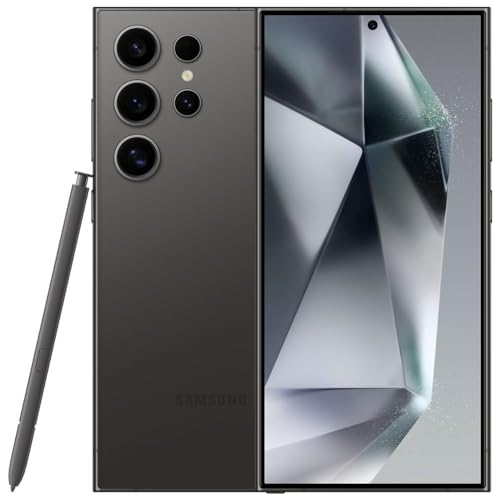
The S24 Ultra is Samsung’s flagship in the fullest sense: the biggest, brightest display in the S line, a titanium frame, the most capable camera system Samsung sells, and the only phone in this guide with the S Pen stored inside the body. If your shopping method is “tell me which Samsung is best and I will decide whether it is worth it,” this is the phone you are asking about.
The camera system is the headline for most buyers. The high-resolution main camera handles everyday shooting superbly, the ultrawide covers landscapes and group shots, and the pair of telephoto lenses means zooming to frame a stage, a bird, or a kid on a distant soccer field does not collapse into a watercolor smear the way digital zoom does. In good light the results are excellent; in low light the Ultra is the most consistent Samsung here. Video is equally strong, with stabilization that makes handheld clips look deliberate rather than accidental.
Then there is the S Pen. It lives in a silo in the phone’s frame, charges nothing and needs no pairing ritual, and it is ready the second you pull it out — the screen wakes with a note page even from sleep. Jotting a phone number, annotating a screenshot of a floor plan, signing a PDF, sketching a garden layout: these are small tasks that a finger does clumsily and the pen does well. People who use it tend to become quietly dependent on it, which is worth knowing if you are choosing between the Ultra and everything else.
Strengths: Best Samsung camera system with genuine long-range zoom; built-in S Pen; brightest, toughest display in the range; seven years of updates; DeX support; fast wired and wireless charging.
Trade-offs: It is a large, heavy phone, and the flat-edged frame that makes it feel secure also makes it a two-handed device for most people. It sits at the top of Samsung’s price tiers, and its size is simply too much for small hands or tight pockets.
Who it suits: Photographers, note-takers, field workers who mark up documents and photos, and anyone who keeps a phone four-plus years and wants the model that will feel current the longest.
Availability note: the current listing for this pick is a renewed unit, professionally inspected and restored rather than factory-new.

2. Samsung Galaxy S24 — the flagship most people should buy
The standard S24 is the sweet spot of the S line: the same flagship processor family, the same seven-year update commitment, the same bright 120Hz AMOLED display technology, and a proper three-camera system with a real telephoto — in a body that fits normal hands and normal pockets. For most people reading this guide, this is the Samsung to beat.
Day to day, the S24 feels every bit as fast as the Ultra. Apps open instantly, games run smoothly, and the screen is bright enough for summer sunlight. The camera gives up the Ultra’s long zoom reach and some low-light polish, but the main camera is genuinely good, the ultrawide is useful, and the 3x telephoto covers portraits and modest zoom — the distances most people actually shoot at. Portraits, food, pets, travel snapshots: this camera handles the real-world list well.
What you give up versus the Ultra is a specific list: no S Pen, a smaller battery that is good rather than huge, less zoom, and a slightly smaller screen. What you gain is a phone that disappears into your day instead of demanding to be managed. It is also the easiest flagship here to use one-handed on a train, in a grocery aisle, or while holding a coffee.
Strengths: Flagship performance in a compact, comfortable body; seven years of updates; strong main camera with real telephoto; bright 120Hz display; wireless charging and full water resistance.
Trade-offs: Battery life is a solid day rather than a day and a half for heavy users. Zoom range is modest next to the Ultra. No S Pen and no microSD slot, so choose storage carefully at purchase.
Who it suits: Buyers who want a true flagship experience without the size and top-tier cost of the Ultra — which is to say, most flagship buyers.
Worth knowing: the listing linked here is renewed stock, a pre-owned unit checked and restored to full working order.

3. Samsung Galaxy Z Fold 6 — the phone that becomes a tablet
The Z Fold 6 is two devices sharing one hinge. Closed, it is a tall, narrow phone you can use one-handed for messages and quick checks. Open, it becomes a small tablet with a bright inner display that changes how certain tasks feel: spreadsheets you can actually read, two apps side by side without squinting, ebooks and PDFs at a comfortable size, maps you can explore, and video calls with room to breathe. If you have ever wished your phone were bigger only sometimes, this is the only design that answers that wish.
The multitasking software is the mature part of the package. Samsung has been refining foldable multitasking longer than anyone, and it shows: split-screen pairs are easy to save and relaunch, apps resize gracefully, and DeX support means the Fold can also drive a monitor when you reach a desk. For people who travel for work, the Fold genuinely can replace a tablet in the bag, and sometimes serves as the backup laptop screen setup in a pinch.
Honesty about the trade-offs matters here. The Fold is thick and heavy when closed. The inner screen, while much tougher than early foldables, is still a folding display — it has a visible crease, wants a gentler touch than glass, and repairs are expensive, so a protection plan is a sensible line item rather than an upsell. The cameras are good but a step behind the S24 Ultra, and you pay a premium tier price for the hinge engineering. None of that makes it a bad buy; it makes it a deliberate buy.
Strengths: Tablet-sized inner display for real multitasking; excellent split-screen software; cover screen is fully usable one-handed; flagship performance; seven years of updates; DeX support.
Trade-offs: Heavy and thick when folded; the crease is visible in some light; inner screen needs more care than ordinary glass; cameras trail the Ultra; top-tier pricing.
Who it suits: Frequent travelers, spreadsheet-and-documents professionals, avid readers, and anyone who currently carries both a phone and a tablet and would rather carry one device.
Quick note: this pick is currently sold as a renewed model, inspected and refurbished through the seller’s renewal program.

4. Samsung Galaxy Z Flip 6 — the phone that folds to fit your life
The Z Flip 6 folds a full-size smartphone in half, and the appeal is more practical than nostalgic. Folded, it slips into pockets that reject modern phones — small jeans pockets, a clutch, a jacket’s inside pocket. Half-open, it stands on a table by itself, which turns out to be useful constantly: video calls without a stand, group photos on a timer without propping the phone against a water bottle, and selfies using the good main camera instead of the lesser front camera, framed on the cover screen.
That cover screen — Samsung calls it the Flex Window — is the feature that makes the current Flip generation click. It is large enough for notifications, weather, calendar, music controls, quick replies, and widgets, so a surprising amount of phone use happens without opening the phone at all. That habit also helps the Flip’s modest battery, because the big inner screen stays off more of the day. Open it up and you get a tall, bright, full-quality display that feels like any flagship’s.
The compromises are the physical ones. The battery is the smallest in this guide, and heavy users who keep the inner screen open all day will be charging by evening. There is no telephoto camera — zoom is digital — and the folding screen asks for the same care as the Fold’s, including keeping the pre-applied screen protector in place. You are trading camera reach and endurance for size and flexibility. For the right buyer, that trade is not a compromise at all; it is the entire point.
Strengths: Folds to half size for real pockets; large, useful cover screen; stands on its own for hands-free photos and calls; main camera doubles as a high-quality selfie camera; flagship speed; seven years of updates.
Trade-offs: Smallest battery of the six picks; no dedicated zoom lens; folding screen needs gentle handling; long-term hinge and screen care are part of ownership.
Who it suits: Anyone tired of giant phones, content creators who shoot themselves, video-call-heavy families, and buyers who value how a phone carries as much as how it performs.
One detail to flag: the current listing is a renewed version, professionally restored and covered by the renewed program’s guarantee.

5. Samsung Galaxy A55 — the mid-range phone that feels grown up
The A55 is where Samsung’s value line stops feeling like a compromise and starts feeling like a decision. The frame is metal rather than plastic, the screen is a bright 120Hz Super AMOLED that would not embarrass a flagship, and the whole phone has the solid, sealed, water-resistant feel that budget phones usually skip. Hold it next to an S-series phone and the family resemblance is obvious; hold it next to other mid-range phones and it usually wins the first impression.
Performance is the honest middle. The processor handles the everyday list — messaging, social feeds, streaming, maps, photos, light games — without stutter, and the phone stays composed under normal multitasking. Where you feel the step down from the S line is in sustained heavy gaming, faster camera processing, and the extras: no wireless charging, no DeX, no telephoto lens. The camera system itself is a good main camera with an ultrawide and a macro; daylight photos are pleasing, portraits are tidy, and low light is where the flagship gap shows, with softer detail and slower capture.
Battery life is a quiet strength. The large battery paired with an efficient processor makes the A55 a comfortable full-day phone for heavy users and a two-day phone for moderate ones — a claim the flagships above cannot always make. Add four generations of OS upgrades and five years of security patches, and the A55 is a phone you can buy, use for years, and hand down without it becoming a security problem. For families buying two or three phones at once, that math matters.
Strengths: Metal frame and water resistance at a mid-range tier; bright 120Hz AMOLED screen; excellent battery life; long update support for the price class; reliable main camera in good light.
Trade-offs: No wireless charging, no telephoto camera, no DeX. Low-light photos trail the S line. Processor is capable rather than fast — heavy gamers should look up the range.
Who it suits: Sensible upgraders, parents buying for themselves and teens in one trip, and anyone whose flagship money would rather go toward something else while the phone still feels premium.
Availability note: this listing is the international version of the model, so confirm band support and warranty terms for your country first.

6. Samsung Galaxy A15 5G — the budget phone done right
The A15 5G answers a simple question: how good can a Samsung be at the budget tier? Surprisingly good, if your priorities are the fundamentals. You get a large, bright Super AMOLED display with a smooth refresh rate — a screen spec many budget rivals still do not match — a big battery that comfortably runs past a day, 5G connectivity, and Samsung’s commitment to four generations of OS updates and five years of security patches, which is almost unheard of at this level and is the main reason this phone is on the list.
It is also the only phone in this guide with a microSD slot, which changes the budget math. Buy the base storage, add an inexpensive card, and photos, music, and downloads have room to grow. For a first phone, a phone for a parent who mostly calls and messages, a delivery driver’s workhorse, or a backup phone in the glove box, that flexibility plus the battery life is a compelling combination.
Set expectations correctly and the A15 will not disappoint you. The processor is the slowest here — apps take a beat longer to open, and heavy games are not its territory. The cameras are fine in daylight and soft at night. The build is plastic, charging is wired only, and there is no water resistance rating to lean on. None of that is a flaw at this tier; it is the honest list of what budget money does not buy. What it does buy — screen, battery, updates, expandability — is exactly the list most budget buyers actually live with every day.
Strengths: Excellent AMOLED display for the tier; big, long-lasting battery; microSD expansion; four OS upgrades and five years of security patches; dependable everyday performance.
Trade-offs: Slowest processor in this guide; cameras are daylight-only performers; plastic build; no wireless charging or water resistance; not suited to demanding games.
Who it suits: Budget buyers, first-phone buyers, parents and grandparents, and anyone who needs a reliable second or work phone without flagship money.
The S Pen, explained honestly
The S Pen is easy to dismiss as a gimmick until you watch someone who actually uses one. On the S24 Ultra the pen lives inside the phone, so it is simply always there — no case accessory to forget, no separate purchase to lose. Pull it out and the phone offers a note page even with the screen off, which makes it the fastest way to capture a measurement, a name, or an idea before it evaporates. The pen is pressure-sensitive, so handwriting and sketching feel like writing rather than dragging a stick across glass, and Samsung’s software converts handwriting to text, straightens your underlines, and lets you annotate screenshots and PDFs in a couple of taps.
The realistic uses cluster into a few groups. Note-takers and students get lecture notes and marked-up slides. Tradespeople and inspectors get photos annotated on site — circle the valve, arrow the crack, send it. Shoppers and planners get lists written the way lists were always written. Artists get a pocket sketchbook that is genuinely responsive. What the S Pen is not: a reason to buy the Ultra by itself if none of those groups sounds like you. Plenty of Ultra owners never touch the pen, and they still have the best Samsung camera. But if you recognized your own habits in that list, no other phone in this guide — and very few phones anywhere — will substitute.
Samsung DeX: your phone as a small desktop
DeX is Samsung’s desktop mode, available on the S24, S24 Ultra, Z Fold 6, and Z Flip 6 in this guide. Connect the phone to a monitor or TV — by cable, or wirelessly to many smart TVs — add a Bluetooth keyboard and mouse, and the phone presents a windowed desktop: browser in one window, email in another, documents dragged between them. For hotel-room work, a presentation you forgot to move to a laptop, or a home desk where the “computer” is mostly web and documents anyway, DeX is startlingly capable.
It is worth being clear-eyed about the limits. DeX runs Android apps in windows, not full desktop software, so specialized professional tools will not translate. Performance is phone performance — fine for office work, not for heavy media production. But as a feature that costs nothing extra on a phone you already own, it changes what the S and Z flagships can cover in your life, and for light-computing households it has quietly replaced more than a few aging laptops.
How the three lines really differ
Strip away the marketing and the differences come down to where each line spends its money. The S line spends on the complete flagship package: processor, cameras, display brightness, build materials, charging options, and the longest support. The Z line spends on the hinge and folding display first, then fits a flagship-grade package around that engineering — which is why the Fold’s cameras sit a step below the Ultra’s and the Flip’s battery is small. The A line spends on the screen, the battery, and software support, and saves on the processor, camera hardware, charging, and extras like DeX and wireless charging.
That framing makes the choice simpler. If the folding screen is not something you actively want, the Z line’s compromises buy you nothing — an S phone is the better flagship. If the folding screen is something you actively want, no S phone can substitute, and the Z trade-offs are simply the cost of the format. And if your daily use is calls, messages, photos, video, and apps, the A line’s spending pattern matches your life better than either flagship line, and the savings are real.
There is also a resale angle worth knowing. Flagship S models — the Ultra especially — hold their trade-in value better than any other Android phones, which softens the true cost of the next upgrade two or three years from now. The A series depreciates faster in percentage terms but starts so much lower that the absolute loss stays small. Foldables sit in between: desirable, but their value depends heavily on the hinge and inner screen being in perfect condition when you trade them in.
Choosing by how you actually use your phone
You shoot a lot of photos and video. S24 Ultra if zoom and low light matter, S24 if most of your shooting is close and well lit, Z Flip 6 if you are usually in front of the camera rather than behind it.
You work from your phone. Z Fold 6 for documents and multitasking, S24 Ultra for the pen and DeX at a desk, S24 for DeX in a smaller package.
You mostly message, browse, and stream. A55, honestly. You will not feel the missing flagship features, and the battery will make you happier than a faster processor would.
You need the longest possible battery. A15 5G or A55. Efficient processors and big batteries beat flagship specs for pure endurance.
You keep phones for five years or more. Any S24-series or Z6 phone, on the strength of the seven-year update commitment — or the A55 and A15 5G, whose five-year security support is the best in their classes.
You are buying for a teenager or a parent. A15 5G for value and expandability, A55 if the budget stretches — both are easy to support remotely because Samsung’s interface will be familiar to anyone who has used a Galaxy before.
Buying notes: carriers, unlocked phones, and storage
Samsung phones are sold everywhere, which means the same model appears at different effective prices depending on the channel. Carrier deals often discount flagships heavily in exchange for a long installment plan on a premium rate plan — read the total cost of the plan, not just the phone’s monthly line. Unlocked models bought outright work across carriers, receive updates directly on Samsung’s schedule rather than a carrier’s, and keep your options open if you switch networks or travel with local SIM and eSIM options. For most readers, an unlocked phone from a retailer like Amazon is the cleanest purchase, and it is why each pick above ends with a price check rather than a carrier pitch.
One more practical note on connectivity: US Galaxy models in this guide support eSIM alongside or instead of a physical SIM depending on the variant, and the flagships support dual-SIM arrangements that pair a physical SIM with an eSIM — genuinely useful if you keep separate work and personal numbers or add a local data plan when traveling. All six phones support 5G on the major US networks, and the flagships add the fastest Wi-Fi standards, which matters if your home router supports them and means little if it does not. Check your carrier’s band support when importing or buying a gray-market variant; the models sold through US retail channels are the ones this guide assumes.
Storage is the one decision you cannot undo. With no microSD slot on the S and Z lines, choose based on your camera habits: light users are fine at the base tier, anyone shooting lots of video — especially at high resolution — should step up one tier. On the A15 5G, the card slot relaxes that decision, which is part of its charm. Finally, whatever you buy, budget for a case. The flagships are glass front and back, the foldables have a hinge to protect, and a slim case costs a fraction of any screen repair.
best printers for android phones
best 128 micro sd cards for smartphones
One UI and the Galaxy software experience
Every phone in this guide runs Samsung’s One UI on top of Android, and your feelings about One UI will shape your feelings about the phone. The short version: it is a feature-rich interface that puts reachability first — Samsung shifts interactive elements toward the bottom of the screen where your thumb lives — and it offers more customization than stock Android. You can rearrange almost everything, run apps in floating windows on the flagships, automate routines based on time and place, and theme the whole interface. The trade-off for that richness is a settings menu with real depth to it and a handful of Samsung’s own apps sitting alongside Google’s. Most people settle in within a week; people who prize absolute minimalism sometimes never do. It is worth spending ten minutes with a display unit if interface feel matters to you.
The current generation also leans into on-device and cloud-assisted AI features under the Galaxy AI banner: live translation of calls and in-person conversations, chat and writing assistance that adjusts tone, note summarization, and generative photo editing tools like moving or removing objects from a picture. Availability varies by model — the full set lives on the S24 series and the Z6 foldables, while the A series gets a smaller selection. Treat these as useful bonuses rather than the reason to buy. Translation on a trip and quick note summaries genuinely save time; the rest ranges from handy to novelty depending on your habits. Also note that Samsung has said AI features are free through a stated window and may be charged for later, so do not build your purchase case entirely on them.
Cameras in the real world, not on a spec sheet
Spec sheets will tell you megapixel counts; they will not tell you what the photos look like at a birthday dinner. Samsung’s processing style is consistent across the line: bright exposures, saturated colors, aggressive sharpening, and a strong hand with HDR. Point any of these phones at a landscape or a plate of food and the result is immediately shareable. Skin tones have improved generation over generation, and the flagships’ night modes produce genuinely usable photos in lighting where the A series starts to struggle — the A55 does respectably, the A15 5G noticeably less so.
Zoom is the clearest practical divide. The S24 Ultra’s dedicated telephoto lenses mean the photo of the stage, the moon, or the deer at the field’s edge is a real photograph. The S24’s 3x lens covers portraits and moderate reach. The Z Fold 6 sits near the S24 in spirit. The Z Flip 6 and both A phones rely on cropping the main sensor, which is fine to about 2x and increasingly soft beyond it. If your camera roll is full of distant subjects, that sentence should steer your whole purchase. If your camera roll is people, pets, and places at arm’s length, every camera here will make you happy, and the differences shrink to low-light polish.
Video follows the same ladder. The flagships record smooth, well-stabilized footage at high resolutions with strong microphones, and the Ultra is the pick for anyone filming events seriously. The Flip has a trick nothing else here matches: prop it half-open on a table and it becomes its own tripod for timelapses, video calls, and hands-free recording, using the main camera for quality the front cameras cannot touch.
Durability, repairs, and the cost of keeping a phone for years
Long update support only pays off if the hardware survives, so durability deserves a section of its own. The S24 line uses hardened glass front and back with aluminum or titanium frames and carries a proper water and dust resistance rating — rain, splashes, and a brief dunk are non-events. The A55 shares that rating and a metal frame, which is unusual generosity at its tier. The A15 5G has no such rating and a plastic build; it is sturdy in the way plastic phones are, forgiving of drops but not of water.
The foldables ask for a different mindset. Both Z models are water resistant, which surprises people, but their inner screens are softer than glass and can be marked by a fingernail pressed hard or grit trapped in the fold. Samsung includes a factory screen protector on the inner display and advises — correctly — not to remove it yourself. Hinge repairs and inner-screen replacements are the expensive end of phone repair, so for the Fold and Flip a manufacturer protection plan is a rational purchase rather than a luxury. Factor that into the true cost of going foldable, and both phones still make sense for the buyers they suit; just go in with open eyes.
Batteries age on every phone here, and Samsung’s battery-health settings can cap charging to extend lifespan if you plan to keep the phone for the full support window. A battery replacement midway through a five-to-seven-year life is far cheaper than a new phone, and it is part of why the long update commitments on these models are worth real money.
The wider Galaxy ecosystem
A Samsung phone rarely lives alone, and the ecosystem is a legitimate part of the decision. Galaxy Watches pair most fully with Galaxy phones, unlocking health features that stay limited on other Android brands. Galaxy Buds switch between a Galaxy phone and a Galaxy tablet or laptop with minimal fuss, and Samsung’s tablets and laptops share clipboard, calls, and file transfer with the phones in ways that feel borrowed from a certain fruit-themed rival. None of this should trap you — everything here works fine with third-party accessories — but if you already own Galaxy gear, staying in the family has real convenience value, and if you are buying a watch or earbuds soon, the bundles retailers offer around the S and Z launches are worth checking before you pay full price for each piece separately.
Switching to Samsung, or upgrading within it
Coming from another Android brand, the move is easy: Samsung’s Smart Switch app moves apps, photos, messages, and settings over a cable or Wi-Fi in one sitting. Coming from an iPhone, Smart Switch still does the heavy lifting, including photos and contacts, though iMessage history and paid iOS apps do not transfer — budget an evening, not a weekend. Upgrading from an older Galaxy is the smoothest path of all, and it is worth checking trade-in values before you buy: Samsung and the major retailers routinely credit older flagships generously against the S24 series and the foldables, sometimes enough to move a buyer up a tier. A traded-in S21 or S22 can change the arithmetic of this entire guide, so get a quote for your current phone before you settle on a tier.
Battery life and charging, phone by phone
Battery rankings surprise people who shop by spec sheet, because the flagships’ powerful processors and bright screens spend energy the A series never has to. In mixed everyday use, the A15 5G and A55 are the endurance champions of this guide — light users can genuinely see two days. The S24 Ultra follows, with a large battery that carries heavy users through a full day and moderate users well into a second. The S24 and Z Fold 6 are dependable one-day phones: fine for most people, tight for the heaviest users on long days away from a charger. The Z Flip 6 brings up the rear, as its folding design leaves the least room for cells; Samsung improved it over its predecessor, and the cover-screen habit of checking notifications without opening the phone helps, but a power bank is a sensible companion for travel days.
Charging tells a similar story of tiers. The flagships charge at brisk wired speeds and support wireless charging, including the magnetic-style alignment ecosystems through compatible cases, plus reverse wireless charging that can top up earbuds or a watch from the phone’s back — a small feature that rescues a dead Galaxy Watch before a run more often than you would expect. The A55 charges at a respectable wired pace but skips wireless entirely, and the A15 5G charges the slowest of the six. Overnight chargers will not care about any of this; people who top up in twenty-minute bursts between commitments will feel the difference daily, and it is one of the clearest quality-of-life gaps between the lines.
The models that did not make the list — and when to buy them anyway
A six-pick guide means leaving out good phones, and honesty requires naming them. The Galaxy S24 Plus is the S24 with a bigger screen and battery; it lost its slot only because most buyers are better served saving toward the Ultra or saving money with the standard S24 — but if you want a large display without the Ultra’s size, price tier, or pen, the Plus is a perfectly rational buy. The Galaxy S24 FE trims a few flagship features for a lower tier and is worth considering on promotion, though the A55 usually undercuts it and the S24 usually outclasses it, which squeezes it from both sides.
On the A side, the A35 sits just below the A55 with a plastic frame and a slightly weaker processor; when the price gap between them is small, the A55 is the better purchase, and when the gap is large, the A35 becomes the value pick we would swap in. The A25 and A05 families drop below the A15’s standard in display quality or update support and are hard to recommend while the A15 5G exists. Last year’s flagships deserve a mention too: a discounted S23 series phone still receives years of updates and outperforms the A line, and for camera-focused buyers on a budget, a previous-generation flagship on clearance is often the smartest money in the whole Samsung catalog.
A practical checklist before you buy
Run through this list before ordering and you will avoid nearly every common Samsung buying mistake. First, hold your current phone and honestly measure your hand comfort: if it already feels like a stretch, the Ultra and Fold are not for you, whatever their specs promise. Second, check your photo library’s storage use today and double it — that is your realistic storage tier for a phone you will keep for years, and on the S and Z lines you cannot add a card later. Third, look at your last month of photos and count how many were taken zoomed in or in the dark; a high count argues for the Ultra, a low count says the A55’s camera will serve you fine.
Fourth, decide about the pen and the hinge with your calendar, not your imagination: if your actual week contains site visits, lectures, sketches, or two-device travel, those features earn their keep, and if it does not, they will not start mattering because you own them. Fifth, price the whole purchase — case, charger if you need one, protection plan for a foldable, and the trade-in value of your current phone — rather than the headline number alone. Sixth, if you are buying for someone else, match the phone to their habits rather than your enthusiasm: the best Samsung in this guide is the wrong gift if it is too big for their hands or too complex for their needs, and the humble A15 5G has made more grandparents happy than any folding phone ever will.
Frequently asked questions
How long will a Galaxy S24 or Z Fold 6 actually be supported?
Samsung promises seven years of Android OS upgrades and seven years of security patches for the S24 series and the Z Fold 6 and Z Flip 6, counted from launch. In practice that means a phone bought now stays current and secure into the early 2030s — longer than most people keep a phone, which also makes these models good hand-me-downs.
Is the A series a bad choice for gaming?
It depends on the game. The A55 handles popular casual and mid-weight titles smoothly, and the A15 5G is fine for light games. Demanding 3D games at high settings are flagship territory — the S24 line’s processors and cooling are built for sustained performance that the A line does not promise.
Does the Z Flip 6’s crease bother you in daily use?
You can see the crease at certain angles and feel it when your finger crosses the middle of the screen, and most owners stop noticing it within the first week because you look at the display, not across it. It is a real characteristic of folding screens rather than a defect — but if you know surface perfection matters to you, see one in person before buying either foldable.
Can I use a Samsung phone on any carrier?
Unlocked Galaxy phones work on all major US carriers and most smaller ones. Carrier-sold models may be locked until paid off. If you travel internationally, an unlocked model also gives you the freedom to use local SIM or eSIM service instead of roaming.
Is it worth paying for the Ultra just for the S Pen?
Only if you will use it weekly. The Ultra also brings the best zoom cameras and the biggest display, so the pen is rarely the only reason — but if your work involves annotating photos and documents or handwriting notes, the pen alone can justify the step up, because no other phone in this guide includes one.
Whichever Galaxy ends up in your pocket, you are buying into the deepest bench in Android — and the right pick is simply the one whose strengths line up with the way you already spend your day. Buy the phone that fits your hands, your camera habits, and your budget tier, keep it updated, and it will quietly repay the decision for years.