As an Amazon Associate, we may earn an affiliate commission from qualifying purchases made through links on this page, at no extra cost to you.
Rooting is a hardware decision before it is a software one
Most guides about rooting start with the wrong question. They ask which rooting tool to download, or which one-click app still works, when the question that actually decides everything was settled the day the phone left the factory: can the bootloader be unlocked, and will the manufacturer let you do it without a fight? If the answer is no, no amount of clever software will help. If the answer is yes, everything else — custom recovery, custom ROMs, system-level ad blocking, kernel tweaks, full backups — follows from that single unlocked door. The six phones in this guide were chosen on that basis first, and on everything else second. Each one ships from a manufacturer with a documented, working bootloader unlock path, and each one has a living community of developers who actually build and maintain software for it, not just a forum thread from three years ago with a dead download link.
That distinction matters more in 2026 than it did five years ago. Rooting used to be a mainstream hobby with a dozen tools competing for attention; today it is a smaller, more deliberate practice, and the phones that reward it have narrowed to a short list. Google still publishes factory images for every Pixel and lets anyone unlock the bootloader with a single fastboot command. OnePlus still tolerates — and in practice encourages — the enthusiast crowd that built its brand. Nothing ships a phone that feels designed by people who remember the custom ROM era. Motorola maintains an official unlock portal for a long list of models. Fairphone treats the owner as the owner, with a phone designed to be opened, repaired, and re-flashed for a decade. Those are the brands that show up below, because they are the brands where rooting is a supported possibility rather than a cat-and-mouse game.
It is also worth being honest about what rooting costs, because a guide that only lists benefits is selling something. Unlocking a bootloader wipes the phone completely, so the first step is always a backup. On most phones it permanently trips a hardware flag that the manufacturer can see, and that can end warranty coverage for software-related repairs; some manufacturers treat it more generously than others, and the details differ by region, so the warranty section of each pick below is worth reading before you buy rather than after. Rooting also changes how the phone relates to the security systems that banks and streaming apps rely on. Google’s Play Integrity checks can detect an unlocked bootloader, and while the community has developed workarounds, they are workarounds: they break, they get patched, and they require maintenance. If your banking app or your employer’s device policy is non-negotiable, rooting your only phone is a decision that deserves a long pause. Many experienced root users keep a second, cheaper phone for experiments and leave their daily driver stock — and honestly, that is often the smartest setup of all.
The other thing this guide assumes is that you know why you want root in the first place. The classic reasons have not gone away: removing bloatware that cannot otherwise be uninstalled, running a system-wide ad blocker, backing up app data properly, installing a custom ROM to keep an old phone current, undervolting or tuning the kernel for battery life, or simply having the freedom to change things the manufacturer decided for you. What has changed is that several of those jobs now have partial answers without root — Android’s own permission controls are better, private DNS can block many ads, and manufacturers support their phones for longer. Rooting in 2026 is less about fixing a broken phone and more about taking deliberate ownership of a good one. The phones below are the ones where that ownership is real, documented, and still worth having.
A note on how this guide is organized: every pick is a phone you can buy today, with a real bootloader unlock path that we describe in its own words, and a real community behind it. After the picks, there is a section on what to look for when you are comparing root-friendly phones — the checks that separate a phone that unlocks cleanly from one that unlocks in theory and fights you in practice — followed by a qualitative comparison table and answers to the questions people actually ask before they wipe their first phone. Nothing here promises a one-click root, because there is not one, and nothing here quotes a price, because prices move and the right question is which tier a phone sits in, not what it cost on a Tuesday.
In this guide
Quick comparison: the six picks at a glance
| Phone | Bootloader unlock | Custom ROM scene | Best for |
|---|---|---|---|
| Google Pixel 9 | Official, one command, factory images published | Strongest — GrapheneOS, LineageOS, CalyxOS | The safest first root |
| Google Pixel 8a | Same official Pixel unlock path | Same ROMs as the flagship line, smaller price tier | Rooting on a budget |
| OnePlus 13 | Fastboot unlock, no waiting period | Large, long-running enthusiast community | Power users who want speed and freedom |
| Nothing Phone 2 | Official unlock, clean near-stock software | Growing, with LineageOS support | Rooting with a phone that already feels open |
| Motorola Moto G Power 5G | Official Motorola unlock portal | Smaller but steady, focused on LineageOS | A second phone for experiments |
| Fairphone 5 | Officially supported, designed to be opened | /e/OS and LineageOS, ten-year support horizon | Long-term ownership and repair |
The best Android phones to root, reviewed

Google Pixel 9: the safest first root you can buy
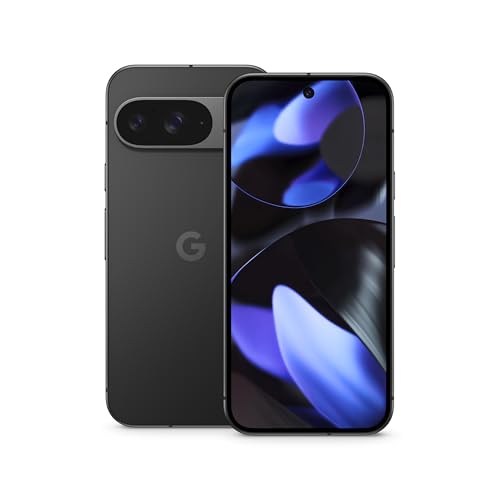
If there is a single phone that defines what root-friendly means in 2026, it is the Pixel 9, and the reason is not the camera or the processor — it is the paperwork, or rather the absence of it. Google publishes factory images for every Pixel, documents the unlock process on its own developer site, and lets you unlock the bootloader with a fastboot command after toggling a single switch in Developer options. There is no account to register, no waiting period measured in days, no unlock code to request from a support portal, and no regional lottery in which some variants unlock and others do not. Buy the unlocked model directly from Google or an open-market retailer, enable OEM unlocking, run the command, and the bootloader opens. That is the whole ceremony, and it is the reason the Pixel line has been the default recommendation for rooting for the better part of a decade.
The practical consequence of that openness is the deepest custom ROM bench in Android. LineageOS supports the Pixel 9 with official builds, GrapheneOS — the privacy-focused system that many people root-adjacent users actually want — treats Pixels as its reference hardware, and CalyxOS offers a middle path with microG for people who want de-Googled software without giving up push notifications entirely. This matters because rooting is rarely the end goal; the end goal is usually running different software, and the Pixel is the phone where that software exists, is maintained, and is tested by thousands of people before you ever flash it. When something goes wrong — and sooner or later, when you are flashing things, something will — the recovery path is equally well documented: Google’s factory images can be flashed back with the official flash tool, and the Pixel’s rescue mode is forgiving in a way that carrier-locked phones simply are not.
For rooting itself, the Pixel 9 follows the well-worn modern path. Unlock the bootloader, boot a patched boot image through Magisk, and you have root with systemless modifications that leave the system partition untouched. That systemless approach is important: it means over-the-air updates still arrive, and you can take them by re-patching the new boot image rather than reflashing the whole phone. The Pixel’s monthly security updates, which arrive faster than on any other brand, are actually an advantage here rather than a chore — each update is a fresh factory image you can patch and flash in minutes, and the community’s guides for the Pixel 9 are updated within hours of each release. If you have never rooted before, this is the phone where the gap between reading the guide and doing it is the smallest.
Strengths: the simplest documented unlock in the industry, with no account, no waiting period, and no regional exceptions on the unlocked model; factory images published by Google for every build, which makes recovery from a bad flash straightforward; the largest and best-maintained custom ROM ecosystem, including GrapheneOS, LineageOS, and CalyxOS; monthly security updates that arrive first and can be re-patched quickly; and a developer community so large that almost any problem you meet has already been solved and written up. The Pixel 9 is also a genuinely good phone before you modify anything — the camera, the clean software, and the seven-year update promise mean you are not buying a compromise in order to get root.
Trade-offs: unlocking the bootloader trips the warranty flag and can affect Play Integrity, so banking apps and some games may need workarounds that require ongoing maintenance; carrier-sold Pixel models, notably those sold through some US carriers, can ship with OEM unlocking greyed out, so the unlocked model must be bought deliberately; the Pixel’s hardware is premium-tier, so it costs more than a second-hand or budget route into rooting; and the very popularity of the Pixel means Google’s own security features, like hardware-backed attestation, are the most aggressive in the ecosystem — the cat-and-mouse game with Play Integrity is fought hardest on this phone. None of those are reasons to avoid it, but they are reasons to buy the right variant and to go in with your eyes open.
Who it suits: first-time root users who want the best-documented path, anyone whose goal is a custom ROM rather than root alone, and people who want their rooted phone to also be their daily driver. If you only buy one phone from this guide, buy this one — and buy the unlocked model, not a carrier variant.
Start with the phone the whole rooting community already standardizes on, then check price on Amazon.
One condition note on this pick: the listing currently available is an Amazon Renewed unit, a pre-owned unit that has passed the Renewed program inspection and carries the program guarantee, rather than a factory-sealed new unit.

Google Pixel 8a: the same unlock, in the budget tier
The Pixel 8a exists for everyone who read the Pixel 9 section and thought: yes, but do I need to spend flagship money to learn this? The answer is no, and the 8a is the proof. It is the same proposition in the mid-range tier — the same unlock policy, the same factory images, the same fastboot command, the same ROM community, just attached to a cheaper phone with a plastic back and a smaller battery. Google does not segment its openness by price. The phone that costs roughly half as much unlocks exactly the same way, and that is not a small thing: it means the cheapest safe way to learn rooting in 2026 is also one of the best-documented.
What you give up against the flagship is hardware, not freedom. The 8a’s processor is a generation behind, the charging is slower, the camera is simpler, and the screen is smaller and less bright. None of that matters to the bootloader. What matters is that LineageOS and GrapheneOS both support the 8a, that Magisk patches its boot image the same way, and that the recovery process is identical — flash the factory image, start over, lose nothing but time. For a first root, that identical recovery process is the whole point: you will make a mistake at some point, probably by flashing the wrong file or skipping a wipe, and the phone that forgives it cheaply is the phone to learn on. The 8a forgives it as cheaply as any phone on the market, and it costs less to replace if you somehow manage the truly unrecoverable, which with a Pixel is genuinely hard to do.
There is a second role for the 8a that experienced root users will recognize immediately: the second phone. Many people who root keep their main phone stock — for banking, for work apps, for the sheer reliability of a phone that has never been modified — and do their experimenting on a cheaper device. The 8a is nearly ideal for that job. It is fast enough to feel like a real phone rather than a toy, its battery lasts a day, and because it is a Pixel, every ROM and every root guide written for the flagship line transfers over with minimal translation. You can test a new ROM on the 8a on a Friday evening, decide you like it, and flash the same ROM to your main phone on Saturday with confidence, because you already know how it behaves. That is a workflow the 8a enables better than any other budget phone, because no other budget phone shares its software ecosystem so completely.
Strengths: the full Pixel unlock path — one command, no waiting, factory images published — at a mid-range price; official LineageOS and GrapheneOS support, so the ROM choice is the same as on the flagship; the cheapest genuinely safe phone to learn rooting on, with a forgiving recovery path; a capable daily driver in its own right, with the same clean software and long update support as its bigger sibling; and an ideal second phone for experiments, letting you keep a stock daily driver untouched while you tinker on the side.
Trade-offs: mid-range hardware means slower charging, a dimmer screen, and a less capable camera than the flagship Pixel; the same Play Integrity caveats apply, so banking apps may need workarounds; the same warning about carrier variants applies — buy the unlocked model, because a carrier-locked 8a can have OEM unlocking disabled; and the smaller battery and older chip mean it will age faster as a daily driver than the Pixel 9, so think of it as a learning tool and a backup first, and a long-term flagship second. The trade-offs are all about hardware tier, not about openness — and for a rooting phone, that is exactly the right place for trade-offs to live.
Who it suits: beginners who want the safest possible first root without flagship spending, anyone who wants a dedicated experiment phone alongside a stock daily driver, and buyers who care more about software freedom than about the fastest chip or the best camera.
If the flagship Pixel feels like too much to risk on a first root, start here instead and check price on Amazon.
Note on condition before you order: the current listing for this pick is a Renewed unit sold under the Amazon Renewed program, which means a pre-owned unit covered by the program guarantee instead of a brand-new retail box.

OnePlus 13: the enthusiast’s phone, still unlocked
OnePlus built its brand on the enthusiast crowd, and the OnePlus 13 is the phone where that history still pays off. The unlock path is the classic one: enable Developer options, toggle OEM unlocking, reboot to fastboot, and run the unlock command. There is no waiting period, no unlock code to beg from a portal, and no account age requirement. It is the same ceremony OnePlus has offered since the OnePlus One, and the fact that it still works unchanged in 2026, after the brand’s merger into Oppo’s orbit and several generations of software redesign, is genuinely reassuring. Companies change their minds about openness — the history of Android is littered with brands that were friendly until they were not — and OnePlus has, so far, not changed its mind.
What the OnePlus 13 adds over the Pixel is raw capability and a community with a different character. The hardware is unapologetically fast: a top-tier chip, generous memory, very fast charging, and a large battery that shrugs off a day of heavy use. For root users, that performance matters in specific ways. Kernel tweaks and undervolting have more headroom on a phone with thermal room to spare. Gaming with root-level tools — frame rate unlocks, controller mapping, per-app performance profiles — runs better on hardware that is not already at its limit. And the community that gathers around OnePlus has always skewed toward performance tuning rather than privacy hardening, which means the guides, kernels, and modules you will find are optimized for speed and battery life rather than for de-Googling. That is a real difference in flavor, and if your reason for rooting is performance, the OnePlus community speaks your language more fluently than any other.
There are two caveats that belong in any honest account of the OnePlus 13, and both are about the company’s direction rather than the phone in your hand. First, OxygenOS has moved steadily closer to Oppo’s ColorOS over the last few generations, and while the underlying Android is still unlockable, the software you start from is more heavily skinned than it used to be — which is, for many people, the very reason to flash a custom ROM. Second, OnePlus’s update policy and regional variant maze deserve attention: the global model unlocks cleanly, but carrier-specific and some regional variants have historically had different bootloader policies, so the unlocked global model is the one to buy, and it is worth confirming the exact model number before ordering. Neither caveat changes the verdict — the OnePlus 13 remains one of the two or three best rooting phones you can buy — but both reward a careful purchase, and a careful purchase is the theme of this whole guide.
Strengths: a fastboot unlock with no waiting period and no portal, continuing a decade of OnePlus openness; flagship hardware with real headroom for kernel tuning and performance modules; a large, performance-focused community producing custom kernels and Magisk modules; fast charging and a big battery that make heavy use painless; and a phone that is genuinely enjoyable stock, so rooting feels like an upgrade rather than a rescue. If the Pixel is the safe choice, the OnePlus 13 is the fun one — and for many root users, fun is the point.
Trade-offs: OxygenOS has grown closer to ColorOS, so the stock software is more skinned than the OnePlus of old — a reason to root, but also a reminder that the brand has changed; regional and carrier variants can differ in unlock policy, so the global unlocked model must be bought deliberately; the custom ROM scene, while large, is smaller than the Pixel’s, and GrapheneOS does not support OnePlus hardware; and unlocking still trips warranty and Play Integrity flags, with the same banking-app workarounds and the same maintenance burden as on any rooted phone. The OnePlus 13 rewards the buyer who checks the model number first.
Who it suits: performance-focused root users, gamers who want kernel-level control, and anyone who finds the Pixel a little too restrained — people who root to make a fast phone faster, not to make a private phone more private.
For the fastest hardware with the friendliest unlock in the enthusiast world, check price on Amazon.
Variant note on this pick: the listing currently live is the factory-unlocked OnePlus 13, the configuration this guide recommends for unlocking; as noted above, confirm the exact model on arrival, because regional variants can differ in unlock policy.

Nothing Phone 2: rooting with a phone that already feels open
The Nothing Phone 2 is the most interesting pick in this guide, because it is the only one whose manufacturer seems to actually like the idea of people modifying its phone. Nothing’s software is famously close to stock Android — clean, light, fast, and free of the duplicate apps and heavy skins that drive people to root in the first place — and the company has maintained an official bootloader unlock path since its first phone. The ceremony is the standard one: Developer options, OEM unlocking, fastboot, done. There is no waiting period and no portal. What makes the Nothing Phone 2 special is not that the door is open — several phones on this list can say that — but that the house behind the door was already built for people who care about software. Rooting a Nothing Phone feels less like fighting the manufacturer and more like accepting an invitation.
The custom ROM picture is younger than the Pixel’s but real and growing. LineageOS supports the Nothing Phone 2 with official builds, and the community around it is unusually active for a brand of Nothing’s size — partly because the phone’s transparent design and distinctive glyph lighting attracted exactly the kind of buyer who enjoys tinkering. That community is the phone’s safety net: when a new Android version lands, someone in the Nothing community is usually among the first to document the new boot image, the new unlock quirks, and the new Magisk path. The phone’s hardware helps too. It sits in the upper mid-range tier with a capable chip, a bright display, and wireless charging — good enough to be a daily driver without apology, and cheap enough relative to the flagship tier that experimenting on it does not feel reckless.
It is worth saying plainly what the Nothing Phone 2 is not. It is not the most powerful phone on this list, and it is not the phone with the largest ROM bench. If your goal is the deepest possible custom ROM selection, the Pixel 9 is still the answer. If your goal is raw performance tuning, the OnePlus 13 still wins. What the Nothing Phone 2 offers is a different trade: a phone that needs the least modification to feel right, from a company that treats openness as a feature rather than a grudging concession. For a first-time root user, that matters more than it sounds. The less you need to change, the fewer things can go wrong, and the more you can focus on the one or two modifications you actually wanted — a system-wide ad blocker, a backup tool, a kernel tweak — instead of spending a weekend rebuilding the entire software experience from scratch.
Strengths: an official unlock with no waiting period from a company that treats openness as a feature; near-stock software that needs little modification, so rooting is an addition rather than a rescue; official LineageOS support and an unusually active community for a young brand; upper mid-range hardware that works as a real daily driver; and a distinctive, well-built phone that stands out without costing flagship money. The Nothing Phone 2 is the pick for people who want rooting to feel easy, not adversarial.
Trade-offs: the ROM ecosystem is smaller and younger than the Pixel’s, so the choice of custom systems is narrower; the hardware is a step below the flagship tier, with a less capable camera and slower charging than the phones above; the brand is young, so its long-term update commitment and its future bootloader policy are less proven than Google’s or OnePlus’s decade-long records; and the same Play Integrity and warranty caveats apply as everywhere else — an unlocked bootloader is an unlocked bootloader, whatever the logo on the back. Buy it for what it is today, not for what the company might become.
Who it suits: first-time root users who want the gentlest possible introduction, people who like clean software and want root as a finishing touch rather than a rebuild, and buyers who enjoy being part of a young, enthusiastic community rather than following the crowd.
When you want a phone that already respects you before you unlock it, check price on Amazon.

Motorola Moto G Power 5G: the official unlock portal in the budget tier
Motorola occupies a quiet, useful corner of the rooting world. It does not advertise to enthusiasts, its phones do not dominate the custom ROM charts, and its marketing will never mention a bootloader. But behind that unglamorous surface, Motorola maintains something genuinely valuable: an official bootloader unlock portal, where the owner of a supported model can request an unlock key, receive it, and unlock the phone through fastboot. The Moto G Power 5G is supported on that portal, and it is the cheapest phone in this guide with a manufacturer-sanctioned path to an unlocked bootloader. That combination — a low price tier and an official process — makes it the most practical second phone for rooting experiments you can buy.
It helps to understand what the portal involves, because it is more ceremony than the Pixel’s single command. You enable Developer options, retrieve the phone’s unlock data string through fastboot, paste it into Motorola’s website, agree to the terms — which include a clear statement that unlocking may void the warranty — and receive a key by email. Then you run the unlock command with that key, and the phone wipes itself and reboots unlocked. The whole process takes perhaps half an hour, most of it waiting for an email. It is not difficult, but it is deliberate, and that deliberateness is worth noticing: Motorola wants you to have read the warning. Read it. The warranty language is real, and on a budget phone the warranty is proportionally more of the phone’s value than on a flagship, so the decision deserves the same care as on any other device.
Once unlocked, the Moto G Power 5G is a modest but honest rooting platform. LineageOS support exists for the Moto G line, though the ROM selection is narrower than the Pixel’s and the pace of updates is slower — this is a community of volunteers working on a budget phone, not a flagship with a thousand developers. Magisk works through the standard patched-boot-image path, and the phone’s near-stock software means there is relatively little bloat to remove, which is itself a small mercy. Where the phone shines is its role: a huge battery that lasts two days of light use, a big screen, and a price tier that makes it painless to dedicate to a single purpose — a test device for a new ROM, a home server running from a phone, a car dashboard, a backup phone with root-only backup tools installed. These are the jobs where a rooted budget phone earns its keep, and the Moto G Power 5G does them while costing less than a repair bill on a flagship.
Strengths: an official, manufacturer-run unlock portal for a supported model, with a documented process and a real key — no exploits, no shady tools; a low price tier that makes it the cheapest sanctioned route into rooting on this list; a very large battery and a big screen that suit always-on or secondary roles; near-stock software with little bloat to fight; and steady, if small, LineageOS community support. As a second phone, it is hard to beat on value.
Trade-offs: the unlock process requires a website, an email, and a key, so it is slower and more formal than the Pixel’s one-command path; the ROM ecosystem is small, updates are slower, and some models and carrier variants are not eligible for the portal at all, so the exact model number must be checked against Motorola’s supported list before buying; the hardware is budget-tier, with a modest camera and slower performance than the phones above; and the warranty warning is explicit — unlocking is a real trade against warranty coverage, and on this phone the portal makes you acknowledge that in writing. Buy the right model, read the warning, and go in with a plan.
Who it suits: anyone who wants a dedicated experiment phone without spending much, buyers who prefer an official manufacturer process even if it involves a portal and a key, and people with a specific second-phone job — testing ROMs, a car install, a backup device — rather than a daily driver to root.
For the cheapest official path to an unlocked bootloader, check price on Amazon.

Fairphone 5: rooting as a ten-year promise
The Fairphone 5 is the odd one out in this guide, and it is here because it answers a question the other five phones do not ask: what if the phone you root is the phone you keep? Fairphone’s entire pitch is longevity and ownership. The phone is designed to be opened with a standard screwdriver, its battery, screen, cameras, and ports are user-replaceable modules, and the company promises software support for ten years. The bootloader unlock is officially supported — Fairphone documents it, provides the tooling, and treats the owner’s right to modify the software as part of the product rather than a violation of it. For a root user, that posture changes the calculation completely: you are not fighting a manufacturer that tolerates you, you are using a product that was designed for you.
The custom ROM story is honest and specific. Fairphone’s own software is close to stock Android, and the company officially supports alternative systems: /e/OS, the de-Googled system built on LineageOS, offers the Fairphone 5 as one of its reference devices, and LineageOS itself supports it. That is a narrower bench than the Pixel’s, but it is a bench with a different character — the ROMs here are about privacy and longevity rather than performance tuning, and they are maintained by people who care about the same ten-year horizon Fairphone does. Rooting itself follows the standard path: unlock through Fairphone’s documented process, patch the boot image with Magisk, and you have root on a phone you can also repair yourself. There is a satisfying coherence to that — a phone you can open, a bootloader you can open, software you can change, all from the same philosophy.
The honest caveats are about reach, not about principle. The Fairphone 5 is sold officially in Europe and in a limited set of markets, and in the United States it is available only through specific channels — which means American buyers need to check availability and network compatibility carefully before ordering, because a phone that does not work on your carrier is a paperweight no matter how open it is. The hardware is mid-range: a capable but unremarkable chip, a good but not class-leading camera, and a design that prioritizes repairability over thinness. And the community, while dedicated, is small, so ROM updates and root guides arrive more slowly than on a Pixel. None of that makes the Fairphone 5 a bad rooting phone. It makes it a specific one — the right choice for a particular kind of owner, and a puzzling choice for anyone who just wants the fastest phone or the most ROMs.
Strengths: an officially supported bootloader unlock from a company that treats modification as a right; a repairable, modular design with user-replaceable parts and a ten-year support horizon; official /e/OS and LineageOS support for a privacy-focused, long-lived software path; near-stock software that is pleasant before you modify it; and the only phone on this list where rooting, repairing, and keeping the device for a decade are all part of the same story. For long-term ownership, nothing else here comes close.
Trade-offs: limited official availability outside Europe, so buyers elsewhere must verify channels and carrier compatibility; mid-range hardware that will not win speed tests against the flagship picks; a small community, which means slower ROM updates and fewer guides; and a design that trades thinness and polish for repairability — the Fairphone 5 looks and feels like a tool, because it is one. The trade-offs are the price of the philosophy, and the philosophy is the reason to buy it.
Who it suits: owners who plan to keep one phone for many years, privacy-focused users who want /e/OS or a de-Googled system with official support, and anyone who believes the right to repair and the right to root are the same right.
If you want the phone you root to be the phone you keep for a decade, check price on Amazon.
A note on origin for this pick: the listing live at the moment is an international variant, which can differ in band support and warranty coverage from a domestic-market unit.
What to look for in a root-friendly phone
The six picks above share a property that is easy to miss when you are comparing spec sheets: they are all phones whose manufacturers have made a decision, in writing, to let the owner unlock the bootloader. That decision is the first and most important thing to check, and it is worth learning how to verify it yourself, because the phones that are not on this list are mostly absent for one of a handful of reasons — and recognizing those reasons will save you from buying the wrong phone even when it is not one of the six above.
Check the unlock policy before the spec sheet
Start with the manufacturer’s own words. Google documents Pixel unlocking on its developer site. OnePlus describes the fastboot unlock in its community forums and support pages. Motorola publishes a list of models eligible for its unlock portal. Fairphone documents its process in its support center. Nothing states its unlock support publicly. If a manufacturer does not publish an unlock path, assume there is not one — forum posts claiming a workaround for a locked phone are usually describing an exploit that a security update has already closed, or a method that works on one regional variant and bricks another. The test is simple: can you find the unlock process on the manufacturer’s own site, written in the manufacturer’s own voice? If the answer is yes, the phone belongs in the conversation. If the answer is no, no camera score compensates.
Then check the variant. This is where more rooting plans die than anywhere else. The same phone can have different bootloader policies depending on where it was sold and through whom. Carrier-sold phones in the United States are the classic trap: a Pixel or a Motorola bought through a carrier can arrive with OEM unlocking greyed out, and no software trick will re-enable it, because the lock is enforced by the carrier’s configuration. International variants of Samsung phones unlock while the US Snapdragon variants do not — which is why Samsung, despite making excellent hardware, appears nowhere in this guide: the variant lottery is too punishing, and the Knox fuse means unlocking permanently and visibly trips a hardware flag that disables features like the secure folder even if you relock. Xiaomi is a different cautionary tale: the company still offers unlocking, but through an account-based process with waiting periods that have grown longer and more restrictive under HyperOS, and community reports of approvals being delayed or denied are common enough to plan around rather than ignore. The lesson is the same in every case: buy the unlocked model, from the manufacturer or an open-market retailer, and confirm the exact model number against the unlock documentation before you pay.
Factory images and recovery matter more than the root method
Beginners obsess over which rooting tool to use, and experienced users obsess over recovery — because recovery is what determines whether a mistake costs you an evening or a phone. Before you buy, check whether the manufacturer publishes factory images: complete, official software packages that restore the phone to its out-of-the-box state. Google publishes them for every Pixel build. OnePlus publishes full firmware packages. Fairphone publishes factory images for its models. Motorola publishes firmware through its own channels, though less conveniently. A phone with published factory images is a phone you can always bring back; a phone without them is a phone where a bad flash can become permanent. This is the single most practical reason the Pixel sits at the top of this guide, and it is worth more than any benchmark score.
Alongside factory images, check the custom ROM bench. A phone with official LineageOS support has passed a bar: a maintainer has committed to building it regularly, the device tree is public, and the builds are tested. GrapheneOS support means the phone meets a strict security standard. /e/OS support means the phone has been chosen for a privacy-focused system with its own update infrastructure. Unofficial ROMs — builds posted by an individual on a forum — can be excellent, but they depend on one person’s free time, and they stop when that person stops. When you are choosing between two phones, prefer the one with official builds from a project you have heard of. The six phones in this guide all clear that bar in one way or another, and that is not an accident.
Understand what unlocking does to warranty and Play Integrity
Unlocking a bootloader wipes the phone — everything, including photos, messages, and app data — so the backup happens before the unlock, not after. On most phones it also sets a flag the manufacturer can read, and that flag can affect warranty coverage. The details vary: Google’s warranty language is relatively forgiving for hardware faults unrelated to modification, Fairphone’s philosophy is the most owner-friendly, and Motorola’s portal makes you acknowledge the warranty consequence explicitly. None of them will cover a phone you bricked by flashing the wrong firmware, and all of them can tell that you unlocked. Go in knowing that, and if the warranty matters to you, root a second phone rather than your only one.
The second consequence is Play Integrity, Google’s system for verifying that a device is in a known-good state. An unlocked bootloader fails the strongest integrity checks, and that affects banking apps, payment apps, some games, and some streaming apps in high-definition modes. The community’s response is a set of Magisk modules that mask the unlocked state, and for most apps, most of the time, they work. But they are an ongoing maintenance burden: Google updates its checks, the modules adapt, and after a major Android release there is usually a period where something is broken. If you depend on a particular banking app, check the community’s current reports for that app before you unlock — and keep a stock phone available as a fallback if the app is truly non-negotiable. Rooting is a hobby with a maintenance cost, and Play Integrity is where that cost is paid.
The rooting path itself, in plain language
For all six phones in this guide, the modern rooting path is the same, and it is worth understanding before you buy, because it explains why the bootloader matters so much. First, you unlock the bootloader, which wipes the phone. Then you install the Magisk app, patch the phone’s boot image with it, and boot or flash that patched image — which gives you root access without modifying the system partition, a method called systemless root. From there you can install modules: system-wide ad blocking, backup tools that can save app data properly, kernel managers, and interface tweaks. When an over-the-air update arrives, you install it to the inactive slot, patch the new boot image, and reboot — a process the community documents for each phone, usually within hours of the update’s release.
What you should not expect is a one-click tool. The one-click root apps of the past mostly worked by exploiting security holes, and those holes have been closed for years. Any tool that promises to root a modern phone with one tap is either outdated, a scam, or a piece of malware — and the rooting community’s first rule, repeated in every forum, is never to run a rooting tool you cannot inspect. The legitimate path is manual, documented, and specific to your phone model, and the guides for the six phones in this guide are maintained by their communities precisely because the path is manual. That is a feature, not a bug: a process you understand is a process you can recover from.
best custom keyboards for android
best printers for android phones
Frequently asked questions
Will rooting void my warranty?
Unlocking the bootloader usually affects warranty coverage, but the details depend on the manufacturer and the country you bought the phone in. Google and Fairphone are relatively forgiving for hardware faults that have nothing to do with modification; Motorola’s unlock portal asks you to acknowledge the warranty consequence explicitly before it issues a key. No manufacturer covers damage caused by flashing the wrong firmware. The practical advice is simple: if the warranty matters to you, root a second phone, keep your daily driver stock, and read the warranty terms for your specific model before you unlock rather than after.
Can I still use banking apps on a rooted phone?
Usually, but not always, and not without maintenance. An unlocked bootloader fails Google’s strongest Play Integrity checks, and banking apps are the most likely to notice. The community maintains Magisk modules that hide the unlocked state, and they work for most apps most of the time — but Google updates its checks regularly, and after a major Android release there is often a window where a workaround is broken. Before you unlock, search the community’s current reports for your specific banking app, and keep a stock phone or an alternative way to bank available if the app is essential to your daily life.
Is rooting the same as installing a custom ROM?
No, though they are often done together. Rooting gives you administrator access on the phone’s existing software; installing a custom ROM replaces the software entirely. You can root without changing ROMs, which is what most people do — they keep the manufacturer’s software and add root-only tools like system-wide ad blocking and proper backups. You can also install a custom ROM without rooting, which is what privacy-focused users often do with GrapheneOS or /e/OS. The two are independent choices, and the bootloader unlock is the step that makes both of them possible.
Which phone should I choose for my first root?
The Google Pixel 9, or the Pixel 8a if you want to spend less. The reasons are the same ones repeated throughout this guide: the unlock is a single documented command with no waiting period, Google publishes factory images for recovery, the ROM community is the largest in Android, and almost any mistake you make is recoverable in an evening. Buy the unlocked model directly, back up before you unlock, and treat your first root as a learning project on a phone you can afford to wipe twice.
Can I unroot and go back to stock?
Yes, on every phone in this guide. The process is the reverse of rooting: flash the manufacturer’s factory image, which removes root and restores the stock software, and relock the bootloader if you want to. Relocking restores most of the phone’s security posture, though some manufacturers’ flags — Samsung’s Knox fuse is the famous example, which is one more reason Samsung is not in this guide — record that an unlock happened even after relocking. On a Pixel, a OnePlus, a Nothing Phone, a Motorola, or a Fairphone, returning to stock is a documented, routine procedure, and it is one of the best reasons to prefer phones with published factory images.
The honest summary is this: rooting in 2026 is narrower, quieter, and more deliberate than it used to be, and that is not a loss. The phones that still welcome it — the Pixel 9 and 8a, the OnePlus 13, the Nothing Phone 2, the Moto G Power 5G, and the Fairphone 5 — are the phones where the manufacturer has decided, in writing, that the owner is the owner, and where a community of real people maintains the software that makes that ownership meaningful. Choose the one that matches your reason for rooting, buy the unlocked model, back up before you unlock, and take your time with the first flash. The phone will still be there in the morning.