As an Amazon Associate, we may earn an affiliate commission from qualifying purchases made through links on this page, at no extra cost to you.
In this guide
Quick picks: best business 2 1 laptops
| # | Product | Where to buy |
|---|---|---|
| 1 | Lenovo ThinkPad X1 2-in-1 | Check on Amazon |
| 2 | HP EliteBook x360 1040 | Check on Amazon |
| 3 | Dell Latitude 7350 Detachable | Check on Amazon |
| 4 | Microsoft Surface Pro | Check on Amazon |
| 5 | Lenovo ThinkPad X13 2-in-1 | Check on Amazon |
| 6 | ASUS ExpertBook B5 Flip | Check on Amazon |
A folding laptop has to earn its hinge
A business 2-in-1 laptop is a bet. You are paying for a hinge — or a detachable keyboard — that a standard clamshell does not need, and the bet only pays off if the extra moving parts change how you work at least a few times a week. If they do, the return is real: you present standing up with the screen in tent mode, you mark up a contract with a pen on a train tray table, you fold the keyboard away and hand the screen to a client across a café table so they are looking at the figures instead of at the back of a lid. If they do not, you have bought a heavier, more expensive laptop whose party trick you use twice a year.
That is why this guide judges the six machines below less like consumer convertibles and more like tools. The questions that matter are unglamorous. Does the hinge stay tight in year three, or does the screen start to nod every time the train brakes? Where does the pen live, and will you still have it in November? Does the keyboard switch off properly when you fold it back, or do your thighs type gibberish into the document? Can your IT department image it, lock it, and find it? A beautiful folding screen with a pen that lives loose in your bag is a worse business tool than a plainer machine whose pen is still clipped to its frame two years in.
Two families share this category, and they suit different people. Convertibles fold their keyboard 360 degrees behind the screen; they are laptops first and tablets second, heavier but sturdier, with real keyboards and full-size ports. Detachables are tablets first; the keyboard is a cover that comes off, which makes them lighter and better for reading, annotating, and carrying under one arm, at the cost of lap comfort and port selection. Neither family is better. The right choice depends on whether your tablet moments happen at a desk, in a meeting chair, or standing in a warehouse aisle with a clipboard’s worth of forms to sign.
One honest warning before the picks: a 2-in-1 is a compromise by design. The tablet mode is thicker and heavier than a dedicated tablet, and the laptop mode usually gives up some cooling headroom and keyboard travel to the folding mechanism. Buy one because your work genuinely moves between typing, presenting, and writing by hand — not because the folding looks good in a product video.
There is also a quieter economic argument, and for many firms it is the decisive one. A 2-in-1 replaces two devices — the laptop and the tablet an employee would otherwise carry, charge, insure, and eventually replace on separate cycles. One device means one warranty, one management enrolment, one charger in the bag, and one screen to protect. Set against that, the folding premium is often smaller than the cost of the second device it retires, which is why the category keeps growing in fleets even as consumer fashion moves on. The maths only works, though, if the machine is genuinely used in both modes; a convertible that never folds is just an expensive laptop with a touchscreen.
Two families, one decision: convertible or detachable
Before comparing models, settle the architecture, because it decides your daily frustrations in advance. A convertible is one rigid object. Nothing detaches, nothing gets left in a hotel room, and the keyboard — a real keyboard, with real travel — is always attached. In exchange, the tablet you get is the whole laptop: thick, dense, and honest about it. Convertibles suit people whose tablet moments are seated — a meeting chair, a train table, a client’s desk — where the folded machine rests on something and the pen does the moving.
A detachable inverts every term of that bargain. The computer lives behind the screen, so the tablet part is genuinely light and genuinely pleasant to hold, read from, and carry into places a laptop looks out of place. The keyboard is a cover with ambitions: good enough for email and edits, honest about not being a desk keyboard. Detachables suit people whose tablet moments are mobile — walking a floor, standing at a machine, moving between rooms — and whose long typing happens back at a dock with a proper keyboard waiting.
The mistake is choosing by the demo. In a store, the detachable feels futuristic and the convertible feels ordinary. Six months in, the question is whether your keyboard cover is in the same bag as the tablet, whether the kickstand fits your actual lap, and whether the hinge you fold forty times a week still feels like the day it arrived. Choose the family that matches your seated-to-standing ratio, then choose the model inside it.
Many buyers, of course, live in the overlap: seated in the morning, standing after lunch. For them the tiebreaker is the keyboard. If your standing work still involves real typing — long forms, detailed notes, code — the convertible’s attached keyboard wins, because it is always there and always full-size. If your standing work is taps, ticks, and signatures, the detachable’s lightness wins, and the keyboard’s compromises never get the chance to annoy you. Be honest about the split; the wrong family bought hopefully is the most expensive outcome in this category.
What to look for in a business 2-in-1 laptop
The hinge is the product
Everything else in a convertible — the screen, the chip, the battery — is shared with ordinary laptops. The hinge is the part you are actually choosing. Good business hinges are tested through tens of thousands of open-close and fold cycles, and the better designs use dual torque mechanisms that hold the screen steady in tent mode without letting it creep. When you handle a machine in a store, fold it slowly and stop at several angles: a quality hinge holds each position without wobble, and the screen should not bounce when you tap it in laptop mode. Wobble is not a cosmetic flaw; it is the first sign of the looseness that makes a three-year-old convertible feel tired.
Hinge design also decides how the machine ages in a bag. Convertibles carry their screen and keyboard face to face in tablet mode, so a design that leaves the keys slightly recessed protects the display from key-shaped pressure marks. Detachables sidestep the hinge question but replace it with connector pins and magnets: check that the keyboard attaches with a positive, aligned snap rather than a vague magnetic suggestion, because a detachable keyboard that shifts a millimetre mid-sentence will drop keystrokes and your patience with it.
Tent mode deserves its own test, because it loads the hinge differently from every other position: the machine stands on its edges and the screen’s weight tries to fold it flat. A hinge that holds a laptop screen steady can still creep in tent mode on a vibrating train table or a café counter near a door. When you evaluate a convertible, set it in tent mode, tap the top corner as you would to dismiss a notification, and watch whether the angle changes over a minute. The picks below were chosen with that creep in mind — a presenter who has to re-set the screen mid-sentence loses the room’s attention at exactly the wrong moment.
The pen: latency, grip, and where it sleeps
For business use, the pen is rarely about drawing. It is about signing, annotating, sketching a process flow on a shared screen, and marking the one paragraph in a forty-page deck that legal needs to see. What matters is not headline pressure levels — every pen here tracks thousands of levels — but latency low enough that the ink appears under the tip rather than chasing it, a barrel thick enough to write a full page without hand cramp, and palm rejection that lets you rest your hand on the glass like paper.
Above all, decide where the pen sleeps. Pens fall into three camps: garaged inside the chassis (smallest, impossible to lose, sometimes too thin for long writing), magnetically attached to the side or top edge (comfortable size, vulnerable in a crowded bag), and loose in a loop or your pocket (the one you will replace). If your work involves signing documents daily, a garaged pen you always have beats a beautiful pen you left at the office. If you annotate for hours, choose the full-size pen and accept the magnetic risk. There is no wrong answer, only an answer that does not match your habits.
Screens that survive meeting rooms
Business screens are read under fluorescent light, through conference-room glare, and occasionally outdoors between sites. Brightness and an anti-glare finish matter more than resolution bragging rights. A matte or low-reflectance panel at moderate brightness is easier on the eyes across a six-hour day than a glossy showroom screen, and it keeps your figures legible to the person sitting at the glare angle of the table. Touch adds a small weight and power penalty to every panel; on a 2-in-1 it is not optional, but do not pay extra for resolution your spreadsheets cannot use.
Aspect ratio quietly shapes how a 2-in-1 feels. Taller screens — 16:10, or 3:2 on the detachable below — show more rows of a document and feel far more natural rotated or folded flat, because a page of text on a wide 16:9 panel in tablet mode leaves awkward margins. If you will read and annotate documents in tablet mode often, the taller screen is worth more than a faster chip.
Security and manageability are not optional extras
A machine that leaves the office needs the security stack that stays with it: a fingerprint reader or an IR camera for face sign-in, a TPM for encrypted storage, and — in larger fleets — Intel vPro or an equivalent management layer so IT can provision, patch, and retire the device without touching it. Privacy screens, offered on several picks below, narrow the viewing angle so the person in the next airline seat cannot read your forecast; they cost some brightness, and they are worth it for anyone who works on sensitive material in public.
Repairability belongs in this section too, because a 2-in-1’s hinge and battery are wear items. Business lines from the major makers publish service manuals, sell replacement batteries and keyboards, and design the base to open with standard screws. That support ecosystem — not the launch-day review — decides whether a small fault in year two is a quick repair or a written-off machine.
Ports, docks, and the desk you come back to
A convertible that travels all week still spends its evenings somewhere, and the best business 2-in-1s return to a desk through a single USB-C or Thunderbolt dock cable that carries power, displays, and peripherals. Check that the machine charges over USB-C rather than a proprietary barrel alone, that it can drive two external monitors from the dock, and that it keeps at least one USB-A port for the presentation clicker, security key, or legacy device that always appears at the worst moment. Detachables are thinner here — one or two USB-C ports is typical — so a detachable buyer should budget for the dock or hub from day one rather than discovering the gap in a client’s boardroom.
The keyboard has to know when to disappear
Folding a keyboard behind a screen creates a problem no clamshell ever faces: the keys are now on the outside, under your fingers, while you hold the machine as a tablet. Good convertibles solve it completely — sensors detect the fold past 180 degrees and disable the keyboard and trackpad, so gripping the back of the tablet types nothing. Test this in the store by folding a machine flat and squeezing the back while a document is open; any design that lets a stray keypress through will do it again in a meeting. In tent and stand modes the same logic applies, and the better machines wake the keyboard the moment you fold back, without a pause that makes you tap a key twice to check.
In laptop mode, judge the keyboard as you would any business laptop’s, because that is where most of your words will happen. Folding designs sometimes thin the deck or shorten key travel; the picks below were chosen partly because theirs did not. A backlight with more than one level, a layout that keeps the arrow keys honest, and a trackpad that stays accurate when the machine is warm are the unglamorous details that decide whether the laptop half of a 2-in-1 is a pleasure or a compromise you rationalise.
Battery and weight: the travel math
Every gram of a 2-in-1 is a gram you carry through airports, and every hinge adds some. As a working rule, convertibles cluster around three pounds and detachables a pound lighter with their keyboards attached; both are fine in a shoulder bag, and both become tiresome held one-handed for a twenty-minute inspection. Battery claims deserve similar realism: a machine that lasts a full working day of documents, calls, and browsing is doing its job, and pen-heavy or presentation-heavy days — screen bright, screen on — will shorten that. Fast charging matters more than the last theoretical hour, because twenty minutes plugged in during lunch is how travelling machines actually survive the afternoon.
Warranties, damage cover, and the hinge claim
Business warranties are where 2-in-1s separate into serious tools and consumer toys. The hinge, the pen, and the folding screen are the parts most likely to meet an accident, so read the cover with those in mind: accidental-damage protection is worth more on a convertible than on any clamshell, because the screen spends its life exposed in tablet mode rather than protected inside a closed lid. Onsite service matters for the same reason — a machine that folds for a living earns its money in meetings, and a ten-day mail-in repair is a louder cost than the service contract ever was.
Ask two specific questions before buying. Is the battery replaceable by a technician without replacing the whole base, and is the pen covered or cheaply re-ordered when — not if — one disappears? The makers represented below all publish parts and service documentation for their business lines, which is precisely why this roundup contains no consumer convertibles wearing a business badge: when a hinge loosens in year three, the difference between a spare part and a write-off is the difference between a tool and a gamble.
The six picks, judged as tools rather than gadgets
The machines below are the current business 2-in-1 lines from the makers who support them properly — spare parts, fleet management, and warranties that survive a hinge claim. Each one is the right answer for somebody and the wrong answer for somebody else, and the trade-offs section of each review is written to make that somebody else obvious before money changes hands.

Lenovo ThinkPad X1 2-in-1 — the flagship convertible for people who present
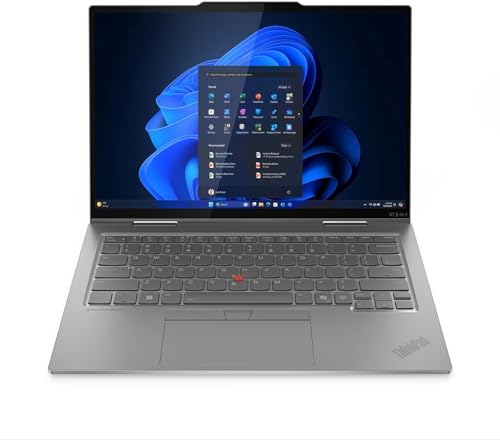
The X1 2-in-1 is the machine Lenovo builds when it is showing off, and it shows in the details that matter at work. The 360-degree hinge is the stiffest-feeling in this roundup: fold it into tent mode on a conference table and it stays there, tap the screen to advance a slide and it does not rock. That stiffness is exactly what a presenter needs, because tent mode is how this laptop earns its keep — screen facing the room, keyboard folded away underneath, pen in hand to circle the number everyone is arguing about. The optional pen garages in the side of the chassis on many configurations, charging while it sleeps, so it is simply always there.
On the desk it behaves like the premium ThinkPad it is. The keyboard keeps the deep, quiet travel the line is known for, the trackpad is large, and the port selection — Thunderbolt, USB-A, HDMI — means most people will not need a dongle for a projector or a clicker. Intel vPro configurations slot into managed fleets, the IR camera handles face sign-in, and the 16:10 screen options include brighter and privacy variants for people whose spreadsheets travel.
Back at a desk, the X1 docks over Thunderbolt and forgets it can fold, which is the correct behaviour. Where it reminds you is in small rooms: stand mode turns it into a self-supporting second screen for a video call, freeing the desk for paper, and the pen makes a genuinely good whiteboard substitute when the meeting room’s actual whiteboard is behind glass or already full. Owners tend to develop one habit quickly — presenting from tent mode with the pen rather than from behind the keyboard — because it changes the geometry of the meeting from broadcasting to discussing.
Strengths. The hinge and build quality lead the class, with the solid, creak-free feel of a machine built for a four-year service life. The garaged pen removes the lost-stylus problem entirely. Keyboard quality is the best here for long writing days, and the security and management options cover everything from a solo consultant to a regulated enterprise. Battery life comfortably covers a working day of documents and calls.
Trade-offs. This is the premium end of the category, and configurations climb quickly once you add the brighter screen, more storage, and vPro. The garaged pen is slim — fine for signatures and mark-ups, less comfortable for an hour of handwritten notes. In full tablet mode it is a thick, dense slab, better rested on a table than held in one hand.
Who it suits. Consultants, sales engineers, and executives who present from their own machine several times a week and want the pen, the hinge, and the keyboard to all feel first-class. If your 2-in-1 moments happen in meeting rooms rather than in the field, start your shortlist with the X1 and make the others beat it — check price on Amazon.
Check price on Amazon: Lenovo ThinkPad X1 2-in-1

HP EliteBook x360 1040 — the fleet-friendly convertible with the clever camera
HP’s EliteBook x360 line is what large IT departments buy when they want a convertible that behaves like the rest of the fleet, and the 1040 is its 14-inch flagship. The design is restrained aluminium, the hinge folds smoothly through laptop, tent, and tablet positions, and the whole machine is built around being deployed in hundreds: HP’s Wolf security suite, vPro options, and a chassis that service techs can open and repair. What lifts it above fleet-grade dullness is the attention to video calls — a high-quality webcam with auto-framing and appearance filtering that makes a hotel-room call look like a studio one — and an optional pen that magnetically attaches and wirelessly charges on the side of the machine.
In daily use the EliteBook feels like the sensible choice in the best sense. The keyboard is crisp, the 16:10 display options include a Sure View privacy variant that narrows viewing angles at a keypress, and the speakers are tuned for voices, which matters when the machine spends half its life as a meeting endpoint. Folded flat, it is a competent annotation tablet; in tent mode it is a tidy personal display for a desk that already has a keyboard.
The privacy screen deserves a practical note: it is a mode, not a permanent dimming. You work at full brightness at your desk, then narrow the viewing angle for the flight, accepting a dimmer, more directional picture as the price of confidentiality — a trade frequent travellers make happily. HP’s pen, meanwhile, is the one most likely to be borrowed in a meeting, because it feels like a pen rather than a stylus; just build the bag check into your leaving routine, since the magnet that makes it convenient is not a lock.
Strengths. The strongest manageability and security story here, with HP’s layered protection aimed at fleets that cannot afford surprises. Video-call quality is excellent, the privacy screen option is genuinely useful on planes, and the magnetic pen charges where it sits instead of needing a cable. Build and serviceability are properly business-grade.
Trade-offs. The magnetic pen is the one most likely to be knocked off in a bag — the classic trade for its full-size comfort. Some of the best features live on higher configurations, so the fleet price and the headline price can drift apart. The design, while handsome, is the most conservative here; nobody will ask what it is.
Who it suits. Anyone buying through or alongside an IT department, and hybrid workers whose day is a braid of documents and video calls with pen annotation in between. If your calendar is half meetings and the other half mark-ups, the EliteBook x360 fits that rhythm — check price on Amazon.
Check price on Amazon: HP EliteBook x360 1040

Dell Latitude 7350 Detachable — the tablet that brings its keyboard along
The Latitude 7350 Detachable starts from the opposite end: it is a 13-inch tablet with a kickstand, and the keyboard is a slim cover that snaps on when typing is required. Dell aimed it at people whose work happens standing up — inspections, rounds, site surveys, retail floors — and it shows in the details. The screen is a tall 3:2 panel that reads like a sheet of paper, the pen is active and quick for forms and signatures, and the whole package with keyboard attached still undercuts the convertibles here on weight. Collaboration cameras face both ways, because the person holding it is often showing the screen to someone else.
The detachable life has a specific texture. At a desk you will want a dock; in a chair with the kickstand open it is stable on a table but wobbles on a lap in the way all kickstand designs do. The keyboard itself is better than most covers — backlit, with a real key feel — but it is not the keyboard you would choose for a 4,000-word report. Dell’s management and security stack is fully present, which is what separates this from a consumer tablet with a keyboard case: it can be imaged, encrypted, tracked, and wiped like any other Latitude.
Plan the accessories as part of the purchase, because a detachable’s ecosystem is its ergonomics. A protective case with a hand strap turns it into a proper clipboard replacement, a desktop dock turns it back into a workstation, and a second charger that lives in the travel bag removes the daily unplugging ritual. Dell sells this kit as a system for exactly the roles the machine targets, and the total — machine plus case, dock, and pen — is the honest figure to compare against the convertibles here.
Strengths. The lightest complete package here and the most natural to carry under one arm. The 3:2 screen is superb for documents, forms, and annotation. Pen work feels immediate, the cameras serve field collaboration well, and it carries the full Dell business support and security ecosystem despite the tablet shape.
Trade-offs. Lap typing is compromised by the kickstand, full stop. Ports are minimal — plan on a hub or dock — and the keyboard and pen are the accessories most likely to need replacing over the machine’s life. Sustained heavy work warms the back panel, because a tablet’s cooling options are limited.
Who it suits. Field professionals, healthcare and logistics staff, and anyone whose “office” is a sequence of locations where the machine is carried more than it is typed on. If your pen use is forms, signatures, and checklists rather than essays, the 7350 Detachable matches the shape of your day — check price on Amazon.
Check price on Amazon: Dell Latitude 7350 Detachable

Microsoft Surface Pro — the pen-first detachable for annotators
The Surface Pro is the machine that defined the detachable category, and its current business editions remain the reference point for pen work. The Slim Pen writes with the lowest perceived latency here — ink that feels laid down rather than dragged — and the pen stores and charges in a recess in the Signature Keyboard, a small piece of design that means the pen is charged and present every time you flip the cover open. The 3:2 display is bright, colour-accurate, and taller than widescreen rivals, which is why a page of comments feels like a page rather than a letterbox.
As a laptop, the Surface Pro is a study in priorities. The kickstand is infinitely adjustable and machined beautifully, the keyboard cover has genuinely good keys for something that thin, and the whole kit disappears into a bag like a magazine. But it is a tablet wearing a keyboard: the ports are two USB-C and nothing else, the kickstand needs desk depth behind the screen, and on a lap — especially a train lap — it never quite settles. Business editions add the management and security options fleets require, including replaceable components that earlier generations lacked.
The Surface Pro’s desk life runs through a dock, and with one it is a civilised workstation: two external screens, the tablet itself angled below them as a dedicated note surface, pen in hand while the real keyboard does the typing. That arrangement — writing surface permanently open beside the keyboard — is something no convertible can offer, and it is how many owners end up using the machine most. It reframes the detachable question: the tablet is not a mode you visit, it is a second workspace that happens to contain the whole computer.
Strengths. The best pen experience in this roundup, full stop — latency, storage, charging, and the tall screen combine into the most natural digital-paper feel. It is the thinnest and most elegant package here, the display quality is outstanding, and the keyboard cover’s pen well solves the lost-pen problem in a different, equally effective way.
Trade-offs. The keyboard and pen are essential purchases rather than included givens in many bundles, so compare complete kits, not tablet-only listings. Lap use is the weakest here, repairability is improving but still behind the big business lines, and heavy sustained workloads are limited by the thin chassis. Two ports is two ports, whatever the brochure says.
Who it suits. Heavy annotators — reviewers, editors, lawyers, academics, designers — whose primary tablet activity is writing on documents, and who mostly type at desks or tables where a dock waits. If the pen is the point of the purchase, the Surface Pro is the one to beat — check price on Amazon.
Check price on Amazon: Microsoft Surface Pro
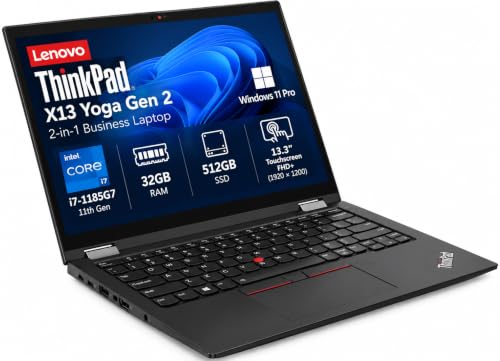
Lenovo ThinkPad X13 2-in-1 — the compact traveller’s convertible
Think of the X13 2-in-1 as the X1’s smaller, thriftier sibling: the same design language and hinge discipline shrunk to a 13.3-inch chassis that fits the tray tables and café counters where its bigger brother feels grand. It keeps the essentials that make a ThinkPad a ThinkPad — the keyboard feel, the TrackPoint for those who use it, a proper spread of ports for its size, and a garaged pen on many configurations — while trimming the flagship’s screen options and speaker drama. For road warriors, the size is the feature: it opens fully in an economy seat, and the weight difference is the kind you feel at the end of a terminal, not the start.
The smaller chassis does impose its physics. The screen, while sharp and usefully tall at 16:10, gives you less canvas in split-screen work, and the pen is the slim garaged type that suits signatures and diagrams better than longhand essays. In return you get a machine that behaves like a tool rather than a flagship: durable, unshowy, and supported by the same parts and service network as the X1. For a small firm standardising on one convertible, this is often the rational fleet choice.
A travel day shows the X13 at its best. It charges over USB-C from the same compact adapter as a phone-class charger in a pinch, wakes instantly for the two minutes of work a departure lounge actually allows, and the garaged pen means the signature a client needs at the gate is a ten-second job rather than a bag excavation. Machines this size live or die on whether you bother to bring them; the X13’s whole design argues, successfully, that you will.
Strengths. Genuinely portable without giving up the business essentials — keyboard, ports, garaged pen, and fleet management all survive the shrink. The hinge feels as deliberate as the flagship’s, and the machine’s durability testing pedigree is the real thing. It is usually the most attainable route into a proper business convertible.
Trade-offs. The smaller screen asks for discipline with window management, and the slim pen shares the X1’s long-writing compromise. Speaker and camera quality are workmanlike rather than delightful. If your desk has a dock and two monitors, some of its portability premium is wasted on you.
Who it suits. Frequent travellers, field sales staff, and small teams who want one dependable convertible that disappears into a bag and survives being opened a dozen times a day. If you measure a laptop by how little you notice carrying it, the X13 earns its place — check price on Amazon.
Check price on Amazon: Lenovo ThinkPad X13 2-in-1

ASUS ExpertBook B5 Flip — the value-minded flip with a big screen
ASUS builds its ExpertBook line for the businesses the big three sometimes overlook, and the B5 Flip is its 14-inch convertible statement: a full-size folding screen, a garaged stylus, and a chassis tested to military durability standards, usually at a gentler point in the market than the flagship names. The touches are practical. A number pad can appear in the touchpad for spreadsheet work, the webcam carries a physical privacy shutter, and the port selection is generous, because ASUS assumes you do not have a corporate dock standard to fall back on.
In use, the B5 Flip feels like the generalist of the group. The hinge is smooth and holds its angles, the screen options include rich, colour-deep panels that flatter presentations, and the keyboard is comfortable across a long day. It lacks some of the flagship polish — the fleet software story is thinner than HP’s or Lenovo’s, and the brand’s business support network, while real, is not as deep in every region. For an owner-operator or a small office buying three machines rather than three hundred, those are acceptable trades for what you get in the box.
Ownership is where the B5 Flip quietly scores. Standard screws, a battery a technician can reach, and ports that keep cheap peripherals in play all lower the cost of the second and third year, which is where a small firm’s money actually goes. The folding screen also gives a solo practitioner a party trick with substance: flip it to tent mode on a reception desk and it becomes the sign-in screen, the portfolio, or the quote the client reads while you make the coffee.
Strengths. A lot of machine for the money: durable chassis, garaged pen, big bright screen, and ports that reduce dongle dependence. The touchpad number pad is a small gift to anyone who lives in spreadsheets, and the physical camera shutter is the kind of privacy feature you use daily. Battery life is strong for a full-size convertible.
Trade-offs. Fleet management and global support depth trail the biggest business brands, which matters if you are deploying across countries. The pen is capable rather than best-in-class for long annotation sessions. Resale and accessory ecosystems are smaller, so cases, spare pens, and docks take slightly more hunting.
Who it suits. Small businesses, practices, and independent professionals who want a full-size business convertible with a pen in the box and no flagship tax. If you are buying for a team you can count on your fingers, the B5 Flip stretches the budget furthest — check price on Amazon.
Check price on Amazon: ASUS ExpertBook B5 Flip
The pen at work: annotation, whiteboards, and signatures
It is worth being concrete about what the pen actually does all day, because “supports a stylus” hides three very different jobs. The first is annotation: marking a PDF, circling a clause, sketching over a screenshot. Every pen here does this well, and the deciding factor is not the pen but the software habit — set your PDF reader and note app as the defaults, and the mark-up takes seconds instead of becoming a small project. The second job is the shared whiteboard: in a video call, screen-sharing a blank canvas and thinking with the pen while the room watches is the closest digital equivalent of standing at a flipchart, and it works on all six machines because the bottleneck is your confidence, not the hardware.
The third job is the signature, and it is the one that quietly justifies the category for many firms. Contracts, delivery notes, inspection forms, and consent documents signed on the glass — captured in the workflow instead of printed, signed, scanned, and re-filed — remove a whole loop of paper handling. For that job, pen precision matters less than pen presence: the garaged and keyboard-stored pens win, because the signature happens where the client is, not where the pen was left. If your business signs things away from desks, weight that fact heavily in the choice above.
Side by side: how the six compare
| Model | Form | Pen storage | Best at | Watch out for |
|---|---|---|---|---|
| ThinkPad X1 2-in-1 | 360° convertible, 14-inch | Garaged in chassis | Presenting, keyboard feel, fleet polish | Premium configurations add up |
| HP EliteBook x360 1040 | 360° convertible, 14-inch | Magnetic, charges on the side | Video calls, security, privacy screen | Magnetic pen can detach in a bag |
| Dell Latitude 7350 Detachable | Detachable tablet, 13-inch | Active pen, carried with the unit | Field work, forms, lightest carry | Kickstand lap use, minimal ports |
| Microsoft Surface Pro | Detachable tablet, ~13-inch | In the keyboard’s charging well | Handwriting and annotation feel | Keyboard and pen often separate purchases |
| ThinkPad X13 2-in-1 | 360° convertible, 13.3-inch | Garaged in chassis | Travel, small bags, tray tables | Smaller canvas, slim pen |
| ASUS ExpertBook B5 Flip | 360° convertible, 14-inch | Garaged stylus | Value, ports, number-pad touchpad | Thinner fleet support network |
Read the table as a map of priorities rather than a league table. The two detachables trade lap comfort for carry weight; the two ThinkPads trade screen size for portability within the same design philosophy; the HP optimises the meeting-heavy day; the ASUS optimises the invoice. Every machine here can run an office workload without breathing hard — the differences that will actually reach your daily life are the hinge, the pen’s home, and how the machine behaves in the specific chair you work from.
One column deserves emphasis because buyers underrate it until the first loss: pen storage. A garaged pen and a keyboard-well pen are present by design; a magnetic pen is present by habit. If you know yourself to be a person who leaves umbrellas in restaurants, treat that row of the table as a deciding factor rather than a footnote, because the best pen in this roundup is worthless in a drawer in another city.
Matching the machine to the way you work
The presenter. Your laptop’s second screen is the room. You need tent mode that does not wobble, a pen for circling figures, and the confidence that the machine will connect to whatever projector the client owns. That points to the X1 2-in-1 or the EliteBook x360 — full convertibles with stiff hinges and ports that reduce dongle roulette. Practice the fold before the meeting; the two seconds of fumbling you save are the two seconds the room spends doubting you.
The field professional. Your laptop’s desk is a tailgate, a ward round, a warehouse aisle. Weight and one-handed carry dominate, forms and signatures dominate the pen work, and the screen must be readable standing up. That is the Latitude 7350 Detachable’s home ground, with the Surface Pro as the alternative if your forms are annotation-heavy. Whichever you choose, budget for the rugged case and the spare pen from day one; field kit fails at the edges, not the centre.
The note-taker. Your meetings produce handwriting, not recordings. Pen latency and a tall screen matter more than any benchmark, and the pen must be present and charged without thought. The Surface Pro’s pen-in-keyboard system and the ThinkPads’ garaged pens are the two philosophies that work; choose the Surface if handwriting is your main input, a ThinkPad if it shares the day equally with typing.
The trainer. Your screen is a teaching surface. You annotate over slides, sketch the diagram the manual forgot, and pass the machine across the table so a trainee can try the workflow with the pen. A convertible in stand mode — screen forward, keyboard tucked behind — is the natural tool, and the X1 or the B5 Flip give you the largest canvas for it. What matters most is the least technical thing: a screen coating and brightness that survive a bright training room, and a pen that survives being borrowed thirty times a week.
The executive traveller. Your constraints are the tray table, the lounge, and the person in the next seat. The X13 2-in-1 fits the space you actually get, the EliteBook’s privacy screen protects the work, and the X1 splits the difference with the best keyboard for the hotel-desk hours. In all three cases, the winning feature is the one you stop noticing: a machine light enough that you bring it, charged enough that you open it.
Living with a hinge: keeping a 2-in-1 healthy for years
A convertible’s lifespan is decided by habits more than by specifications. Open and fold the machine from the centre of the lid, not from a corner: corner lifting twists the panel and loads one hinge, and it is the single most common cause of the looseness owners blame on build quality. When you fold to tablet mode, check the keyboard deck is clear — a pen, a paperclip, or a crumb layer between keys and screen is how displays get their first pressure mark. In tablet mode, rest the machine on its keyboard side on a clean surface, or use a sleeve as a mat; the folded-back keys are disabled, but they still collect grit that later meets the screen.
Detachables need one extra habit: treat the connector as a port, not a magnet trick. Align the keyboard before you press it home, keep crumbs and paperclips away from the contact strip, and carry the tablet in a case that covers the connector edge — a bent pin or a strip of grit is the detachable equivalent of a loose hinge. And whatever the family, resist the one-handed corner yank when a screen feels stiff first thing in the morning; hinges loosen from leverage, and leverage is a choice.
Give the pen a homecoming ritual. Garaged pens take care of themselves, but magnetic and keyboard-well pens need a habit: pen back in its place before the machine goes in the bag, every time, the way you would hang up keys. Once a month, wipe the hinge barrels and the detachable connector pins with a dry cloth; dust in a hinge is friction, and friction is wear. Finally, keep the software side boring — let the maker’s updates handle hinge-sensor and pen firmware, because the auto-rotate and keyboard-disable behaviours that make a 2-in-1 feel seamless are software as much as hardware, and they are maintained like it.
Frequently asked questions
Is a business 2-in-1 worth it over a regular laptop and a separate tablet?
It is worth it when the same work moves between the modes — a document you type in the morning, present at noon, and annotate in the afternoon lives best on one machine with one battery and one set of files. If your tablet use is only reading and media, a regular business laptop plus an inexpensive tablet is simpler and often lighter overall. The honest test is the last month: count the times you wished your laptop folded or your tablet had your real keyboard. If the count is in double figures, the 2-in-1 earns its hinge.
Convertible or detachable: which lasts longer in business use?
Convertibles usually age more gracefully, because the hinge is engineered as a permanent joint and there are no exposed connector pins or separate pieces to lose. Detachables concentrate their wear in the keyboard cover and its connector, which are replaceable — so a detachable can be refreshed mid-life in a way a convertible cannot. Fleets that keep machines four years tend to favour convertibles; field roles that destroy keyboards favour detachables precisely because the fragile part is cheap to swap.
Can a 2-in-1 replace a desktop at the office?
Yes, with a dock. Every machine here drives external monitors and charges over USB-C or Thunderbolt, so a single cable at the desk turns any of them into a desktop with your real keyboard, mouse, and screens — and the folding trick simply goes unused until you travel. The limits are sustained heavy workloads: rendering, compiling very large projects, or running many virtual machines will thermal-throttle a thin convertible sooner than a desktop. For office workloads, the docked 2-in-1 is now the default pattern in many firms.
What should I check about the pen before buying?
Three things: where it stores, whether it charges there, and how it feels across a full page rather than a signature. A pen that stores loose will be lost; a pen that needs a cable will be flat. Then write a paragraph with it in the store or during the return window — slim garaged pens are fine for mark-ups but can cramp during long notes, and that is a mismatch no specification sheet will warn you about. Also confirm whether the pen is included or a separate purchase, because on detachables it is frequently the latter.
Do I need vPro or a specific security package on a 2-in-1?
If the machine is yours alone, the essentials are a TPM, encrypted storage, and a fingerprint reader or IR camera — all present across these picks. vPro and the makers’ fleet security suites earn their place when an IT department manages the device: remote provisioning, out-of-band management, and hardware-level threat detection. Solo buyers can skip the fleet tiers without weakening their own security; organisations should let their IT policy, not the brochure, make the call.
The short answer
One last filter before the names: buy the support, not just the machine. All six picks come from business lines with published service documentation, spare-part channels, and warranties that treat a hinge as a component rather than an excuse. That infrastructure is invisible on the day the box arrives and decisive on the day something loosens, cracks, or stops charging — which, across a three-to-five-year working life, is a day that comes for a meaningful share of machines that fold for a living.
Buy the X1 2-in-1 if you present for a living, the EliteBook x360 if your life is video calls inside a managed fleet, the Latitude 7350 Detachable if your work happens standing up, the Surface Pro if the pen is the point, the X13 2-in-1 if you travel light, and the ExpertBook B5 Flip if the budget has to stretch. Underneath those choices sits the same principle: a business 2-in-1 is not a laptop with a trick, it is a decision about where your work happens — at a desk, across a table, or in your hands — and the right machine is the one whose hinge disappears into that routine until folding it feels as unremarkable as opening it.