The best wireless printers scanners are the all-in-one printers that print, scan and copy without a cable in sight: a document sent from a phone, a photograph printed from a laptop in another room, a page scanned to a computer over the same wireless network. The eight printers below all do all three jobs wirelessly, and every one is a real all-in-one with a named scanner and a named wireless connection, not a printer with a scanner added as an afterthought.
The list covers four makers, HP, Brother, Canon and Epson, and it covers the two kinds of ink system that matter most: cartridge printers and tank printers. The HP OfficeJet Pro and Envy picks, the Brother picks, the Canon PIXMA and MegaTank picks, and the Epson EcoTank pick cover colour and monochrome, home and home-office use, and the choice between a low-cost printer with cartridges and a tank printer that is refilled rather than replaced. Two Canon PIXMA picks and two Brother picks appear, because each maker offers a different size and a different system in this guide.
A wireless printer is bought for the desk it will live on, so the guide looks at what each printer actually offers: the print, scan and copy functions, the automatic document feeder, the duplex printing, the display, the mobile printing, and the ink system. A printer with an automatic document feeder is a different purchase from one without it, and a tank printer is a different purchase from a cartridge printer, and the guide says plainly which is which, so the buyer can match the printer to the work they actually do.
In this guide
Quick picks: best wireless printers scanners
| # | Product | Where to buy |
|---|---|---|
| 1 | HP OfficeJet Pro 8125 Wireless All-in-One Printer | Check on Amazon |
| 2 | Brother Work Smart 1360 Wireless Colour Inkjet All-in-One | Check on Amazon |
| 3 | Canon PIXMA TS6520 Wireless Colour Inkjet Printer, White | Check on Amazon |
| 4 | Canon MegaTank G3270 All-in-One Wireless Colour Printer | Check on Amazon |
| 5 | HP Envy 6155 Wireless All-in-One Colour Inkjet Printer, Portobello | Check on Amazon |
| 6 | Brother DCP-L2640DW Wireless Compact Monochrome Printer | Check on Amazon |
| 7 | Epson EcoTank ET-2900 Wireless Colour All-in-One Supertank Printer, Black | Check on Amazon |
| 8 | Canon PIXMA TR4720 All-in-One Wireless Printer, Black | Check on Amazon |
How the picks were chosen
The picks were chosen from the site's own product search, looking only at genuine wireless all-in-one printers sold as complete printers: print, scan and copy, with a named wireless connection and a named maker. A listing was dropped if it was a printer without a scanner, a scanner without a printer, a different colour of a model already picked, or a printer whose wireless connection was not stated. The Epson ET-2903 was dropped because it is a variant listing of the ET-2900 already on this list, and the second TR4720 listing was dropped for the same reason.
The ink system was checked first, because it decides the running cost: a cartridge printer is cheaper to buy and dearer to run, while a tank printer costs more to buy and is refilled with bottles rather than replaced. The picks here cover both, and the guide names the system of each printer so the buyer can choose for the volume they print. The automatic document feeder came next, because it decides whether a stack of pages can be scanned at once, and the guide names which printers have one.
Finally, each printer was checked for the practical things that decide whether a wireless printer gets used: duplex printing, a display that is easy to read, mobile printing from a phone, and a compact size that fits the desk. The eight picks below cover all of those, in different combinations, and the guide notes which printer does each thing best, so the buyer can spend on the feature that matters most to them and skip the ones that do not.
Quick comparison
| Product | Standout detail |
|---|---|
| HP OfficeJet Pro 8125 Wireless All-in-One Printer | HP OfficeJet Pro 8125, ADF, duplex |
| Brother Work Smart 1360 Wireless Colour Inkjet All-in-One | Brother Work Smart 1360, ADF, 1.8 inch display |
| Canon PIXMA TS6520 Wireless Colour Inkjet Printer, White | Canon PIXMA TS6520, OLED display, compact |
| Canon MegaTank G3270 All-in-One Wireless Colour Printer | Canon MegaTank G3270, refillable tank |
| HP Envy 6155 Wireless All-in-One Colour Inkjet Printer, Portobello | HP Envy 6155, duplex, Portobello |
| Brother DCP-L2640DW Wireless Compact Monochrome Printer | Brother DCP-L2640DW, monochrome laser |
| Epson EcoTank ET-2900 Wireless Colour All-in-One Supertank Printer, Black | Epson EcoTank ET-2900, supertank, photos |
| Canon PIXMA TR4720 All-in-One Wireless Printer, Black | Canon PIXMA TR4720, ADF, fax |

1. HP OfficeJet Pro 8125 Wireless All-in-One Printer
Key specs
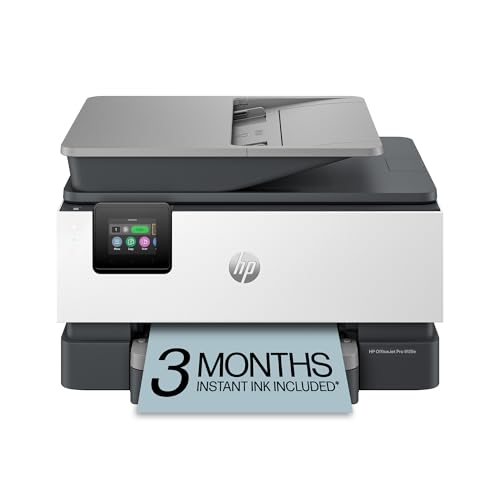
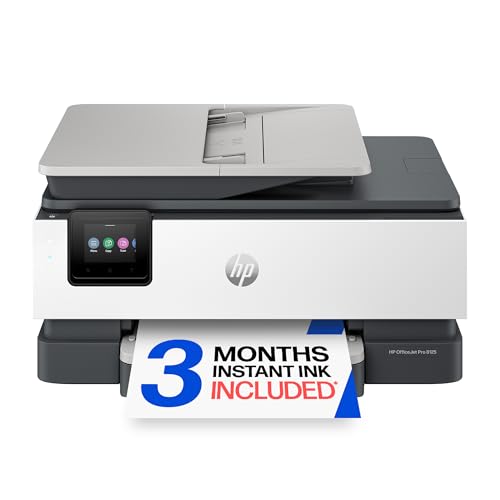
HP OfficeJet Pro 8125 wireless all-in-one colour inkjet printer, print, scan, copy, ADF, duplex printing, best for home office, 3 month trial of Instant Ink included, AI-capable, C2VJ4A.
Strengths
- The automatic document feeder scans a stack of pages without feeding them one by one.
- Duplex printing prints both sides, which saves paper on long documents.
- The wireless connection and the mobile printing suit a home office with several devices.
Trade-offs
- The Instant Ink trial is a subscription, so the buyer should read its terms before signing up.
- The printer is an inkjet, so it needs regular use to keep the nozzles clear.
- The OfficeJet Pro is a home-office printer, so it is larger than the compact picks here.
Who it fits
A buyer who wants a home-office printer with an ADF and duplex, for documents.
Best for: A home office that prints and scans documents every day.
Not suited for: Buyers who print rarely, who should take a tank printer or a simpler pick.
In daily use
Set the printer up on the wireless network once, and let every device in the house use it, because that is the point of a wireless printer. Load the ADF with a stack of pages for scanning, and use duplex printing for long documents to save paper.
The HP OfficeJet Pro 8125 is the office pick in this guide: the home-office printer with an ADF.
Check price on Amazon: HP OfficeJet Pro 8125 Wireless All-in-One Printer

2. Brother Work Smart 1360 Wireless Colour Inkjet All-in-One
Key specs
Brother Work Smart 1360 wireless colour inkjet all-in-one, print, scan, copy, best for home, duplex printing, auto document feeder, mobile printing, 1.8-inch display, works with Alexa.
Strengths
- The automatic document feeder and duplex printing cover the two features a home office needs most.
- The 1.8-inch display makes the printer easy to use without a computer.
- Mobile printing and Alexa support cover printing from a phone or by voice.
Trade-offs
- The printer is an inkjet, so it needs regular use to keep the nozzles clear.
- The 1.8-inch display is small, so a buyer who wants a large screen should look at the Canon TS6520.
- The Work Smart 1360 is a home printer, so it is not built for heavy office volumes.
Who it fits
A buyer who wants an ADF, duplex and a display, with mobile printing, for home.
Best for: A home that prints, scans and copies, with a phone as well as a computer.
Not suited for: Buyers who print very heavily, who should take a tank printer.
In daily use
Use the 1.8-inch display to copy and scan without switching the computer on, because the printer is designed to work on its own. Print from a phone over the wireless network, and use the ADF for a stack of pages rather than feeding them one by one.
The Brother Work Smart 1360 is the home pick: the all-in-one with an ADF and a display.
Check price on Amazon: Brother Work Smart 1360 Wireless Colour Inkjet All-in-One

3. Canon PIXMA TS6520 Wireless Colour Inkjet Printer, White
Key specs
Canon PIXMA TS6520 wireless colour inkjet printer, 1.42-inch OLED display, white, print, scan, copy, 1.42-inch OLED display, intuitive control panel, compact for home design.
Strengths
- The 1.42-inch OLED display is the clearest screen in this guide, and it is easy to read.
- The compact white design suits a home desk and a light-coloured room.
- The intuitive control panel makes copying and scanning simple without a computer.
Trade-offs
- There is no automatic document feeder stated in the listing, so a stack of pages must be fed one by one.
- The printer is an inkjet, so it needs regular use to keep the nozzles clear.
- The white finish shows marks more readily than a dark printer.
Who it fits
A buyer who wants a compact Canon printer with a clear OLED display, for home.
Best for: A home desk where the printer should look good and be easy to use.
Not suited for: Buyers who need an ADF, who should take the HP OfficeJet Pro pick.
In daily use
Use the OLED display to copy and scan without a computer, because the screen is the point of this printer. Keep the printer on the desk where it can be seen, because the white compact design is made to be looked at, and wipe it with a dry cloth to keep it bright.
The Canon PIXMA TS6520 is the display pick: the compact Canon with an OLED screen.
Check price on Amazon: Canon PIXMA TS6520 Wireless Colour Inkjet Printer, White

4. Canon MegaTank G3270 All-in-One Wireless Colour Printer
Key specs
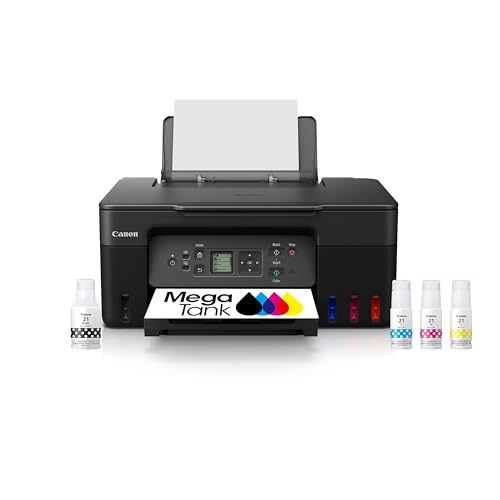
Canon MegaTank G3270 all-in-one wireless colour printer, print, copy, scan, refillable tank system, compact desktop design, home and office use.
Strengths
- The refillable tank system is filled with bottles rather than replaced, which suits a buyer who prints a lot.
- The compact desktop design fits a home desk without taking over it.
- The print, copy and scan functions cover all three jobs in one wireless printer.
Trade-offs
- The tank system costs more to buy than a cartridge printer, so the saving comes over time.
- There is no automatic document feeder stated in the listing, so a stack of pages must be fed one by one.
- The printer is an inkjet, so it needs regular use to keep the nozzles clear.
Who it fits
A buyer who prints a lot and wants a tank system, for home or a small office.
Best for: A household that prints often and wants to refill rather than replace.
Not suited for: Buyers who print rarely, for whom a cartridge printer is cheaper to buy.
In daily use
Fill the tanks with the bottles provided, and keep the printer switched on, because a tank printer that is left off for months can clog. Print regularly, even a test page, to keep the nozzles clear, and the tank system will repay its higher purchase cost over time.
The Canon MegaTank G3270 is the tank pick: the refillable printer for heavy use.
Check price on Amazon: Canon MegaTank G3270 All-in-One Wireless Colour Printer

5. HP Envy 6155 Wireless All-in-One Colour Inkjet Printer, Portobello
Key specs
HP Envy 6155 wireless all-in-one colour inkjet printer, print, scan, copy, duplex printing, best for home, 3 month trial of Instant Ink included, AI-capable, C2WR7A, Portobello.
Strengths
- Duplex printing prints both sides, which saves paper on long documents.
- The Portobello colour is a warm tone that suits a home desk.
- The wireless connection covers printing from every device in the house.
Trade-offs
- The Instant Ink trial is a subscription, so the buyer should read its terms before signing up.
- There is no automatic document feeder stated in the listing, so a stack of pages must be fed one by one.
- The printer is an inkjet, so it needs regular use to keep the nozzles clear.
Who it fits
A buyer who wants a stylish HP printer with duplex, for home.
Best for: A home desk where the printer should look good and print both sides.
Not suited for: Buyers who need an ADF, who should take the HP OfficeJet Pro pick.
In daily use
Set the printer up on the wireless network once, and print from any device in the house. Use duplex printing for long documents, and keep the printer switched on, because an inkjet that is left off for months can clog.
The HP Envy 6155 is the stylish pick: the Portobello HP with duplex printing.
Check price on Amazon: HP Envy 6155 Wireless All-in-One Colour Inkjet Printer, Portobello

6. Brother DCP-L2640DW Wireless Compact Monochrome Printer
Key specs
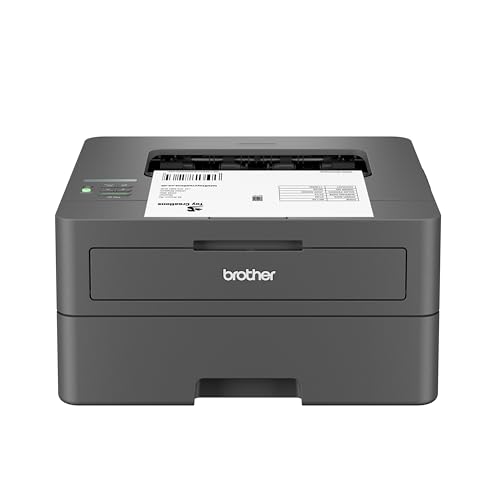
Brother DCP-L2640DW wireless compact monochrome multi-function printer, copy, scan, duplex, mobile printing.
Strengths
- The monochrome laser printing suits documents, with sharp black text.
- The compact size fits a small desk or a crowded home office.
- Duplex printing and mobile printing cover the two features a document printer needs most.
Trade-offs
- It prints in black and white only, so a buyer who needs colour should take another pick.
- There is no automatic document feeder stated in the listing, so a stack of pages must be fed one by one.
- The printer is a laser, so it is better for documents than for photographs.
Who it fits
A buyer who prints documents in black and white, and wants a compact laser printer.
Best for: A home office that prints letters and documents, not photographs.
Not suited for: Buyers who need colour printing, who should take a colour pick.
In daily use
Use the DCP-L2640DW for documents, because its monochrome laser printing gives sharp black text. Print from a phone over the wireless network, and use duplex printing for long documents to save paper.
The Brother DCP-L2640DW is the monochrome pick: the compact laser for documents.
Check price on Amazon: Brother DCP-L2640DW Wireless Compact Monochrome Printer

7. Epson EcoTank ET-2900 Wireless Colour All-in-One Supertank Printer, Black
Key specs
Epson EcoTank ET-2900 wireless colour all-in-one supertank printer, black, cartridge-free print, scan, copy, up to 10 ppm, borderless photo printing, ideal for home and everyday use.
Strengths
- The cartridge-free supertank system is filled with bottles, which suits a buyer who prints a lot.
- Borderless photo printing covers photographs as well as documents.
- The print, scan and copy functions cover all three jobs in one wireless printer.
Trade-offs
- The tank system costs more to buy than a cartridge printer, so the saving comes over time.
- The 10 ppm speed is modest, so a buyer who prints very fast should look elsewhere.
- There is no automatic document feeder stated in the listing, so a stack of pages must be fed one by one.
Who it fits
A buyer who wants a cartridge-free Epson tank printer, for home and photographs.
Best for: A home that prints documents and photographs, and wants to refill rather than replace.
Not suited for: Buyers who print rarely, for whom a cartridge printer is cheaper to buy.
In daily use
Fill the supertank with the bottles provided, and print regularly to keep the nozzles clear. Use borderless printing for photographs, and keep the printer switched on, because a tank printer that is left off for months can clog.
The Epson EcoTank ET-2900 is the supertank pick: the cartridge-free Epson for home and photographs.
Check price on Amazon: Epson EcoTank ET-2900 Wireless Colour All-in-One Supertank Printer, Black

8. Canon PIXMA TR4720 All-in-One Wireless Printer, Black
Key specs
Canon PIXMA TR4720 all-in-one wireless printer, home use with auto document feeder, mobile printing and built-in fax, black.
Strengths
- The auto document feeder scans a stack of pages without feeding them one by one.
- The built-in fax is a feature the other picks here do not offer.
- Mobile printing covers printing from a phone over the wireless network.
Trade-offs
- The fax is a feature most households no longer need, so it is an extra for many buyers.
- The printer is an inkjet, so it needs regular use to keep the nozzles clear.
- The TR4720 is a home printer, so it is not built for heavy office volumes.
Who it fits
A buyer who wants an ADF and a built-in fax, for home use.
Best for: A home that still faxes, and wants to scan a stack of pages at once.
Not suited for: Buyers who do not need a fax, who should take the Brother Work Smart pick.
In daily use
Load the ADF with a stack of pages for scanning or faxing, and use mobile printing from a phone for everyday printing. Keep the printer switched on, because an inkjet that is left off for months can clog, and the fax is there when it is needed.
The Canon PIXMA TR4720 is the fax pick: the all-in-one with an ADF and a fax.
Check price on Amazon: Canon PIXMA TR4720 All-in-One Wireless Printer, Black
Buying guide: best wireless printers scanners
Ink: cartridges or tanks
The ink system decides the running cost, and the picks here cover both. A cartridge printer, like the HP, Brother and Canon PIXMA picks, is cheaper to buy and dearer to run, because the cartridges are replaced when they run out. A tank printer, like the Canon MegaTank G3270 and the Epson EcoTank ET-2900, costs more to buy and is refilled with bottles, which suits a buyer who prints a lot. A buyer who prints rarely should take a cartridge printer, because the saving of a tank printer only comes with volume, while a buyer who prints every day should take a tank printer, because the saving comes quickly.
The automatic document feeder
An automatic document feeder scans or copies a stack of pages without feeding them one by one, and three printers here have one: the HP OfficeJet Pro 8125, the Brother Work Smart 1360 and the Canon PIXMA TR4720. A buyer who scans multi-page documents should choose one of them, because feeding pages one by one is slow and tedious. A buyer who scans a single page at a time does not need an ADF, and the other five picks cover that use well, with a flatbed scanner that suits photographs and single pages.
Duplex: printing both sides
Duplex printing prints on both sides of the paper, which saves paper on long documents, and four printers here offer it: the HP OfficeJet Pro 8125, the Brother Work Smart 1360, the HP Envy 6155 and the Brother DCP-L2640DW. A buyer who prints long documents should choose a duplex printer, because the saving is real over a year of printing. A buyer who prints single pages does not need it, but it costs nothing to have, and it is worth using when the document is long.
Displays: OLED, LCD and small screens
The display is how the printer is used without a computer, and the picks here offer a 1.42-inch OLED display on the Canon TS6520, a 1.8-inch display on the Brother Work Smart 1360, and simpler controls on the rest. A clear display makes copying and scanning simple, because the printer can be used on its own. A buyer who copies and scans often should choose a printer with a display, while a buyer who prints only from a computer can take a simpler model.
Mobile printing and wireless setup
Every printer here prints wirelessly, and most offer mobile printing from a phone, so a document can be sent from any device in the house. The setup is done once, on the wireless network, and then every phone, tablet and laptop can use the printer. A buyer should check that the printer's app works with their phone, because the app is how mobile printing is set up, and a printer that is hard to set up is a printer that is not used. Keep the printer switched on, because a wireless printer that is off cannot be found.
Colour or monochrome
Seven printers here print in colour, and one, the Brother DCP-L2640DW, prints in black and white only. A colour printer suits photographs and colour documents, while a monochrome laser suits letters and documents with sharp black text. A buyer who prints photographs should take a colour inkjet, and a buyer who prints only documents should consider the monochrome laser, because its text is sharper and its toner lasts longer than ink. The choice is about what is printed, not about the printer.
Size and the desk
A printer lives on a desk, so its size matters, and the picks here range from the compact Canon TS6520 and Brother DCP-L2640DW to the larger HP OfficeJet Pro 8125. Measure the desk before ordering, because a printer that does not fit the desk ends up on the floor, where it collects dust. Leave room behind the printer for the paper output, and room above it for the scanner lid, because a scanner lid that cannot open fully is a scanner that cannot be used.
Keeping an inkjet healthy
An inkjet printer needs regular use to keep its nozzles clear, and the picks here are all inkjets except the Brother laser. Print at least once a week, even a test page, and keep the printer switched on, because a printer that is left off for months can clog. Run the printer's own cleaning cycle when the output fades, and do not let the ink run completely dry, because air in the lines is harder to clear than a low cartridge is to replace.
Usage and care
Set the printer up on the wireless network once, following the printer's own setup, and test it from every device that will use it, because a printer that works from one device and not another is a printer that is not set up properly. Load the paper tray with the right size, and keep the paper dry, because damp paper jams. Print a test page after setup, and scan a test page too, because both functions should be checked before the printer is needed.
Clean the scanner glass with a microfibre cloth once a month, because a dirty glass makes streaks on every scan and copy. Keep the printer switched on, because an inkjet that is left off for months can clog, and run the cleaning cycle when the output fades. Store spare ink or toner in a cool, dry place, and do not shake a cartridge, because ink spills are hard to clean.
Use the ADF for a stack of pages, and the flatbed for a single page or a photograph, because each suits a different job. Use duplex printing for long documents, and borderless printing for photographs where the printer offers it. A printer looked after this way, used weekly and kept clean, lasts years longer than one that is left off for months and then expected to work at once.
Common mistakes
The most common mistake is buying a printer without a scanner, when a scanner was wanted. The picks in this guide all print, scan and copy, but not every printer on the market does, and the buyer should check the functions before ordering. A printer that only prints is a printer that cannot scan, and the buyer discovers it only when the first document needs scanning.
The second mistake is ignoring the ink system. A cartridge printer is cheap to buy and dearer to run, while a tank printer is dearer to buy and cheaper to run, and the buyer who prints a lot with a cartridge printer pays more over time than the buyer who took a tank printer. Match the ink system to the volume printed, because the purchase cost is only the start of what a printer costs.
The third mistake is leaving an inkjet switched off for months. The nozzles clog, the cleaning cycle wastes ink, and the printer that was fine in spring is a problem in autumn. Keep the printer switched on, print at least once a week, and run the cleaning cycle when the output fades, because a printer that is used regularly is a printer that works when it is needed.
Wireless printers for a home office
A home office wants an ADF, duplex printing and a display, and the HP OfficeJet Pro 8125 and the Brother Work Smart 1360 cover those between them. Set the printer up on the wireless network once, and let every device in the house use it, because a home office has more than one computer. Keep the paper tray full, and the ink or toner at hand, because a home office printer that runs out in the middle of a document is a frustration that is easily avoided.
Wireless printers for photographs
A home that prints photographs wants a colour inkjet with borderless printing, and the Epson EcoTank ET-2900 is the pick here, because it prints borderless photographs as well as documents. Use proper photo paper, because plain paper gives a poor photograph, and print from a phone over the wireless network, because the photograph is already on the phone. A tank printer suits a household that prints photographs often, because the ink is refilled rather than replaced.
Wireless printers for documents only
A household that prints only documents wants a monochrome laser, and the Brother DCP-L2640DW is the pick here, because its black text is sharp and its toner lasts. Print from any device over the wireless network, use duplex printing for long documents, and keep the printer switched on, because a laser printer that is ready is a laser printer that is used. A monochrome laser is the cheapest way to print documents well, and it is the right choice when colour is never needed.
Wireless printers for a small desk
A small desk wants a compact printer, and the Canon PIXMA TS6520 and the Brother DCP-L2640DW are the picks here, because both are compact enough for a crowded desk. Measure the desk before ordering, and leave room behind the printer for the paper output and room above it for the scanner lid, because a scanner lid that cannot open fully is a scanner that cannot be used. A compact printer on a small desk should be kept switched on and connected to the wireless network, so it is ready whenever a document needs printing, and the paper tray should be kept full, because a small desk has no room for a paper stack beside the printer.
Final recommendation
If one printer has to win this guide, it is the HP OfficeJet Pro 8125, because it is the home-office printer done right: an automatic document feeder, duplex printing, and wireless printing from every device, in a printer that prints, scans and copies. The Canon MegaTank G3270 is the pick for buyers who print a lot and want a tank system, and the Brother DCP-L2640DW is the pick for buyers who print documents in black and white only.
For most buyers, the choice comes down to three questions. How much is printed? A lot points to a tank printer, a little points to a cartridge printer. Is an ADF wanted? If yes, the HP OfficeJet Pro, the Brother Work Smart and the Canon TR4720 are the answers. Is colour wanted? If no, the Brother monochrome laser is the pick. Answer those three, and the right printer in this guide picks itself.
Whatever printer is chosen, set it up on the wireless network once, print at least once a week, and clean the scanner glass monthly. A wireless all-in-one printer bought carefully is a printer that serves a home for years, and the eight printers in this guide are all printers that can do that, in different ink systems and sizes, for different homes.
Frequently asked questions
What is the best wireless printer with a scanner?
The best wireless printer with a scanner in this guide is the HP OfficeJet Pro 8125, because it prints, scans and copies wirelessly, with an automatic document feeder and duplex printing. Every printer in this guide prints, scans and copies, so the choice is about the ADF, the ink system and the size, rather than the functions themselves.
Do wireless printers need a cable?
No, a wireless printer connects to the home network without a cable, and every device on the network can use it. The setup is done once, on the wireless network, and the printer should be kept switched on, because a wireless printer that is off cannot be found by any device.
What is the difference between a cartridge and a tank printer?
A cartridge printer uses replaceable cartridges, while a tank printer is refilled with bottles. A cartridge printer is cheaper to buy and dearer to run, while a tank printer costs more to buy and is cheaper to run over time. The Canon MegaTank G3270 and the Epson EcoTank ET-2900 in this guide are tank printers, and the rest are cartridge printers, except the Brother laser, which uses toner.
Do I need an automatic document feeder?
An automatic document feeder is needed when a stack of pages is scanned or copied at once, because it feeds them without the buyer standing over the printer. The HP OfficeJet Pro 8125, the Brother Work Smart 1360 and the Canon PIXMA TR4720 in this guide have one. A buyer who scans a single page at a time does not need it, and the flatbed scanner on every printer here covers that use.
How do I keep an inkjet printer from clogging?
Keep an inkjet printer switched on, print at least once a week, even a test page, and run the printer's own cleaning cycle when the output fades. Do not let the ink run completely dry, because air in the lines is harder to clear than a low cartridge is to replace. A printer that is used regularly is a printer that works when it is needed.
Can I print from my phone to a wireless printer?
Yes, every printer in this guide offers mobile printing, so a document or a photograph can be sent from a phone over the wireless network. Set the printer up on the network once, check that the printer's app works with the phone, and the phone can print to it from anywhere in the house.
How do I scan a document with a wireless printer?
Place the document face down on the scanner glass, or load a stack in the automatic document feeder where the printer has one, and start the scan from the printer's display or from the app on a phone or computer. The scan is sent over the wireless network to the device, where it can be saved or shared. Clean the scanner glass once a month, because a dirty glass makes streaks on every scan, and a stack of pages should be loaded straight so the feeder does not jam.
More from ilcastellomenu.com
Best printers with ADF scanner: printers with an automatic document feeder
Best affordable printers with scanners: affordable printers with scanners
Best printers and scanners for home: printers and scanners for the home