The best laptops for business use i7 are the machines that keep up when the working day gets busy: a dozen browser tabs, a spreadsheet full of formulas, a video call, and a document all open at once. An Intel Core i7 gives a business laptop the headroom to handle that load without stuttering, and it keeps the machine useful for years rather than months. This guide compares seven i7 business laptops that were verified against their Amazon listings for the exact brand, model and processor — a check that matters, because laptop listings are full of renewed machines and vague processor descriptions. Every pick below is a new, non-renewed listing with its i7 model named, so you can compare them honestly and choose the one that fits how you actually work. A seventh pick joins the list below: the same Lenovo V15 Gen 5 model in a higher specification, with 32GB of memory and a 1TB drive instead of 16GB and 512GB. It is the same laptop with more headroom, and it suits buyers who run many apps at once or keep large files locally. The two V15 configurations sit side by side in the guide so you can compare them directly and decide whether the extra memory and storage are worth it for your work.
In this guide
Quick picks: best laptops for business use i7
| # | Product | Where to buy |
|---|---|---|
| 1 | Lenovo V15 Gen 5 Business Laptop (Intel Core i7-13620H) | Check on Amazon |
| 2 | ASUS ExpertBook B5 Business Laptop (Intel Core i7-1260P) | Check on Amazon |
| 3 | ASUS ExpertBook B9 Business Laptop (Intel Core i7-1255U) | Check on Amazon |
| 4 | Lenovo ThinkPad T14 Business Laptop (Intel Core i7) | Check on Amazon |
| 5 | Lenovo V14 Gen 4 Business Laptop (Intel Core i7-13620H) | Check on Amazon |
| 6 | Lenovo ThinkPad X1 Carbon Gen 11 (Intel Core i7-1365U vPro) | Check on Amazon |
| 7 | Lenovo V15 Gen 5 Business Laptop (Intel Core i7-13620H, 32GB RAM, 1TB SSD) | Check on Amazon |
How the picks were chosen
The picks were chosen from Amazon listings returned by the site's own product search, and every laptop was verified by its full listing title before it was included. That verification step removed eleven listings that turned out to be renewed machines hiding behind truncated titles, including several HP EliteBook and Dell Latitude models that looked new in search results but were refurbished. A laptop only made the list if its listing names a specific Intel Core i7 processor and is a new, non-renewed sale. The seven that remain cover the main business lines — Lenovo ThinkPad and V-series, and ASUS ExpertBook — in 14-inch and 15.6-inch sizes, with processors from the efficient i7-1255U to the powerful i7-13620H. Memory, storage, screen size and business features such as fingerprint readers, privacy shutters and vPro support were compared, and no laptop was included on the strength of its listing claims alone. The seventh pick is the higher-specification version of the Lenovo V15 Gen 5 already in the guide, with 32GB of RAM and a 1TB SSD. It was verified by its full listing title, which names the same i7-13620H processor, and it is a new, non-renewed listing. Including both configurations lets the guide compare them honestly instead of pretending only one exists.
Quick comparison
| Product | Best for |
|---|---|
| Lenovo V15 Gen 5 Business Laptop (Intel Core i7-13620H) | 15.6-inch, i7-13620H, 16GB, 512GB |
| ASUS ExpertBook B5 Business Laptop (Intel Core i7-1260P) | 14-inch, i7-1260P, 16GB, 1TB |
| ASUS ExpertBook B9 Business Laptop (Intel Core i7-1255U) | 14-inch, i7-1255U, 32GB, 2TB |
| Lenovo ThinkPad T14 Business Laptop (Intel Core i7) | 14-inch, Core i7, 16GB, 1TB |
| Lenovo V14 Gen 4 Business Laptop (Intel Core i7-13620H) | 14-inch, i7-13620H, 16GB, 512GB |
| Lenovo ThinkPad X1 Carbon Gen 11 (Intel Core i7-1365U vPro) | 14-inch touch, i7-1365U vPro, 32GB, 1TB |
| Lenovo V15 Gen 5 Business Laptop (Intel Core i7-13620H, 32GB RAM, 1TB SSD) | 15.6-inch, i7-13620H, 32GB, 1TB |

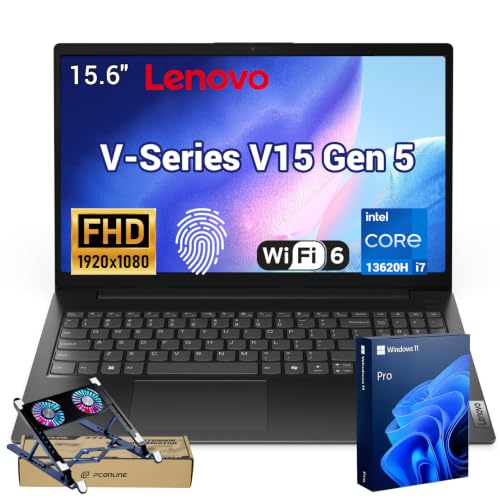
1. Lenovo V15 Gen 5 Business Laptop (Intel Core i7-13620H)
15.6-inch FHD business laptop with an Intel Core i7-13620H processor, 16GB DDR5 RAM and a 512GB SSD; numeric keypad, Ethernet, HDMI, fingerprint reader, Wi-Fi 6 and Windows 11 Pro; sold with a bundle.
Strengths
- The i7-13620H is a strong performer for spreadsheets, video calls and multitasking, with headroom for heavier office work.
- The 15.6-inch screen and full numeric keypad suit number-heavy work without an external keyboard.
- DDR5 memory, a fingerprint reader and Windows 11 Pro cover the practical bases for business use.
Trade-offs
- At 15.6 inches it is a desk-first machine rather than a travel laptop, and it is heavier to carry than the 14-inch picks here.
- The bundle adds items you may not need, so check what is included before deciding it is good value.
- Battery life on a performance H-series chip is shorter than on the U-series models in this guide.
Who it fits
Office workers who want a full-size business laptop with a number pad and a fast i7, and who mostly work at a desk.
Best for: desk-based business work with big spreadsheets and a numeric keypad
Not suited for: anyone who carries a laptop all day and wants the lightest possible bag
In daily use
In daily use the V15 Gen 5 settles into the role of a desktop replacement: open it on the desk, plug in a monitor if you like, and let the i7 handle a dozen browser tabs, a spreadsheet and a video call at the same time. The numeric keypad earns its keep in accounting and data work, and the fingerprint reader means signing in takes a second. Keep the vents clear when it is working hard, and remember that a performance chip like the i7-13620H will use its battery faster than a low-power chip, so keep the charger in the bag.
Before you buy
Before you buy, check the screen size against your bag and your desk — 15.6 inches is comfortable to work on but takes up real space. Confirm the bundle contents on the listing, since the extras vary, and check the port layout: Ethernet and HDMI are present, which matters if your office still uses wired networks or older projectors. Also confirm the RAM and storage match your needs, since 16GB and 512GB suit most business work but heavy multitaskers may want more.
Check price on Amazon: Lenovo V15 Gen 5 Business Laptop (Intel Core i7-13620H)

2. ASUS ExpertBook B5 Business Laptop (Intel Core i7-1260P)
14-inch FHD thin and light business laptop with an Intel Core i7-1260P, 1TB SSD, 16GB DDR5 RAM, all-day battery, enterprise-grade video conferencing, NumberPad and Windows 11 Pro; model B5402CBA-XVE75.
Strengths
- The i7-1260P balances performance and efficiency, so it handles office work without draining the battery quickly.
- A full 1TB of storage leaves room for large files, offline documents and years of accumulated work.
- The thin and light body with enterprise video-conferencing features suits hybrid workers who meet on camera all day.
Trade-offs
- The 14-inch screen is smaller than the 15.6-inch options, so spreadsheet work benefits from an external monitor.
- Thin and light means fewer ports than a full-size business laptop, so check the port list against your accessories.
- The NumberPad is a touchpad overlay rather than a physical keypad, which takes getting used to.
Who it fits
Hybrid workers who carry their laptop between home and office and spend much of the day on video calls.
Best for: hybrid work with video calls, travel, and a light bag
Not suited for: anyone who wants a built-in numeric keypad or a larger screen
In daily use
In daily use the ExpertBook B5 is the laptop you forget you are carrying: it slips into a bag, opens quickly, and gets through a working day on its battery for typical office tasks. The video-conferencing features matter if your calendar is full of calls — a clear camera and microphone make a real difference to how you come across. Keep the software updated, use the fingerprint or Windows Hello sign-in if your model supports it, and carry a small USB-C adapter if your office still uses older peripherals.
Before you buy
Before you buy, check the exact model number on the listing — this is the B5402CBA-XVE75 configuration with the i7-1260P, 1TB SSD and 16GB DDR5. Confirm the battery expectations against your own working day, since heavy video calling uses more power than documents and email. And check the ports: thin laptops often need an adapter for Ethernet or an older monitor connection.
Check price on Amazon: ASUS ExpertBook B5 Business Laptop (Intel Core i7-1260P)

3. ASUS ExpertBook B9 Business Laptop (Intel Core i7-1255U)
14-inch FHD thin and light business laptop with an Intel Core i7-1255U, 2TB SSD, 32GB LPDDR5 RAM, military-grade durability, webcam privacy shield and Windows 11 Pro; model B9450CBA-XVE77.
Strengths
- 32GB of RAM and a 2TB SSD give this laptop far more headroom than a typical business machine, so it stays responsive with many apps open.
- Military-grade durability and a webcam privacy shield are practical features for a laptop that travels and joins video calls.
- The i7-1255U is an efficient chip, so the laptop runs cool and quiet during ordinary office work.
Trade-offs
- The premium specification costs more than the other picks here, which is hard to justify for light office work alone.
- The U-series chip trades peak speed for efficiency, so heavy rendering or compiling is not its strength.
- At 14 inches the screen is compact, and long spreadsheet sessions are easier with an external monitor.
Who it fits
Professionals who want a durable, long-lasting laptop with generous memory and storage, and who travel with it regularly.
Best for: demanding multitasking, travel, and a laptop built to last years
Not suited for: anyone whose heaviest task is email and documents and wants the lowest cost
In daily use
In daily use the ExpertBook B9 feels like a laptop bought for the long term: 32GB of memory means you stop thinking about how many tabs and apps are open, and the 2TB drive means you stop deleting files to make room. The privacy shield is a small thing you will use every day on video calls, and the durable build takes the knocks of travel without complaint. Keep it updated, back it up, and it should serve for years without feeling slow.
Before you buy
Before you buy, check the model number — this is the B9450CBA-XVE77 with the i7-1255U, 32GB RAM and 2TB SSD. Decide honestly whether you need 32GB and 2TB: they are worth it for heavy multitasking and large files, but light office work will not use them. Confirm the warranty terms, since a laptop bought for years of service should have support to match.
Check price on Amazon: ASUS ExpertBook B9 Business Laptop (Intel Core i7-1255U)
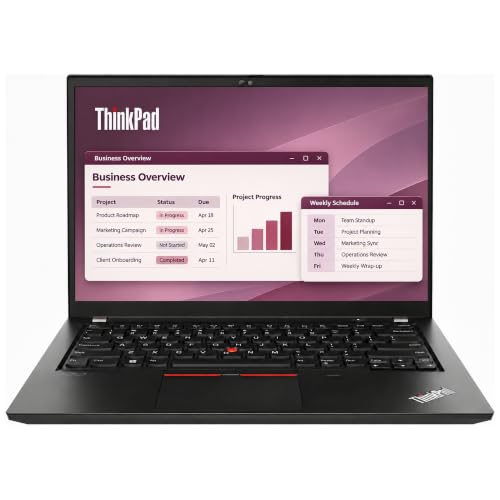
4. Lenovo ThinkPad T14 Business Laptop (Intel Core i7)
14-inch Full HD business laptop with an Intel Core i7 processor, 16GB RAM and 1TB SSD; backlit keyboard, fingerprint reader, Wi-Fi 6, Thunderbolt 4 and Windows 11 Pro.
Strengths
- The ThinkPad T14 is a long-established business line with a keyboard that is widely regarded as one of the best for typing all day.
- 16GB of RAM and a 1TB SSD cover most business workloads comfortably, with room for large files.
- Thunderbolt 4, Wi-Fi 6 and a fingerprint reader cover modern connectivity and quick, secure sign-in.
Trade-offs
- The listing does not specify which generation of i7 is fitted, so buyers who need a particular chip should confirm with the seller.
- The 14-inch screen is compact for split-screen work, and a second monitor helps for long sessions.
- ThinkPads hold their value, but the price reflects the brand and the build rather than raw specification alone.
Who it fits
Anyone who types all day and wants a proven business laptop with a great keyboard and a solid, repairable design.
Best for: all-day typing, office work, and a proven business laptop
Not suited for: anyone who needs a specific i7 generation confirmed in writing before buying
In daily use
In daily use the ThinkPad T14 is a workhorse: the keyboard is the part you notice first, with keys that travel properly and a layout that stays out of your way. The fingerprint reader signs you in before you have finished sitting down, and Thunderbolt 4 means one cable can connect a monitor, a dock and power. Keep the machine updated, use the TrackPoint or the touchpad whichever suits you, and the T14 will quietly get through years of working days.
Before you buy
Before you buy, note that the listing describes the processor as an Intel Core i7 without naming the generation — if your software needs a specific chip, ask the seller to confirm it before ordering. Check the storage and memory against your workload: 16GB and 1TB suit most business use. And confirm the included accessories, since the listing mentions no mouse and the exact contents can vary.
Check price on Amazon: Lenovo ThinkPad T14 Business Laptop (Intel Core i7)

5. Lenovo V14 Gen 4 Business Laptop (Intel Core i7-13620H)
14-inch FHD business laptop with an Intel Core i7-13620H, 16GB RAM and 512GB SSD; RJ45 Ethernet, Wi-Fi, privacy shutter, anti-glare screen and Windows 11 Pro; aimed at business, college and home use.
Strengths
- The i7-13620H gives this 14-inch laptop the performance of a much larger machine, so it handles demanding office work easily.
- An anti-glare screen and a privacy shutter are practical touches for working in bright rooms and on video calls.
- Ethernet, Wi-Fi and a full set of business features make it easy to connect in offices that still use wired networks.
Trade-offs
- The H-series chip uses more power than the U-series models here, so battery life is shorter under load.
- 512GB of storage is enough for most office work but can fill up with large media files over time.
- The V14 line is a value business range, so the build is practical rather than premium.
Who it fits
Anyone who wants strong i7 performance in a portable 14-inch body, including small-business owners and students with demanding workloads.
Best for: strong performance in a portable 14-inch laptop for business or study
Not suited for: anyone who needs the longest possible battery life above all else
In daily use
In daily use the V14 Gen 4 is the laptop that does more than its size suggests: the i7-13620H chews through spreadsheets, video calls and browser tabs without slowing down, and the anti-glare screen keeps text readable near a window. The privacy shutter is a small sliding cover you will use every time a call ends. Keep the charger handy on heavy days, since the performance chip draws more power, and use the Ethernet port when the office Wi-Fi is crowded.
Before you buy
Before you buy, check the processor is the i7-13620H as listed, and compare the 512GB storage with what you keep on the machine — cloud storage or an external drive can cover the rest. Confirm the screen is the anti-glare FHD panel described, and check the port layout against your dock or monitor, since a value business laptop may need an adapter for some connections.
Check price on Amazon: Lenovo V14 Gen 4 Business Laptop (Intel Core i7-13620H)

6. Lenovo ThinkPad X1 Carbon Gen 11 (Intel Core i7-1365U vPro)
14-inch WUXGA touchscreen business laptop with an Intel Core i7-1365U vPro processor, 32GB LPDDR5 RAM, 1TB Gen4 performance SSD, Thunderbolt and Windows 11 Pro; 100 percent sRGB anti-glare display.
Strengths
- The i7-1365U vPro chip brings business-grade manageability and security features that IT departments value.
- 32GB of fast LPDDR5 memory and a 1TB Gen4 SSD make multitasking and large files feel effortless.
- The bright, colour-accurate touchscreen is a genuine asset for presentations, annotation and creative review.
Trade-offs
- The X1 Carbon commands a premium price, and much of its value is in features that a solo user may not need.
- Touchscreens add weight and cost, and they collect fingerprints that a non-touch screen does not.
- vPro features matter most in managed fleets; a home office may not use them at all.
Who it fits
Executives and professionals who present, annotate and travel, and IT-managed teams that need vPro security and manageability.
Best for: executive travel, presentations, and IT-managed business use
Not suited for: anyone who wants the lowest-cost i7 business laptop and never uses a touchscreen
In daily use
In daily use the X1 Carbon Gen 11 feels like a laptop designed to be carried: light, rigid, and quick to wake, with a screen that stays readable in bright rooms and a touchscreen that makes presenting and marking up documents natural. The vPro features sit quietly in the background for managed machines, while the 32GB of memory keeps heavy multitasking smooth. Keep it in a sleeve, use the touchscreen with clean hands, and let Windows Update handle drivers so the Thunderbolt ports keep working as expected.
Before you buy
Before you buy, confirm this is the Gen 11 configuration with the i7-1365U vPro, 32GB RAM and 1TB Gen4 SSD, since X1 Carbon generations and specifications vary widely. Decide whether the touchscreen and vPro features are worth the premium for your work — they are for presenters and managed fleets, less so for a home office. And check the warranty, since a premium laptop should have support that matches its price.
Check price on Amazon: Lenovo ThinkPad X1 Carbon Gen 11 (Intel Core i7-1365U vPro)
7. Lenovo V15 Gen 5 Business Laptop (Intel Core i7-13620H, 32GB RAM, 1TB SSD)
15.6-inch FHD business laptop with an Intel Core i7-13620H processor, 32GB DDR5 RAM and a 1TB SSD; numeric keypad, Ethernet, HDMI, fingerprint reader, Wi-Fi 6 and Windows 11 Pro; sold with a bundle.
Strengths
- 32GB of memory and a 1TB drive give this configuration far more headroom than the 16GB version, so it stays responsive with many apps open.
- The i7-13620H handles demanding office work, large spreadsheets and video calls without slowing down.
- The 15.6-inch screen and numeric keypad suit number-heavy work, and the fingerprint reader signs you in in a second.
Trade-offs
- The higher specification costs more than the 16GB version, which is hard to justify for light office work alone.
- At 15.6 inches it is a desk-first machine, heavier to carry than the 14-inch picks here.
- The H-series chip uses more battery than the U-series models, so heavy days need the charger nearby.
Who it fits
Anyone who wants the Lenovo V15 Gen 5 with maximum headroom — heavy multitaskers and people who keep large files locally.
Best for: heavy multitasking and large files in a full-size business laptop
Not suited for: light office work where 16GB and 512GB would already be enough
In daily use
In daily use the 32GB V15 Gen 5 is the laptop that stops making you wait: dozens of browser tabs, a large spreadsheet, a video call and a document all stay open at once, and the machine does not slow down. The 1TB drive means you stop deleting files to make room, and the numeric keypad keeps number work fast. Keep the vents clear when it is working hard, and remember that a performance chip uses its battery faster than a low-power chip, so keep the charger in the bag on heavy days.
Before you buy
Before you buy, compare this configuration with the 16GB version in this guide: the difference is memory and storage, not the processor or the screen, so choose based on how much you multitask and how much you store locally. Confirm the bundle contents on the listing, since the extras vary, and check the port layout — Ethernet and HDMI are present, which matters if your office uses wired networks or older projectors.
Check price on Amazon: Lenovo V15 Gen 5 Business Laptop (Intel Core i7-13620H, 32GB RAM, 1TB SSD)
Buying guide: best laptops for business use i7
Pick the right i7 for your work
Not every i7 is the same. Chips with a U at the end, like the i7-1255U and i7-1365U, are built for efficiency: they run cool, last longer on battery, and handle office work, video calls and browsing with ease. Chips with an H at the end, like the i7-13620H, are built for performance: they handle heavier multitasking, large spreadsheets and demanding apps, but they use more power and more battery. The i7-1260P sits in between. If your day is documents, email and calls, a U-series chip is the sensible choice. If you regularly push the machine hard, an H-series chip earns its keep.
Memory and storage matter as much as the chip
A fast processor cannot rescue a laptop with too little memory. For business use, 16GB of RAM is the practical minimum today, and 32GB is worth it if you keep many apps and browser tabs open or work with large files. Storage matters too: 512GB is enough for most office work, while 1TB or 2TB suits people who keep large media libraries or years of documents locally. All seven picks here have at least 16GB and 512GB, and two have 32GB and 1TB or more — check your own usage before deciding which end of that range you need.
Check the screen and the keyboard
You will look at the screen and type on the keyboard for thousands of hours, so both deserve attention. A 14-inch screen is portable and fine for most work, while a 15.6-inch screen gives more room for spreadsheets and split-screen working. Anti-glare coatings help in bright rooms, and a touchscreen is useful for presenting but not essential for typing. For keyboards, business lines like ThinkPad and ExpertBook are designed for all-day typing, with proper key travel and a layout that does not cramp your hands. If you can, try the keyboard before you buy — comfort is personal.
Business features worth paying for
A fingerprint reader or Windows Hello camera signs you in quickly and securely, and a webcam privacy shutter is a small feature you will use every day. Thunderbolt ports let one cable connect a monitor, a dock and power. Ethernet matters if your office still uses wired networks. And vPro, found on some Intel business chips, adds manageability and security features that IT departments value — useful in a managed fleet, less important for a solo user. Weigh each feature against your own working pattern rather than paying for all of them at once.
Warranty and support
A business laptop is a working tool, and its warranty matters as much as its specification. Check how long the manufacturer's warranty lasts, what it covers, and how quickly a repair is turned around — a laptop that is away for two weeks is a laptop you cannot work on. Business lines like ThinkPad and ExpertBook usually offer better support options than consumer laptops, including on-site service and accidental-damage cover. If the laptop is for a team, check whether the maker offers a business support channel and whether spare parts are available for your model. And keep the purchase receipt and the serial number somewhere safe: you will need both if you ever claim.
Using and caring for your pick
Set the laptop up properly on the first day: install updates, sign in with a strong password and a fingerprint or face recognition, and turn on automatic backup for your documents. Keep the vents clear — a laptop that cannot breathe will slow down and wear its battery faster. Use a sleeve when you carry it, and avoid leaving it in a hot car. Charge it sensibly: lithium batteries last longest when they are not kept at 100 percent all the time, so use the battery-care setting if your laptop offers one. Back up your work every day, whether to the cloud or an external drive, because a business laptop holds work that is worth far more than the machine itself. For the higher-specification V15, the same care applies: keep the vents clear, use the fingerprint reader for quick sign-in, and back up daily. With 32GB of memory and a 1TB drive, the temptation is to keep everything open and never delete anything — resist it, and archive old files regularly so the drive stays fast. And remember that a larger drive holds more work, which makes the backup habit even more important.
Common mistakes to avoid
The most common mistake is buying on the processor name alone — an i7 in a laptop with 8GB of RAM and a slow drive will feel slower than an i5 with 16GB and a fast SSD. The second is ignoring the renewed trap: many laptop listings that look new are refurbished, so always read the full title and the condition before you buy. The third is choosing a screen that is too small for your work and then spending the laptop's life hunched over it — a 14-inch screen is portable, but long spreadsheet sessions deserve an external monitor. The fourth is skipping the backup: a business laptop without backup is a disaster waiting for a date. And the fifth is buying more laptop than you need — a premium ultrabook is wasted on email alone. Another mistake is buying two configurations of the same laptop without comparing them — the 16GB and 32GB versions of the V15 Gen 5 look identical but behave differently under heavy multitasking, so check the memory and storage on the listing before you order. A related mistake is assuming a warranty covers accidental damage: most standard warranties do not, so check the terms and consider accidental-damage cover if the laptop travels. And do not forget the charger: a business laptop’s charger is specific to its wattage, and a cheaper replacement that cannot deliver enough power will charge slowly or not at all.
Final recommendation
For most business users, the Lenovo V15 Gen 5 is the best all-round value: a strong i7-13620H, a full-size screen with a numeric keypad, and a sensible specification for desk-based work. If you travel, the ASUS ExpertBook B5 is lighter, lasts longer on battery, and still carries a full 1TB of storage. And if you want a machine for years of demanding work, the ThinkPad X1 Carbon Gen 11 with 32GB of memory and a vPro chip is the premium choice. Whichever you choose, verify the exact processor and condition on the listing before you order — the model number is what you are actually buying. The seventh pick does not change the overall advice, but it sharpens it: if you choose the Lenovo V15 Gen 5, the 32GB and 1TB configuration is the better long-term buy for heavy multitaskers, while the 16GB and 512GB version is the better value for ordinary office work. The ASUS ExpertBook B5 remains the best travel choice, and the ThinkPad X1 Carbon Gen 11 remains the premium pick for executives and managed teams. One last point: buy the laptop for the work you will do in two years, not only the work you do today. A laptop with 16GB of memory and a 512GB drive is enough now, but software grows heavier every year, and a machine with headroom stays useful longer. That is why the 32GB V15 Gen 5 and the ThinkPad X1 Carbon Gen 11 are worth considering even if they cost more today — they are the laptops you will still be happy with when your workload grows.
Frequently asked questions
Is an i7 laptop worth it for business use?
For most business work, yes — an i7 gives headroom for multitasking, video calls and large files, and it keeps the laptop useful for longer. If your work is only email and documents, a modern i5 can be enough, but the i7 is the safer long-term choice.
What is the difference between i7 U-series and H-series chips?
U-series chips like the i7-1255U prioritise efficiency and battery life, while H-series chips like the i7-13620H prioritise performance. Choose U-series for portability and battery, H-series for heavy multitasking and demanding apps.
How much RAM and storage should a business laptop have?
16GB of RAM and a 512GB SSD are the practical minimum for business use today. 32GB and 1TB or more are worth it if you multitask heavily or keep large files locally.
Should I avoid renewed business laptops?
Renewed laptops can be good value, but they are not new machines, and their batteries and wear can vary. If you buy renewed, do it deliberately from a seller you trust — not by accident because the listing hid the word renewed in its full title.
Should I buy 16GB or 32GB of RAM in a business laptop?
16GB is enough for most business work — documents, email, video calls and a dozen browser tabs. 32GB is worth it if you keep many apps open at once, work with large spreadsheets or databases, or want the laptop to stay responsive for several years. The two V15 Gen 5 configurations in this guide let you compare both options in the same laptop.
Do business laptops come with Windows 11 Pro?
Most business laptops do, including all seven picks in this guide. Windows 11 Pro adds features that businesses use, such as BitLocker encryption, remote desktop hosting and group-policy management. If you buy a laptop with Windows 11 Home by mistake, upgrading to Pro costs extra, so check the listing before you order.
Can I upgrade the RAM or storage later?
It depends on the model. Many business laptops let you upgrade the storage, but the memory is often soldered to the board and cannot be changed. Check the specifications for your model before you buy — if the memory cannot be upgraded, choose the amount you will need in two years, not the amount you need today.
What screen size is best for business use?
A 14-inch screen is the best balance of portability and usability for most business users, and it fits in any bag. A 15.6-inch screen gives more room for spreadsheets and split-screen work, but it is heavier to carry. If you work at a desk most of the time, consider a 14-inch laptop plus an external monitor for the best of both.