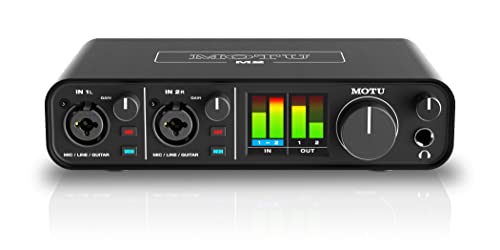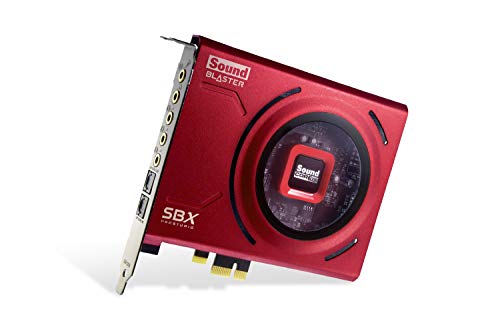
Internal vs external sound card is the first fork in every sound-card purchase: a PCIe card that lives inside your desktop, or a USB unit that lives on your desk. Both convert digital audio and drive your headphones or speakers; they differ in installation, portability, noise environment, controls, and which machines they can serve at all. Neither is the ‘serious’ option and the other the toy — each is the right answer for a different desk.
Short verdict: internal for a fixed desktop where you want maximum specification per tier and an invisible installation; external for laptops, consoles, shared setups, and anyone who wants a volume knob and a device that survives PC upgrades. The criteria below make the trade-offs concrete, and How to Choose a Sound Card places this choice inside the full buying decision.
Disclosure: As an Amazon Associate, ilcastellomenu.com earns from qualifying purchases. Product details and availability can change; check the retailer listing before you buy.
Quick verdict: internal vs external sound card
Internal cards win on tidiness, raw specification at a given tier, and set-and-forget permanence. External units win on compatibility (anything with USB), portability, physical controls, and isolation from the electrically noisy interior of a gaming PC. If your life includes a laptop or a console, the verdict is already written; the interesting debate is only for the pure desktop user, and it is closer than partisans of either side admit.
Sound quality itself does not decide this comparison: excellent and mediocre products exist in both forms. What decides it is your machines, your desk, and your habits — which is why the criteria are practical rather than sonic.
In this guide
Installation and compatibility
Internal means opening the PC: power off, unplug, seat the card in a PCIe slot, fit drivers — the fifteen-minute process in How to Install a Sound Card. It also means having a desktop with a free slot, clearance from the graphics card, and a case you are willing to open. Prebuilt PCs with cramped layouts and all laptops need not apply.
External means a USB cable and two minutes, on desktops, laptops, and — for models that support it — consoles. That universality is the external form’s superpower: the same unit serves the gaming PC tonight, the work laptop tomorrow, and the console at the weekend, carrying its settings and sound signature with it. Categories like Best USB Sound Cards for Gaming and Best External Sound Cards for Recording exist because that flexibility is a feature users actively shop for.
Compatibility has a second layer: drivers and software. Both forms need manufacturer support for your operating system, but external units are more often class-compliant or app-supported across platforms, while internal cards are historically Windows-PC creatures. Check your exact OS either way before buying.
Noise and the electrical environment
A gaming PC’s interior is an electrically busy neighbourhood — graphics cards and power circuitry radiate interference that audio circuits must be shielded against. Good internal cards shield well and measure superbly, but the risk is structural: interference that tracks GPU load is a known internal-card complaint, and its severity depends on your specific build, slot position, and luck.
External units sidestep the neighbourhood entirely by living outside the case, which is why the silence test in How to Test a Sound Card so often flatters them in high-power gaming rigs. Their own risk is the USB connection itself — poor cables, hubs, and noisy ports can introduce their own gremlins — but a direct port and the supplied cable reduce that to a rarity.
Honest summary: a well-shielded internal card in a well-behaved PC and a decent external unit on a direct port both deliver clean audio. The external form simply has fewer variables between you and that result, which matters if your PC is a worst-case environment — small case, huge GPU, card forced into the adjacent slot.
Power, amplification, and features
Internal cards draw from the PC’s power supply and historically offer the strongest headphone amplification and the richest surround outputs at a given tier — discrete multi-channel analogue outputs for real speaker systems are largely an internal-card feature, which is why home-theatre PC builders and users of Best Sound Cards for Home Studio setups still default to them.
External units have closed the amplification gap at the enthusiast end — desktop DAC-amps are externals by definition and drive almost anything — while basic USB dongles remain modest. The external form’s feature signature is different: physical volume knobs, mute buttons, game/chat mix controls, and displays, all within arm’s reach instead of inside a software panel.
Feature shopping should therefore start from your transducer and your habits: demanding headphones plus real surround speakers lean internal (or serious desktop external); headset gaming plus streaming controls lean external. The DAC comparison in sound-card-vs-dac further splits the external camp for music-first buyers.
Desk reality: space, cables, and controls
Internal cards are invisible: no desk footprint, no extra cable, nothing to knock off. For minimal desks and shared spaces, invisibility is a genuine feature, and settings live in software you open rarely once configured via how-to-set-up-a-sound-card.
External units occupy desk and add a cable, but repay it with the control you touch most: volume. A knob under your hand changes behaviour — people ride volume constantly when it is effortless — and hardware mute buttons end the ‘which app has my mic’ scramble before calls. Streamers and call-heavy users consistently rate this the deciding factor, above specifications.
Aesthetics cut both ways: some desks welcome a handsome audio unit as furniture; others count every object as clutter. Photograph your desk, imagine the unit on it for a year, and trust that reaction more than any review.
Upgrades, longevity, and value
An internal card’s life is tied to the PC ecosystem: it moves between desktops if slots and drivers cooperate, but a shift to laptops or a small-form-factor build can strand it. An external unit is platform-agnostic and typically outlives two or three computers, which reframes its price across a much longer service life.
Resale and hand-me-down value follow the same logic: externals have a universal second-hand market, internals a narrower desktop-only one. Neither form depreciates to zero quickly if bought well, but the external’s audience is everyone with a USB port.
Value verdict: at equal sound quality, the external usually costs a little more and serves a lot longer across machines; the internal usually specifies a little higher and integrates a lot cleaner. Both statements can be true because they are pricing different virtues.
Who should choose which
Choose internal if you have one desktop, a free slot, real surround speakers or demanding headphones to feed, and a preference for invisible hardware. Choose external if you use a laptop or console, share audio gear across machines, stream or call often enough to want physical controls, or simply refuse to open your PC. Choose external also as the tiebreak when your gaming rig is electrically noisy and you do not want to gamble on shielding.
Whichever form lands on or in your machine, verify it with @@how-to-test-a-sound-card@@ and configure it properly — form factor decides where your sound lives, but setup decides how good it is.
The console and living-room dimension
Consoles settle part of this debate by architecture: they accept external audio over USB or optical and offer no internal path at all, so a player whose life spans PC and console and wants one audio standard across both is an external buyer by definition. The unit becomes the constant — same headphones, same signature, same controls — while platforms rotate beneath it, which is a genuinely different ownership experience from PC-bound audio.
Living-room PCs blur the line from the other direction: a media PC feeding an AV receiver over optical or HDMI may need no sound card of either form, because the receiver owns conversion and amplification. Buyers in that room should price the receiver path before either card form — sometimes the correct sound card is the one already sitting under the television.
The pattern across both cases is the same lesson this comparison keeps teaching: the right form is the one your machines and rooms describe, and describing them honestly — before shopping — is most of the decision.
Two-device households and hand-me-downs
External units circulate: the gaming PC’s DAC-amp retires to the laptop desk, then to a child’s first setup, serving competently at every stop because its interface never changes. Internal cards circulate only within the desktop population of the household, and often strand when a build goes small-form-factor or a laptop replaces a tower. In multi-machine homes, that circulation is a real economic property, not a footnote.
It also changes gift and upgrade logic. An external unit is the rare tech gift that fits any recipient with a USB port and improves most of them; an internal card is a gift only a desktop owner’s exact slot configuration can accept. Households that standardise on external audio accumulate a flexible pool — the same argument, in audio form, as the shared-switches logic for hot-swappable keyboards.
None of this dethrones the internal card in its home: the dedicated, single, high-spec desktop. It merely insists that households, unlike single desks, should count circulation among the criteria — because in a household, gear rarely dies; it migrates.
Heat, slots, and the crowded modern PC
Modern desktops pack their interiors as never before: multi-slot graphics cards, tower coolers, and cable forests compete for the same space a sound card wants, and some builds physically cannot host an internal card in a healthy position. Audit your case honestly — slot free, clearance real, airflow plausible — before treating internal as an option, because a card wedged against a GPU shroud is an external purchase waiting to happen, at return-postage prices.
External units have their own crowding: the desk. A unit needs a stable home within cable reach of both PC and headphones, safe from the coffee orbit and the cat’s patrol. Neither form is spaceless; they merely bill different real estate, and the honest buyer prices both rents before signing.
The verdict for upgraders and first-time buyers
First-time buyers with one desktop and no complications can choose either form on features and sleep well; the comparison’s traps are all in the special cases. Serial upgraders — of PCs, of headphones, of rooms — should weight the external’s portability as a compounding asset, because every future change is cheaper when the audio device does not care about it.
Whichever you choose, choose it as a platform decision for the next several years rather than a component decision for this quarter. Audio gear outlives the components around it when it is chosen that way, and the sound card — internal or glowing on the desk — becomes the stable centre your other upgrades orbit.
Scenario head-to-head: the small-form-factor and laptop life
Some desks settle this comparison before it starts. A laptop has no internal option at all; a small-form-factor PC may have a slot in theory and no thermal or physical room in practice; a mini PC on a monitor’s back has an opinion about cables that amounts to a veto. For all of these, external is not the winner of a comparison but the only contestant, and the buyer’s real work shifts to choosing well within the external field — size, controls, connection — rather than relitigating a form factor the machine has already decided. There is a freedom in that: half the catalogue falls away, and the remaining half can be compared on quality alone.
The reverse scenario exists too and deserves its sentence: a full tower with slots to spare, a user who never touches connections, and a desk with no surface to give. There, internal’s invisibility is a genuine feature and external’s virtues — the knob, the reach — are virtues nobody will use. Form-factor comparisons fail when they argue in the abstract; they succeed when the machine and the desk are allowed to vote first, which is why this guide keeps returning the decision to the specific build in front of you.
Scenario head-to-head: the recording and streaming desk
A desk where audio is produced, not just consumed, weights the comparison toward external for reasons beyond noise. Inputs live on external units where hands and cables can reach them; microphone and instrument connections are swapped between sessions, sometimes between songs, and a connection at the back of a tower loses that argument every day of the week. Monitoring controls, gain knobs, and headphone jacks sit in the working area where the session happens. The internal card’s counter-virtue — nothing on the desk, nothing to knock — matters in proportion to how finished and static the setup is, and production setups are neither.
The exception inside the exception: a streaming desk whose production is entirely in software, with a USB microphone carrying its own input story, may need the card only for listening — and for listening alone, an internal card’s invisibility competes honestly again. The scenario’s lesson is to count the connections you actually make and break weekly. That number, more than any specification, is the recording desk’s verdict on this comparison, and it is a number you can produce from last week’s memory in thirty seconds.
The interference question, examined street by street
External’s headline advantage — distance from the computer’s electrical noise — deserves a more precise map than it usually gets. The noise has sources with addresses: the graphics card under load, the power supply, the motherboard’s own audio traces picking up the board’s traffic. An internal card lives in that neighbourhood and defends itself with shielding, layout, and filtering, and good ones defend very well. An external unit moves the conversion outside the neighbourhood entirely, which is a stronger defence in principle — but it receives its power and data through a cable from the same neighbourhood, and a ground loop between the computer and other connected equipment can deliver noise to the external unit’s doorstep by wire. Distance helps; it does not exempt.
The practical consequence is that the internal-versus-external noise gap is largest for owners whose current noise is the internal-environment kind — the buzz that tracks the graphics load — and smallest, sometimes zero, for owners whose noise is a loop between devices, which both forms will inherit until the loop is addressed. Diagnose your noise’s address before letting this criterion decide, using the isolation method in the testing guidance: the comparison can only spend its advantage on the noise you actually have.
And keep the perspective the measurements enforce: in a well-built modern machine, a good internal card’s noise performance can be entirely sufficient for any listening a human does, and the external advantage, while real on a bench, may be inaudible at the desk. Buy the form for your diagnosed problem and your desk’s reality, not for a noise floor your ears will never visit.
Upgrade paths and the life of each form across machines
Follow each form across a decade of computing and their characters diverge. The internal card is loyal to one machine: it will serve that build superbly and then face the upgrade question — does the new build have the slot, the room, the lane budget — as a negotiation it sometimes loses. The external card is a citizen of every machine you own: it moves to the new build without a negotiation, serves the laptop in the interim, visits a second household machine on weekends, and accumulates a familiarity that makes it, effectively, your personal audio standard across all your computing. For households standardising on laptops and small machines, that portability is not a feature among others; it is the whole future of the category, and the market’s centre of gravity has been moving external-ward for exactly that reason.
Resale tells the same story in miniature. An external unit sells to anyone with a port; an internal card sells to the shrinking set of buyers with the right slot and the willingness to open a case. Neither fact should bully a buyer whose current machine and habits genuinely suit internal — a decade is a long time and the present build deserves its say — but a buyer on the fence, with a machine change visible in their next few years, should let the trajectory vote. Buy the form your next machine can also host, and the card becomes infrastructure rather than an accessory of one build.
Controls and the daily ergonomics of reach
The most-used control in any audio setup is the volume, and the two forms place it in different worlds. The external unit offers a physical knob under your hand: instant, eyes-free, independent of whatever is on screen, and shared naturally with anyone else at the desk. The internal card offers software — a panel, a system slider, a keyboard shortcut — which is precise and automatable but lives behind windows, updates, and the occasional application that has seized the audio for itself. Neither is superior in the abstract; they suit different relationships with the desk. Users who adjust constantly, take calls, and share the machine tend to fall in love with the knob within a week. Users whose volume lives at one setting for months will never miss it.
Inputs follow the same geography. Swapping headphones, plugging in a microphone, connecting an instrument — on an external unit these are desk-level acts performed without thought; on an internal card they are expeditions behind the tower, performed with a phone torch and feelings. Count your weekly expeditions honestly. The count is small for most people and decisive for some, and it correlates almost perfectly with satisfaction in this comparison a year after purchase — a better predictor, in owner reports, than any measured specification either form advertises.
Heat, dust, and the physical environment inside and outside the case
An internal card lives in the case’s climate: warm, dusty over time, and subject to the graphics card’s weather. Modern components tolerate this well, and failures from environment alone are rare — but the card has no say in its climate, and a neglected case with clogged filters runs hotter every year of its life. An external unit lives in the room’s climate instead: cooler, cleaner, and vulnerable to a different set of accidents — spills, falls, being swept off a desk by a headphone cable, the slow abrasion of being a desk object among desk objects. Neither environment is safe; they are differently risky, and the risks map onto households. A tidy desk in a calm room favours external’s longevity. A chaotic desk, children, and pets argue for the card that lives behind steel.
Dust deserves its specific note because it is the one environmental factor owners control completely in both worlds: a case cleaned on a rhythm keeps its internal card in a benign climate indefinitely, and an external unit wiped down and kept clear of vents does the same on the desk. The form factor decides which cleaning ritual you are signing up for, not whether there is one.
The verdict, restated as a set of desk descriptions
Choose internal if your machine is a tower with room and slots, your connections are set-and-forget, your desk surface is precious or chaotic, and your listening is the card’s whole job. Choose external if your machines are laptops or small builds or several in number, your connections change with your sessions, your noise is the internal-environment kind, or your hand wants a knob it can reach without looking. If both descriptions fit parts of your life — the common case — let the machine you will own longest vote, and let the desk you sit at most break the tie.
And if the comparison has stayed tied through every section, consider that the tie itself is information: your use is genuinely form-neutral, and the decision should fall to the specific products — the better card, at its price, with the healthier driver support — rather than to the category. Buyers in that position can shop the shortlists for their use, such as external cards shortlisted for recording on one side and the internal gaming roundups on the other, and let a concrete product, rather than an abstract form, finally persuade them. That is not an evasion of the comparison. It is the comparison completing itself honestly.
Questions worth asking of any specific model, in either form
- Where does this unit’s volume control live, and can I reach it the way I actually work — by hand, by shortcut, by software only?
- What happens to my front-panel jacks, my other audio devices, and my defaults when this card joins the machine?
- How recent is the newest driver, and does the maker’s support story suggest another will come?
- If internal: does my slot choice clear the graphics card, and does the card need supplementary power? If external: is the cable long enough for the placement I actually want?
- What does the unit do at sleep, at wake, and when the machine restarts — and do owner reports agree with the manual?
Five questions, and between them they cover nearly every regret recorded against both forms. Ask them of the specific models on your shortlist, keep the answers with your installation record, and the form-factor debate — which this guide has argued from scenarios, noise maps, upgrade paths, ergonomics, and climate — resolves into what it should have been from the start: a description of your own desk, read carefully.
Power and grounding, continued: why some external setups hum and some internal ones do not
The ground loop deserves its own field notes because it is the noise most likely to ambush an external buyer who purchased specifically to escape noise. A loop forms when connected devices find two paths to ground — through their power supplies and through the audio cable joining them — and the small difference between those grounds becomes a hum or buzz in the signal. It is a system property, not a device defect, which is why it can appear the day a new device joins a previously silent setup and vanish when one cable is rerouted. The cures are system cures: powering the connected devices from the same outlet strip so their grounds agree, choosing a digital connection that carries no ground between devices where the option exists, and, as a last resort, purpose-built isolation in the audio path.
Internal cards meet grounding differently: they share the machine’s ground by design, which makes them immune to inter-device loops with the PC itself but leaves them neighbours to everything the PC’s ground carries. Neither form is the ‘quiet one’ in all systems. Each is quiet in the systems whose noise geography suits it — which is, for the last time in this guide, an argument for diagnosing your own system’s geography before the form factor is allowed to promise you silence.
The second computer test: what happens when the card changes machines
Borrow the cross-testing discipline from troubleshooting and apply it to this purchase: if you can, hear your shortlisted form on a second machine before committing. External units make this trivially easy — that ease is itself one of their virtues, since a device you can audition everywhere is a device you can also lend, test, and resell without ceremony. What the second machine teaches is portability of behaviour: whether the unit’s drivers install cleanly elsewhere, whether its settings travel, whether its virtues were its own or were lent by the first machine’s chain. Internal cards cannot take this test, which does not damn them; it simply means their audition is necessarily an installation, with a return policy standing in for the test bench.
Households with two machines get a second dividend from the test: the discovery of which machine actually needs the card. It is not always the main one. The older machine, the noisier machine, the machine whose owner is recorded — the card’s highest use is sometimes a room away from where instinct first placed it, and only the portability of the external form lets the discovery be made by experiment rather than by argument.
Aesthetics and the desk as it is actually lived on
Aesthetics are usually exiled from serious comparisons, which is a mistake in a category where one of the two forms lives visibly on the desk for years. An external unit is furniture: its size, its finish, its cable’s exit direction, and its indicator lights all join the room. Some owners prize a well-made unit’s presence — the knob is a pleasure to touch and to see — and some experience any additional object as clutter with a power supply. Neither response is superficial. The desk is a working environment whose feel affects the work, and a device resented daily for its presence will be resented at a volume its specifications cannot shout down.
Internal’s aesthetic is absence, and absence has its own devotees: the clean desk, the invisible upgrade, the machine that simply sounds better one day with nothing new to dust. If your instinct runs that way, trust it as data rather than apologising for it in a comparison about circuits. Form factors are lived with, not just listened through, and the lived-with part of this decision is entitled to its vote.
Failure modes and what repair looks like for each form
When each form fails, it fails in character. The internal card’s failures are the PC’s failures — a device that vanishes after an update, a slot that misbehaves, a driver conflict — and its repair is a PC repair: case open, reseat, reinstall, the troubleshooting sequence this site documents. The external unit’s failures are a peripheral’s failures — a cable, a port, a power supply, a knob’s encoder wearing — and its repair begins with substitutions any household can perform in minutes. Owners with a low tolerance for opening cases should weight that difference heavily; owners who build PCs for pleasure may find the internal card’s failure modes are simply their hobby continuing by other means.
Warranty service follows the same split: the external unit travels alone to its maker, light and complete, while the internal card’s absence leaves a hole in a machine that may be needed daily. Neither consideration decides a purchase in health, but purchases are made for whole lifespans, including the bad weeks, and a form whose bad weeks you can manage is worth points that no benchmark records.
The hybrid answer: both forms in one life, assigned by job
Some setups honestly resolve this comparison by division of labour, and the pattern is common enough among experienced owners to deserve a name. The internal card serves the machine’s fixed life — the tower’s speakers, the always-connected headset — with zero desk footprint. An external unit serves the mobile and production life — recording sessions, the laptop, the good headphones’ evening listening — moving where it is needed. The division works when the jobs genuinely separate and fails when it merely duplicates, so audit before adopting it: two devices serving one job is clutter, while two devices serving two jobs is a system.
The hybrid also has a purchase order: buy the form your primary job demands first, live with it, and let the second form be earned by a named, recurring inconvenience rather than by the comparison’s abstract completeness. Owners who arrive at the hybrid by that road describe it as inevitable. Owners who buy both on day one describe it, more often, as a drawer.
A closing field guide: five desks and their forms
- The single tower, set-and-forget: internal, invisible, and done — the form disappears into the machine it serves.
- The laptop professional: external by necessity, chosen for its knob, its inputs, and its manners across docks and desks.
- The producer’s bench: external, where the connections live within reach and the sessions dictate the geography.
- The shared family machine: internal for survival, or external for the honesty of a knob everyone can find — decided by the household’s chaos level, which only its members can grade.
- The two-machine household: external, as the household’s shared audio standard, unless the machines’ jobs separate cleanly enough to earn the hybrid.
Five desks, and behind each the same reasoning this guide has used throughout: machines, connections, noise geography, reach, and time. Describe your desk in those five terms and the form is no longer a preference to defend but a conclusion to read off — which is the most any comparison can honestly offer, and all this one ever promised.
Travel and the borrowed desk: the external unit’s second life
An external card has a use its internal sibling can never match: it can leave. The same unit that serves the home tower can serve a laptop in a hotel, a borrowed machine at a relative’s house, a workbench PC during a project — carrying your headphones’ amplification, your microphone’s input quality, and your familiar settings into rooms whose own audio you would never trust. For people whose computing genuinely moves, this portability compounds: the card stops being a component of one machine and becomes a personal standard, the way a good pair of headphones already is. Judge that value by your calendar rather than your desk — count the nights your computing sleeps away from home in a year, and let the count argue.
The internal card’s answer is that most computing does not move, and a component optimised for the desk it never leaves is optimised correctly. Both are right, about different lives. The comparison’s last lesson is its first one, returned with evidence: describe the life first, and the form describes itself.
What the second-hand market reveals about both forms
Used listings are an underused source of evidence in this comparison, because they record what owners actually kept, broke, and valued. External units list with their cables and knobs intact or honestly worn, their faults visible in photographs, their prices holding a pattern that says listeners keep them across machines. Internal cards list with their brackets and driver discs, their prices reflecting the narrower pool of buyers who can host them. Reading a month of listings for each form teaches more about real ownership — which models age gracefully, which makers’ units still work a decade on — than a week of launch reviews, because time is the one reviewer who cannot be sponsored.
If you buy used, buy the form whose inspection you can perform: an external unit can be tested on the spot with your own headphones and phone, while an internal card’s test requires a machine, an open case, and trust. That asymmetry is worth money in the negotiation, and it belongs in the comparison’s ledger alongside the specifications — one more place where the forms differ not in quality but in the kind of ownership they make easy.
The final tiebreakers, for the genuinely undecided
If the scenarios, noise maps, upgrade paths, ergonomics, and climates have left you exactly tied, use the tiebreakers in this order. First, the next machine: buy the form it can host. Second, the hands: buy the form whose controls your daily habits will actually touch with pleasure. Third, the specific products: buy the better card, whichever form it is, from the maker with the healthier drivers. Fourth, the return window: buy from the seller who lets you hear the decision in your own room, because a tied comparison is precisely the kind that only your own desk can settle. A tie broken by any of these is not a coin flip; it is the comparison correctly identifying that your remaining differences live in logistics and products rather than in principle — and logistics and products are exactly where purchases should be decided once principle has had its say.
One final scenario: the desk you have not built yet
End the comparison by aiming it at the future, because sound cards outlive desks. Picture your setup three years out, honestly: the machine you expect to own, the room you expect to sit in, the work and play you expect to fill them with. If that picture is a settled tower in a settled room, internal’s invisibility will still be serving you then, and its case is complete. If the picture moves — laptops, smaller machines, other rooms, a production habit still growing — the external unit is the one already packed for the journey. Buyers consistently underweight this exercise because the present desk is vivid and the future one is not, but the card will live in both, and it is the only purchase in the build whose form factor cannot be changed later by swapping a cable. Spend two minutes on the picture. It is the cheapest foresight in the entire comparison, and it has settled more real purchases than any specification either form has ever printed.
Keep the five answers from this guide’s final checklist with your machine’s papers, whichever form you chose. They are the record of a decision made from your desk’s facts rather than from a category’s reputation, and when the next machine arrives and the comparison reopens — as it always does — those answers are the baseline the new decision starts from, instead of from memory, habit, or whoever is arguing loudest that week.
Decisions recorded that way compound in value across every build that follows.
Gear mentioned in this guide
The products below are examples referenced in this guide. They were verified through the Amazon Creators API product pool for this site; use them as concrete reference points for the features discussed, not as a ranked list.
- Creative Sound Blaster Z SE Internal PCI-e Gaming Sound Card and DAC, 24-bit / 192 kHz, 116 dB SNR, ASIO, 600Ω Headphones Amp, Mic EQ, Discrete 5.1 / Virtual 7.1, Supports Dolby Digital Live, DTS … — Check on Amazon
- Sound BlasterX G6 Hi-Res 130dB 32bit/384kHz Gaming DAC, External USB Sound Card with Xamp Headphone Amp, Dolby Digital, 7.1 Virtual Surround Sound, Sidetone/Speaker Control for PS4, Xbox One — Check on Amazon
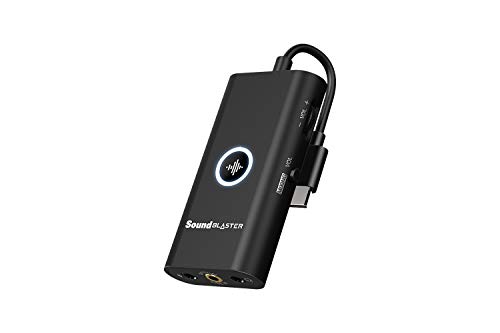
- Creative Sound Blaster G3 USB-C External Gaming USB DAC and Amp for PS4, Nintendo Switch, Ft. GameVoice Mix (Audio Balance for Game/Chat), Mic/Vol Control and Mobile App Control, Plug-and-Play — Check on Amazon

Frequently asked questions
Does an external sound card sound worse than internal?
Not inherently. Both forms contain excellent and mediocre products. External units avoid case interference and offer physical controls; internal cards offer strong amplification and surround outputs. Judge specific models, not the form.
Can I use an internal card with a laptop?
No — laptops have no PCIe expansion slots for sound cards. Laptop users should choose an external USB sound card or DAC-amp, which also carries over to consoles and future machines.
Which is better for gaming?
Both serve gaming well. External units are popular with gamers for console compatibility and desk controls like game/chat mix; internal cards suit desktop-only players wanting maximum specification and a tidy build. Your machines decide more than your games do.
Do external sound cards work on consoles?
Many do, within each model’s stated support — connection methods vary (USB, optical, 3.5 mm) by console and model. Check the specific unit’s console compatibility before buying for that purpose.
Will an external unit reduce GPU whine in my headphones?
Often, yes — moving conversion outside the case removes the audio path from the interference source. It is one of the most reliable fixes for noise that tracks gaming load, provided the unit itself is decent and directly connected.
Which lasts longer?
In service terms, external units typically outlast more computers because they are platform-agnostic. Internal cards last as long as your desktop upgrade path keeps a suitable slot and driver support.
Related Guides
Keep exploring with these guides and roundups from the same desk and audio cluster: