Knowing how to test a sound card turns ‘it sounds better, I think’ into evidence: a structured twenty minutes of channel checks, noise tests, known recordings, and a microphone trial will tell you whether a new card works correctly, whether it beats your onboard audio, and whether a fault is real or imagined. Run it after every installation, after driver changes, and whenever sound starts behaving strangely.
You need only the card, your usual headphones or speakers, a handful of recordings you know intimately, and your voice. The method below assumes the card is installed and configured — How to Install a Sound Card and How to Set Up a Sound Card cover those stages — and it ends with a comparison protocol that keeps your ears honest, because ears are enthusiastic liars when money has been spent.
Disclosure: As an Amazon Associate, ilcastellomenu.com earns from qualifying purchases. Product details and availability can change; check the retailer listing before you buy.
What you need and how to prepare
Gather three or four reference tracks across types: a well-recorded vocal piece, something with deep bass and something with delicate high detail, plus a game or film scene with clear positional audio. Familiarity is the whole qualification — you are listening for differences and defects, and only music you know by heart reveals either. Add a channel-identification test (your card’s software or the OS usually includes one) and a voice recorder app.
Set a reference volume and note it. Loudness masquerades as quality in every audio comparison ever performed, so all A/B judgements in this routine happen at matched, comfortable levels. If your card and onboard audio will be compared, route both to the same headphones and switch devices in settings rather than swapping plugs mid-test.
Close other audio apps before starting. Multiple programs holding devices, applying their own enhancements, or sitting on different sample rates muddy every result that follows.
In this guide
Test 1: channels, balance, and the basics
Run the channel test and confirm each named channel sounds from the correct physical speaker — or, on headphones, that left and right are not swapped. Then play a mono recording and confirm it images dead centre; a wandering centre means imbalance, a wiring slip, or one driver of a headphone underperforming, any of which invalidates every later test until fixed.
Sweep the volume control through its range listening for crackle, channel dropouts at low volume, or one side fading before the other. On cards with switchable gain, repeat at your other gain setting with appropriate headphones. These are thirty-second checks that catch a depressing share of real-world faults while returns are still painless.
Test every output you will use — headphone jack, line out, optical if fitted — and every input, even the ones you rarely touch. A port you discover dead in month seven was probably dead in week one, when it was the retailer’s problem.
Test 2: noise — the silence between the notes
The defining test for most upgrades: with nothing playing, raise the volume to your normal listening level and a little beyond, and listen. Hiss, buzz, or whine that tracks mouse movement or gaming load is electrical interference — precisely what a good dedicated card should banish compared with noisy onboard implementations, and the core comparison in Sound Card vs Onboard Audio.
Repeat with a silent passage in a real recording, since some noise hides until a signal path is active. Note whether noise changes with gain setting, USB port (for external units), or graphics load; those correlations are diagnostic gold if you later need the troubleshooting path in How to Fix Sound Card Not Detected or a support conversation.
Judge noise at your listening level, not at maximum volume with your ear against the driver — every device on earth hisses there, and it tells you nothing about your life with the card. The question is always: at the volume I actually use, is the background clean?
Test 3: known recordings and honest comparison
Play your reference tracks and listen for the things recordings reveal: vocal clarity and sibilance control, bass definition rather than mere quantity, separation between instruments in busy passages, and the decay of notes into silence. Then — the crucial step — switch back to onboard audio at matched volume and play the same thirty seconds. Differences that survive level-matching are real; differences that vanish were loudness wearing a costume.
Do not rush this. Live with the card for a few days of normal use before final judgement if a return window allows, because novelty flatters everything and fatigue reveals truth. Keep notes in plain words — ‘cymbals cleaner, bass tighter, same hiss at low volume’ — rather than scores; plain words remain meaningful in a month, scores do not.
If the card and onboard sound genuinely identical on your headphones at your volumes, believe your ears. The honest outcome may be that your onboard was fine and your headphones are the ceiling — the conclusion Do You Need a Sound Card for Gaming prepares gamers for — and a return inside the window is a successful test, not a failed purchase.
Test 4: games, positional audio, and the microphone
Load a game with strong audio design and test positioning: close your eyes and localise sounds, check that rear cues read as rear (with virtual surround engaged if that is your setup), and confirm dialogue stays centred and intelligible under action. If you use surround speakers, verify the game’s layout setting matches your physical layout as configured in setup — mismatches here are configuration, not card quality.
Record your voice through the card’s microphone input: a paragraph read at normal level, a loud laugh, a quiet aside. Play it back on headphones. You are listening for clarity without clipping on the loud parts, acceptable noise on the quiet parts, and no electrical whine underneath. Then make the same recording through your old input at matched levels; microphone improvement is often the most dramatic and least advertised benefit of a dedicated card, as the recording-focused lists in Best Sound Cards for Recording emphasise.
Finish with a real call or a test in your voice app of choice, because app-level processing changes the picture and your friends’ or teammates’ verdict is the one that counts socially.
Test 5: stability under real conditions
Use the card hard for a session: a long game, a film, music while working. Listen for dropouts, crackle that appears under system load, or devices vanishing after sleep — the intermittent faults that bench tests miss. Check after waking the PC from sleep and after a restart that the card returns as the default device without persuasion.
If crackle appears only under heavy GPU or CPU load, note the correlation; driver updates, a different slot or USB port, or a format change often cure it, and your notes make any support interaction short. Stability is a quality dimension like any other, and a card that sounds superb but drops out mid-match has failed its real test.
External units get one extra check: confirm the unit survives being the selected device across USB power states, and try a direct motherboard port if a hub was involved in any dropout — hubs cause a memorable share of external-audio mysteries.
Recording your results and what to do with them
Write down: channels correct or not, noise verdict at listening level, comparison outcome against onboard in plain words, microphone verdict, and any stability notes. That half-page is your evidence for a return, a warranty claim, a support ticket, or simply your own confidence that the upgrade was real.
If results disappoint, troubleshoot before returning: confirm defaults and formats via the setup guide, update drivers, and re-run the failing test. A large share of ‘faulty’ cards are misconfigured cards, and the distinction is worth twenty minutes. If results delight, save your settings export alongside the notes — together they are the complete record of a working system.
Testing for recording and production work
Production use adds tests playback never touches. Record silence through your microphone input at your working gain and listen for the noise floor you will be fighting in every take; record a loud passage and confirm headroom before clipping; and check latency by monitoring yourself while recording — a delay between speaking and hearing that disrupts performance is a driver and buffer configuration issue to solve now, not mid-session.
Instrument and line inputs deserve the same rigour: record a known source, compare against the same source through your previous setup, and listen for hum that suggests grounding issues in the chain. Production faults hide at low levels and announce themselves in mixes, weeks later, when the session cannot be repeated — which is why this testing is front-loaded and slightly paranoid by design.
Document your working settings per input: gain positions, buffer choices, and formats that proved stable. Production reliability is a settings discipline, and the notebook is part of the instrument.
Building a reference playlist that never changes
A test method is only as repeatable as its material, so freeze a reference set: the same tracks, the same game scene, the same voice script, stored locally so streaming quality never varies the experiment. Note the exact timestamps you audition — the chorus, the quiet intro, the bass entrance — because comparing different passages across devices manufactures differences that do not exist.
Refresh the set rarely and deliberately. New reference material invalidates your old notes, so additions should be occasions, not habits: when a new recording teaches you something your set cannot reveal, adopt it and re-baseline your main devices against it in one sitting.
Over years, that frozen set becomes an instrument panel for your whole audio life — every headphone, card, and speaker you own gets the same examination, and your notes accumulate into a personal database no review site can sell you: how your gear actually compares, in your room, to your ears.
Testing after the honeymoon: the thirty-day recheck
Day-one tests catch defects; day-thirty tests catch truths. Novelty has faded, your ears have calibrated to the card as the new normal, and the comparison that matters becomes available: switch back to the old path for one evening and notice what you miss — or do not. Missing something specific confirms the upgrade’s value in the only currency that counts; missing nothing is equally valuable information, honestly arrived at, while some return windows are still open.
Record the thirty-day verdict in the same notes as the day-one results. The pair of documents — first impression and settled judgement — is the complete test record, and it will make your next audio purchase startlingly well-informed, because you will know exactly which differences survived a month of your real life.
What to do when tests disagree with reviews
If your level-matched tests find a card ordinary that reviews called revelatory, believe your tests. Reviews listen on different headphones, in different rooms, with different references and sometimes different review units; your chain is the only one your money lives in. The reverse also holds: a card your tests love that reviewers shrugged at is a good card for you, full stop.
The mature position is that testing is not a referendum on reviewers but a calibration of your own system. Keep the method, keep the notes, and let the verdicts fall where the evidence puts them — that is the entire philosophy of this guide, and it generalises to every audio purchase you will ever make.

Designing a test battery you can repeat exactly
A test you cannot repeat is an opinion, so design the battery before you run it. Fix the variables: the same recordings, at the same files and quality, through the same player; the same headphones in the same fit; the same volume staging, set by the method in the setup guidance; the same room and hour, as far as life permits. Write the battery down as a checklist with the order fixed, because order matters — ears fatigue, and a test run in a different sequence is a different test. Fifteen focused minutes, identically arranged, will tell you more than an afternoon of enthusiastic listening, and it will tell you the same thing next month, which is the property that makes it a test rather than a mood.
Include one test you expect the card to pass trivially and one you expect to challenge it. The trivial test — channels correct, no gross noise — calibrates your confidence in the session itself: if the trivial test surprises you, your setup or your chain is at fault, not the card, and the session should stop and fix that first. The challenging test — the quietest passage you own, the most demanding headphone at honest volume, the microphone at real gain — is where the card’s character will actually show. A battery of only easy tests produces only easy confidence.
Score in writing, against named criteria, immediately. Audio memory is the shortest memory you own; an impression not written within the minute is an impression your later self will invent. The scoresheet from this battery becomes the baseline the rest of this guide keeps invoking — for the thirty-day recheck, for warranty conversations, for the next card’s audition. Testing without a scoresheet is listening with extra steps.
The silence tests, expanded: hunting noise by type
Silence is the most revealing material you can play a sound card, because every flaw the card owns performs solo in it. Run the silence battery in layers. First, nothing playing, volume at your normal listening position: what you hear is the chain’s resting state, and it should be nothing, or near enough that you must concentrate to find it. Then raise the volume slowly through and past your range: note where hiss enters and whether it tracks the volume control or sits constant beneath it — a distinction that locates the noise before or after the control in the chain, and therefore whose problem it is.
Then provoke. Noise that follows the computer’s activity — that rises when the graphics card works, that ticks with disk or network activity, that changes when you move the mouse — is interference with an address, and the address is the machine’s electrical environment. Test the same silence with the machine idle and under load, and write the difference down. Then change one variable: a different port, a cable rerouted, the card moved if it is internal and you are equipped. Interference testing is a process of elimination with a notebook, and it converges quickly because the noise, obligingly, always answers the variable that owns it.
Finally, test silence through the microphone path: record pure room, at your working gain, and listen to the recording on headphones. The noise you find there is what your listeners will hear under your voice, and it divides honestly into the room’s contribution — which no card can fix — and the input’s own hiss, which is the card’s report card. Record the same silence through any alternative input you own and compare. This is the test that decides streaming and recording purchases in practice, and it is the one most buyers never think to run until their first audience tells them.
Known recordings: choosing material that actually tests
Test material earns its place by exposing something specific, so choose deliberately rather than reaching for favourites. You want a recording with genuine quiet in it — a solo instrument in a real room, a spoken voice with pauses — because quiet is where noise and reverberation live. You want a recording with dense, loud passages that stress the chain’s headroom and reveal strain as a hardening of the sound. You want a recording whose stereo placement you know intimately, so that channel errors and imaging changes announce themselves. And you want a voice — ideally a familiar one, a podcast host or a family recording — because the ear’s oldest expertise is voices, and faults that hide in music stand naked in speech.
Use files you own in the best quality you have, from a player you trust, with every enhancement in the chain switched off for the duration of the battery. Streaming services are acceptable material if their quality is set high and constant, but a local file removes one more variable, and variables are the enemy this whole method exists to defeat. Keep the playlist frozen once chosen. Its familiarity compounds: after a year of testing with the same five recordings, you will hear changes in seconds that a new listener would miss entirely, because you are no longer listening to the recordings — you are listening to the differences, which is what testing is.
Add one recording you dislike or find difficult if you can bear it: a bright, crowded production that punishes harshness, or a bass-heavy track that punishes looseness. Favourites forgive; difficult material cross-examines. The card that survives your difficult recording without making you reach for the volume has passed the most honest test in the battery.
Comparison method: switching, levelling, and believing your notes
Comparison is the soul of testing and the place it most often corrupts itself, so observe its two laws. The first law is level matching: when two devices or settings are compared, the louder one wins the listener’s favour almost regardless of quality, because loudness reads as clarity and presence. Match levels as carefully as your tools allow — by a test tone and a meter if you have them, by patient adjustment against a fixed passage if you do not — and distrust any comparison where the levels were left to chance. Half the revelations in audio are level differences wearing revelations’ clothing.
The second law is switching speed. Compare in short alternations on the same passage, not in long sessions on different days, because auditory memory for fine detail lasts seconds, not hours. If your chain makes switching slow — cables to move, defaults to change — accept fewer, more deliberate comparisons rather than pretending long-range memory is doing work it cannot. And write the verdict at the moment of switching, in the scoresheet’s plain language: which you preferred, for which named quality, on which passage. A comparison without a written verdict is a rumour you will later quote as a fact.
Blind comparison, where a helper switches and you judge without knowing, is the gold standard and worth attempting once if your curiosity is serious — its results are famously humbling, and the humility is itself useful calibration for every other test you run. But do not let the perfect method veto the good ones: a level-matched, short-alternation, written-verdict comparison, sighted though it may be, will guide a purchase correctly far more often than not.
Testing under load: games, calls, and the machine at full stretch
A card that tests beautifully on a quiet desktop may behave differently when the machine is working, so the battery needs a load session. Run your most demanding game or workload and repeat the silence test and one known recording. Listen for the interference that load provokes, for dropouts or crackle that suggest the chain is being starved, and for fan noise — the machine’s, not the card’s — which is part of your real listening environment and should be part of the test’s honesty. Test a call under the same load, with a recording made of your own voice, because the call-under-load is the exact condition your listeners will judge you by and the condition bench tests never simulate.
Sustained load adds the time dimension: an hour into a session, does anything drift — heat-related behaviour in an internal card packed against a hot graphics card, a wireless or USB device renegotiating, a driver tiring in some small way? Faults that arrive with heat and time are real faults with real addresses, and the load session is the only test that visits them. Note the time any symptom appears; ‘crackle after roughly forty minutes of play’ is a sentence a support team can act on, and it begins, as every good diagnosis in these guides begins, with a pattern written down.
Testing the microphone as your audience hears it
Your audience never hears your monitoring; they hear the processed, transmitted, compressed version of you that leaves their speakers. Test that version. Record yourself in the actual applications — the call platform, the streaming software, the game chat — using their local recording or a cooperative friend, and judge those recordings with a listener’s ear: intelligibility first, then naturalness, then the noise underneath. Test at your real distance and your real energy, including the loud moment and the quiet aside, because a setup tuned for a careful test voice will betray the real one in both directions.
Compare against a reference if you can: the same sentences recorded through your previous setup, kept from before the upgrade. The comparison answers the only question your audience cares about — are you clearer than you were? — and it does so in the only terms that matter, theirs. If the new card’s advantage does not survive the journey through the call platform’s processing, that is not a failure of your testing; it is a finding about where your audio chain’s real bottleneck lives, and it redirects your next improvement — usually to placement, gain, or the room — with precision. The gaming-focused explainer on whether a sound card earns its place for gamers reaches the same conclusion from the buying side: the microphone chain is where audiences actually grade you.
When tests and specifications disagree: trusting the right evidence
Sooner or later a card will test better than its measurements suggest, or worse, and the disagreement is worth handling explicitly. Measurements describe the device at a bench, in a defined chain, at defined levels. Your tests describe your device, in your chain, at your levels, through your transducers, in your room. For the decision you actually face — keep or return, buy or pass — your evidence is the relevant evidence, provided your method was sound: levels matched, variables fixed, verdicts written. A card that measures superbly and sounds wrong in your chain is wrong in your chain, and that is the chain you own.
The converse deserves equal respect: a card that delights you in testing while measuring indifferently is not secretly bad, and you need not apologise for keeping it. Its measurable flaws may live below your chain’s thresholds, or in conditions your use never visits. The mature position, which this guide recommends without embarrassment, is a hierarchy of evidence: measurements screen out the incompetent before purchase; your own structured tests decide among the competent after it. Each kind of evidence does the job it is good at, and neither is asked to do the other’s.
Keep both kinds of paper. If the card ever goes to a warranty claim or a resale listing, the combination of published measurements and your dated scoresheets is the most complete description of a used audio device a buyer or a support desk could ask for — and producing it marks you, correctly, as the kind of owner whose equipment is worth buying.
The long test: living with the card for a month before the final verdict
The battery takes an afternoon; the verdict takes a month, because the traits that decide long ownership are the ones that only repetition reveals. Driver manners across sleeps and updates. The control panel’s behaviour on the day you are in a hurry. The volume control’s feel at the exact level you use every night. The microphone’s performance on the call where you were tired and quiet. None of these appear in a test session, and together they are most of what you will remember about the card in three years. So run the battery, form the provisional verdict, and then simply live — with the scoresheet open for one more column, dated a month later, where the living gets recorded.
The month column has a predictable shape: it demotes first impressions, good and bad alike, and promotes the unglamorous. Cards that survive it tend to be kept for their full service life, and cards that fail it fail for reasons that were never going to appear in a review — which is why this guide, and the buying guidance it supports in the sound card selection walkthrough, treat your own month as the final authority. Test rigorously, then live honestly, then decide. In that order, and no other.
Testing for buyers: the showroom and the return-window versions
Testing has two commercial moments, and they need different batteries. The showroom test — a shop’s demo, a friend’s unit, a display model — cannot run your full battery, so run its essence: your own headphones, one recording you know cold from your own device, the silence test at the unit’s real gain, and the volume control worked across its range. Ten minutes, and you will know whether the card belongs on your shortlist, which is all a showroom test can honestly decide. Anyone who claims to have chosen a card definitively from a showroom floor has confused a shortlist with a verdict.
The return-window test is the real purchase test, and it should be scheduled like one: the full battery within the first days, while returning costs nothing but honesty, and the load session and microphone tests inside the first week. Buyers routinely let the window close during the honeymoon, when the new device can do no wrong, and meet its flaws in week five as owners rather than as judges. The window is part of the product you paid for. Use it on the retailer’s schedule, not on your enthusiasm’s, and let the scoresheet — not the honeymoon — sign the acceptance.
Testing cables, ports, and the rest of the supporting cast
A sound card never performs alone, and a rigorous test occasionally has to acquit the card by convicting its company. Cables first: an intermittent crackle that moves when a cable is touched is the cable’s confession, and the test is to substitute a known-good cable and rerun the failing passage — the cheapest experiment in audio and the one most often skipped in favour of blaming the expensive box. Ports second: the same device on a different port, ideally a different controller or a direct connection instead of a hub, separates the device’s behaviour from the port’s manners. Transducers third: the fault that follows the headphones to another source was never the card’s, and the fault that stays with the card across two headphones never was the headphones’.
Keep one known-good reference of each supporting item if your testing is at all regular — one cable, one pair of headphones, one recording chain you trust. References are what turn troubleshooting from a fog of possibilities into a sequence of substitutions, each with a verdict. The method is identical to the keyboard world’s cross-testing, and it is no accident: in every category on this site, the discipline of the known-good spare is the difference between owners who diagnose and owners who guess.
Testing after a change: updates, new transducers, new rooms
The battery’s most valuable runs are not its first but its repetitions after change. A driver update, a new operating system, a new pair of headphones, a house move — each alters the chain, and the battery, run identically, isolates what the change did. This is regression testing, borrowed from software, and it deserves borrowing: keep the baseline scoresheet, rerun after the change, and compare columns. A new headphone judged against the frozen playlist and the old scoresheet cannot be flattered by novelty; an update that quietly raised the noise floor cannot hide inside a general impression that things sound ‘a bit different lately’.
Schedule the reruns by trigger rather than by calendar alone: every change gets a battery, and a quiet year gets one anyway, as the setup guide’s quarterly check prescribes. The habit sounds like work and behaves like insurance — its payouts are the faults caught while they are still one variable deep, with the change that caused them still warm and reversible. The alternative, which most owners choose by default, is to discover three changes later that something is wrong and to have no idea which change to interrogate. Testing, in the end, is how you keep your own history legible.
Reading other people’s tests: reviews, measurements, and forums, weighted properly
Your battery is the final authority for your chain, but other people’s tests are how the shortlist formed, so weight them like an analyst. Measured reviews with published methods are the strongest external evidence: they can be checked, repeated, and compared across products, and their disagreements are usually traceable to method rather than to taste. Listening reviews are evidence about the reviewer’s chain and preferences; they transfer to you exactly as far as their chain resembles yours, which is a judgement you should make explicitly rather than assume. Forum reports are unmatched for longevity and driver behaviour — the things benches cannot see — and unreliable for sound quality, where they aggregate every bias at once.
The weighting produces a sensible order of trust: measurements to screen, listening reviews to shortlist, forums to vet ownership, and your own battery to decide. Buyers get into trouble by collapsing the order — most often by letting a forum’s loudest thread or a single glowing review do the deciding that only their own chain can do. The card you are testing is, in the end, the only unit whose performance you will ever hear. Test it like it matters, because of all the units in the world, it is the one that does.
The verdict form: turning a month of testing into a decision
- Noise: silent at working gain, idle and under load, through outputs and the microphone path — or the specific noise, named and located.
- Drive: my hardest transducer reaches honest volume with headroom, at a gain setting in its healthy range.
- Honesty: known recordings sound like themselves; channels, balance, and placement all verified.
- Manners: defaults hold, sleep and wake are clean, the panel stays out of my way, updates have not broken anything in a month.
- Service: the microphone, judged by recordings through the applications my listeners use, is at least as clear as what it replaced.
Five lines, each traceable to a test in this guide, each answerable from the scoresheets rather than from sentiment. A card that passes all five is not merely a good card; it is a card proven good in the only laboratory whose results you will ever live with. File the verdict with the installation record and the setup notes, and the card’s documentation is complete — a small, exemplary archive that will make its eventual successor’s testing faster, its warranty’s conversations shorter, and its resale, if it comes to that, the easiest listing you will ever write.
One last discipline: testing the tester
Every battery in this guide quietly assumes the reliability of its own instruments — your ears, your recordings, your reference chain — and a mature tester audits those too, occasionally. Your ears change across a day: fatigued ears judge harshly, morning ears judge kindly, and a battery run at midnight after hours of listening is measuring your state as much as the card’s. Schedule important verdicts for rested ears, and note the session’s conditions on the scoresheet with the same honesty you apply to the equipment. Your recordings can mislead if their quality or level shifts between sessions, which is why the playlist is frozen and its files are never re-downloaded, re-ripped, or ‘upgraded’ mid-comparison. Your reference chain drifts if its own components change unrecorded, which is why the references are kept boring and stable on purpose.
None of this is a counsel of despair about testing; it is the opposite. A tester who knows their instruments’ limits produces verdicts that survive scrutiny — their own, a support desk’s, a buyer’s. The card was the subject of this guide, but the instrument was always you, and instruments that are calibrated, rested, and honest are the entire difference between testing and merely listening with conviction. Keep yours in tune, and every future card you audition will be judged by the best equipment you own.
There is a final, quieter benefit to all this rigour, worth naming before the guide closes. A listener who tests this way learns their own hearing — its strengths, its fatigue patterns, its genuine preferences as opposed to its borrowed ones — and that knowledge outlasts every device it was practised on. The cards will come and go across the years. The calibrated listener remains, and each new audition is shorter and surer than the last because the instrument doing the judging keeps improving. That is the real return on the battery’s fifteen minutes: not a verdict on one card, but a tester being built, one honest session at a time.
So run the battery once more, slowly, on the card in front of you — not to repeat yourself, but to notice what the first run’s familiarity now lets you hear. Testing, like the listening it serves, rewards the second pass most of all.
Write that second pass down too, dated, beside the first — the pair of them is the truest portrait of the card you own.
Gear mentioned in this guide
The products below are examples referenced in this guide. They were verified through the Amazon Creators API product pool for this site; use them as concrete reference points for the features discussed, not as a ranked list.
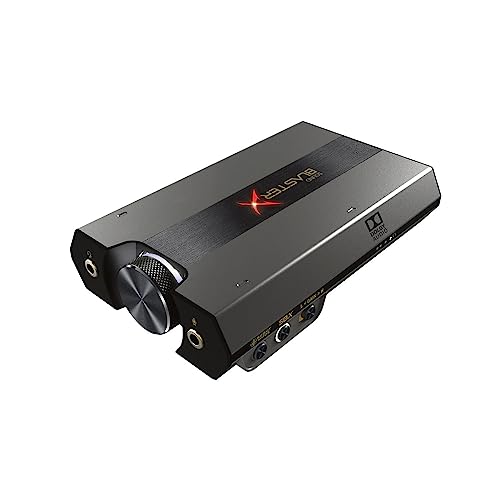
- Sound BlasterX G6 Hi-Res 130dB 32bit/384kHz Gaming DAC, External USB Sound Card with Xamp Headphone Amp, Dolby Digital, 7.1 Virtual Surround Sound, Sidetone/Speaker Control for PS4, Xbox One — Check on Amazon
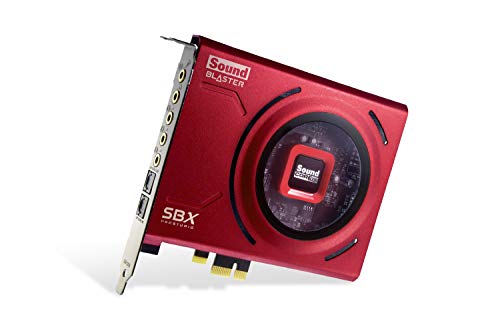
- Creative Sound Blaster Z SE Internal PCI-e Gaming Sound Card and DAC, 24-bit / 192 kHz, 116 dB SNR, ASIO, 600Ω Headphones Amp, Mic EQ, Discrete 5.1 / Virtual 7.1, Supports Dolby Digital Live, DTS … — Check on Amazon
Frequently asked questions
How do I know if my sound card is better than onboard?
Level-matched A/B listening on recordings you know well, plus the silence test for noise. If differences survive matched volume — cleaner background, better bass definition, clearer positioning — the improvement is real. If they vanish, your onboard was already adequate for your headphones.
What is the fastest meaningful test?
Three minutes: channel test tones for correct mapping, silence at listening volume for noise, and thirty seconds of a favourite track against your old device at matched level. That trio catches most faults and most illusions.
Why does everything sound louder, not better, on the new card?
Different default output levels. Louder reliably fools ears into hearing ‘better’, which is why this guide insists on matching volume before judging. Once matched, judge clarity, noise, and positioning instead of impact.
How should I test virtual surround?
In a game you know, with your eyes closed, localising sounds deliberately — especially rear cues, the hardest for virtualisation. Compare against plain stereo on the same scene; good virtual surround widens and places, bad processing just echoes.
What if I hear crackling only in games?
Note it as a load-correlated fault: update drivers, try a standard output format, and test a different slot or port. Persistent load-only crackle after those steps is support-worthy, and your notes will make the case clearly.
Should I test with speakers or headphones?
Both, if you use both — they exercise different outputs and amplifier paths. Headphones reveal noise and detail most ruthlessly; speakers reveal channel mapping and room behaviour. Test the chain you actually listen through.
Related Guides
Keep exploring with these guides and roundups from the same desk and audio cluster: