Disclosure: As an Amazon Associate, ilcastellomenu.com earns from qualifying purchases. Product examples below link to Amazon, where you can check current availability and specifications; this guide itself lists no fixed prices because pricing and bundles change frequently.
The air cooling vs liquid cooling for gaming PC debate generates more heat than either method removes, so let us start with the honest summary: a good tower air cooler and a good liquid loop both cool a gaming processor properly, and the choice is really about case fit, noise character, maintenance appetite and looks. This guide compares them on performance, acoustics, reliability, cost and installation, then gives clear recommendations by processor class and case type.
Context first: this comparison concerns the CPU. Your graphics card almost certainly air-cools itself regardless, and case airflow — the subject of How to Cool a Gaming PC — matters as much as the CPU cooler you choose. Keep that hierarchy in mind whenever a forum thread tries to sell you a radiator as a substitute for a ventilated case.
Air Cooling vs Liquid Cooling for Gaming PC Builds: The Quick Verdict
Choose air if your case fits a tall tower, your processor is anything up to the high-performance mainstream, and you value set-and-forget reliability: a quality air cooler has exactly one moving part, cannot leak, and will outlive the PC around it. Choose liquid — specifically an all-in-one (AIO) loop with a 240 mm or larger radiator — if your case cannot fit a big tower, if you run a flagship processor at sustained full load, if you are moving heat out of a compact build, or if the clean look over the motherboard genuinely matters to you. Custom open loops are a hobby of their own and sit outside this comparison’s scope — and outside most gaming needs.
The verdict’s surprise for newcomers is how strong modern air cooling is. The best towers trade blows with mid-size liquid loops on raw temperature while costing less and asking nothing. Liquid’s wins are real but specific, and the sections below make them precise.
In this guide
Cooling Performance, Honestly Compared
Heat removal is a surface-area and airflow game. A flagship air tower packs enormous fin area and one or two large fans into the space above the CPU; a 240–360 mm radiator spreads similar area along the case edge and exhausts heat directly out of the chassis, which is liquid’s structural advantage: the CPU’s heat leaves instead of warming the case air your GPU breathes. In practice, at gaming loads — which rarely pin a CPU the way rendering does — top air coolers and 240 mm AIOs land within a few degrees of each other on mainstream processors, and both keep well clear of throttling.
Where liquid pulls ahead is sustained, all-core load on high-power flagship chips, and in small cases where a tower physically cannot exist. Where air pulls ahead is idle and light-load behaviour, and in long-term consistency: an air cooler’s performance in year five equals year one, while an AIO slowly loses coolant to permeation and its pump ages. If your PC is already overheating, do not buy either until you have diagnosed why — How to Fix a Gaming PC that Overheats orders that investigation properly, because a remount and fresh paste fix more ‘inadequate’ coolers than replacements do.
Noise: Different Voices, Similar Volumes
Noise is a character difference more than a volume difference. Air coolers speak with one or two large fans that ramp with load — a smooth, low whoosh when the fan curve is set well. Liquid adds a pump: a constant, faint hum or whine that some ears find more intrusive than fan noise precisely because it never changes, plus radiator fans that behave like any others. At full gaming load both approaches are audible; at desktop idle a good air setup can be effectively silent while a pump still murmurs. Sensitive listeners in quiet rooms should weight this section heavily — it decides daily happiness more than two degrees ever will.
| Criterion | Tower air cooler | AIO liquid cooler | Edge |
|---|---|---|---|
| Gaming-load temperatures | Excellent on mainstream CPUs | Excellent; better on flagship sustained loads | Liquid, narrowly, at the top end |
| Idle noise | Can be near-silent | Pump hum persists | Air |
| Moving parts | Fan(s) only | Fans plus pump | Air |
| Failure mode | Fan dies — cheap, obvious, safe | Pump dies or slow coolant loss — system overheats | Air |
| Case fit | Needs height clearance and RAM clearance | Needs radiator mounting space | Depends on the case |
| Maintenance | Dust the fins occasionally | Dust the radiator; finite service life | Air |
| Cost for strong performance | Lower | Higher | Air |
| Looks over the motherboard | Large tower dominates the view | Clean block, tubes and radiator | Liquid, for windowed builds |
Read the table as a personality test: the left column is the appliance philosophy — install, forget, replace a fan in a decade — and the right is the enthusiast philosophy, accepting a consumable component in exchange for fit and aesthetics. Neither philosophy is wrong; mismatching the philosophy to the owner is the only real error in this comparison.
Installation, Compatibility and Maintenance
Air installation is minutes of work with two cautions: check the cooler’s height against your case’s clearance and its overhang against tall memory, and tighten mounting hardware evenly so the base sits flat. Liquid installation adds radiator placement decisions — front intake versus top exhaust changes whether the GPU or the CPU gets the warmer air — plus tube routing and the rule that the pump should not sit at the loop’s highest point, so trapped air collects in the radiator instead. Both are well within a careful beginner’s ability, and both reward reading the manual’s mounting diagram before touching a screw.
Maintenance diverges over years. Air asks for dust removal and, eventually, a fan. AIOs ask for radiator dusting and acceptance of a service life: pumps are rated in years, coolant permeates slowly through the tubes, and the unit is replaced as a whole rather than serviced. Custom loops invert everything — maximum performance and maximum upkeep — and belong to enthusiasts who enjoy the maintenance itself. Budget accordingly: the liquid buyer should mentally schedule a replacement cooler within the PC’s lifetime; the air buyer should not. These long-view costs also feed the platform thinking in How to Upgrade a Gaming PC.
Recommendations by Build Type
Mainstream gaming build in a standard mid-tower: buy the best-value tower air cooler and spend the savings on the graphics card — you will feel that trade every session. Flagship processor in a showcase case with a window: a 360 mm AIO earns its place on sustained performance and looks. Small-form-factor build: liquid, or a low-profile air cooler chosen with open eyes about its limits, because physics gives you no third option. Quiet-room and recording setups: big air, slow fans, done. Existing owners wondering whether to switch camps should first extract everything from what they own — curves, paste, airflow — using How to Cool a Gaming PC; switching camps is the last cooling upgrade, not the first. Complete builds in Best Computer Towers for Gaming show both philosophies assembled well.
The Radiator Size Ladder: 120, 240, 280 and 360 mm
Liquid cooling is not one thing, and its sizes deserve separation because the smallest AIOs are the comparison’s most common disappointment. A 120 mm single-fan radiator has less surface and less fan than a good tower air cooler, and it typically loses to one while costing more and adding a pump — its only honest use is a case with no other option. The 240 mm class is where liquid becomes competitive with top air, the 280 mm class quietly excellent where cases fit its wider fans, and 360 mm is the flagship territory where liquid’s sustained-load advantage is real. Judge any specific AIO against the air cooler at its price and size class, never against ‘air cooling’ as an abstraction.
Air has its own ladder, symmetrically: slim low-profile coolers for small cases, single towers as the mainstream default, and dual towers as the flagship class that trades blows with mid-size liquid. The fair fight — dual tower versus 240 mm — is the comparison this guide’s table describes, and its closeness is the story. Below those classes, both technologies serve constrained builds honourably; above them, you are buying silence and headroom rather than survival.
What the Noise Measurements Leave Out
Published noise figures flatten a truth your ears will not: character matters as much as volume. Fan noise is broadband and breath-like; pump noise is tonal, and tonal sounds draw attention at levels broadband sounds do not. Fan noise also scales with load, arriving when game audio covers it, while pump noise is constant, present in the quiet menu and the late-night strategy session alike. Two coolers with identical measured loudness can therefore produce opposite satisfaction in the same owner, and the only reliable test is your own ears in your own room — a strong argument for buying either type from somewhere with a humane return policy.
There is a tuning asymmetry too. Fan curves give air owners deep control over their cooler’s voice across the whole load range. AIO owners control radiator fans the same way, but the pump often offers only a fixed speed or a couple of modes — the one voice in the system you cannot fully direct. Makers have improved pump acoustics markedly, and mounting the radiator to minimise vibration transfer helps, but the asymmetry is structural and worth weighing if your PC lives in a bedroom or a recording space.
The Environmental and Ownership Ledger
A longer view occasionally settles close calls. An air cooler is a lump of metal and a fan: it will serve multiple builds across a decade, its only consumable is a fan, and its end of life is recyclable simplicity. An AIO is a sealed appliance with a finite service life whose replacement is wholesale; across a decade of ownership you may buy two. Neither fact should bully anyone out of a liquid build they love — the performance and aesthetic cases stand on their own — but in a comparison that prides itself on honesty, the decade ledger belongs on the page, beside the degrees and the decibels.
Three Builds, Three Decisions
Cases settle what tables cannot. Build one: a mainstream gaming PC in a standard mid-tower with a mesh front, owned by a player who values quiet evenings and zero maintenance. The dual-tower air cooler wins without a contest — it cools the processor class completely, idles in silence, and will still be doing both when the PC around it is replaced. Every pound not spent on liquid goes to the graphics card, where it is felt in every frame. This is the default build of the gaming world, and air is its default for structural reasons, not habit.
Build two: a flagship processor in a showcase case with a glass panel, owned by an enthusiast who renders video on weekends and games at night. Sustained all-core loads are real here, the case’s height is committed to its looks, and the clean sightline over the motherboard is part of the purchase’s pleasure. A 360 mm liquid loop earns its place on performance, fit and aesthetics simultaneously — the three honest reasons, all present at once. Build three: a small-form-factor machine in a case the size of a shoebox, where no tower taller than a fist can stand. Liquid, or a low-profile air cooler chosen with clear eyes, because physics has already made the decision and the only remaining choice is which constraint to respect.
Note what never decided any of the three: forum tribalism, the cooler’s appearance in a render, or the assumption that one technology is simply ‘the future’. Case, chip, workload and owner decided — in that order — and the same four questions will decide yours. That is the whole method of this comparison, and it generalises to nearly every component choice in a gaming PC.
How Each Technology Actually Moves Heat
Both technologies obey the same physics and differ in logistics, so start with the journey heat takes. In an air cooler, heat leaves the CPU into a metal base, travels through heat pipes — sealed tubes whose internal fluid evaporates at the hot end and condenses at the cold end, shuttling heat with remarkable efficiency — and spreads into a stack of thin fins. A fan pushes case air through those fins, and the air carries the heat away. The system’s ceiling is set by fin area, airflow and the temperature of the air the case supplies.
An all-in-one liquid cooler inserts a detour. Heat enters a water block, where a pump pushes warmed liquid through tubes to a radiator — which is, in the end, a fin stack like the air cooler’s, usually larger and mounted at the case’s edge — where fans exhaust the heat directly out of the case or draw fresh air across the fins. The liquid is not magic; it is a conveyor, moving the heat from a cramped neighbourhood (around the socket, where GPU heat also lives) to a location with more room and better air. Every advantage liquid cooling has flows from that relocation, and every disadvantage flows from the machinery the relocation requires: pump, seals, fluid and time.
This framing predicts the real-world results this guide reports. Where the socket area has room and air, a large tower’s fin stack rivals a modest radiator, because the radiator is a fin stack too. Where the socket is cramped, the case small, or the CPU’s heat output large and sustained, relocation wins, because the radiator can be bigger than anything that fits on the socket and can drink cooler air than the case’s interior offers. Decide by your constraints, not by the technologies’ reputations.
Sustained Load, Heat Soak and the First Ten Minutes Lie
Short benchmarks flatter liquid cooling for a reason every buyer should understand: water has thermal mass. In the first minutes of a load, the liquid in the loop absorbs heat faster than the radiator sheds it, so temperatures look superb while the loop is still warming. As the session lengthens, the liquid reaches equilibrium and the radiator’s true capacity takes over — which may be better or worse than the early impression, but is always the honest number. Judge any cooler, of either type, by its state after thirty sustained minutes, because that is the state your long sessions will live in.
Air coolers heat-soak too, but faster and more transparently: their smaller mass reaches equilibrium quickly, so their ten-minute behaviour is close to their two-hour behaviour. This is one of air’s underappreciated virtues — what you measure is what you get, early and late. Liquid’s mass is not a deception; the same thermal buffer smooths short bursts beautifully, swallowing a loading screen’s spike without the fans ever stirring. For bursty workloads that buffer is a genuine feature. For marathon loads it is a delay, not a defence.
Room temperature referees both. A loop or a tower can only approach the temperature of the air it breathes, and a cooler that wins by a wide margin in a cool test room may tie in a warm bedroom in August. When comparing reviews, note the ambient conditions they report, and when testing your own build, record the room’s temperature alongside the components’. Cooling is always a delta above the room, and the room is the one component no cooler can upgrade.
Failure Modes and Lifespans: What Eventually Goes Wrong
Air coolers fail the way bridges do — slowly, visibly, and almost never all at once. The fan is the only moving part, and fans announce their decline over months with bearing noise and wavering speed before they stop. The fins clog with dust on a schedule your cleaning habits set. The heat pipes themselves are sealed, passive and effectively immortal. An air cooler bought today will very likely outlive the platform it cools, and its failure, when it comes, will be a fan you can replace in minutes for little money.
Liquid coolers carry a more interesting risk portfolio. The pump is a moving part submerged in the system’s lifeblood, and when it fails the cooler fails completely and suddenly. The liquid itself slowly permeates through the tubing over years, lowering fill level in a sealed unit you cannot top up. Seals age, and while leaks in modern all-in-ones are uncommon, their consequences are categorically worse than any failure an air cooler can produce, because the failing fluid lives above your other components. Manufacturers’ warranties on quality units now run long enough to cover the realistic risk window, and that warranty length is a specification worth reading as carefully as radiator size.
None of this makes liquid reckless — millions of systems run it for years without incident — but it changes the ownership posture. An air-cooled PC can be ignored thermally for half a decade. A liquid-cooled PC deserves an annual glance: listen to the pump, watch the temperature baseline for the slow creep that announces permeation or pump wear, and know the unit’s age and warranty status. Our seasonal routine in the guide on how to cool a gaming pc builds exactly that glance into the year.
Compatibility: Sockets, Clearances and the Cases That Decide for You
Cooling choices are often made by the case before the buyer gets a vote. Air towers demand height — the distance from socket to side panel — and the tallest, best-performing towers simply do not fit slim or small cases. They also overhang memory slots and the top expansion slot on many boards, turning a memory upgrade into a cooler removal. None of this is hidden: cooler height, case clearance and slot overhang are all published or measurable, and the builder who measures first is never surprised. Our guide on how to check compatibility of a CPU cooler walks those measurements in order.
Liquid demands a different geometry: radiator mounting points of the right size, in positions that suit your airflow plan, with clearance for the radiator-plus-fan sandwich that specifications sometimes understate. A case advertising support for a large radiator at the top may fit it only with low-profile memory, or only with the motherboard’s heatsinks clearing by a hair. Tube length then decides whether the block reaches comfortably from the chosen mount. The compatibility question for liquid is not ‘does it fit’ but ‘does it fit in the position my airflow plan wants, with my other parts installed’.
Future compatibility argues quietly for air. A tower cooler adapts to a new socket with a mounting bracket, often available for years, while an ageing all-in-one faces the same bracket question plus its own lifespan clock. Builders who keep coolers across platform generations — a common and sensible frugality — find air the more cooperative technology. The cooler is one of the few components that can serve three builds; choose one whose maker supports that ambition.
Noise Character in Detail: What You Will Actually Hear at Midnight
Decibel figures flatten the thing you actually care about, which is character. Air coolers speak in fan noise alone: a broad whoosh that scales with load, from fans you can often replace with quieter models if the stock ones displease you. Because the fans sit inside the case’s centre, the case itself muffles them, and a well-tuned air system at idle can be effectively silent — fans stopped or crawling — in a way that defines a machine’s manners in a quiet room.
Liquid adds a second voice: the pump, a faint hum or buzz at a fixed pitch that does not scale with load and therefore becomes most noticeable exactly when everything else is quiet. Most owners never hear theirs; some pumps, and some mounting orientations that let air gather at the pump, produce a tone their owners cannot unhear. This is liquid’s acoustic gamble — not volume but timbre — and it is why experienced builders treat pump noise reports in reviews as seriously as temperature results. A radiator’s fans, meanwhile, sit at the case’s skin, less muffled than a tower’s, which is the honest counterweight to liquid’s reputation for quiet: at full load, a big radiator moving serious air is not a silent device either.
The practical method is tuning, on both sides. Fan curves that respect the difference between bursty and sustained load, radiators mounted to exhaust rather than to fight the case’s path, and pumps run at the speed their maker recommends rather than maximised — these choices decide the midnight experience more than the technology badge does. Buy the technology your constraints prefer; then tune it like you live with it, because you do.
Custom Loops, Briefly and Honestly
This comparison concerns the two mainstream choices, but a third exists and deserves an honest paragraph so its romance does not distort the other two. A custom loop — hand-plumbed tubing, a separate pump and reservoir, blocks for CPU and often GPU — is the finest cooling a PC can have and the most demanding hobby inside the hobby. It can cool a graphics card as no air cooler can, it can be genuinely quiet at loads that make all-in-ones audible, and it is beautiful in the way engineered things are. It also costs multiples of either mainstream option, requires periodic maintenance of fluid and fittings, and converts every hardware upgrade into a plumbing project.
The verdict for nearly every reader is that a custom loop is not a cooling decision but a hobby decision: people build them because building them is the point, and the temperatures are the trophy. If that sentence excites you, no advice here should stop you. If it does not, know that a well-chosen air tower or all-in-one captures the overwhelming majority of the practical benefit, and that the remaining margin belongs to enthusiasts the way a racing bicycle’s margin belongs to racers — real, and irrelevant to the journey most riders are taking.
A Decision Walkthrough for Four Common Builds
The quiet living-room PC
Its priorities are acoustic manners at moderate loads and absolute reliability while ignored. A large air tower with a slow, generous fan curve wins here: no pump voice in a quiet room, no lifespan clock, and temperatures that a living-room workload never threatens. Liquid’s advantages never get a chance to speak in this build.
The high-refresh esports tower
Sustained CPU clocks at high frame rates, in a case with room to breathe. Either technology serves; the deciding factors are the specific CPU’s heat and the case’s layout. A dual-tower air cooler is the simple, durable answer; a large radiator earns its place if the case’s front is the only good intake and the socket area is crowded by a flagship GPU’s exhaust.
The compact small-form-factor build
Space decides. A low-profile air cooler suits modest CPUs; beyond them, a modest radiator mounted where the case designer intended is often the only way to move enough heat out of a tiny volume. In this class the comparison is not a preference but a fitment table, and the case manual is the real buying guide.
The workstation that also games
Sustained all-core loads for hours are liquid’s strongest honest case: a large radiator sheds render-farm heat with better manners than a tower working at its limit, and the machine’s owner is usually present, attentive and maintenance-minded. Pair it with a long warranty and the annual inspection habit, and the technology’s risks are managed rather than merely accepted.
Reading Cooler Reviews Without Being Misled
Cooler reviews are necessary and treacherous, because a cooler’s measured performance is a property of the whole test system, not the cooler alone. The variables that move results — the case, its fan arrangement, the ambient temperature, the exact CPU and its power settings, even the thermal paste and mounting repeatability — differ between reviewers enough that the same two coolers can swap ranking between publications honestly. Read reviews for patterns across several sources, and distrust any single chart that crowns a winner by a margin smaller than the testing noise.
Prefer reviews that report the right things: temperatures as a delta above ambient, noise measured at a stated distance, and sustained-load results rather than sprint benchmarks. A review that tells you how a cooler behaves at a fixed, quiet fan speed is worth more than one that only reports its maximum-cooling roar, because your life with the cooler will be lived at the speeds your ears accept. Also note whether the review’s case resembles yours; a tower tested in an open bench has been measured in a world your build does not inhabit.
Finally, remember what reviews cannot measure at all: the pump’s voice in your room at midnight, the bracket’s availability in five years, the maker’s warranty behaviour in your country. Those belong to owner reports and to the manufacturer’s record, and for a component you intend to keep across a platform or two, they deserve a share of the decision that no temperature chart can claim.
Gear for This Guide
The examples below come from our verified product pool and illustrate the product classes discussed in this guide. They are examples, not a ranked list — use the criteria in this article to judge any model, including newer revisions.
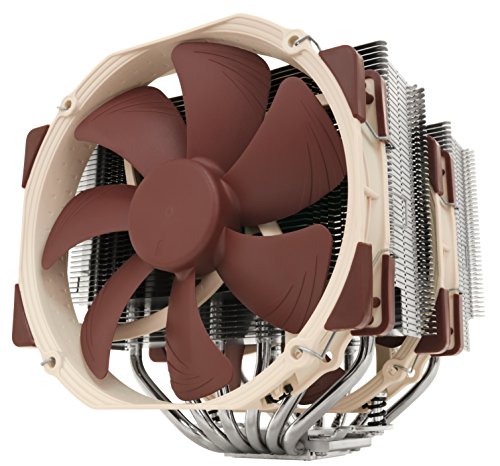
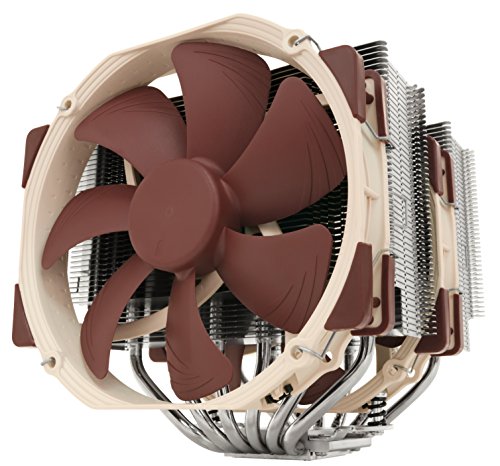
Noctua NH-D15 CPU Cooler
The air benchmark: dual-tower, dual-fan cooling that matches mid-size liquid loops on most processors while asking for nothing but dusting. Noctua NH-D15 CPU Cooler — Check on Amazon

Thermalright Peerless Assassin 120 SE CPU Cooler
The value proof for air — flagship-class design at a mainstream price, and the cooler that makes liquid a want rather than a need for most builds. Thermalright Peerless Assassin 120 SE CPU Cooler — Check on Amazon

ARCTIC Liquid Freezer III Pro 360 AIO CPU Cooler
The liquid case at full size: a 360 mm radiator for flagship processors and sustained loads, in a case with room to mount it. ARCTIC Liquid Freezer III Pro 360 AIO CPU Cooler — Check on Amazon
Frequently Asked Questions
Can liquid cooling leak and destroy my PC?
Modern AIOs are sealed, factory-filled units and leaks are rare, but the risk is not zero, which is one reason air remains the default recommendation for unattended reliability. A tower air cooler has no liquid to leak under any circumstances.
How long does an AIO cooler last?
Typically several years of service before pump wear or coolant loss ends its useful life; treat it as a component with a lifespan, unlike an air tower whose heatsink is effectively immortal and whose fans are cheaply replaced.
Is a bigger radiator always better?
Up to the limits of your processor’s heat output, larger radiators cool more quietly at the same temperature. Beyond a 360 mm unit, gaming returns are negligible, and case fit becomes the binding constraint.
Do I need liquid cooling for overclocking?
For moderate overclocks on mainstream chips, a top air tower suffices. Sustained, aggressive overclocking of flagship processors is liquid’s home turf — though modern processors’ automatic boost behaviour has narrowed what manual overclocking buys gamers.
Which is better for a PC that travels to LAN events?
Air, for robustness: no pump to upset, no liquid to shift, and a securely mounted tower tolerates transport well. If you run liquid, transport the PC so the radiator stays sensibly oriented and check fittings on arrival.
Can I mix air and liquid in one PC?
In effect, almost every liquid-cooled PC does: the GPU air-cools itself and case fans move air regardless. The CPU cooler choice never removes the need for case airflow — it changes where the CPU’s heat joins the airstream.
Bottom line: air is the reliable, quiet, economical default that cools most gaming PCs superbly; liquid earns its premium in compact cases, flagship sustained loads and showcase builds. Match the method to your case, chip and temperament — not to forum fashion.
Is liquid cooling safe around my other components?
Modern all-in-one coolers are sealed, factory-filled and designed for years of service, and leaks are uncommon — but uncommon is not impossible, and the consequence asymmetry is real, which is why this guide treats warranty length and maker reputation as buying criteria. Mount the radiator so the pump is not the highest point in the loop, check fittings when you move the machine, and include the cooler in your annual inspection. Managed that way, liquid’s risk is a reasonable price for its benefits where those benefits are real.
Can I reuse an air cooler on my next build?
Very often, yes — it is one of air cooling’s quiet economic advantages. You will need the correct mounting bracket for the new socket, which reputable makers supply for years, sometimes free. Clean the base, apply fresh paste, and a cooler can serve two or three platforms across a decade, which no sealed liquid unit should be asked to do.
Why do some high-end CPUs seem to demand liquid cooling?
Because their sustained power draw under full multi-core load exceeds what most air towers can shed quietly in a typical case — the operative word being quietly. A top air cooler can usually keep such a chip safe; the question is the noise and margin at which it does so. For gaming loads specifically, which rarely pin every core the way rendering does, air remains viable further up the range than workstation folklore suggests.
Does radiator size matter more than fan quality?
Within reason, radiator area is the stronger lever — it is the surface the heat ultimately leaves from — but fans decide how much of that area is actually used, and poor fans on a large radiator waste its advantage while adding noise. Treat them as a system: enough radiator for your heat load, fans good enough to serve it quietly, and a mounting position that feeds the radiator the coolest air available.
Should a first-time builder start with air or liquid?
Air, for reasons beyond performance: it installs with fewer steps, has no pump orientation or tube routing to learn, forgives mistakes, and its single moving part is trivially replaceable if anything is wrong. A first build has enough new experiences without adding a fluid system. Liquid becomes a reasonable choice on the second build, or the first upgrade, when the builder knows their case, their noise preferences and their CPU’s real heat — which is to say, when the choice can be made from evidence.
Can I mix both — liquid on the CPU and air on the GPU?
That is exactly what most liquid-cooled gaming PCs are: an all-in-one on the CPU and the graphics card’s own air cooler doing its work. The interaction to manage is airflow — a radiator exhausting at the top helps the GPU by removing CPU heat from the case, while a radiator intaking at the front feeds the GPU warmer air. Choose the radiator position with the whole case’s air path in mind, not the CPU’s temperatures alone.
How long should an all-in-one cooler last?
A quality unit should serve through one platform’s life — plan around five to six years, inside its warranty — after which permeation and pump wear make replacement the prudent course even if it still runs. Track its age the way you track the build’s, and let the annual temperature baseline tell you when its performance starts its slow decline, so the replacement is a plan rather than a failure.
Does liquid cooling help the GPU too, or only the CPU?
In an all-in-one setup, indirectly. Removing the CPU’s heat from the case’s interior — especially with a top-exhaust radiator — lowers the air temperature the GPU’s own cooler breathes, and cards commonly run a little cooler and quieter as a result. The effect reverses with a front-intake radiator, which pre-warms the GPU’s air. The GPU itself remains air-cooled in either arrangement; only custom loops and hybrid cards put the card itself under liquid.
What is the most common installation mistake with each type?
With air towers, it is forgetting the memory and slot clearance until the cooler is already mounted — measure first, as the compatibility section insists. With all-in-ones, it is mounting the radiator so the pump sits at the loop’s highest point, where collected air can starve and noise it. Both mistakes are free to avoid and annoying to correct, which makes them the two sentences in this guide most worth remembering on build day.
Is an air cooler enough for overclocking?
For modest, everyday overclocking on most gaming CPUs, a high-end air tower is genuinely sufficient — the flagship air coolers were built for exactly this territory. Liquid pulls ahead as voltages and sustained all-core loads climb toward the serious end, where its radiator area and heat relocation matter. Be honest about which overclocking you mean: a small, stable uplift for gaming, or a sustained maximum pursued as its own project. The first is air’s home ground; the second is where liquid earns its complexity.
Why does my liquid cooler’s temperature advantage shrink in summer?
Because both technologies are anchored to room temperature, and the radiator’s larger surface was buying its advantage partly with cooler test conditions. In a hot room, every cooler rides the same rising floor, and the gap between a good tower and a good all-in-one compresses toward the difference in their raw capacity. If summer temperatures concern you, the effective purchases are room cooling and airflow — the delta above ambient is your cooler’s report card, and it may be passing even while the absolute numbers climb.
Should I replace a working air cooler when I upgrade my CPU?
Only if the new chip’s heat exceeds the old cooler’s capacity or the mounting system cannot adapt. Check the cooler’s rated dissipation against the new CPU’s sustained draw, confirm a bracket exists for the socket, and keep a cooler that passes both tests — with fresh paste, it will serve the new platform as faithfully as the old. Replacing a sufficient cooler buys nothing but a smaller bank balance, and the upgrade budget is always better spent where the diagnosis points.
Can I hear whether my choice is working well?
Partly, and your ear is a legitimate instrument here. A cooling system in health has a predictable voice: quiet at idle, a smooth rise under load, no rattles, grinding, gurgling or new tones. Changes in that voice — a fan’s bearing whine, a pump’s new buzz, a curve that suddenly hunts up and down — are early reports from the system, usually arriving weeks before temperatures confess the same story. Learn your machine’s normal voice in its first month and you own a diagnostic that never needs opening.
In one sentence, which should I choose?
Choose air for simplicity, longevity and silence at ordinary loads, and choose liquid when your CPU’s sustained heat, your case’s shape or your noise-shaping needs give its relocation trick real work to do — and let your constraints, not the technologies’ reputations, make the call.
Do I need to change the liquid in an all-in-one cooler?
No — sealed all-in-ones are not user-serviceable, and opening one voids its warranty and its point. The fluid’s slow permeation over the years is one of the reasons the unit has a planned lifespan rather than an indefinite one. When the annual baseline shows its performance fading and its warranty has run its course, the maintenance is replacement, performed as a planned upgrade rather than an emergency.
Does case size alone ever settle this choice?
Yes, at both extremes. The smallest cases physically exclude tall towers and often dictate a radiator; the largest cases give both technologies room and return the decision to preference and budget. Measure your case’s cooler height and radiator mounts before falling for either option — geometry votes first.
Related Guides
Keep exploring with these guides and roundups from the same Gaming PCs collection: