Disclosure: As an Amazon Associate, ilcastellomenu.com earns from qualifying purchases. Prices and availability change; check Amazon for the latest.
Where to buy
Check the latest price, availability and delivery on Amazon. Orders are placed on Amazon.
- Epson SureColor P900 — Check on Amazon
- Canon PIXMA PRO-200 — Check on Amazon
- Epson EcoTank Photo ET-8550 — Check on Amazon
- Canon imagePROGRAF PRO-300 — no link.
- Canon imagePROGRAF PRO-1000 — no link.
- 24-Inch Pigment Photo Printer Class — no link.
Read the full guide ↓
Finding the best archival photography printers means matching the machine to the work in front of you, not chasing the longest feature list. Archival photography printing is a promise about decades: pigment inks on acid-free fine-art paper, stored and displayed so the print outlives the photographer’s hard drives. This shortlist ranks printers on the things that actually decide archival life — pigment ink sets and their colour gamut, the fine-art media path (thick, textured papers fed without bending or scuffing), maximum print size, and the driver’s black-and-white and colour-management depth — with the professional 24-inch class included unlinked because no desktop pool model reaches it.
This guide compares six options across the budgets and use cases that archival photography printer buyers actually face, explains the trade-offs in plain language, and finishes with a setup walkthrough, the mistakes that waste the most money, and answers to the questions readers ask before they commit. Where a tier or method has an honest limitation, we say so directly, because a shortlist you can trust is worth more than a longer one padded with poor fits.
Permanence honesty, stated once: ‘archival’ describes the ink-paper-storage system, not a printer badge. Pigment picks lead; the dye tank pick is included for economy and is never described as the permanence benchmark.
In this guide
Quick Picks
| Badge | Pick | Why it stands out | Link |
|---|---|---|---|
| Best Overall | Epson SureColor P900 | Seventeen-inch width prints true portfolio and exhibition sizes at home or in a small studio | Check on Amazon |
| Best Dedicated Photo Printer | Canon PIXMA PRO-200 | Eight-colour dye ink set produces vivid photographs and art prints with smooth skin tones and gradients | Check on Amazon |
| Best Tank Value for Large Prints | Epson EcoTank Photo ET-8550 | Six-colour ink set is built for photographs and art reproduction, with smoother gradients than 4-colour machines | Check on Amazon |
| Best Compact Pigment | Canon imagePROGRAF PRO-300 | Pigment inks are the archival choice for prints that will be sold, framed or kept for decades | Unlinked pick — see notes below |
| Best 17-Inch Professional | Canon imagePROGRAF PRO-1000 | Benchmark colour and monochrome output for photographers who sell prints | Unlinked pick — see notes below |
| Best for Exhibition Scale | 24-Inch Pigment Photo Printer Class | Roll media ends the sheet-size ceiling: panoramas and full exhibition sizes from one machine | Unlinked pick — see notes below |
How These Picks Were Chosen
Every option here was judged against the criteria that decide real-world satisfaction for a archival photography printer, using manufacturer specifications, documented features and the ownership patterns that show up again and again in buyer feedback. Products that looked good in a headline but failed on consumable costs, compatibility or workflow were cut, and the shortlist keeps a genuine spread of budgets and approaches rather than six versions of the same machine.
- Pigment ink set: number of inks, matte/photo black handling and published permanence data for the ink-and-paper pair
- Fine-art media path: straight or front feed for thick, textured and board media without roller marks
- Maximum size: 13 x 19 in desktop versus 17 in versus the 24 in professional class
- Colour management: ICC profile support, driver quality and soft-proofing workflow fit
- Black-and-white mode depth: dedicated advanced B&W modes versus simple greyscale conversion
- Running reality: ink cartridge sizes and cost per print at your actual sizes
Two honesty notes apply to the whole list. First, prices move constantly, so this guide never prints a fixed price for a specific product; the search’s budget framing is discussed as a tier, and Amazon shows the live figure. Second, where fewer than six linked products honestly fit a specialised lens, we fill the remaining places with clearly marked as unlinked alternatives instead of forcing a poor match into the list. You may also find our related reading useful: Best Bargain Laser Printers and Best Black And White Photo Inkjet Printers.
The 6 Best Archival Photography Printers
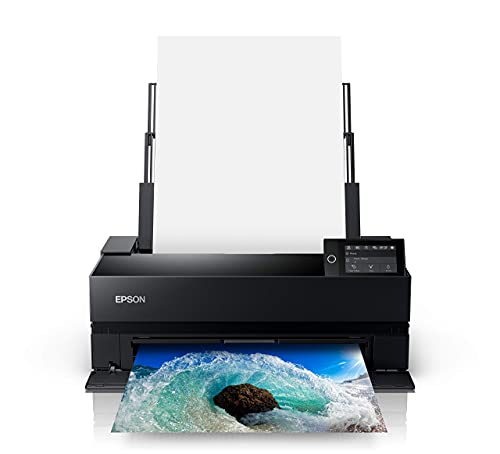
Epson SureColor P900 (Best Overall)
Seventeen-inch width prints true portfolio and exhibition sizes at home or in a small studio That is the core of its case as best overall in this shortlist. It suits buyers whose work matches its design centre: the people described in the verdict below will get their money’s worth, while the trade-offs listed honestly underneath explain who should keep scrolling. In daily use, it is the combination of its inkjet design, its consumable economics and its workflow fit that separates it from machines with similar headline specifications.
See the current listing for the Epson SureColor P900 on Amazon for full specifications and delivery options.
Strengths
- Seventeen-inch width prints true portfolio and exhibition sizes at home or in a small studio
- Ten-colour ink set with violet expands gamut for saturated landscapes and deep monochrome work
- Roll and sheet handling with a dedicated black-and-white mode suits serious photographers
Trade-offs
- Premium pricing for machine and cartridges; this is a specialist tool
- Large, heavy body needs a permanent, sturdy surface
- No scan or copy functions; it is a printer only
- Type: 17-inch professional photo printer
- Max paper size: 17 x 22 in
- Ink: 10-colour UltraChrome PRO10 class ink set
- Connectivity: Wi-Fi, Ethernet, USB
- Focus: exhibition and fine-art photo printing
In practice, ownership rhythm matters as much as the specification sheet. Owners who build this machine into a simple weekly routine — a standing place, consumables in reserve, settings saved as defaults — report the smoothest experience, while occasional users should plan a short warm-up test before important jobs. Warranty and support are part of the product, especially for machines that earn money. A seller, studio or office should weigh support hours, parts availability and advance-replacement terms alongside specifications. Hobby users can lean on community knowledge, which is deep for popular models and thin for obscure ones. Popularity itself is a feature: every common problem on a common machine already has a documented answer.
Best for: buyers who want overall performance from a archival photography printer and will use it regularly / Not suited for: buyers whose work falls outside its inkjet design centre or who need capabilities listed in its trade-offs

Canon PIXMA PRO-200 (Best Dedicated Photo Printer)
Eight-colour dye ink set produces vivid photographs and art prints with smooth skin tones and gradients That is the core of its case as best dedicated photo printer in this shortlist. It suits buyers whose work matches its design centre: the people described in the verdict below will get their money’s worth, while the trade-offs listed honestly underneath explain who should keep scrolling. In daily use, it is the combination of its inkjet design, its consumable economics and its workflow fit that separates it from machines with similar headline specifications.
See the current listing for the Canon PIXMA PRO-200 on Amazon for full specifications and delivery options.
Strengths
- Eight-colour dye ink set produces vivid photographs and art prints with smooth skin tones and gradients
- Dedicated printer design (no scanner compromises) keeps the focus on output quality
- Handles fine-art and thicker media better than general-purpose all-in-ones
Trade-offs
- Cartridge-based ink is expensive per print compared with tank systems
- No scan or copy functions, so it cannot be a household’s only printer
- Large footprint for a single-function machine
- Type: 8-colour dye inkjet photo printer
- Max paper size: 13 x 19 in (A3+)
- Connectivity: Wi-Fi, Ethernet, USB
- Focus: dedicated photo and art printing
- Print head: FINE technology
In practice, ownership rhythm matters as much as the specification sheet. Owners who build this machine into a simple weekly routine — a standing place, consumables in reserve, settings saved as defaults — report the smoothest experience, while occasional users should plan a short warm-up test before important jobs. Running costs deserve a paragraph of their own in any honest guide, because the purchase price is the smallest cheque most owners write. Consumables, media, spare parts and your own time all belong in the ledger. A machine that costs more upfront but halves consumable spending usually wins by the second year, while a bargain machine with expensive supplies quietly becomes the priciest option in the drawer. Before buying, price the consumables you will actually use, at the volumes you actually run, and compare cost per finished job rather than cost per box.
Best for: buyers who want dedicated photo printer performance from a archival photography printer and will use it regularly / Not suited for: buyers whose work falls outside its inkjet design centre or who need capabilities listed in its trade-offs

Epson EcoTank Photo ET-8550 (Best Tank Value for Large Prints)
Six-colour ink set is built for photographs and art reproduction, with smoother gradients than 4-colour machines That is the core of its case as best tank value for large prints in this shortlist. It suits buyers whose work matches its design centre: the people described in the verdict below will get their money’s worth, while the trade-offs listed honestly underneath explain who should keep scrolling. In daily use, it is the combination of its inkjet design, its consumable economics and its workflow fit that separates it from machines with similar headline specifications.
See the current listing for the Epson EcoTank Photo ET-8550 on Amazon for full specifications and delivery options.
Strengths
- Six-colour ink set is built for photographs and art reproduction, with smoother gradients than 4-colour machines
- Wide-format 13 x 19 in output suits portfolio prints and sellable art prints
- Tank refills make test prints and proofing far less painful than cartridge photo printers
Trade-offs
- Priced as a creator tool, well above everyday home printers
- Big and heavy for a home desk; plan a permanent home for it
- Using the wrong paper profile wastes the colour advantage, so media settings need care
- Type: 6-colour refillable-tank photo all-in-one
- Max paper size: 13 x 19 in
- Functions: print, scan, copy
- Connectivity: Wi-Fi, Ethernet, USB
- Rated speed: up to 16 ppm (manufacturer figure)
In practice, ownership rhythm matters as much as the specification sheet. Owners who build this machine into a simple weekly routine — a standing place, consumables in reserve, settings saved as defaults — report the smoothest experience, while occasional users should plan a short warm-up test before important jobs. Paper and media handling separate toys from tools. Straight paper paths handle thick stock, rear feeds protect delicate surfaces, and honest tray capacities decide whether a long job needs babysitting. Always match the media setting to what you loaded: that single dropdown controls feed speed, ink or toner behaviour and drying assumptions. Most mysterious quality problems trace back to a mismatch between the paper in the tray and the paper the driver believes is there.
Best for: buyers who want tank value for large prints performance from a archival photography printer and will use it regularly / Not suited for: buyers whose work falls outside its inkjet design centre or who need capabilities listed in its trade-offs
Canon imagePROGRAF PRO-300 (Best Compact Pigment)
Pigment inks are the archival choice for prints that will be sold, framed or kept for decades That is the core of its case as best compact pigment in this shortlist. It suits buyers whose work matches its design centre: the people described in the verdict below will get their money’s worth, while the trade-offs listed honestly underneath explain who should keep scrolling. In daily use, it is the combination of its inkjet design, its consumable economics and its workflow fit that separates it from machines with similar headline specifications.
This is an unlinked pick in this guide: we describe it so you can compare the approach, and recommend checking current availability and pricing at reputable retailers, since we only link products verified in our research pool.
Strengths
- Pigment inks are the archival choice for prints that will be sold, framed or kept for decades
- Ten-colour set with matte and photo black gives deep monochrome and wide gamut
- Handles thick fine-art media through a dedicated feed path
Trade-offs
- Premium machine and cartridge costs
- Print-only; no scan or copy
- Pigment matte rendering differs from dye gloss; paper choice matters enormously
- Type: 13-inch professional photo printer
- Ink: 10-colour LUCIA PRO class pigment ink set
- Max paper size: 13 x 19 in class
- Focus: fine-art and exhibition photo printing
In practice, ownership rhythm matters as much as the specification sheet. Owners who build this machine into a simple weekly routine — a standing place, consumables in reserve, settings saved as defaults — report the smoothest experience, while occasional users should plan a short warm-up test before important jobs. Maintenance is cheaper than repair in every category. Keep firmware and drivers current, clean paper paths and print heads on the maker’s schedule rather than after failures, and use the machine’s own test pages to diagnose before changing parts. Keep one set of consumables in reserve so a low warning never becomes a missed deadline, and keep notes: the date, the change and the result turn future troubleshooting from folklore into lookup.
Best for: buyers who want compact pigment performance from a archival photography printer and will use it regularly / Not suited for: buyers whose work falls outside its inkjet design centre or who need capabilities listed in its trade-offs
Canon imagePROGRAF PRO-1000 (Best 17-Inch Professional)
Benchmark colour and monochrome output for photographers who sell prints That is the core of its case as best 17-inch professional in this shortlist. It suits buyers whose work matches its design centre: the people described in the verdict below will get their money’s worth, while the trade-offs listed honestly underneath explain who should keep scrolling. In daily use, it is the combination of its inkjet design, its consumable economics and its workflow fit that separates it from machines with similar headline specifications.
This is an unlinked pick in this guide: we describe it so you can compare the approach, and recommend checking current availability and pricing at reputable retailers, since we only link products verified in our research pool.
Strengths
- Benchmark colour and monochrome output for photographers who sell prints
- Chroma Optimizer gives gloss uniformity that cheaper photo printers cannot match
- Handles thick fine-art media with a vacuum feed system
Trade-offs
- Very large and heavy; it needs a dedicated stand or table
- Cartridge costs per print are the highest in this guide
- Print-only machine with no scan or copy
- Type: 17-inch professional photo printer
- Ink: 11 colours plus Chroma Optimizer (LUCIA PRO class)
- Max paper: 17 x 22 in
- Focus: gallery and fine-art printing
In practice, ownership rhythm matters as much as the specification sheet. Owners who build this machine into a simple weekly routine — a standing place, consumables in reserve, settings saved as defaults — report the smoothest experience, while occasional users should plan a short warm-up test before important jobs. Finally, buy for the work you have, not the work you imagine. List the jobs from the last three months, count them, and size the machine to that reality with modest headroom. Aspirational purchases fill cupboards; honest ones fill order books. If a bigger need genuinely arrives, a well-chosen first machine becomes the backup rather than the mistake, and the upgrade decision makes itself with real numbers behind it.
Best for: buyers who want 17-inch professional performance from a archival photography printer and will use it regularly / Not suited for: buyers whose work falls outside its inkjet design centre or who need capabilities listed in its trade-offs
24-Inch Pigment Photo Printer Class (Best for Exhibition Scale)
Roll media ends the sheet-size ceiling: panoramas and full exhibition sizes from one machine That is the core of its case as best for exhibition scale in this shortlist. It suits buyers whose work matches its design centre: the people described in the verdict below will get their money’s worth, while the trade-offs listed honestly underneath explain who should keep scrolling. In daily use, it is the combination of its photo design, its consumable economics and its workflow fit that separates it from machines with similar headline specifications.
This is an unlinked pick in this guide: we describe it so you can compare the approach, and recommend checking current availability and pricing at reputable retailers, since we only link products verified in our research pool.
Strengths
- Roll media ends the sheet-size ceiling: panoramas and full exhibition sizes from one machine
- Multi-pigment ink sets are the archival benchmark this whole category is judged against
- Borderless roll printing suits print-for-sale workflows
Trade-offs
- Dealer or specialist-retailer purchase with freight delivery; it does not arrive like a desktop box
- Floor or stand space, media storage and profiling time are part of ownership
- Overkill for photographers who never print past 13 x 19 in
- Type: roll-and-sheet pigment inkjet printer class, 24 in carriage
- Media: fine-art, canvas and exhibition papers on roll or sheet
- Use: gallery, portfolio and print-sale production
In practice, ownership rhythm matters as much as the specification sheet. Owners who build this machine into a simple weekly routine — a standing place, consumables in reserve, settings saved as defaults — report the smoothest experience, while occasional users should plan a short warm-up test before important jobs. Connectivity sounds like a footnote until the whole household shares one machine. Dual-band Wi-Fi, Ethernet for a fixed desk, and phone printing through the maker’s app cover nearly every real situation. What matters is not the longest feature list but whether the printer stays visible on your network month after month, wakes predictably, and accepts jobs from the devices your family or team actually uses. When in doubt, place the printer where the signal is strong and the paper is close.
Best for: buyers who want exhibition scale performance from a archival photography printer and will use it regularly / Not suited for: buyers whose work falls outside its photo design centre or who need capabilities listed in its trade-offs
Comparison Table
| Pick | Type | Key specs | Price |
|---|---|---|---|
| Epson SureColor P900 | inkjet | Type: 17-inch professional photo printer; Max paper size: 17 x 22 in; Ink: 10-colour UltraChrome PRO10 class ink set | Check price on Amazon |
| Canon PIXMA PRO-200 | inkjet | Type: 8-colour dye inkjet photo printer; Max paper size: 13 x 19 in (A3+); Connectivity: Wi-Fi, Ethernet, USB | Check price on Amazon |
| Epson EcoTank Photo ET-8550 | inkjet | Type: 6-colour refillable-tank photo all-in-one; Max paper size: 13 x 19 in; Functions: print, scan, copy | Check price on Amazon |
| Canon imagePROGRAF PRO-300 | inkjet | Type: 13-inch professional photo printer; Ink: 10-colour LUCIA PRO class pigment ink set; Max paper size: 13 x 19 in class | Check price on Amazon |
| Canon imagePROGRAF PRO-1000 | inkjet | Type: 17-inch professional photo printer; Ink: 11 colours plus Chroma Optimizer (LUCIA PRO class); Max paper: 17 x 22 in | Check price on Amazon |
| 24-Inch Pigment Photo Printer Class | photo | Type: roll-and-sheet pigment inkjet printer class, 24 in carriage; Media: fine-art, canvas and exhibition papers on roll or sheet; Use: gallery, portfolio and print-sale production | Check price on Amazon |
Read the table as a map, not a ranking: the right row is the one whose type and key specs match your workload, which the buying guide below unpacks. Related comparisons worth reading next include Best Black And White Printers Staples That Keep Ink Longest and Best Laserjet Printers For Mac.
How to Choose the Right Archival Photography Printer
Archival is a system, not a printer
Ink, paper and storage multiply together. Pigment ink on a cheap acidic paper is not archival, and the finest paper fades in a sunny hallway. Budget for acid-free fine-art media and sensible display or storage as part of the same purchase decision.
Pigment versus dye, settled
Pigment inks sit on the paper surface and lead published permanence testing on fine-art papers, which is why four of these six picks are pigment machines. Dye inks (the tank pick) can be excellent and economical, but for prints sold or archived as photography, pigment is the honest default.
Size decides the shortlist first
Decide your largest honest print size before comparing anything else. If 13 x 19 in covers your work, the desktop pigment picks compete closely; if you sell 17 x 22 in or panoramas, you are choosing between the 17-inch pick and the unlinked 24-inch class.
The media path is the hidden spec
Thick cotton-rag and baryta papers need a straight or front manual feed. Check the maximum media thickness and feed design for the exact papers you use; a printer that scuffs matte black on your favourite stock fails its only job.
Profile before you judge
Every finalist deserves one test print with the paper maker’s ICC profile and the driver’s correct media setting. Most ‘this printer is inaccurate’ verdicts are a wrong media type setting wearing a disguise.
Budget framing deserves one direct paragraph. Treat the search’s price band, where it has one, as a tier signal rather than a promise: entry tiers buy capability with compromises in speed, capacity or consumable cost, mid tiers are where most buyers should live, and premium tiers buy time, consistency and support. Spend first on the constraint you hit weekly, not the feature you might use yearly. Readers comparing neighbouring topics should also see Best Printers For Designers.
How Do You Set Up an Archival Photography Printing Workflow?
- Choose and standardise one or two fine-art papers first; the printer decision follows the media
- Install the printer with its full driver (not a generic OS driver) and the paper makers’ ICC profiles
- Calibrate your monitor, then soft-proof the first image with the target paper’s profile
- Set the media type exactly as the paper maker specifies; it controls ink load and black selection
- Print a known test image at your standard size and judge it under your display lighting after it dries
- Record the winning settings (profile, media type, quality) as a preset per paper
- Store finished prints flat, interleaved with acid-free tissue, away from light and humidity
- Re-check with a small test print whenever a new paper batch or ink set goes in
Problem: output quality drops suddenly → fix: stop changing settings at random. Return to the last known-good configuration, run the machine’s own test or calibration routine, check consumable levels and media settings, and change one variable at a time until quality returns.
Problem: the machine will not connect or respond → fix: restart the printer and the sending device, confirm both are on the same network, and fall back to a cable connection to separate a network problem from a machine problem before reinstalling anything.
Common Mistakes
- Calling a print archival because the printer is expensive, while printing on acidic office paper
- Judging colour straight off the printer before pigment prints finish dry-down
- Skipping the paper maker’s profile and blaming the printer for the mismatch
- Feeding thick fine-art board through a path designed for thin sheets
- Storing prints in attics, garages or sunny frames and calling the result a printer failure
- Buying the 24-inch class for three large prints a year instead of using a lab
Most of these mistakes share one root: deciding from a headline instead of from your own workload. A ten-minute audit of what you actually produce each week prevents nearly all of them. For a neighbouring angle on the same category, see Best Printers For Apple Macs.
Ownership Notes: Living With Your Choice
Sustainability is a practical topic, not a slogan. Duplex printing halves paper for long documents, refillable systems slash plastic cartridge waste, and buying the right machine once beats replacing a wrong one twice. Recycle cartridges and resin waste responsibly, print test pages on scrap, and prefer designs and settings that succeed first time. The greenest print is the one you do not have to reprint.
Reliability is mostly environment and habit. Printers of every technology dislike dust, humidity swings and long neglect. Machines that run weekly stay ready; machines that sit for months need cleaning cycles, test prints or first-layer attention before they behave. If your use is occasional, favour technologies and models known for sitting gracefully, keep consumables sealed, and build a small monthly test print into your routine so problems surface on a quiet Tuesday rather than on deadline day.
Colour deserves respect and a small amount of process. Screens show light; prints reflect it, so prints will always read slightly differently. Work in a consistent light, let prints dry fully before judging them, and change one variable at a time. For documents, insist on crisp text and clean graphics. For images, judge skin tones and shadow detail rather than chasing the most saturated output, because the most vivid setting is rarely the most accurate one.
Noise and footprint shape whether a machine gets used or resented. A printer on a shared desk should be quiet, compact and quick to wake. A production machine can live louder and larger in a utility space where its size buys speed and capacity. Measure the space with trays open and cables attached, not the closed-box dimensions in a listing, and leave room to load media without moving the machine.
Real-World Workloads: How These Picks Behave
Consider the budget year rather than the budget day. Spread across twelve months, the honest comparison between two machines is purchase price plus consumables plus media plus the value of your reprints and your time. Entry machines often win month one and lose month twelve; tank, laser and thermal systems often do the opposite. None of that makes one universally right: a light user should absolutely buy the cheap machine and never think about it again. It makes the right choice personal, which is why this guide gives you the per-job economics instead of a single verdict.
Consider the learning investment. An hour spent on the manufacturer’s own tutorials and a calibration routine returns more quality than any accessory. New owners should schedule that hour in the first week, run the built-in tests, and keep the results as a baseline. Months later, when quality drifts, that baseline tells you whether the machine changed or the materials did. The picks above were chosen partly for the quality of this onboarding path, because a machine that teaches its owner well gets better results from the same hardware.
Consider the upgrade path. Few buyers keep their first machine forever; they either outgrow it or specialise. A sensible first purchase remains useful as the second machine: the generalist becomes the backup when the specialist arrives, and the beginner machine becomes the classroom, household or travel unit. When two picks tie, prefer the one that will still have a job in your setup after an upgrade, because that is the purchase you will never regret making.
Consider reliability over a three-year horizon. Moving parts wear, heads and screens and rollers are consumables in slow motion, and the difference between brands shows up in parts availability and documented repair procedures. Popular models win here almost by definition: their parts are stocked, their error codes are searchable and their communities have photographed every repair. For equipment that earns money or anchors a household, that boring popularity is a genuine feature and this guide weights it accordingly.
Consider the deadline scenario in its purest form: the job must exist, finished, at a fixed hour, and there is no second chance to order parts. Professionals defend deadlines with redundancy and rehearsal: consumables stocked, a test run completed the day before, and a plan B that has actually been tried. Whatever pick you choose from this guide, run your deadline job once in rehearsal at low stakes. The confidence that buys is worth more than any specification on the box.
Consider the weekday-morning workload, because that is where equipment choices are truly tested. Jobs arrive in bursts, nobody has time to coax a reluctant machine, and the person printing is often not the person who set it up. Equipment that earns its place in this scenario shares three traits: it wakes fast, it defaults correctly without supervision, and it fails loudly and early rather than silently and late. When you read the picks above, judge each one against your own busiest hour, not your calmest afternoon, and favour the option whose defaults you can set once and trust.
Consider the beginner’s first month. Every technology in this guide has a learning curve measured not in intelligence but in small, avoidable failures: the wrong setting, the wrong material, the skipped test. A good first purchase shortens that month with clear documentation, forgiving defaults and a large community that has already made your mistakes for you. If two picks look equal on specifications, choose the one with the deeper pool of tutorials, profiles and answered questions, because that pool is what you will actually use at 11 p.m. when something goes wrong.
Consider the shared-household or small-team scenario. Different people bring different devices, patience levels and job types, and the machine becomes infrastructure rather than a personal tool. Infrastructure rewards boring virtues: one-button routines, visible consumable levels, a paper path that tolerates imperfect loading, and controls a guest can understand without a manual. The picks flagged as all-in-ones and all-rounders in this guide exist precisely for this scenario, and they usually outlast cleverer specialist machines in shared spaces.
Consider the side-business workload, where output is sold and every reprint is margin lost. Here the maths changes: consumable cost per sellable unit, batch consistency and turnaround time dominate, and a machine that is merely good enough at home becomes expensive. Sellers should track three numbers from the first week: cost per finished unit, failure rate per batch, and minutes of hands-on time per order. The right pick is the one that improves those numbers, and it is often the mid-tier workhorse rather than the flagship or the bargain.
Consider the space-constrained scenario: a dorm room, a studio flat, a market stall, a corner of a kitchen table that must be cleared for dinner. Footprint is not just width and depth; it is the space with trays open, lids up and material loaded, plus storage for consumables. Compact picks in this guide were chosen with that full working envelope in mind. If space is your binding constraint, measure your surface, check the working footprint, and let that honest measurement veto otherwise attractive machines.
Consider the high-volume week: the deadline, the event, the seasonal rush, the class set, the order spike. Equipment bought for average weeks fails in peak weeks, usually at the consumables tray or the duty cycle rather than in dramatic breakdowns. The defence is unglamorous: headroom in rated capacity, spare consumables on the shelf before the rush, and a rehearsed fallback, even if the fallback is a slower second machine or a local print service. Judge the picks above by how they behave in your peak week, and stock accordingly.
Consider the quality-critical job: the piece that will be framed, sold, signed, worn or handed to a client. For these jobs the workflow matters as much as the machine: a test piece first, settings recorded, output inspected under the light it will live in, and enough consumable reserved to redo the job once without a shopping trip. Every pick in this guide can produce quality-critical work within its design centre; the discipline around it is what separates a showcase result from an almost.
What Owners Learn After the First Month
Environmental choices in this category are mostly about waste avoidance. Print once, correctly: proof small, check settings, then commit. Use duplex where the job allows, refillable or high-yield consumables where volumes justify them, and the manufacturer’s recycling route for what cannot be refilled. None of this requires buying anything marketed as green; it requires running the machine you bought with a little discipline, which this guide’s how-to and mistakes sections are designed to build.
If your workload is about to change (a new business, a course, a growing shop, a child starting school), buy for the workload twelve months out, not the one twelve months back. Equipment in this category is cheapest when bought once at the right size. The picks are tiered deliberately so you can locate your future workload in the list, and the trade-offs state plainly which direction each machine fails in when outgrown: speed, capacity, quality ceiling or consumable cost.
Support communities are an invisible specification. For every pick above, thousands of owners have already hit your future problem and documented the fix, but the depth varies by model popularity. Before finalising a choice, it is worth two minutes searching your intended model’s name plus your intended job; if the results are rich and recent, you are buying into a living ecosystem, and if they are thin, price that loneliness into the decision.
One final calibration: no printer in this guide, at any tier, does everything. The six picks are six different answers to the same question, each correct for a different owner. The verdict lines exist to match you to your answer quickly, and the final recommendation names the default for the majority. If your workload is unusual, trust the criteria sections over the ranking order; they were written for exactly your situation.
Keep the box and packaging until the returns window closes and the machine has survived your hardest typical job. It feels like clutter and it is, briefly, but repacking a large machine without its moulded packaging is miserable and sometimes impossible. After the window, recycle the packaging, file the receipt with your consumable note, and let the machine get on with the unglamorous business of working every time you ask it to.
After the first month, owners consistently say the specification they underrated was the unglamorous one: tray capacity, warm-up time, app quality or the price of the second set of consumables. None of those photograph well in a listing, and all of them decide daily satisfaction. If you are choosing between two finalists in this guide, spend your last comparison minutes on exactly those unglamorous lines of the spec box, because that is where your future self will feel the difference every single week.
A word about buying timing and channels. Prices for machines in this category move with seasons, sales events and stock cycles, sometimes by a lot within a month. The sensible approach is to choose the model first using this guide, then buy when the live price on the listing is one you are comfortable with, from a seller whose returns window covers your first real workload. A great printer bought in a panic at a bad price still stings; the same printer bought calmly rarely disappoints.
Accessories are where budgets quietly leak. A spare set of consumables is a genuine necessity; most other accessories are optional until a specific job demands them. Buy the machine, run your real work for a fortnight, and let that experience write your accessory list. Owners who follow that order spend less and own fewer gadgets in drawers, because every later purchase answers a problem they have actually met rather than one a listing suggested they might.
Setup day deserves more respect than it gets. Ninety unhurried minutes (unboxing, calibration, network setup, test prints from every device, defaults configured, consumable codes photographed into a note) prevent the majority of the complaints that fill support forums. Rushing setup to save half an hour is the most expensive time-saving in this entire category. The how-to section in this guide is written to be followed in order, once, on that first day.
There is a particular pleasure in a workflow that disappears. When the machine wakes reliably, accepts jobs from any device, produces the expected output and asks for consumables with fair warning, printing stops being an event and becomes infrastructure, like hot water. Every pick in this guide was weighed on its ability to reach that state of boring reliability in its category, because boring, in equipment you depend on, is the highest praise available.
Think about who else will use this machine and what they will do wrong. They will load the wrong paper, send a huge job twice, ignore the low-ink warning and close the lid mid-maintenance. Forgiving machines survive households and small teams; temperamental precision tools belong with a single careful owner. The trade-off lists above quietly encode this: where a pick demands process discipline, it says so, and generalists are praised for tolerating chaos.
Total cost has a time dimension most comparisons miss: your attention. A machine that needs weekly coaxing costs more than its consumables; it costs the mental slot it occupies. When two picks are close, choose the one you will think about least. That principle explains several rankings in this guide that look surprising on specifications alone, and it is the principle experienced owners apply without being able to name it.
Final Recommendation
For most readers, start with the Epson SureColor P900 (Best Overall): it covers the widest range of real work with the fewest compromises. If your priorities lean the way the second pick leans, the Canon PIXMA PRO-200 (Best Dedicated Photo Printer) is the alternative to beat. Budget-focused buyers should weigh the value picks in the table against their consumable costs over a full year, and specialists should choose by the lens that matches their actual output rather than by headline specifications. Every linked pick above leads to its live Amazon listing, where current pricing and availability decide the final timing of the purchase.
Frequently Asked Questions
What makes a print genuinely archival?
The combination: pigment inks with published permanence data, acid-free (ideally cotton-rag or alpha-cellulose) paper, and dark, dry, stable storage or UV-protective framing. Any weak leg shortens the life regardless of the others.
Is the tank printer in this list archival?
Its dye-based photo inks produce beautiful prints and unbeatable running costs, but dye permanence on fine-art papers trails pigment. It is badged for value and volume, not as the archival benchmark.
Do I need the 24-inch class?
Only if your sold or exhibited work genuinely exceeds 17 inches wide or you print panoramas regularly. Otherwise a lab handles the rare oversize job more cheaply than owning the class.
Matte black or photo black?
Matte black suits matte fine-art papers; photo black suits glossy and baryta. Printers that switch automatically (or carry both) save the ink-flush waste of manual swapping.
How long should a test print dry before judging?
Pigment prints shift as they dry; give them at least 30 minutes, ideally overnight, before final colour judgements.
Key Takeaways
- Best Overall: Epson SureColor P900 — Seventeen-inch width prints true portfolio and exhibition sizes at home or in a small studio
- Best Dedicated Photo Printer: Canon PIXMA PRO-200 — Eight-colour dye ink set produces vivid photographs and art prints with smooth skin tones and gradients
- Best Tank Value for Large Prints: Epson EcoTank Photo ET-8550 — Six-colour ink set is built for photographs and art reproduction, with smoother gradients than 4-colour machines
- Judge a archival photography printer by your real workload first: pigment ink set: number of inks, matte/photo black handling and published permanence data for the ink-and-paper pair — and the other criteria in How These Picks Were Chosen matter more than headline specifications.
- Running costs decide long-term satisfaction more than the purchase tier: consumables, paper and your weekly volume are the numbers to check before any headline specification.
- Prices and availability change constantly, so this guide prints no fixed product prices; check the live figure on Amazon when you are ready to buy.


