ilcastellomenu.com is reader-supported. When you buy through links on our site, we may earn an affiliate commission.
Where to Buy
Value in a security camera is a trap disguised as a number. The cheapest camera on the shelf can become the most expensive object in your house once its cloud plan renews, its night picture turns out to be fog, and its app takes up permanent residence in your notifications. The best bang for buck security cameras are the ones whose total story — picture, storage, subscription honesty and daily manners — stays cheap after the first month, and that is the standard this guide buys by.
Six cameras make the list, and they split the value argument into its real tribes. Two are indoor cameras that cost less than a family takeaway yet shoot far above their station. One pans and tilts its way around a whole room for the price of a fixed camera. One lives outside on batteries for seasons at a time. One refuses subscriptions on principle. And one is the value pick only inside an ecosystem its owner has already joined — a distinction this guide will insist on, because bang for buck is always relative to the house the camera moves into.
Every pick below is drawn from this site’s verified camera pool and linked accordingly, so the names, models and listings are exactly what you will find when you click through. Prices are deliberately not printed — they move too fast in this category to be honest in an article — but the value logic for each pick is spelled out in the currency that does not move: what you get, what you keep paying for, and what you give up.
A note on what did not make it. The bargain bin beneath these six is full of cameras whose value evaporates in a compulsory cloud plan, an app that harvests more attention than the camera saves, or night vision that exists mainly in the product name. Bang for buck is not the bottom of the market. It is the point where the curve bends — maximum honest capability per unit of money and bother — and each pick below is a different bend in that curve.
Key Takeaways
- Judge value over two years, not at checkout: subscription costs quietly outrank hardware prices in this category.
- Local storage on a memory card is the single strongest value feature a budget camera can offer.
- Wyze Cam v4 is the all-round value benchmark — strong picture, card storage, no forced plan.
- Blink Outdoor 4 wins the outdoor value argument on battery life measured in seasons, not weeks.
- Pan-and-tilt (Tapo C210, eufy E220) replaces two fixed cameras in many rooms — that is value you can count in cameras not bought.
- Ring’s value only computes inside a Ring or Alexa household; outside one, the same camera is merely a camera.
In this guide
Quick Picks
| Pick | Badge | Why it earns its place |
|---|---|---|
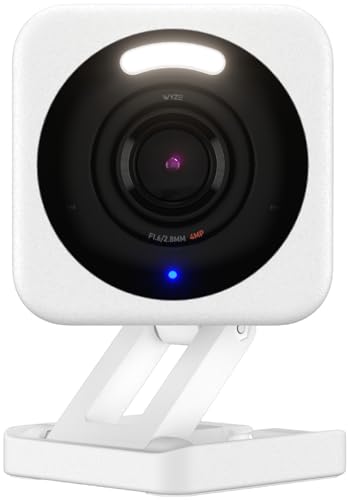
| Wyze Cam v4 | Best overall value | The benchmark budget camera: sharp 2.5K-class picture, colour night vision and card storage with no compulsory plan. |
| Blink Mini 2 | Best for Alexa households | A tiny plug-in indoor camera whose value compounds in Alexa homes, with an LED spotlight and a wider view than its predecessor. |
| TP-Link Tapo C210 | Best pan-and-tilt value | Rotates to cover a whole room, tracks motion, stores to a card — the two-cameras-in-one value play. |
| Blink Outdoor 4 | Best outdoor battery value | Weatherproof, wire-free and famously long-lived on its batteries — outdoor coverage without an electrician or a ladder routine. |
| eufy Indoor Cam E220 | Best no-subscription indoor camera | Pan-and-tilt 2K clarity with on-device intelligence and local storage — eufy’s refusal to charge rent for your own hallway. |
| Ring Indoor Cam (2nd Gen) | Best for Ring households | A compact plug-in camera with a physical privacy cover whose value unlocks inside the Ring and Alexa ecosystem. |
How We Chose These Picks
The value maths used here counts three costs: the camera, the storage it needs to be genuinely useful, and the subscription it pressures you toward over two years of ownership. Cameras were then judged on the capabilities that survive that accounting — resolution and night picture, detection intelligence, app reliability, and how gracefully each works if you never pay a monthly fee at all.
That last test eliminated more famous names than any other. A camera that becomes a live-view ornament without its plan may still suit some owners, but it cannot headline a value guide. Every pick below remains a real camera — recording locally, alerting sensibly, viewable on demand — at zero monthly cost, with subscriptions framed as upgrades rather than rent. Within that rule, each pick was assigned the household it serves best rather than forced onto a single podium.

Wyze Cam v4 — Best overall value
Wyze built its reputation by embarrassing cameras several times its price, and the Cam v4 is the mature version of that trick. The picture is the headline — a 2.5K-class sensor with colour night vision that keeps working in the dim light real rooms actually have, rather than demanding the floodlit conditions of a product photograph. On a shelf above a living room or watching a front path through a window-adjacent mount, it produces footage you can actually use: faces, number plates at sensible distances, the parcel thief’s jacket colour rather than his silhouette.
The value engineering is in the storage. A memory card slot means continuous or event recording with no subscription at all, and the camera’s detection features cover the essentials before any plan enters the conversation. Wyze’s paid tier exists and adds polish, but the camera does not hold its own features hostage to it, which is precisely the behaviour this guide exists to reward. The app is busy — Wyze has many products and opinions — yet the camera’s core loop of alert, view, review is quick and dependable.
Where does the cheapness show? In the ecosystem’s sprawl, in setup that occasionally asks for patience with Wi-Fi passwords and firmware, and in the knowledge that a camera this inexpensive is built to a bill of materials that flagship indoor cameras exceed in speaker quality, fit and finish. None of that touches the footage. As the default answer to ‘which security camera should I buy first’, the v4 has earned its position the honest way: by making the question boring.
- Resolution: 2.5K-class with colour night vision
- Storage: microSD card local recording, optional cloud plan
- Use: indoor, and sheltered spots with the right setup
- Detection: motion and sound with smart alerts on plan tiers
- Mounting: magnetic base and standard mounting options
Strengths
- Picture quality embarrasses dearer cameras
- Card storage keeps it subscription-free
- Colour night vision works in real room light
Trade-offs
- App carries the whole Wyze ecosystem’s clutter
- Setup and firmware occasionally test patience
- Speaker and finish are built to the price
Best for: first-time camera buyers and anyone covering a room or entrance who wants maximum honest camera per unit of money.
Not suited for: owners who want a sealed outdoor camera for an exposed wall — that is the Blink Outdoor 4’s paragraph, not this one’s.

Blink Mini 2 — Best for Alexa households
The Mini 2 is Amazon’s own value argument, and it is aimed squarely at the household that already talks to Alexa. As a camera it is a tidy step up from the original Mini: a wider field of view that genuinely covers a room corner-to-corner, an LED spotlight that gives its night picture colour and its intruder a moment of discouragement, and a compact body that disappears on a bookshelf. Plugged in, it never thinks about batteries, and paired with an Echo Show it becomes a camera you view by asking — a convenience whose value only Alexa households can cash.
Blink’s economics deserve the same clear eye as Wyze’s. The camera is inexpensive; the Blink subscription is where the system’s full memory lives, because without a plan the Mini 2 is primarily a live-view and alert device rather than a recording archive. Owners who accept that trade knowingly — many do, happily, for the ecosystem’s simplicity — get a polished, dependable little camera. Owners who want recordings without rent should look at the Wyze or Tapo paragraphs and feel no guilt about it.
The Mini 2 also moonlights outdoors in sheltered spots with Blink’s weather-resistant power adapter, which stretches its value for porches and covered entries. Its person detection and app experience are clean and uncluttered in the way single-ecosystem products can be. Judged purely as a camera it sits mid-list; judged as an Alexa household’s second, third and fourth camera — the ones covering the nursery, the garage and the dog’s favourite crime scene — its value multiplies in a way spec sheets cannot express.
- Type: plug-in indoor camera, optional weather adapter for sheltered outdoor use
- View: wide field of view with LED spotlight
- Night picture: colour-assisted by spotlight
- Ecosystem: Alexa and Echo Show viewing by voice
- Recording: full archive features live on the Blink plan
Strengths
- Voice viewing on Echo devices is genuinely handy
- Spotlight improves night picture and deters
- Tiny, tidy and simple to live with
Trade-offs
- Recording value leans on the subscription
- Little to offer outside the Amazon ecosystem
- No local card storage to fall back on
Best for: Alexa households adding cameras room by room, especially where an Echo Show already sits in the kitchen.
Not suited for: subscription refusers and Android-ecosystem homes, which get more camera for the money from Wyze or Tapo.

TP-Link Tapo C210 — Best pan-and-tilt value
The C210’s value argument fits in one sentence: it moves. A pan-and-tilt camera on a shelf can survey an entire open-plan room, follow a toddler or a burglar across it with motion tracking, and stare down the hallway on command — work that would otherwise need two fixed cameras and two purchases. When value is counted in rooms covered rather than cameras bought, the C210 is the strongest arithmetic in this guide.
Tapo, TP-Link’s smart-home brand, pairs that movement with the value features this guide prizes: generous local storage on a memory card, recording and alerts that function without a subscription, and an app that has matured into one of the calmer experiences in budget cameras. The picture is a clear 2K-class image with infrared night vision, the two-way talk is serviceable for reassuring dogs and startling couriers, and privacy mode turns the lens away when the household is home — a small feature that makes an indoor moving camera far easier to live with.
The moving parts are the caveat, as moving parts always are. A motor is a thing that can wear, whirr and eventually fail in a way a fixed camera cannot, and the C210’s coverage, while wide, is sequential — it cannot watch the door and the window in the same instant the way two cameras can. Owners should also place it where its rotation is unobstructed; a camera that tracks motion into the side of a bookcase helps no one. For the single-camera room, though, this is the pick that feels like a cheat code.
- Movement: pan and tilt with motion tracking
- Storage: microSD local recording, optional cloud
- Night vision: infrared
- Extras: privacy mode, two-way talk
- Use: indoor rooms, nurseries, open-plan spaces
Strengths
- One camera covers a whole room
- Local storage keeps it plan-free
- Privacy mode makes indoor use comfortable
Trade-offs
- Motors add a wear point fixed cameras lack
- Coverage is sequential, not simultaneous
- Needs clear space to rotate and track
Best for: open-plan rooms, nurseries and living spaces where one moving camera replaces two fixed ones.
Not suited for: owners wanting simultaneous views of two separate entrances — buy two fixed cameras instead.

Blink Outdoor 4 — Best outdoor battery value
Outdoor value is not measured at the checkout; it is measured on a ladder, in February, changing batteries. The Outdoor 4’s defining number is therefore not its resolution but its stamina: Blink’s battery system is famous for running for seasons — up to a couple of years in favourable, low-traffic duty — on a set of lithium AAs. Every rival that needs monthly attention costs its owner time, and time is the currency this guide counts alongside money.
As a camera it is a solid, weatherproof wire-free unit with a wide view, infrared night vision, two-way talk and person detection in its feature set, all orchestrated through the Blink app and a small Sync Module that lives indoors. Installation is the category’s easiest story: a mount, two screws, and a position chosen for the view rather than for the nearest socket, because there is no socket. Renters and the wiring-averse get a genuine outdoor camera with no permanent modification beyond two screw holes.
The value ledger’s other column is familiar from its indoor sibling: Blink’s subscription carries the richest recording experience, and while local storage via the Sync Module’s USB option softens that, owners should enter Blink knowing the ecosystem’s shape. Activity discipline matters too — point any battery camera at a busy pavement and its stamina and your alert sanity drain together. Placed with judgement on a drive, a gate or a garden, the Outdoor 4 is the outdoor camera whose total cost of ownership embarrasses wired rivals that needed an electrician to begin their lives.
- Type: wire-free battery outdoor camera, weatherproof
- Power: lithium AA batteries, seasons-long in typical duty
- System: works with Blink Sync Module, Alexa viewing
- Night vision: infrared
- Storage: cloud plan, with local option via Sync Module
Strengths
- Battery stamina slashes ownership effort
- Truly wire-free install almost anywhere
- Weatherproof build for real outdoor duty
Trade-offs
- Best recording experience sits on the plan
- Busy scenes drain batteries and patience
- Needs the Sync Module ecosystem
Best for: drives, gates, gardens and rental properties needing outdoor coverage with no wiring and minimal ladder time.
Not suited for: high-traffic frontages needing constant recording — a wired camera’s stamina suits that duty better.

eufy Indoor Cam E220 — Best no-subscription indoor camera
The E220 is the value pick for owners whose objection is philosophical as much as financial: eufy built its name on local storage and on-device processing, and this pan-and-tilt indoor camera embodies both. Its 2K-class picture is crisp, it rotates to cover the room and track movement, and its detection intelligence — distinguishing people and pets, listening for a baby’s cry — runs on the camera rather than in a rented cloud. Footage lives on a memory card in your home, and the monthly cost of owning this camera is zero forever.
That philosophy produces a distinctive ownership feel. Setup is quick, the app is confident, and features that rivals gate behind subscriptions — smart alerts, activity zones, recorded history — are simply the camera working as sold. For a nursery, where the cry detection and the pan-tilt’s ability to find the cot from anywhere in the room combine beautifully, the E220 is arguably the single best-value camera in this entire guide, full stop.
The honest caveats are about ecosystem and expectations. eufy’s world integrates less deeply with Alexa and Google households than Amazon’s or Google’s own cameras do, though basic viewing links exist, and owners building a whole-home system should weigh that. And a local-first camera asks its owner to think once about the card — its size, its endurance rating, its replacement in a few years. Owners who accept those two sentences get the strongest no-rent indoor camera here, and the satisfaction of a value argument that never renews.
- Movement: pan and tilt with motion tracking
- Storage: microSD local, on-device AI detection
- Detections: person, pet and crying-baby listening
- Night vision: infrared
- Subscription: none required for core features
Strengths
- Full features with zero monthly cost
- On-device intelligence is fast and private
- Superb nursery camera with cry detection
Trade-offs
- Ecosystem links thinner than Amazon/Google rivals
- Owner manages the memory card’s life
- Cloud convenience features are deliberately minimal
Best for: subscription refusers, nursery duty and privacy-minded owners who want their footage stored in their own home.
Not suited for: deep Alexa or Google households wanting every camera viewable by voice on every screen.

Ring Indoor Cam (2nd Gen) — Best for Ring households
Ring’s indoor camera is the ecosystem pick in its purest form, and this guide includes it because for millions of households the ecosystem is the value. If a Ring doorbell already guards the front door, this camera extends the same app, the same alert language and the same subscription across the hallway, the garage and the landing for a modest per-room cost — and a single plan covering the whole home’s Ring devices makes each additional camera cheaper to run than the first.
The hardware has one feature this guide wishes were universal: a physical privacy cover that swivels to block the lens and mute the camera, giving an indoor camera an off state you can see. The picture is a clean 1080p-class image with colour night vision, the body is compact and plug-in simple, and two-way talk and siren-free indoor manners suit domestic duty. As a standalone camera judged cold, it is competent rather than remarkable — which is exactly the point of its paragraph.
Because the cold judgement matters too: Ring’s recording life is its subscription, full stop — without the plan this is a live-view camera — and owners outside the Ring world get more recording camera for their money from Wyze, Tapo or eufy above. The E220’s local philosophy and Ring’s cloud philosophy are the two poles of this category, and neither is wrong; they are answers for different households. If your doorbell already says Ring, this is your value pick. If nothing in your home does, it is a fine camera shopping in the wrong guide.
- Type: compact plug-in indoor camera
- Privacy: physical swivel cover blocks lens and mic
- Picture: 1080p-class with colour night vision
- Ecosystem: Ring app and Alexa, shared home plans
- Recording: subscription-based archive
Strengths
- Physical privacy cover should be industry standard
- Extends a Ring doorbell system cheaply per room
- One home plan can cover every Ring device
Trade-offs
- Recording requires the subscription
- Unremarkable as a standalone purchase
- 1080p-class picture trails the 2K rivals here
Best for: homes already running a Ring doorbell or alarm, adding indoor coverage room by room under one plan.
Not suited for: new buyers with no Ring gear, who get more camera per coin from the Wyze, Tapo or eufy picks.
How Do the Six Value Cameras Compare Side by Side?
| Pick | Badge | Best for | Not suited for |
|---|---|---|---|
| Wyze Cam v4 | Best overall value | first-time camera buyers and anyone covering a room or entrance who wants maximum honest camera per unit of money. | owners who want a sealed outdoor camera for an exposed wall — that is the Blink Outdoor 4’s paragraph, not this one’s. |
| Blink Mini 2 | Best for Alexa households | Alexa households adding cameras room by room, especially where an Echo Show already sits in the kitchen. | subscription refusers and Android-ecosystem homes, which get more camera for the money from Wyze or Tapo. |
| TP-Link Tapo C210 | Best pan-and-tilt value | open-plan rooms, nurseries and living spaces where one moving camera replaces two fixed ones. | owners wanting simultaneous views of two separate entrances — buy two fixed cameras instead. |
| Blink Outdoor 4 | Best outdoor battery value | drives, gates, gardens and rental properties needing outdoor coverage with no wiring and minimal ladder time. | high-traffic frontages needing constant recording — a wired camera’s stamina suits that duty better. |
| eufy Indoor Cam E220 | Best no-subscription indoor camera | subscription refusers, nursery duty and privacy-minded owners who want their footage stored in their own home. | deep Alexa or Google households wanting every camera viewable by voice on every screen. |
| Ring Indoor Cam (2nd Gen) | Best for Ring households | homes already running a Ring doorbell or alarm, adding indoor coverage room by room under one plan. | new buyers with no Ring gear, who get more camera per coin from the Wyze, Tapo or eufy picks. |
What Actually Makes a Security Camera Good Value?
Start with the two-year ledger. Write down the camera’s price, the memory card it needs if it supports one, and twenty-four months of the subscription it steers you toward. That second column humbles many famous bargains and crowns several quiet ones, and it is the arithmetic behind every verdict in this guide. A camera with local storage and honest free features can cost more on the shelf and less by the second winter; a camera given away nearly free can be the dearest object in the house by the same date.
Then weight the features that protect value rather than decorate listings. Night picture quality, because incidents keep night hours. Detection that separates people from foliage, because an owner who mutes a crying-wolf camera owns no camera at all. And an app that loads the live view before the courier has left the step. Resolution headlines matter less than all three, which is why this guide’s picks cluster at sensible resolutions with strong everything-else, rather than at maximum pixels with a neglected app.
Finally, count the cameras you do not have to buy. A pan-and-tilt that covers the room, a wide view that covers the drive and the door in one frame, an outdoor camera whose batteries excuse you from a second purchase of an electrician’s afternoon — coverage is value in its most literal form. The cheapest camera system is the one with the fewest cameras in it that still sees everything you care about.
Subscriptions, Cards and Clouds — How Should a Value Buyer Store Footage?
Local card storage is the value buyer’s home ground: a one-off card, footage in your house, no rent. Its disciplines are small and learnable — buy an endurance-rated card made for cameras, size it for a week or more of events, and remember that a stolen camera takes its card with it, which is the cloud’s one unanswerable argument. Hybrid owners get both: card for continuity, modest cloud for the clips that matter most, at the lowest plan tier that preserves them.
Cloud subscriptions earn their money in three situations: cameras in theft-prone positions, owners who review footage from afar for a property they rarely visit, and households deep in an ecosystem where one plan covers many devices — the Ring pattern, where the marginal cost per camera shrinks as the system grows. Outside those situations, a value buyer should treat the plan as an optional polish and choose cameras, like the Wyze, Tapo and eufy here, that remain fully themselves without it.
The trap to refuse is the camera whose free tier is a demonstration: live view only, alerts that point at recordings you cannot see, history that evaporates in hours. Such cameras are not inexpensive; they are subscriptions wearing a camera as a hat. Every pick in this guide was required to be a complete camera at zero monthly cost first — the plans discussed are upgrades to an owned thing, not rent on a borrowed one.
How Do You Set Up a Bargain Camera Like a Professional?
Place value cameras like a miser and aim them like a professional. The miser part: cover the approach, not the panorama — a camera at the front door’s choke point, at face height as far as mounting allows, records the one useful angle instead of a beautiful wide shot of a hooded figure’s crown. The professional part: walk the view at night with the camera live on your phone, check where the infrared blooms against a near wall, and angle away from reflective surfaces and the porch light that will blind it politely every evening.
Set detection zones before the first night, not after the first hundred alerts. Exclude the pavement, the road and the neighbour’s flag; include the path, the gate and the door. Turn person detection on wherever the camera offers it, set sensitivity a notch below the default that reports every moth as an intruder, and give the system a week of tuning — value cameras reward the owner who spends one evening teaching them the difference between the postman and the apocalypse.
Maintain the bargain. Wipe outdoor lenses when you pass with the bins, glance at the card’s health in the app each season, and confirm after every app update that your zones and schedules survived — updates occasionally reset the very settings that made the camera livable. A value camera is a small system, and small systems stay valuable exactly as long as their owner spends ten minutes a season keeping them honest.
What Mistakes Do Buyers Keep Making?
- Buying the camera and discovering the plan. Read what the free tier actually includes before checkout; if recordings need rent, price the rent into the camera.
- Skipping the memory card. On card-capable cameras the card is not an accessory, it is the recording system — buy the endurance-rated one with the camera.
- Mounting for the view you enjoy, not the evidence you need. High wide shots flatter the garden and anonymise the visitor. Choke points and face height win cases.
- Pointing a battery camera at a busy street. Traffic eats batteries and fills the alert feed until the owner mutes the camera that guards them.
- Judging night vision by the box. Test your own camera on your own wall at night during the return window; that is the only night that matters.
- Mixing ecosystems room by room. Three apps for five cameras is a tax paid daily. Pick a tribe per house unless a single room has a special job.
How Do the Ecosystems Change the Value Equation?
Three of these six cameras are also citizenship papers. Blink and Ring belong to Amazon’s world, where Alexa voice viewing, Echo Show picture-in-picture doorbell moments and one shared subscription knit cameras into a household system whose value is more than the sum of its lenses. eufy and Tapo represent the independent states: standards-based, app-centred, asking no allegiance and offering no court. Wyze sits between, an ecosystem of its own that happens to sell very inexpensive citizenship.
Neither model is superior in the abstract; they are superior for different buyers. The ecosystem camera is worth more to the household already invested — every Echo screen in the house becomes a monitor, every routine can include the cameras — and worth less to the household starting cold, which pays the same money for features locked behind allegiance it has not sworn. The independent camera’s value travels with it between houses, landlords and platforms, which is why renters and the platform-agnostic should weight the Tapo and eufy paragraphs heavily.
The practical test is the five-year question. Camera hardware lasts; ecosystems are marriages. If you can picture your household still talking to the same voice assistant and opening the same app in five years, ecosystem value is real and should be counted generously. If your technology allegiances have historically lasted as long as your phone contracts, buy the cameras that are complete in themselves, and let the ecosystems compete for your next house instead.
What About the Driveway Test — Reading a Number Plate at Night?
Owners consistently overestimate what any camera in this price class will do with a number plate at night, and the disappointment is worth pre-empting. A plate is small, reflective and moving; infrared light that flatters a face at three metres turns a plate at fifteen into a white flare. The honest capability of these six is identification at conversational distances — the door, the gate, the car on your own drive — and context at longer ones: vehicle colour, type, direction, timing. That context, paired with the choke-point camera at the door, is what actually helps police and insurers, and it is available from every pick here.
If plate capture at distance is a genuine requirement — a long drive, a rural gate, a history of incidents — the answer is not a dearer camera from this list but a different tool: a camera placed at the gate itself, close to where vehicles slow, where even a budget model reads plates easily in daylight and often at night. Position beats specification in surveillance more reliably than in any other consumer technology, and the value buyer’s superpower is spending on placement — a longer cable run, a post at the gate — instead of on pixels that physics will defeat anyway.
How Should Renters Buy Security Cameras for Value?
Renters shop under a landlord’s law: no drilling into masonry, no wired runs, nothing that cannot be undone on moving day — and under a renter’s economics, where a camera system must move house as easily as a suitcase. The value ranking reshuffles accordingly. Battery and plug-in cameras rise because their installation is furniture rather than alteration: the Blink Outdoor 4 on two screws or even a rented-friendly mount, the indoor picks on shelves, the whole system packed into one box when the tenancy ends. A wired system with an electrician’s invoice is, for a renter, value destroyed at the moment of installation.
Deposit arithmetic favours adhesive and shelf placement more than owners expect, and the cameras here cooperate: indoor models sit happily on bookcases and window ledges — with the caveat that a camera behind glass loses its infrared to reflections at night, so the ledge works for daylight rooms and the shelf wins after dark. For the front door, renters should look hard at covering the approach from inside through a side window for live view, while accepting that recorded night evidence wants a camera outside the glass; the Outdoor 4 on a fence post or drainpipe mount usually finds a landlord-acceptable perch.
The renter’s other advantage is honesty about timescale. A two-year tenancy is exactly the horizon over which subscription maths bites hardest, and the card-storage cameras — Wyze, Tapo, eufy — complete a whole tenancy without a single monthly payment, then move to the next flat. Ecosystem cameras make sense for renters only when the ecosystem itself is portable for them — an Alexa household carries its allegiance in a speaker, not in the walls — which is why the Mini 2 travels better, as a value proposition, than its recording model suggests on paper.
What Does a Second Camera Add That a First One Cannot?
The first camera teaches an owner what they actually worry about, which is rarely what they predicted. The front door camera reveals that the back garden is where the foxes, the neighbours’ cats and one memorable attempted shed entry all happened; the hallway camera reveals that the dog’s afternoons are a soap opera. Value buyers should therefore buy the first camera as research — one flexible unit, a pan-and-tilt ideally, placed at the main choke point — and let a month of its footage write the shopping list for the second. Owners who buy four cameras on day one reliably guard three wrong places expensively.
The second camera’s job is usually angle, not area: the face-level view that pairs with the first camera’s wide context, the garden view that covers the door camera’s blind side, the indoor witness to the outdoor camera’s alert. This pairing logic is why the guide’s picks mix tribes comfortably — a Wyze at the door and a Tapo roaming the living room is a more valuable system than two of either, because their strengths interlock. Ecosystems complicate the pairing, which is a fair price to name: cross-brand pairs mean two apps, and owners should decide whether the interlocking strengths are worth the second icon on the phone’s home screen.
There is also a redundancy argument that matters for the one camera guarding something precious — the nursery, the workshop, the empty holiday flat. Two inexpensive cameras watching the same space from different corners fail independently: different power, different angles, different blind spots. For the price of one premium camera, the value buyer often gets a genuinely more reliable system from two modest ones, and reliability — the footage existing at all — is the only specification that outranks every other in this entire category.
How Will You Know Your Bargain Camera Has Stopped Being One?
Value decays in recognisable ways, and an owner watching for them can retire a camera at the right moment instead of after the incident it missed. The first symptom is alert fatigue chosen by the owner: notifications muted ‘temporarily’ in spring and still muted in autumn. The second is storage rot — the card that has written itself to death and now records a mosaic, the free cloud tier quietly shrunk by a policy change until the archive is a rumour. The third is ecosystem drift: the app update that moves features behind the plan, announced in the cheerful tone companies reserve for taking things away.
None of these is a reason for cynicism; they are maintenance signals, like a bicycle’s chain going slack. The responses are cheap when caught early: a fresh endurance card each couple of years, a settings audit after major app updates, a willingness to move a camera to a new tribe when its old one changes the deal. The owners who get a decade of value from budget cameras are not the ones who bought perfectly — no such purchase exists — but the ones who treated value as a condition to be maintained rather than a price that was once paid.
A Word on Wi-Fi, the Invisible Half of Every Bargain
Every camera in this guide is only as good as the Wi-Fi where it is mounted, and the outdoors picks live or die at the garden wall where the signal goes to fade. Owners blame cameras for dropouts that belong to physics: brick, foil insulation and distance tax the signal, and a camera at the edge of coverage spends its battery and its temper retrying. Before returning a ‘faulty’ bargain, stand at its mount with your phone and look at the signal honestly; the cure is often a mesh node moved one room closer, which costs less than the camera upgrade you were contemplating and improves every device in the house.
The value angle is that network spending multiplies. A modest mesh improvement lifts the door camera, the garden camera and the household’s laptops together, while a camera upgrade lifts one view. Buyers assembling a system from this guide should sequence their spending accordingly: cameras first at the choke points, network second if the furthest camera struggles, and only then additional cameras. It is unglamorous advice that no camera listing will ever give you, which is rather the point of a guide.
What Should You Do in the First Week With a New Camera?
Treat the first week as a commissioning period, not a honeymoon. Day one is placement and the night walk described earlier. Days two and three are for watching the alert feed with a notebook’s scepticism: what triggered, what should have, what the camera thinks a person is. By day four the zones and sensitivity should be tuned to your household’s actual wildlife — the spider that web-builds across every outdoor lens in the country included; a cobweb at night is a white firework in infrared, and a small repositioning defeats it better than any setting.
End the week with the failure drills. Pull the camera’s power and watch it come back. Fill its card or test its archive retrieval by finding one specific moment — Tuesday, the courier, the blue van — and timing how long the app takes to surrender it. Check what the footage looks like exported, because the clip you send an insurer is the exported file, not the app’s flattering preview. A camera that passes its first week’s drills will serve for years; one that fails them has told you so while the return window is still open, which is the most valuable service a new purchase can perform.
The Upgrade Path: When Does Value Say Spend More?
A value guide that never tells you to spend more is a sales pitch in a hair shirt. There are three moments when the honest answer leaves this price class. The first is evidence-grade duty: a business premises, a dispute with history, a property with real incidents — where wired cameras, a recorder and retention measured in months are not luxuries but the actual requirement, and a bargain camera is a false economy that will be Exhibit A in its own failure. The second is the multi-camera household crossing into double figures, where a proper recorder-based system starts to out-organise a drawerful of apps. The third is simpler: when the subscription you are avoiding costs less than the time you spend avoiding it, the value has quietly changed sides.
For everyone else — the flat, the family house, the rental, the smallholding with a gate and a dog — the six cameras here are not the cheap option. They are the correct option, bought with open eyes about storage, ecosystems and ladders in February. That is what bang for buck means when it is said by someone who has to live with the purchase: not the least money spent, but the most security honestly obtained for it.
One Last Thought Before You Click
Security cameras are bought in a mood — after a neighbour’s break-in, a spate of parcel thefts, a noise in the night — and moods overspend and underthink in equal measure. The six cameras here were chosen to survive the mood’s passing: each remains useful, honest and cheap to own on an ordinary Tuesday in six months’ time, when the incident is forgotten and the camera is simply part of how the house keeps an eye on itself. Buy for the Tuesday, tune for a week, and the value will still be there long after the mood that prompted the purchase has faded.
And if the choice still feels difficult, remember the asymmetry that governs this whole category: an inexpensive camera can always be joined by a second one next season, its lessons learned and its blind spots mapped, while an expensive mistake teaches the same lessons at several times the tuition. Start small, start honest, and let the house itself tell you what it needs next.
Final Recommendation
Start with the Wyze Cam v4 unless your house argues otherwise: it is the value benchmark because it is a complete, sharp, card-recording camera that asks nothing monthly. If your room is large or your subject moves, the Tapo C210 and eufy E220 turn one purchase into whole-room coverage — the eufy taking the honours for owners who want intelligence and storage kept in the home.
Outdoors, the Blink Outdoor 4’s battery stamina makes it the cheapest outdoor camera to own over years, while its indoor sibling the Mini 2 and the Ring Indoor Cam serve the two big ecosystems — worth their price inside those households, and only inside them. Value, in the end, is a match between a camera’s ledger and a household’s habits; these six cover the habits that matter.
Related guides
Frequently Asked Questions
Do cheap security cameras really work without a subscription?
The right ones do — that was the entry requirement for this guide. The Wyze Cam v4, Tapo C210 and eufy E220 all record to memory cards, send meaningful alerts and offer full live view with no plan at all. The Blink and Ring picks are the honest exceptions to understand before buying: their cameras work and alert without a plan, but their recorded archive lives on the subscription, so price two years of it into your decision.
Is 2K worth paying for over 1080p in a budget camera?
At budget prices the difference is smaller than the night-vision and detection differences between models. A 2K-class camera like the Wyze or eufy earns its keep when you need to zoom into a face or plate within its footage; a well-tuned 1080p camera with good night picture, like the Ring Indoor Cam, still identifies visitors at a door. Spend first on night quality and storage honesty, then on pixels.
How many cameras does a normal house actually need?
Fewer than the industry hopes. Most homes are honestly covered by two to four: the front approach, the back garden or door, and one indoor choke point such as the hallway — with a pan-and-tilt indoor camera often covering what two fixed ones would. Walk your own house as a stranger would enter it, and buy for those routes; a camera watching a room nobody would cross is décor with a lens.
Can indoor cameras work outdoors for extra value?
Only in genuinely sheltered spots and only when the manufacturer blesses it — the Blink Mini 2 with its weather-resistant adapter is the sanctioned version of the trick. A bare indoor camera under an eave still meets wind-driven rain eventually, and a dead camera is the worst value in this guide. For exposed positions, the Outdoor 4’s price buys the sealing that the weather will test weekly.
Which of these is best for a nursery?
The eufy Indoor Cam E220, and it is not close: pan-and-tilt to find the cot, on-device crying detection, local storage that keeps the most private footage in the house inside the house, and no subscription attached to your child’s first years. The Tapo C210 is the runner-up on movement and value; both beat a fixed camera in a room where the subject relocates between cot, floor and chair.
What memory card should a value buyer choose?
An endurance-rated microSD card designed for surveillance cameras, sized generously — cards are cheap, and a larger card means a longer history before the oldest footage is overwritten. Ordinary phone cards work until they do not; camera duty writes constantly, and endurance cards are built and warranted for exactly that. Buy the card with the camera and the system is complete on day one.
Related Guides
Keep the value theme going with our guide to the best battery operated cameras for security, protect the plug-in picks with the best backup plug-in battery for Wi-Fi cameras, and compare the best bang for your buck vlogging cameras if your cameras are for creating rather than guarding.


