ilcastellomenu.com is reader-supported. When you buy through links on our site, we may earn an affiliate commission.
Where to Buy
A podcast used to be a voice in the dark; now it is a face in a feed. Video has become the discovery engine of podcasting — the clip that travels is a picture with subtitles — and so the best cameras for filming podcasts have become a serious production question. It is also a peculiar one. A podcast camera does not chase action or survive weather; it sits in a room, pointed at a seated human, and records conversation for one to three hours without being thought about. Almost everything that makes a camera exciting is irrelevant, and almost everything that makes one dependable is decisive.
This guide serves the three real podcast setups. There is the solo creator at a desk, filming themselves between a microphone and a bookshelf. There is the two-host studio, the classic across-a-table conversation that now anchors entire networks. And there is the guest room — the remote-recorded or in-person interview where a producer needs cameras that run themselves while humans concentrate on talking. The six picks span all three, from webcam-class devices that vanish into a desk to mirrorless bodies that give a network its signature look.
The governing virtue is stamina under boredom. Podcast sessions are long, warm and repetitive; cameras that overheat, stop at arbitrary limits, drift out of focus during a monologue or demand attention mid-answer are not merely annoying — they tax the conversation itself, which is the product. Every pick below was judged first on whether it can be forgotten for the length of an episode, and only then on how beautiful its forgetting looks.
Audio, stated plainly: the camera is not the microphone. Your audience will forgive a soft picture and abandon an echoing voice inside a minute. These cameras were chosen partly for how cleanly they cooperate with real podcast audio — accepting an external feed, providing usable monitoring, and staying out of the audio chain’s way — but the budget logic of this guide always protects the microphone line first. Buy the camera that lets the conversation sound expensive.
Finally, a word about looks. A podcast’s visual identity is mostly light, set and consistency, not sensor size: the same two chairs, the same background depth, the same framing, episode after episode, until the audience can recognise the show from a thumbnail’s corner. The cameras here were chosen for how well they hold a look — reliable colour, repeatable framing, files an editor can template — because a podcast is a series, and a series is a promise kept weekly.
One more truth from inside working studios: nobody’s favourite episode was saved by a camera, and several beloved ones were nearly lost to one. The picks below were filtered by producers’ scar tissue as much as by specifications — the bodies in this list are the ones that appear in the credits of shows that publish every week, because publishing every week is the whole game and everything else is a screensaver.
Judge every pick below, then, by a single scene: it is minute eighty of a warm session, the guest has just begun the story the whole episode will be remembered for, and nobody in the room — host, producer, audience — is thinking about the camera at all. The bodies that can guarantee that scene are the ones ranked highest here, and the guarantee, not the glamour, is what your money is buying.
Key Takeaways
- The podcast camera’s first virtue is being forgettable for three hours straight.
- Protect the audio budget first — audiences forgive soft pictures, never bad sound.
- Consistency is the look: same framing, same colour, every episode, recognisably yours.
- Webcam-class picks trade beauty for invisibility; mirrorless picks trade invisibility for beauty.
- Multi-camera shows need matched colour and sync discipline more than flagship bodies.
- Heat and recording limits are episode-enders — test your longest session before launch.
- Rehearse at full length, in the warm room, with the door shut — before episode one, not after episode three.
In this guide
Quick Picks
| Pick | Badge | Why it is here |
|---|---|---|
| Sony ZV-E10 II | Best dedicated podcast mirrorless | Built for seated creators: calm focus, clean output and no recording drama. |
| OBSBOT Tiny 2 | Best self-operating desk camera | A PTZ webcam that frames, follows and gestures-controls itself — a producer in a box. |
| Canon EOS R50 | Best first mirrorless for new shows | Friendly, affordable RF body that makes a new podcast look established from episode one. |
| Elgato Facecam | Best fixed desk webcam for pure simplicity | A fixed-focus, set-once webcam that makes the desk angle impossible to get wrong. |
| Logitech Brio 4K | Best plug-anywhere guest and travel camera | The universal donor: works on any laptop, in any room, for any guest, immediately. |
| Sony Alpha 7 IV | Best flagship look for network shows | Full-frame polish and focus for podcasts produced like television. |
How Did We Choose Cameras for Filming Podcasts?
We tested for duration before beauty. Each candidate had to make sense across a realistic recording day: a two-hour episode, a back-to-back guest session, a warm room with the door closed for sound. Published recording limits, heat reputations and power options — dummy batteries, USB power, mains adapters — were treated as headline specifications, because in podcasting they are. A camera that stops during the best answer of the season has failed at the only moment that mattered. It is a humbling order of priorities for anyone who loves cameras, and it is the correct one: in podcasting, the spec sheet is the trailer and the session is the film.
Second, unattended focus behaviour. A podcast host leans, gestures, laughs forward into the microphone and rocks back; the camera must hold the face through all of it without hunting, and without the focus breathing that makes viewers seasick. We favoured systems whose face and eye tracking is boring in the best way — present, calm and unmentioned in every review of the show itself.
Third, integration. Podcasts are edited fast and often by the hosts themselves, so we weighted clean HDMI or USB webcam output for live switching and streaming, files that drop into a template edit without a colour science project, and colour that matches across bodies — because the two-shot and the close-up must look like one show. The picks below cover the realistic range from plug-and-forget to small-network polish.
What we ignored: action credentials, weather sealing, burst rates and every other virtue of cameras built for movement. A podcast studio is the most controlled environment in all of filming, and the ranking spends its respect accordingly — on stamina, focus manners, integration and the quiet economics of a show that must publish every week.
We also applied the substitute test: could a competent stranger run this camera after a ten-minute briefing from the production bible? Podcast studios get sick days, holidays and growth; equipment that only one person alive can operate is a fragility disguised as expertise. Every pick here passes the substitute test at its tier — the webcams trivially, the mirrorless bodies with a settings preset and a laminated card, which is exactly how real studios actually run them.
Which Six Cameras Belong on a Podcast Set?
The order runs from the flagship look down to the invisible desk companion. Most real studios end up owning two tiers at once — mirrorless bodies for the hosts, a webcam-class camera for the producer’s angle or the remote guest — and the list is built to be combined exactly that way.

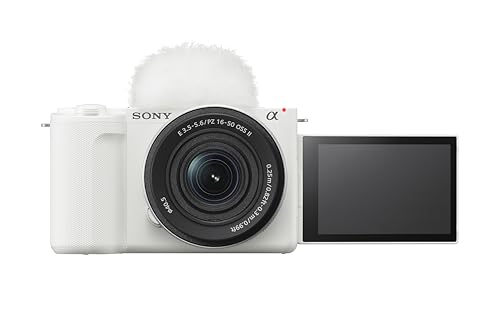
Sony ZV-E10 II — Best dedicated podcast mirrorless
The ZV-E10 II is what happens when a camera is designed by people who film seated humans for a living. Its autofocus is calibrated for exactly the podcast problem — one face, modest movement, a microphone crossing the frame — and it holds that face with a calm that more expensive generalist bodies sometimes fumble. Its creator conveniences, dismissed by traditionalists, are podcast gold: clear recording indication, easy exposure for a lit desk, and output options that feed a switcher or a streaming setup without a fight.
- APS-C mirrorless body on the Sony E-mount system
- Face and eye autofocus tuned for seated presenters
- Clean output for capture and live switching
- Compact body that disappears behind a microphone arm
Across a long session it behaves like studio furniture. The compact body runs cool in a warm room, sips power sensibly, and accepts the continuous-power arrangements that episode-length recording demands. For the solo podcaster or the two-host show buying matched bodies, that dependability is the product: the camera is set in the first episode’s prep and simply never discussed again, which is the highest state a podcast camera can achieve.
Its look is the modern creator look — clean, bright, flattering — and for most shows that is not a compromise but the house style itself. Paired with one good lens and the lighting discipline the later sections describe, the ZV-E10 II produces the picture that clip algorithms reward, at a total kit cost that leaves the budget’s respect where it belongs: on microphones, treatment for the room, and the hosts’ time. Its tally and monitoring clarity make the ninety-second pre-flight a formality rather than a search.
Strengths
- Focus manners designed for exactly this seated job
- Long-session behaviour with no drama or fuss
- Creator conveniences that map one-to-one onto podcast needs
Trade-offs
- APS-C depth of field is honest rather than lush
- No viewfinder, irrelevant at a desk but missed elsewhere
- Battery swaps or continuous power needed for marathon days
Best for: solo podcasters and two-host shows wanting the modern creator look.
Not suited for: networks chasing a full-frame cinema signature for flagship shows.

OBSBOT Tiny 2 — Best self-operating desk camera
The Tiny 2 answers the podcast’s staffing problem with robotics. Its motorised gimbal tracks the host as they lean and gesture, reframing like a patient camera operator, and its gesture controls let a solo host start, stop and reframe without breaking the conversation’s flow to touch a keyboard. For the one-person show — host, producer and engineer in a single chair — that autonomy is not a gimmick; it is the difference between a video podcast that happens weekly and one that keeps being postponed.
- Compact PTZ webcam with motorised gimbal framing
- AI tracking that follows a seated host’s movement
- Gesture control for hands-free operation mid-conversation
- USB connection for direct recording and streaming
Its picture is the best of the webcam class: a large sensor by webcam standards, colour that survives office lighting, and low-light behaviour that respects evening recording sessions. It will not match a mirrorless body’s depth or dynamic range, and it does not pretend to. What it offers instead is a complete absence of production friction — plug in, be framed, talk — which for most podcasts is worth more than beauty, because the episode that exists beats the episode that was going to look amazing.
Multi-camera shows have quietly adopted it as the third angle: the wide or the producer’s view that no human was free to operate. Set it to a slow, conservative tracking profile and it produces the safety shot editors pray for during the moments both hosts talk over each other. In the ecology of a real podcast studio, the Tiny 2 is not the star camera. It is the crew member who never sleeps, never sighs and never misses the answer. Calibrate its tracking speed slow; a patient frame reads as professional, a eager one as surveillance.
Strengths
- Operates itself — tracking and gesture control free the host
- Best-in-class webcam picture for desks and small studios
- Zero-friction setup that protects the weekly publishing habit
Trade-offs
- Webcam-class depth and range cannot match mirrorless files
- Tracking can be calmed but not made invisible in its movements
- Depends on its software for the full feature set
Best for: solo hosts, remote-guest setups and third angles in small studios.
Not suited for: shows selling a cinematic look as part of their brand.

Canon EOS R50 — Best first mirrorless for new shows
New podcasts die of friction more often than of content, and the R50 is engineered mercy for exactly that stage. It is the affordable body whose footage looks established immediately — Canon’s colour flattering the hosts, its autofocus quietly competent, its menus navigable by a tired creator at midnight before upload day. A show’s first twenty episodes are a war of attrition against its own production process; this is the camera that makes the process light enough to survive.
- APS-C mirrorless body on the Canon RF mount
- Reliable face-detection autofocus for hosts
- Pleasing default colour that shortens the edit
- Compact body suited to desk and small-studio rigs
It also teaches good habits painlessly. The R50 rewards the basics — a lit face, a locked exposure, a considered background — with footage that looks like the shows it competes with, and its RF mount means the lens bought for episode thirty still serves the body bought for episode one, and the upgrade beyond both. Podcast networks are full of flagship bodies purchased for shows that folded at episode nine; the R50’s economics respect the order in which shows actually earn their gear.
In a two-host setup, a pair of R50s delivers matched colour and framing for less than one flagship body, which is the correct mathematics for almost every podcast ever launched. Spend the difference on the room and the microphones, publish on schedule, and let the audience’s growth — not the launch-day anxiety — decide when the studio graduates. The shows that last are the ones still recording in month six, and this camera is built to be recording in month six. Screenshot its final settings into the production bible — the pair’s second body should be a photocopy of the first.
Strengths
- Established-looking footage from the very first episode
- A pair costs less than one flagship — correct podcast maths
- Friendly operation for creators editing their own shows
Trade-offs
- Long sessions need a continuous-power plan
- Fewer pro output options than the ZV-E10 II
- APS-C look is clean rather than cinematic
Best for: new shows, first studios and matched pairs on a sane budget.
Not suited for: flagship productions needing full-frame files and pro I/O.

Elgato Facecam — Best fixed desk webcam for pure simplicity
The Facecam’s radical feature is what it refuses to do: it does not autofocus, because at a fixed desk distance focus is a decision, not a process. Set it once, and every episode begins with the host exactly as sharp as the last — no hunting when a hand crosses the frame, no drift during the best story of the season. For the solo podcaster filming at a desk, that removal of a variable is a genuine production philosophy, and a surprisingly liberating one.
- Dedicated USB webcam with a prime lens approach
- Fixed focus that removes an entire failure mode
- Software control of exposure and colour for a repeatable look
- Designed for desk-distance framing all day
Its software manners suit series production. Exposure and colour settings save with the device, so the look survives reboots, updates and the mysterious reset gremlins of a working studio; episode forty matches episode four because the camera was never invited to improvise. In a medium where the thumbnail grid is the show’s public face, that repeatability is a brand asset disguised as a webcam setting.
It knows its place in the kit honestly: the desk angle, the remote guest’s respectable option, the backup that keeps a recording day alive when the main camera sulks. Shows that grow will graduate their A-camera to a mirrorless body and keep the Facecam working the second angle for years. Equipment that ages into a role instead of a drawer is the definition of a good buy, and this unassuming rectangle manages it by being exactly as ambitious as a desk requires. Its discipline is contagious: hosts sit where the frame expects, and the show’s posture improves around it.
Strengths
- Fixed focus deletes the most common podcast camera failure
- Saved settings keep the series look identical across episodes
- Utter simplicity — the camera is never the reason a session stalls
Trade-offs
- No tracking or reframing — the desk must come to it
- Webcam-class files for close work only
- Fixed framing punishes hosts who roam while they talk
Best for: solo desk shows, remote guests and permanent second angles.
Not suited for: hosts who perform standing, pacing or across a room.

Logitech Brio 4K — Best plug-anywhere guest and travel camera
Every podcast with guests eventually faces the remote problem: a brilliant guest, a terrible camera, a laptop in a dim kitchen. The Brio is the classic answer producers mail, recommend or simply insist upon — a webcam that upgrades any participant to acceptable in the time it takes to plug in a USB cable. Its compatibility is its feature: whatever the guest’s machine, the Brio appears, works and quietly raises the episode’s floor.
- 4K-capable USB webcam with wide software compatibility
- Adjustable field of view for tight rooms
- Reliable autofocus and auto light correction
- Clips to any screen or small tripod
At home it earns its keep as the utility angle — the overhead desk view, the whiteboard camera, the producer’s own feed in a remote session. Its adjustable field of view adapts to the cramped rooms real podcasts are recorded in, and its automatic corrections, while not beautiful, are dependable in the way that matters at 9 p.m. with a guest in another timezone and no engineer on the call.
It is also the travel camera of working podcasters: the hotel-room episode, the conference-corridor interview, the emergency recording when the main kit is in another city. A show’s archive is full of episodes that exist because a Brio was in the laptop bag. Judge it as infrastructure rather than art and it is one of the highest-value objects in this entire guide — the camera that guarantees the show can always, at minimum, go on. Keep one in the travel bag permanently; a camera that must be remembered will eventually be forgotten.
Strengths
- Works with everything, everywhere, immediately
- Adjustable framing suits cramped real-world rooms
- The standard answer to the remote-guest problem
Trade-offs
- Automatic picture is dependable, never beautiful
- Small-sensor look flattens in poor light
- Not a main camera for a show with visual ambitions
Best for: remote guests, travel episodes and utility angles in any studio.
Not suited for: the A-camera of a show selling a signature look.

Sony Alpha 7 IV — Best flagship look for network shows
At the top of the podcast economy, shows are television now: sponsors buy the picture as much as the audience, sets are built, and the camera is part of the set’s furniture of credibility. The Alpha 7 IV is the body that delivers that tier’s look — full-frame depth separating host from background, focus that holds through a two-hour conversation without a single visible hunt, and files that grade into the polished finish flagship shows are recognised by. If the podcast is the business, this is the business’s camera.
- Full-frame mirrorless body on the Sony E-mount system
- Real-time eye autofocus for long conversations
- Log profiles for a graded, network-grade finish
- Dual slots and pro output options for produced sessions
Produced sessions exploit its depth: matched pairs for the two hosts, a third body on the wide, clean output to a switcher for live direction, dual-slot recording as the insurance a sponsored session demands. Its ecosystem covers the fast standard zooms and portrait primes that podcast sets standardise on, and every freelance director and editor in the industry already knows its files. Hiring-friendly equipment is a real production virtue, and this body is the industry’s common tongue.
The honest cost is attention: a flagship body wants a person, or at least a prep ritual, that the webcam-class picks never ask for. Networks pay that gladly because the look is the product. Solo creators should read this pick as a destination rather than a starting point — the camera a successful show graduates to, bought with the show’s money, after the audience has voted for the conversations it will spend its life recording. Programme its custom modes per show — the flagship’s memory is the studio’s insurance against prep fatigue.
Strengths
- The flagship podcast look: depth, focus and gradeable files
- Produced-session features — dual slots, pro outputs, ecosystem
- The industry’s common tongue for hired crews and editors
Trade-offs
- Price and attention demands exceed most shows’ real needs
- Long sessions need the full power and heat routine planned
- Overkill whose cost is better spent on audio at small scale
Best for: network flagships, sponsored studios and television-tier shows.
Not suited for: new or solo shows whose budget belongs in sound and consistency.
Why Does a Podcast Camera Need So Little — and That Little So Completely?
A podcast session asks a camera for perhaps five things: stay on, stay focused, stay the same colour, stay quiet and stay out of the way. The list is short because the environment is controlled, and it is absolute because the session is long and the content unrepeatable. A dropped frame in a landscape is nothing; a frozen camera during the guest’s one great answer is a hole in the archive forever. This is why the guide ranks stamina and manners above the specifications that dominate other genres — the podcast camera is a witness, and witnesses are judged on reliability, not flair.
It also explains the webcam-class picks’ presence beside mirrorless flagships. A Facecam or a Brio performs the five duties with almost no failure modes, because it has almost no modes at all. The mirrorless bodies perform them beautifully but with more moving parts in the arrangement — power, heat, focus settings, output chains. Neither philosophy is wrong; they are answers for different staffing levels, and the mature studio usually runs both, matched to who is operating what.
Test your own setup against the five duties with one brutal rehearsal: record your longest planned episode, in your warmest room, with the door shut, before the show launches. Whatever fails, fails in private. Podcasts are full of episode-three revelations that a single rehearsal would have made episode-zero corrections, and the camera is the most common revelation of all.
How Should You Light and Frame Two People Talking?
The classic podcast frame is a negotiation between intimacy and information: close enough to read faces, wide enough to include the microphones that explain what this is. Light the faces first and the set second — a soft key for each host, gentle separation from the background, and practical lights in frame for depth. The cameras here all reward that order; none of them can reverse it. A flagship body under ceiling fluorescents will lose to a webcam under one soft, well-placed panel every single episode.
Framing consistency is a discipline of marks and habits: tape on the desk for the microphone arms, chairs that return to the same position, camera settings saved and screenshotted in the show’s production bible. Audiences feel inconsistency as unease they cannot name; the thumbnail grid exposes it mercilessly. Build the frame once, photograph the setup, and spend future creativity on the conversation, which is where a podcast’s novelty is supposed to live.
Backgrounds deserve their budget of thought. Depth — a shelf, a plant, a lit logo, a window with a blind — separates the professional frame from the video-call frame more reliably than any sensor does. The full-frame and APS-C picks render that depth with pleasing softness; the webcam picks ask the room itself to provide it. Either way, the set is a cast member, and it should be dressed like one.
How Do Multi-Camera Podcast Setups Stay in Sync and in Colour?
Sync is a solved problem treated with respect: a clap on camera at the start, continuous recording on every body, and audio from one source of truth — the mixer or recorder — laid under all angles in the edit. The failure mode is never technology; it is a camera started late, stopped early or set to a different frame rate in a moment of prep fatigue. The production bible and a spoken checklist exist because multi-camera podcasts are edited by tired people, and tired people need the session to arrive pre-organised.
Colour matching follows the same philosophy: same white balance set manually, same picture profile family, same lens character where budgets allow. Matched pairs — two R50s, two ZV-E10 IIs — delete the problem at purchase. Mixed fleets are workable, and most real studios are mixed, but they charge a small tax on every edit forever, which is why this guide keeps pointing pairs out as the correct podcast mathematics.
Switchers and live direction are the grown-up end of the same discipline. Bodies with clean output — the Sonys here especially — feed a switcher that cuts the show in real time, collapsing the edit to a polish. It is the single biggest time investment a weekly show can make in itself, and it only works on cameras whose output behaviour is boring. Boring, again, is the compliment this entire genre runs on.
What Should a Podcast Studio Buy in What Order?
Microphones and room treatment first, because audio is retention. One good light per host second, because light is the picture. The camera third — from this list, at the tier your staffing honestly supports. Then the unglamorous infrastructure: continuous power for every body, a recording and backup routine, spare cables in labelled boxes, and a production bible that lets a substitute human run the session. Studios fail from missing infrastructure far more often than from insufficient cameras.
Upgrade by pain, not by envy. When the edit keeps rescuing focus, the focus tier is the upgrade. When sessions keep ending early, stamina is. When the show’s look is the thing sponsors mention, the flagship body has finally earned its invoice. Each pick in this guide is a rung, and the healthy show climbs them in the order its own episodes demand — which is why the list is written as a ladder rather than a podium.
And keep the retired tier working. Yesterday’s A-camera is today’s third angle and tomorrow’s travel body. Podcast kits compound like the shows themselves, episode by episode, and the studios that last are visibly built from their own history — every camera in the room has recorded a hundred conversations and is ready, without discussion, to record the next one.
How Do You Film a Remote Guest Without Ruining Either Room?
The remote guest is two productions pretending to be one. Your room you control; theirs you influence — with a camera recommendation from this list’s plug-anywhere tier, a window-light suggestion delivered kindly, and a pre-call tech check scheduled like it matters, because it is the episode. The Brio exists in this guide largely for that phone call: the one where a producer upgrades a guest’s picture in five minutes of friendly instruction.
Record both ends locally whenever the platform allows it, and treat the streamed picture as the backup rather than the master. Internet weather should never be the quality ceiling of an archive. The cameras here all serve local recording well; the discipline is procedural, not optical, and like all podcast discipline it pays out in the episodes nobody remembers as difficult.
Finally, direct the guest’s frame as you would a studio’s: eye-line near the lens, light from the front, background chosen rather than inherited. A guest who looks like they belong in the show relaxes into the conversation, and the audience reads the whole episode as one room. That illusion is the remote podcast’s entire craft, and it is built from webcams, windows and kindness far more than from flagship glass.
What Does the Edit Need From the Cameras?
Templates. A weekly show survives on an edit that is ninety percent pre-built: intro, angles, lower thirds, clip exports. Cameras serve that template by being identical every week — same resolution, same frame rate, same colour, same file naming from the same card routine. The picks above were chosen partly as template citizens: their footage drops into last week’s project and the project simply continues, which is the least glamorous and most valuable property a podcast camera can have.
Clips are the second demand. Discovery happens in excerpts, so the A-camera’s framing should survive a vertical crop with the host’s face and the microphone both alive in it. Film the wide with that crop in mind — hosts placed with intention, headroom measured — and the show’s marketing department, usually the host at midnight, inherits footage that wants to travel.
Archive the masters like the show will matter in ten years, because the episodes that do are never the ones predicted. Standard files from mainstream systems — another quiet argument for this list’s brands — open in whatever software the future is running. The podcast is a library being built in public; the cameras are its printing press, and presses are chosen for the permanence of what they print.
How Do You Keep a Podcast Looking Alive When Nothing Moves?
The visual problem of the genre is real: two seated people, one room, ninety minutes. The answers are editorial as much as optical — angle changes on the cut, the wide held long enough to feel like a place, reaction shots treasured in the edit because a listening face is a podcast’s most expressive footage. Cameras serve this by being plural and patient: several modest angles, all rolling, all matched, give the editor a conversation’s rhythm to cut to. This is the deepest argument for the pairs-and-thirds structure this guide keeps recommending.
Within the frame, micro-movement is production design: a plant’s shadow, a practical lamp’s warmth, the guest’s hands allowed their geography. Locked-off does not mean lifeless when the set is dressed for depth. The mirrorless picks render that depth with a softness that flatters it; the webcam picks ask for more of it from the room. Either way, dress the room like it is on television, because now it is.
And respect the cutaway economy. Inserts — the notebook, the book being discussed, the product on the desk — are the B-roll of a genre with no landscapes. A third camera that can grab them, or a host camera reframed between segments, gives episodes a visual grammar beyond faces. Plan two inserts per segment in the production bible and the show will look directed, because it will have been.
What Changes When the Podcast Goes Live?
Live recording converts the camera’s virtues into risks: there is no edit to forgive a frozen feed, a hunt for focus, a body that decides the session is over. The picks that shine live are the boring-output champions — clean feeds from the Sonys, the set-once Facecam, the autonomous Tiny 2 — because liveness rewards exactly the dependability this guide has been ranking all along. If your show is heading live, rehearse the full chain at full length, with a failure drill: kill the A-camera mid-rehearsal and watch the show continue on the wide, because one day it will have to.
Live also changes the contract with the hosts. They must play to a lens that cannot be edited kinder later, which argues for the most forgiving setups: flattering light, the calm-focus bodies, framing that survives laughter and leans. Producers of live podcasts become conservative about equipment for the same reason pilots are conservative about weather — the sky does not accept apologies, and neither does a live audience’s chat.
Keep the local recordings running even live. The stream is the event; the files are the archive, the clips and the insurance. Shows that treat the live broadcast as the master discover, eventually and publicly, why this guide keeps repeating the rule. Record everything, everywhere, always — the podcast commandment with no exceptions in it.
How Should a Solo Podcaster Direct Themselves?
The solo host is performer, director and engineer in one skull, and the camera setup must be designed for the skull’s limits. Automate ruthlessly: the Tiny 2’s tracking or a fixed Facecam frame, exposure locked, focus preset, recording started by a ritual that cannot be half-done. Every decision the setup removes from recording day is attention returned to the conversation, and solo shows live or die on the host’s available attention.
Build a pre-flight of ninety seconds: framing checked on a monitor in the host’s eye-line, audio levels witnessed, a test sentence played back through headphones. It feels like overhead until the first time it catches the silent channel or the drifted frame before the guest arrives — after which it becomes religion. The cameras in this guide were chosen partly for how checkable they make that ritual: clear indicators, honest previews, no mysteries.
And design for the bad day. The solo show’s worst sessions — tired host, difficult guest, technical gremlin — are where simple, forgettable cameras earn their entire price. A flagship that needs its operator is a liability to a one-person production; a camera that simply witnesses is a colleague. Choose colleagues. The audience can hear the difference in the host’s voice before they can see it in the picture.
How Does a Podcast’s Camera Age Across a Hundred Episodes?
A podcast camera is not bought for episode one; it is bought for the statistical certainty of episode ninety, recorded tired, in a heatwave, with a guest who arrived early. The bodies and webcams in this guide share a trait rarely printed on boxes: their virtues do not degrade with familiarity. Their settings stay where the bible put them, their files stay template-shaped, their failure modes — the few they have — are known, rehearsed and insured against by the second and third angles standing beside them.
There is also an audience-side ageing. Viewers bond with a frame the way they bond with a voice; the hundredth episode’s identical framing is not monotony but home. Shows that rebrand their picture every season spend that bond and must earn it back, while shows that hold their look watch recognition compound like interest. The camera decision, made once and kept, becomes part of the show’s identity — which is why this guide treats consistency as a specification and ranks the set-once, saved-settings, matched-pair options with such respect.
So buy for the hundredth episode: the stamina, the saved look, the substitute-proof operation, the archive of standard files. Episode one will look after itself — first episodes are allowed their roughness, and audiences forgive beginnings everything except absence. Show up weekly, framed the same, sounding wonderful, and the cameras will have done the only job podcasting ever really asked of them.
How Do the Six Compare on a Podcast Set?
Read the roster by staffing. No operator at all: the Tiny 2, Facecam and Brio run themselves. One operator who is also the host: the ZV-E10 II and R50 ask little and give much. A producer in the room: the Alpha 7 IV rewards their presence with the flagship look. Most studios end up with one from each row, and the rows are designed to interlock rather than compete.
| Pick | Badge | Where it earns its place |
|---|---|---|
| Sony ZV-E10 II | Best dedicated podcast mirrorless | The podcast-native mirrorless: creator design pointed at a desk instead of a vlog. |
| OBSBOT Tiny 2 | Best self-operating desk camera | The autonomous angle: tracks the host, obeys gestures, needs no operator at all. |
| Canon EOS R50 | Best first mirrorless for new shows | The starter with polish: Canon colour and calm focus at a first-show price. |
| Elgato Facecam | Best fixed desk webcam for pure simplicity | The set-once desk eye: fixed focus, honest colour, nothing to misconfigure. |
| Logitech Brio 4K | Best plug-anywhere guest and travel camera | The universal guest camera: any laptop, any room, acceptable picture, zero setup. |
| Sony Alpha 7 IV | Best flagship look for network shows | The television tier: full-frame depth and focus for flagship, sponsored shows. |
What Mistakes Do Video Podcasts Make With Cameras?
Buying the flagship first and the microphone never. The audience’s loyalty is auditory; a beautiful picture of a bad-sounding conversation is a screensaver. Every budget in this guide protects audio before optics, and the shows that ignore the order usually own excellent cameras and a comments section complaining about echo.
Trusting autofocus settings out of the box. Default tracking modes are tuned for vloggers walking toward sunsets, not hosts leaning into punchlines. Spend one rehearsal session dialling focus sensitivity to your room’s reality — who moves, how fast, what crosses the frame — and save the result as the show’s permanent preset.
Recording the stream instead of the cameras. A streamed picture is a compressed rumour of the episode; the local files are the episode. Record in every camera, every time, and treat streaming as distribution. Shows learn this once, usually in the episode with the famous guest and the frozen feed.
Changing the set a little every week. Novelty belongs in the conversation; the frame is the show’s face and faces should be recognisable. Lock the look, document it, and let the audience’s familiarity compound — the podcasts that look ‘suddenly professional’ in month eight usually just stopped rearranging the furniture.
A fifth mistake is filming the podcast like a meeting: camera high in a corner, hosts small in a wide room, the geometry of surveillance. Podcasts are intimate media wearing video’s clothes; the frame should sit at eye level, at conversational distance, as if the viewer had been given the third chair. Every pick here can occupy that chair — the mistake is never the camera’s, it is the tripod’s placement, and it costs nothing to fix tonight.
Final Recommendation
Match the camera to the staffing, honestly. Solo and self-produced: the Sony ZV-E10 II as the thinking host’s mirrorless, the OBSBOT Tiny 2 as the operator you do not have to hire, the Elgato Facecam as the desk’s permanent eye. New shows: a pair of Canon EOS R50s and the audio they leave budget for. Guests and travel: the Logitech Brio, everywhere, always. Flagships: the Sony Alpha 7 IV, when the show’s revenue signs the cheque. Every tier assumes the same foundation underneath it: treated sound, lit faces and a frame that never changes its mind.
Then lock the frame, write the production bible, and publish on schedule. A podcast is not a camera test with guests; it is a conversation that keeps its appointments. Choose the body that protects the appointments, and the audience will never once think about your camera — which, in this genre, is the entire review. Keep the appointment, and the camera has kept its promise.
A closing word for the host reading this at midnight with episode one unwritten: the camera is the easiest part of this decision, and it is now made. The conversation is the hard part, and it has been waiting for you to stop shopping. Set the frame, press record, and let the show begin becoming the thing only it can become.
Frequently Asked Questions
Can I just use my phone as the podcast camera?
For episode one, honestly, yes — a recent phone on a tripod, lit well, beats a delayed launch. Graduate when the phone’s limits tax the routine: storage, interruptions, focus manners across a long session. The ZV-E10 II and R50 exist at exactly the price where the graduation stops hurting. The graduation trigger is routine pain, not picture envy — when the phone starts costing you sessions, it has given its notice.
How many cameras does a two-host podcast need?
Two for the hosts and, ideally, one wide for the room — the Tiny 2 is the classic unattended third. A single wide camera can carry a show, but the two-shot-plus-close-ups grammar is what makes video podcasts feel produced, and it is achievable at the R50 tier without heroics. The wide third angle is also your insurance: when one host camera fails, the episode survives on the wide and the remaining close-up.
Why does my footage look worse than shows using the same camera?
Light and background, almost always. They light faces with soft sources, dress the background, and lock exposure and white balance manually. The camera is the last ten percent of a podcast’s look; the room is the first ninety, and it is cheaper to fix. Shoot one rehearsal episode and grade it honestly against your favourite show’s frame; the gap will name its own cause.
Do I need 4K for a video podcast?
Need, no; benefit from, often — 4K masters let editors punch in for close-ups and vertical clips from one wide shot, which is a real workflow for small teams. Several picks here offer it. Treat it as editing flexibility, not as picture quality the audience can see. If you shoot 4K, archive the masters and edit from proxies on modest machines — the workflow matters more than the number.
How do I stop my camera overheating during long episodes?
Choose bodies with proven long-session manners, power them continuously rather than by battery where possible, give them air, and test your exact longest session in rehearsal. If a body still struggles, it is the wrong body for podcasting regardless of its other virtues — stamina is the spec here. Treat a body that cannot pass your longest-session rehearsal as a stills camera that visits your studio, not a podcast camera.
Should both hosts’ cameras match exactly?
Ideally, yes — matched bodies and lenses delete colour-matching from every edit forever. Mixed cameras work, with manual white balance and matched profiles, but they charge a small tax per episode. At podcast scale, the matched pair is usually the cheapest professional decision available. If budgets force a mix, put the matched pair on the hosts and let the wide be the odd one — the wide forgives what close-ups cannot.
Related Guides
Keep exploring with our cameras for filming concerts guide and the church streaming camera roundup and our cameras for cooking streams guide — each guide applies the same verified-pool, no-invented-specs approach to a neighbouring question.


