ilcastellomenu.com is reader-supported. When you buy through links on our site, we may earn an affiliate commission.
Where to Buy
A note on territory before the microphones come out: this site already carries a guide to cameras with mic inputs judged as connection hardware — sockets, monitoring and gain stages compared like specifications. This page is the companion written from the other side of the desk: the best cameras with mic input for youtube judged as production tools inside a working creator’s week. The question here is not whether a socket exists, but what a channel’s Tuesday actually sounds like when the camera, the microphone and the room have finished negotiating.
YouTube punishes audio sins with a cruelty it never shows to images. A viewer forgives a soft frame while a recipe is explained; nobody forgives a voice that clips, pumps or drowns in bathroom echo, because the voice is the programme. Every body below has a genuine 3.5mm microphone input — that was the entrance fee — but the ranking was earned in workflow: how a talking-head set gets built around the camera, how audio gets monitored before the audience hears the mistake, and how specific microphones behave with each body’s preamps.
The creator shapes considered here are the ones that fill the platform: the solo educator filming at a desk, the interviewer with a guest across the table, the vlogger whose set is wherever the day happens, and the streamer-adjacent creator who records in long, unrepeatable sessions. Each pick is cast against those working lives rather than against a spec sheet, and each review names the microphone pairing its workflow actually calls for.
No prices appear for any pick, because creator budgets are built from channels, not catalogues — a camera is bought with last quarter’s revenue and next quarter’s plans. What this guide prices instead is attention: the minutes per video that good audio workflow saves, and the reshoots that monitoring prevents. Those are the currencies a working channel spends daily.
Key Takeaways
- Every body here has a real 3.5mm mic input — judged this time by YouTube workflow, not socket specs.
- Monitoring before you publish beats repairing after: headphone access shapes several rankings.
- Talking-head, interview, vlog and long-session workflows each crown a different pick.
- Microphone pairings are named per pick, because preamps have personalities.
- Cable discipline and gain staging save more videos than any camera upgrade.
- The channel’s shape should choose the camera, not the catalogue’s order.
In this guide
Quick Picks
| Camera | Badge | Why it earns its place |
|---|---|---|
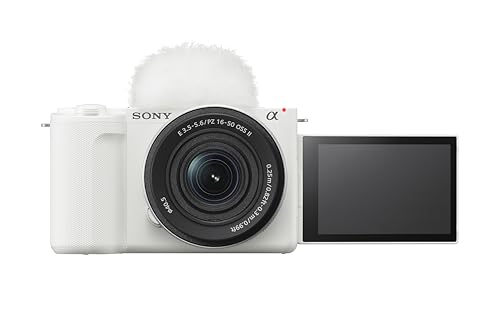
| Sony ZV-E10 II | The solo creator’s desk anchor | Built around one-person production: mic input up top, product-friendly focus, and a workflow that assumes no crew. |
| Canon EOS R50 | The beginner channel’s kindest start | Flip-screen ergonomics, forgiving colour and a mic input that welcomes a first lavalier. |
| Nikon Z30 | The vlogger’s audio companion | Small enough to live on a mini tripod, with a mic input that turns location sound into a strength. |
| Panasonic LUMIX S5II | The channel that became a studio | Full-frame depth, marathon manners and an audio path that grows toward professional microphones. |
| DJI Osmo Pocket 3 | The wireless-audio wanderer | Its own wireless microphone ecosystem makes moving YouTube sound effortless and close. |
| Canon EOS R10 | The two-person crew’s Canon | Faster handling and a proper photographer’s layout for channels filming events and guests. |
How Did We Judge These Cameras as YouTube Production Tools?
Each candidate was imagined through a production week rather than a test bench. Monday’s desk tutorial, Wednesday’s guest interview, Friday’s location vlog and Sunday’s long recording session impose different demands: a body that shines at the desk may fight the vlogger, and a pocketable filming tool may leave an interviewer without monitoring. Picks survived by excelling at one working shape without disgracing the others.
Audio workflow received the deepest audit. How quickly can a creator set levels and trust them? Does the body show meters where eyes already are? Can headphones be worn during recording on this set, or must the creator fly blind and pray? How do common microphones — lavaliers, on-camera shotguns, wireless receivers — actually behave with this body’s preamp gain and plug-in power? Those answers, not socket counts, built the ranking.
The final filter was growth. Channels change shape: the solo educator adds a co-host, the vlogger starts a studio series, the interviewer goes on the road. Bodies whose audio ecosystems expand — wireless receivers in the shoe, adapters for bigger microphones, clean output to a streaming desk — were favoured, because a camera a channel outgrows in a year is expensive at any figure.
What Does a Talking-Head Set Actually Need From Its Camera?
A talking-head set is a small television studio pretending to be a spare room, and its camera sits at the centre of a web: microphone close to the mouth, light soft and frontal, background far enough behind the chair to fall gently soft. The camera’s job in that web is reliability under repetition — autofocus that holds a presenter’s eyes through hand gestures and leans, exposure that does not hunt when a cloud crosses the window, and an audio path the creator can set on Monday and trust on Friday.
Monitoring defines the professional version of that set. A creator who hears the room while recording catches the refrigerator’s hum, the neighbour’s drilling and their own clipped enthusiasm in the moment, when the fix costs seconds. Sets without monitoring discover those sins in the edit, where the fix costs a reshoot — or a published apology. This guide treats monitoring access as a first-class feature for exactly that arithmetic.
The unglamorous third requirement is session length. Tutorials and courses record in marathons, so power from the wall, heat manners over hours, and a file workflow that does not punish long takes all belong in a talking-head camera’s true specification. Bodies below were weighed on marathons, not sprints, whenever the desk was their assigned home.
Which Microphones Pair With Which Kind of Set?
The lavalier is the talking-head’s default for a reason: pinned near the collar, it holds the voice at a constant distance while the presenter’s hands stay free and the frame stays clean. Wireless lavalier systems add freedom to stand, gesture and demonstrate, with the receiver feeding the camera’s input directly — the pairing most desk picks below assume as their standard rig.
Shotgun microphones earn their place when the set moves or the frame widens: demonstrations at a workbench, cooking channels, workshop tours. Mounted on the camera or a small boom just out of frame, a shotgun reaches for the voice while rejecting the room’s sides — though never its echo, which is why room treatment still outranks microphone shopping for any creator recording in a bare-walled box.
Interview sets split the difference and double the problem: two voices, two distances, one camera input on most bodies here. Solutions range from two wireless lavaliers mixed at a receiver, to a single well-placed microphone between chairs for conversational formats. The picks below note which bodies make two-voice days graceful and which make them a post-production penance.
Which Are the Best Cameras With Mic Input for YouTube Production?
A desk anchor with monitoring manners, two creator compacts built around the solo workflow, a full-frame flagship for channels that became studios, a gimbal camera with a wireless audio ecosystem of its own, and a Canon whose flip-screen ergonomics suit the one-person crew.

Sony ZV-E10 II — The solo creator’s desk anchor
Some cameras tolerate solo creators; this one was designed by people who interviewed them. The ZV-E10 II places its microphone input where a working set wants it, pairs it with a directional capsule in the body for emergency audio, and builds its whole interface around the assumption that the person in front of the lens is also the person behind it. For the desk educator — YouTube’s most populous species — that assumption saves minutes on every single video.
In workflow terms, its gift is frictionless repetition. A creator’s set lives assembled: camera on its tripod, wireless receiver in the shoe, levels remembered, background a known quantity. This body rewards that permanence with autofocus that re-finds a face after the presenter ducks out of frame for a prop, and with background-defocus and product-showcase habits that match how tutorials are actually filmed — object lifted to lens, face returning, lesson continuing.
- Set role: permanent desk and tutorial rig
- Audio: 3.5mm input, wireless receivers ride the shoe
- Focus: face and product modes for solo filming
- Power: wall power for marathon sessions
- Workflow: built for one-person production weeks
Strengths
- Set it up once, film all week
- Solo filming features match real tutorials
- E-mount glass grows with the channel
Trade-offs
- No viewfinder for outdoor filming days
- Monitoring needs an accessory workaround
- Small body heats under marathon abuse
The channel-growth story is where owners get evangelical: the same body that films a first tutorial at a kitchen table anchors a rented studio corner two years later, because the lens mount, the audio path and the muscle memory all scale. Equipment that survives a channel’s awkward adolescence without a replacement cycle is worth more than its specification suggests.
Pairing advice from working sets converges on a wireless lavalier as the default voice, with an on-camera shotgun as the second microphone for demonstration days. The body’s preamps treat both kindly at sensible gains, and creators learn the one lesson that matters — set levels for the loudest laugh, not the average sentence — within their first week.
Live-adjacent creators add a final use: its clean output feeds a streaming desk, so the recording camera and the live camera become one body with two jobs. Channels that stream their recording sessions for patrons collapse two equipment budgets into one, and the savings fund the microphone upgrade this guide keeps recommending.
Desk ergonomics repay a closer look, because a creator touches this workflow two hundred times a year. The record button where the presenter’s hand expects it, the tally light that ends the ‘is it filming’ anxiety, the screen bright enough to check framing without leaving the chair — these are not features in a brochure’s sense, they are the difference between a set that invites filming and one that must be argued with weekly.
Audio growth on this body follows the channel’s own syllabus: begin with the internal directionality for emergency pickups, graduate to the wired lavalier, then to wireless freedom, then to a second microphone for the guest chair. Each step is a one-purchase lesson, and the body’s input handles the whole curriculum without the hiss or gain mysteries that make beginners blame themselves for a preamp’s personality.
Its product-showcase focus habit sounds like a gimmick until a review channel lives with it for a month: hold the object up, watch focus walk to it without a hand leaving the frame, return to the face as the object falls. Tutorials are choreography before they are content, and a body that has learned the dance steps saves its presenter a retake on every single demonstration.
Its tally of small mercies ends with the editor: files that arrive consistent in colour and level across a month of uploads, so a channel’s archive looks like one programme rather than a mood diary. Consistency is the visual signature subscribers learn to trust, and it is manufactured here, at the desk, by a body that behaves the same way every morning.
Best for: solo educators, reviewers and tutorial channels filming at a permanent set. Not suited for: interview-heavy formats needing dual monitoring out of the box.

Canon EOS R50 — The beginner channel’s kindest start
First channels fail from friction more often than from quality, and the EOS R50’s workflow virtue is how little friction stands between an idea and a recording. The flip screen faces the presenter, the menus speak plainly, Canon’s colour flatters a face lit by a window and a prayer, and the microphone input sits ready for the lavalier that transforms a beginner’s audio from bathroom echo to broadcast intimacy in one purchase.
For YouTube specifically, its person-tracking keeps a moving presenter honest. Cooking channels, craft tutorials and classroom explainers all involve a host who reaches, turns and leans out of the careful centre — and this body’s autofocus follows without the nervous hunting that makes viewers seasick. A beginner can think about the lesson instead of the camera, which is the entire secret of channels that survive their first year.
- Set role: first-channel and small-room sets
- Audio: 3.5mm input for lavalier or shotgun
- Screen: fully articulating for solo framing
- Colour: forgiving skin tones in mixed light
- Workflow: minimal friction from idea to record
Strengths
- Beginners film more because filming is easy
- Face tracking frees presenters to move
- Colour forgives imperfect lighting
Trade-offs
- Monitoring options are limited at this tier
- Compact body, compact battery discipline
- Serious audio rigs will outgrow its simplicity
Family and education channels form its heartland: the teacher filming lessons at the kitchen table after school, the grandparent whose cooking channel outgrew the family group chat. In those hands the camera’s kindness is a production feature — nobody is coming to operate it, so it must operate itself gracefully while the human does the human part.
Microphone progression on this body usually runs in a healthy order: a wired lavalier first, learning gain and placement; a wireless system when the demonstrations start moving; a shotgun when the set widens. Each step teaches one audio idea, and the body’s straightforward input never punishes the learning curve with hiss or mystery.
Creators should note the honest ceiling stated in its trade-offs rather than discovering it: when a channel reaches the stage of guests, monitoring rituals and multi-microphone days, this body becomes the second camera — a role it fills happily for years, wide on the room while its successor takes the close-up.
The classroom channels have built a folklore around this body that deserves recording: teachers film a lesson in the morning, edit at lunch on the same machine that runs the class projector, and publish before the students reach home. That velocity — camera forgiving, files friendly, colour finished — is a workflow specification no test bench measures, and it is why education may be the largest YouTube genre nobody films with ‘creator’ cameras in the marketing sense.
Parents filming family channels add a second testimony: the body survives being operated by whoever is free, because its assisted modes make a competent camera operator of any relative in ninety seconds. Channels are family businesses more often than the industry admits, and equipment the whole family can run is equipment that never misses the moment for want of its one trained operator.
Its appetite for forgiving light extends to the room tone of a channel’s look: faces stay pleasant under the mixed bulbs of a real home, so a beginner’s set can grow lamp by lamp instead of demanding a lighting rig before the first upload. Channels are built in the months when everything is improvised, and equipment that flatters improvisation gets channels built.
Its guided interface keeps teaching after purchase in a way channels feel in their comments: presenters framed better, exposed better, sounding closer, because the camera coached the set’s hundred small decisions. Equipment that educates its owner while it works is the beginner channel’s truest production partner.
Best for: new channels, teachers and family creators filming solo in small rooms. Not suited for: guest-heavy interview formats as the only camera.

Nikon Z30 — The vlogger’s audio companion
Vlogging’s audio problem is geography: the presenter is here, the interesting thing is over there, and the wind has opinions about both. The Z30’s workflow answer is a small body that keeps a proper microphone input despite its size, so a wireless lavalier can ride on the presenter’s jacket while the camera floats at arm’s length — voice constant, background alive, wind somebody else’s problem. Channels built on movement sound professional on this body because the microphone travels with the mouth.
Its long-session manners suit the format’s other shape: the sit-down segment filmed in a hotel room, a café corner or the car between locations. Recording limits that respect a real conversation, a screen that flips for the one-person framing check, and files that cut cleanly with bigger cameras’ footage make it the travelling half of many two-body channels.
- Set role: vlogging and travel segments
- Audio: 3.5mm input, wireless lav on the presenter
- Carry: mini-tripod native, arm’s-length friendly
- Sessions: long takes for real conversations
- Workflow: voice travels with the presenter
Strengths
- Location sound stays close and clean
- Size keeps the set invisible in public
- Cuts cleanly beside bigger bodies’ footage
Trade-offs
- No viewfinder in harsh sunlight
- Stabilisation is a technique, not a feature
- Desk-bound channels may want more rig
Travel channels describe the same discovery independently: the videos viewers rewatch are the ones where the presenter sounds close. Scenery is everywhere on the platform; intimacy is scarce. A lavalier feeding this body’s input manufactures that intimacy in airports, markets and mountain weather where a camera-mounted microphone would deliver mostly atmosphere and apology.
Cold-weather and rain filming expose its one workflow tax — small bodies and gloved hands are uneasy partners — and working vloggers answer with preparation: settings locked before leaving shelter, the microphone already riding, recording started with the big button and faith. The channels that plan this way film in conditions their rivals wait out.
As a second body for desk channels it earns a different living: the overhead angle, the side angle on a demonstration, the camera that films the filming. Small, quiet and sonically competent, it multiplies a solo creator’s coverage without multiplying the crew.
Cold-open filming is its party trick: the vlogger’s first ninety seconds, shot walking from the door to the day’s subject, voice close on the lavalier, world steady enough to hold attention. Channels live or die on those ninety seconds, and a body that makes them routine — small, quick, sonically close — is worth more to a growing channel than any amount of studio polish applied later to videos nobody started watching.
Its stills ability keeps surprising owners into a second hobby, which matters to channels more than it first appears: the thumbnail photograph, the community-post image, the behind-the-scenes frame all come from the same little body, in a quality that keeps a channel’s visual identity coherent across every surface the audience touches.
Battery honesty on location is its unlisted feature: predictable consumption, spares that are small enough to live in the same pocket as the microphone’s transmitter, and a charging story that works from the same power bank as everything else in a travel kit. Vlogging dies of logistics more often than of image quality, and this body’s logistics are a pocket, not a spreadsheet.
Its partnership with a phone deserves a workflow line: quick transfers for the community post, the thumbnail check, the behind-the-scenes story, all without breaking the filming day apart. Channels are conversations conducted on several surfaces at once, and a body that feeds them all from one card keeps the conversation coherent.
Best for: vloggers, travel channels and moving presenters who record as they go. Not suited for: studio-bound interview shows as a main camera.

Panasonic LUMIX S5II — The channel that became a studio
Successful channels reach a season where the spare room becomes a studio, the uploads become a schedule, and the camera must behave like broadcast equipment. The S5II is this guide’s answer for that season: a full-frame body whose long-session reliability lets a creator record a course in a day, whose audio path accepts everything from a lavalier to — through its accessory ecosystem — professional XLR microphones, and whose monitoring manners let the recordist hear trouble while trouble is still cheap.
The workflow difference shows in interview production. Two wireless lavaliers feeding a receiver, levels watched on honest meters, headphones on the operator, a guest who forgets the machinery within minutes — the body runs that set without becoming its problem. Channels filming conversations for a living describe the same relief: the audio meeting simply stops being the stressful agenda item.
- Set role: studio anchor for grown channels
- Audio: 3.5mm input plus XLR path via adapter
- Monitoring: headphone access for live confidence
- Sessions: marathon recording without drama
- Workflow: interview and course production
Strengths
- Audio ecosystem grows to professional microphones
- Marathon sessions stay calm and monitored
- Interviews run without audio anxiety
Trade-offs
- Size and cost of entry exceed starter sets
- Full-frame glass budget follows it home
- Overkill for a single weekly desk video
Course creators are its most demanding parish — six hours of curriculum in a day, a voice that must stay identical across forty lessons, files that an editor assembles for months. The body’s consistency across those marathons is its legend: same colour, same levels, same calm, lesson after lesson, which is precisely what educational content is made of.
Podcast-video hybrids exploit its other talent: sitting at the centre of a table where audio is the senior partner. With proper microphones adapted in and monitoring live, the camera becomes the podcast’s eyes rather than its compromise, and channels crossing from audio into video keep their sound standards intact through the move.
The honest framing, as ever in this guide: a channel filming one desk video a week does not need this body, and its review says so. It is cast for the season when production becomes a job with a schedule — and for that season, it ends the equipment conversation for years.
Multi-camera productions adopt it as the anchor because its colour and files behave like the bigger cinema bodies its owners aspire to, letting a channel’s A-camera grow into a fleet without a visual seam. The wide shot and the close-up stop looking like different budgets, and that invisible consistency is what subscribers describe, inaccurately but tellingly, as a channel ‘looking professional now’.
Its fan-cooled marathon manners change scheduling itself: course creators book the studio for a day rather than a week of fragments, because the body will record a curriculum in the order it will be taught. Teaching in order keeps a presenter’s energy coherent across lessons — a pedagogical benefit delivered, improbably, by a cooling fan.
Its timecode and multi-camera manners, borrowed from production culture, let a growing channel’s live events and recorded series share one discipline: everything stamped, everything syncable, the editor’s night shortened by hours. Channels discover the value of that discipline at exactly the moment their productions outgrow memory and hope, which is to say at the moment this body was cast for.
Its reliability compounds into a scheduling freedom creators describe with genuine emotion: the course filmed in a weekend, the series banked before a holiday, the interview season survived without a single lost session. Equipment trust, accumulated over months, becomes creative courage — the willingness to plan bigger than the gear ever required.
Best for: established channels, course creators and interview productions with studio habits. Not suited for: casual uploaders filming a single weekly video.

DJI Osmo Pocket 3 — The wireless-audio wanderer
A different audio philosophy earns this little gimbal its place. Instead of a forest of cables feeding a camera input, the Pocket 3 works with DJI’s own wireless microphone transmitters that connect directly and record with a closeness no camera-mounted microphone can fake. For the walking tour, the market visit, the workshop wander — YouTube’s most mobile formats — the presenter’s voice arrives intimate and steady while the gimbal keeps the world level around it.
Workflow honesty requires the boundary stated early: this is not a desk anchor and offers no conventional socket story for a studio’s microphone shelf. Its audio world is its own ecosystem, superb within its borders. Creators whose channels live outdoors, on foot and in motion find those borders wide enough to build a career inside; creators building a fixed studio should choose from the bodies above and let this one be the second camera.
- Set role: mobile filming with close wireless voice
- Audio: direct wireless transmitter pairing
- Stabilisation: gimbal steadiness while walking
- Carry: pocket-sized, always along
- Workflow: tours, visits, walk-and-talk formats
Strengths
- Voice stays close at any walking pace
- No cables between presenter and camera
- Films where studio rigs cannot go
Trade-offs
- No conventional input for studio microphones
- Ecosystem commitment is total
- Desk formats gain little from its talents
Real-estate and venue-tour channels have quietly standardised on it, because the format is one continuous walk with continuous narration — precisely the shot its stabilisation and wireless voice were born for. Properties filmed this way feel visited rather than advertised, and viewers’ comments notice the sound quality without knowing why.
Event coverage is the second parish: conferences, fairs and festivals where a presenter threads through crowds gathering voices. A transmitter on the presenter’s collar and the gimbal in one hand produce broadcast-shaped material from a kit that fits a coat, while rigged competitors are still negotiating tripods with security.
Backup recording habits deserve mention for professionals: the ecosystem’s transmitters can keep their own internal audio as insurance, a belt-and-braces practice working creators adopt after exactly one lost clip teaches them why. Insurance is a workflow, and this ecosystem teaches it early.
Audio insurance practices around it deserve their own sentence in any workflow guide: working creators record the transmitter’s internal backup on any clip that cannot be repeated — the interview answer, the ceremony, the once-a-year event — because storage is cheap and regret is forever. The habit generalises to every camera in this guide, and channels that adopt it stop telling lost-audio stories in their anniversary videos.
Its limitations at the desk are worth restating as a casting note rather than a flaw: a channel whose life is a fixed set gains little from a gimbal’s genius and loses the conventional input its microphone shelf expects. Casting is this guide’s whole method — the right body in the right workflow is a professional; the same body miscast is a disappointment with a receipt.
Its vertical filming fluency deserves the workflow credit: shorts and clips cut from the same outing as the long video, framed natively rather than amputated in post, voice equally close in both. Channels now live in two aspect ratios at once, and a body fluent in both — with the audio to match — is a second employee disguised as a pocket camera.
Its discreet audio pairing solves the venue problem nobody lists: the museum, the market and the place of worship where a visible microphone changes what people say. A transmitter that reads as a lapel accessory and a camera that reads as a toy gather the world’s unguarded register, and channels built on that register cannot buy it with larger equipment at any price.
Best for: walking, touring and event channels that film on the move. Not suited for: fixed-studio channels needing conventional microphone inputs.

Canon EOS R10 — The two-person crew’s Canon
Some channels outgrow the one-person desk without becoming studios: a presenter plus a partner who operates, events covered as they happen, guests filmed in real rooms. The EOS R10 fits that two-person shape — a body with a photographer’s control layout for the operator, subject tracking that keeps a moving host sharp, and a microphone input that takes the production’s shotgun or wireless receiver as seriously as the format demands.
Its YouTube workflow strength is responsiveness. Event-adjacent content — workshops, launches, community gatherings — cannot be restaged for a slow camera, and this body’s speed in focus, shooting and handling lets a small crew gather publishable material from unrepeatable hours. The audio follows the same philosophy: a receiver in the shoe, levels set from a quick rehearsal sentence, and an operator free to watch the room instead of the menus.
- Set role: two-person and event filming
- Audio: 3.5mm input for receiver or shotgun
- Handling: photographer’s dials for an operator
- Focus: tracking for moving presenters
- Workflow: unrepeatable events, gathered live
Strengths
- Operator-friendly controls under pressure
- Fast enough for events that happen once
- Canon colour flatters guests and crowds
Trade-offs
- Monitoring still limited versus studio bodies
- Small batteries on long event days
- Desk-only channels pay for speed they skip
Workshop and class channels — pottery, dance, martial arts, cookery schools — film in rooms full of motion and instruction, and their creators describe the same need: a camera that follows the teaching while the microphone follows the teacher. A wireless transmitter on the instructor and this body in the partner’s hands is that format’s standard rig, and it works because both halves stay out of the lesson’s way.
Guest segments benefit from its colour manners in a way spec sheets miss: visitors filmed under a venue’s mixed lighting still look like themselves, which keeps the channel’s visual identity coherent across locations. Consistency across a season of uploads is a brand asset, and colour that travels well is how small channels fake a big production department.
Growth from here is graceful — the body remains the event camera when a studio anchor arrives, and the operator skills it teaches transfer upward through Canon’s range. Channels rarely regret a body that keeps its job after promotion season.
Event channels develop a pre-flight liturgy around it that beginners should steal wholesale: batteries rotated and counted, the receiver’s charge verified aloud, thirty seconds of test audio through headphones before the room fills, a spare cable in the operator’s pocket. None of it is photography; all of it is why their footage exists. Professionalism at this level is a checklist with a camera attached.
Its operator ergonomics under pressure — dials that fall to trained fingers, a grip that survives a long handheld ceremony — explain why two-person crews defend it against technically richer rivals. In a room that happens once, the camera the operator can run blind beats the camera with the better brochure, and ‘blind’ here means eyes on the room, where the next moment is already starting.
Its stills quality quietly serves the channel’s other surfaces: thumbnails shot rather than screenshotted, community photographs with real depth, the presenter’s portrait for the press page. A channel is a small media company wearing a video costume, and a body that covers its photography as well as its filming collapses another equipment conversation entirely.
Its growth path into a channel’s permanent B-camera is the closing argument: the desk anchor may change brands someday, but an operator-friendly Canon that knows the programme’s colour and the crew’s hands keeps its job through every transition. Longevity in a supporting role is still longevity, and this body is built for the long supporting career.
Best for: two-person crews, event and workshop channels filming live rooms. Not suited for: solo desk creators who will never use its speed.
How Do the Six YouTube Bodies Compare on a Production Week?
| Camera | Home workflow | Audio route | Channel shape |
|---|---|---|---|
| Sony ZV-E10 II | Desk anchor | Wireless lav default | Scales with channel |
| Canon EOS R50 | Beginner-friendly set | Lavalier first steps | Becomes the B-camera |
| Nikon Z30 | Vlog audio companion | Lav travels with voice | Second-angle value |
| Panasonic LUMIX S5II | Studio-grade anchor | XLR growth path | Marathon monitored sets |
| DJI Osmo Pocket 3 | Mobile audio ecosystem | Walk-and-talk native | Second camera for studios |
| Canon EOS R10 | Two-person crew body | Events gathered live | Colour travels well |
The rows describe homes, not ranks. A channel’s shape — solo desk, travelling voice, studio conversation, moving event — should pick the row, and most grown channels eventually run two rows in harness: a desk anchor for the flagship series and a mobile body for the world outside. Buying the second row first, because it films the life you actually have, is this guide’s recurring heresy and its honest advice.
One pattern deserves emphasis because beginners invert it constantly: the microphone budget should mature before the camera budget does. Every body here with a better microphone out-records the body above it with a worse one, and the audience — who experience the channel mostly as a voice — will never know which body filmed anything. Spend where the viewer lives.
How Do You Set Levels So a Whole Video Stays Clean?
Gain staging is the whole craft in one habit: set the microphone’s own level first, then the camera’s input gain, aiming for a voice that peaks comfortably below distortion on the loudest sentence of the rehearsal — the laugh, the emphasis, the moment the presenter forgets the meter exists. Record thirty seconds of the actual content, listen on headphones, and only then begin. Thirty seconds of rehearsal has saved more uploads than any equipment in this guide.
Automatic gain is the beginner’s siren: it lifts quiet sentences and strangles loud ones, pumping the room’s noise in every pause until the video breathes like a diver. Manual levels, set once per set and left alone, sound calmer because they are calmer — the room stays one consistent place instead of a volume-shaped hallucination. Every body here allows manual discipline; the workflow is choosing it.
Leave headroom for the edit as a matter of doctrine. A track recorded slightly conservatively can be lifted, normalised and polished; a clipped track is a scar no plugin truly removes. Professionals record quieter than pride suggests, and their channels sound expensive for reasons their equipment lists cannot explain.
How Should a Creator Treat a Room Before Blaming a Microphone?
Echo is a property of rooms, not microphones, and no purchase in this guide repeals it. Bare walls, hard floors and a desk in the middle compose the classic beginner’s bathroom-adjacent sound, and the cures are domestic: soft furnishings, a rug, curtains, bookshelves breaking the reflections, recording closer to the microphone so the voice outruns the room. A treated corner of an ordinary room out-records a palace of marble on any equipment.
Distance is the second cure and costs nothing. Halving the gap between mouth and microphone does more for clarity than doubling the microphone budget, which is why lavaliers — worn at the collar, indifferent to the room’s size — dominate this guide’s pairings. Camera-mounted microphones at conversational distances record the room’s opinion of the voice; worn microphones record the voice.
Test the room with a clap and a sentence before building the set in it. Creators who audition rooms the way they audition cameras choose kitchens over echoing studios, walk-in wardrobes over offices, and parked cars — famously kind acoustics — over rented spaces. The best audio room on a channel’s premises is rarely the one with the desk in it.
How Do You Record a Guest Interview That Sounds Like One Conversation?
Match the microphones before matching anything else. Two voices recorded through two different microphone types at two different distances will never sit in the same room, however the edit pleads with them. Identical lavaliers at identical distances from identical collars is the boring, correct answer — and where budget forbids it, one good microphone placed equidistant between two chairs beats two mismatched ones in separate worlds.
Levels are set per voice, in rehearsal, on the loudest story each guest is likely to tell — then left alone. The amateur’s instinct to ride gains during conversation manufactures pumping and panic; the professional sets headroom, trusts it, and spends the interview listening to the conversation instead of the meters. Guests relax into a room where nobody fiddles, and relaxed guests are the entire product.
Record the room itself for a full minute before anyone leaves: the silence of that particular space, which the editor uses to stitch cuts invisibly. Room tone is the least glamorous file on the card and the one whose absence is loudest. Interviews are conversations; the room is their third participant, and it deserves its credit on the recording.
What Does a Channel’s Second Year of Audio Upgrades Look Like?
Year two usually buys silence before it buys microphones: the room treatment, the door seal, the soft furnishings that lower every recording’s noise floor permanently. Creators resist this order because rugs do not unbox well on camera, yet the channels whose audio leaps in year two are reliably the ones that treated the room — the upgrade that improves every microphone they will ever own.
The second purchase is monitoring made permanent: proper headphones that live at the set, not borrowed from a commute, and the habit — by now a reflex — of the thirty-second rehearsal listen. By year two the reflex has saved enough reshoots to have paid for the studio’s rent in reclaimed hours, though no creator ever invoices themselves to prove it.
Only then does the microphone shelf deepen: a second lavalier for the guest chair, a shotgun for the demonstration bench, perhaps the adapter path toward a broadcast dynamic for the podcast table. Notice the order — room, monitoring, microphones, body — because it is this guide’s entire philosophy arranged as a shopping list, and it inverts the order beginners instinctively shop in.
How Should a Creator Light a Face Without Lighting the Whole Room?
One soft source, close and to the side, does most of what a studio does to a face: it models the features, gives the eyes their catchlight, and lets the background fall into a darkness that reads as depth rather than neglect. The camera’s job in that arrangement is merely honesty — exposure that holds the lit side without panic, focus that stays on the nearer eye — and every body in this guide performs it once the light is right.
Distance is the light’s volume knob. A lamp a metre from the face wraps and flatters; the same lamp across the room becomes surveillance footage. Creators rearrange furniture for microphones without hesitation and then light from wherever the socket happens to be, which is exactly backwards — the light deserves the microphone’s privilege of being placed for the voice’s partner, the face.
Background light is a separate, smaller decision: a practical lamp in frame, a coloured glow for identity, or honest darkness. Channels develop signatures in that background more than in any camera setting, and the creators who choose it deliberately — rather than inheriting whatever the room was doing — are recognisable from a thumbnail’s distance, which is where recognition is worth money.
What Audio Mistakes Do YouTube Creators Keep Making?
Recording the first take as the real take leads the list. Levels unchecked, a hum unnoticed, a microphone still muted from yesterday — the platform’s graveyard of reshoots is built from skipped thirty-second tests. Every workflow in this guide begins with a rehearsal recording listened to on headphones; creators who adopt that single ritual stop publishing apologies in pinned comments.
Buying microphones in the wrong order follows. A camera-mounted shotgun for a desk presenter, a studio condenser for a walking tour, a lavalier for a two-guest interview — each is a good microphone miscast, and miscasting, not quality, is what audiences hear. Match the microphone to the set’s geometry first; the picks above name their intended pairings precisely to prevent this purchase.
Neglecting cables and batteries completes the trio of unglamorous killers. A crackling lead, a wireless pack dying mid-guest, a receiver uncharged since last week — small logistics, fatal consequences. Working channels keep a charged spare, a backup cable and a pre-flight checklist taped inside the kit lid, because professionalism is mostly the absence of preventable surprises.
Final Recommendation
For the platform’s most common shape — one creator, one desk, a lesson to teach — the Sony ZV-E10 II is this guide’s recommendation: its workflow assumes exactly that life and removes friction from every step of it. Beginners who want colour that forgives and menus that encourage should start on the Canon EOS R50 instead, and travelling voices belong on the Nikon Z30 with a lavalier riding along.
When the channel grows up, the LUMIX S5II waits with the studio manners and the professional audio path; when it goes outside, the Osmo Pocket 3 carries the voice through the crowd; and when it becomes a two-person production, the EOS R10 keeps pace with rooms that happen once. Choose the body that matches the channel you actually run — then spend the next upgrade on the microphone, the room and the rehearsal habit, in that order.
And keep one humble artefact from your first year of filming: the earliest video whose audio embarrassed you. Every established creator in this guide’s research has one, and its hiss is a measuring instrument — proof, playable in ten seconds, of how far the room, the microphones and the habits have come.
Frequently Asked Questions
How is this guide different from the site’s other mic-input guide?
That guide compares microphone inputs as hardware — sockets, monitoring and gain design. This page judges the same requirement as production workflow: how each body behaves inside a talking-head set, an interview day, a vlogging route and a marathon session, and which microphones each workflow actually calls for.
Do all six cameras really have a microphone input?
Five offer the conventional 3.5mm input this guide’s title promises, and their reviews treat that socket as the centre of the workflow. The Osmo Pocket 3 is cast honestly as the exception: it takes its audio through its own paired wireless transmitters rather than a studio socket, which suits mobile formats and no one else.
What is the first microphone a new channel should buy?
For most solo creators, a lavalier — wired to learn on, wireless when the format starts moving. It places the voice at a constant, close distance, forgives untreated rooms better than any alternative, and teaches gain discipline that transfers to every microphone that follows.
Why does monitoring matter so much in these rankings?
Because hearing a fault during recording costs seconds and hearing it in the edit costs a reshoot. Bodies and setups that let a creator monitor live — headphones on, meters visible — prevent the platform’s most common audio disasters, so this workflow guide weighs monitoring as a first-class feature.
Can I record good YouTube audio in an untreated room?
Better than you fear, with geometry on your side: microphone close to the mouth, soft furnishings recruited where possible, and levels set manually. A lavalier in a furnished bedroom out-records a fine microphone across an echoing office on any body in this guide.
When should a channel upgrade its camera for audio reasons?
When the workflow outgrows the path — guests multiplying beyond one input’s grace, monitoring becoming non-negotiable, sessions lengthening into marathons. Those are the S5II’s home conditions. Until they arrive, microphones, rooms and rehearsal habits return more quality per upgrade than a new body does.
Related Guides
Set up your sound with microphone placement for talking-head videos, compare cameras with mic inputs compared as hardware, or grow the channel with building a two-camera YouTube studio when the second angle calls.


