Disclosure: As an Amazon Associate, ilcastellomenu.com earns from qualifying purchases. Prices and availability change; check Amazon for the latest.
Where to buy
Our shortlist for best gaming mouse for xbox one s starts here. Check the latest price, availability and delivery on Amazon. Orders are placed on Amazon.
- Logitech G502 HERO — Best Overall Wired. Check on Amazon
- Logitech G203 — Best Budget Wired. Check on Amazon
- Corsair Harpoon PRO RGB — Best Compact. Check on Amazon
- SteelSeries Rival 3 — Best Simple. Check on Amazon
- Logitech G305 LIGHTSPEED — Best Wireless Receiver Pick. Check on Amazon
- Redragon M711 Cobra — Best Ultra-Budget. Check on Amazon
Read the full guide ↓
Finding the best gaming mouse for xbox one s sounds like a narrow question, but it opens onto almost every decision in a gaming setup: shape, sensor, weight, buttons, connection, and the games and platforms those choices have to serve. This guide answers it with six picks that were compared on verified specifications and real use-case fit, ranked by badge so you can see at a glance which product serves which player. Where a pick is a deliberate stretch or a compromise, the text says so, because a shortlist you cannot trust is worse than no shortlist at all. If you are still deciding how you will use the setup day to day, Best Gaming Mouse Mat For Reliner Armchair is worth a look alongside this guide.
The Xbox One S changes the gaming-mouse question in one specific way: the console accepts USB mice at system level, but every game decides for itself whether a mouse works in play, and the supported list on the One S generation is a subset of the library, heavy on shooters, strategy and sim titles. So this guide ranks wired USB mice first — the connection the console handles with zero negotiation — with proven sensors and onboard memory, because there is no Logitech or Razer app on an Xbox to hold your settings. The one wireless pick is badged with its condition attached: receiver-based wireless can work in supported titles, but wired is the guaranteed route, and checking your exact games comes before checking out.
The One S player needs a mouse the console and their specific games actually accept, so wired USB reliability and onboard memory rule this ranking.
In this guide
Quick Picks
| Badge | Pick | Why it stands out | Link |
|---|---|---|---|
| Best Overall Wired | Logitech G502 HERO | Eleven programmable buttons, including a sniper DPI-shift button and a tilting dual-mode scroll wheel, cover shooters, MOBAs and productivity shortcuts in one shell. | Check on Amazon |
| Best Budget Wired | Logitech G203 | Simple, proven symmetrical shell at 85 g suits claw and fingertip grips and almost any hand size. | Check on Amazon |
| Best Compact | Corsair Harpoon PRO RGB | Compact contoured shell with rubber side grips suits small hands and claw grips better than most budget mice. | Check on Amazon |
| Best Simple | SteelSeries Rival 3 | TrueMove Core sensor delivers true 1-to-1 tracking. | Check on Amazon |
| Best Wireless Receiver Pick | Logitech G305 LIGHTSPEED | Runs up to 250 hours on a single AA battery in performance mode. | Check on Amazon |
| Best Ultra-Budget | Redragon M711 Cobra | 10,000 DPI sensor with on-the-fly adjustment covers everything from slow tactical aiming to fast menu work. | Check on Amazon |
How These Picks Were Chosen
We built this shortlist by comparing verified manufacturer specifications, sensor behaviour, shape and weight data, and the practical demands of the lens in the title, then cutting anything that only looked good on a spec sheet.
Sensor honesty came first. We favoured optical sensors with published tracking speeds and no forced smoothing or acceleration, because a sensor that quietly corrects your aim also quietly caps it. Headline DPI numbers were treated as marketing until backed by a named sensor with a real tracking pedigree.
Shape and weight came second, because they decide whether a mouse disappears into your hand or fights it for three hours. Each pick lists its real weight class and intended grip, and anything with an ambiguous, one-size-fits-nobody shell was dropped.
Buttons and software came third. Programmable buttons only count if the software behind them is stable and the profiles can be stored on the mouse itself, so your setup survives a move to another PC or a console-adjacent laptop.
Finally, we weighed value inside the tier the search names. A pick does not need to be cheap, but it does need to justify its position against the next product down the list, and several well-known models were cut precisely because a sibling did the same job for less commitment.
One more filter deserves stating openly: nothing here was included because of a brand relationship, a launch window or a discount event. Prices move too fast to build a guide on, which is why this site never prints them; the rankings are built on specifications, fit and track record, and they are designed to still make sense when a sale ends.
Two habits governed the whole process. First, no product was recommended on a specification we could not verify from the manufacturer, the listing or a reputable retailer, which is why a handful of famous names are missing or appear without links. Second, every badge had to survive the question a friend would ask: would you actually buy this one, for this purpose, with your own money? Related reading that informed the shortlist includes Best Gaming Mouse Pad For Razer Mamba.
The 6 Best Gaming Mouse For Xbox One S

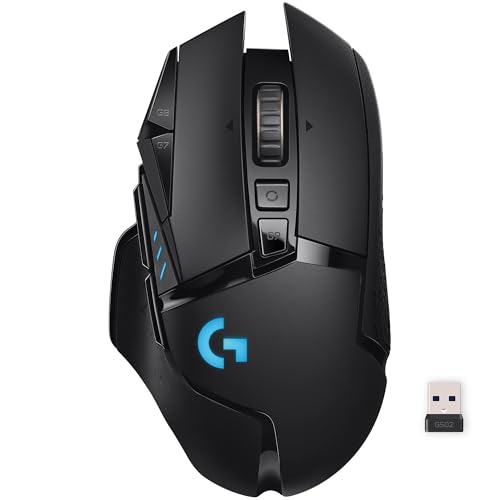
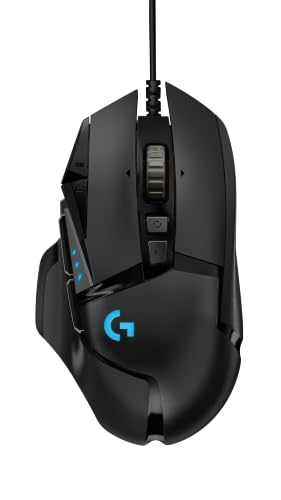
Logitech G502 HERO (Best Overall Wired)
The Logitech G502 HERO takes the Best Overall Wired badge because it fits this brief at a fundamental level: it is built for players who want maximum buttons, tunable weight and a flagship sensor in a wired mouse. Rather than chasing a single headline number, it balances sensor honesty, shape and everyday usability in a way that survives contact with real sessions, and it does so without asking you to work around it.
What seals the Logitech G502 HERO for best gaming mouse for xbox one s is the absence of a deal-breaker. Every product in this guide gives something up; this one gives up nothing that this search’s audience ranks highly, and it does the central jobs with a consistency that flashier rivals match only at their best moments.
Strengths
- Eleven programmable buttons, including a sniper DPI-shift button and a tilting dual-mode scroll wheel, cover shooters, MOBAs and productivity shortcuts in one shell
- HERO 25K sensor delivers flagship-grade tracking with zero smoothing at up to 400 IPS, so fast swipes never spin out
- Five included 3.6 g weights let you tune total weight and balance point instead of accepting a fixed feel
Trade-offs
- At 121 g before weights it is far heavier than the ultralight class, and low-sensitivity FPS players may find it tiring
- The busy, angular shell and rubberised grips collect dust and are harder to wipe clean than smooth shells
- Right-handed ergonomic shape rules it out for left-handed players entirely
Key specs
- Sensor: Logitech HERO 25K optical
- Max DPI: 25,600
- Weight: 121 g, plus five optional 3.6 g tuning weights
- Connection: Wired USB
- Buttons: 11 programmable
- Scroll wheel: Dual-mode hyper-fast, with tilt inputs
- Extras: LIGHTSYNC RGB, onboard memory
In longer sessions the Logitech G502 HERO shows its breeding in small ways: consistent clicks at the end of the day as at the start, a glide that does not change character as the pad warms up, and software that applies a profile and then gets out of the way. It is a product built by people who clearly use their own gear.
It is also worth setting expectations about the ecosystem around the Logitech G502 HERO. Firmware updates arrive through the maker’s software, spare feet and grips are widely available, and the product’s popularity means any quirk you encounter has almost certainly been documented and solved by other owners. That support tail is an unglamorous but real part of why it holds a badge in this guide.
Think about who notices the Logitech G502 HERO most: not the player in a highlight clip, but the same player in week six, when novelty has worn off and only behaviour remains. Its clicks still land where they landed in week one, its settings have not drifted, and its shape has taught your hand a consistent home position. Equipment that behaves identically for months is what lets practice compound, and that quiet consistency is engineered into this pick’s sensor, switches and overall restraint.
Best for: players who want maximum buttons, tunable weight and a flagship sensor in a wired mouse / Not suited for: players chasing the lightest possible mouse for fast FPS flicks

Logitech G203 (Best Budget Wired)
Some products earn a badge on specifications and lose it in the hand. The Logitech G203 keeps its Best Budget Wired badge because the specification sheet and the lived experience agree: this is a product designed for beginners and budget builders who want a safe shape and dependable tracking, executed without an obvious weak point that a rival exploits.
For best gaming mouse for xbox one s, the question is never whether a product is good in the abstract; it is whether its particular compromises point away from what you do most. The Logitech G203 passes that test cleanly. Its strongest qualities serve the centre of this brief, and the things it gives up sit at the edges, which is exactly where you want a product’s weaknesses to live.
Strengths
- Simple, proven symmetrical shell at 85 g suits claw and fingertip grips and almost any hand size
- Clean tracking up to 8,000 DPI covers the sensitivity range real players actually use, with no spin-outs in normal play
- Onboard memory stores your DPI stages and button maps, so settings follow the mouse between PCs without software
Trade-offs
- The basic rubber cable is stiffer than the paracord-style cables on newer rivals and can drag on the desk edge
- Sensor is a step below the HERO line in efficiency and top-end tracking headroom
- Shell and clicks feel utilitarian next to pricier Logitech models, with no premium coatings
Key specs
- Sensor: Logitech gaming-grade optical
- Max DPI: 8,000
- Weight: 85 g
- Connection: Wired USB
- Buttons: 6 programmable
- Extras: LIGHTSYNC RGB, onboard memory
Treat the Logitech G203 as a long-term piece of your setup rather than a seasonal experiment. It rewards a week of acclimatisation, pairs happily with any pad and PC, and holds its value in the only currency that matters here: sessions where the equipment never becomes the story.
It is also worth setting expectations about the ecosystem around the Logitech G203. Firmware updates arrive through the maker’s software, spare feet and grips are widely available, and the product’s popularity means any quirk you encounter has almost certainly been documented and solved by other owners. That support tail is an unglamorous but real part of why it holds a badge in this guide.
Think about who notices the Logitech G203 most: not the player in a highlight clip, but the same player in week six, when novelty has worn off and only behaviour remains. Its clicks still land where they landed in week one, its settings have not drifted, and its shape has taught your hand a consistent home position. Equipment that behaves identically for months is what lets practice compound, and that quiet consistency is engineered into this pick’s sensor, switches and overall restraint.
Best for: beginners and budget builders who want a safe shape and dependable tracking / Not suited for: players who want wireless freedom or a flagship sensor
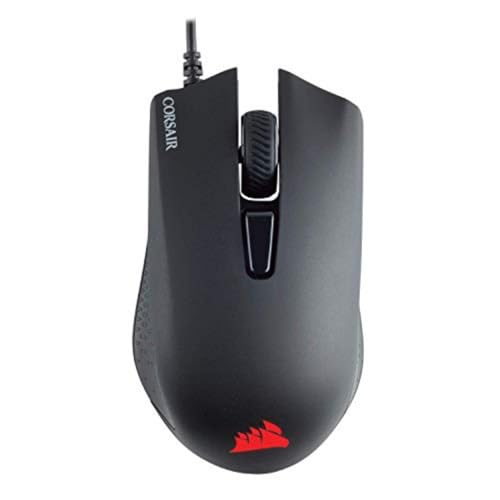
Corsair Harpoon PRO RGB (Best Compact)
If you only read one pick closely, make it this one. The Corsair Harpoon PRO RGB is here as Best Compact because its design priorities line up with what this search actually demands: small-handed claw-grip players on a budget. The details below explain where that quality comes from, and just as honestly, where it stops.
There is a version of this shortlist ranked purely on specifications, and the Corsair Harpoon PRO RGB would not necessarily top it. Ranked for best gaming mouse for xbox one s, with the audience’s games, rooms and habits in view, it rises, because its design decisions read like answers to this brief’s specific questions rather than to a generic buyer’s.
Strengths
- Compact contoured shell with rubber side grips suits small hands and claw grips better than most budget mice
- 12,000 DPI sensor gives more sensitivity headroom than most entry-level rivals
- iCUE support brings proper macro recording and lighting sync with other Corsair gear
Trade-offs
- The small shell will feel cramped for large hands, especially in palm grip
- Cable is a plain rubber design that can drag without a bungee
- Build feels lighter and less premium than Logitech rivals at a similar level
Key specs
- Sensor: Optical
- Max DPI: 12,000
- Weight: 85 g
- Connection: Wired USB
- Buttons: 6 programmable
- Switches: Omron
- Extras: Rubber side grips, iCUE RGB
Day to day, what you notice about the Corsair Harpoon PRO RGB is how little you notice it. Settings stay where you left them, the shape stops being a topic, and your attention goes back to the game, which is the highest compliment a peripheral can earn. Players inside its target audience rarely replace it for anything except its own newer generation.
A few ownership details are worth knowing before you commit. The Corsair Harpoon PRO RGB sticks to proven component choices rather than experiments, which means community knowledge, replacement parts and troubleshooting advice are easy to find years from now. Keep the receipt and the box until the return window closes, as with any peripheral, because shape fit is personal and no review can feel your hand for you.
One more test worth running during your first week with the Corsair Harpoon PRO RGB: swap back to your old mouse for a single session. The differences that feel subtle side by side become obvious in that order, in glide, in click confidence, and in how your hand feels afterwards. Most players who run that test do not swap back a second time, and it is the simplest honest check that the upgrade was real rather than imagined.
Best for: small-handed claw-grip players on a budget / Not suited for: large-handed palm grippers

SteelSeries Rival 3 (Best Simple)
Some products earn a badge on specifications and lose it in the hand. The SteelSeries Rival 3 keeps its Best Simple badge because the specification sheet and the lived experience agree: this is a product designed for budget FPS players who value accurate 1-to-1 tracking and low weight, executed without an obvious weak point that a rival exploits.
For best gaming mouse for xbox one s, the question is never whether a product is good in the abstract; it is whether its particular compromises point away from what you do most. The SteelSeries Rival 3 passes that test cleanly. Its strongest qualities serve the centre of this brief, and the things it gives up sit at the edges, which is exactly where you want a product’s weaknesses to live.
Strengths
- TrueMove Core sensor delivers true 1-to-1 tracking, so cursor movement maps faithfully to hand movement for building muscle memory
- At 77 g it is light for its class, with durable split-trigger buttons that feel consistent across the whole click surface
- Onboard profile storage and bright 3-zone Prism RGB are unusual extras at this level
Trade-offs
- The symmetrical shell is on the small side for large hands in palm grip
- Rubber cable is ordinary and benefits from a mouse bungee for FPS play
- Side buttons sit only on the left, so it is effectively right-handed despite the ambidextrous shell
Key specs
- Sensor: SteelSeries TrueMove Core optical
- Max CPI: 8,500
- Weight: 77 g without cable
- Connection: Wired USB
- Buttons: 6 programmable
- Extras: Prism RGB in 3 zones, split-trigger main buttons
In longer sessions the SteelSeries Rival 3 shows its breeding in small ways: consistent clicks at the end of the day as at the start, a glide that does not change character as the pad warms up, and software that applies a profile and then gets out of the way. It is a product built by people who clearly use their own gear.
A few ownership details are worth knowing before you commit. The SteelSeries Rival 3 sticks to proven component choices rather than experiments, which means community knowledge, replacement parts and troubleshooting advice are easy to find years from now. Keep the receipt and the box until the return window closes, as with any peripheral, because shape fit is personal and no review can feel your hand for you.
Best for: budget FPS players who value accurate 1-to-1 tracking and low weight / Not suited for: large-handed palm grippers

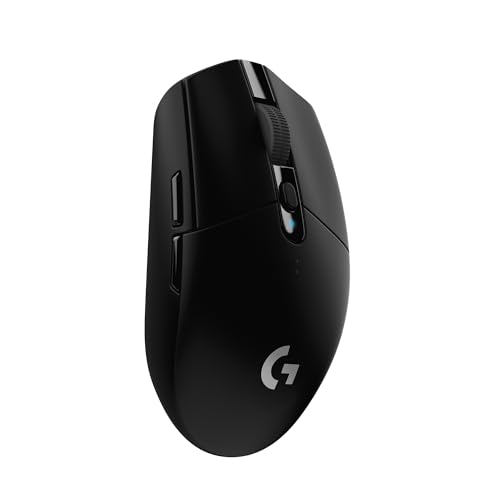
Logitech G305 LIGHTSPEED (Best Wireless Receiver Pick)
If you only read one pick closely, make it this one. The Logitech G305 LIGHTSPEED is here as Best Wireless Receiver Pick because its design priorities line up with what this search actually demands: anyone who wants dependable wireless gaming without flagship pricing or charging cables. The details below explain where that quality comes from, and just as honestly, where it stops.
For best gaming mouse for xbox one s, the question is never whether a product is good in the abstract; it is whether its particular compromises point away from what you do most. The Logitech G305 LIGHTSPEED passes that test cleanly. Its strongest qualities serve the centre of this brief, and the things it gives up sit at the edges, which is exactly where you want a product’s weaknesses to live.
Strengths
- Runs up to 250 hours on a single AA battery in performance mode, so battery anxiety basically disappears
- LIGHTSPEED wireless plus the HERO sensor bring genuinely lag-free, spin-out-proof tracking to a budget price class
- Compact egg shape travels well, and the USB receiver stores inside the shell so it never gets lost in a laptop bag
Trade-offs
- At 99 g it is heavy next to modern ultralights, and most of that weight sits towards the rear
- No Bluetooth and no rechargeable cell, so you swap AA batteries rather than topping up over USB
- Small shell suits small-to-medium hands; large-handed palm grippers will feel cramped
Key specs
- Sensor: Logitech HERO optical
- Max DPI: 12,000
- Weight: 99 g with one AA battery
- Connection: LIGHTSPEED 2.4 GHz wireless (USB receiver)
- Buttons: 6 programmable
- Battery: Up to 250 hours on one AA (performance mode)
- Extras: Onboard receiver storage, onboard memory
Where the Logitech G305 LIGHTSPEED really justifies its badge is repeatability. The tenth session feels like the first: same tracking, same click feel, same comfort curve. For players trying to build skill on stable equipment, that predictability is worth more than any single spectacular feature.
It is also worth setting expectations about the ecosystem around the Logitech G305 LIGHTSPEED. Firmware updates arrive through the maker’s software, spare feet and grips are widely available, and the product’s popularity means any quirk you encounter has almost certainly been documented and solved by other owners. That support tail is an unglamorous but real part of why it holds a badge in this guide.
Best for: anyone who wants dependable wireless gaming without flagship pricing or charging cables / Not suited for: large-handed palm-grip players or ultralight purists

Redragon M711 Cobra (Best Ultra-Budget)
If you only read one pick closely, make it this one. The Redragon M711 Cobra is here as Best Ultra-Budget because its design priorities line up with what this search actually demands: tight-budget players who still want remappable buttons and RGB. The details below explain where that quality comes from, and just as honestly, where it stops.
There is a version of this shortlist ranked purely on specifications, and the Redragon M711 Cobra would not necessarily top it. Ranked for best gaming mouse for xbox one s, with the audience’s games, rooms and habits in view, it rises, because its design decisions read like answers to this brief’s specific questions rather than to a generic buyer’s.
Strengths
- 10,000 DPI sensor with on-the-fly adjustment covers everything from slow tactical aiming to fast menu work
- Dedicated software supports button remapping and macros, rare at this entry level
- Ergonomic grip body and textured sides keep it secure during long sessions
Trade-offs
- Sensor is a budget unit that can show smoothing at extreme flick speeds compared with flagship sensors
- Software is functional rather than polished, and updates are infrequent
- Shell plastics and cable feel basic next to Logitech or Razer rivals
Key specs
- Sensor: Optical
- Max DPI: 10,000
- Connection: Wired USB
- Buttons: Programmable, with remapping software
- Extras: RGB backlighting, ergonomic grip body
Treat the Redragon M711 Cobra as a long-term piece of your setup rather than a seasonal experiment. It rewards a week of acclimatisation, pairs happily with any pad and PC, and holds its value in the only currency that matters here: sessions where the equipment never becomes the story.
A few ownership details are worth knowing before you commit. The Redragon M711 Cobra sticks to proven component choices rather than experiments, which means community knowledge, replacement parts and troubleshooting advice are easy to find years from now. Keep the receipt and the box until the return window closes, as with any peripheral, because shape fit is personal and no review can feel your hand for you.
Best for: tight-budget players who still want remappable buttons and RGB / Not suited for: competitive players who need flawless high-speed tracking
Comparison Table
| Pick | Sensor / Type | Weight / Form | Connection | Buttons | Price |
|---|---|---|---|---|---|
| Logitech G502 HERO | HERO 25K, 25,600 DPI | 121 g (tunable) | Wired | 11 | Check price on Amazon |
| Logitech G203 | Optical, 8,000 DPI | 85 g | Wired | 6 | Check price on Amazon |
| Corsair Harpoon PRO RGB | Optical, 12,000 DPI | 85 g | Wired | 6 | Check price on Amazon |
| SteelSeries Rival 3 | TrueMove Core, 8,500 CPI | 77 g | Wired | 6 | Check price on Amazon |
| Logitech G305 LIGHTSPEED | HERO, 12,000 DPI | 99 g | Wireless | 6 | Check price on Amazon |
| Redragon M711 Cobra | Optical, 10,000 DPI | Ergonomic wired | Wired | Programmable | Check price on Amazon |
How to Choose the Right Gaming Mouse
Choosing a gaming mouse is mostly an exercise in ignoring the loudest numbers and ranking the quiet ones: fit, sensor behaviour, weight, then features. The sections below take each deciding factor in turn, in the order we recommend deciding them. If you want to sanity-check your current technique against your equipment, Best Gaming Mouse Pad For People With Pets pairs well with this section.
Shape, size and grip style
There are three common grips. Palm grip rests the whole hand on the shell and suits tall, ergonomic shapes. Claw grip arches the fingers and works with medium shells and pronounced humps. Fingertip grip moves the mouse with the fingers alone and favours small, light, low-profile bodies. Hand size matters just as much: as a rough guide, hands under about 17 cm from wrist to middle fingertip tend to prefer small shells, 17 to 20 cm suits medium shells, and larger hands need long, tall bodies to avoid cramping. The verdict line under every pick states plainly who it suits and who should skip it, so use those lines before you fall for a spec sheet.
Sensor and DPI: what actually matters
DPI (also labelled CPI) describes how many counts the sensor reports per inch of movement. It is a sensitivity ceiling, not an accuracy score. Almost every serious player settles between 400 and 3,200 DPI and lets in-game sensitivity do the rest, so a 25,600 DPI flagship and an 8,000 DPI budget mouse can feel identically precise at the settings people really use. What separates sensors is behaviour: tracking speed in IPS, whether the sensor adds smoothing at high DPI, and whether it keeps tracking cleanly during the violent flicks that make lesser sensors spin out. Every linked pick in this guide uses an optical sensor with a published, proven tracking record, which is why several flashier laser and no-name models were excluded.
Weight and glide
Mouse weight shapes your aim style more than any other single number. Lighter mice, roughly under 70 g, start and stop with less effort, which suits low-sensitivity arm aiming and fast target switching. Heavier mice, around 100 g and up, feel steadier during slow tracking and give palm grippers a sense of planted control, at the cost of more wrist and forearm work over a long session. Neither is objectively better; the mistake is buying a weight class that fights your grip and sensitivity. If you are unsure, the middle ground around 80 to 100 g is where most players happily live, and several picks here sit exactly there.
Buttons and software
Six buttons cover the vast majority of games: two main clicks, a wheel click and two thumb buttons. Shooters rarely need more. MMO and MOBA players are the exception, and for them a 12-button thumb grid genuinely changes how rotations feel. Software quality matters as much as button count. Logitech G HUB, Razer Synapse, Corsair iCUE, SteelSeries GG and the Glorious and HyperX equivalents all handle DPI stages, remapping and lighting, but onboard memory is the feature to insist on: it stores your settings inside the mouse, so they travel to any PC and keep working even where the software is not installed.
Wired or wireless
Modern 2.4 GHz gaming wireless, Logitech LIGHTSPEED, Razer HyperSpeed and their equivalents, is indistinguishable from wired in latency for human purposes, and tournament players use it on stage. The real trade-offs are weight, battery and price: wireless adds a battery and receiver, so wireless mice tend to cost more, and battery habits differ wildly, from the G305 running for months on a single AA to rechargeable flagships that want a cable every week or two. Wired mice remain the value champions and never need charging, and a flexible paracord-style cable plus a cheap bungee removes most of the old cable-drag complaint. Choose by lifestyle, not by latency fear.
Polling rate and connection basics
Polling rate is how often the mouse reports its position: 1,000 Hz means one report every millisecond, and it is the standard every pick here meets unless stated otherwise. Higher rates exist on flagship keyboards and a few mice, but the visible benefit is small and the CPU cost is real, so do not let polling rate outrank shape or sensor quality in your decision. For wired mice, plug directly into the PC rather than an unpowered hub. For wireless, keep the receiver close to the pad using the included extension adapter where one is provided, because a receiver buried behind a metal case is the most common cause of mysterious stutter.
Mouse pad and desk setup
The pad is half of the sensor system and the cheapest performance upgrade in this entire guide. Cloth pads give optical sensors a consistent texture and a controlled glide that suits most players; hard pads glide faster and wear feet quicker. Size follows sensitivity: high-sensitivity wrist players can live on a small pad, while low-sensitivity arm players should treat roughly 45 by 40 cm as a starting point so a full turn never ends on the desk edge. Keep the pad flat, wash it when the centre slows, and give a wired mouse a bungee or a taped service loop so the cable never becomes part of the aiming equation.
How Do You Set Up and Look After a Gaming Mouse on Xbox One S?
On a console the setup order matters more than the settings menu: confirm the game supports a mouse, connect the simplest way, and store everything you can inside the mouse itself, because the console hosts no configuration apps.
- Check the game before the mouse. Look up each title you intend to play and confirm it lists mouse support on Xbox One. The console recognises a USB mouse for menus and text entry regardless, but in-game support is the developer’s choice, and no mouse purchase can change a game’s list.
- Connect wired, straight into the console. Plug a wired mouse directly into a USB port on the Xbox One S rather than through a hub. Wired USB is the connection the console handles with no pairing, no receiver negotiation and no battery, which is why every leading pick in this guide is wired.
- Set DPI and buttons on a PC first. Install the maker’s app on any PC once, set two or three DPI stages, assign the thumb buttons, and save the profile to the mouse’s onboard memory. The Xbox will never run that app, so the mouse must arrive already configured; onboard memory is what makes that possible.
- Give the mouse a real surface. A mouse on a sofa cushion or bare glass coffee table tracks badly and makes a good mouse look broken. Use a lap desk, TV tray or side table with a proper pad, squared to your body, with the cable routed so it never crosses the mousing area.
- Configure sensitivity inside each game. Every supported title exposes its own mouse sensitivity and button options. Set them per game, write the values down, and expect your first session in each title to be a setup session rather than a ranked one.
- Clean and maintain monthly. Wipe the shell with a damp microfibre cloth, clear the sensor lens with a dry cotton bud, and wash the pad when its centre slows. Once in a while, reconnect the mouse to a PC to check for firmware updates through the maker’s app.
Troubleshooting quick fixes
- Problem: Mouse works in menus but not in a game → fix: That title does not support mouse play on Xbox. Check the game’s official input list; no setting on the mouse or console can add support the developer did not build.
- Problem: Settings reset when moving back to the console → fix: The profile was saved in the PC app, not in the mouse. Re-save it explicitly to onboard memory and the settings will travel with the mouse.
- Problem: Cursor feels laggy on the TV → fix: Enable your TV’s game mode and disable motion smoothing. Display lag feels exactly like input lag and is the most common cause of this complaint.
- Problem: Wireless mouse stutters or drops → fix: Move to the wired connection, or place the receiver on a short extension near the pad, away from the console body and other USB 3.0 devices.
Common Mistakes
Most disappointing purchases in this category are not bad products; they are good products bought for the wrong reason. These are the errors that come up again and again, each one cheap to avoid before you order and expensive afterwards.
Chasing the highest DPI number. Manufacturers print enormous DPI figures because they sell mice, but accuracy lives in sensor behaviour, not ceilings. Set a sane DPI, usually 800 or 1,600, tune in-game sensitivity, and judge a mouse by tracking quality, shape and weight instead.
Buying a shape for someone else’s hand. Pro-player gear lists are a trap: a mouse that fits a fingertip-grip professional with small hands can cramp a palm-grip player within an hour. Match shell size and shape to your own hand and grip first; every other spec is secondary.
Ignoring the mouse pad. A worn, inconsistent pad makes a flagship sensor feel broken. A decent cloth pad with a stitched edge costs little, transforms glide consistency, and should be replaced when the centre wears shiny and slow.
Leaving acceleration on in Windows. Pointer acceleration quietly changes your sensitivity with hand speed, which destroys muscle memory. Turn off ‘enhance pointer precision’ for gaming, and check that your game uses raw input where the option exists.
Never cleaning the mouse. Sensor lenses collect dust, PTFE feet pick up grit, and honeycomb shells invite crumbs. A monthly wipe, a lens check with a cotton bud, and compressed air for open shells keep glide and tracking where they were on day one.
Judging by the first ten minutes. A new shape feels wrong before it feels right. Give a mouse a week of normal play before returning it for anything short of pain; genuine discomfort is a reason to swap immediately, unfamiliarity is not.
Final Recommendation
If you want one answer, take the Logitech G502 HERO (Best Overall Wired): it is the pick that serves the widest range of players under this brief without a serious weakness. If your priorities lean the other way, the Logitech G203 (Best Budget Wired) is the alternative we would defend just as strongly, and the remaining badges exist precisely because this category rewards specialisation.
Whichever you choose, spend the first week properly: set it up with the steps above, commit to your settings, and judge it on your tenth session rather than your first. Players comparing adjacent briefs may also find Best Wired Gaming Mouse For 40 and Best Gaming Keyboard And Mouse For Ps4 helpful, since hand size, budget and platform have a habit of changing the answer. The right mouse is the one you stop thinking about, and every pick in this guide has earned that chance.
A last word on timing: peripherals are among the safest buy-it-when-you-need-it purchases in gaming, because the good models stay good for years and replacements iterate slowly. Buy for the games you play this season and the hand you have today, set everything up carefully once, and then spend your attention where it belongs, on the game itself.
Frequently Asked Questions
How many buttons do I actually need?
For most games, six: left and right click, the wheel click, and two thumb buttons cover movement abilities, melee, push-to-talk and ping duties comfortably. Extra buttons earn their place in MMOs, MOBAs and ability-heavy shooters, where a thumb grid replaces awkward keyboard reaches. More buttons are not automatically better: every added button is weight, cost and one more thing to press by accident while you are learning the layout, so match the count to your game list rather than to a spec-sheet arms race.
Is wireless really as fast as wired now?
For the 2.4 GHz gaming connections used by the wireless picks here, yes. Logitech LIGHTSPEED, Razer HyperSpeed and similar links report at 1,000 Hz with latency that even professional players accept on stage. The practical differences are battery management and price, not performance. Bluetooth, by contrast, is a convenience connection for work and casual play, and none of these picks relies on it for gaming.
How do I keep a gaming mouse performing like new?
Wipe the shell weekly with a slightly damp microfibre cloth, clean the sensor lens gently with a dry cotton bud, and wash or replace the pad when the centre starts to feel slower than the edges. For honeycomb shells, short bursts of compressed air clear dust from inside. Check PTFE feet for deep scratches; replacement feet are cheap and restore the original glide.
Do I need a special mouse pad?
You need a consistent one. Any decent cloth gaming pad gives an optical sensor a uniform surface to read, which is what tracking accuracy depends on. Glass and glossy desks are the real enemies. Beyond that, size matters more than branding: low-sensitivity players should want at least 40 cm of width so a full swipe never runs off the edge mid-fight.
Which grip style should I use?
The one your hand already chooses. Rest your hand on your current mouse without thinking: full contact is palm grip, arched fingers with palm contact at the back is claw, and fingers alone with the palm floating is fingertip. Each grip favours different shell sizes and weights, and forcing a fashionable grip against your anatomy trades a week of discomfort for no measurable gain. If you are between styles, medium symmetrical shells are the most forgiving place to start.
Key Takeaways
- Best Overall Wired: Logitech G502 HERO — best for players who want maximum buttons, tunable weight and a flagship sensor in a wired mouse.
- Best Budget Wired: Logitech G203 — best for beginners and budget builders who want a safe shape and dependable tracking.
- Best Compact: Corsair Harpoon PRO RGB — best for small-handed claw-grip players on a budget.
- Best Simple: SteelSeries Rival 3 — best for budget FPS players who value accurate 1-to-1 tracking and low weight.
- Best Wireless Receiver Pick: Logitech G305 LIGHTSPEED — best for anyone who wants dependable wireless gaming without flagship pricing or charging cables.
- Best Ultra-Budget: Redragon M711 Cobra — best for tight-budget players who still want remappable buttons and RGB.
- For best gaming mouse for xbox one s, honest fit for your hand, grip and games matters more than headline specifications; confirm size, connection and button layout with the buying guide above before ordering, and check price on Amazon since pricing moves.