Where to buy
Every machine shortlisted here was checked against live listings and manufacturer documentation before earning a row. Follow any Amazon link to see today’s stock position and delivery estimate, then complete checkout over there. Qualifying orders may pay us a small commission.
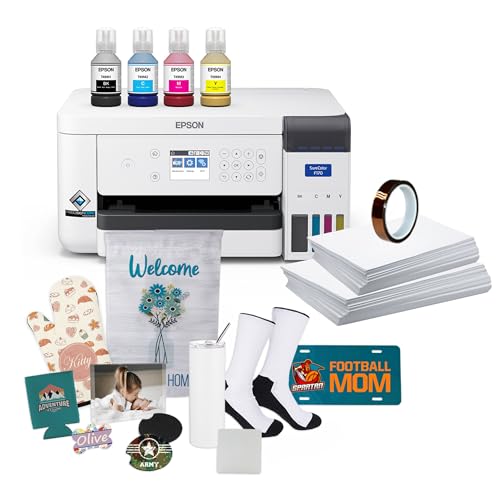
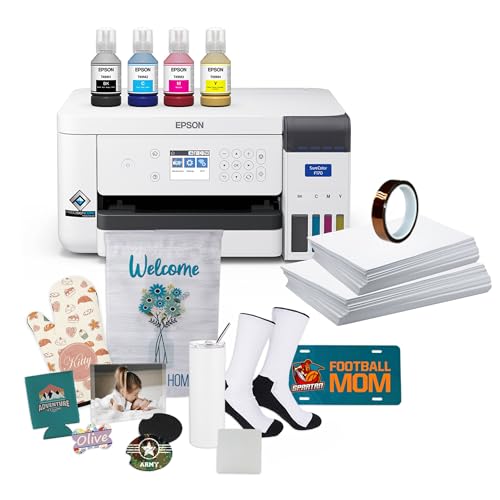
- Best Dedicated Sublimation: Epson SureColor F170 Dye-Sublimation Printer — Check on Amazon
- Best Convertible Tank: Epson EcoTank ET-2800 Wireless Supertank Printer — Check on Amazon
- Best Wide-Format Transfer: Epson EcoTank ET-15000 Wireless Wide-Format Supertank Printer — Check on Amazon
- Best for Transfer Volume: Epson EcoTank ET-3850 Wireless Supertank Printer — Check on Amazon
- Best Single-Function Value: Canon PIXMA iX6820 Wireless Business Printer — Check on Amazon
- Best Starter for Transfers: Canon MegaTank G3270 All-in-One Wireless Printer — Check on Amazon
Read the full guide ↓
Disclosure: As an Amazon Associate, ilcastellomenu.com earns from qualifying purchases. Links to Amazon on this page are affiliate links; they cost you nothing extra. Listing details such as price and availability change often, so check the current Amazon listing before you buy.
Nobody judges a transfer printer by the sheet that rolls out of it. Judgment arrives three weeks later, when a shirt comes out of the laundry basket and somebody checks whether the chest graphic still looks sharp or has quietly cracked along the fold lines. Heat is the real finishing step in this craft: the printer merely parks pigment or dye on a carrier sheet, and the press decides whether that artwork migrates into cloth or sits on top waiting to fail. Cotton designs ride on coated transfer paper, polyester designs can absorb sublimation vapor directly into the fiber, and confusing those two routes wastes more money than any hardware mistake.
That chemistry split explains why this shortlist reads like two smaller lists stitched together. A pair of sublimation options anchors the polyester end: one factory-built machine that arrives ready for its own bottled dye inks, plus a refillable-tank model that crafters commonly re-plumb with sublimation fluid on day one. The remaining four are conventional inkjets picked for gentle paper transport, sane running costs, and — in two cases — a 13 x 19 inch throat wide enough for full-front artwork and gang sheets. Tell me your garment fabric first and the correct half of the page selects itself.
One more variable hides inside the fabric decision and deserves naming early: the hand feel your buyers expect. Sportswear customers judge a garment the moment it stretches across shoulders, and a stiff transfer patch on a performance shirt reads as a defect even when the print itself is flawless. Decorative tees tolerate — sometimes even suit — a slight film presence. Match the process to the garment’s social contract and returns become rare visitors.
Calibrate your hopes before spending anything. A home transfer will not outlast a commercial screen print through years of hot industrial laundering, whatever the packaging implies. What good equipment genuinely delivers is a bright, tidy result that tolerates ordinary domestic washing — cool water, garment flipped inside out, nothing abusive — across dozens of cycles, while behaving identically on shirt thirty as it did on shirt three. Consistency across a batch, far more than any headline specification, drove the rankings that follow.
Key Takeaways
- Cotton shirts mean transfer paper; polyester shirts open the sublimation route.
- Pigment-ink and tank machines cut the per-shirt cost for repeat sellers.
- Wide-format picks matter once designs outgrow letter-size chest prints.
- A heat press matters as much as the printer — budget for both halves.
- Test-wash one shirt before any batch you intend to sell or gift.
In this guide
Quick Picks
Six machines, six distinct buyers. The label attached to each table row reappears above its full review further down, so a pick never changes identity halfway through the page.
| Buyer type | Pick | Why it stands out | Link |
|---|---|---|---|
| Best Dedicated Sublimation | Epson SureColor F170 Dye-Sublimation Printer | The only purpose-built desktop sublimation printer here — warranty intact | Check on Amazon |
| Best Convertible Tank | Epson EcoTank ET-2800 Wireless Supertank Printer | Cartridge-free tank printing that ends the ink-anxiety cycle for home users | Check on Amazon |
| Best Wide-Format Transfer | Epson EcoTank ET-15000 Wireless Wide-Format Supertank Printer | Prints up to 13 x 19 inches with tank economics — the craft and poster favorite | Check on Amazon |
| Best for Transfer Volume | Epson EcoTank ET-3850 Wireless Supertank Printer | The home-office EcoTank: document feeder, Ethernet and auto two-sided printing | Check on Amazon |
| Best Single-Function Value | Canon PIXMA iX6820 Wireless Business Printer | Affordable 13 x 19 borderless printing from five individual ink tanks | Check on Amazon |
| Best Starter for Transfers | Canon MegaTank G3270 All-in-One Wireless Printer | Canon’s MegaTank answer: high page yields and strong color in a home-friendly body | Check on Amazon |
How These Picks Were Chosen
Three filters shaped this shortlist, each borrowed from failures seen in real craft rooms. Paper transport came first, because transfer media and sublimation sheets both punish tight roller bends and grabby feed mechanisms, rewarding straight or rear-fed paths. Running cost at garment volumes came second: anyone pressing thirty shirts weekly feels cartridge pricing within a fortnight, which floated tank machines upward. Chemistry honesty came third, so each recommendation states plainly whether it transfers from paper or sublimes into polyester.
You will find a factory sublimation unit sitting beside a convertible tank model because that argument deserves both sides aired. Re-plumbing a fresh EcoTank for sublimation duty is a documented, popular route, yet it steps outside the manufacturer’s ink expectations and support umbrella. The dedicated alternative asks more money upfront and simply performs its single job with approved consumables from the first morning. Neither stance is foolish; they suit different appetites for tinkering, and each review below declares which temperament it serves.
Printers whose garment claims rested purely on marketplace keyword stuffing never made the cut, and neither did laser hardware. Toner-based garment work is a legitimate separate discipline with dedicated media, so folding it into an inkjet roundup would mislead both readerships. Anyone still torn between the two chemistries should cross-read our companion roundup covering sublimation machines built specifically for shirts before committing funds.
The 6 Best Inkjet Printers for T-Shirt Transfers
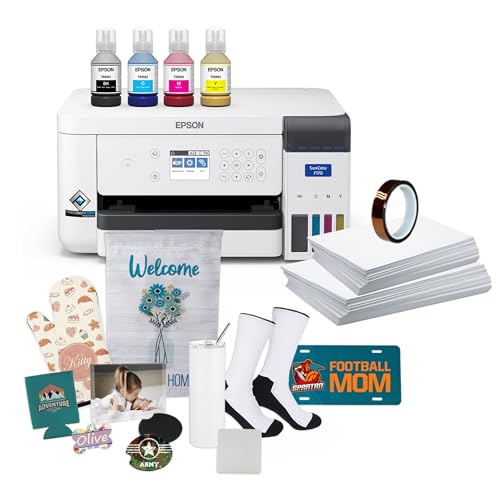
Best Dedicated Sublimation: Epson SureColor F170 Dye-Sublimation Printer
Pick the SureColor F170 after you have stopped debating processes and settled on polyester forever. Epson built this unit for exactly one trade: its auto-feed tray swallows sublimation sheets, its bottled T49M inks are the genuine dye formulation, and the whole paper path expects this media daily. Artwork emerges mirrored, meets a hot press, and the dye turns to gas that stains the garment fiber itself — leaving zero raised edge, zero rubbery hand feel, and nothing capable of peeling away in the wash.
Understand the fences around that talent before ordering. Plain cotton refuses sublimation outright unless specialty coatings enter the picture, pale blanks show designs most faithfully since no white underbase exists, and this box will never moonlight as a document printer. Stay inside its lane, though, and nothing else here repeats results so mechanically. Anyone pressing team jerseys, athletic tops, or poly-coated tote blanks for paying customers should begin the search at this machine and only wander if its sheet width feels cramped.
Notice, too, what the F170 removes from a seller’s week: the profile hunting, the conversion forums at midnight, the nagging question of whether a clog is a hardware fault or an ink experiment’s consequence. Supported sublimation compresses troubleshooting into a phone call and a documented answer. For a business pressing against delivery deadlines, that compression is worth money in a way spec sheets never capture.
| Print technology | Dye-sublimation (dedicated) |
|---|---|
| Functions | Print only |
| Max paper | Up to 8.5 x 14 inches via tray/bypass (maker spec) |
| Paper | 150-sheet auto-feed tray |
| Ink | Epson T49M dye-sublimation bottles |
Strengths
- Designed and warrantied for sublimation — no conversion gamble
- PrecisionCore printhead tuned for sublimation ink delivery
- Ships as a complete starter system with genuine Epson sublimation ink
Trade-offs
- Letter/legal width only — oversized designs need a bigger solution
- Sublimation output still needs a heat press and polyester-coated blanks
- Genuine ink costs more than third-party conversion inks
Best for: garment sellers committed to polyester and poly-coated blanks who want supported sublimation from day one. Not suited for: cotton shirts, dark garments, or anyone wanting one printer for documents too.

Best Convertible Tank: Epson EcoTank ET-2800 Wireless Supertank Printer
Ask craft-room regulars which tank printer gets converted most often and the ET-2800 name surfaces immediately. Rather than loading the bundled standard bottles, owners fill its reservoirs with sublimation ink from new, obtaining a dye printer for considerably less commitment than the factory-built option above. Refillable tanks make the scheme practical — no cartridges to drill, no chips to fool — while Wi-Fi, USB, and app control fit a spare-bedroom studio as comfortably as a desk corner.
Go in clear-eyed about the trade you are making. Once non-standard ink flows, warranty comfort and manufacturer hand-holding recede, replaced by a huge peer community trading profiles and troubleshooting lore. Color accuracy leans on community-supplied profiles rather than Epson’s own tuning, which most sellers accept after a weekend of test squares. Thousands run precisely this arrangement profitably, so treat it as a community-supported project rather than a boxed promise. Filled with its intended inks instead, the same hardware doubles as this roundup’s sharpest-value transfer-paper machine for cotton garments.
| Print technology | Inkjet (refillable tanks) |
|---|---|
| Functions | Print, scan, copy |
| Connectivity | Wi-Fi, USB |
| Ink | EcoTank bottles, front tanks |
| Mobile | Epson Smart Panel, AirPrint |
Strengths
- Refillable tanks slash per-page ink cost versus any cartridge machine here
- Front-facing tanks make ink levels visible at a glance
- Bottle refills are keyed and mess-minimizing compared with early tank designs
Trade-offs
- No automatic duplex and no document feeder at this step of the range
- Print speed is leisurely next to office machines
- Using non-Epson ink (including sublimation conversions) voids the warranty — convert a dedicated unit only
Best for: crafters comfortable converting a new EcoTank to sublimation ink, or wanting a tank transfer-paper printer for cotton. Not suited for: buyers who want maker-supported sublimation out of the box — that is the F170 above.

Best Wide-Format Transfer: Epson EcoTank ET-15000 Wireless Wide-Format Supertank Printer
Every designer eventually draws something wider than a letter sheet allows, and the ET-15000 exists for that afternoon. Its print path accepts stock up to 13 x 19 inches, unlocking full-front graphics, oversized tote artwork, and gang layouts that nest several designs per sheet to trim per-shirt media costs. Tank reservoirs keep even those poster-sized color floods affordable, while scan, copy, and fax functions absorb the paperwork trailing a market stall or online shop.
Desk space is the toll this capability collects: the chassis is broad, heavy, and happiest with a permanent home rather than weekly relocation. Standard inks pair it with transfer paper for cotton work, and the same conversion logic discussed for its smaller sibling applies here for polyester, caveats included. Sellers whose bottleneck has shifted from print quality to sheet dimensions will find this the obvious graduation step; our transfer-paper printer roundup maps exactly where wide format starts repaying its footprint.
| Print technology | Inkjet (refillable tanks) |
|---|---|
| Functions | Print, scan, copy, fax |
| Max paper | Up to 13 x 19 inches |
| Connectivity | Wi-Fi, Ethernet, USB |
| Paper | 250-sheet tray |
| Duplex | Automatic |
Strengths
- Wide-format 13 x 19 printing for posters, signage and oversized craft work
- EcoTank running costs keep big color pages affordable
- Full office functions including fax and a document feeder
Trade-offs
- Physically large — measure the desk before ordering
- Scan and copy are limited to smaller sizes than the print path
- Premium band pricing, even before the first ink bottles
Best for: sellers printing oversized or gang-sheet designs on transfer or sublimation paper. Not suited for: small craft spaces or letter-size-only workflows, where its width buys nothing.
Best for Transfer Volume: Epson EcoTank ET-3850 Wireless Supertank Printer
When transfers become a daily production habit rather than a weekend experiment, the ET-3850 earns its keep. Automatic two-sided printing handles the invoice-and-label side of a small garment operation, the document feeder chews through multi-page scanning without babysitting, and Ethernet joins Wi-Fi for a shared workspace. It collapses what would otherwise be two machines into a single footprint, with neither job subsidizing the other’s ink appetite.
Expect honest transfer-paper results rather than sublimation permanence: on cotton and cotton blends, pressed carefully and laundered gently, its output keeps customers satisfied through a normal garment life. Nothing printed onto a carrier sheet will bond like dye inside polyester fiber, and this review will not pretend otherwise. Choose this model when the business already exists, the blanks are cotton-family, and the printer must justify its desk space every working day rather than occasionally.
A practical note on its document feeder, since sellers underestimate it until tax season: contracts, supplier invoices, and shipping paperwork accumulate in any garment micro-business, and a machine that scans stacks unattended quietly returns an hour a week. That hour, spent designing or pressing instead, is the ET-3850’s least advertised and most compounded feature.
| Print technology | Inkjet (refillable tanks) |
|---|---|
| Functions | Print, scan, copy |
| Connectivity | Wi-Fi, Ethernet, USB |
| Duplex | Automatic |
| Extras | Automatic document feeder |
Strengths
- Document feeder turns multi-page scanning into a load-and-walk-away job
- Automatic two-sided printing plus Ethernet for a shared home office
- Tank ink economics with office-grade paper handling
Trade-offs
- Sits in a higher purchase band than the basic EcoTanks
- No fax, for the few offices that still need it
- Bigger footprint than entry all-in-ones
Best for: cotton-transfer sellers with daily volume who also need a serious home-office all-in-one. Not suited for: polyester sublimation work or occasional crafters, for whom it is more machine than the hobby needs.

Best Single-Function Value: Canon PIXMA iX6820 Wireless Business Printer
Plenty of sellers already own scanning and office capacity elsewhere; what they lack is a wide, quiet throat dedicated to artwork. The PIXMA iX6820 fills precisely that gap, laying 13 x 19 inch borderless sheets from a five-tank ink system at a single-function price. Transfer media, poster board, and photo stock all pass through with the unruffled manner of a machine descended from office hardware rather than craft gadgets.
Cartridges are the compromise hiding inside that value: per-sheet ink costs sit above every tank rival here, suiting steady weekly volume better than relentless production runs. Its network manners are excellent, sharing politely across a household or studio without demanding attention. Design-led sellers whose transfers run wide, colorful, and frequent-but-not-constant will find this Canon threading a needle that the all-in-one crowd walks straight past.
| Print technology | Inkjet (5 individual tanks) |
|---|---|
| Functions | Print only |
| Max paper | Up to 13 x 19 inches, borderless |
| Connectivity | Wi-Fi, Ethernet, USB |
| Footprint | About 23.0 x 12.3 x 6.3 inches |
Strengths
- Borderless prints up to 13 x 19 for posters, portfolios and art
- Five individual tanks replace only the color that runs out
- Compact for a wide-format machine — a shelf-friendly footprint
Trade-offs
- Print only — no scanner or copier
- Cartridge yields are modest for heavy wide-format volume
- An older platform; setup utilities feel their age
Best for: design-focused sellers wanting affordable wide-format transfer printing without all-in-one extras. Not suited for: high-volume production, where tank ink costs pull the EcoTanks ahead within months.

Best Starter for Transfers: Canon MegaTank G3270 All-in-One Wireless Printer
Start nervous beginners here without hesitation. The G3270 pairs tank running costs with a rear feed that treats coated transfer sheets gently, borderless output for edge-to-edge artwork, and a purchase outlay modest enough to leave real money for the heat press — which, as later sections argue, is where a novice’s second round of spending belongs anyway.
Its ceiling is the starter ceiling everywhere: letter and legal widths rather than wide format, plus speeds that test patience on batch day. Forgiving paper handling and pennies-per-print ink turn the inevitable tuition shirts — the crooked placements, the scorched corners, the first sacrificed wash test — into cheap lessons instead of expensive ones. Let actual sales, not curiosity, tell you when graduation to wider or dedicated hardware has arrived.
| Print technology | Inkjet (refillable tanks) |
|---|---|
| Functions | Print, scan, copy |
| Connectivity | Wi-Fi, USB |
| Speed | Up to 11 ipm black / 6 ipm color (maker figures) |
| Resolution | Up to 4800 x 1200 dpi |
Strengths
- MegaTank bottles deliver thousands of pages before the first refill decision
- Integrated front tanks and a clean, compact design for home desks
- Strong color output for school projects, flyers and everyday photos
Trade-offs
- No automatic two-sided printing
- No document feeder for multi-page scans
- Rear tray capacity is modest for big batch jobs
Best for: beginners starting cotton transfer work who want tank economy and a gentle paper path. Not suited for: wide designs or polyester sublimation as a primary process.
Comparison Table
| Pick | Badge | Type | Tier |
|---|---|---|---|
| Epson SureColor F170 Dye-Sublimation Printer | Best Dedicated Sublimation | Dye-sublimation (dedicated) | upper-mid |
| Epson EcoTank ET-2800 Wireless Supertank Printer | Best Convertible Tank | Inkjet (refillable tanks) | mid |
| Epson EcoTank ET-15000 Wireless Wide-Format Supertank Printer | Best Wide-Format Transfer | Inkjet (refillable tanks) | premium |
| Epson EcoTank ET-3850 Wireless Supertank Printer | Best for Transfer Volume | Inkjet (refillable tanks) | upper |
| Canon PIXMA iX6820 Wireless Business Printer | Best Single-Function Value | Inkjet (5 individual tanks) | mid |
| Canon MegaTank G3270 All-in-One Wireless Printer | Best Starter for Transfers | Inkjet (refillable tanks) | mid |
Transfer Paper vs Sublimation: The Decision That Chooses Your Printer
Fabric dictates everything downstream, so settle the garment question before admiring any hardware. Sublimation dye needs polyester molecules to latch onto; press it against untreated cotton and the design rinses away like watercolor in rain. Transfer paper sidesteps that chemistry entirely by gluing a printed film onto whatever cloth sits beneath it, which is why cotton, blends, and dark colors all remain reachable through the paper route.
Each path carries a signature feel on the finished shirt. Sublimated artwork becomes indistinguishable from the garment itself — fold it, stretch it, and nothing cracks because nothing sits on the surface. Paper transfers leave a detectable patch, thinnest on modern light-fabric sheets and most obvious on the opaque films dark garments require. Neither sensation is automatically wrong: band merch and sportswear buyers expect the weightless result, while a one-off birthday shirt survives perfectly well with a slight film presence.
Consider also how each route ages across a product line. A design that begins life as a paper transfer on cotton cannot migrate to polyester sublimation without its colors shifting character, because the two chemistries render saturation differently under heat. Brands selling the same artwork on multiple garment types should proof both versions side by side before listing either, and keep the approved samples labeled by process forever.
Cost structures diverge just as sharply. Paper transfers bill you per shirt forever, sheet by sheet, whereas sublimation shifts spending toward the printer and its bottled inks while the paper itself stays cheap. Occasional gift-makers should therefore stay with paper and any decent inkjet; sellers moving weekly polyester volume should run the sublimation arithmetic honestly. Mixed wardrobes mean mixed methods, and several thriving micro-brands quietly operate one machine from each camp, a point our guide to inkjet printers for heat transfers explores from the paper side.
Ink, Paper, and the Wash Test: Making Transfers Last
Ink formulation quietly decides how a transfer ages. Pigment particles lodge among cotton fibers and shrug off wash water better than standard dye, which is why pigment-capable machines earn favor for paper work. Whichever ink you run, the paper’s polymer coating does the actual bonding under heat, so a mismatched paper-and-ink pairing undermines even excellent hardware.
Pigment discipline extends to storage of the printer itself: a machine that sits idle for a month between craft fairs should run one small full-color print weekly, because dried nozzles announce themselves first on the most urgent order of the season. Sellers who calendar that tiny maintenance print stop losing Saturday mornings to cleaning cycles.
Treat the first shirt of any new combination as a laboratory sample, never as inventory. Press it, let it rest a day, then launder it inside out on a cool gentle cycle and inspect the edges under bright light. Fine lines lift first, corners announce weak adhesion earliest, and colors that looked rich when hot sometimes settle duller after washing. Two sacrificed blanks at this stage protect an entire batch later.
Storage habits matter more than sellers expect. Keep unopened paper flat, sealed, and away from bathroom humidity; keep printed sheets dust-free while they await pressing; and wash finished garments without fabric softener, which coats the transfer film and shortens its life. Small disciplines, repeated boringly, separate sellers with return customers from sellers with return parcels.
How Do You Choose a Printer for T-Shirt Transfers?
Begin with the blanks you actually intend to wear or sell, because fabric settles the chemistry before any badge on this page applies. List your three most likely garments, note each fiber content from its label, and let that tally steer you toward paper or sublimation. Shoppers who skip this inventory routinely buy capable printers for garments those printers cannot serve.
While listing garments, photograph the fiber label of every blank style you stock and save the images beside the design files. Six months from now, when a reorder arrives in a subtly different blend from a new supplier, that photograph is the evidence that catches a chemistry mismatch before an entire batch gets pressed onto cloth the process cannot serve.
Sheet width comes next in the decision order. Measure your largest realistic design, add margin for placement error, and check whether letter width still contains it after mirroring and trimming. Artists whose work keeps escaping that boundary should shortlist the wide-format pair; everyone else saves money and desk space by staying standard.
Now interrogate your weekly volume honestly, because volume chooses the ink system. A handful of shirts monthly tolerates cartridge economics without pain, while daily pressing turns tank reservoirs from luxury into arithmetic necessity. Count the paperwork tail too — invoices, care cards, shipping labels — since an all-in-one quietly absorbs chores a print-only box leaves behind.
Finally, budget the workstation as a single purchase rather than a printer with accessories. The press, a heat-safe surface, spare blanks for testing, and the first paper stock all belong in the same spreadsheet line as the machine itself. Buyers who fund the whole station at once start selling sooner than buyers who fund a premium printer and then wait two months to afford heating it.
How to Print and Press a Transfer That Survives the Wash
Work through this sequence in order, on a sacrificial garment, before any shirt that matters gets involved. Sublimation pressing follows the same choreography, substituting the paper manufacturer’s own time and temperature figures.
- Mirror the design for light-fabric transfer paper. The image prints reversed and presses face-down; dark-fabric papers are the exception and print unmirrored — check the sheet’s own instructions every time you change paper type.
- Select the paper type the transfer maker specifies. Most papers ask for a plain or matte setting rather than a photo setting, because photo modes lay down more ink than the coating can carry.
- Print one test sheet and inspect it dry. Colors shift slightly as transfer prints dry and again under heat; judge the pressed test shirt, not the fresh sheet, before running a batch.
- Pre-press the garment for a few seconds. This drives out moisture and wrinkles, the two quiet causes of patchy adhesion, and flattens seams and collars out of the design area.
- Press at the paper maker’s temperature, pressure, and time — exactly. Use a timer, apply firm even pressure, and peel hot or cold strictly as the instructions direct; peel timing is chemistry, not preference.
- Wash-test before you batch. Launder the test shirt inside out, cold and gentle, at least twice, and inspect edges and fine lines before the design goes near a customer or a gift bag.
Let the test shirt cool, rest overnight if patience allows, and then wash it twice inside out before judging anything. Only a design that survives that small ordeal unchanged earns promotion to a full batch run.
Peel timing deserves its own rehearsal, because it is the step beginners rush. Hot peel, warm peel, and cold peel papers behave like different materials, and the correct moment is printed on the packet rather than decided by impatience. Practice the peel on the test shirt at three timings and feel how the film releases; your hands will remember the right resistance long after the instruction sheet is lost.
Common Mistakes
Using light-fabric paper on a dark shirt
Light-fabric sheets carry no opaque backing layer, so their transparent film assumes a pale garment underneath providing the whites. Press one onto a black tee and every light tone drowns in the dark cloth showing through, leaving a murky ghost of the artwork. Dark garments demand the opaque variant, printed unmirrored and peeled before pressing.
Blaming the printer for an iron’s uneven heat
A household iron heats unevenly, dumping extra energy at its center while the edges lag far behind the dial’s promise. Transfers forgive many sins but not cold corners, which lift within a wash or two and get blamed on ink quality. Either press in overlapping sections with real patience or accept that a small swing-away press is this craft’s genuine entry ticket.
Skipping the mirror step
Lettering betrays this slip instantly: words reading correctly on the printed sheet will read backwards on the shirt, because light-fabric transfers flip during pressing. Build the mirror step into your software routine — ideally a saved preset — rather than relying on memory at midnight before a market day. Dark-fabric media are the exception, so re-check instructions whenever paper type changes.
Washing the first shirt hot and immediately
Hot water and an immediate first wash attack the polymer bond before it has fully cured and settled into the fibers. Give a finished garment at least a day of rest, then launder it cool, gentle, and inside out. Sellers should print that guidance on a care card, because customers will otherwise test your work in the harshest cycle they own.
Final Recommendation
If decision fatigue has set in, simplify by fabric: polyester sellers start at the F170 and stop shopping. Its factory-supported sublimation removes conversion risk, community-profile hunting, and warranty ambiguity in a single stroke, leaving only design and pressing to master. Cotton sellers with daily volume should land on the ET-3850 for identical reasons of operational calm.
Everyone else can relax into the middle of the list. Beginners belong on the G3270, wide-format dreamers on the ET-15000 or the iX6820 depending on volume, and adventurous converters on the ET-2800 with eyes open. No pick here is a trap; each simply optimizes a different honest priority.
Frequently Asked Questions
Can I use a normal inkjet printer for t-shirt transfers?
Yes — ordinary inkjets are exactly how most home transfer work happens. Load the correct transfer paper for your fabric color, select the media setting the paper maker specifies, and print a mirrored design for light-fabric sheets. Pigment-ink models hold up best through repeated laundering, though standard dye machines still produce perfectly giftable shirts.
Do transfers work on dark shirts?
Dark shirts work, but they change the media rather than the printer. Opaque dark-fabric paper carries its own white backing layer, prints unmirrored, and gets peeled then pressed onto the garment. Expect a more noticeable film feel than light-fabric results, and trim closely around artwork so the backing patch stays invisible.
How many washes does an inkjet transfer last?
longevity depends on ink, paper, pressing accuracy, and laundry habits acting together. A well-pressed pigment transfer washed cool and inside out commonly survives dozens of home cycles before fine edges soften. Hot washes, tumble-dryer abuse, and fabric softener each shorten that span considerably, which is why sellers include care instructions with every order.
Is converting an EcoTank to sublimation hard?
The mechanical part is genuinely easy: fill the tanks with sublimation ink instead of the bundled bottles, install community color profiles, and print. The harder part is administrative — accepting that warranty cover and manufacturer support no longer apply, and that troubleshooting becomes forum work. Convert a brand-new, dedicated unit rather than the household’s only printer.
Do I need a heat press, or will an iron do?
An iron can prove the concept and produce a few decent shirts, especially with patient overlapping presses. What it cannot deliver is uniform temperature and pressure across a full design, which is precisely what durability requires. Anyone selling, gifting widely, or pressing weekly should treat a modest heat press as part of the printer purchase.
Can I print transfers and documents on the same printer?
Sharing works beautifully for transfer-paper machines, which print documents between garment jobs without complaint. The exception is any tank converted to sublimation ink: that unit is a dye printer forever afterward and must never return to paperwork. Households should therefore convert a second, dedicated machine rather than the family workhorse.
Your First Ten Shirts: A Beginner’s Production Diary in Advance
Shirt one exists to be ruined informatively. Print your most complicated design — the one with fine lines, pale gradients, and small lettering — then press it onto the cheapest blank you own. Wear it around the house, spill coffee near it, and launder it without mercy beyond reason. Every weakness in your process will introduce itself on this garment rather than on a customer’s.
Keep the ruined first shirt. Hang it somewhere visible in the work area, not as a trophy of failure but as a calibration artifact: its cracks mark exactly what under-pressing looks like, its scorched corner prices the cost of distraction. New helpers learn more from handling that garment for thirty seconds than from any laminated instruction card.
Shirts two through five are where rhythm forms. You will learn how long your press truly needs to reach temperature between garments, discover that placement templates beat eyeballing, and find your personal trimming tolerance around artwork edges. Keep a notebook beside the press during this stretch: times, temperatures, paper batch, and the result after washing. Those scribbles become the production recipe that later batches follow without thinking.
By shirts six through ten, attention shifts from survival to sameness. Lay the garments side by side and hunt for drift — a design creeping leftward, colors deepening as the press cycles, one corner consistently paler than its siblings. Small drifts caught across ten shirts are free education; the same drift discovered across fifty finished orders is a refund queue. Graduate to selling only when the tenth shirt could swap places with the first unnoticed.
Selling Shirts Without Lying to Anyone, Including Yourself
Honesty is a production material in this trade, as real as ink. Describe a transfer as a transfer, not as screen printing, and tell buyers plainly how the garment should be washed and what lifespan to expect. Customers forgive a design that fades after a year of hard use far more readily than they forgive discovering the decoration method was misrepresented at purchase.
Delivery presentation is the final honesty surface. A shirt folded with its care card visible, in a bag that does not crush the transfer, tells the buyer the maker respected the object after pressing it. That respect gets photographed, reviewed, and repeated to friends more reliably than any advertisement a micro-brand can afford.
Pricing honesty matters inwardly too. Count the blank, the sheet, the ink, your pressing minutes, the failed test shirts, and the packaging before naming a number, because hobby arithmetic that ignores labor quietly converts a business into an expensive pastime. Sellers who know their true per-shirt cost can discount deliberately for bulk orders instead of accidentally donating margin on every sale.
Expect questions and answer them before they are asked: a care card in every parcel, a listing note about film feel on dark garments, a realistic dispatch window during busy weeks. The micro-brands that survive their first year rarely out-print competitors; they out-communicate them, and their reviews read like thank-you letters about expectations set accurately.
Blanks, Weeding, and the Unglamorous Half of Transfer Quality
The blank garment contributes half the finished quality yet receives a fraction of the shopping attention printers get. Fabric weight changes how a transfer sits, cheap blanks twist after washing and take your straight design with them, and collar construction decides whether chest placement looks centered or drunken. Buy one sample of any new blank line and torture-test it before ordering fifty.
Blank sourcing rewards boring loyalty. Once a blank passes your torture test — wash, stretch, twist, rewash — reorder the identical line from the identical supplier and resist novelty pricing from unfamiliar mills. A transfer process tuned to one blank’s weave and weight produces sameness almost automatically, while every blank change quietly resets half your learned settings.
Weeding and trimming are the invisible labor lines in every order. Intricate artwork with floating islands demands opaque paper gymnastics or a redesign, and close trimming around complex shapes consumes minutes that pricing must acknowledge. Experienced sellers design with the scissors in mind: bolder shapes, connected elements, and lettering large enough to survive both cutting and laundering.
Nobody photographs this half of the workflow for social media, which is exactly why beginners underestimate it. A tidy bench, sharp blades, a cutting mat that is not scarred into furrows, and blanks sorted by size before printing begins will save more shirts per month than any printer upgrade on this page. Process tidiness is quality control wearing an apron.
From Craft Table to Small Business: Scaling Without Ruining the Fun
Growth usually arrives disguised as one exhausting weekend: a team order, a fundraiser deadline, a design that catches local attention. The correct response is a gang sheet and a calendar, not panic — lay multiple designs per wide sheet, batch identical press settings together, and schedule pressing in focused blocks rather than single shirts scattered through a day.
Resist upgrading hardware at the first sign of demand. A second press often unlocks more capacity than a faster printer, because pressing, trimming, and packing — not printing — consume the hours in a transfer workflow. Add the bottleneck tool first, keep the proven printer, and let a full order book, sustained over months rather than one frantic weekend, authorize bigger machinery.
Protect the pleasure deliberately as volume climbs. Reserve one session a month for experimental designs with no customer attached, keep a personal shirt in every few batches, and remember that this business began as a craft you enjoyed. Sellers who automate the boring parts and guard the playful parts tend to still be selling, happily, in year three.
Design Files for Shirts: Sizing, Resolution, and Color That Survives the Press
File preparation decides more outcomes than printer badges do. Work at the physical size you intend to press, keep raster artwork at a resolution that stays crisp at that size, and enlarge small marketplace files cautiously — software upscaling invents detail that heat will expose as mush. Vector sources remain the forgiving format whenever a design allows them.
Resolution discipline extends to text: lettering below a certain physical size fills in under heat as the coating spreads microscopically, turning elegant thin type into bold mush. Set a house minimum for letter height on garments, test it once at the press, and redesign any artwork that violates it rather than hoping the press will be merciful. It will not be.
Color needs its own expectations meeting. Screens glow with transmitted light while shirts reflect ambient light, so printed transfers land slightly deeper and less luminous than the monitor promised. Brighten artwork a touch, beware pale yellows on cream blanks, and press one color-test strip whenever a design matters. Sublimation adds its own shift, appearing dull on paper and blooming only under press heat.
Sizing is a quiet credibility test. A chest graphic that suits a medium looks lost on a 2XL and crowded on a youth small, so scale designs proportionally across sizes or state fixed dimensions clearly in listings. Mockups should show the real design at the real scale on a real blank whenever possible; customers return shirts over proportion surprises more often than over color.
The Pressing Station: Heat, Space, and Safety in a Small Craft Room
Arrange the pressing zone like a tiny factory floor, not a craft afterthought. The press wants a heat-proof, rock-steady surface at comfortable working height, with blanks staged on one side and finished garments cooling on the other, so hot work never crosses paths with folded stock. Good flow prevents the classic accident: a fresh print set face-down on a just-pressed shirt.
Electrical reality belongs in the station plan as well. A heat press draws serious current for sustained periods, so give it a circuit that is not simultaneously feeding a kettle, a space heater, and the printer. Tripped breakers mid-press produce the classic half-bonded transfer — the one that looks perfect leaving the station and peels in the customer’s second wash.
Respect the heat as a genuine hazard rather than a setting. A press platen causes instant burns, needs clearance from curtains and paper stock, and should never share a wobbly extension lead with other hungry appliances. Ventilation matters during long sessions, since heated coatings and adhesives produce fumes a closed spare room concentrates quickly.
Small rooms succeed through vertical thinking: blanks on wall shelves, paper stored flat in a drawer beneath the press table, finished orders bagged and hung rather than piled. Label every storage spot during your first month, because a station that only works when one person remembers everything is a station that fails during your busiest week.
One-Off Gifts vs Repeat Designs: Two Different Transfer Businesses
A one-off gift rewards experimentation — an unusual blank, a photo transfer, lettering in three sizes while you decide. The economics forgive waste because the deadline is a birthday, not a payroll, and the recipient values the personal artifact over production polish. Gift work is where new techniques should be auditioned before customers ever see them.
Gift shirts also carry a hidden advantage for learning: their recipients report back with love rather than invoices. A brother-in-law will tell you the print cracked in October with a laugh and a photograph, giving you durability data no customer would bother sending. Route experimental techniques through family first and harvest the friendliest research panel in the world.
Repeat designs invert every priority. The tenth identical shirt must match the first, placement guides become mandatory, and a design file gets frozen once approved so nobody helpfully improves it mid-run. Batch identical press settings together, keep one approved sample shirt as the physical reference, and photograph each completed batch beside it before packing.
Many healthy micro-brands run both trades from one bench: gifts and customs funding the experiments, repeat designs paying the predictable bills. Keep the two workflows visually separate — different shelves, different order sheets — because a one-off mindset applied to a batch causes drift, while batch rigidity applied to a gift kills the charm someone paid for.
A Note on Sizing Charts, Mockups, and the Shirt That Comes Back
Returns in this trade usually trace back to sizing rather than print quality. Publish a measured size chart — actual garment dimensions, not generic letter labels — and ask custom-order customers to confirm measurements before printing. A blank cannot be un-pressed, so every sizing conversation must happen while the design still lives harmlessly on a screen.
A measured chart also protects you in disputes. When a buyer claims a shirt shrank two sizes, the chart plus the blank maker’s own specifications settle the conversation in one message exchange. Keep the chart’s revision date visible and re-measure whenever a blank supplier changes, because garments drift quietly between production runs just as designs do.
Mockups deserve the same skepticism as advertising photography, including your own. Generate them from the real design file at true scale, avoid filters that saturate colors beyond what ink can deliver, and include one photograph of an actual pressed shirt in every listing. Buyers calibrate expectations from images; honest images manufacture fewer disappointed customers.
When a shirt does come back, treat the parcel as tuition rather than insult. Examine whether the complaint involves placement, proportion, color, or durability, log it beside the batch notes, and fix the process step responsible before the next run. Sellers who study their rare returns systematically watch the return rate shrink toward zero while competitors keep re-learning identical lessons.