Disclosure: As an Amazon Associate, ilcastellomenu.com earns from qualifying purchases. If you buy through links on this page, we may earn a commission at no extra cost to you, and it never changes which products we recommend or how we rank them.
Where to buy
Linked models are listed on Amazon; open a listing to check the day’s availability, delivery estimate and included starter toner before you commit.
- Pantum P2502W Monochrome Laser Printer — the lowest doorway into home laser printing, sized for light duties. Check on Amazon
- Brother HL-L2460DW Wireless Monochrome Laser Printer — the household workhorse most families should stretch to if they can. Check on Amazon
- Brother MFC-L2820DW Wireless Monochrome Laser All-in-One — the stretch that adds scanning and copying to the same dependable engine. Check on Amazon
- Canon imageCLASS LBP122dw Wireless Monochrome Laser Printer — a tidy Canon alternative discussed in words only, with no verified listing in this batch.
- HP LaserJet M110we Wireless Monochrome Laser Printer — the tiniest footprint in the conversation, likewise covered without a link here.
- Brother MFC-L3780CDW Wireless Color Laser All-in-One — the colour stretch pick for homes whose budget can climb to it. Check on Amazon
The keyword that found this page was typed with typos — lbudget aser — and that feels right. Nobody shops for a home laser in a state of ceremony. They shop because the inkjet died again, mid-form, and the household has had enough.
Here is the secret the printer aisle keeps quiet: for the way homes actually print, the cheap technology is also the right technology. Families print in ambushes. A form appears in an inbox at 8 p.m. and is due at school at 8 a.m. A tenancy document needs signing the night before a move. A grandchild’s worksheet, a plumber’s invoice, a boarding pass, a recipe someone refuses to cook from a phone screen — each one urgent, each one black and white, each one separated from the previous ambush by days or weeks of total silence from the printer.
Ink handles that rhythm terribly. It dries in the nozzles during the silences, spends its first minutes of every ambush cleaning itself, and charges cartridge prices for the privilege. Toner handles it beautifully: it is dry already, it waits without complaint, and a home cartridge can last a family the better part of a year. That is why a budget guide for homes is a laser guide, and why the machines below — from the little Pantum at the bottom of the price ladder to a colour stretch pick at its top — all print with toner and differ mainly in how much household they can carry.
Budget, in these pages, means honest cheapness: a fair purchase price, toner that does not ambush the wallet later, and a machine simple enough that nobody in the house needs to become its keeper. It does not mean the flimsiest box on the shelf, and one pick below exists mainly to show where the floor of sensible cheapness actually sits.
Key Takeaways
- Home printing arrives in urgent bursts after long silences, and toner survives that rhythm while ink dries out.
- The purchase price is the small number; toner yield decides what a home printer really costs.
- Print-only is fine until the first form must come back signed — then a scanner earns its shelf space.
- Most households never need colour at home; the few that do should buy it deliberately, not by default.
- Where the printer lives — main network, reachable shelf, paper nearby — matters as much as its engine.
In this guide
Quick Picks
| Household | Pick | The deciding thought | Link |
|---|---|---|---|
| Best Lowest-Cost Laser for Home | Pantum P2502W Monochrome Laser Printer | Genuine toner printing for light, occasional home duties at the smallest spend | Check price on Amazon |
| Best Home Laser for Most Households | Brother HL-L2460DW Wireless Monochrome Laser Printer | Speed, automatic two-sided printing and a deep tray carry a whole family’s documents | Check price on Amazon |
| Best Budget-Stretch All-in-One for Home | Brother MFC-L2820DW Wireless Monochrome Laser All-in-One | Adds the scanner that forms, homework and home admin keep asking for | Check price on Amazon |
| Best Compact Canon Alternative (Prose-Only) | Canon imageCLASS LBP122dw Wireless Monochrome Laser Printer | A neat Canon option for small spaces, covered without a verified link | Prose only |
| Best Smallest-Footprint Pick (Prose-Only) | HP LaserJet M110we Wireless Monochrome Laser Printer | The tiniest box in the class for shelves where every centimetre argues | Prose only |
| Best If the Home Budget Stretches to Color | Brother MFC-L3780CDW Wireless Color Laser All-in-One | Colour plus serious scanning, for homes certain their colour need is weekly | Check price on Amazon |
How These Picks Were Chosen
I ranked these machines the way a household experiences them, not the way a showroom displays them. First came survival: does the printer wake after a quiet month and print the urgent page cleanly? Then came appetite: how deep is the tray, how honest is the toner yield, how painless is a cartridge change at 10 p.m.? Then the household questions — can a child send a worksheet to it, can a parent scan a form back from it, will it fit where the house actually has room?
Only models from this site’s verified printer pool received purchase links, checked against Amazon listing records for this batch. Two respected compact machines outside that pool appear as prose-only alternatives, because a budget guide should name the whole landscape while linking only where verification exists. Prices are deliberately absent from the prose: street prices for this class move constantly, and a budget decision deserves the live figure on the listing, not a number frozen in an article.
One prejudice shaped the order. For a whole household, I value a slightly larger machine bought once over a tiny machine outgrown in a season. The Pantum is recommended warmly — for the duties it can actually carry — and the Brother HL is placed above it because most family homes print more, and more variously, than they predict on shopping day.
The 6 Best Budget Laser Printers for Home

Pantum P2502W Monochrome Laser Printer — Best Lowest-Cost Laser for Home
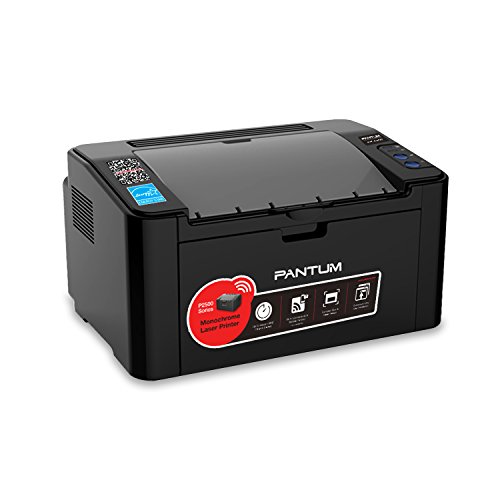
Meet the floor of sensible cheapness. The Pantum P2502W is a small mono laser with Wi-Fi that does one job — documents, in black, when asked — for the lowest entry cost in this guide. Its natural homes are specific: the spare room that hosts grandchildren twice a month, the student house where printing means coursework and the odd form, the second property, the elderly relative whose needs are letters and puzzles printed by visiting family. In those homes its limitations barely register and its virtues — toner that never dries, a footprint that fits a bookshelf, a price that does not need a family meeting — register daily.
Now the boundaries, stated plainly. Two-sided printing is a manual affair: print the odd pages, turn the stack, print the evens, and forgive yourself the first time the order comes out wrong. The paper tray is modest, matched to modest volumes. There is no scanner, no copier, no Ethernet socket, and colour belongs to some other machine’s biography. A busy family of five would find every one of those edges within a month, which is why this pick sits at the bottom of the ladder as a deliberate, honest rung rather than a recommendation for everyone.
Toner economics suit its station. Cartridges are sized and priced for light use, so a household printing a few dozen pages a month spends very little across a year. The trap is only in misassignment: give this printer a family’s full workload and its small tray and manual duplex turn cheap into tiresome. Give it the light workload it was built for and it may be the most satisfactory purchase on this page.
| Printing method | Laser, black only |
|---|---|
| Functions aboard | Print only |
| Connections offered | Wi-Fi and USB |
| Size character | Compact, shelf-friendly |
| Tray character | Small, for light monthly volumes |
| Two-sided work | Manual turning of the stack |
Strengths
- Cheapest honest entry into home toner printing
- Untroubled by the long idle gaps of occasional use
- Small enough for homes without a desk to spare
Trade-offs
- Manual duplex makes long documents a small ceremony
- No scanner for the signed-form return journey
- Busy families will outgrow its tray within weeks
Best for: light-duty homes, spare rooms, students and grandparents’ shelves Not suited for: a whole family’s daily paperwork or long two-sided documents
Check on Amazon for the little Pantum’s current listing.
There is a small social test every budget printer should pass: can a visiting relative use it without a tutorial? The Pantum mostly can — it appears on the network, accepts a job, prints it — and for the relative’s house or the spare room, that is the whole requirement. Where it fails the test is volume surprises: the relative who decides to print a forty-page travel itinerary, two-sided, discovers the manual flip halfway through. Hosts learn to steer big jobs to the main household machine, and small jobs to this one, and peace is kept.

Brother HL-L2460DW Wireless Monochrome Laser Printer — Best Home Laser for Most Households
If the Pantum is the floor, this Brother is the ground floor most families should actually live on. The HL-L2460DW prints at up to 34 pages per minute by Brother’s figures, turns pages over automatically for two-sided output, holds 250 sheets so the tray stops being a household topic, and connects by dual-band Wi-Fi, Ethernet or USB. Around a family kitchen table, those specifications translate into a simple experience: somebody sends a document, the document appears, nobody discusses the printer. That invisibility is the true product being bought.
Its fit for home rhythms is exact. School reading packets arrive two-sided and tidy instead of as a drift of single sheets. A parent’s work document prints at breakfast without waking the house — lasers are brief and businesslike in their noise. The manual feed slot takes the envelope for the birthday card, the label sheet for the parcel, the thicker card for the school project, each without disturbing the plain paper loaded for everyday life. And when the machine sits silent through a holiday fortnight, the first page back is as black and crisp as the last page before it, because toner does not keep a diary of neglect.
Its refusals are the same as any print-only mono machine: nothing scans, nothing copies, nothing colours. Households discover their position on scanning within the first month — phone camera apps genuinely cover the occasional form — and this guide’s next pick exists for the families who scan weekly. For the larger tribe whose paper flows one way, out of the printer and into school bags, envelopes and filing drawers, this is the budget laser to buy and then forget, which is the highest compliment a home appliance can earn.
| Printing method | Laser, black only |
|---|---|
| Functions aboard | Print only |
| Connections offered | Dual-band Wi-Fi, Ethernet, USB |
| Maker’s speed figure | Up to 34 ppm |
| Tray capacity | 250 sheets, plus manual feed slot |
| Two-sided work | Automatic |
Strengths
- Fast, two-sided and deep-trayed enough for real family volume
- Wired or wireless connection makes placement a free choice
- Toner indifference to idle weeks suits bursty home printing
Trade-offs
- Scanning and copying must happen somewhere else
- Colour schoolwork needs a plan B outside this box
- One special sheet at a time through the manual slot
Best for: most families printing documents, homework and admin in black and white Not suited for: homes that scan weekly or print colour materials regularly
Check on Amazon to see the HL-L2460DW’s present details.
Noise and manners deserve a mention in a home context. This Brother prints with the brief, purposeful sound of a machine doing a short job and then stopping — no prolonged whirring, no cleaning rituals audible through a wall. In flats and small houses where the printer shares air with a sleeping child or a working parent on a call, that brevity is a genuine household feature, and one reason laser owners rarely go back.

Brother MFC-L2820DW Wireless Monochrome Laser All-in-One — Best Budget-Stretch All-in-One for Home
The stretch pick asks a household one question: how often does paper need to travel back? If the answer is weekly — the signed permission slip, the scanned receipt for expenses, the copied ID for an application, the homework sheet a teacher wants returned digitally — then the MFC-L2820DW is not a luxury version of the HL above but the correct tool, because it carries the same fast mono engine, the same 250-sheet tray and automatic duplex, and adds a flatbed scanner, copier and fax in the same footprint family.
Home scanning has a texture that spec sheets miss. The originals are awkward: a passport, a child’s drawing too precious to feed through rollers, a crumpled till receipt, a page from a stapled booklet. A flatbed accepts all of them with a lift of the lid, and Brother’s app carries the result to a phone or computer without a cable dance. Copies, meanwhile, remain the unsung utility of family life — the form that must exist twice, the document a grandparent wants in hand. One machine on one shelf quietly covers the whole circuit of household paper, out and back.
The budget logic deserves care. This model costs more than its print-only sibling, and a household that scans twice a year is buying ballast. But a household that scans weekly and buys print-only will spend the difference in time, trips and workarounds within a season. Colour remains absent, as with every mono pick here; the colour question gets its own stretch pick at the end of this line-up, at a different level of commitment entirely.
| Printing method | Laser, black only |
|---|---|
| Functions aboard | Print, scan, copy, fax |
| Connections offered | Wi-Fi, Ethernet, USB |
| Maker’s speed figure | Up to 34 ppm |
| Tray capacity | 250 sheets, plus manual slot |
| Two-sided work | Automatic printing |
Strengths
- Completes the out-and-back circuit of family paperwork
- Flatbed scanning welcomes awkward, precious originals
- Same fast engine and tray as the print-only favourite
Trade-offs
- Costs more than households that rarely scan should spend
- Still no colour for school projects and party printing
- Takes more desk than a print-only box
Best for: families and home administrators whose forms return signed and scanned Not suited for: households whose paper only ever travels one way
Check on Amazon for the all-in-one Brother’s listing.
One more scenario belongs to this all-in-one: the year of administration. A house move, a probate, a benefits claim, a school transfer — life periodically generates a season in which every week brings forms that must be copied, signed, scanned and sent. Households in that season bless the flatbed daily. Households merely approaching it — and most can see it coming a year away — should let the MFC’s modest stretch price settle the question early.
Canon imageCLASS LBP122dw Wireless Monochrome Laser Printer — Best Compact Canon Alternative (Prose-Only)
Canon loyalists shopping this class will land on the imageCLASS LBP122dw, a compact wireless mono laser in Canon’s small-machine line, offering automatic two-sided printing in a tidy body aimed at homes and small desks. On paper it stands close to the Brother HL: same job, same colour — black — same promise of toner reliability through idle weeks. Households that know Canon’s menus, trust Canon’s build, or simply prefer its design language have a perfectly rational candidate here.
It is written about rather than linked because this batch’s verified pool contains no listing for it, and this guide links only what it has checked. If you pursue it, compare the lived details against the Brother: tray depth, first-page pace from sleep, the yield and availability of its toner cartridges, and how its wireless setup treats your particular router. Those four answers, not the badge, should settle a contest between two competent mono lasers.
Consider it the reminder that this category has no single anointed brand. The budget home laser is a solved problem sold by several makers; the differences that matter are the household details this guide keeps returning to — duplex, tray, toner, network manners — and any machine that answers them well will serve a family faithfully.
Strengths
- Compact Canon design with automatic two-sided printing
- Familiar territory for households already using Canon gear
- Same toner virtues: idle-proof, crisp, cheap per page
Trade-offs
- No verified listing in this batch, hence no purchase link
- Print-only, like the Brother it shadows
- Compare cartridge yields carefully before committing
Best for: Canon-preferring households wanting a compact mono laser Not suited for: readers who want every pick here to carry a checked link
Between the two prose-only compacts sits a genuine household dilemma worth airing. Brand familiarity is not a trivial thing in a home: the adult who sets up the printer will troubleshoot it at bad moments, and menus they already understand are worth real money in avoided frustration. If your household’s history is Canon, the LBP122dw’s familiarity may outweigh a rival’s slightly deeper tray. Budget shopping is still shopping for a tool a particular family must live with, and fit is a specification too.
HP LaserJet M110we Wireless Monochrome Laser Printer — Best Smallest-Footprint Pick (Prose-Only)
The M110we’s claim on a household is measured in centimetres. HP built this little mono laser for the spaces other printers cannot enter: the end of a kitchen counter, a hall shelf, the top of a filing cabinet in a flat where the desk is also the dining table. Wireless printing from phones and laptops, toner reliability, and a body that asks almost nothing of the room — for a single person or a couple with light needs, that combination can be the entire argument.
Smallness is bought with capacity, as always. The tray holds little, speeds are modest, and the machine expects a life of short jobs: a letter, a label, a form, a ticket. Feed it a family’s homework traffic and it will feel besieged; feed it one person’s occasional documents and it disappears into the furniture, which is exactly what its owners want from it. HP’s app-led setup will suit households already comfortable in that ecosystem.
Like the Canon above, it appears without a link because the verified pool for this batch does not include it. Judge it against the Pantum at the bottom of this guide: the Pantum carries the verified link and the entry price, the HP carries the smaller body and the familiar badge. Either can be the right small answer; the household’s shelf and habits should cast the deciding vote.
Strengths
- The smallest home in this conversation for a laser engine
- Wireless phone and laptop printing for light duties
- Toner patience through long quiet stretches
Trade-offs
- Tiny tray and modest pace cap its workload firmly
- No verified listing here, so research it on maker’s pages
- Print-only and mono, in the smallest possible package
Best for: small flats and light users where space is the scarcest resource Not suited for: family-volume printing or long documents
The little HP also makes a thoughtful gift machine — the printer adult children install at a parent’s house so that letters, puzzles and photos of documents can flow without a support visit for every page. Its smallness means it can live where the parent actually sits, and its wireless setup means the family tech department can configure it once and then mostly forget it exists. Gifts of infrastructure succeed when they demand nothing; judged that way, the M110we is better designed than many larger machines.

Brother MFC-L3780CDW Wireless Color Laser All-in-One — Best If the Home Budget Stretches to Color
Every budget guide needs one pick that tests the budget’s honesty, and this is it. The MFC-L3780CDW is a colour laser all-in-one — print, scan, copy, fax — whose feeder scans both sides of a sheet in a single pass and whose colour output covers the school project, the church newsletter, the small-business flyer and the colour-coded family calendar without a trip to a print shop. It costs more to buy and more to feed than everything above it, and for the right household it is still the correct purchase, because a need that recurs weekly should be owned, not rented trip by trip.
The discipline it asks in return is default settings. Set mono as the household standard, so the daily tide of forms and homework drafts spends black toner only, and let colour be chosen deliberately for the pages that earn it. Four cartridges punish carelessness and reward that one habit extravagantly. With it, a family gets colour’s genuine joys — the child’s project printed at 9 p.m. instead of panicked over at 7 a.m., the home business’s documents looking like a business — at a running cost the budget can absorb.
Be honest about the alternative diagnosis, though. Many households believe they need colour because one week in September demanded it; by October the colour cartridges are ageing capital. If your family’s colour printing would not fill a page in this paragraph’s list every single week, the mono picks above plus an occasional print-shop visit is the thriftier truth, and there is no shame in it — budget wisdom is mostly the art of not buying September’s emergency as a permanent appliance.
| Printing method | Laser, colour |
|---|---|
| Functions aboard | Print, scan, copy, fax |
| Feeder talent | Scans both faces in one pass |
| Connections offered | Dual-band Wi-Fi, Ethernet, USB |
| Tray capacity | 250 sheets plus manual slot |
| Two-sided work | Automatic |
Strengths
- Real colour for projects, newsletters and home business paper
- One-pass two-sided scanning is a genuine weekly time saver
- Replaces mono machine, scanner and colour trips in one body
Trade-offs
- Highest purchase and feeding costs in this guide
- Needs a mono default habit to stay a budget citizen
- Large and heavy for a home appliance shelf
Best for: households with weekly colour needs and the discipline to default to mono Not suited for: families whose colour demand is a September rumour
Check on Amazon to weigh the colour stretch against its live listing.
Before the table, one cost exercise every budget shopper should perform with a pencil. Write down the household’s honest monthly page estimate — most families land between fifty and two hundred — then look up each candidate’s standard and high-yield cartridge yields on its listing, and divide. The machine with the slightly higher shelf price frequently wins the three-year arithmetic by a distance, because toner, not hardware, is where home printing money actually goes. Five minutes of division has saved more household money than any sale event.
Comparison Table
| Pick | Scans? | Colour? | Duplex | Budget character |
|---|---|---|---|---|
| Pantum P2502W | No | No | Manual | The floor of sensible cheap |
| Brother HL-L2460DW | No | No | Automatic | The family ground floor |
| Brother MFC-L2820DW | Yes | No | Automatic | The paperwork stretch |
| Canon imageCLASS LBP122dw | No | No | Automatic | The compact Canon route |
| HP LaserJet M110we | No | No | Check spec | The centimetre-saving route |
| Brother MFC-L3780CDW | Yes | Yes | Automatic | The colour commitment |
Consider the school project that defines so many families’ colour anxiety, and look at it closely. The volcano poster, the family-tree chart, the book report cover — most are built on the computer, heavy with coloured backgrounds that drink ink, and printed once. A colour laser prints them respectably; a mono laser prints their text pages and leaves the single colour sheet to a shop or a friend’s machine; an inkjet prints them beautifully and then dries out waiting for the next one. There is no universal answer, only an honest count of how many such projects a year your household actually produces — and for most, the count is in single figures.
Energy deserves a line in the budget ledger too. A laser draws its power in short, purposeful bursts while printing and sips almost nothing asleep; it does not run cleaning cycles at 3 a.m. to keep itself alive. Over a year of bursty home use the difference is not enormous, but it points the same way as everything else in this guide: the laser’s economics suit a household that prints like weather — long calms, sudden storms.
Why a Laser Suits Home Printing Better Than Most Homes Expect?
Homes misjudge their own printing because the memorable jobs are the colourful ones. The photograph for the fridge, the child’s rainbow project — these stick in the mind, so households shop as if colour were the main event. The tally by the tray tells another story: month after month, the overwhelming majority of home pages are documents in black. Shopping for the memorable minority means paying colour prices, in money and in clogged-ink frustration, for the monochrome majority’s daily work.
There is also the matter of readiness. A home printer is an emergency service that happens to make pages: it is wanted at deadline moments, by tired people, with no warm-up patience available. A laser’s whole design — dry toner, instant fusing, sleep measured in pennies — is readiness engineering. An inkjet’s design assumes regular, affectionate use. Match the machine to the household’s true rhythm and the printer stops being a recurring family grievance, which is worth more than any feature comparison can express.
There is an emotional undercurrent to this purchase that deserves honesty. A home printer is often bought in the aftermath of a failure — the dead inkjet, the missed deadline, the form that could not be printed the night it mattered. Shopping angry leads to two errors: buying the very cheapest box in pure reaction, or buying a flagship in pure insurance. The middle of this guide — the two Brother mono machines — exists because it is where calm arithmetic and real household life meet. Take a breath, count last month’s paper, and buy for that household rather than for the bad evening.
Print-Only or All-in-One: The One Decision That Shapes a Home Laser Purchase?
Decide by counting return journeys. Take last month: how many times did a document need to be scanned, copied, or sent back into the digital world? Twice or less, and a print-only machine plus a phone scanning app will carry the house happily, saving money and shelf. Weekly or more, and the all-in-one stops being an upgrade and becomes the honest tool — the difference will repay itself in evenings not spent improvising workarounds.
Remember that this decision outlives the shopping mood. Households grow into paperwork: school years intensify, a home business starts, an elderly parent’s affairs need administering. If your household’s paperwork curve is visibly rising, buy the scanner now at budget-stretch prices rather than replacing a print-only machine in eighteen months at full price. If the curve is flat or falling — children leaving, admin simplifying — the print-only pick is the wise, cheaper citizen.
Height matters more than households expect. A printer at knee level gets kicked, dusted with floor grit and forgotten; a printer at waist height gets loaded properly and used gladly. If the all-in-one is chosen, its scanner lid needs opening room above it — measure before the shelf is declared perfect. And keep the machine out of the kitchen’s steam path and the bathroom’s humidity entirely; toner is dry powder and would like its neighbourhood dry as well.
Where Should a Home Laser Live, and How Should the Household Treat It?
Put it where paper already flows: near the household’s sorting place for post and school bags, on the main network, with its paper supply in the same cupboard and a pen within reach for the signing it enables. Printers exiled to spare rooms get used less and blamed more; printers installed at the crossroads become invisible utilities. Leave air around its vents, a surface that does not wobble, and clearance to lift a scanner lid if it has one.
Treatment is mostly two habits. Keep the tray genuinely full — a printer topped up to its line during a calm moment never announces emptiness during a crisis — and let the machine sleep rather than switching it off at the wall, so phones can wake it when a document ambush arrives at midnight.
These portraits share a moral: the right budget laser is the one matched to a counted workload, not an imagined one. Households consistently overestimate their colour needs and underestimate their scanning needs, because colour is vivid in memory and scanning is invisible until the week it is suddenly urgent. If you take one action from this entire guide before buying, take the tally: one week, one sheet of paper by the old printer, one mark per job and per scan. That sheet is worth more than any review, including this one.
The Home Laser Decision in Four Household Portraits
The student flat
Four tenants, four laptops, one shelf, and a printing life of essays, tenancy forms and return labels. Money is shared and therefore argued about; the Pantum or the little HP answers, with a house rule that whoever prints a novel replaces the paper. Volume is low, bursts are deadline-shaped, and toner patience is the whole ballgame.
The family with school-age children
Homework, permission slips, reading logs, the occasional project — plus two working parents’ documents layered on top. This household prints more than it thinks and scans more than it admits. The MFC all-in-one is its honest match, with the HL as the choice if the scanning tally is honestly counted and found small.
The home business and the paperwork-heavy household
Invoices, contracts, shipping labels, tax folders that breed in drawers. Here the printer is a business tool wearing home clothes, and its budget should be judged like one: the all-in-one’s scanner and the colour stretch pick both earn consideration, because an hour of the owner’s time costs more than the price difference being debated.
Grandparents deserve a portrait of their own in this decision, even though the original four portraits omitted them. A grandparent’s home prints in the smallest bursts of all — a letter, a puzzle, a document a family member emails over — and values simplicity above every specification. For that home the smallest, simplest machine, set up by family and left strictly alone, beats any feature list. When you shop for another household, shop for their hands and habits, not your own.
One more household type quietly thrives on the budget laser: the carer. Managing another person’s appointments, prescriptions, benefits and correspondence generates a steady drip of documents that must be printed, copied, signed and posted, often under time pressure and emotional load. For that household the all-in-one’s flatbed and the laser’s readiness are not conveniences but load-bearing kindnesses — the machine works the first time, every time, on the worst weeks. If your home carries care paperwork, weight reliability above every other line in this guide and buy the Brother all-in-one without a second thought.
Likewise the household that has just moved house. For about ninety days a new address turns printing into a contact sport: tenancy documents, utility forms, school enrolments, change-of-address confirmations, insurance schedules. Families in that season print more than in the following two years combined, and they do it from boxes, on floors, with the printer perched wherever it landed. A laser tolerates the chaos; it does not need level ground, daily affection or a settled desk. Buy before the move if you can, and let it be the first appliance that works properly in the new place.
Teaching the Household to Print Well: Small Habits, Large Savings
The two-sided reflex and the draft drawer
Set duplex as the default and drafts become the household’s normal paper economy: reading copies, homework attempts and internal documents all arrive two-sided, halving paper use without a single act of willpower. Keep a drawer of one-sided discards for notes and children’s drawing — a laser household generates its own scrap supply, and using it is thrift that feels like abundance.
Paper manners for children and guests
Teach the young printers three things: check the preview before sending, send once and wait, and tell an adult when the tray is empty rather than feeding it greeting cards. Guests need one thing — the printer’s name in the list — which a small label on the machine provides. Households run on these micro-manners far more than on machinery.
How to Set Up a Home Laser the Whole Household Can Use
Choose the home it will live in, not the desk it fits on
Walk the house with the box unopened and choose by traffic, not by the first flat surface. The right spot is reachable in slippers, near the paper and the pens, with a socket that is not already hosting a kettle’s ambitions.
Join the main network and print the proof page
Connect to the household’s everyday network — never the guest one — then print a test page from a phone and from a computer. Both must succeed before the box is recycled; setup problems found on day one are errands, while setup problems found in month two are mysteries.
Load it like you mean it
Fill the tray to its line with the household’s standard paper, fan the stack first, and set the paper guides snug. Half the world’s paper jams are born in a lazily loaded tray on installation day.
Teach the two household workflows
Show everyone the document workflow — phone or computer, preview, print — and, if the machine scans, the return workflow. Two demonstrations, ninety seconds each, and the household’s printing questions mostly answer themselves forever after.
Put toner on the household’s radar, not its calendar
Check the toner gauge when the machine first murmurs about it, and order the replacement then, not at the empty stage. A spare cartridge in the cupboard is the cheapest insurance a paperwork household can buy.
Create the household printing card
One card, kept at the machine: its name in the print list, where paper and toner live, what to do when it flashes a light. Babysitters, grandparents and housesitters all become competent printers when the card exists.
Set the calendar’s two printer dates
Twice a year: dust the vents, check for a firmware update, confirm the spare cartridge is still in the cupboard, and print something long just to hear it run. Ten minutes, twice a year, is the entire maintenance religion of a home laser.
Notice how few of the mistakes below are about the machines themselves. Budget home printing fails in the planning, the placing and the feeding far more often than in the engine. That is encouraging news: it means a modest machine, chosen against an honest tally of the household’s paper and installed with a little ceremony, will outperform an expensive machine bought on a guess. The list is short because the category is forgiving — get the handful of joins right and the rest is just printing.
Common Mistakes
Buying the cheapest machine for a whole household’s duty
The floor pick is honest machinery for light work; assigning it a family’s full traffic turns savings into friction within a month. Match the machine’s appetite to the household’s real volume, not its hoped-for volume.
Letting the printer live on the guest network
Guests can print and residents cannot — the exact opposite of a home. The printer belongs on the main network beside the phones and laptops that own it.
Assuming mono is a detail the household will not notice
If your children bring home colour homework weekly, they will notice, loudly, in September. Count the colour need honestly before choosing, not after.
Skipping the all-in-one to save money the household then spends in time
Weekly scanning improvised through phone apps and borrowed machines costs evenings. When the tally says weekly, the scanner is the budget choice, whatever the sticker claims.
Feeding premium habits to a budget machine — or starving it
Bargain paper that sheds dust, or heavy card forced through a light tray, will make any budget laser look unreliable. Feed it decent plain paper and its rated media, and it will return years of uneventful service.
A closing word about expectations. A budget laser will not make your household love paperwork; nothing can. What it removes is the printer’s contribution to paperwork misery — the dried cartridge before the deadline, the smudged page, the mysterious refusal. Households consistently describe the change in the same terms: printing stopped being an event. For a machine that costs what these cost, stopping being an event is a triumph worth buying deliberately.
Final Recommendation
For the typical family home, buy the Brother MFC-L2820DW if your paperwork travels back as scans — most family paperwork does — or the HL-L2460DW if it honestly does not, and let either become the house’s quiet document utility. The Pantum P2502W is the right answer for light-duty corners of life: spare rooms, student shelves, grandparents. Stretch to the colour MFC-L3780CDW only when weekly colour is a fact rather than a fear. Whichever arrives, install it at the household’s crossroads, fill its tray properly, default it to two-sided, and enjoy the peculiar luxury of a printer nobody talks about anymore.
Set it up once, fill it properly, teach the household in ninety seconds, and let it serve quietly and reliably for many good years to come, asking almost nothing in return beyond paper, power and the occasional cartridge at sensible intervals.
And if the household includes a teenager studying for major examinations, expect a temporary printing season of past papers and revision notes; a laser takes that season in its stride, and the family will remember its calm long after the results arrive.
Related Guides
Frequently Asked Questions
What is the best budget laser printer for a typical home?
For a typical home — documents and homework out, signed forms and receipts back — the Brother MFC-L2820DW covers the whole circuit at a budget-stretch price. Homes whose paper travels only outward can save with the HL-L2460DW, the same engine without the scanner. Typical is the operative word: count your own household’s scanning for a week before deciding which typical you are.
Do budget laser printers work with phones and Chromebooks?
Yes — the wireless picks here are built for exactly that mixed-device household. Phones print through their built-in print services, Chromebooks find network printers through their own settings, and no family member needs the one true computer to act as gatekeeper. Join the printer to the main network once and every device in the house can reach it.
How long does toner last in a home laser?
Longer than most households expect. A standard cartridge is rated in the low thousands of pages, and a family printing in bursts — dozens of pages in a busy week, none in a quiet one — commonly measures cartridge life in many months rather than weeks. High-yield cartridges stretch that further and lower the cost of each page; the starter cartridge in the box is smaller, so budget for the first full cartridge sooner than later.
Is a mono laser enough for a family with school-age kids?
For the great majority of school paper — worksheets, reading, forms, drafts — yes, and teachers design for the printers families actually own. The exceptions are colour-specific projects and the occasional photograph-based assignment. Households meeting those weekly should look at the colour stretch pick; households meeting them monthly can use a print shop for those pages and keep the mono economy all year.
Why not just buy a cheap inkjet instead?
Because cheap inkjets charge their real price later and at the worst moments: cartridges that dry during quiet weeks, cleaning cycles before urgent pages, running costs several times a laser’s per sheet. If the home prints photographs regularly an inkjet earns its place, but as the household’s document machine, a budget laser is cheaper to own and calmer to live with from the second month onward.
Can a budget home laser print envelopes and labels?
Yes, through the manual feed slot that most picks here provide: one envelope or label sheet at a time, fed straight to reduce curling and jams. Choose envelopes and labels rated for laser heat, load a single piece for a first test, and the machine will handle the household’s cards, parcels and post without complaint. It is a small ceremony, but an infrequent one.