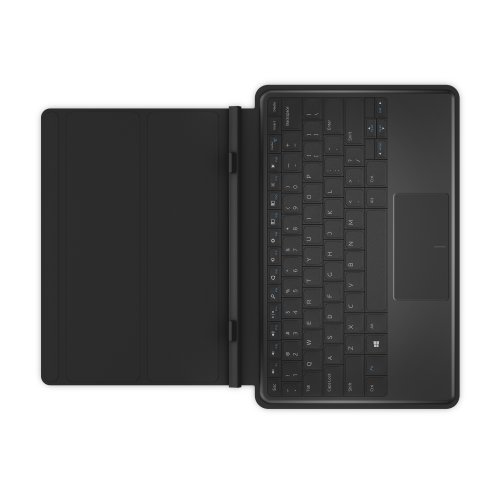
A portable keyboard turns an Android tablet into a real work machine, and this guide compares the best ones for the job. A tablet is great for reading and watching, but typing a long email, an essay, or a document on a glass screen is slow and tiring. A small Bluetooth keyboard fixes that: it pairs in seconds, it gives you real keys, and it folds or slips into a bag beside the tablet. The best portable keyboards are light, quiet, and comfortable enough to type on for an hour, with a battery that lasts for weeks. The keyboards in this guide cover the designs that work with an Android tablet. Slim keyboards like the Logitech Keys-to-Go and the Arteck are the lightest options: they slide into a bag and feel like a notebook cover. Foldable keyboards like the Samsers and the ProtoArc XK01 fold in half for travel and open to a full-size layout with a number pad. Multi-device keyboards like the Logitech K480 and the Pebble Keys 2 K380s switch between a tablet, a phone, and a computer, which suits buyers who type on more than one device. The OMOTON adds a backlight for typing in dim light. This guide compares seven portable keyboards for Android tablets, all Bluetooth, all rechargeable or battery powered, and all checked against their current Amazon listings. Each one below is a complete keyboard — keys, battery, and Bluetooth included — not a tablet case, a mouse, or a keyboard cover. Read the comparison table for a fast overview, then dig into the individual sections for the strengths and trade-offs that matter for your tablet, your bag, and the way you type. One practical note before the list: check that the keyboard layout matches the language you type in, and check the key size. A very small keyboard saves space but it is tiring for long typing, while a full-size foldable keyboard is comfortable but heavier. Pair the keyboard with your tablet before your first trip, so you know it connects cleanly.
In this guide
Quick picks: best portable keyboards for android tablet
| # | Product | Where to buy |
|---|---|---|
| 1 | OMOTON Bluetooth Tablet Keyboard Rechargeable with Backlit, Oversize Keycap | Check on Amazon |
| 2 | Logitech Keys-to-Go Bluetooth Keyboard for Windows and Android, Graphite | Check on Amazon |
| 3 | Arteck Compact Wireless Bluetooth Keyboard for iPad Tablet iPhone PC Black | Check on Amazon |
| 4 | Samsers Foldable Bluetooth Keyboard with Touchpad, Ultra Slim Compact, Black | Check on Amazon |
| 5 | ProtoArc XK01 Full-Size Foldable Bluetooth Keyboard for Travel, Black | Check on Amazon |
| 6 | Logitech K480 Wireless Multi-Device Keyboard for Windows, macOS, iPadOS, Android or Chrome OS, Bluetooth, Compact | Check on Amazon |
| 7 | Logitech Pebble Keys 2 K380s Wireless Bluetooth Keyboard, Tonal Graphite | Check on Amazon |
Quick comparison
| Product | Key traits |
|---|---|
| OMOTON Bluetooth Tablet Keyboard Rechargeable with Backlit, Oversize Keycap | Backlit, rechargeable, oversize keycaps, ultra-slim |
| Logitech Keys-to-Go Bluetooth Keyboard for Windows and Android, Graphite | Portable, built-in cover, Windows and Android |
| Arteck Compact Wireless Bluetooth Keyboard for iPad Tablet iPhone PC Black | Compact, wireless, rechargeable, multi-device |
| Samsers Foldable Bluetooth Keyboard with Touchpad, Ultra Slim Compact, Black | Foldable, touchpad, ultra slim, phone holder |
| ProtoArc XK01 Full-Size Foldable Bluetooth Keyboard for Travel, Black | Foldable, full-size, 105 keys, number pad |
| Logitech K480 Wireless Multi-Device Keyboard for Windows, macOS, iPadOS, Android or Chrome OS, Bluetooth, Compact | Multi-device, Bluetooth, compact, device dial |
| Logitech Pebble Keys 2 K380s Wireless Bluetooth Keyboard, Tonal Graphite | Slim, portable, compact, multi-device, quiet keys |

1. OMOTON Bluetooth Tablet Keyboard Rechargeable with Backlit, Oversize Keycap
What stands out
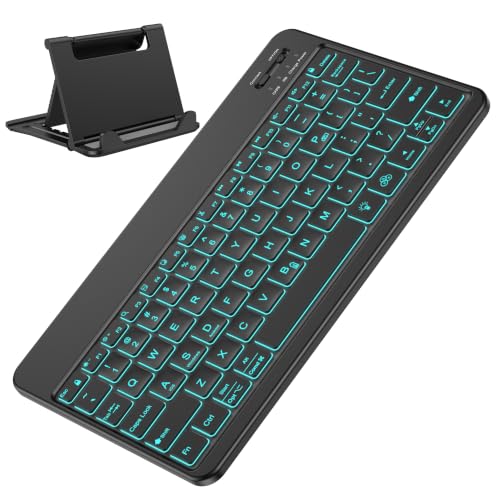
The OMOTON Bluetooth tablet keyboard is the best all-round portable keyboard on this list, and its backlight is the reason. It is a rechargeable, ultra-slim wireless keyboard with oversize keycaps and a backlight, built for Samsung tablets and other Android tablets. The larger keycaps make it more comfortable to type on than most slim keyboards, and the backlight lets you type in a dim room, on a night flight, or in a dark lecture hall. It pairs over Bluetooth and the battery lasts for weeks of normal use.
Trade-offs to weigh
The trade-offs are size and features. The OMOTON is a slim keyboard rather than a foldable one, so it does not pack down as small as the Samsers or the ProtoArc. It has no touchpad, so you still need the tablet screen or a mouse for pointing, and it has no multi-device switch for jumping between a tablet and a phone. Buyers who want the smallest packed size should choose a foldable keyboard; buyers who want the most comfortable slim keyboard should take the OMOTON.
Who it fits best
Best for Android tablet owners who want a comfortable backlit keyboard for typing anywhere, especially students and travellers.
In daily use
In everyday use, the OMOTON Bluetooth Tablet Keyboard Rechargeable with Backlit, Oversize Keycap settles into a routine quickly. Set it up once, the way you like it, and give yourself a few days to adjust before judging it. The first session is about learning the layout and the feel; the second and third are where it starts to feel natural. Keep it clean, keep it in the conditions it was designed for, and it will stay consistent. If it has parts that wear — cables, surfaces, moving components — a quick check now and then keeps small issues from becoming real ones, and keeping the packaging and documentation for the first weeks makes any return or exchange far simpler. Pay attention to the small details in the first week, like how it feels after an hour of use and whether anything needs adjusting, because those early impressions usually predict how happy you will be with it in six months.
Before you buy
Before buying the OMOTON Bluetooth Tablet Keyboard Rechargeable with Backlit, Oversize Keycap, check two practical things. First, measure and compare: check the dimensions, the capacity, and the compatibility details listed on the product page against what you already own and the space you have. A product that does not fit your setup will never feel right, whatever its specifications say. Second, think about your routine — where it will live, how it will be stored, and what it needs to connect to. None of this is difficult, but all of it is easier to plan before the product arrives than after. Finally, check the reviews for long-term reports rather than first impressions, because a product that still earns praise after six months is a safer buy than one that only impresses on the first day.
Check price on Amazon: OMOTON Bluetooth Tablet Keyboard Rechargeable with Backlit, Oversize Keycap

2. Logitech Keys-to-Go Bluetooth Keyboard for Windows and Android, Graphite
What stands out
The Logitech Keys-to-Go is the lightest keyboard on this list, and its portability is the reason. It is a portable Bluetooth keyboard for Windows and Android with a built-in cover, designed to slide into a bag beside a tablet like a notebook. The keys are sealed against spills and crumbs, which matters for a keyboard that lives in a bag, and the battery lasts for months. For buyers who want the thinnest, lightest keyboard that still types well, the Keys-to-Go is the benchmark.
Trade-offs to weigh
The trade-offs are key feel and features. The Keys-to-Go has a flat, sealed key design, which is easy to clean but feels different from a normal keyboard — some typists love it and some do not. It has no backlight and no touchpad, and the keys are smaller than a full-size keyboard. Buyers who type for hours should try a foldable full-size keyboard like the ProtoArc instead; buyers who want the lightest bag should take the Keys-to-Go.
Who it fits best
Best for travellers who want the lightest, most spill-resistant keyboard for an Android tablet.
In daily use
Day to day, the Logitech Keys-to-Go Bluetooth Keyboard for Windows and Android, Graphite is the kind of product you stop thinking about, which is the highest praise it can earn. It does its job the same way every time, without quirks or surprises, and lets you focus on the work or the game instead of the hardware. That consistency matters more than any single feature. Treat it reasonably — a clean desk, a suitable surface, and storage that protects it when it is not in use — and it will keep that consistency for a long time. The best products are the ones that fade into the background. If you use it in different places, try it in each one during the first week, because a product that works well on a desk can feel different in a bag, in a car, or in a shared room.
Before you buy
A few checks before you order the Logitech Keys-to-Go Bluetooth Keyboard for Windows and Android, Graphite will save disappointment. Confirm the key details on the listing match what you expect — the exact model name, the included accessories, and the variant — since similar-looking models can differ in important ways. Check the return policy and the warranty terms so you know your options if it arrives damaged or does not suit you. And if you are replacing something you already own, compare the new product with the old one on the points that mattered most, rather than on headline features you may never use. Also check what is not included in the box, like cables, mounts, or adapters, since those extras can add cost and delay if you need to order them separately after the product arrives.
Check price on Amazon: Logitech Keys-to-Go Bluetooth Keyboard for Windows and Android, Graphite

3. Arteck Compact Wireless Bluetooth Keyboard for iPad Tablet iPhone PC Black
What stands out
The Arteck compact wireless Bluetooth keyboard is the value pick in this list, and its simplicity is the reason. It is a compact, rechargeable wireless keyboard that works with tablets, phones, and computers over Bluetooth, and it does the essentials well: comfortable keys, a slim body, and a battery that lasts for weeks. It is light enough to carry every day, and it costs less than the Logitech models. For buyers who want a straightforward portable keyboard without paying for a brand name, the Arteck is the safe choice.
Trade-offs to weigh
The trade-offs are features and key size. The Arteck has no backlight, no touchpad, and no multi-device switch, so it is a single-purpose keyboard for one device at a time. The keys are compact, which saves space but is less comfortable than the OMOTON oversize keycaps for long typing. Buyers who want a backlight should take the OMOTON; buyers who want the cheapest reliable portable keyboard should take the Arteck.
Who it fits best
Best for budget buyers who want a simple, reliable Bluetooth keyboard for an Android tablet.
In daily use
Over a full week of use, the Arteck Compact Wireless Bluetooth Keyboard for iPad Tablet iPhone PC Black shows its character in small ways. The feel stays the same from the first day to the last, nothing loosens or rattles, and the finish holds up to regular handling. If you switch between tasks, you will appreciate that it does not need a different setup for each one: configure it once for the way you actually use it and leave it alone. If you share the space with work or family, the same product should handle those jobs without feeling out of place, which is a useful bonus for a single-product setup. Notice how it handles the edges of its job too, not just the middle: the first and last minutes of a session, the switch between tasks, and the moment you put it away all tell you more than the headline features do.
Before you buy
When the Arteck Compact Wireless Bluetooth Keyboard for iPad Tablet iPhone PC Black arrives, spend a little time setting it up properly. Follow the included instructions, check that everything listed as included is actually in the box, and test the main functions within the first day or two. Then leave the settings alone for a week. Constant tweaking is the enemy of getting used to a product, and most people get better results from a stable setup than from a perfect one. If something feels wrong after a few days, change one thing at a time so you know what actually helped. Write down the settings that work best for you once you find them, so you can return to them quickly if the product is ever reset or if you need to set up a second one the same way.
Check price on Amazon: Arteck Compact Wireless Bluetooth Keyboard for iPad Tablet iPhone PC Black

4. Samsers Foldable Bluetooth Keyboard with Touchpad, Ultra Slim Compact, Black
What stands out
The Samsers foldable Bluetooth keyboard with touchpad is the most versatile travel keyboard on this list, and its touchpad is the reason. It folds in half for travel and opens to a full-size layout with a multi-touch trackpad, so you can type and point without touching the tablet screen. The phone holder props up a phone or a small tablet for reading while you type. For travellers who want a complete laptop-like setup in a package that fits in a jacket pocket, the Samsers is the most capable design here.
Trade-offs to weigh
The trade-offs are the hinge and the weight. A foldable keyboard has a hinge in the middle, and the keys on either side of the fold feel slightly different from a normal keyboard. It is also heavier than a slim keyboard like the Keys-to-Go, and the touchpad is small compared with a laptop trackpad. Buyers who want the lightest keyboard should take a slim model; buyers who want a touchpad and a full-size layout in a folding package should take the Samsers.
Who it fits best
Best for travellers who want a folding keyboard with a touchpad, especially for working from a tablet on the move.
In daily use
In everyday use, the Samsers Foldable Bluetooth Keyboard with Touchpad, Ultra Slim Compact, Black settles into a routine quickly. Set it up once, the way you like it, and give yourself a few days to adjust before judging it. The first session is about learning the layout and the feel; the second and third are where it starts to feel natural. Keep it clean, keep it in the conditions it was designed for, and it will stay consistent. If it has parts that wear — cables, surfaces, moving components — a quick check now and then keeps small issues from becoming real ones, and keeping the packaging and documentation for the first weeks makes any return or exchange far simpler. Pay attention to the small details in the first week, like how it feels after an hour of use and whether anything needs adjusting, because those early impressions usually predict how happy you will be with it in six months.
Before you buy
Before buying the Samsers Foldable Bluetooth Keyboard with Touchpad, Ultra Slim Compact, Black, check two practical things. First, measure and compare: check the dimensions, the capacity, and the compatibility details listed on the product page against what you already own and the space you have. A product that does not fit your setup will never feel right, whatever its specifications say. Second, think about your routine — where it will live, how it will be stored, and what it needs to connect to. None of this is difficult, but all of it is easier to plan before the product arrives than after. Finally, check the reviews for long-term reports rather than first impressions, because a product that still earns praise after six months is a safer buy than one that only impresses on the first day.
Check price on Amazon: Samsers Foldable Bluetooth Keyboard with Touchpad, Ultra Slim Compact, Black

5. ProtoArc XK01 Full-Size Foldable Bluetooth Keyboard for Travel, Black
What stands out
The ProtoArc XK01 is the full-size pick in this list, and its number pad is the reason. It is a full-size foldable Bluetooth keyboard for travel with 105 keys, a number pad, and oversize 0.65-inch keycaps, which makes it the most comfortable keyboard here for long typing and for numbers work. It folds for travel and connects to three devices over Bluetooth, so it switches between a tablet, a phone, and a computer. For buyers who type a lot and want a real keyboard feel in a portable package, the XK01 is the best choice.
Trade-offs to weigh
The trade-offs are size and weight. A full-size foldable keyboard is bigger and heavier than a slim keyboard, even when folded, and it needs a proper bag. The number pad is useful for spreadsheets and data entry, but it adds width that some buyers do not need. Buyers who want the smallest keyboard should take the Keys-to-Go; buyers who type for hours and use numbers should take the ProtoArc.
Who it fits best
Best for heavy typists who want a full-size keyboard with a number pad that still folds for travel.
In daily use
Day to day, the ProtoArc XK01 Full-Size Foldable Bluetooth Keyboard for Travel, Black is the kind of product you stop thinking about, which is the highest praise it can earn. It does its job the same way every time, without quirks or surprises, and lets you focus on the work or the game instead of the hardware. That consistency matters more than any single feature. Treat it reasonably — a clean desk, a suitable surface, and storage that protects it when it is not in use — and it will keep that consistency for a long time. The best products are the ones that fade into the background. If you use it in different places, try it in each one during the first week, because a product that works well on a desk can feel different in a bag, in a car, or in a shared room.
Before you buy
A few checks before you order the ProtoArc XK01 Full-Size Foldable Bluetooth Keyboard for Travel, Black will save disappointment. Confirm the key details on the listing match what you expect — the exact model name, the included accessories, and the variant — since similar-looking models can differ in important ways. Check the return policy and the warranty terms so you know your options if it arrives damaged or does not suit you. And if you are replacing something you already own, compare the new product with the old one on the points that mattered most, rather than on headline features you may never use. Also check what is not included in the box, like cables, mounts, or adapters, since those extras can add cost and delay if you need to order them separately after the product arrives.
Check price on Amazon: ProtoArc XK01 Full-Size Foldable Bluetooth Keyboard for Travel, Black

6. Logitech K480 Wireless Multi-Device Keyboard for Windows, macOS, iPadOS, Android or Chrome OS, Bluetooth, Compact
What stands out
The Logitech K480 is the multi-device pick in this list, and its device dial is the reason. It is a wireless multi-device keyboard that connects over Bluetooth to Windows, macOS, iPadOS, Android, and Chrome OS, and the dial on the left switches between three paired devices. It has a built-in cradle that holds a tablet or a phone upright while you type, so your screen is at eye level. For buyers who type on a tablet, a phone, and a computer in the same day, the K480 is the most practical keyboard here.
Trade-offs to weigh
The trade-offs are size and portability. The K480 is a compact desktop-style keyboard rather than a travel keyboard: it is thicker and heavier than the slim models, and it does not fold. The keys are round and compact, which some typists like and some do not. Buyers who travel light should take the Keys-to-Go; buyers who work at a desk with several devices should take the K480.
Who it fits best
Best for buyers who type on a tablet, a phone, and a computer and want one keyboard that switches between them.
In daily use
Over a full week of use, the Logitech K480 Wireless Multi-Device Keyboard for Windows, macOS, iPadOS, Android or Chrome OS, Bluetooth, Compact shows its character in small ways. The feel stays the same from the first day to the last, nothing loosens or rattles, and the finish holds up to regular handling. If you switch between tasks, you will appreciate that it does not need a different setup for each one: configure it once for the way you actually use it and leave it alone. If you share the space with work or family, the same product should handle those jobs without feeling out of place, which is a useful bonus for a single-product setup. Notice how it handles the edges of its job too, not just the middle: the first and last minutes of a session, the switch between tasks, and the moment you put it away all tell you more than the headline features do.
Before you buy
When the Logitech K480 Wireless Multi-Device Keyboard for Windows, macOS, iPadOS, Android or Chrome OS, Bluetooth, Compact arrives, spend a little time setting it up properly. Follow the included instructions, check that everything listed as included is actually in the box, and test the main functions within the first day or two. Then leave the settings alone for a week. Constant tweaking is the enemy of getting used to a product, and most people get better results from a stable setup than from a perfect one. If something feels wrong after a few days, change one thing at a time so you know what actually helped. Write down the settings that work best for you once you find them, so you can return to them quickly if the product is ever reset or if you need to set up a second one the same way.

7. Logitech Pebble Keys 2 K380s Wireless Bluetooth Keyboard, Tonal Graphite
What stands out
The Logitech Pebble Keys 2 K380s is the quietest keyboard on this list, and its design is the reason. It is a slim, portable, compact Bluetooth keyboard with quiet keys and a tonal graphite finish that looks good on a desk or in a bag. It connects to several devices, it is light enough to carry every day, and the keys are comfortable for long typing without the click of a mechanical keyboard. For buyers who type in a library, a shared office, or a quiet room, the K380s is the most considerate choice.
Trade-offs to weigh
The trade-offs are features and layout. The K380s has no backlight, no touchpad, and no number pad, so it is a pure typing keyboard rather than a complete workstation. The keys are compact, and the layout is minimal. Buyers who want a backlight should take the OMOTON; buyers who want a quiet, good-looking portable keyboard should take the K380s.
Who it fits best
Best for students and office workers who want a quiet, slim Bluetooth keyboard for an Android tablet.
In daily use
In everyday use, the Logitech Pebble Keys 2 K380s Wireless Bluetooth Keyboard, Tonal Graphite settles into a routine quickly. Set it up once, the way you like it, and give yourself a few days to adjust before judging it. The first session is about learning the layout and the feel; the second and third are where it starts to feel natural. Keep it clean, keep it in the conditions it was designed for, and it will stay consistent. If it has parts that wear — cables, surfaces, moving components — a quick check now and then keeps small issues from becoming real ones, and keeping the packaging and documentation for the first weeks makes any return or exchange far simpler. Pay attention to the small details in the first week, like how it feels after an hour of use and whether anything needs adjusting, because those early impressions usually predict how happy you will be with it in six months.
Before you buy
Before buying the Logitech Pebble Keys 2 K380s Wireless Bluetooth Keyboard, Tonal Graphite, check two practical things. First, measure and compare: check the dimensions, the capacity, and the compatibility details listed on the product page against what you already own and the space you have. A product that does not fit your setup will never feel right, whatever its specifications say. Second, think about your routine — where it will live, how it will be stored, and what it needs to connect to. None of this is difficult, but all of it is easier to plan before the product arrives than after. Finally, check the reviews for long-term reports rather than first impressions, because a product that still earns praise after six months is a safer buy than one that only impresses on the first day.
Check price on Amazon: Logitech Pebble Keys 2 K380s Wireless Bluetooth Keyboard, Tonal Graphite
Buying guide
Bluetooth pairing: connect before you travel
Every keyboard here connects over Bluetooth, and pairing takes seconds: turn on the keyboard, open the Bluetooth settings on your tablet, and select the keyboard. Pair it at home before your first trip, so you know it connects cleanly and the layout is right. If the keyboard supports several devices, pair each one and learn the switch key. A keyboard that is already paired is a keyboard you can use the moment you sit down.
Key size and layout: comfort matters more than looks
A portable keyboard saves space by shrinking the keys, and the smallest keyboards are tiring for long typing. Oversize keycaps, as on the OMOTON, and full-size layouts, as on the ProtoArc, are more comfortable for hours of work. Check the layout matches the language you type in, and check that the keys you use most — enter, shift, and backspace — are where your fingers expect them. A keyboard that fights your fingers is a keyboard you will stop using.
Foldable or slim: choose by how you travel
A slim keyboard like the Keys-to-Go slides into a bag and weighs almost nothing, which suits daily carry. A foldable keyboard like the Samsers or the ProtoArc packs smaller but weighs more, and it opens to a fuller layout for longer typing. If you travel light every day, take a slim keyboard. If you travel less often but type for hours when you do, take a foldable one.
Backlight: worth it for dim rooms
A backlit keyboard lets you type in a dark room, on a night flight, or in a dim lecture hall, and it is the feature buyers miss most when they do not have it. The OMOTON is the only backlit keyboard in this guide, and it is the pick for anyone who types in low light. If you always type in a bright room, a backlight matters less — save the money and take a simpler keyboard.
Battery: rechargeable or replaceable
Most portable keyboards here are rechargeable over USB, and the battery lasts for weeks or months of normal use. A few use replaceable batteries, which last longer between changes but need a spare battery when they run out. Rechargeable is more convenient for daily use; replaceable is simpler for a keyboard you use rarely. Either way, charge or check the battery before a trip, not during it.
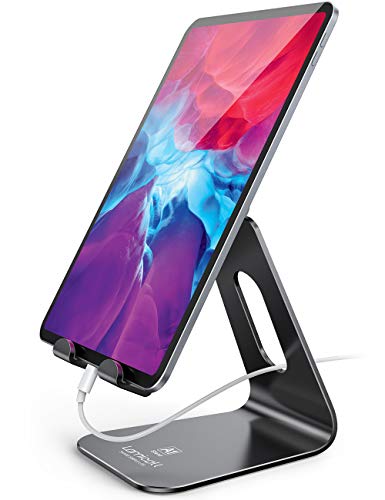
Tablet stand: hold the screen at eye level
A keyboard is only half the setup — the tablet needs to stand at eye level, or your neck will ache. The Logitech K480 has a built-in cradle for a tablet or phone. For other keyboards, buy a small folding tablet stand, or prop the tablet against a book. A screen at eye level and a keyboard at hand level is the setup that lets you type for an hour without strain.
Frequently asked questions
What is the best portable keyboard for an Android tablet?
For most buyers, the OMOTON Bluetooth tablet keyboard is the best all-round choice: backlit, rechargeable, and comfortable with oversize keycaps. Travellers who want the lightest keyboard should choose the Logitech Keys-to-Go, and heavy typists should choose the ProtoArc XK01.
Do Bluetooth keyboards work with Android tablets?
Yes. Every keyboard in this guide connects to an Android tablet over Bluetooth, and pairing takes seconds in the tablet Bluetooth settings. Check that the keyboard layout matches your language, and pair it at home before your first trip.
Is a foldable keyboard good for typing?
Yes, for travel. Foldable keyboards like the Samsers and the ProtoArc open to a full-size layout that types well, and they fold in half for carrying. The hinge in the middle feels slightly different from a normal keyboard, but most typists adjust within a day.
What is the difference between the Logitech K480 and the K380s?
The K480 has a device dial and a built-in cradle for a tablet or phone, which suits a desk with several devices. The K380s is slimmer, lighter, and quieter, which suits carrying in a bag. Both switch between devices over Bluetooth.
Do I need a backlit keyboard for a tablet?
You need one if you type in dim light — a dark room, a night flight, or a lecture hall. The OMOTON is the backlit pick in this guide. If you always type in a bright room, a simpler keyboard without a backlight costs less and lasts longer per charge.
Can one keyboard work with a tablet and a phone?
Yes. Multi-device keyboards like the Logitech K480, the Pebble Keys 2 K380s, and the ProtoArc XK01 pair with several devices and switch between them with a key or a dial, so one keyboard covers a tablet, a phone, and a computer.
Conclusion
The best portable keyboard for an Android tablet is the one that matches how you type and how you travel. The OMOTON is the best all-round pick with its backlight and oversize keycaps, the Logitech Keys-to-Go is the lightest pick for daily carry, and the Arteck is the budget pick for simple typing. The Samsers is the most versatile travel keyboard with its touchpad, the ProtoArc XK01 is the pick for heavy typists who want a full-size layout and a number pad, the Logitech K480 is the pick for a desk with several devices, and the Pebble Keys 2 K380s is the quietest pick for libraries and shared rooms. Pair the keyboard at home, check the layout, and buy the one you will actually carry with your tablet.