The best keyboards for Dell tablet owners are harder to find than keyboards for an iPad, because Dell's tablets span several generations and several keyboard designs: the Venue 11 Pro has its own slim and mobile keyboards, the Latitude detachables use pogo-pin travel keyboards, and the Venue 10 Pro has its own slim Bluetooth options. Buy the wrong one and it will not fit, will not connect, or will not charge. This guide compares the exact keyboards made for Dell tablets, plus two universal Bluetooth keyboards that work with any Dell tablet, so you can match the keyboard to the tablet you actually own.
The first step is to check which Dell tablet you have. The model name is usually printed on the back or shown in the settings, and it matters more than anything else here: a Venue 11 Pro keyboard does not fit a Venue 10 Pro, and a Latitude 7320 detachable keyboard does not fit a Latitude 7210. The three Dell Venue 11 Pro keyboards in this guide even have different part numbers, 2K3H1, 5J36C and 1YP0V, and they are listed separately so you can match the part number to your tablet. Universal keyboards are the safe fallback when the exact model is unclear, because they connect by Bluetooth and fit any tablet with a stand or a case.
It is also worth understanding why Dell tablet keyboards are so confusing. Dell sold tablets across several generations, from the Venue 8 and Venue 10 and Venue 11 Pro to the Latitude detachables, and each generation had its own keyboard designs, its own connectors and its own part numbers. Some keyboards attach through pogo pins, some through a dock, and some connect by Bluetooth. That variety is the reason this guide exists: the wrong keyboard is a common and expensive mistake, and the right keyboard is a matter of matching model names and part numbers rather than guessing from a photo.
In this guide
Quick picks: best keyboards for dell tablet
| # | Product | Where to buy |
|---|---|---|
| 1 | Dell Slim Tablet Keyboard for Venue 11 Pro (2K3H1) | Check on Amazon |
| 2 | Dell Mobile Tablet Keyboard for Venue 11 Pro (5J36C) | Check on Amazon |
| 3 | Dell Slim Keyboard for Venue 11 Pro (1YP0V) | Check on Amazon |
| 4 | Dell Latitude 7320 Detachable Travel Keyboard | Check on Amazon |
| 5 | Dell Latitude 2-in-1 Travel Keyboard | Check on Amazon |
| 6 | Arteck Universal Backlit Wireless Bluetooth Keyboard | Check on Amazon |
| 7 | BoxWave SlimKeys Bluetooth Keyboard for Dell Venue 10 Pro | Check on Amazon |
| 8 | Logitech Keys-to-Go Bluetooth Keyboard | Check on Amazon |
How the picks were chosen
The picks were chosen from current Dell tablet keyboard listings, with three hard filters. First, the keyboard must be made for a Dell tablet or be a universal Bluetooth keyboard that works with tablets, which rules out laptop keyboards, desktop keyboards and keyboard covers that appeared in the search results. Second, the listing must name the exact model or part number, so buyers can match it to their tablet before ordering. Third, generic no-name docks and keyboard skins were excluded, because a keyboard that does not fit or does not connect is worse than no keyboard at all.
Within those filters the guide favours exact matches first: three Venue 11 Pro keyboards with different part numbers, two Latitude detachable travel keyboards, one universal backlit Bluetooth keyboard, and one slim Bluetooth keyboard made for the Venue 10 Pro. That covers the Dell tablets most people actually own, with a universal option for everyone else. Fit, connection type and typing feel were weighed more heavily than extra features, because a tablet keyboard that does not fit is useless.
Availability was also considered, because Dell tablet keyboards are older products and some are only available as older stock. This guide lists keyboards that are currently listed and orderable, and it says plainly where a model is older stock so buyers can check the condition before ordering. A keyboard that cannot be ordered is no help to anyone, however perfect the fit, so every pick here is a live listing with a stated model or part number.
Quick comparison
| Product | Standout detail |
|---|---|
| Dell Slim Tablet Keyboard for Venue 11 Pro (2K3H1) | Slim keyboard, Venue 11 Pro, part 2K3H1 |
| Dell Mobile Tablet Keyboard for Venue 11 Pro (5J36C) | Mobile keyboard, Venue 11 Pro, part 5J36C |
| Dell Slim Keyboard for Venue 11 Pro (1YP0V) | Slim keyboard, Venue 11 Pro, part 1YP0V |
| Dell Latitude 7320 Detachable Travel Keyboard | Detachable travel keyboard, Latitude 7320, pogo pin |
| Dell Latitude 2-in-1 Travel Keyboard | Travel keyboard, Latitude 2-in-1 |
| Arteck Universal Backlit Wireless Bluetooth Keyboard | Universal backlit Bluetooth keyboard, tablets and PC |
| BoxWave SlimKeys Bluetooth Keyboard for Dell Venue 10 Pro | SlimKeys Bluetooth keyboard, Venue 10 Pro |
| Logitech Keys-to-Go Bluetooth Keyboard | Portable Bluetooth keyboard, built-in cover, graphite |
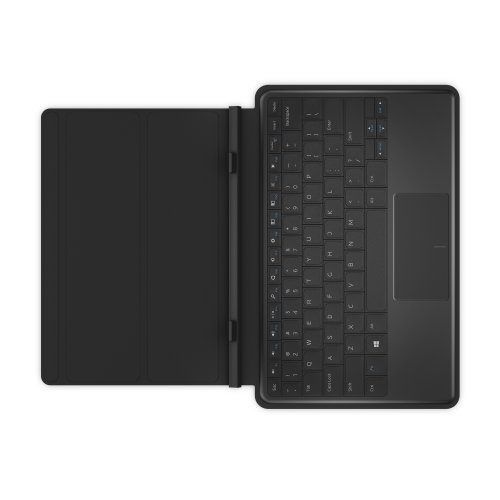
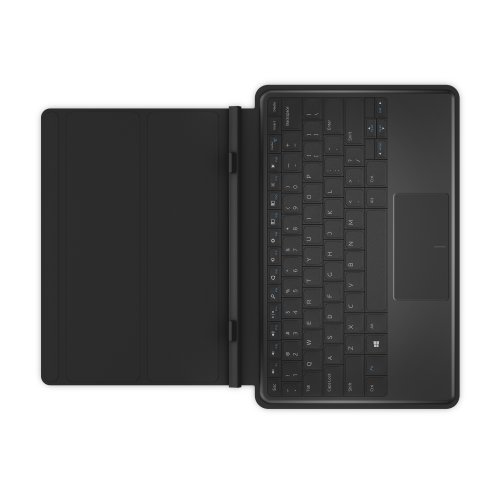
1. Dell Slim Tablet Keyboard for Venue 11 Pro (2K3H1)
Key specs
Dell tablet keyboard, slim, for the Venue 11 Pro, part number 2K3H1. The slim keyboard made specifically for the Venue 11 Pro.
Strengths
- Made for the Venue 11 Pro, so the fit and the connector match the tablet exactly.
- Slim design keeps the tablet and keyboard portable together.
- Dell part number 2K3H1 lets you confirm the match before ordering.
Trade-offs
- Only fits the Venue 11 Pro, so it is useless for any other tablet.
- Slim keys have short travel, which some typists find less comfortable.
- Older model, so check the listing condition and availability before ordering.
Who it fits
Venue 11 Pro owners who want the exact slim keyboard made for their tablet.
Best for: Venue 11 Pro users who want a guaranteed fit.
Not suited for: anyone with a different Dell tablet or a non-Dell tablet.
In daily use
In daily use, the 2K3H1 slim keyboard turns the Venue 11 Pro into a small laptop. It attaches to the tablet, adds a real keyboard with proper keys, and keeps the whole package slim enough for a bag. The fit is exact because it was made for this tablet, with no wobble and no adapter needed. Check the part number on your tablet or its documentation before ordering, because the Venue 11 Pro had several keyboards, and this is the slim one. Keep the connector clean, and the keyboard will work every time you attach it.
Worth knowing: the 2K3H1 is the slim keyboard, and slim is the point. It adds a real keyboard to the Venue 11 Pro without turning the tablet into a laptop-sized package, which matters when the tablet travels in a small bag. The fit is exact because Dell made it for this tablet, so there is no wobble, no adapter and no pairing step. Confirm the part number before ordering, because the Venue 11 Pro had several keyboards, and the part number is the only reliable way to tell them apart.
Check price on Amazon: Dell Slim Tablet Keyboard for Venue 11 Pro (2K3H1)

2. Dell Mobile Tablet Keyboard for Venue 11 Pro (5J36C)
Key specs
Dell tablet keyboard, mobile, for the Venue 11 Pro, part number 5J36C. The mobile keyboard for the Venue 11 Pro, with a built-in battery.
Strengths
- Made for the Venue 11 Pro, with a mobile design for use away from a desk.
- Built-in battery powers the keyboard, so it works away from the tablet's power.
- Part number 5J36C confirms the exact match for the Venue 11 Pro.
Trade-offs
- Only fits the Venue 11 Pro, so it does not work with other tablets.
- Built-in battery needs charging and will age over time.
- Mobile design may feel less stable on a desk than a dock keyboard.
Who it fits
Venue 11 Pro owners who want a mobile keyboard with its own battery for use on the move.
Best for: travellers who use the Venue 11 Pro away from a desk.
Not suited for: anyone with a different tablet model.
In daily use
In daily use, the 5J36C mobile keyboard is the Venue 11 Pro keyboard for people who move. Its built-in battery means it keeps typing even when the tablet is low, and the mobile design suits laps, trains and café tables better than a rigid dock. Attach it, check the charge, and type: the keys are real keys, not a touchscreen keyboard, so long emails and documents become practical. Charge the keyboard overnight before a trip, and confirm the part number matches your tablet, because the Venue 11 Pro keyboards are not interchangeable.
Worth knowing: the built-in battery is what makes the 5J36C a mobile keyboard rather than a desk keyboard. It keeps typing when the tablet is low, and it works on laps, trains and café tables where a dock keyboard would be awkward. The trade-off is charging: the keyboard needs its own charge, and a flat keyboard battery is as useless as a flat tablet. Charge it overnight before a trip, and check the part number matches your Venue 11 Pro before you buy.
Check price on Amazon: Dell Mobile Tablet Keyboard for Venue 11 Pro (5J36C)

3. Dell Slim Keyboard for Venue 11 Pro (1YP0V)
Key specs
Dell slim keyboard for the Venue 11 Pro, part number 1YP0V. Another slim keyboard variant made for the Venue 11 Pro.
Strengths
- Made for the Venue 11 Pro, so the fit matches the tablet.
- Slim profile keeps the tablet package portable.
- Part number 1YP0V lets you confirm the match before buying.
Trade-offs
- Only fits the Venue 11 Pro, and only this part-number variant.
- Slim keys have short travel for long typing sessions.
- Older stock, so availability and condition vary by listing.
Who it fits
Venue 11 Pro owners whose tablet matches part number 1YP0V.
Best for: buyers who need a slim Venue 11 Pro keyboard and have confirmed the part number.
Not suited for: anyone who has not checked their tablet's part number yet.
In daily use
In daily use, the 1YP0V slim keyboard is a straightforward match for the Venue 11 Pro it was made for. It attaches cleanly, types reliably, and adds almost no bulk to the tablet, which is the point of a slim keyboard. The important step is before you buy: confirm the part number. Dell made more than one keyboard for the Venue 11 Pro, and the part numbers are the only reliable way to tell them apart. Once matched, the keyboard simply works, and the tablet becomes a much better tool for writing and email.
Worth knowing: the 1YP0V is another slim variant for the Venue 11 Pro, and its existence is exactly why part numbers matter. Three keyboards for one tablet, all slim, all Dell, all different in small ways that affect fit. The listing gives the part number plainly, so match it against your tablet's documentation before ordering. Once matched, the keyboard attaches cleanly and types reliably, and the tablet becomes a far better tool for writing and email.
Check price on Amazon: Dell Slim Keyboard for Venue 11 Pro (1YP0V)

4. Dell Latitude 7320 Detachable Travel Keyboard
Key specs
Dell Latitude 7320 detachable travel keyboard with a pogo pin connection. The travel keyboard for the Latitude 7320 detachable tablet.
Strengths
- Made for the Latitude 7320 detachable, with a pogo pin connection that needs no Bluetooth pairing.
- Travel design suits a tablet that moves between meetings and desks.
- Detachable format lets the tablet work as a pure tablet when the keyboard is removed.
Trade-offs
- Only fits the Latitude 7320 detachable, so it is useless for other models.
- Pogo pin connectors need to be kept clean to work reliably.
- Travel keyboards are thinner and less rigid than desktop keyboards.
Who it fits
Latitude 7320 detachable owners who want the exact travel keyboard for their tablet.
Best for: business users who carry the Latitude 7320 between meetings.
Not suited for: anyone with a different Latitude model.
In daily use
In daily use, the Latitude 7320 travel keyboard is the reason the detachable works as a laptop. Snap it on through the pogo pin connection and the tablet gains a keyboard and a trackpad, with no Bluetooth to pair and no battery to charge in the keyboard itself. Take it off and the tablet is a pure slate again for reading and handwriting. Keep the pogo pins clean and dry, because a dirty contact is the most common cause of a keyboard that stops responding, and store the keyboard flat so it does not bend in a bag.
Worth knowing: pogo pin keyboards are the most reliable tablet keyboards, because there is no Bluetooth to pair and no battery to charge in the keyboard. The connection is physical, so it works every time, instantly. The trade-off is care: the pins must be kept clean and dry, and the keyboard must be stored flat so it does not bend. A dirty pin is the most common cause of a keyboard that stops responding, and cleaning it takes seconds with a dry cloth.
Check price on Amazon: Dell Latitude 7320 Detachable Travel Keyboard
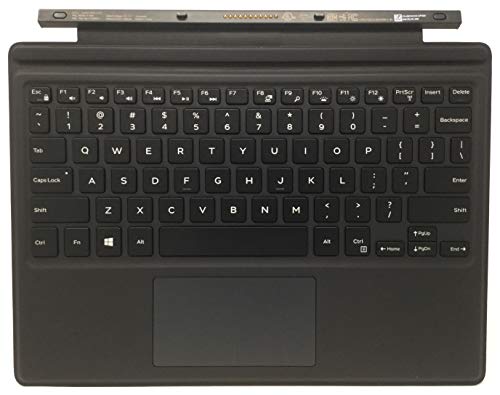
5. Dell Latitude 2-in-1 Travel Keyboard
Key specs
Dell Latitude 2-in-1 travel keyboard. The travel keyboard for Dell Latitude 2-in-1 tablets.
Strengths
- Made for Latitude 2-in-1 tablets, so the fit and connection match.
- Travel design is light and portable for a tablet that moves around.
- Turns a 2-in-1 tablet into a laptop for typing work.
Trade-offs
- The listing does not name a specific Latitude model, so confirm compatibility before ordering.
- Travel keyboards have short key travel and a small trackpad.
- Older model, so check availability and condition.
Who it fits
Latitude 2-in-1 owners who want a travel keyboard and have confirmed it fits their model.
Best for: business users who type on a Latitude 2-in-1.
Not suited for: anyone who has not confirmed their exact Latitude model.
In daily use
In daily use, the Latitude 2-in-1 travel keyboard does the job its name promises: it travels. It is light, it attaches to the tablet, and it turns a device that is awkward for typing into one that handles email and documents comfortably. The one caution is compatibility: the listing covers Latitude 2-in-1 tablets generally, so check your exact model against the listing before ordering, and ask the seller if it is unclear. Once fitted, keep the contacts clean and the keyboard flat in your bag.
Worth knowing: the Latitude 2-in-1 travel keyboard's listing is general rather than model-specific, so the step before buying is to confirm it fits your exact Latitude model. Ask the seller if the listing does not say, and check the return policy before ordering. Once fitted, the keyboard turns a tablet that is awkward for typing into one that handles email and documents comfortably, which is the whole point of a 2-in-1. Keep the contacts clean and the keyboard flat in your bag.
Check price on Amazon: Dell Latitude 2-in-1 Travel Keyboard

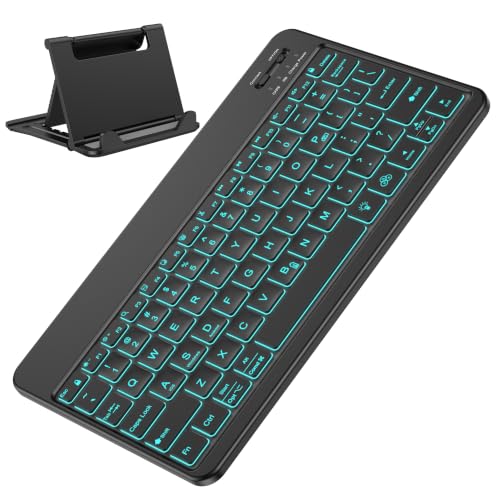
6. Arteck Universal Backlit Wireless Bluetooth Keyboard
Key specs
Universal backlit wireless Bluetooth keyboard for iPad, tablet and PC. A universal keyboard that works with any Dell tablet by Bluetooth.
Strengths
- Universal Bluetooth connection works with any Dell tablet and most other tablets.
- Backlit keys help with typing in dim rooms and on evening flights.
- Works with tablets, phones and PCs, so one keyboard covers several devices.
Trade-offs
- Universal fit means it does not attach to the tablet, so you need a separate stand or case.
- Bluetooth needs pairing and a charged battery.
- Backlight drains the battery faster when left on.
Who it fits
Dell tablet owners who want a universal keyboard that works with any tablet, or who own several devices.
Best for: anyone unsure of their exact Dell tablet model.
Not suited for: buyers who want a keyboard that physically attaches to the tablet.
In daily use
In daily use, the Arteck universal keyboard is the safe choice when the exact Dell model is unclear. Pair it by Bluetooth, prop the tablet on a stand or a case, and type: the backlit keys are a genuine help in dim rooms, and the keyboard works just as well with a phone or a laptop. It does not attach to the tablet, so it is a two-piece setup rather than a single device, but that is also its strength, because it never becomes obsolete when the tablet changes. Charge it regularly and turn the backlight off when you do not need it.
Worth knowing: the Arteck is the keyboard to buy when the exact Dell model is uncertain, because Bluetooth does not care which Dell tablet you own. It also works with a phone and a laptop, so one keyboard covers every device you carry, which is good value and less clutter. The backlit keys are a genuine help in dim rooms, and the battery lasts well if you turn the backlight off when you do not need it. The trade-off is that it does not attach to the tablet, so you need a stand or a case.
Check price on Amazon: Arteck Universal Backlit Wireless Bluetooth Keyboard

7. BoxWave SlimKeys Bluetooth Keyboard for Dell Venue 10 Pro
Key specs
BoxWave SlimKeys Bluetooth keyboard compatible with the Dell Venue 10 Pro, portable and thin with chiclet-style keys. A slim Bluetooth keyboard made for the Venue 10 Pro.
Strengths
- Made for the Venue 10 Pro, so the size and layout suit the tablet.
- Slim, portable design with chiclet-style keys for comfortable typing.
- Bluetooth connection works without a physical dock or connector.
Trade-offs
- Only fits the Venue 10 Pro, so it does not work with the Venue 11 Pro or Latitude tablets.
- Bluetooth needs pairing and battery power.
- Third-party brand, so support and spares are more limited than Dell's own keyboards.
Who it fits
Venue 10 Pro owners who want a slim Bluetooth keyboard made for their tablet.
Best for: travellers who use the Venue 10 Pro on the move.
Not suited for: anyone with a Venue 11 Pro or a Latitude tablet.
In daily use
In daily use, the BoxWave SlimKeys keyboard gives the Venue 10 Pro what its touchscreen cannot: real keys. The chiclet-style keys are comfortable for longer writing than a screen keyboard allows, and the slim Bluetooth design slips into a bag beside the tablet. Pair it once and it reconnects when switched on, which makes it practical for quick sessions in cafés and on trains. Confirm the Venue 10 Pro model before ordering, keep the keyboard charged, and it will make the older tablet useful for writing again.
Worth knowing: the BoxWave SlimKeys gives the Venue 10 Pro a second life as a writing device. The tablet itself is older, but with a real keyboard it handles email, notes and documents far better than a touchscreen ever could. The chiclet-style keys are comfortable for longer sessions than a screen keyboard allows, and the slim Bluetooth design slips into a bag beside the tablet. Confirm the Venue 10 Pro model before ordering, and keep the keyboard charged.
Check price on Amazon: BoxWave SlimKeys Bluetooth Keyboard for Dell Venue 10 Pro

8. Logitech Keys-to-Go Bluetooth Keyboard
Key specs
Portable Bluetooth keyboard for Windows and Android in graphite, with a built-in cover. A portable tablet keyboard that works with Dell tablets by Bluetooth.
Strengths
- Portable design with a built-in cover protects the keys in a bag.
- Bluetooth connection works with Windows and Android tablets, including Dell tablets.
- Slim and light, so it travels easily with the tablet.
Trade-offs
- No physical attachment to the tablet, so a stand or case is needed.
- Compact keys suit travel better than long typing sessions.
- Bluetooth needs pairing and a charged battery.
Who it fits
Dell tablet owners who want a slim, portable Bluetooth keyboard for travel.
Best for: travellers who carry a tablet and a keyboard together.
Not suited for: anyone who needs a full-size keyboard for long desk sessions.
In daily use
In daily use, the Keys-to-Go is the keyboard that disappears into a bag. It is slim, light, and the built-in cover protects the keys, so it survives travel without a case. Pair it by Bluetooth, prop the tablet up, and type: it is not a full-size keyboard, but for email, notes and documents on the move it is more than enough. Keep it charged and it will be ready whenever the tablet is.
Worth knowing: the Keys-to-Go is Logitech's answer to the travel keyboard problem, and the built-in cover is the clever part: it protects the keys in a bag without a separate case, so the keyboard is always ready. It is compact rather than full-size, so it suits travel and short sessions better than all-day typing, but for a Dell tablet on the move it is an excellent companion. Pair it once and it reconnects when switched on.
Check price on Amazon: Logitech Keys-to-Go Bluetooth Keyboard
Buying guide: best keyboards for dell tablet
Check your exact tablet model first
The model name is printed on the back of most Dell tablets and shown in the settings, and it decides everything. A Venue 11 Pro keyboard does not fit a Venue 10 Pro, a Latitude 7320 keyboard does not fit a Latitude 7210, and even within the Venue 11 Pro there are several keyboards with different part numbers. Write down the model and the part number before you shop, and match the listing to both. If the listing does not name your model, do not guess: ask the seller or buy a universal Bluetooth keyboard instead.
Attached keyboards versus Bluetooth keyboards
Attached keyboards connect through pogo pins or a dock, need no pairing and no separate battery, and turn the tablet into a single device. Bluetooth keyboards work with any tablet, but they need pairing, charging, and a separate stand to hold the tablet upright. Attached keyboards are best when the exact match exists; Bluetooth keyboards are best when it does not, or when one keyboard must serve several devices.
Part numbers matter for the Venue 11 Pro
Dell made several keyboards for the Venue 11 Pro, and they are told apart by part numbers: 2K3H1 is the slim keyboard, 5J36C is the mobile keyboard with a built-in battery, and 1YP0V is another slim variant. The part number is printed on the keyboard and often on the tablet's documentation. Match it exactly, because a keyboard with the wrong part number may not fit or may not connect.
Typing feel and travel
Tablet keyboards are thin by necessity, so their keys have short travel and less feedback than a desktop keyboard. Chiclet-style keys are the most common design and suit most typists, while slim keyboards can feel cramped on long documents. If you type for hours, a full-size Bluetooth keyboard with a stand may be more comfortable than the tablet's own slim keyboard, even if it is less portable.
Usage and care
For an attached keyboard, align the connectors carefully and press gently until it seats: forcing it bends the pins. For a Bluetooth keyboard, pair it once through the tablet's settings, then check that it reconnects automatically after switching it off and on. Keep the keyboard charged or stocked with batteries, and keep the connectors and contacts clean and dry, because a dirty contact is the most common cause of a keyboard that stops responding. Store a detachable keyboard flat in a bag, not bent or folded, and keep it away from magnets and liquids.
Learn the tablet's keyboard shortcuts, because they save more time than any keyboard feature: copy, paste, switching apps and searching are the four that matter most. If the keyboard has a trackpad, learn its gestures for scrolling and right-clicking. Turn off the Bluetooth keyboard when it is not in use, so it does not drain its battery or type accidentally in a bag. And keep the tablet's on-screen keyboard enabled as a backup, so a dead keyboard battery never stops you working.
If the tablet has a case, check that the keyboard still fits with the case on, because some cases block the pogo pins or the dock connector. Remove the case before attaching the keyboard if it interferes, and refit it when the keyboard is removed. For Bluetooth keyboards, keep the tablet's Bluetooth switched on and the keyboard charged, and learn the keyboard shortcuts for your tablet's operating system, because they save more time than any keyboard feature. And keep a charging cable for the keyboard in the same bag as the tablet, so it is always to hand.
Common mistakes
The most common mistake is buying a keyboard for the wrong Dell tablet model, usually a Venue 11 Pro keyboard for a Venue 10 Pro, or the reverse. Another is buying a keyboard cover or a skin while expecting a working keyboard: covers protect, they do not type. A third is ignoring the part number on Venue 11 Pro keyboards, which leads to a keyboard that looks right and does not fit. Buyers also forget that Bluetooth keyboards need charging, and discover the battery is flat at the start of a meeting.
Do not force an attached keyboard onto the tablet, because bent pogo pins are expensive to repair. Do not leave a Bluetooth keyboard switched on in a bag, because it drains the battery and can type random characters into open documents. Do not assume a universal keyboard will attach to the tablet: it will not, and you need a stand or a case to hold the tablet upright. And do not buy a keyboard without checking the return policy, because a wrong-model keyboard is the most common reason for a return in this category.
Another mistake is buying a keyboard for a Dell laptop while expecting it to fit a Dell tablet. Laptop keyboards and tablet keyboards are different products with different connectors, and a laptop keyboard will not attach to a tablet or work with it. Check the listing for the word tablet and for your tablet's model name, and if the listing talks about laptops, it is the wrong product. The same applies to keyboard docks for other brands: a keyboard made for an iPad will not fit a Dell tablet, however similar it looks.
Final recommendation
For most Dell tablet owners, the answer is the exact keyboard made for their tablet: the Dell Slim Keyboard for Venue 11 Pro (2K3H1) for Venue 11 Pro owners, the Dell Latitude 7320 Detachable Travel Keyboard for Latitude 7320 owners, and the BoxWave SlimKeys for Venue 10 Pro owners. If the exact model is unclear, or the tablet is an unusual model, the Arteck Universal Backlit Bluetooth Keyboard is the safe fallback, because it works with any Dell tablet by Bluetooth and doubles as a keyboard for a phone or a laptop.
Check the model name and the part number before ordering, confirm the listing matches both, and keep the keyboard clean and charged. A tablet with the right keyboard is a genuinely useful work device; a tablet with the wrong keyboard is an expensive paperweight. Buy the match, not the bargain, and the tablet will earn its place in your bag.
One last check before you order: look at the tablet, find the model name, and write it down alongside the part number if one is given. Compare both against the listing, check the return policy, and only then order. A five-minute check saves a return, a week of waiting, and the frustration of a keyboard that looks right and does not fit. The right keyboard makes a Dell tablet genuinely useful for work; the wrong one is just an expensive accessory.
Frequently asked questions
Which keyboard fits the Dell Venue 11 Pro?
Three keyboards in this guide fit the Venue 11 Pro, and they are told apart by part number: the Dell Slim Tablet Keyboard (2K3H1), the Dell Mobile Tablet Keyboard (5J36C) with a built-in battery, and the Dell Slim Keyboard (1YP0V). Check your tablet's documentation for the part number and match it exactly before ordering.
Can I use a universal Bluetooth keyboard with a Dell tablet?
Yes. Universal Bluetooth keyboards such as the Arteck Backlit Keyboard in this guide work with any Dell tablet that supports Bluetooth. You will need a separate stand or case to hold the tablet upright, because a universal keyboard does not attach to the tablet.
What is the difference between the Venue 11 Pro keyboards?
The 2K3H1 is the slim keyboard, the 5J36C is the mobile keyboard with a built-in battery, and the 1YP0V is another slim variant. They were made for the same tablet but have different designs and part numbers, so match the part number rather than the name when you buy.
Do Dell Latitude detachable keyboards need Bluetooth?
No. The Latitude 7320 Detachable Travel Keyboard connects through pogo pins, so it needs no Bluetooth pairing and no battery in the keyboard itself. Keep the pogo pin contacts clean and dry for a reliable connection.
Will a Venue 10 Pro keyboard fit a Venue 11 Pro?
No. The Venue 10 Pro and Venue 11 Pro are different sizes with different connectors, so their keyboards are not interchangeable. Buy the keyboard made for your exact model, and check the part number where one is given.
Can I use any Bluetooth keyboard with a Dell tablet?
Yes, as long as the tablet supports Bluetooth. Universal Bluetooth keyboards such as the Arteck and Logitech Keys-to-Go in this guide work with any Dell tablet. You will need a separate stand or case to hold the tablet upright, because a universal keyboard does not attach to the tablet.
How do I find my Dell tablet's model name?
The model name is usually printed on the back of the tablet, and it is also shown in the settings under About or Device information. Write it down along with any part number shown on the tablet or its documentation, and match both against the keyboard listing before ordering.
What if my Dell tablet keyboard stops working?
First check the connection: for attached keyboards, clean the pogo pin contacts with a dry cloth and reseat the keyboard; for Bluetooth keyboards, check the battery, re-pair the keyboard, and restart the tablet. If the keyboard still does not respond, try it on another device if possible to find out whether the keyboard or the tablet is at fault, and check whether the keyboard is still under warranty before buying a replacement.
Are Dell tablet keyboards still available?
Yes, although many are older models sold as older stock, so availability varies by listing. The keyboards in this guide are current listings with stated model or part numbers. If the exact Dell keyboard for your tablet is unavailable, a universal Bluetooth keyboard such as the Arteck or Logitech Keys-to-Go in this guide works with any Dell tablet and is a good fallback.
More from ilcastellomenu.com
Best Tablet Keyboards for PC: more keyboard options for tablets
Best Portable Keyboards for Android Tablet: keyboards that travel