A WiFi signal extender, also called a range extender or a repeater, is the simplest fix for a home with dead spots. It picks up your router wireless signal, amplifies it, and rebroadcasts it further, so a bedroom at the far end of the house, a garden office, or a basement that barely gets a signal can finally stream, call, and browse properly. It costs far less than a mesh system, it needs no wiring, and it takes minutes to set up. The extenders in this guide cover the range from a basic dual-band model for a small flat to a WiFi 6 extender for a busy household with many devices. TP-Link dominates the list, because TP-Link makes the most widely sold extenders, and NETGEAR is here with a strong alternative. Three budget extenders round out the list for buyers who want the cheapest working fix for a single dead spot. Every extender below is a real, current model, checked against its Amazon listing. The comparison focuses on the details that decide whether an extender actually helps: the WiFi standard, the speed, the coverage, the number of devices it can serve, and whether it has an Ethernet port for a wired device. Read the comparison table for a fast overview, then dig into the individual sections for the strengths and trade-offs of each extender. The buying guide at the end explains where to place an extender, when an extender is the right answer and when a mesh system is better, and the practical details that decide whether your dead spot disappears or just moves.
In this guide
Quick picks: best wifi signal extenders
| # | Product | Where to buy |
|---|---|---|
| 1 | TP-Link AC1200 WiFi Extender RE315, Dual Band | Check on Amazon |
| 2 | TP-Link AC1900 WiFi Range Extender RE550, Dual Band | Check on Amazon |
| 3 | TP-Link AX3000 WiFi 6 Dual-Band Range Extender | Check on Amazon |
| 4 | TP-Link WiFi Extender RE220 with Ethernet Port, Dual Band | Check on Amazon |
| 5 | NETGEAR WiFi Extender EX5000, 1.2 Gbps | Check on Amazon |
| 6 | WiFi Extender 1200Mbps Dual Band Signal Booster for Home | Check on Amazon |
| 7 | WiFi Extender Signal Booster with Ethernet Port, Dual Band | Check on Amazon |
| 8 | WiFi Extender Signal Booster for Home, 1200Mbps, 4 Antennas | Check on Amazon |
Quick comparison
| Product | Key traits |
|---|---|
| TP-Link AC1200 WiFi Extender RE315, Dual Band | AC1200, dual band, up to 1600 sq ft, 32 devices |
| TP-Link AC1900 WiFi Range Extender RE550, Dual Band | AC1900, dual band, gigabit Ethernet, up to 2200 sq ft |
| TP-Link AX3000 WiFi 6 Dual-Band Range Extender | AX3000 WiFi 6, dual band, Ethernet port, up to 2400 sq ft |
| TP-Link WiFi Extender RE220 with Ethernet Port, Dual Band | Dual band, Ethernet port, up to 44 percent more bandwidth |
| NETGEAR WiFi Extender EX5000, 1.2 Gbps | 1.2 Gbps, up to 1500 sq ft, 25 devices, easy setup |
| WiFi Extender 1200Mbps Dual Band Signal Booster for Home | 1200Mbps, dual band, for home, 5GHz and 2.4GHz |
| WiFi Extender Signal Booster with Ethernet Port, Dual Band | Dual band, Ethernet port, for home and office |
| WiFi Extender Signal Booster for Home, 1200Mbps, 4 Antennas | 1200Mbps, dual band, 4 antennas, repeater and access point |

1. TP-Link AC1200 WiFi Extender RE315, Dual Band
What stands out
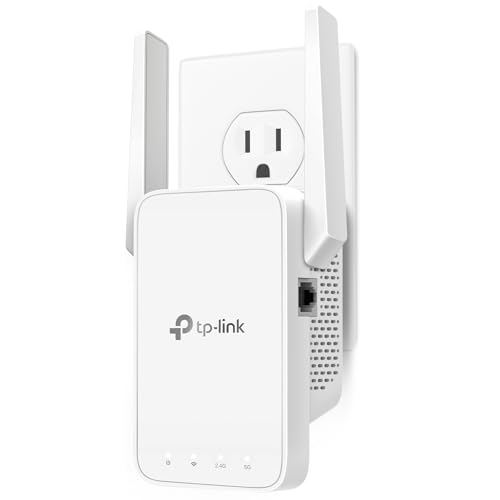
The TP-Link AC1200 WiFi Extender RE315 is the best extender for most homes, and the one to buy if you want a simple, reliable fix for a dead spot. Dual-band WiFi at up to 1.2Gbps covers streaming, video calls, and browsing in a room that your router cannot reach, and the claimed coverage of up to 1600 square feet and 32 devices is enough for a flat or a small house. Setup is through the TP-Link app, and the extender plugs straight into a wall socket, so there are no cables and no clutter. TP-Link is the best-selling extender brand, and the RE315 is its most balanced model.
Trade-offs to weigh
The trade-offs are speed and the WiFi standard. The RE315 is WiFi 5, not WiFi 6, so it does not have the newest features for crowded networks, and its speed, while enough for most homes, is lower than the AX3000 model below. It is a single extender, so it fixes one dead spot rather than blanketing a large house. For a flat or a small house with one weak room, none of this matters, but for a large home with many devices, the AX3000 or a mesh system is the better answer.
Who it fits best
Best for flats and small houses with one dead spot, and for buyers who want a simple, affordable extender from the best-known brand.
In daily use
In everyday use, the TP-Link AC1200 WiFi Extender RE315, Dual Band settles into a routine quickly. Set it up once, the way you like it, and give yourself a few days to adjust before judging it. The first session is about learning the layout and the feel; the second and third are where it starts to feel natural. Keep it clean, keep it in the conditions it was designed for, and it will stay consistent. If it has parts that wear — cables, surfaces, moving components — a quick check now and then keeps small issues from becoming real ones, and keeping the packaging and documentation for the first weeks makes any return or exchange far simpler.
Before you buy
Before buying the TP-Link AC1200 WiFi Extender RE315, Dual Band, check two practical things. First, measure and compare: check the dimensions, the capacity, and the compatibility details listed on the product page against what you already own and the space you have. A product that does not fit your setup will never feel right, whatever its specifications say. Second, think about your routine — where it will live, how it will be stored, and what it needs to connect to. None of this is difficult, but all of it is easier to plan before the product arrives than after.
Check price on Amazon: TP-Link AC1200 WiFi Extender RE315, Dual Band

2. TP-Link AC1900 WiFi Range Extender RE550, Dual Band
What stands out
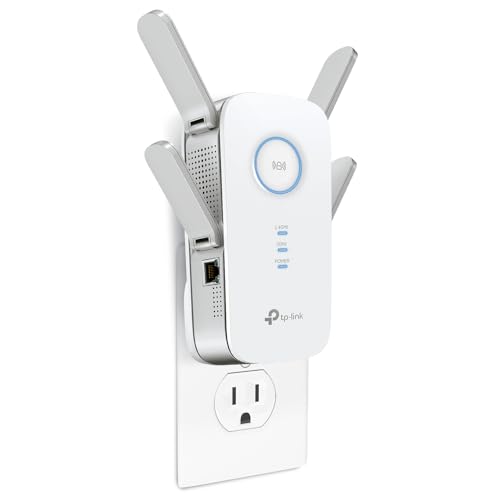
The TP-Link AC1900 WiFi Range Extender RE550 is the stronger dual-band extender in this guide, and the gigabit Ethernet port is the feature that sets it apart. The AC1900 speed gives you more headroom for 4K streaming and large downloads, and the Ethernet port lets you connect a wired device, such as a smart TV, a games console, or a desktop PC, to the extended network. The claimed coverage of up to 2200 square feet suits a larger home than the RE315, and the dual-band design keeps the 5GHz band free for fast devices while the 2.4GHz band serves older ones. For a home with a wired device in the dead spot, the RE550 is the pick.
Trade-offs to weigh
The compromises are size and the WiFi standard. The RE550 is a larger plug-in unit than the RE315, and it is still WiFi 5 rather than WiFi 6. The extra speed is wasted if your internet plan is slower than the extender, so check your plan before paying for speed you cannot use. For most homes, though, the RE550 is the best balance of speed, coverage, and a wired port.
Who it fits best
Best for larger homes, for 4K streaming in a far room, and for anyone who needs an Ethernet port for a TV, console, or desktop in the dead spot.
In daily use
Day to day, the TP-Link AC1900 WiFi Range Extender RE550, Dual Band is the kind of product you stop thinking about, which is the highest praise it can earn. It does its job the same way every time, without quirks or surprises, and lets you focus on the work or the game instead of the hardware. That consistency matters more than any single feature. Treat it reasonably — a clean desk, a suitable surface, and storage that protects it when it is not in use — and it will keep that consistency for a long time. The best products are the ones that fade into the background.
Before you buy
A few checks before you order the TP-Link AC1900 WiFi Range Extender RE550, Dual Band will save disappointment. Confirm the key details on the listing match what you expect — the exact model name, the included accessories, and the variant — since similar-looking models can differ in important ways. Check the return policy and the warranty terms so you know your options if it arrives damaged or does not suit you. And if you are replacing something you already own, compare the new product with the old one on the points that mattered most, rather than on headline features you may never use.
Check price on Amazon: TP-Link AC1900 WiFi Range Extender RE550, Dual Band

3. TP-Link AX3000 WiFi 6 Dual-Band Range Extender
What stands out
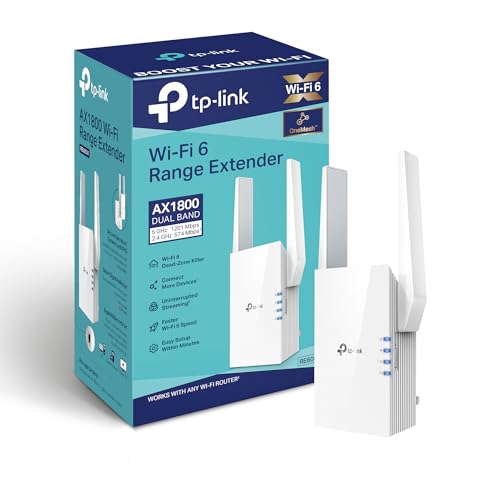
The TP-Link AX3000 WiFi 6 Dual-Band Range Extender is the newest and fastest extender in this guide, and the one to buy if your router and your devices support WiFi 6. The AX3000 speed and the WiFi 6 features, including better handling of many devices at once, make it the best choice for a busy household with phones, laptops, TVs, and smart home devices all competing for bandwidth. The Ethernet port lets you wire a device into the extended network, and the claimed coverage of up to 2400 square feet suits a larger home. It is a PCMag Editor Choice, which reflects how well it performs in testing against its rivals.
Trade-offs to weigh
The trade-offs are cost and compatibility. The AX3000 costs more than the AC1200 and AC1900 models, and its WiFi 6 advantages only appear if your router and devices support WiFi 6. With an older WiFi 5 router, it still works, but you will not see the full benefit. Buyers with a WiFi 6 router and many devices should take the AX3000; buyers with an older router should save money with the RE315 or the RE550.
Who it fits best
Best for WiFi 6 households, busy homes with many devices, and buyers who want the fastest extender in this guide.
In daily use
Over a full week of use, the TP-Link AX3000 WiFi 6 Dual-Band Range Extender shows its character in small ways. The feel stays the same from the first day to the last, nothing loosens or rattles, and the finish holds up to regular handling. If you switch between tasks, you will appreciate that it does not need a different setup for each one: configure it once for the way you actually use it and leave it alone. If you share the space with work or family, the same product should handle those jobs without feeling out of place, which is a useful bonus for a single-product setup.
Before you buy
When the TP-Link AX3000 WiFi 6 Dual-Band Range Extender arrives, spend a little time setting it up properly. Follow the included instructions, check that everything listed as included is actually in the box, and test the main functions within the first day or two. Then leave the settings alone for a week. Constant tweaking is the enemy of getting used to a product, and most people get better results from a stable setup than from a perfect one. If something feels wrong after a few days, change one thing at a time so you know what actually helped.
Check price on Amazon: TP-Link AX3000 WiFi 6 Dual-Band Range Extender
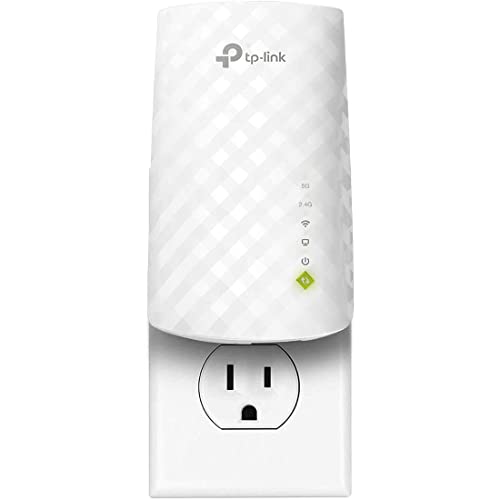
4. TP-Link WiFi Extender RE220 with Ethernet Port, Dual Band
What stands out
The TP-Link WiFi Extender RE220 is the compact, affordable extender in this guide, and its Ethernet port makes it more useful than its size suggests. Dual-band WiFi with an Ethernet port means you can plug a wired device into the extended network, and the compact plug-in design fits in a hallway or a bedroom without blocking the neighbouring socket. TP-Link claims up to 44 percent more bandwidth than a single-band extender, which reflects the benefit of using both the 2.4GHz and 5GHz bands. For a single dead spot in a small home, the RE220 is the cheapest TP-Link that does the job properly.
Trade-offs to weigh
The compromises are speed and coverage. The RE220 is slower than the RE315 and the RE550, and its coverage suits a small home rather than a large one. It is WiFi 5, not WiFi 6, and it has no external antennas, so its range is limited by its size. For a flat with one weak room, it is enough; for a large house, it is not.
Who it fits best
Best for small flats, single-room dead spots, and buyers who want the cheapest TP-Link extender with an Ethernet port.
In daily use
In everyday use, the TP-Link WiFi Extender RE220 with Ethernet Port, Dual Band settles into a routine quickly. Set it up once, the way you like it, and give yourself a few days to adjust before judging it. The first session is about learning the layout and the feel; the second and third are where it starts to feel natural. Keep it clean, keep it in the conditions it was designed for, and it will stay consistent. If it has parts that wear — cables, surfaces, moving components — a quick check now and then keeps small issues from becoming real ones, and keeping the packaging and documentation for the first weeks makes any return or exchange far simpler.
Before you buy
Before buying the TP-Link WiFi Extender RE220 with Ethernet Port, Dual Band, check two practical things. First, measure and compare: check the dimensions, the capacity, and the compatibility details listed on the product page against what you already own and the space you have. A product that does not fit your setup will never feel right, whatever its specifications say. Second, think about your routine — where it will live, how it will be stored, and what it needs to connect to. None of this is difficult, but all of it is easier to plan before the product arrives than after.
Check price on Amazon: TP-Link WiFi Extender RE220 with Ethernet Port, Dual Band

5. NETGEAR WiFi Extender EX5000, 1.2 Gbps
What stands out
The NETGEAR WiFi Extender EX5000 is the NETGEAR alternative in this guide, and it is the pick for buyers who prefer NETGEAR or who already use NETGEAR networking gear. The 1.2Gbps speed covers streaming and browsing in a far room, the claimed coverage of up to 1500 square feet suits a flat or a small house, and the setup is designed to be simple, with a clear app and a one-touch connection to the router. NETGEAR has a long record in home networking, and the EX5000 is a straightforward, well-supported extender that works with any router brand, not just NETGEAR.
Trade-offs to weigh
The trade-offs are the device count and the WiFi standard. The EX5000 supports up to 25 devices, which is fewer than the TP-Link RE315, and it is WiFi 5 rather than WiFi 6. It has no gigabit Ethernet port listed, so buyers who need a wired connection in the dead spot should look at the TP-Link RE550 or the AX3000 instead. For a simple wireless fix, though, the EX5000 is a solid choice.
Who it fits best
Best for NETGEAR households, for buyers who want a simple extender from a long-established networking brand, and for flats with a single dead spot.
In daily use
Day to day, the NETGEAR WiFi Extender EX5000, 1.2 Gbps is the kind of product you stop thinking about, which is the highest praise it can earn. It does its job the same way every time, without quirks or surprises, and lets you focus on the work or the game instead of the hardware. That consistency matters more than any single feature. Treat it reasonably — a clean desk, a suitable surface, and storage that protects it when it is not in use — and it will keep that consistency for a long time. The best products are the ones that fade into the background.
Before you buy
A few checks before you order the NETGEAR WiFi Extender EX5000, 1.2 Gbps will save disappointment. Confirm the key details on the listing match what you expect — the exact model name, the included accessories, and the variant — since similar-looking models can differ in important ways. Check the return policy and the warranty terms so you know your options if it arrives damaged or does not suit you. And if you are replacing something you already own, compare the new product with the old one on the points that mattered most, rather than on headline features you may never use.
Check price on Amazon: NETGEAR WiFi Extender EX5000, 1.2 Gbps

6. WiFi Extender 1200Mbps Dual Band Signal Booster for Home
What stands out
The WiFi Extender 1200Mbps Dual Band Signal Booster is the budget pick in this guide, and it does the basic job for the least money. Dual-band WiFi at 1200Mbps covers the 5GHz band for fast devices and the 2.4GHz band for older ones, and the extender plugs into a wall socket and rebroadcasts your network into a room that your router cannot reach. For a single dead spot where the need is basic browsing, streaming, and calls, this extender is enough, and it costs a fraction of the TP-Link models above.
Trade-offs to weigh
The trade-offs are the brand and the support. This is an unbranded extender, so the build quality, the app, and the long-term support are less certain than with TP-Link or NETGEAR. The coverage claims on unbranded extenders are optimistic, so expect a smaller real-world range than the listing suggests. Buyers who want a reliable, supported extender should choose a TP-Link instead; buyers who want the cheapest working fix should take this one.
Who it fits best
Best for budget buyers who need the cheapest working fix for a single dead spot, and for renters who do not want to spend much on a temporary home.
In daily use
Over a full week of use, the WiFi Extender 1200Mbps Dual Band Signal Booster for Home shows its character in small ways. The feel stays the same from the first day to the last, nothing loosens or rattles, and the finish holds up to regular handling. If you switch between tasks, you will appreciate that it does not need a different setup for each one: configure it once for the way you actually use it and leave it alone. If you share the space with work or family, the same product should handle those jobs without feeling out of place, which is a useful bonus for a single-product setup.
Before you buy
When the WiFi Extender 1200Mbps Dual Band Signal Booster for Home arrives, spend a little time setting it up properly. Follow the included instructions, check that everything listed as included is actually in the box, and test the main functions within the first day or two. Then leave the settings alone for a week. Constant tweaking is the enemy of getting used to a product, and most people get better results from a stable setup than from a perfect one. If something feels wrong after a few days, change one thing at a time so you know what actually helped.
Check price on Amazon: WiFi Extender 1200Mbps Dual Band Signal Booster for Home

7. WiFi Extender Signal Booster with Ethernet Port, Dual Band
What stands out
The WiFi Extender Signal Booster with Ethernet Port is the budget extender with a wired option, and it is the pick for buyers who want a cheap extender that can also serve a wired device. The dual-band design covers 5GHz and 2.4GHz, the Ethernet port lets you connect a TV, a console, or a desktop to the extended network, and the extender is designed for home and office use. For a desk in a far room where a wired connection is useful, this extender gives you both wireless coverage and a wired port for the price of a budget model.
Trade-offs to weigh
The compromises are the same as the other budget extender: an unbranded product with less certain build quality, support, and real-world range than the TP-Link and NETGEAR models. The Ethernet port is a genuine advantage, but the wireless performance is basic. Buyers who need a reliable extender with a wired port should look at the TP-Link RE550 instead; buyers on a tight budget who need the port should take this one.
Who it fits best
Best for budget buyers who need an Ethernet port in a far room, and for home offices where a wired connection matters more than the fastest wireless speed.
In daily use
In everyday use, the WiFi Extender Signal Booster with Ethernet Port, Dual Band settles into a routine quickly. Set it up once, the way you like it, and give yourself a few days to adjust before judging it. The first session is about learning the layout and the feel; the second and third are where it starts to feel natural. Keep it clean, keep it in the conditions it was designed for, and it will stay consistent. If it has parts that wear — cables, surfaces, moving components — a quick check now and then keeps small issues from becoming real ones, and keeping the packaging and documentation for the first weeks makes any return or exchange far simpler.
Before you buy
Before buying the WiFi Extender Signal Booster with Ethernet Port, Dual Band, check two practical things. First, measure and compare: check the dimensions, the capacity, and the compatibility details listed on the product page against what you already own and the space you have. A product that does not fit your setup will never feel right, whatever its specifications say. Second, think about your routine — where it will live, how it will be stored, and what it needs to connect to. None of this is difficult, but all of it is easier to plan before the product arrives than after.
Check price on Amazon: WiFi Extender Signal Booster with Ethernet Port, Dual Band

8. WiFi Extender Signal Booster for Home, 1200Mbps, 4 Antennas
What stands out
The WiFi Extender Signal Booster for Home with four antennas is the antenna pick in this guide, and the four antennas are the reason to choose it. Four antennas give the extender more ways to catch and rebroadcast your router signal, which helps in homes with thick walls or a router in a difficult spot. The 1200Mbps dual-band speed covers 5GHz and 2.4GHz, and the extender works as a repeater or as an access point, so it can extend a wireless network or create a new one from a wired connection. For a home where a single-antenna extender struggles, the extra antennas are worth having.
Trade-offs to weigh
The compromises are the same as the other budget extenders: an unbranded product with less certain build quality, support, and real-world range than the TP-Link and NETGEAR models. Four antennas help, but they cannot fix a router signal that is too weak to begin with, and the extender is larger than the compact TP-Link models. Buyers who want a reliable extender with strong antennas should look at the TP-Link RE550 instead; buyers on a tight budget who want the most antennas for the money should take this one.
Who it fits best
Best for budget buyers who want four antennas for a stronger signal through walls, and for homes where a basic extender struggles to hold a connection.
In daily use
Day to day, the WiFi Extender Signal Booster for Home, 1200Mbps, 4 Antennas is the kind of product you stop thinking about, which is the highest praise it can earn. It does its job the same way every time, without quirks or surprises, and lets you focus on the work or the game instead of the hardware. That consistency matters more than any single feature. Treat it reasonably — a clean desk, a suitable surface, and storage that protects it when it is not in use — and it will keep that consistency for a long time. The best products are the ones that fade into the background.
Before you buy
A few checks before you order the WiFi Extender Signal Booster for Home, 1200Mbps, 4 Antennas will save disappointment. Confirm the key details on the listing match what you expect — the exact model name, the included accessories, and the variant — since similar-looking models can differ in important ways. Check the return policy and the warranty terms so you know your options if it arrives damaged or does not suit you. And if you are replacing something you already own, compare the new product with the old one on the points that mattered most, rather than on headline features you may never use.
Check price on Amazon: WiFi Extender Signal Booster for Home, 1200Mbps, 4 Antennas
Buying guide
Where to place an extender
Placement decides whether an extender helps or not. Put the extender halfway between the router and the dead spot, where it still gets a strong signal from the router. An extender placed inside the dead spot has nothing to amplify, and one placed next to the router extends nothing. Most extenders have a signal light that tells you when the placement is right: green means a good spot, red means too far from the router. Move it a metre or two at a time until the light is green.
Extender or mesh: which is right for you
An extender is best for one or two dead spots in an otherwise well-covered home. A mesh system is better for a large home with weak coverage everywhere, because mesh nodes work together as one network with seamless roaming, while an extender creates a second network name that your phone must switch to. If your whole house has weak WiFi, buy a mesh system. If only one room is weak, an extender is cheaper and simpler.
WiFi 5 or WiFi 6
WiFi 6 is the newer standard, and it handles many devices at once better than WiFi 5, with lower latency and better efficiency. If your router and your devices support WiFi 6, a WiFi 6 extender like the TP-Link AX3000 is worth the extra cost. If your router is WiFi 5, a WiFi 5 extender is enough, because the extender cannot be faster than the router it connects to. Check your router standard before you buy.
Speed: what the numbers mean
Extender speeds like AC1200, AC1900, and AX3000 are combined figures across both bands, and the real speed you see will be lower, because the extender uses some of its bandwidth talking to the router. Halve the headline number for a rough idea of the real speed, and check that it is still faster than your internet plan. A 1.2Gbps extender is more than enough for a 100Mbps or 200Mbps internet plan, and even a 500Mbps plan is well served by it.
Ethernet ports: why they matter
An Ethernet port on an extender lets you connect a wired device, such as a smart TV, a games console, or a desktop PC, to the extended network. A wired connection is more stable than wireless for streaming and gaming, so a port is worth having if the dead spot contains a TV or a console. The TP-Link RE550, the AX3000, the RE220, and the budget booster in this guide all have Ethernet ports, so check the listing before you buy.
Setup and security
Most extenders set up in minutes through an app or a web page, and the simplest method is WPS, a button on the router and a button on the extender that connect them automatically. After setup, check that the extender firmware is up to date, and use the same WiFi password as your router. Place the extender away from thick walls, metal objects, and microwave ovens, all of which weaken the signal, and keep it out of direct sunlight.
Frequently asked questions
Will a WiFi extender fix my dead spot?
In most cases, yes, if the extender is placed correctly. Put it halfway between the router and the dead spot, where it still gets a strong signal. An extender cannot create a signal where none exists, so if the dead spot is very far from the router, you may need a mesh system or a wired access point instead.
Do WiFi extenders slow down your internet?
An extender can halve the speed of the connection it extends, because it uses the same radio to talk to the router and to your devices. In practice, this rarely matters, because most internet plans are slower than the extender. A dual-band extender, or a WiFi 6 extender, reduces the loss by using one band for the router and one for your devices.
What is the difference between a WiFi extender and a mesh system?
An extender rebroadcasts your router signal and creates a second network name that your devices must switch to. A mesh system uses several nodes that work together as one network, with seamless roaming as you move around the house. An extender is cheaper and suits one dead spot; a mesh system is better for a large home with weak coverage everywhere.
Do I need a WiFi 6 extender?
Only if your router and your devices support WiFi 6. A WiFi 6 extender with a WiFi 5 router still works, but you will not see the full benefit. If you have a WiFi 6 router and many devices, the TP-Link AX3000 is worth the extra cost. Otherwise, a WiFi 5 extender is enough.
Can I use an extender with any router?
Yes. The extenders in this guide work with any router brand, using standard WiFi. You do not need a TP-Link router to use a TP-Link extender, or a NETGEAR router to use a NETGEAR extender. Setup is through the extender app or a web page, and it takes only a few minutes.
Conclusion
The best WiFi signal extender is the one that matches your home, your router, and your dead spot. For most homes, the TP-Link AC1200 RE315 is the right answer: simple, affordable, and enough for a flat or a small house. The TP-Link AC1900 RE550 is the pick for larger homes and for anyone who needs an Ethernet port, and the TP-Link AX3000 is the fastest choice for WiFi 6 households with many devices. The compact RE220 is the cheapest TP-Link that does the job, and the NETGEAR EX5000 is the solid alternative for NETGEAR households. The three budget extenders are the cheapest working fixes for a single dead spot, with the Ethernet model the better choice if you need a wired connection and the four-antenna model the better choice for a signal through thick walls. Whichever extender you choose, place it halfway between the router and the dead spot, check the signal light, and remember that an extender fixes one weak room, while a mesh system is the answer for a whole house with weak coverage.