A wireless headset is really two products sold in one box: headphones for your ears and a microphone for everyone else’s. Most buying guides score the first half and wave at the second, yet the microphone is the part your colleagues, teammates and clients actually judge. A headset can sound glorious to you while your voice arrives thin, distant or buried under keyboard noise, and no amount of driver quality fixes that. This guide therefore treats the mic and the wireless link as the main event: how the microphone rejects background sound, whether the connection is a low-latency dongle or plain Bluetooth, and how the two behave together across a working day that mixes video calls, focused listening and, for many readers, an evening of gaming.
This article is supported by its readers. When you buy through links in this guide, the site may earn an affiliate commission, at no extra cost to you. The selections and judgements here are built from manufacturer specifications, published documentation and buying-guide research, comparing published microphone, battery and connectivity figures across the current ranges of the major headset makers.
The six picks below deliberately span two worlds. Three are work-first headsets built around boom microphones and meeting-platform certification. Two are gaming headsets whose detachable or retractable mics and 2.4GHz dongles solve the latency problem that Bluetooth cannot. One is a lifestyle headphone with hidden microphones, included because it is the strongest option for people who take calls between music and travel rather than living on either a meeting schedule or a game server. Read the “what to look for” section first if the vocabulary of codecs, dongles and multipoint connections is new; it explains every axis the reviews then use.
In this guide
Quick picks: best wireless headsets with mic
| # | Product | Where to buy |
|---|---|---|
| 1 | Jabra Evolve2 75 | Check on Amazon |
| 2 | SteelSeries Arctis Nova Pro Wireless | Check on Amazon |
| 3 | HyperX Cloud III Wireless | Check on Amazon |
| 4 | Sony WH-1000XM5 | Check on Amazon |
| 5 | Logitech Zone Vibe Wireless | Check on Amazon |
What to look for in a wireless headset with a mic
Microphone design: boom, retractable or hidden
The single biggest predictor of call quality is where the microphone sits. A boom mic parks the capsule a few centimetres from the corner of your mouth, close enough that your voice dominates everything else in the room, and that geometry does more for clarity than any processing chip. Work headsets refine the boom with arrays of several microphones and noise-cancelling algorithms that subtract steady background sound, so a voice stays intelligible beside an open window or a humming air conditioner. Gaming headsets use either a detachable boom, which comes off when the headset is only for music, or a retractable one that slides into the earcup. Hidden microphones, built into the earcups of lifestyle headphones, are the weakest arrangement for voice pickup because they sit far from the mouth and must work harder computationally; the best of them are now genuinely good in quiet rooms, but a boom still wins in a noisy kitchen or a shared office.
Noise cancellation on the microphone, not just the earcups
Two different technologies share the “noise cancelling” label, and only one of them helps the people listening to you. Active noise cancellation in the earcups silences the room for the wearer. Microphone noise cancellation silences the room for everyone else, filtering your surroundings out of the transmitted signal. Manufacturer documentation describes these systems differently — some use dual-mic arrays, some add AI-based voice isolation trained to separate speech from other sounds — but the practical questions are the same. Does the system cope with intermittent noise like a barking dog or a doorbell, or only with steady hum? Does it clip the beginnings of words when you start speaking after a pause? Published spec sheets rarely answer either question directly, which is why the reviews below weigh the microphone architecture and the maker’s stated design intent rather than repeating marketing labels.
Connection type: Bluetooth, 2.4GHz dongle, or both
Bluetooth is the universal option: it pairs with phones, tablets and laptops without accessories, and modern versions handle music and calls well. Its weakness is latency and, on some computers, call quality, because the connection switches to a lower-bandwidth hands-free mode when the microphone is active. A USB dongle running a proprietary 2.4GHz link avoids both problems. The dongle presents itself to the computer as a dedicated audio device, keeps full-quality audio in both directions, and cuts delay to a level where lip movement in a video call or a footstep in a game lines up with what you hear. The strongest headsets offer both: dongle for the desk, Bluetooth for the phone, with the ability to stay connected to two devices and switch without re-pairing. If a headset will spend its life on one computer, the dongle matters more than almost any other feature; if it travels between phone and laptop all day, multipoint Bluetooth is the feature that earns its keep.
Latency and what it actually affects
Latency is the gap between something happening and you hearing it. For music it is irrelevant. For video calls it is mildly annoying when it grows, because conversation starts to feel like a satellite interview. For gaming and video editing it is decisive: gunshots, footsteps and dialogue all land late, and competitive players notice delays that casual listeners never would. Bluetooth latency varies by codec and device but is commonly well above what a 2.4GHz gaming dongle delivers; dongle-based links from the major gaming brands are specified in the low tens of milliseconds or described as lossless and lag-free for practical purposes. The reviews note which picks carry a genuine low-latency mode and which rely on Bluetooth alone, so readers who game should weight that line heavily and readers who only meet and listen can safely ignore it.
Battery life and charging behaviour
Published battery figures are quoted with noise cancellation off or on, at moderate volume, sometimes with the microphone muted — the conditions are rarely identical across brands, so treat the numbers as tiers rather than exact predictions. What matters practically is the shape of the battery story. Work headsets in this guide are rated in the range of a full working week of calls between charges. Gaming headsets trade some of that endurance for their low-latency radios, and one pick below sidesteps the question entirely with swappable batteries, so the headset never sits tethered to a cable. Fast charging deserves attention too: several models recover hours of use from a short top-up, which rescues a forgotten overnight charge far better than a slightly larger battery does. Also check what the headset does while charging — some work over USB as a wired headset, others simply go silent.
Comfort: weight, clamping force and earcup materials
A headset worn for eight hours is furniture for your head. Weight is the headline figure, but distribution matters as much: a well-shaped headband spreads load so that a heavier headset can feel lighter than a poorly balanced lighter one. Clamping force is the second variable — too loose and the headset slides when you look down at a keyboard, too tight and it becomes a headache by mid-afternoon, a trade-off that glasses wearers feel first because the arms of their frames are pressed into the skin. Earcup material shapes both comfort and sound: leatherette seals well and isolates noise but warms up in summer, while fabric and mesh breathe better and isolate less. Several picks use memory-foam cushions and suspension-style headbands specifically to keep pressure off the crown of the head, and the reviews flag which designs suit long, stationary days and which suit shorter, more mobile use.
Platform compatibility and on-ear controls
Compatibility has two layers. The audio layer is simple: Bluetooth works nearly everywhere, and USB dongles work with PCs and most consoles, though the console picture splits by brand — some dongles serve PlayStation and PC but not Xbox, which historically requires a specifically licensed wireless model. The software layer is where work headsets earn their certification badges: models certified for Microsoft Teams or Zoom offer a dedicated button that answers calls and launches the app, plus mute synchronisation, so the headset’s mute light and the meeting window always agree. That sounds trivial until the first time someone speaks for a minute on a headset that was muted in hardware while the app showed them live. Controls deserve a thought as well: a physical mute button you can find by touch, ideally one that works by raising the boom, beats any touch panel when a call goes sideways and you need silence immediately.
Codecs and music quality between calls
Most headsets in this guide spend part of their day playing music, podcasts or game audio, so codec support is worth a brief pass. Standard Bluetooth audio (SBC and AAC) covers phones and laptops well, and Apple devices favour AAC. Higher-resolution codecs appear on the lifestyle pick, which is the one to choose if music quality between meetings is a genuine priority. Gaming headsets take a different route: over their dongles they deliver uncompressed or lightly compressed audio at full quality in both directions, which is precisely the thing Bluetooth call mode cannot do. The honest summary is that every pick here sounds good for its category, none of them replaces a dedicated audiophile headphone, and the differences that matter are in microphone performance, connection behaviour and comfort — the axes this guide scores.
Sidetone: hearing your own voice
One specification hides in the software menus and quietly decides how natural calls feel. Sidetone is the controlled feed of your own voice back into your ears while you talk. Without it, sealed earcups make your voice sound muffled and distant to yourself, and most people unconsciously start shouting to compensate — tiring over a long call and painfully loud for everyone else. With a well-judged sidetone level, you speak at a normal volume and can hear whether the room around you is leaking into the call. The work headsets in this guide expose sidetone as an adjustable setting in their companion apps, and the gaming models offer it as a monitoring level. It is worth setting deliberately on the first day rather than leaving the default, because the right amount is personal and the wrong amount is a common, invisible reason people abandon headsets they otherwise like.
Software, equalisers and firmware updates
Every pick here has a companion app or desktop suite, and the software is part of the product. It carries the microphone settings that matter most — noise-cancellation strength, sidetone, voice equalisation — plus battery reporting, button remapping on the gaming models, and firmware updates that occasionally improve call processing months after purchase. Two practical consequences follow. First, a headset whose key mic settings live only in a phone app is a mild nuisance for a desktop-bound worker, and one managed from the computer itself is smoother. Second, firmware support is a longevity signal: makers who keep updating a model’s processing are treating it as a platform, and the work brands in particular publish update histories that stretch for years. None of this should outrank the microphone itself, but between two close picks, the better software story is the rational tiebreaker.
Headset or true-wireless earbuds with a mic?
True-wireless earbuds now advertise call quality aggressively, and for short calls on the move they are excellent: tiny, pocketable, and good enough in a quiet street. The comparison turns on physics and endurance. Earbud microphones sit in the ear, even farther from the mouth than a headphone’s hidden mics, and rely entirely on processing to reconstruct your voice; in wind or a busy café, a boom headset pulls ahead clearly. Earbuds also divide their battery between two small cells and a charging case, so a long day of back-to-back calls means mid-day case stops, while the headsets here run for days. Comfort cuts both ways: earbuds disappear for an hour and ache by hour four, while a good over-ear headset spreads its presence thinly enough for a full shift. The deciding rule is simple. If calls are occasional and mobility is everything, earbuds win. If your voice is on show for hours daily — meetings, teaching, streaming, team chat — a proper headset with a boom is the professional tool, and it is the category the rest of this guide covers.
There is also a middle path worth naming, because many hybrid workers already own it: a good pair of earbuds for the commute and short calls, plus one of the boom headsets below kept at the desk for the scheduled hours. That pairing costs less than the flagship single-device answers and outperforms them at both extremes — true pocketability on the move, true microphone authority at the desk. Readers who recognise their week in that description should weight the work picks by desk comfort and dongle behaviour alone, and let the earbuds they already own handle everything else.
Microphone technique: the free upgrade
Hardware sets the ceiling on call quality, but technique decides how close to that ceiling you get, and the adjustments cost nothing. Boom position comes first. The capsule should sit roughly two fingers’ width from the corner of the mouth, slightly below the lip line and angled toward it — close enough to dominate the signal, far enough to stay out of the breath stream that produces popping sounds on plosive consonants. A boom pushed up beside the cheek or left pointing at the nose loses most of its advantage and makes the processing work against avoidable noise. Owners of retractable and hidden microphones cannot move the capsule, which is precisely why their positioning discipline matters more: facing the person you are effectively broadcasting to, rather than a second monitor, keeps your voice on the array’s strongest axis.
Input level is the second adjustment. Every operating system and meeting app has a microphone gain control, and the common failure is a level set so high that the noise-cancellation system spends its effort fighting distortion, or so low that the software’s automatic gain pumps the volume up and down audibly between sentences. The healthy target is a level where normal speech sits comfortably in the upper middle of the meter without touching the top on emphasis. Most meeting platforms also add their own processing layer — noise suppression settings inside the app stack on top of the headset’s own — and running aggressive suppression in both places can hollow out a voice. Choosing one layer to do the work, usually the headset’s, and setting the app to its lighter mode is the combination experienced call hosts tend to settle on.
The room itself is the third factor, and the cheapest to improve. Soft furnishings absorb the reflections that make a voice sound like it is calling from a bathroom; a bookcase, curtains or even a rug between the desk and the nearest hard wall will do more for perceived quality than a tier of headset pricing. Distance to noise sources matters in the same plain way: a headset microphone cannot tell the difference between a dishwasher it should remove and a colleague it should keep if both are equally loud at the capsule, so moving the desk a few metres from the kitchen appliances outperforms any algorithm. None of this diminishes the picks below — a good boom in a treated corner of a room is the combination that makes clients assume you work from a studio — but it does mean the reader with the mid-priced pick and a sensible setup will out-sound the reader with the flagship and a tiled echo chamber.
How wireless links behave in real homes and offices
Published wireless ranges are measured in open air and should be read as best-case figures. In a real building, the 2.4GHz band that both Bluetooth and gaming dongles use is absorbed by masonry, deflected by metal and shared with Wi-Fi networks, microwave ovens and every neighbour’s router. The practical behaviour differs by connection type. A dongle link is a single-purpose channel between two known devices, and because the dongle can be positioned — on a desk, at the end of a short USB extension, away from the interference radiating off the back of a computer — it tends to hold a clean connection across a room and into the next one. Bluetooth adapts its power and data rate as conditions worsen, which keeps calls alive at surprising distances but sometimes at reduced quality, and its behaviour depends heavily on the host device’s own radio and antenna.
Three habits separate reliable setups from flaky ones. Keep the dongle in line of sight of where you sit, rather than in a port on the back of a tower under a desk, because the human body and furniture are effective obstacles at these frequencies. If the headset will roam — calls taken while making coffee are the classic case — expect the honest working range to be the same floor of the house rather than the whole property, and treat anything beyond that as a bonus. And when two wireless systems coexist, a gaming dongle and a dense Wi-Fi network on the same band, small changes of channel on the router and physical separation between the dongle and other transmitters resolve most dropouts. The headsets in this guide all implement their links competently; the environment, as usual, is the variable.
The six best wireless headsets with a mic

Jabra Evolve2 75: the meeting-room benchmark
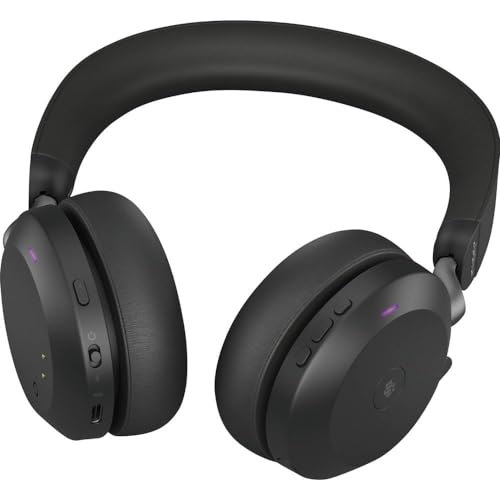
Jabra builds headsets for call centres and boardrooms, and the Evolve2 75 is the distilled version of that heritage for hybrid workers. Its short, discreet boom arm carries an array of microphones designed to focus on the wearer’s voice and suppress the office around it, and the boom doubles as the mute control: raise it and you are muted, lower it and you are live, a gesture that becomes automatic within a day. The headset connects through a USB dongle for the computer and Bluetooth for a phone at the same time, carries certification for the major meeting platforms, and wraps it all in an on-ear design that stays wearable through a long schedule of calls.
Two details reward a closer look. The earcups carry a busy-light ring that glows when you are on a call, a small social signal that saves household members and colleagues from talking over your meeting. And the carrying case and fold-flat design acknowledge that this headset commutes between home and office rather than living on one desk. Jabra’s software exposes the microphone and sidetone settings from the computer, which suits a desk-bound owner, and the platform publishes firmware updates for the model on a regular cadence.
The on-ear form is the deliberate trade here. It is lighter and cooler than the big over-ear models, and the active noise cancellation is tuned to take the edge off office hum rather than to erase a jet cabin. Jabra’s published figures put talk time at roughly a working week of meetings between charges, with a quick top-up restoring hours. For a buyer whose day is measured in meetings and who wants their voice to be the clearest one on every call, this is the reference design the rest of the category is judged against.
Strengths: excellent boom microphone with strong background-noise rejection; boom-raise mute that works by touch; dual connection via USB dongle and Bluetooth; meeting-platform certification; comfortable on-ear fit for long call schedules. Trade-offs: on-ear design isolates less than over-ear rivals; noise cancellation is office-grade rather than travel-grade; priced as professional equipment. Who it suits: hybrid workers and managers whose reputation travels through their voice on calls all day, and who want the mute and connection behaviour handled without thinking, so confirm the USB-A or USB-C dongle version matches your laptop when you check price on Amazon.
Check price on Amazon: Jabra Evolve2 75
Poly Voyager Focus 2: the office traditionalist
Poly’s Voyager line has been the default headset of professional offices for years, and the Focus 2 is its current flagship for desk-based hybrid work. It takes the over-ear route the Jabra declines: plush cushions, strong active noise cancellation with several levels, and a boom microphone with the company’s acoustic-fence approach, which uses the mic array to draw a boundary around the wearer and treat everything beyond it as noise to be removed. The result is a headset aimed at open-plan offices and busy households where the call has to sound like it came from a quiet room.
The wearing experience backs up the call credentials. The headband and cushions are built for the full working day rather than the hour-long call, and the acoustic-fence concept extends to how the headset handles its wearer’s own environment: sounds arriving from in front, where a conversation partner would sit, are treated differently from the diffuse noise of the room. Poly also sells the model in versions tailored to the major softphone ecosystems, and its management software is the one most familiar to corporate IT departments, which matters if an employer is issuing the headset rather than an individual choosing it.
Connectivity follows the professional pattern: a USB dongle for the computer, Bluetooth for the phone, and certification options for the major platforms, including a Teams variant with its own dedicated button. Poly rates the battery for long days of talk time, and the headset can be worn with the boom on either side, a small detail that matters to left-side and right-side loyalists. It is not a gaming headset and makes no pretence of being one — there is no low-latency mode for play — but as a pure instrument for sounding professional from anywhere, it is the most conservative and arguably the most complete choice here.
Strengths: powerful microphone noise reduction designed for open-plan noise; strong, adjustable noise cancellation in the earcups; dongle plus Bluetooth dual connection; boom can be worn on either side; platform-certified versions available. Trade-offs: no low-latency mode for gaming; styling is office-first; the feature set is aimed at calls, so media extras are limited. Who it suits: professionals in noisy shared spaces who need every call to sound controlled and quiet, and who value certification and call handling over entertainment features, so choose the standard or Teams-certified edition to suit your software when you check price on Amazon.

SteelSeries Arctis Nova Pro Wireless: the gamer’s command centre
SteelSeries aims this headset at players who also live on voice chat, and its party trick is endurance without cables: two swappable battery packs, one in the headset and one charging in the base station, so a flat battery is a ten-second swap rather than the end of the session. The base station is the second half of the design, a control hub with a small display that manages the low-latency 2.4GHz connection to a PC or console while Bluetooth runs simultaneously to a phone, letting game audio and a phone call coexist. The microphone retracts completely into the earcup and uses AI-assisted noise cancellation on the transmitted signal to strip out keyboard clatter and fan noise.
The base station deserves a sentence of its own, because it changes how the headset is owned. It is a small DAC and control surface with a volume wheel and a display showing connection and battery state, and it anchors the headset to a battlestation in a way a bare dongle does not. Players who move between a desk and a sofa setup should note that the station, not just the headset, has to travel. The earcups’ noise cancellation, rare in gaming headsets, earns its place for players in shared rooms and for the work-from-home double life this headset is so often bought for.
That retractable mic is the honest compromise in the design: it is the best of the hidden and retractable designs here for team chat, and SteelSeries’ software processing is genuinely effective, but a fixed boom at the mouth still holds a small edge for broadcast-style clarity. In exchange, the headset disappears visually when the mic is stowed and works as an everyday headphone. Console buyers must read the variant carefully, because the Xbox and PlayStation/PC editions are different products with different compatibility. For the player who wants one premium headset to run a whole desk — game, chat, phone, music — nothing else in this guide is as complete.
Strengths: swappable dual batteries end charging downtime; simultaneous 2.4GHz and Bluetooth connections; base station with on-device controls; retractable mic with AI noise reduction; active noise cancellation unusual in gaming headsets. Trade-offs: the most complex setup in this guide; retractable mic trails the best booms slightly; console editions are platform-specific; premium pricing. Who it suits: serious players and streamers who want a single headset for game audio, team voice and phone duties at one desk, and who will use the base station rather than resent it, so verify the PC, PlayStation or Xbox edition against your setup when you check price on Amazon.
Check price on Amazon: SteelSeries Arctis Nova Pro Wireless

HyperX Cloud III Wireless: the endurance specialist
HyperX built its reputation on headsets that players wear for entire tournaments without complaint, and the Cloud III Wireless leans into endurance in both senses. The headline figure is battery life: HyperX rates it at up to 120 hours over its 2.4GHz dongle connection, several times what most wireless gaming headsets manage, which changes the ownership experience from nightly charging to an occasional chore. The microphone is a detachable boom with an LED mute indicator and a mesh pop filter, positioned properly at the mouth, and it unplugs entirely when the headset is used for films or music away from the desk.
The microphone itself is worth a closer description, because it carries the pick. It is a proper boom on a flexible arm, long enough to reach the corner of the mouth rather than hovering at the cheek, with a built-in pop filter and a mute switch whose LED state is visible at a glance. Detachable booms are sometimes treated as a compromise; here the detachability is a genuine second life for the headset as a wired or wireless music and film headphone, with the mic living in a drawer until the next session rather than sticking out of a bag on a commute.
The comfort story is the other half of the appeal: memory-foam cushions, a padded headband and a frame tuned to clamp gently have made this line a default recommendation for glasses wearers and long-session players for years. What it does not offer is Bluetooth — the dongle is the only wireless route, alongside a wired fallback — so it will not pair directly with a phone, and there is no noise cancellation in the earcups. Judged purely as a PC and console voice-and-game headset, though, the combination of a proper boom, a lag-free link and that battery makes it the easiest pick here to live with.
Strengths: exceptional rated battery life over the dongle connection; detachable boom mic with visible mute indicator; proven long-session comfort; low-latency link suited to competitive play; simple, focused feature set. Trade-offs: no Bluetooth for phones; no earcup noise cancellation; fewer software extras than flagship rivals; mic quality is very good rather than class-leading. Who it suits: PC and console players who want a set-and-forget headset that charges rarely and always sounds clear to teammates, and who do not need it to double as a phone headset, so look at the stated console support for the current version when you check price on Amazon.
Check price on Amazon: HyperX Cloud III Wireless

Sony WH-1000XM5: the call-capable traveller
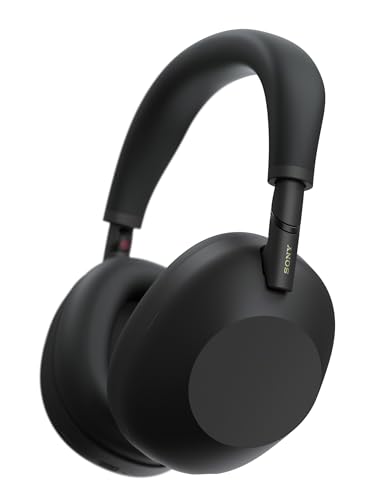
Sony’s flagship headphone is in this guide because it is the answer for a specific, common reader: the person whose headset budget is also their travel headphone budget, who takes calls between flights and focus sessions rather than sitting in meetings all day. There is no boom; instead, an array of microphones in the earcups works with AI-based processing to isolate the wearer’s voice, and Sony’s implementation is the strongest of the hidden-mic designs, holding up well in quiet and moderately busy spaces. The noise cancellation remains the benchmark for travel, and the sound quality for music is the best in this guide.
For call-heavy travellers, two supporting features matter. The headset works wired over USB or a cable when a battery runs down or an airline seat demands it, and its microphone performance holds up notably better in the specific chaos of an airport announcement environment than most hidden-mic rivals, because Sony’s processing is trained to lock onto the wearer’s voice pattern. The touch controls, elegant for media, are the one call-handling weakness: answering and muting are gestures rather than the unambiguous physical buttons of the work headsets, and in a stressful moment a button is worth more than a swipe.
The limitations are structural and worth stating plainly. There is no low-latency dongle, so gaming over Bluetooth carries delay, and in a genuinely loud environment — a station concourse, a café at full roar — the hidden mics cannot match a boom at the mouth, because physics gives the boom a head start no algorithm fully erases. Battery life is rated around a full day and more of playback, multipoint Bluetooth connects a laptop and phone together, and the whole thing folds flat for a bag. As a one-device answer for the travelling professional whose calls are frequent but not their entire job, it earns its place.
Strengths: best-in-guide music sound and travel noise cancellation; strongest hidden-microphone call performance; multipoint Bluetooth for laptop and phone; long rated battery life; light, flat-folding design. Trade-offs: no boom, so very noisy environments expose the mic; no low-latency dongle for gaming; call controls are touch-based rather than physical buttons; priced as a flagship headphone. Who it suits: frequent travellers and hybrid workers who want one premium device for music, focus and a reasonable load of calls, and who do not game competitively, so decide whether the call volume in your week justifies a boom model instead when you check price on Amazon.
Check price on Amazon: Sony WH-1000XM5

Logitech Zone Vibe Wireless: the lightweight all-rounder
Logitech’s Zone Vibe Wireless occupies the sensible middle of the work market: an over-ear headset light enough to forget, with a flip-down boom that mutes when raised, dual connectivity through a USB receiver and Bluetooth, and certification for the main meeting platforms. The microphone uses noise-cancelling processing aimed at the home office — a dog in the next room, a delivery at the door — and the earcups use a fabric finish and memory foam that suit warm rooms better than leatherette. It is the pick that asks the least of its owner: charge it occasionally, flip the boom, and get on with the day.
Logitech’s software story is a quiet strength at this tier. The same management tools that large employers use to deploy Logitech peripherals recognise the headset, firmware and settings can be handled centrally, and for an individual buyer the consumer app covers sidetone, equaliser presets and battery status without fuss. The colour range and knit-fabric finish also deserve credit for making a work tool look like something designed for a home rather than issued by a facilities department — a small thing that decides whether a headset gets worn or left in its box between meetings.
Its compromises are the mirror of its price tier. There is no active noise cancellation in the earcups, so a loud household stays audible to you even while your mic keeps it from the call, and the build favours lightness over the dense, premium feel of the flagships above. Sound for music is pleasant rather than thrilling. None of that undermines the proposition for its audience: home-based staff issued one headset by an employer, students in shared houses, and anyone whose meetings are daily but whose budget is not flagship-shaped. Among the work headsets here it is the value reference point.
Strengths: very light over-ear design with breathable fabric cushions; flip-to-mute boom with noise-cancelling mic; USB receiver plus Bluetooth; platform certifications; the most accessible pricing tier among the work picks. Trade-offs: no earcup noise cancellation; build feels less premium than flagship models; music performance is mid-pack; battery life is good rather than exceptional. Who it suits: home workers, students and office teams equipping several people at once, who need dependable call clarity and comfort without flagship cost, so match the receiver type to your laptop’s ports when you check price on Amazon.
Check price on Amazon: Logitech Zone Vibe Wireless
Side by side: the six at a glance
The table below compares the six qualitatively, on the axes this guide argues matter: microphone arrangement, connection type, and the job each headset is really built for. It is a map of philosophies rather than a ranking.
| Headset | Microphone | Connection | Best at |
|---|---|---|---|
| Jabra Evolve2 75 | Short boom, raise to mute | USB dongle + Bluetooth | All-day meeting schedules |
| Poly Voyager Focus 2 | Boom with acoustic-fence array | USB dongle + Bluetooth | Noisy open-plan offices |
| SteelSeries Arctis Nova Pro Wireless | Retractable, AI-assisted | 2.4GHz base + Bluetooth | Gaming desk command centre |
| HyperX Cloud III Wireless | Detachable boom | 2.4GHz dongle only | Long gaming sessions, rare charging |
| Sony WH-1000XM5 | Hidden earcup array | Bluetooth multipoint | Travel, music and moderate calls |
| Logitech Zone Vibe Wireless | Flip-down boom, flip to mute | USB receiver + Bluetooth | Home-office value |
Read the microphone column first, because it predicts call quality better than any other line. The three boom designs sit at the top for voice clarity in noise, the retractable SteelSeries mic trades a little of that clarity for a clean look and total convenience, and Sony’s hidden array is the exception that performs above its category in calm surroundings. The connection column then splits the list by lifestyle: dongle owners get lag-free, full-quality audio at a desk; Bluetooth owners get freedom of movement between devices. The two gaming headsets and the three work headsets all offer a dongle of some kind, which is not a coincidence — it is the professional and competitive consensus about how wireless audio should reach a computer.
Certification, decoded: Teams, Zoom and UC
The badges on work-headset boxes confuse buyers because three similar claims mean different things. “Certified for Microsoft Teams” is the strictest: the maker and Microsoft have verified that the headset’s dedicated button launches and answers within Teams, that mute state synchronises both ways between headset and app, and that audio performance meets the platform’s requirements. Zoom certification follows the same pattern for Zoom’s client. The broader label “UC” — unified communications — simply means the headset is designed to work across softphone platforms generally, without one platform’s button integration. None of these badges changes the microphone hardware; the same model often ships in a Teams edition and a UC edition that differ only in firmware behaviour and the button’s function.
The practical advice is to buy the edition that matches the software your working day actually runs on. A Teams-shop employee gains real convenience from the certified variant — joining from the headset button, trusting the mute light — while a freelancer who rotates between Zoom, Meet and browser-based calls is better served by the UC edition and its neutral behaviour. Employers issuing headsets at scale should standardise on one edition per platform for the same reason. What no buyer should do is pay a premium for a certification badge belonging to a platform they will never open, or assume an uncertified headset will not work: every pick in this guide functions on every platform at the audio level, and certification is about the last layer of integration polish.
Care, hygiene and keeping a headset alive
A headset worn daily ages in predictable places, and a little maintenance stretches its life considerably. Earcushions are the wear item: leatherette surfaces eventually flake and foam loses its spring, and every maker in this guide sells replacement cushions, which restore both comfort and the acoustic seal the noise cancellation depends on. Wiping cushions after use in hot weather and letting them dry before the headset goes into a case slows that ageing more than any product applied to them. Boom arms and hinges are the mechanical weak points — the flip-to-mute gesture on the work picks is designed for thousands of repetitions, but forcing a boom past its stop or sitting a headset down on its arm shortens that life quickly.
Batteries age by chemistry rather than by use alone. A headset that lives on a charger at full charge, or sits discharged in a drawer for a season, will lose capacity faster than one cycled through ordinary working weeks; the swappable-battery design of the SteelSeries pick sidesteps the issue by making the wear item replaceable. Firmware updates, mentioned earlier, occasionally include battery-management improvements as well as audio ones, which is another reason to install them rather than defer indefinitely. Treated this way, the headsets in this guide are multi-year purchases, and the cost-per-year arithmetic favours the well-built pick over the cheap one replaced twice.
Matching the headset to your day
Back-to-back meetings from a desk. Start with the Jabra Evolve2 75 or the Poly Voyager Focus 2. Both give you a boom at the mouth, a dongle that behaves like a wired device, and mute controls your hand can find without looking. Choose the Jabra for a lighter on-ear feel, the Poly for stronger isolation in a loud room.
A noisy household behind you. Microphone noise cancellation becomes the deciding feature. The Poly’s acoustic-fence design and the Jabra’s boom array are built for exactly this, filtering your surroundings out of the call even when the room itself is not quiet. The gaming picks’ AI-assisted mics also perform well here, which is worth knowing if the same headset must serve a team chat at night.
Competitive gaming with voice. The dongle is non-negotiable, which narrows the field to the SteelSeries and the HyperX. The SteelSeries is the maximalist answer — simultaneous phone connection, swappable batteries, a base station running the desk. The HyperX is the minimalist one — a superb boom, a simple link and a battery that lasts for weeks of evenings. Both are right; the choice is about how much desk infrastructure you want.
One device for travel, music and calls. The Sony WH-1000XM5 stands alone here, because it is the only pick designed as a headphone first. Accept the hidden-mic ceiling on call quality in loud places, and in return you get the best music and the best silence on a train or in a cabin of anything in this guide.
Equipping a household or a small team on a budget. The Logitech Zone Vibe Wireless is the rational fleet purchase: certified, comfortable, light, and priced so that buying three does not require a meeting about the purchase. Its lack of earcup noise cancellation is the sacrifice, and in a quiet home office it is barely felt.
Common mistakes when buying a wireless headset
The most frequent error is buying for the ears and forgetting the voice: choosing on music reviews and driver sizes, then discovering on the first important call that the microphone is the weak half of the product. The second is assuming Bluetooth is Bluetooth. A headset that connects to a laptop over plain Bluetooth may sound noticeably worse on calls than the same headset over its dongle, because of the hands-free mode switch described earlier; buyers who skip the dongle version sometimes blame the headset for a limitation of the connection. Third, check console compatibility before purchase rather than after — wireless gaming compatibility is licensed and platform-specific, and a headset that works wirelessly with one console may be wired-only on another. Fourth, beware the mute you cannot verify: headsets with a physical mute indicator, a boom-raise gesture or platform synchronisation prevent the classic accident of speaking while muted, or worse, the reverse. Finally, remember the second device. A headset that cannot stay connected to phone and computer together will be re-paired daily, and small daily frictions are what turn good hardware into drawer clutter.
Two further mistakes are quieter. The first is ignoring the return window’s real purpose with a product worn on the head: comfort is individual in a way specifications cannot predict, because head shape, glasses and hairstyle all change how a given clamping force feels by hour six. A headset that reads perfectly and pinches by Thursday is the wrong headset, and buyers should treat the first week as a fitting period rather than a commitment. The second is buying last year’s flagship blindly. Wireless headsets improve through firmware as well as hardware, and an older model near the end of its update life can be a worse long-term purchase than a current mid-range model still receiving microphone-processing refinements — check the maker’s support pages for recent update activity before assuming the older badge is the smarter buy.
Frequently asked questions
Is a boom microphone really better than hidden mics?
For the people listening to you, yes, especially outside quiet rooms. A boom places the capsule close to your mouth, so your voice arrives louder than the room around you before any processing begins, and processing then has an easy job. Hidden earcup microphones have improved enormously with AI-based voice isolation and perform well in calm spaces, but in wind, traffic or a busy café the boom’s physical advantage remains decisive.
Why does my headset sound worse on calls than on music?
Because Bluetooth changes modes. Music uses a one-way, high-quality stereo profile, while calls switch to a two-way hands-free profile with far less bandwidth, which compresses your outgoing voice and the call audio you hear. A USB dongle connection avoids the switch entirely, keeping full quality in both directions, which is why the work and gaming picks in this guide ship with one.
Can one headset serve both work meetings and gaming?
Yes, and the overlap models are the dongle-equipped ones. A headset with a 2.4GHz link, a good boom and meeting-platform manners — the SteelSeries for gaming-first buyers, the Jabra or Poly for meeting-first buyers — covers both days credibly. The features that do not transfer are console licensing for gaming and Teams or Zoom certification buttons for work, so decide which side of your life gets the native support.
How long should a wireless headset battery last?
Judge by your pattern rather than the largest number. A headset rated for a working week of talk time, like the work picks here, needs charging so rarely that battery stops being a thought. Gaming headsets trade endurance for their low-latency radios, and the honest range runs from a long weekend of play to the HyperX’s exceptional rated figure. Swappable batteries, as on the SteelSeries, remove the question altogether for desk-based use.
What does multipoint connection actually do?
Multipoint keeps the headset connected to two devices at once — typically a computer and a phone — and switches audio intelligently between them. A call arriving on the phone interrupts the laptop’s video; pausing one source lets the other through. For hybrid workers it is the feature that most reduces daily friction, because the headset stops belonging to one device and starts belonging to you. It is worth confirming before purchase that a given model offers true multipoint rather than simple remembered pairing: remembered devices still need a manual reconnect each time you switch, while genuine multipoint holds both connections live and hands over automatically, and the difference between those two behaviours is exactly the daily friction the feature exists to remove.
The last word
Choose the headset whose microphone flatters your voice in the room you really work and play in, and every call you join will sound like it came from somewhere quieter, calmer and more professional than the truth.