Disclosure: As an Amazon Associate, ilcastellomenu.com earns from qualifying purchases. Prices and availability change; check Amazon for the latest.
Where to buy
Our shortlist for best wireless keyboard and mouse combo for gaming 1 usb starts here. Check the latest price, availability and delivery on Amazon. Orders are placed on Amazon.
- Logitech G305 LIGHTSPEED — Best Mouse Half. Check on Amazon
- Razer BlackWidow V3 Mini HyperSpeed — Best Keyboard Half. Check on Amazon
- HyperX Pulsefire Haste Wireless — Best Lightweight Mouse Half. Check on Amazon
- Logitech G PRO X Superlight — Best Premium Mouse Half. Check on Amazon
- Logitech G PRO Mechanical Gaming Keyboard — Best Wired Keyboard Half (One-Receiver Route). Check on Amazon
- Single-Receiver Keyboard and Mouse Sets (One-Dongle Class Pick) — Best True One-Dongle Set (Prose Pick) (unlinked pick; mainstream single-receiver set tier, covered at class level in this guide).
Read the full guide ↓
The hunt for the best wireless keyboard and mouse combo for gaming 1 usb dongle at a time runs into a fact the product pages rarely state plainly: true gaming-grade sets that share a single receiver are vanishingly rare. Office combos share one dongle as a matter of routine, but gaming keyboards and gaming mice are almost always sold as separate devices, each with its own receiver, because each is tuned, updated and replaced on its own cycle. So this guide answers the keyword honestly in both of its readings. If your 1 USB means one shared receiver, it shows you the class where that genuinely exists and names its gaming compromises without dressing office hardware up as esports gear. If your 1 USB means one receiver for the wireless half of a serious gaming setup — a wired keyboard that needs no receiver at all, paired with a proper wireless gaming mouse — it builds that setup from verified gaming components.
Why insist on the distinction? Because the two readings lead to opposite purchases, and a guide that blurred them would sell you the wrong thing with confidence. The single-receiver reading is usually about a laptop with scarce ports, a living-room PC, or a desk that must stay clean; the one-receiver reading is about a gaming desk where the keyboard can take a cable but the mouse must be free. Both are reasonable. What is not reasonable is a membrane office set marketed with gaming artwork, so every pick below is labelled for exactly what it is — gaming component, wired component, or office-class class pick — and the comparison table keeps those labels visible. For the broader combo landscape, Best Gaming Keyboard And Mouse Combo Under $100 covers the budget end of the market this guide deliberately narrows.
Key Takeaways
- No verified gaming combo in our pool shares one receiver between a gaming keyboard and a gaming mouse — the true one-dongle sets are office-class, and this guide labels them that way instead of disguising them.
- The strongest gaming answer to ‘1 USB’ is one receiver total: a wired gaming keyboard (no receiver needed) plus a proper wireless gaming mouse on the single dongle.
- Judge the mouse half by gaming standards — sensor, switches, programmable buttons — because that is where office sets compromise hardest.
- Count your real constraint before buying: one free port, one receiver, or one cable-free desk are three different problems with three different fixes.
In this guide
Quick Picks
| Badge | Pick | Why it stands out | Link |
|---|---|---|---|
| Best Mouse Half | Logitech G305 LIGHTSPEED | The mouse half to beat: months per AA battery, receiver storage in the shell, real gaming tracking. | Check on Amazon |
| Best Keyboard Half | Razer BlackWidow V3 Mini HyperSpeed | A true wireless mechanical gaming keyboard — 65% layout, three connection modes, up to 200-hour battery. | Check on Amazon |
| Best Lightweight Mouse Half | HyperX Pulsefire Haste Wireless | 61 g wireless gaming mouse with six programmable buttons for the aim-first half of the setup. | Check on Amazon |
| Best Premium Mouse Half | Logitech G PRO X Superlight | The premium mouse half: under 63 g, flawless sensor, zero cable drag. | Check on Amazon |
| Best Wired Keyboard Half (One-Receiver Route) | Logitech G PRO Mechanical Gaming Keyboard | The wired keyboard half — needs no receiver, so the mouse keeps the only dongle in the setup. | Check on Amazon |
| Best True One-Dongle Set (Prose Pick) | Single-Receiver Keyboard and Mouse Sets (One-Dongle Class Pick) | The true one-dongle class, covered at class level — one receiver for both devices, office-class components. | Unlinked pick |
How These Picks Were Chosen
The selection rules for this guide were stricter than usual, because the keyword invites a specific kind of dishonesty: taking any wireless keyboard-and-mouse box with gaming styling and presenting it as a gaming combo. We rejected that outright. Linked picks had to be genuine gaming components with listings confirmed in our verified shortlist on 2026-11-21 — a wireless gaming keyboard with mechanical switches, and wireless gaming mice with gaming sensors and programmable buttons. The one wired component, a tenkeyless gaming keyboard, is badged as wired wherever it appears, because its whole role in this guide is that a wired keyboard consumes no receiver at all.
The single-receiver class is represented by one unlinked class pick, described at class level with no link and no invented model specifications, because no set in that class passed the gaming-component test and none sits in our verified shortlist. That is a deliberate gap, and the article says so rather than filling it with a plausible-looking box. Within the linked components, the badges split the two honest strategies: the best keyboard half and mouse half for a two-device wireless pairing, the lightweight and premium mouse options for players who prioritise aim, and the wired keyboard route for the strictest one-receiver interpretation. Combos that bundle a headset, pad and mouse into one bargain box were also rejected — they answer a different keyword, and their mice are the first place the budget shows.
The 6 Best Wireless Keyboard And Mouse Combo For Gaming 1 Usb

Logitech G305 LIGHTSPEED (Best Mouse Half)
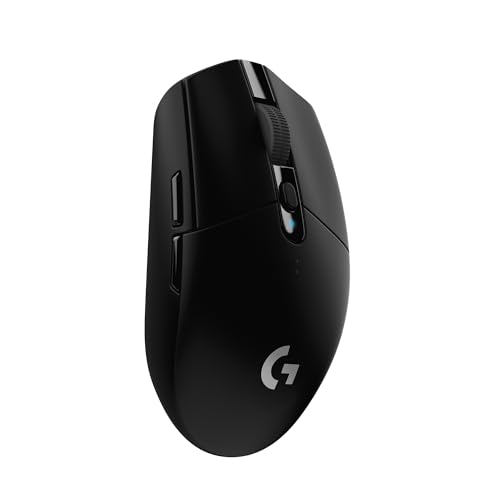
Any honest one-USB gaming setup starts with the mouse, because the mouse is where wireless earns its keep and where office sets compromise hardest. The G305 is the mouse half we would build around: LIGHTSPEED receiver wireless with a HERO gaming sensor, six programmable buttons, and up to 250 hours from a single AA battery. That battery figure matters doubly in a combo context — a mouse that needs charging every few days adds a second cable routine to a setup whose entire point was simplicity, while the G305 asks for a battery swap a few times a year. Its receiver also stores inside the shell, so a laptop player moving between desk and couch never leaves the one dongle behind.
See the Logitech G305 LIGHTSPEED on Amazon: Check on Amazon
Strengths
- Runs up to 250 hours on a single AA battery in performance mode, so battery anxiety basically disappears
- LIGHTSPEED wireless plus the HERO sensor bring genuinely lag-free, spin-out-proof tracking to a budget price class
- Compact egg shape travels well, and the USB receiver stores inside the shell so it never gets lost in a laptop bag
Trade-offs
- At 99 g it is heavy next to modern ultralights, and most of that weight sits towards the rear
- No Bluetooth and no rechargeable cell, so you swap AA batteries rather than topping up over USB
- Small shell suits small-to-medium hands; large-handed palm grippers will feel cramped
- Sensor: Logitech HERO optical
- Max DPI: 12,000
- Weight: 99 g with one AA battery
- Connection: LIGHTSPEED 2.4 GHz wireless (USB receiver)
- Buttons: 6 programmable
- Battery: Up to 250 hours on one AA (performance mode)
- Extras: Onboard receiver storage, onboard memory
Paired with either keyboard route in this guide, the G305 covers the gaming side completely: tracking that never spins out, clicks that feel like a gaming mouse because they are one, and a compact shape that travels between the desk and the living room without complaint. Its limits are the ones its badge accepts — a small shell that large-handed palm grippers will find cramped over long sessions, rear-heavy balance from the AA cell, and no Bluetooth for a second device. None of them touches its role here. If the budget for the whole setup is tight, spend the saving the G305 creates on the keyboard half; the mouse is the half your hand judges every second.
Best for: anyone who wants dependable wireless gaming without flagship pricing or charging cables / Not suited for: large-handed palm-grip players or ultralight purists

Razer BlackWidow V3 Mini HyperSpeed (Best Keyboard Half)
The BlackWidow V3 Mini HyperSpeed is what a gaming keyboard half actually looks like, and placing it next to the office-class pick at the end of this guide is the fastest way to understand the gap between the two worlds. It is a 65% mechanical board with Razer’s Green tactile-and-clicky switches, per-key Chroma lighting, doubleshot keycaps, and three ways to connect — HyperSpeed 2.4 GHz wireless, Bluetooth, and USB-C wired — with up to 200 hours of battery in wireless use. In a two-device wireless pairing it brings its own receiver, which is exactly the honest cost of gaming-grade parts, and its compact footprint returns the desk space a mouse needs to move.
See the Razer BlackWidow V3 Mini HyperSpeed on Amazon: Check on Amazon
Strengths
- 65% layout keeps arrow keys while leaving maximum desk room for the mouse
- HyperSpeed wireless, Bluetooth and wired modes cover console-adjacent PCs, laptops and tablets from one board
- Up to 200 hours of battery makes it one of the longest-lasting wireless gaming keyboards
Trade-offs
- Green switches are loud and clicky, a poor fit for shared rooms or late-night play
- Compact layout moves many keys behind a function layer, which slows MMO and productivity work
- Doubleshot ABS keycaps shine faster than PBT alternatives
- Layout: 65% compact
- Connection: HyperSpeed 2.4 GHz wireless, Bluetooth, USB-C wired
- Switches: Razer Green mechanical (tactile and clicky)
- Battery: Up to 200 hours
- Keycaps: Doubleshot ABS
For the one-receiver strategist, its Bluetooth mode is the interesting line on the spec sheet: a keyboard that can ride Bluetooth to a laptop frees the single 2.4 GHz receiver for the mouse, though competitive players should test Bluetooth latency against their own standards before trusting it in ranked play — the guide’s buying section treats that trade-off openly. The compromises are the compact layout’s function layer for missing keys, the Green switches’ volume in shared rooms, and ABS keycaps that shine sooner than PBT. As a keyboard half it is the genuine article: mechanical, gaming-tuned, and wireless on its own terms, rather than half of a box that compromised both devices to share one dongle.
Best for: desk-space-strapped players who want one wireless board for several devices / Not suited for: players who need a full key layout or quiet switches

HyperX Pulsefire Haste Wireless (Best Lightweight Mouse Half)
Players whose priority is aim should build the setup around the Pulsefire Haste Wireless instead. At 61 g with a honeycomb shell it is the lightest full gaming mouse among the mouse halves here, its 2.4 GHz receiver connection is properly gaming-grade, and its six programmable buttons and up to 100-hour battery fit the combo brief neatly — one dongle for the mouse, a weekly rather than daily charging habit, and nothing about its tracking that needs an apology in a shooter. Paired with the compact Razer keyboard it makes the most portable serious setup in this guide: two small devices, two receivers, and a footprint a laptop desk can actually hold.
See the HyperX Pulsefire Haste Wireless on Amazon: Check on Amazon
Strengths
- 61 g wireless design with a honeycomb shell delivers ultralight flick speed without a cable
- Up to 100 hours of battery per charge means weekly, not daily, charging habits
- TTC Golden micro switches are dust-resistant and rated for fast, consistent clicks
Trade-offs
- Honeycomb shell openings need regular cleaning and are not ideal around spills
- Symmetrical low-profile shape gives palm grippers limited support
- Grip tape is included rather than moulded in, and some players dislike the feel
- Sensor: HyperX optical
- Max DPI: 16,000
- Weight: 61 g
- Connection: 2.4 GHz wireless (USB receiver), wired backup
- Buttons: 6 programmable
- Battery: Up to 100 hours per charge
- Shell: Honeycomb
The Haste’s trade-offs are the familiar ultralight ones. The honeycomb openings want regular cleaning and a desk without open drinks, the low symmetrical shell gives palm grippers limited support across very long sessions, and grip comes from included tape rather than moulded texture. In return the setup gains the thing office combos can never offer: a mouse half that a competitive player would choose on its own merits. That is the test every half of a build-your-own combo should have to pass, and it is why this guide assembles components instead of pointing at a single box.
Best for: FPS players who want ultralight wireless performance below flagship prices / Not suited for: palm grippers who want a tall, supportive shell

Logitech G PRO X Superlight (Best Premium Mouse Half)
The G PRO X Superlight is the premium answer to the mouse half — under 63 g, a HERO 25K sensor with zero smoothing or acceleration, large PTFE feet, and LIGHTSPEED wireless that reports with wired consistency. In the one-receiver strategy it is the natural partner for the wired G PRO keyboard below: the keyboard takes a cable and no receiver, the Superlight takes the single dongle, and the result is a tournament-grade setup whose only wireless link is the one that benefits from being wireless. In a two-receiver pairing with the BlackWidow Mini it makes the flagship version of the portable setup, at a flagship combined cost.
See the Logitech G PRO X Superlight on Amazon: Check on Amazon
Strengths
- HERO 25K sensor tracks with zero smoothing, filtering or acceleration across the whole DPI range, so flicks and micro-corrections land exactly where your hand puts them
- At under 63 g it is one of the lightest wireless gaming mice ever sold, which cuts stopping friction on big swipes and reduces wrist load over long sessions
- LIGHTSPEED wireless reports at 1,000 Hz with wired-like consistency, and the large zero-additive PTFE feet glide evenly on cloth and hybrid pads
Trade-offs
- No dedicated DPI button on top, so sensitivity changes mean opening G HUB or using a remapped side button
- Charges over Micro-USB rather than USB-C, which feels dated next to newer flagships
- The safe, symmetrical shape offers little palm support, so committed palm-grip players may find it flat
- Sensor: Logitech HERO 25K optical
- Max DPI: 25,600
- Weight: Under 63 g
- Connection: LIGHTSPEED 2.4 GHz wireless (USB receiver)
- Buttons: 5 programmable
- Battery: Up to 70 hours per charge
- Feet: Zero-additive PTFE
Its compromises are unchanged from its solo career and worth repeating in combo context: five programmable buttons is the smallest count here, there is no top DPI button, and charging is Micro-USB in a USB-C world. None of those touches its role as the aiming instrument of the setup. Choose it when the mouse half is the priority and the keyboard is infrastructure; choose the G305 when the whole setup must stay lean; choose the Haste when you want most of the lightness with an extra button and money left for the keyboard. The premium badge is earned by the sensor and the shell, not by the price tier.
Best for: competitive FPS players who want the lightest possible wireless mouse with a flawless sensor / Not suited for: players who need lots of extra buttons for MMO skills or macros

Logitech G PRO Mechanical Gaming Keyboard (Best Wired Keyboard Half (One-Receiver Route))
This is the pick that makes the strictest reading of the keyword work. A wired keyboard needs no receiver — so pair the G PRO Mechanical Keyboard with any wireless mouse in this guide and the entire setup runs on exactly one USB receiver, with zero compromise in either device. The keyboard itself is a proven esports tenkeyless: per-key LIGHTSYNC RGB, onboard memory for profiles, and a detachable cable that makes it the classic tournament-travel board. The tenkeyless footprint also returns mouse room, which low-sensitivity players feel immediately. Its cable is the one visible wire in the setup, and it goes to the device that never moves — which is precisely where a cable costs nothing.
See the Logitech G PRO Mechanical Gaming Keyboard on Amazon: Check on Amazon
Strengths
- Tenkeyless footprint frees up wide mouse-swipe space, which matters in low-sensitivity shooters
- Detachable cable and compact body make it the classic tournament-travel keyboard
- Per-key LIGHTSYNC RGB and onboard profiles carry your setup between PCs
Trade-offs
- No wrist rest in the box, and the high profile can tire wrists without one
- Micro-USB connector is older than the USB-C found on newer boards
- No dedicated media keys beyond function-layer shortcuts
- Layout: Tenkeyless (TKL)
- Connection: Wired USB, detachable Micro-USB cable
- Backlighting: LIGHTSYNC RGB, per-key
- Extras: Onboard memory, portable esports design
Honesty requires the footnote, and this guide prints it in the open: if your constraint is literally one USB port in total, a wired keyboard still occupies a port, and only the unlinked class pick below or a USB hub truly answers you. But for the far more common constraint — one receiver, a clean desk, a laptop dock with the dongle living in it — this route is the strongest in the guide, because neither half is a compromise product. The keyboard’s own trade-offs are a missing wrist rest, a Micro-USB detachable connector, and no number pad. Players who need the pad for work should look at the class pick’s full-size layouts and accept its gaming compromises with open eyes.
Best for: competitive players building a compact, proven keyboard-and-mouse pairing / Not suited for: players who need a number pad for work or MMO keybinds
Single-Receiver Keyboard and Mouse Sets (One-Dongle Class Pick) (Best True One-Dongle Set (Prose Pick))
This closing pick is the only entry that satisfies the keyword literally — a keyboard and mouse set in which one shared USB receiver drives both devices — and it is covered at class level, with no link, because no set in this class is a gaming product and none sits in our verified shortlist. The class is real, common and genuinely useful: full-size wireless keyboards and matching mice, sold as one set, pairing through a single dongle with plug-and-play manners that work before the operating system loads. For a living-room PC, a spare-port-starved laptop, or a family machine that games casually, it is a sensible product — as long as it is bought as what it is.
Strengths
- One receiver genuinely drives both devices, which is exactly the one-USB brief with no workarounds or hubs
- Setup is plug-and-play: one dongle, no pairing menus, and the set usually works before the operating system finishes loading
- Full-size keyboards in this class keep the number pad that gaming boards often drop
Trade-offs
- The mice in these sets use office-class sensors and switches, not gaming-grade parts, and fast flicks can expose the gap
- Keyboards are usually membrane or low-profile scissor designs rather than mechanical gaming switches
- Gaming software, per-key lighting and macro support are minimal or absent compared with true gaming gear
- Form: Keyboard and mouse set sharing one USB receiver
- Connection: 2.4 GHz wireless via the single shared receiver
- Keyboard: Full-size layouts are typical for the class
- Mouse: Compact-to-mid-size wireless mouse
- Software: Usually plug-and-play with little or no gaming software
What it is not is gaming hardware, and the differences are specific. The mice in these sets use office-class sensors and switches chosen for battery life and quiet desks, not for flick tracking or fast, consistent clicks; the keyboards are membrane or low-profile scissor designs rather than mechanical gaming switches; and gaming software, per-key lighting and macro support are minimal or absent. A player whose games are turn-based, casual or controller-first may never feel those gaps. A player shopping with the word gaming in the search should feel them described plainly before spending anything — which is why this class appears here as a clearly labelled prose pick rather than as a linked recommendation wearing gaming colours it has not earned. Players who split the difference often land on Best Mouse For Work And Gaming thinking, and this guide’s component routes exist for exactly that middle ground.
Best for: players whose one-receiver requirement is absolute and whose games are casual enough for office-class hardware / Not suited for: competitive players who need gaming-grade sensors, switches and software
This pick is covered at class level only (mainstream single-receiver set tier); check Amazon for the current models in this class.
Comparison Table
| Pick | Type | Layout / Form | Connection | Highlight | Price |
|---|---|---|---|---|---|
| Logitech G305 LIGHTSPEED (Best Mouse Half) | HERO, 12,000 DPI | 99 g | Wireless | 6 | Check price on Amazon |
| Razer BlackWidow V3 Mini HyperSpeed (Best Keyboard Half) | 65% mechanical | Wireless + Bluetooth | Wireless | Chroma RGB | Check price on Amazon |
| HyperX Pulsefire Haste Wireless (Best Lightweight Mouse Half) | Optical, 16,000 DPI | 61 g | Wireless | 6 | Check price on Amazon |
| Logitech G PRO X Superlight (Best Premium Mouse Half) | HERO 25K, 25,600 DPI | Under 63 g | Wireless | 5 | Check price on Amazon |
| Logitech G PRO Mechanical Gaming Keyboard (Best Wired Keyboard Half (One-Receiver Route)) | TKL mechanical | Detachable cable | Wired | LIGHTSYNC RGB | Check price on Amazon |
| Single-Receiver Keyboard and Mouse Sets (One-Dongle Class Pick) (Best True One-Dongle Set (Prose Pick)) | Keyboard + mouse set | One shared receiver | Wireless | Office-class components | Check price on Amazon |
What Does “1 USB” Actually Mean for a Combo?
Three different problems hide inside the same two characters. The first is the single receiver: both devices, one dongle. That is the office-combo design, and in gaming hardware it barely exists, because gaming keyboards and mice are developed as separate flagships — each with its own receiver, firmware and replacement cycle — and because a shared receiver is a shared point of failure and interference that gaming brands have little incentive to engineer around. The second problem is the single free port: a laptop or mini PC with one available USB socket. That problem is honestly solved by the wired-keyboard route in this guide if a cable to the keyboard is acceptable, or by an inexpensive USB hub if it is not — and a hub, unglamorous as it sounds, is the correct engineering answer more often than any combo box. The third problem is the clean desk: no visible cables, nothing to snag. That one is solved by the two-receiver wireless pairing, because receivers hide inside a dock or behind a monitor and never cross the desk at all.
Naming your problem before shopping changes what ‘best’ means, and it is why this guide refuses to crown a single box. If you truly need the first, the unlinked class pick is your product class and its compromises are listed in daylight. If you need the second or third, the component routes give you gaming-grade halves with exactly one receiver in play or two hidden ones. What none of the honest routes involve is an office set in gaming clothing — and that distinction, more than any single product, is the useful thing this search can teach. Readers comparing the wider market afterwards will find Best Usb Mouse For Gaming a useful cross-check on what a gaming mouse alone should offer.
One more situation deserves naming, because it produces a steady share of this search’s searches: the laptop that docks. A laptop player who connects one cable to a dock at a desk, then undocks for the couch, actually owns two setups — and the receiver strategy can differ between them without any contradiction. Leave the gaming pairing’s receivers in the dock, where they are close to the desk surface and permanently proven, and let the laptop’s own Bluetooth carry the keyboard for couch sessions. Understood that way, the 1 USB question stops being a product hunt and becomes a small piece of desk design, which is why this guide spends as much space on strategies as on products.
How to Choose the Right Keyboard and Mouse Combo
Should you buy a set or assemble components?
A set buys convenience: one box, one receiver, matched styling, and a price that reflects shared engineering. Components buy quality per device: each half chosen on its own merits, each replaceable when it wears or when you outgrow it. For gaming, the component route wins almost every honest comparison, because the mouse — the half your aim lives in — is where sets economise first. Assemble components unless your constraint is the literal single receiver, and if you assemble, spend on the mouse first and the keyboard second; a great mouse with a modest keyboard plays better than the reverse in nearly every genre.
How do you judge the mouse half?
By the same standards as any gaming mouse, because that is what it is. A gaming sensor that tracks fast movement without spinning out, switches that click fast and consistently, programmable buttons you can actually map, and a receiver connection rather than Bluetooth for play. Weight and shape follow your grip and your games, as Best Type Of Mouse For Gaming explains in full. The moment a set’s mouse cannot state its sensor or its buttons plainly, you are looking at an office mouse in costume — the tell that separates the class pick in this guide from the linked gaming halves.
How do you judge the keyboard half?
Switches first: mechanical switches are the gaming standard for feel, durability and consistent actuation, and every linked keyboard here has them. Layout second: a 65% or tenkeyless board returns mouse room and travels well, while full-size keeps the number pad that work and some genres want — decide from your desk and your day job, not from photographs. Connection third: a gaming keyboard should offer a 2.4 GHz receiver mode for play; Bluetooth is a useful second mode for laptops and tablets, treated as a convenience rather than the performance path. Backlighting you can read in a dark room matters more than lighting spectacle.
What about receivers, ports and hubs?
Count honestly before you buy. A dock or monitor hub changes the arithmetic completely — receivers living in a dock are invisible, always connected, and close enough to the desk for a clean signal. If a hub is allowed, the one-receiver constraint usually evaporates and the two-device gaming pairing becomes the obvious build. If no hub is allowed and one port is truly all you have, your real options are the single-receiver class or the wired-keyboard route, and this guide has labelled both. Receiver placement still matters wherever the dongle lives: close to the devices, clear of metal enclosures, for the same interference reasons as any wireless gaming setup.
How should you split the budget between the halves?
Unevenly, in the mouse’s favour. The mouse is the aiming and clicking instrument; its sensor and switches are felt in every second of play. The keyboard’s job — reliable, comfortable, correctly sized keys — is fully done by a mid-tier mechanical board. A useful pattern is to fix the mouse first from the linked halves here, then choose the keyboard route that fits the remaining budget and the receiver strategy: the Razer Mini for a fully wireless compact pairing, the wired G PRO for the strict one-receiver build. Players whose week is mostly work with gaming at the edges will find the balance discussed further in Best Mouse For Work And Gaming.
How Do You Set Up a One-Receiver Gaming Setup?
Whether you chose the component route or the single-receiver class, the setup goal is the same: both devices working, the receiver placed where it will never cause a stutter, and no cable crossing the mouse’s path. Work through the steps in order.
- Decide the receiver strategy first. Before plugging anything in, settle which build you are making: wired keyboard plus one mouse receiver, two receivers for a fully wireless pairing, or the single shared receiver of a class set. The strategy decides which ports and which desk positions you need.
- Place the receiver close and clear. Put the mouse’s receiver in a front port, a dock port near the desk surface, or a short extension lead — within clear sight of the pad and away from USB 3 storage devices and metal case walls that interfere with 2.4 GHz signals.
- Connect the keyboard by its chosen route. For the wired route, route the G PRO’s detachable cable along the desk’s rear edge so it never crosses the mouse area. For the wireless route, pair the keyboard’s receiver or its Bluetooth mode and confirm it in the brand software.
- Charge everything to full. Start both wireless devices from a full charge or fresh batteries. A new setup judged on half-charged hardware teaches you the wrong lessons about its battery rhythm.
- Install software and set the basics. Use G HUB or Razer Synapse to update firmware, set mouse DPI stages you will actually use, map the mouse buttons, and set keyboard lighting to a level you can read keys by in a dark room.
- Test in a low-stakes session. Play something forgiving for the first session and deliberately test the failure points: fast mouse flicks for tracking, a dark-room typing test for the keyboard, and a walk-away test for wireless range if the setup serves a living room.
- Fix the charging routine. Write down where each device charges and when — a weekly top-up beside the desk beats a dead mouse before a ranked session. Keep the mouse’s receiver in its storage compartment whenever the setup travels.
Troubleshooting
- Problem: one device connects and the other does not → fix: confirm each receiver is in a working port and that the device is set to its receiver mode rather than Bluetooth or wired mode; re-pair through the brand software if needed
- Problem: the mouse stutters when the keyboard is in use → fix: separate the two receivers into ports further apart, and move the mouse receiver closer to the pad on an extension lead
- Problem: keys lag or repeat in fast play → fix: if the keyboard is on Bluetooth, switch it to its 2.4 GHz receiver mode for gaming sessions; Bluetooth is the convenience mode, not the performance mode
- Problem: the setup works at the desk but not from the couch → fix: range and line of sight are the limits — move the receiver to a front-facing dock or hub port that can see the room, and test again from playing distance
- Problem: a port shortage appears when you add a headset or drive → fix: that is the hub problem arriving on schedule — a small powered hub for non-gaming peripherals keeps the gaming receivers in their proven ports
Upkeep is minimal once the build is right. Keep both receivers in their proven ports and resist tidying them into new ones; wireless setups fail most often after a well-meant rearrangement. Wipe the keyboard’s keycaps and the mouse shell weekly, clear the mouse sensor lens with compressed air, and check the honeycomb Haste’s shell openings for dust if that is your mouse half. When you travel with the setup, the receiver travels inside the mouse where a storage compartment exists — a lost dongle is the one failure no amount of software can fix.
Common Mistakes
Believing the gaming artwork on an office set. The most expensive mistake in this search’s market is a membrane office combo in aggressive styling, bought as gaming gear. Judge the mouse’s sensor and the keyboard’s switches, which are printed plainly on honest products — or absent on dishonest ones.
Counting receivers instead of solving the actual problem. Players fixate on the number one and buy a compromised set, when their real problem was a port shortage a hub solves or a cable they only disliked seeing. Name the problem first, as the section above this guide’s buying advice explains.
Pairing a flagship mouse with a throwaway keyboard — or the reverse. A combo is judged as a setup. The lopsided builds feel wrong every session: spend on the mouse first, then buy the best keyboard half the remaining budget honestly covers.
Running the keyboard on Bluetooth for ranked play. Bluetooth is for the laptop on the couch. In fast play its latency and power-saving behaviour are the wrong trade; use the receiver mode the keyboard provides, and keep Bluetooth for the second device it was meant for.
Hiding receivers where the signal cannot reach. A receiver tucked behind a metal case or inside a closed cabinet causes the stutters players blame on the devices. Receivers want line of sight to the desk — give it to them and most wireless complaints disappear.
Final Recommendation
If your 1 USB means one receiver in a serious gaming setup, build it the guide’s way: the wired Logitech G PRO Mechanical Gaming Keyboard contributing no receiver at all, and your choice of wireless mouse on the single dongle — the Logitech G305 LIGHTSPEED for value and battery, the HyperX Pulsefire Haste Wireless for lightweight aim, or the Logitech G PRO X Superlight for the premium end. That build compromises nothing, and it is the recommendation most readers of this search actually need.
If you want both halves wireless and compact, pair the Razer BlackWidow V3 Mini HyperSpeed with the G305 or the Haste and accept two small receivers as the honest price of gaming-grade parts. And if your one receiver is a hard physical constraint — one port, no hub, no exceptions — buy the single-receiver class with your eyes open: it is a good office-class product that games casually, and this guide would rather tell you that plainly than sell it to you as something it is not.
Frequently Asked Questions
Does a true one-dongle gaming keyboard and mouse combo exist?
As a gaming-grade product, effectively no — and this guide has not linked one, because none sits in our verified shortlist and the mainstream gaming brands sell their keyboards and mice as separate devices with separate receivers. Single-receiver sets are common and useful, but they are office-class products. Anyone who tells you otherwise is usually describing an office set with gaming styling, which is why the class pick here is labelled so carefully.
Is a wired keyboard plus a wireless mouse really a combo?
It is the build that satisfies the practical version of this search: one receiver in total, no compromised components, and the only cable running to the device that never moves. Combo purists can call it a pairing instead — the guide uses ‘build-your-own’ language for it in the picks — but as a way to play, it outperforms any shared-receiver box at gaming, which is the comparison that matters.
Can I just use a USB hub and buy two wireless devices?
Yes, and for many desks that is the correct answer. A hub turns the one-port problem into a non-problem, after which the fully wireless pairing in this guide — the BlackWidow Mini with a G305 or Haste — becomes the natural build. Keep the gaming receivers in the hub ports closest to the desk surface, and put drives and other peripherals on the remaining ports.
Will Bluetooth work for the keyboard half while gaming?
For slower-paced games and couch play, usually yes; for fast competitive play, it is the wrong tool. Bluetooth prioritises battery life and convenience, and its latency behaviour shows in rapid, repeated inputs. The BlackWidow Mini’s value in this guide is precisely that it offers both: Bluetooth for the laptop, and a proper 2.4 GHz receiver mode for gaming sessions. The wider budget landscape is covered in Best Gaming Keyboard And Mouse Combo Under $100 for readers comparing routes.
Which half should I upgrade first if I start with a basic set?
The mouse, almost always. Its sensor and switches decide how aiming and clicking feel in every game, and moving from an office mouse to a G305-class gaming mouse is the single largest upgrade a set owner can make. The keyboard comes second — a mechanical board transforms typing feel, but it does not rescue a mouse that cannot track your hand.