Disclosure: As an Amazon Associate, ilcastellomenu.com earns from qualifying purchases. Links to Amazon on this page are affiliate links; they cost you nothing extra. Listing details such as price and availability change often, so check the current Amazon listing before you buy.
This graphics card buying guide is the checklist version of everything our guide series teaches: the criteria that matter, in the order to apply them, with the marketing noise filtered out. A graphics card is usually the most expensive component in a gaming PC and the one that decides how games actually look and feel, so the goal here is not to name a single ‘best’ card — it is to make sure the card you buy matches your monitor, your games, your power supply, and your case, at a tier that will stay satisfying for years rather than months.
Work through it top to bottom and you will finish with a shortlist of two or three specific models and the confidence to buy any of them. Where a topic deserves depth — VRAM, power, ray tracing, brand differences — this guide links the dedicated explainer rather than repeating it. And if you want the same conclusions pre-computed into shortlists by budget, the roundups under Best Graphics Cards for Gaming are maintained for exactly that.
Criterion 1: Your monitor sets the budget
Resolution and refresh rate are the specification of the job. 1080p 60–75 Hz is light work that entry cards handle easily; 1080p 144 Hz+ wants entry-to-mid cards for esports and mid-range for AAA; 1440p 144–165 Hz is the current enthusiast sweet spot and mid-to-upper territory; 4K 120 Hz+ is high-end land. Buying above your monitor wastes money every single day; buying below it wastes the monitor. If a monitor upgrade is planned within the card’s life, buy for the target display, not the current one — cards and monitors should be planned as a pair, a theme the picks in Best Graphics Cards for 1440p 144hz and Best Graphics Cards for 240hz are built around.
In this guide
Criterion 2: GPU tier and generation
Within any generation, tiers (entry, mid, upper, high-end, flagship) separate performance far more than brand or factory overclocks do. Prefer the current or immediately previous generation at your tier: newer generations bring better efficiency, current upscaling and frame-generation features, and longer driver support ahead of them. The naming traps to avoid: a higher tier from an older generation versus a lower tier from a newer one is a genuine comparison (weigh features and VRAM, not just raw speed), and laptop cards sharing desktop names are much weaker — this guide is about desktop cards unless stated. For the feature-era question specifically, Rtx vs Gtx Graphics Cards shows why the RTX feature set matters to longevity.
Criterion 3: VRAM — capacity for your resolution
Use the comfort targets from our full explainer, What is Vram on a Graphics Card: 8 GB is today’s workable floor for 1080p, 12 GB is the sensible target for 1440p and a longevity buy at 1080p, and 16 GB suits 4K and heavy creative or AI work. Between two otherwise-equal cards, take the extra VRAM if you keep hardware a long time; between a faster GPU with less VRAM and a slower one with more, take the faster GPU — capacity cannot rescue a chip that is too slow to use it. Creators should read VRAM as a hard requirement set by their applications and project sizes, not a preference.
Criterion 4: Features you will actually use
- Ray tracing: worth paying for if your games showcase it; a per-game judgement, detailed in what is ray tracing. NVIDIA leads, AMD follows respectably, Intel is capable at its tiers.
- Upscaling & frame generation: DLSS (RTX only), FSR (universal), XeSS (Intel). These extend a card’s life in demanding games more than any other feature — treat support as a core spec, not a bonus.
- Encoding for streaming/recording: NVENC’s reputation is earned; AMD’s and Intel’s encoders are strong too, with AV1 support on recent generations worth having for future-proofing — see the streamer-focused picks in best graphics cards for streaming.
- Creative/AI acceleration: if your applications use CUDA, the decision is made for you; verify your exact apps before assuming either way, per nvidia vs amd graphics cards.
- Outputs: enough DisplayPort/HDMI sockets, of recent enough versions, for your monitors today and the one you keep eyeing.
Criterion 5: Power supply and physical fit — the deal-breakers
These two criteria cannot be compromised, only satisfied. Power: the card maker’s recommended PSU wattage, the connector types your PSU actually offers, and sensible headroom — the full reasoning lives in graphics card power consumption explained, and an honest PSU upgrade belongs in the budget if yours falls short. Fit: card length versus case clearance (with front fans/radiators fitted), slot thickness versus the expansion slots and components below, and height versus the side panel including the power cable’s bend. Measure your case; read the card’s dimensions; do not discover either number during installation — the troubleshooting classic in how to fix no display after installing a graphics card too often begins with a card that never truly seated in a too-small case.
Tiers without prices: how the market segments
| Tier | Built for | Buy it if |
|---|---|---|
| Entry | 1080p esports and light AAA at modest settings | Budget is tight, monitor is 1080p 60–144 Hz, expectations are calibrated |
| Mid-range | 1080p ultra, 1440p high, light ray tracing with upscaling | You want the sweet spot — most gamers, most of the time |
| Upper mid-range | 1440p high-refresh, entry 4K with upscaling, strong ray tracing | You keep cards 4+ years and play new releases on day one |
| High-end | 4K high settings, heavy ray tracing, creation plus gaming | Your monitor and workload genuinely demand it |
| Flagship | 4K high-refresh, path tracing, professional/AI work | Money is secondary to capability — and your PSU and case agree |
Notice what the table does not contain: prices. Tier positioning is stable even as prices move, and it is the honest way to shop — decide your tier from your monitor and games, then find the best current model inside it using live shortlists like best graphics cards under 500 for the mid-range heartland. The mid-range deserves its reputation as the sweet spot: efficiency peaks there (performance per watt), features are current, and the experience at 1080p/1440p satisfies the overwhelming majority of players.
Mistakes to avoid
- Buying the GPU in isolation. A flagship card on a 1080p 60 Hz monitor, or paired with a decade-old CPU and a wheezing PSU, is a system designed by a shopping cart, not a person.
- Paying for factory overclocks. Premium OC models buy you a percent or two. Pay for cooler quality, warranty, and VRAM instead — things you will feel for years.
- Ignoring the partner model. Same chip, wildly different coolers and noise. Read reviews of the exact model; acoustics are a daily experience, as how to fix gpu fan noise readers know.
- Skipping the used-market homework. Used cards can be great value, but test before you commit and price in the absent warranty — our testing guide is the inspection routine.
- Future-proofing by overspending tiers. Next generation’s mid-range will humble today’s upper tier for less money. Buy for your monitor and your next few years of games, not for a hypothetical decade.
The pre-purchase checklist
- Monitor resolution and refresh rate written down; tier chosen to match.
- Two or three candidate models shortlisted within the tier, current or last generation.
- VRAM meets the comfort target for your resolution and any creative/AI needs.
- Feature check: ray tracing appetite, upscaling ecosystem, encoder, CUDA if your apps need it.
- PSU wattage and connectors verified against the card’s requirements, with headroom.
- Case clearance measured against the card’s length, thickness, and height.
- Outputs counted against your monitors.
- Reviews of the exact partner model read for thermals and noise.
- Old card’s fate decided (keep as backup until the new one passes testing — it will thank you if anything goes wrong).
- On arrival: install carefully, update drivers, and run the full test routine from how to test a graphics card within the return window.
Graphics card buying guide: three budgets, three builds
Abstract tiers become real when attached to people. Build one: the esports player on 1080p high-refresh. Their money belongs in a strong entry-to-mid card with current upscaling, a fast CPU to feed high frame rates, and nothing spent on ray-tracing muscle they will switch off. Build two: the 1440p all-rounder playing new releases on day one, streaming occasionally, keeping the card four years. Mid-to-upper tier, 12 GB or more of VRAM, the brand decided by how their favourite games use ray tracing and DLSS/FSR, a cooler chosen for noise because the PC lives in a shared room. Build three: the creator-gamer on 4K — video timelines by day, showcase games by night. Upper tier or high-end, VRAM set by their editing projects, encoder and CUDA requirements checked against their exact software, PSU and case upgraded in the same budget because this tier’s power and size demand it. Three correct purchases, almost no overlap in the specific cards — and each buyer used this same checklist to get there. The checklist is the product; the card is just its output.
Notice, too, what each build budgeted beyond the card. The esports player’s system needed the CPU and monitor to match the frame-rate ambition. The all-rounder reserved money for the PSU their tier required rather than discovering it at install time. The creator priced the whole platform change honestly. The most common budgeting failure in graphics cards is not overspending on the card — it is spending everything on the card and meeting the supporting costs (power, space, display) as surprises.
Reading reviews like a buyer, not a spectator
- Find your resolution and your games in the review’s charts; ignore the rest — a card’s ranking genuinely changes by resolution.
- Compare against the cards you are actually choosing between, at the settings you will actually use (upscaling on, ray tracing at your level).
- Read the thermals and acoustics section of the exact partner model; you will live with its cooler daily.
- Check power draw and the reviewer’s PSU note against your own unit, not the recommended figure alone.
- Treat launch-day reviews as the start of the story: driver maturation moves results, especially for newer architectures — glance at a recent re-test if the card has been out a while.
- Be wary of any single-number verdict, including ours elsewhere: your monitor, games, and case make the ranking personal.
Reviews are evidence, and evidence needs cross-examination. Two reputable reviews agreeing on a model’s noise and temperatures is a fact you can buy on; one chart in one game at settings you will never use is entertainment. Buyers who read this way rarely regret a purchase — and when a card disappoints anyway, they can say precisely which criterion reality voted against, which makes the next purchase smarter. That, in the end, is what a buying guide is for.
Timing the purchase: launches, sales, and the waiting game
When to buy is a real criterion with real money attached, and the honest rules are few. New launches reset the value of everything adjacent: the weeks around a generation’s arrival are when last-generation prices fall and when early-adopter premiums are steepest, so a buyer with flexibility buys just after a launch — either the new card at a fair price or the discounted old one — rather than just before it. Seasonal sales move prices at the margins but rarely change which tier your money reaches; a sale that tempts you up a tier is only a bargain if your monitor can use the tier, a sentence this guide has now said in four forms because it is the most expensive sentence in PC building. The waiting game has one legitimate form — a confirmed launch, weeks away, in your exact tier — and one corrosive form, the perpetual deferral in which the perfect future card excuses never enjoying a present one. Set a deadline when you start shopping; a PC is for playing games, not for winning an argument with a product roadmap.
Total cost of ownership: the three-year view
Price the card across the years you will keep it and the comparison reshapes itself. Add the electricity (measurable, modest, real — larger for high-draw tiers and heavy daily use), the PSU upgrade if this card forces one now rather than next build, the warranty length valued honestly against your risk tolerance, and the resale or hand-down value at the end, where generous-VRAM, feature-current cards hold up best. Subtract the bundled game you would genuinely have bought. The result sometimes crowns a different winner than the sticker comparison — typically favouring the efficient, well-warrantied, current-generation card over the raw-speed bargain — and it always produces a number you can defend, which is the true product of any buying guide. Cheap cards bought twice are expensive; the right card bought once is the bargain, and three-year arithmetic is how you tell them apart before the fact rather than after it.
One-page summary: the whole guide on an index card
- Monitor first: resolution and refresh rate set the tier.
- Tier second: current or last generation, sized to that monitor.
- VRAM third: 8 GB floor at 1080p, 12 GB target at 1440p, 16 GB at 4K and for heavy creative/AI work.
- Features fourth: ray tracing appetite, upscaling ecosystem, encoder, CUDA — checked against your actual games and apps.
- Constraints always: PSU wattage and connectors, case dimensions, display outputs — verified, never assumed.
- Model last: the exact partner card chosen on cooler, noise, and warranty from real reviews.
- Arrival protocol: careful install, fresh drivers, full test within the return window, baseline recorded.
Pin that card above the desk. It will outlast this product cycle and the next, because it is not really about graphics cards at all — it is about matching a tool to a job, verifying the constraints that cannot be negotiated, and letting preferences decide only among options that have earned the right to be chosen between. Buy that way and the logo on the box becomes the least interesting thing about your PC, which is exactly as it should be.
After the purchase: the first-week protocol
A buying guide should not abandon you at the checkout. In the first week with a new card: register the warranty while the receipt is findable; install the current driver cleanly and note its version; run the card through a proper test session — benchmark against the model’s typical results, an hour of your most demanding game, temperatures and VRAM behaviour recorded — while the return window is at its widest; and set the two permanent kindnesses, a frame-rate cap at your refresh rate and a fan curve you can live with. File the baseline numbers with the receipt. That small folder is the card’s service history from day one: it powers every future diagnosis, strengthens any warranty claim, and documents the card honestly when you eventually sell it. Buying well, it turns out, includes the week after buying — and a card that passes its first week under measurement is very likely to serve the years after it without drama. That is the outcome this entire guide exists to produce, and it is now yours to execute.

Gear mentioned in this guide
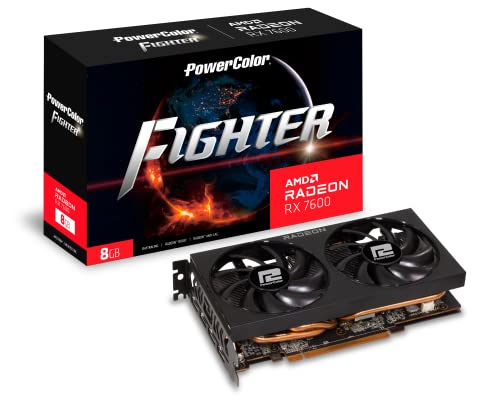
One representative card per buying tier discussed below — value (RX 7600 class), mid-range (RTX 4060 class), and upper tier (RTX 4070 Super class) — so you can see how the tiers present in real listings.
- PowerColor Fighter AMD Radeon RX 7600 — Check on Amazon
- MSI GeForce RTX 4060 Ventus 2X Black 8G OC — Check on Amazon
- ASUS Dual GeForce RTX 4070 Super EVO OC Edition 12GB — Check on Amazon


Criteria in the workshop: judging each specification with a test, not a vibe
The main guide names the criteria; this section turns each into something you can verify before money moves. GPU tier is judged by independent benchmarks of the exact chip in games or applications like yours, at your resolution — never by the number in the name, which is a marketing position, not a measurement. VRAM is judged against your own measured usage if you currently game, using the audit method in our VRAM explainer, or against the requirements of the specific titles you are buying for if you do not. Power is judged by the card maker’s recommended supply and the connector list, checked against the label on your actual unit — photograph it; memory invents connectors that do not exist. Physical fit is judged with a tape measure against the maker’s stated dimensions, including the thickness in slots and the clearance for power cables at the card’s edge, which is where tight builds actually fail. Features are judged by naming the programs that will use them: an encoder for the streaming software you run weekly, a compute platform for the editor you are paid in, upscaling for the games already in your library that support it. A specification that cannot be attached to a test or a named program is decoration, and learning to spot decoration is most of what buying well consists of.
Three more buyers: the upgrade paths the main examples did not cover
The main guide’s builds cover fresh systems; upgraders face different geometry. Consider first the owner of a five-year-old PC with a still-willing processor and a tired card. Their best purchase is usually the most efficient modern mid-range card their existing supply can feed, because it transforms the machine for the least supporting spend — but the honest checklist includes the platform’s remaining life, since a card bought today will likely move to the next build, which argues for buying the card the next build would want within reason. Second, the laptop owner who cannot upgrade internally at all: their realistic paths are an external GPU enclosure where their port supports it — with a real performance tax and a real price — or accepting the laptop’s ceiling and saving toward a desktop or replacement laptop, and a buying guide does them no favours by pretending a accessory erases the design. Third, the parent buying for a child’s first gaming PC, where the criteria reorder themselves: quiet, cool, robust drivers, generous memory for a long service life, and a total system cost that survives contact with a schoolbag budget. In each case the criteria from the main guide still decide — only their order changes, and reading your own order off your situation is the skill this whole guide is teaching.
The used and refurbished market, judged properly
A separate word on buying used, because for many readers it is not a compromise but the plan. The used market’s gift is yesterday’s tiers at today’s lower prices; its price is verification work, and the work is specific. Establish the card’s exact identity and memory configuration from the seller’s photos of the label and, after purchase, from software. Establish its history with direct questions — gaming, mining, workstation — and weigh the answers against the card’s condition rather than treating any single history as automatic disqualification. Establish its health with the benchmark-and-soak sequence in our testing guide, run within the return window your purchase channel provides, and treat a channel with no return window as a discount you must be paid extra, in price, to accept. Refurbished cards from manufacturers or reputable retailers sit between new and used: verified, warranted for a shorter term, and often the sweet spot for buyers who want the verification done by someone else. In all cases, the card’s remaining driver-support horizon — set by its generation, as our generational comparison details — belongs in the price you are willing to pay, because a cheap card near the end of support is a shorter purchase than it looks.
Timing, launches and the discipline of the good-enough decision
Every buyer meets the waiting question, and the main guide’s timing section deserves a decision rule to close it. Waiting is rational in exactly two situations: a confirmed launch or price movement is close enough that its date is known rather than rumoured, or your current system genuinely serves you and the purchase is pure anticipation. Waiting is irrational when a present need — a failing card, a game you cannot play, work you cannot do — is being taxed weekly by a rumour. The deeper discipline is recognising that the market never empties of future improvements; the buyer who requires the perfect moment buys nothing and plays nothing, while the buyer who purchases a well-chosen card at a fair point in its cycle gets years of use that no launch-day saving repays. Set your criteria, set the tier your monitor demands, buy when a card meets both at a price the market considers normal for it, and then stop reading the market. Post-purchase price watching is the only guaranteed way to convert a good decision into a bad feeling, and it changes nothing about the card in your machine, which remains exactly as fast as the day you chose it.
After the click: the buyer’s first-week checklist, expanded
The main guide ends with a first-week protocol; here is its fuller form, because the week after purchase is when a buying decision is actually completed. Day one: verify identity and condition — the model and memory in software match the order, every output works, the benchmark lands where the model should. Register the warranty while the receipt is findable, and photograph the serial label into your PC records. Across the week: run your real library, not just benchmarks, watching temperatures, noise and the three-temperature relationships the overheating guide explains, because a marginal cooler or a lazy fan announces itself early and exchanges are easiest early. Set the driver, the refresh rate, the frame caps and the fan behaviour deliberately, and export or record those settings. Then close the purchase properly: file the numbers, retire the old card to its decided fate — spare, second machine, sale — and stop shopping. A graphics card bought this way stops being a transaction and becomes what it should be: the settled foundation of the next several years of the machine’s life, chosen on evidence, verified in use, and documented well enough that its eventual replacement, years from now, starts from knowledge instead of archaeology.
Red flags in listings and reviews: a sceptic’s checklist
Buying well includes knowing when to walk away from a particular offer, and the warning signs are consistent enough to list. A listing that cannot state the exact model, memory capacity and dimensions — or that contradicts the manufacturer’s own specification page — is asking you to fund its vagueness. A price dramatically below every other seller of the same card, from a seller with no history, is not a discovery but a risk transfer. Reviews that test a different resolution, a different memory variant or a launch driver and present the results as timeless should be read for their cooler and build observations, not their verdicts. Bundles that pad a card with unwanted extras to obscure its real price, and financing that makes a mid-range card cost flagship money by the final payment, both belong in the same sceptical basket. None of this requires cynicism; the legitimate market for graphics cards is large, competitive and mostly honest, and it rewards the buyer who simply insists on exact models, published specifications, and prices that make sense next to their neighbours. The sceptic’s checklist takes minutes to apply and is the difference between shopping and gambling.
The environmental and longevity ledger
One last set of criteria rarely appears in buying guides and quietly shapes years of ownership. Efficiency is comfort: a card that reaches your performance target on less power heats your room less, asks less of your supply and fans, and stays welcome in a small case or a warm climate — judge it by measured consumption in reviews of your candidate’s class, using the framework in our power consumption explainer. Longevity is partly physical — cooler size, fan quality, a backplate that protects the board — and partly institutional: the maker’s warranty length in your country and the reputation of its service process, which you will meet only if something fails, and which owners consistently rate as the difference between a bad week and a bad month. There is also an honest disposal question at the end of the chain: a card bought with enough memory and modern features has a second life in another machine or another home, which is worth more — practically and environmentally — than a minimal card that becomes e-waste at its first upgrade. Buying the card you will keep longest, and that someone else can use after you, is the closest thing this market has to a free lunch.
Assembling the final shortlist: a scoring pass you can do on paper
End the process the way the main guide’s checklist begins it, but with numbers attached. Take your two or three surviving candidates and score each, out of five, on the criteria in the order your situation demands: performance at your monitor in your games, memory headroom for your library’s direction, features your weekly software actually uses, fit and power against your real case and supply, cooler quality and noise at your desk, and the maker’s warranty and service where you live. Weight the first two double if you keep cards for many years; weight noise and fit double if the machine shares a room or a small case. The exercise takes ten minutes and its value is not the arithmetic — it is that every point must be defended from evidence you gathered, a benchmark, a measurement, a specification page, rather than from the loudest review you read last. Cards that survive this pass are rarely regretted, because the buyer can say, months later, exactly why this card and not its neighbour. That sentence, more than any single specification, is what a buying guide exists to give you — and with it written down, the purchase is finished in every sense that matters, including the sense that lets you stop researching and start playing.
Gift purchases and buying for someone else’s machine
Buying a graphics card as a gift adds one hard problem: you may not know the recipient’s machine as well as your own, and the criteria in this guide depend on that knowledge — supply, case, monitor, games. Solve it with information rather than generosity. Ask the questions a salesperson would find impertinent and a gift-buyer must: what case, what power supply, what monitor, what do they play. If the answers cannot be obtained without ruining the surprise, choose the card whose requirements are forgiving — modest power draw, standard connectors, dimensions that fit ordinary cases, generous memory for an unknown library — and keep the receipt and the return path immaculate, because the likeliest gift fault is a fit or connector mismatch, not a bad card. Better still for many households: make the card a joint project, bought together and installed together, which converts the risk into the present itself. A graphics card is the rare gift whose value includes the afternoon spent fitting it, and whose success can be verified, benchmarked and celebrated the same evening — provided the preparation in this guide was done before the wrapping paper came off.
The budget conversation, held honestly and without prices
Every purchase in this category is finally a conversation about proportion, and it can be held without a single specific figure. In a balanced gaming PC, the graphics card is normally the largest single component spend, because it does the largest share of the work the machine exists for — skimping there while spending freely on appearance is the classic inverted build. At the same time, the card should not consume the budget that the monitor, the power supply and the memory needed to be themselves: a flagship card feeding a tired display through an ageing supply is three compromises wearing one impressive badge. Think in shares rather than totals, assign the shares by the machine’s purpose, and let the tier system in the main guide translate your shares into candidates. Revisit the shares whenever the machine’s job changes — a new monitor, a new creative income, a child joining the household’s gaming — because proportion is not a rule learned once but a judgement renewed at each purchase. Buyers who hold this conversation honestly, on paper, before opening a single store page, are strikingly hard to upsell and almost never disappointed, which is as good a definition as any of what this guide was for.
Keep the scoring sheet, the receipts and the benchmark from the first week together in the PC’s records when the purchase closes. Years later, when this card is the old card being replaced, that small file will tell its replacement’s buyer — you, older and with a different library — exactly what this machine needed last time, what the card delivered, and what you wished you had known. Every good purchase teaches the next one; the file is how the lesson survives.
One more small discipline completes the purchase: decide now, while the evidence is fresh, what would make you replace this card — a new monitor, a new kind of work, a failure — and write that trigger beside the scoring sheet. A written trigger turns a future upgrade from an impulse or a panic into the execution of a plan, and it protects this purchase from being second-guessed by every launch announcement between now and then. The card serves until the trigger fires; until it fires, the research is closed and the games are open, which is exactly the relationship with hardware this guide has been arguing for from its first criterion.
When that trigger eventually fires, bring this guide back out and run it again from the monitor outward. The criteria will not have changed, even if every product name has, because they were never really about products: they are about matching a tool to a screen, a library, a room and a person, in that order, with evidence at every step. Buyers who learn the order once tend to keep it for life.
And that, finally, is the standard to hold this purchase to a year from now: not whether a newer card exists — one always will — but whether the machine still does the job you bought it for, at the settings you chose, without your thinking about the card at all — the surest sign that the buying was done well, and done once, properly, the very first time around, too.
Frequently asked questions
How much should I spend on a graphics card?
Spend to your monitor and tier, not to a fixed share of budget folklore. A 1080p player is well served by entry-to-mid spending; a 1440p high-refresh player belongs in the mid-to-upper tiers; 4K high-refresh is high-end money. The right amount is the one that buys your tier’s current-generation card with the VRAM target met — more is waste, less is a compromise you will feel daily.
Should I buy NVIDIA or AMD?
Decide by criteria: ray tracing, DLSS, streaming, and CUDA point to NVIDIA; VRAM generosity and raster value point to AMD; Intel is a credible budget alternative. The full criterion-by-criterion comparison is in our dedicated NVIDIA vs AMD guide — brand loyalty is not a criterion.
Is it better to buy a cheaper card now and upgrade sooner, or an expensive card for longer?
Both strategies work; the mid-path usually wins. A current mid-range card replaced at mid-range intervals tracks technology (features, efficiency) better than a flagship sweated for many years, and costs less over the same period for most usage patterns. Buy a tier up only when your monitor demands it today.
Are previous-generation cards still worth buying?
Yes, when priced as what they are: often excellent performance per unit of money, with slightly older features and less driver runway ahead. Compare VRAM and upscaling support carefully against the current generation at the same money — that is where generational gaps hide.
What warranty and brand factors matter?
Warranty length and the ease of the RMA process vary by brand and region and are worth real money on an expensive component. Register the card when you buy it, keep the receipt, and favour brands with a support reputation you have verified rather than assumed.
Should I buy the extended warranty or store protection plan?
Judge it by what it adds beyond the manufacturer’s warranty, which on most cards already covers several years of defects. Store plans sometimes add accidental-damage cover or faster replacement, which can suit machines that travel or households that cannot wait on a returns process. Read what is actually covered, for how long, and what the claim process involves, and compare that against simply keeping your previous card as a spare — which for many desktop owners provides the same continuity for free. There is no universal answer, but there is a universal rule: never buy a plan whose terms you have not read on the assumption it resembles another plan.
Is it better to buy one powerful card or plan on two mid-range cards over time?
For most owners, the single well-chosen card that matches the monitor, bought once and kept, is the calmer and usually cheaper path: no selling, no reinstalling, no mid-life compromises. The staged approach can suit enthusiasts who enjoy the process and sell hardware easily, and it keeps a system nearer the current feature frontier. Decide by temperament as much as by arithmetic — and if you choose the staged path, buy each card with its resale in mind, keeping boxes and receipts as part of the plan rather than as clutter.
What should I do if the card I chose is out of stock everywhere?
Return to your criteria rather than to the product name. Another card meeting the same tier, memory, feature and fit requirements — including the equivalent from the other brand, judged by the scenario method in our brand comparison — serves the same purpose, and shortages are exactly when brand flexibility pays. What not to do is drift upward a tier in frustration or downward in impatience; both convert a temporary stock problem into a permanent ownership mismatch. If nothing meets the criteria today, a short, dated wait with your requirements written down beats a substitute you will negotiate with for years.
How do I know a deal is genuinely good rather than just discounted?
Compare the offer against the card’s own normal selling level over recent months and against the cards one tier above and below it, not against the launch figure or a struck-through price the seller invented. A genuine deal moves a card into the value territory of the tier below it, or brings the tier above within reach of your set budget. Judge by where the card lands relative to its neighbours on the day, using the criteria in this guide — a discount on the wrong card is not a saving, it is a longer mistake at a shorter price.
The bottom line
A good graphics card purchase is a matched set of decisions: tier to monitor, VRAM to resolution, features to games and apps, power and size to the PC you own. Run the checklist, shortlist two or three models, and buy the one whose cooler, warranty, and price please you most — there is no wrong answer left at that point. For the narrative version of this same process, how to choose a graphics card walks it step by step.